# Python Interfacing a USB Missile Launcher · 2009-02-12
I watch Woot on pretty much a daily basis and as a result I frequently end up purchasing toys that I really don't need. Most recently I picked up this silly pair of USB Missile Launchers for just under 40$ shipped: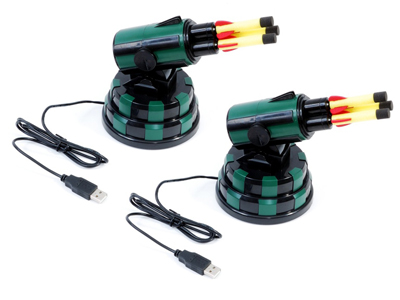
I finally found some free time yesterday to open up the package and plug them in. The hardware is coupled with a simple GUI controller written in Delphi (MissileLauncher.exe) and a USB Human Interface Device (HID) interface written in C++ (USBHID.dll). The toys lost their allure within minutes of harassing my team with a barrage of soft missile shots. That same night I thought I would be able to extend the fun factor by coding up a programmatic interface to the launchers in Python. This blog is about that process.
It's obvious that the bundled DLL is the glue between the GUI and the USB interface. Throwing USBHID.dll into the IDA Pro Disassembler and examining the exports reveals 7 entries, the most interesting sounding of which is OpenHID(). Examining the imports shows dependencies on the Microsoft system DLLs HID.dll and SetupAPI.dll. USBHID.dll is basically a simplified wrapper on top of the Microsoft API. The next step is to take a look at how it is referenced from the GUI. Loading MissileLauncher.exe into IDA and examining the imports unfortunately shows no reference to USBHID.dll. The library and function pointers must be resolved dynamically via LoadLibrary() and GetProcAddress(). Time to examine some cross-references. Hit 'Shift-F12' to pull up the strings window then 'Alt+t' to search for USBHID.dll, enter to follow and you find:
.data:0048790C LibFileName db 'USBHID.dll',0Hit 'x' to pull up the cross-references to the string and you come across the following snippet of code:
.text:00403830 030     xor edx, edx
.text:00403832 030     mov dword_48E510, edx
.text:00403838 030     mov ecx, [ebp+table]
.text:0040383B 030     mov dword ptr [ecx+74h], 0FFFFFFFFh
.text:00403842 030     push offset LibFileName      ; "USBHID.dll"
.text:00403847 034     call LoadLibraryA
.text:0040384C 030     mov dword_48E514, eax
.text:00403851 030     cmp dword_48E514, 0
.text:00403858 030     jz  short loc_40386F
.text:0040385A 030     push offset ProcName         ; "OpenHID"
.text:0040385F 034     push dword_48E514            ; hModule
.text:00403865 038     call GetProcAddress
.text:0040386A 030     mov dword_48E510, eax
So we have EDX=0 at the top, moved into a global DWORD variable @48E510. Next we see the address of our string being pushed to LoadLibrary() and subsequently the return value transferred from EAX into a global DWORD variable @48E514, this is the handle to the loaded DLL. An error check is made to ensure the library exists then the resolved handle and the string "OpenHID", the relevant function to resolve, is pushed to GetProcAddress(). The resolved function pointer is transferred from EAX into a global DWORD variable @48E510. We can press 'n' on both of these global variables to rename them to say 'h_USBHID' and 'OpenHID' respectively. Now let's find out where OpenHID is called from, again examine cross-references by hitting 'x' when the cursor is on top of 'OpenHID'. There are 4 references. Two references from the above snippet which are assigning the variable and two CALL references from the function @00403B64. Here is the first:
.text:00403B64 000     push ebp
.text:00403B65 004     mov ebp, esp
.text:00403B67 004     mov eax, [ebp+arg_0]
.text:00403B6A 004     cmp dword ptr [eax+74h], 0FFFFFFFFh
.text:00403B6E 004     jnz short loc_403B88
.text:00403B70 004     push 1
.text:00403B72 008     push 701h
.text:00403B77 00C     push 0A81h
.text:00403B7C 010     call OpenHID
.text:00403B82 004     mov edx, [ebp+arg_0]
.text:00403B85 004     mov [edx+74h], eax
.text:00403B88
.text:00403B88     loc_403B88:
OpenHID() takes three arguments and is being called here like so:
if (eax74 == 0x0FFFFFFFF)
{
    eax74 = OpenHID(0x0A81, 0x0701, 1);
}
The first argument is the HID Vendor ID (VID), 0x0A81. The second argument is the HID Product ID (PID), 0x0701. The code here opens a handle to the USB Missile Launcher HID if it hasn't already been done. Just a few lines later in the deadlisting we see a WriteFile() operation on the opened handle:.text:00403B88 004 mov ecx, [ebp+arg_0] .text:00403B8B 004 mov byte ptr [ecx+46h], 0 .text:00403B8F 004 mov eax, [ebp+arg_0] .text:00403B92 004 mov edx, [eax+68h] .text:00403B95 004 or byte ptr [edx], 40h .text:00403B98 004 push 0 ; lpOverlapped .text:00403B9A 008 mov ecx, [ebp+arg_0] .text:00403B9D 008 add ecx, 6Ch .text:00403BA0 008 push ecx ; lpNumberOfBytesWritten .text:00403BA1 00C push 2 ; nNumberOfBytesToWrite .text:00403BA3 010 mov eax, [ebp+arg_0] .text:00403BA6 010 add eax, 45h .text:00403BA9 010 push eax ; lpBuffer .text:00403BAA 014 mov edx, [ebp+arg_0] .text:00403BAD 014 push dword ptr [edx+74h] ; hFile .text:00403BB0 018 call WriteFileThe function we are examining takes a single argument, which is a pointer to a structure which contains the data to be written at offset 0x45. The length of the data is 2, the value of the nNumberOfBytesToWrite argument to WriteFile(). At this point we know that we can easily open a handle to the USB Missile Launcher via USBHID.OpenHID() and then we can use WriteFile() to write data to it and likely ReadFile() to read data back. The next step is to figure out the protocol and there are a number of ways we can go about doing this. One method is to use USB sniffing software such as SniffUSB. Here is a screenshot of SniffUSB in action:
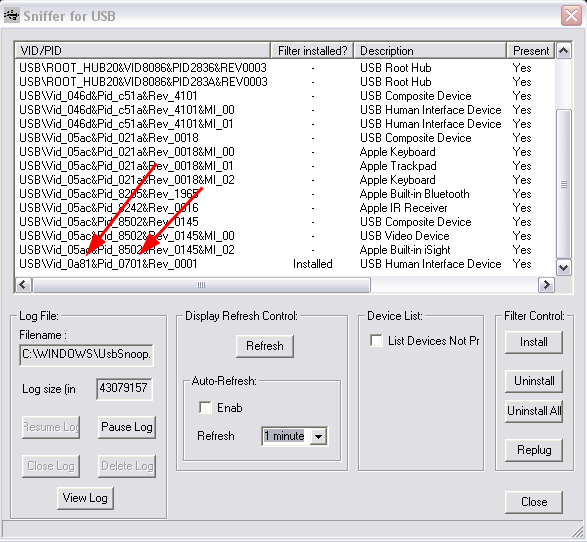
Note that in this screenshot I've already installed the filter control on the HID specific to the USB Missile Launcher. The red arrows highlight the VID/PID values we found earlier within MissileLauncher.exe from the call to OpenHID(). Another way to determine which VID/PID combination maps to the specific HID you are looking for is to unplug the device, hit refresh, then plug it back, hit refresh and see what new row pops up. Once the filter control is installed on your target HID, you must unplug/replug to activate it then you can start interacting with the MissileLauncher.exe GUI and examine the data going across from the UsbSnoop.log file in your Windows directory.
I took a different approach. I decided to 'sniff' the protocol via debugger hooks on ReadFile() / WriteFile(). Load MissileLauncher.exe into OllyDbg and hit F9 to let the program run and the GUI start. Once the GUI is running pull up the modules list with 'Alt-e', select kernel32 and hit 'Ctrl-n' to pull up its list of contained names. Start typing out "writefile" to pull up the appropriate entry then hit 'Shift-F4' to set a condition log breakpoint. A dialogue box appears, for the row labeled "Log function arguments", select the "Always" column radio control. This is a pretty neat feature of OllyDbg by the way, it won't work for any API, just the ones OllyDbg knows about. Repeat the process for "readfile". Hit 'Alt+l' to bring up the log window then hit a button in the MissileLauncher.exe GUI and you should receive log output resembling the following:
7C810E17   CALL to WriteFile from MissileL.00403BB0
             hFile = 000001A8 (window)
             Buffer = 00B6395D
             nBytesToWrite = 2
             pBytesWritten = 00B63984
             pOverlapped = NULL
7C810E17   CALL to WriteFile from MissileL.00404248
             hFile = 000001A8 (window)
             Buffer = 00B6395D
             nBytesToWrite = 2
             pBytesWritten = 00B63984
             pOverlapped = NULL
7C801812   CALL to ReadFile from MissileL.00404265
             hFile = 000001A8 (window)
             Buffer = 00B63954
             BytesToRead = 2
             pBytesRead = 00B63984
             pOverlapped = NULL
7C810E17   CALL to WriteFile from MissileL.004042D0
             hFile = 000001A8 (window)
             Buffer = 00B6395D
             nBytesToWrite = 2
             pBytesWritten = 00B63984
             pOverlapped = NULL
7C810E17   CALL to WriteFile from MissileL.00404316
             hFile = 000001A8 (window)
             Buffer = 00B6395D
             nBytesToWrite = 2
             pBytesWritten = 00B63984
             pOverlapped = NULL
7C801812   CALL to ReadFile from MissileL.0040433A
             hFile = 000001A8 (window)
             Buffer = 00B63954
             BytesToRead = 2
             pBytesRead = 00B63984
             pOverlapped = NULL
7C810E17   CALL to WriteFile from MissileL.00404357
             hFile = 000001A8 (window)
             Buffer = 00B6395D
             nBytesToWrite = 2
             pBytesWritten = 00B63984
             pOverlapped = NULL
7C801812   CALL to ReadFile from MissileL.00404374
             hFile = 000001A8 (window)
             Buffer = 00B63954
             BytesToRead = 2
             pBytesRead = 00B63984
             pOverlapped = NULL
7C810E17   CALL to WriteFile from MissileL.0040453F
             hFile = 000001A8 (window)
             Buffer = 00B6395D
             nBytesToWrite = 2
             pBytesWritten = 00B63984
             pOverlapped = NULL
Let's take this one step further and extract the 2-byte data value being written to the HID handle by extending the conditional log breakpoint on WriteFile. Press 'Alt+b' to bring up the breakpoints window, next drag out the 'Address' column with the mouse to reveal the DLL and API names in addition to the address (there is a lot of "hidden" data like this in various OllyDbg columns). Right click the breakpoint for WriteFile and select "Edit condition", the dialogue from earlier should pop back up. In the second row, for explanation put something like "buffer" and for expression enter "word ptr [[esp+8]]", this will dereference and display the 2-bytes being written from the second argument of WriteFile(). Next for the row that reads "Log value of expression", select the "Always" column radio control. Now when we interact with the MissileLauncher.exe GUI we should get log entries like this in addition to the ReadFile() / WriteFile() call / argument logs:
7C810E17     COND: buffer = 4000
7C810E17     COND: buffer = 4000
7C810E17     COND: buffer = 0800
7C810E17     COND: buffer = 4000
7C810E17     COND: buffer = 4000
7C810E17     COND: buffer = 2000
There are two steps left for decoding the protocol now. One we have to hit each button in the MissileLauncher.exe GUI and take note of the data being written to the HID handle and two, we have to pay attention to the order of reads and writes on the handle and mimick it in our own program. Running through these steps we can conclude the following protocol (from my finished Python script, to be linked later):
self.cmd_map    = \
{
    "down"  : 0x01,
    "up"    : 0x02,
    "left"  : 0x04,
    "right" : 0x08,
    "fire"  : 0x10,
    "stop"  : 0x20,
    "start" : 0x40,
}
The 'start' and 'stop' commands are control codes for putting the device into and out of action. Taking note of the read / write order we conclude the following general pattern:- write(start)
- read()
- write(command)
- loop write(start) / read() while we want command to execute
- write(stop)
self.hid        = ctypes.WinDLL(r"C:\Program Files\USB Missile Launcher\usbhid.dll")
self.launcher   = self.hid.OpenHID(0x0a81, 0x701, 1)
The various commands being written to the HID handle must be in the appropriate endianess (thanks ) and stored in a ctypes string buffer, like so:
start   = ctypes.create_string_buffer(struct.pack(">h", self.cmd_map["start"]))
command = ctypes.create_string_buffer(struct.pack(">h", self.cmd_map[cmd.lower()]))
stop    = ctypes.create_string_buffer(struct.pack(">h", self.cmd_map["stop"]))
The rest is up to your imagination. You can download my code, ped_missile.py, which implements a class for controlling the USB Missile Launcher as well as exposes three interfaces on top of that class. A command line interface, a socket server (protected by a password hardcoded on line 264) and a simple web interface. The web interface is fun for usage through the iPhone in conjunction with the 8$ application AirCam from Senstic.One interesting thing is that we have a lot more granular control of the turret movement now then we did with the original GUI. I wrote two simple loops to count the number of possible horizontal and vertical ticks and the results were 947 horizontal and 91 vertical versus 54 and 10 from the original GUI respectively. Granular control allows you to slowly and quietly reposition the turret for stealthy attacks. I also started writing a class function missile.reset() to center the device automatically but haven't finished it quite yet. Take a look at the source for further information. Everything should be fairly self explanatory.
I'll conclude with an action video put together with the help of my teammates Ali, Cameron and Cody:
Originally published 2009-02-12 on the TippingPoint DVLabs blog.